=== URL: https://useapi.net/docs/start-here/setup-dreamina ===
Document URL: https://useapi.net/docs/start-here/setup-dreamina
---
layout: default
title: Setup Dreamina
parent: Start Here
nav_order: 206
---
#  Dreamina
{: .no_toc }
February 23, 2026
## Table of contents
{: .no_toc .text-delta }
1. TOC
{:toc}
Approximately 10 minutes to complete setup steps.
---
[Dreamina](https://dreamina.capcut.com/) creates AI-generated videos using [Seedance 2.0](https://dreamina.capcut.com/), [Dreamina 3.5 Pro](https://dreamina.capcut.com/), and [Dreamina 3.0](https://dreamina.capcut.com/) models.
**Note:** Seedance 2.0 is not yet visible in the Dreamina website UI but is available internally — we anticipate an official release the week of February 23, 2026. All generations initiated via the API appear on the [Dreamina website](https://dreamina.capcut.com/), where you can verify that the Seedance 2.0 model was used.
This setup guide is specifically for **US/International** accounts. Dreamina requires a US-region IP address to access the international version of the service.
### Install Opera browser with VPN
[Opera](https://www.opera.com/) browser has a built-in free VPN which is required to create and access a Dreamina account from the US/International region.
1. Download and install [Opera](https://www.opera.com/) if you don't have it already
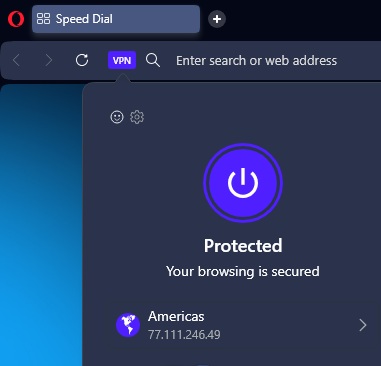
2. Enable the built-in VPN by clicking the **VPN** badge in the address bar
3. Set the VPN region to **Americas**
4. Verify the VPN is active — you should see "Protected" and an Americas IP address
### Create a Dreamina account
⚠️ **Use a dedicated email account for this API — do NOT use your personal email.**
1. Navigate to [https://dreamina.capcut.com/](https://dreamina.capcut.com/) in Opera with VPN enabled
2. Click **Sign in** in the bottom-left corner
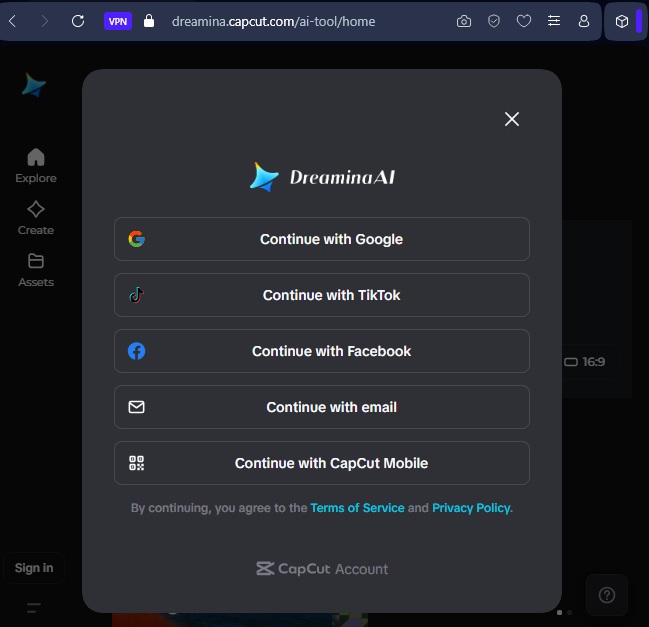
3. Select **Continue with email** from the login options
4. Click **Sign up** to create a new account
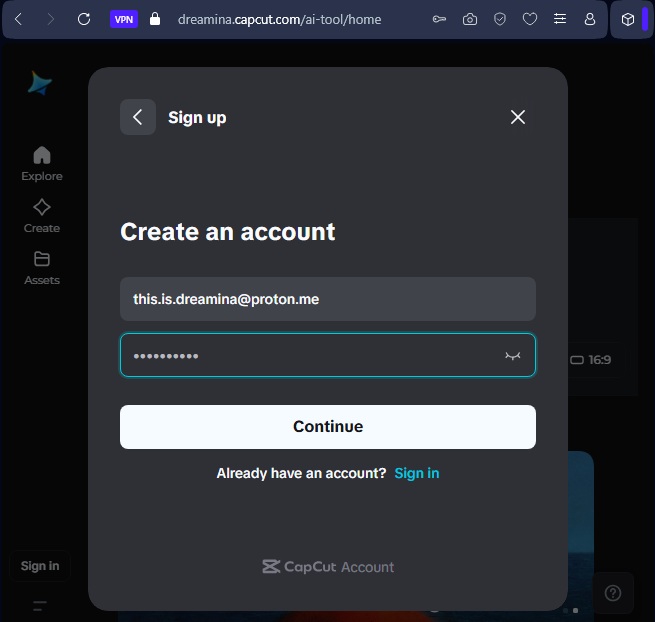
5. Enter your **email address** and choose a **password**
6. Click **Continue** to complete registration
You may need to verify your email address by entering a code sent to your inbox.
### Configure your account via the API
Now that you have a working Dreamina account with email and password, configure it for API access using [POST /accounts](../api-dreamina-v1/post-dreamina-accounts).
### Generate your first video
Once your account is configured, generate a video using [POST /videos](../api-dreamina-v1/post-dreamina-videos):
```bash
curl -X POST \
-H "Authorization: Bearer YOUR_API_TOKEN" \
-H "Content-Type: application/json" \
-d '{
"prompt": "Two cool cats walking and talking",
"model": "seedance-2.0",
"ratio": "16:9",
"duration": 5
}' \
"https://api.useapi.net/v1/dreamina/videos"
```
This returns a `jobid` immediately. Poll for completion using [GET /videos/`jobid`](../api-dreamina-v1/get-dreamina-videos-jobid):
```bash
curl -H "Authorization: Bearer YOUR_API_TOKEN" \
"https://api.useapi.net/v1/dreamina/videos/YOUR_JOB_ID"
```
When `status` changes to `completed`, the `response.videoUrl` field contains the direct video download URL.
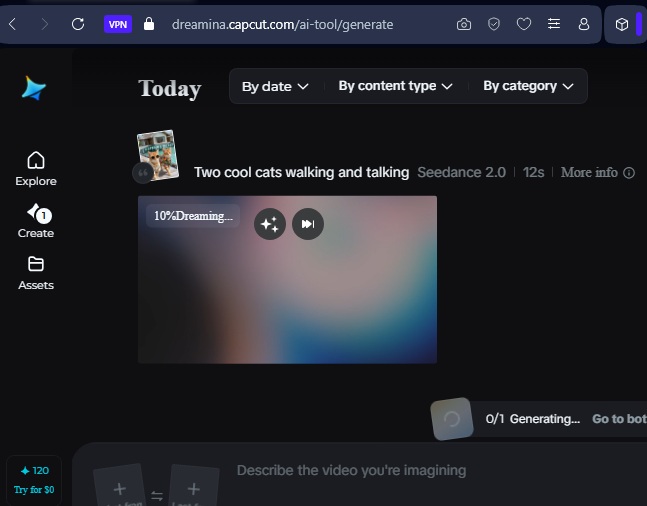
You can also see the generated video in the Dreamina web interface:
### Pricing
[Dreamina Advanced](https://dreamina.capcut.com/) subscription ($40/mo or $335/yr) includes 30K credits per month. A single 12-second Seedance 2.0 generation costs 72 credits — approximately **$0.095/generation** on the monthly plan or under **$0.07/generation** on the yearly plan. Every account also receives 2 free generations per day. Both plans include free and unlimited Seedream 4.0 image generation, including 2K resolution.
### Important notes
- **VPN not required for API usage** — the VPN is only needed for creating the Dreamina account in the browser. The API handles all requests through its own proxy infrastructure.
- **Session management** — the API automatically manages your Dreamina session, including refreshing expired sessions. If you see `596` errors, re-add your account via [POST /accounts](../api-dreamina-v1/post-dreamina-accounts).
- **Avoid using the same account** simultaneously through both the API and the Dreamina website — it should work, but to play safe it's better to avoid potential session conflicts.
- **Avoid logging in from other regions** — do not log in to your Dreamina account from any region other than Americas, as it may change the account's default region.
- **Free credits** — new Dreamina accounts receive free credits. Check your balance via [GET /accounts/`account`](../api-dreamina-v1/get-dreamina-accounts-account).
### Configure your account
=== URL: https://useapi.net/docs/api-dreamina-v1/delete-dreamina-accounts-account ===
Document URL: https://useapi.net/docs/api-dreamina-v1/delete-dreamina-accounts-account
---
layout: default
title:
Dreamina
{: .no_toc }
February 23, 2026
## Table of contents
{: .no_toc .text-delta }
1. TOC
{:toc}
Approximately 10 minutes to complete setup steps.
---
[Dreamina](https://dreamina.capcut.com/) creates AI-generated videos using [Seedance 2.0](https://dreamina.capcut.com/), [Dreamina 3.5 Pro](https://dreamina.capcut.com/), and [Dreamina 3.0](https://dreamina.capcut.com/) models.
**Note:** Seedance 2.0 is not yet visible in the Dreamina website UI but is available internally — we anticipate an official release the week of February 23, 2026. All generations initiated via the API appear on the [Dreamina website](https://dreamina.capcut.com/), where you can verify that the Seedance 2.0 model was used.
This setup guide is specifically for **US/International** accounts. Dreamina requires a US-region IP address to access the international version of the service.
### Install Opera browser with VPN
[Opera](https://www.opera.com/) browser has a built-in free VPN which is required to create and access a Dreamina account from the US/International region.
1. Download and install [Opera](https://www.opera.com/) if you don't have it already
2. Enable the built-in VPN by clicking the **VPN** badge in the address bar
3. Set the VPN region to **Americas**
4. Verify the VPN is active — you should see "Protected" and an Americas IP address

### Create a Dreamina account
⚠️ **Use a dedicated email account for this API — do NOT use your personal email.**
1. Navigate to [https://dreamina.capcut.com/](https://dreamina.capcut.com/) in Opera with VPN enabled
2. Click **Sign in** in the bottom-left corner
3. Select **Continue with email** from the login options

4. Click **Sign up** to create a new account
5. Enter your **email address** and choose a **password**
6. Click **Continue** to complete registration

You may need to verify your email address by entering a code sent to your inbox.
### Configure your account via the API
Now that you have a working Dreamina account with email and password, configure it for API access using [POST /accounts](../api-dreamina-v1/post-dreamina-accounts).
### Generate your first video
Once your account is configured, generate a video using [POST /videos](../api-dreamina-v1/post-dreamina-videos):
```bash
curl -X POST \
-H "Authorization: Bearer YOUR_API_TOKEN" \
-H "Content-Type: application/json" \
-d '{
"prompt": "Two cool cats walking and talking",
"model": "seedance-2.0",
"ratio": "16:9",
"duration": 5
}' \
"https://api.useapi.net/v1/dreamina/videos"
```
This returns a `jobid` immediately. Poll for completion using [GET /videos/`jobid`](../api-dreamina-v1/get-dreamina-videos-jobid):
```bash
curl -H "Authorization: Bearer YOUR_API_TOKEN" \
"https://api.useapi.net/v1/dreamina/videos/YOUR_JOB_ID"
```
When `status` changes to `completed`, the `response.videoUrl` field contains the direct video download URL.
You can also see the generated video in the Dreamina web interface:

### Pricing
[Dreamina Advanced](https://dreamina.capcut.com/) subscription ($40/mo or $335/yr) includes 30K credits per month. A single 12-second Seedance 2.0 generation costs 72 credits — approximately **$0.095/generation** on the monthly plan or under **$0.07/generation** on the yearly plan. Every account also receives 2 free generations per day. Both plans include free and unlimited Seedream 4.0 image generation, including 2K resolution.
### Important notes
- **VPN not required for API usage** — the VPN is only needed for creating the Dreamina account in the browser. The API handles all requests through its own proxy infrastructure.
- **Session management** — the API automatically manages your Dreamina session, including refreshing expired sessions. If you see `596` errors, re-add your account via [POST /accounts](../api-dreamina-v1/post-dreamina-accounts).
- **Avoid using the same account** simultaneously through both the API and the Dreamina website — it should work, but to play safe it's better to avoid potential session conflicts.
- **Avoid logging in from other regions** — do not log in to your Dreamina account from any region other than Americas, as it may change the account's default region.
- **Free credits** — new Dreamina accounts receive free credits. Check your balance via [GET /accounts/`account`](../api-dreamina-v1/get-dreamina-accounts-account).
### Configure your account
=== URL: https://useapi.net/docs/api-dreamina-v1/delete-dreamina-accounts-account ===
Document URL: https://useapi.net/docs/api-dreamina-v1/delete-dreamina-accounts-account
---
layout: default
title: DELETE accounts/account
parent: Dreamina API v1
nav_order: 400
---
## Delete Account Configuration
{: .no_toc }
February 23, 2026
## Table of contents
{: .no_toc .text-delta }
1. TOC
{:toc}
---
Delete a configured Dreamina account. This removes the account from your configuration and cleans up any executing job entries.
**Warning:** This action cannot be undone. You will need to reconfigure the account using [POST /accounts](https://useapi.net/docs/api-dreamina-v1/post-dreamina-accounts) if you want to use it again.
{: .delete }
> **https://api.useapi.net/v1/dreamina/accounts/`account`**
### Request Headers
``` yaml
Authorization: Bearer {API token}
```
- `API token` is **required**, see [Setup useapi.net](../start-here/setup-useapi) for details.
### Path Parameters
- `account` is **required**. The account identifier in `REGION:email` format. Example: `US:user@example.com`.
### Responses
{% tabs v1_delete_dreamina_accounts_response %}
{% tab v1_delete_dreamina_accounts_response 200 %}
200 OK
Account deleted successfully.
```json
{
"account": "US:user@example.com",
"deleted": true,
"remaining": 0
}
```
- `remaining` - Number of other accounts still configured.
{% endtab %}
{% tab v1_delete_dreamina_accounts_response 401 %}
401 Unauthorized
Invalid API token.
```json
{
"error": "Unauthorized"
}
```
{% endtab %}
{% tab v1_delete_dreamina_accounts_response 404 %}
404 Not Found
Account not found or not configured.
```json
{
"error": "Unable to find configuration for account US:user@example.com"
}
```
{% endtab %}
{% endtabs %}
### Examples
{% tabs v1_delete_dreamina_accounts_example %}
{% tab v1_delete_dreamina_accounts_example Curl %}
``` bash
curl -X DELETE \
-H "Authorization: Bearer YOUR_API_TOKEN" \
"https://api.useapi.net/v1/dreamina/accounts/US:user@example.com"
```
{% endtab %}
{% tab v1_delete_dreamina_accounts_example JavaScript %}
``` javascript
const token = 'YOUR_API_TOKEN';
const account = 'US:user@example.com';
const response = await fetch(
`https://api.useapi.net/v1/dreamina/accounts/${encodeURIComponent(account)}`,
{
method: 'DELETE',
headers: {
'Authorization': `Bearer ${token}`
}
}
);
const result = await response.json();
console.log('Delete result:', result);
```
{% endtab %}
{% tab v1_delete_dreamina_accounts_example Python %}
``` python
import requests
from urllib.parse import quote
token = 'YOUR_API_TOKEN'
account = 'US:user@example.com'
headers = {'Authorization': f'Bearer {token}'}
response = requests.delete(
f'https://api.useapi.net/v1/dreamina/accounts/{quote(account, safe="")}',
headers=headers
)
print('Delete result:', response.json())
```
{% endtab %}
{% endtabs %}
### Try It
=== URL: https://useapi.net/docs/api-dreamina-v1/delete-dreamina-scheduler-jobid ===
Document URL: https://useapi.net/docs/api-dreamina-v1/delete-dreamina-scheduler-jobid
---
layout: default
title: DELETE scheduler/jobid
parent: Dreamina API v1
nav_order: 810
---
## Cancel Executing Job
{: .no_toc }
February 23, 2026
## Table of contents
{: .no_toc .text-delta }
1. TOC
{:toc}
---
Remove a job from the executing tracker and cancel it. If the job is still in `created` status, it will be marked as failed with the reason "Cancelled by user".
{: .delete }
> **https://api.useapi.net/v1/dreamina/scheduler/`jobid`**
### Request Headers
``` yaml
Authorization: Bearer {API token}
```
- `API token` is **required**, see [Setup useapi.net](../start-here/setup-useapi) for details.
### Path Parameters
- `jobid` is **required**. The job ID to remove from the scheduler.
### Responses
{% tabs v1_delete_dreamina_scheduler_response %}
{% tab v1_delete_dreamina_scheduler_response 200 %}
200 OK
Job removed from scheduler.
```json
{
"jobid": "j0223140530123456789v-u12345-US:user@example.com-bot:dreamina",
"removed": true
}
```
{% endtab %}
{% tab v1_delete_dreamina_scheduler_response 401 %}
401 Unauthorized
Invalid API token.
```json
{
"error": "Unauthorized"
}
```
{% endtab %}
{% tab v1_delete_dreamina_scheduler_response 404 %}
404 Not Found
Job belongs to a different user.
{% endtab %}
{% endtabs %}
### Examples
{% tabs v1_delete_dreamina_scheduler_example %}
{% tab v1_delete_dreamina_scheduler_example Curl %}
``` bash
curl -X DELETE \
-H "Authorization: Bearer YOUR_API_TOKEN" \
"https://api.useapi.net/v1/dreamina/scheduler/j0223140530123456789v-u12345-US:user@example.com-bot:dreamina"
```
{% endtab %}
{% tab v1_delete_dreamina_scheduler_example JavaScript %}
``` javascript
const token = 'YOUR_API_TOKEN';
const jobid = 'j0223140530123456789v-u12345-US:user@example.com-bot:dreamina';
const response = await fetch(
`https://api.useapi.net/v1/dreamina/scheduler/${jobid}`,
{
method: 'DELETE',
headers: {
'Authorization': `Bearer ${token}`
}
}
);
const result = await response.json();
console.log('Cancel result:', result);
```
{% endtab %}
{% tab v1_delete_dreamina_scheduler_example Python %}
``` python
import requests
token = 'YOUR_API_TOKEN'
jobid = 'j0223140530123456789v-u12345-US:user@example.com-bot:dreamina'
headers = {'Authorization': f'Bearer {token}'}
response = requests.delete(
f'https://api.useapi.net/v1/dreamina/scheduler/{jobid}',
headers=headers
)
print('Cancel result:', response.json())
```
{% endtab %}
{% endtabs %}
### Try It
=== URL: https://useapi.net/docs/api-dreamina-v1/get-dreamina-accounts-account ===
Document URL: https://useapi.net/docs/api-dreamina-v1/get-dreamina-accounts-account
---
layout: default
title: GET accounts/account
parent: Dreamina API v1
nav_order: 350
---
## Get Account Configuration
{: .no_toc }
February 23, 2026
## Table of contents
{: .no_toc .text-delta }
1. TOC
{:toc}
---
Get configuration details for a specific Dreamina account, including session status, available models, and credit balance. Can also be called once a day to claim free daily credits.
{: .get }
> **https://api.useapi.net/v1/dreamina/accounts/`account`**
### Request Headers
``` yaml
Authorization: Bearer {API token}
```
- `API token` is **required**, see [Setup useapi.net](../start-here/setup-useapi) for details.
### Path Parameters
- `account` is **required**. The account identifier in `REGION:email` format. Example: `US:user@example.com`.
### Responses
{% tabs v1_get_dreamina_accounts_account_response %}
{% tab v1_get_dreamina_accounts_account_response 200 %}
200 OK
Account details retrieved with live data from upstream.
```json
{
"account": "US:user@example.com",
"email": "user@example.com",
"region": "US",
"maxJobs": 10,
"sessionExpires": "2026-04-24T12:00:00.000Z",
"session": {
"expires": "2026-04-24T12:00:00.000Z",
"lastRefreshed": "2026-02-23T12:00:00.000Z",
"daysUntilExpiry": 60
},
"models": {
"video": ["seedance-2.0", "dreamina-3.5-pro", "dreamina-3.0"]
},
"credits": {
"total": 24065,
"vip": 12000,
"gift": 10065,
"purchase": 2000,
"dailyClaimed": true
}
}
```
**Note:** The `models`, `credits`, and `session` fields are fetched live from upstream. If upstream queries fail, a summary without these fields is returned.
{% endtab %}
{% tab v1_get_dreamina_accounts_account_response 401 %}
401 Unauthorized
Invalid API token.
```json
{
"error": "Unauthorized"
}
```
{% endtab %}
{% tab v1_get_dreamina_accounts_account_response 404 %}
404 Not Found
Account not found or not configured.
```json
{
"error": "Unable to find configuration for account US:user@example.com"
}
```
{% endtab %}
{% endtabs %}
### Model
```typescript
{
account: string // "US:user@example.com"
email: string
region: string // "US"
maxJobs: number // 1-50
sessionExpires: string // ISO 8601 timestamp
session?: {
expires: string // ISO 8601 timestamp
lastRefreshed: string // ISO 8601 timestamp
daysUntilExpiry: number
}
models?: {
video: string[] // Available model names
}
credits?: {
total: number
vip: number
gift: number
purchase: number
dailyClaimed: boolean
}
error?: string // Error message
}
```
### Examples
{% tabs v1_get_dreamina_accounts_account_example %}
{% tab v1_get_dreamina_accounts_account_example Curl %}
``` bash
curl -H "Authorization: Bearer YOUR_API_TOKEN" \
"https://api.useapi.net/v1/dreamina/accounts/US:user@example.com"
```
{% endtab %}
{% tab v1_get_dreamina_accounts_account_example JavaScript %}
``` javascript
const token = 'YOUR_API_TOKEN';
const account = 'US:user@example.com';
const response = await fetch(
`https://api.useapi.net/v1/dreamina/accounts/${encodeURIComponent(account)}`,
{
headers: {
'Authorization': `Bearer ${token}`
}
}
);
const accountConfig = await response.json();
console.log('Account:', accountConfig);
console.log('Credits:', accountConfig.credits);
console.log('Models:', accountConfig.models);
```
{% endtab %}
{% tab v1_get_dreamina_accounts_account_example Python %}
``` python
import requests
from urllib.parse import quote
token = 'YOUR_API_TOKEN'
account = 'US:user@example.com'
headers = {'Authorization': f'Bearer {token}'}
response = requests.get(
f'https://api.useapi.net/v1/dreamina/accounts/{quote(account, safe="")}',
headers=headers
)
account_config = response.json()
print('Account:', account_config)
print('Credits:', account_config.get('credits'))
print('Models:', account_config.get('models'))
```
{% endtab %}
{% endtabs %}
### Try It
=== URL: https://useapi.net/docs/api-dreamina-v1/get-dreamina-accounts ===
Document URL: https://useapi.net/docs/api-dreamina-v1/get-dreamina-accounts
---
layout: default
title: GET accounts
parent: Dreamina API v1
nav_order: 300
---
## List All Configured Accounts
{: .no_toc }
February 23, 2026
## Table of contents
{: .no_toc .text-delta }
1. TOC
{:toc}
---
List all configured Dreamina accounts.
To get a specific account with live details use [GET /accounts/`account`](https://useapi.net/docs/api-dreamina-v1/get-dreamina-accounts-account).
{: .get }
> **https://api.useapi.net/v1/dreamina/accounts**
### Request Headers
``` yaml
Authorization: Bearer {API token}
```
- `API token` is **required**, see [Setup useapi.net](../start-here/setup-useapi) for details.
### Responses
{% tabs v1_get_dreamina_accounts_response %}
{% tab v1_get_dreamina_accounts_response 200 %}
200 OK
Returns a map of all configured accounts, keyed by account identifier.
```json
{
"US:user@example.com": {
"account": "US:user@example.com",
"email": "user@example.com",
"region": "US",
"maxJobs": 10,
"sessionExpires": "2026-04-24T12:00:00.000Z"
}
}
```
If no accounts are configured, returns an empty object `{}`.
{% endtab %}
{% tab v1_get_dreamina_accounts_response 401 %}
401 Unauthorized
Invalid API token.
```json
{
"error": "Unauthorized"
}
```
{% endtab %}
{% endtabs %}
### Model
```typescript
// Map of account identifier to account summary
{
[account: string]: {
account: string // "US:user@example.com"
email: string
region: string // "US"
maxJobs: number
sessionExpires: string // ISO 8601 timestamp
error?: string // Error message if account has issues
}
}
```
### Examples
{% tabs v1_get_dreamina_accounts_example %}
{% tab v1_get_dreamina_accounts_example Curl %}
``` bash
curl -H "Authorization: Bearer YOUR_API_TOKEN" \
"https://api.useapi.net/v1/dreamina/accounts"
```
{% endtab %}
{% tab v1_get_dreamina_accounts_example JavaScript %}
``` javascript
const token = 'YOUR_API_TOKEN';
const response = await fetch('https://api.useapi.net/v1/dreamina/accounts', {
headers: {
'Authorization': `Bearer ${token}`
}
});
const accounts = await response.json();
console.log('Configured accounts:', accounts);
```
{% endtab %}
{% tab v1_get_dreamina_accounts_example Python %}
``` python
import requests
token = 'YOUR_API_TOKEN'
headers = {'Authorization': f'Bearer {token}'}
response = requests.get('https://api.useapi.net/v1/dreamina/accounts', headers=headers)
print('All accounts:', response.json())
```
{% endtab %}
{% endtabs %}
### Try It
=== URL: https://useapi.net/docs/api-dreamina-v1/get-dreamina-scheduler ===
Document URL: https://useapi.net/docs/api-dreamina-v1/get-dreamina-scheduler
---
layout: default
title: GET scheduler
parent: Dreamina API v1
nav_order: 800
---
## List Executing Jobs
{: .no_toc }
February 23, 2026
## Table of contents
{: .no_toc .text-delta }
1. TOC
{:toc}
---
List all currently executing (in-progress) video generation jobs, grouped by account.
{: .get }
> **https://api.useapi.net/v1/dreamina/scheduler**
### Request Headers
``` yaml
Authorization: Bearer {API token}
```
- `API token` is **required**, see [Setup useapi.net](../start-here/setup-useapi) for details.
### Responses
{% tabs v1_get_dreamina_scheduler_response %}
{% tab v1_get_dreamina_scheduler_response 200 %}
200 OK
Returns executing jobs grouped by account.
```json
{
"executing": {
"US:user@example.com": [
{
"jobid": "j0223140530123456789v-u12345-US:user@example.com-bot:dreamina",
"submitId": "a1b2c3d4-e5f6-7890-abcd-ef1234567890",
"model": "seedance-2.0",
"elapsedSeconds": 45,
"replyUrl": "https://your-domain.com/webhook"
}
]
},
"total": 1
}
```
When no jobs are executing:
```json
{
"executing": {},
"total": 0
}
```
{% endtab %}
{% tab v1_get_dreamina_scheduler_response 401 %}
401 Unauthorized
Invalid API token.
```json
{
"error": "Unauthorized"
}
```
{% endtab %}
{% endtabs %}
### Model
```typescript
{
executing: {
[account: string]: Array<{
jobid: string // Job identifier
submitId: string // Upstream submission ID
model: string // Model used
elapsedSeconds: number // Seconds since job was submitted
replyUrl?: string // Webhook URL if configured
}>
}
total: number // Total number of executing jobs
}
```
### Examples
{% tabs v1_get_dreamina_scheduler_example %}
{% tab v1_get_dreamina_scheduler_example Curl %}
``` bash
curl -H "Authorization: Bearer YOUR_API_TOKEN" \
"https://api.useapi.net/v1/dreamina/scheduler"
```
{% endtab %}
{% tab v1_get_dreamina_scheduler_example JavaScript %}
``` javascript
const token = 'YOUR_API_TOKEN';
const response = await fetch('https://api.useapi.net/v1/dreamina/scheduler', {
headers: {
'Authorization': `Bearer ${token}`
}
});
const scheduler = await response.json();
console.log('Executing jobs:', scheduler.total);
for (const [account, jobs] of Object.entries(scheduler.executing)) {
console.log(` ${account}: ${jobs.length} jobs`);
}
```
{% endtab %}
{% tab v1_get_dreamina_scheduler_example Python %}
``` python
import requests
token = 'YOUR_API_TOKEN'
headers = {'Authorization': f'Bearer {token}'}
response = requests.get('https://api.useapi.net/v1/dreamina/scheduler', headers=headers)
scheduler = response.json()
print(f"Executing jobs: {scheduler['total']}")
for account, jobs in scheduler['executing'].items():
print(f" {account}: {len(jobs)} jobs")
```
{% endtab %}
{% endtabs %}
### Try It
=== URL: https://useapi.net/docs/api-dreamina-v1/get-dreamina-videos-jobid ===
Document URL: https://useapi.net/docs/api-dreamina-v1/get-dreamina-videos-jobid
---
layout: default
title: GET videos/jobid
parent: Dreamina API v1
nav_order: 700
---
## Retrieve Job Status
{: .no_toc }
February 23, 2026
## Table of contents
{: .no_toc .text-delta }
1. TOC
{:toc}
---
Retrieve the status and result of a video generation job by its job ID.
Use this endpoint to poll for completion after submitting a video via [POST /videos](https://useapi.net/docs/api-dreamina-v1/post-dreamina-videos). Jobs are retained for 30 days.
{: .get }
> **https://api.useapi.net/v1/dreamina/videos/`jobid`**
### Request Headers
``` yaml
Authorization: Bearer {API token}
```
- `API token` is **required**, see [Setup useapi.net](../start-here/setup-useapi) for details.
### Path Parameters
- `jobid` is **required**, the unique job identifier returned from [POST /videos](https://useapi.net/docs/api-dreamina-v1/post-dreamina-videos).
### Responses
{% tabs v1_get_dreamina_videos_jobid_response %}
{% tab v1_get_dreamina_videos_jobid_response 200 %}
200 OK
Returns the job record with current status and details.
**Processing (status: created):**
```json
{
"jobid": "j0223140530123456789v-u12345-US:user@example.com-bot:dreamina",
"type": "video",
"status": "created",
"model": "seedance-2.0",
"created": "2026-02-23T14:05:30.123Z",
"request": {
"prompt": "A serene mountain landscape at sunset",
"model": "seedance-2.0",
"ratio": "16:9",
"duration": 5,
"inputMode": "prompt"
},
"response": {
"forecastCost": 125
},
"code": 200
}
```
**Completed:**
```json
{
"jobid": "j0223140530123456789v-u12345-US:user@example.com-bot:dreamina",
"type": "video",
"status": "completed",
"model": "seedance-2.0",
"created": "2026-02-23T14:05:30.123Z",
"updated": "2026-02-23T14:07:15.456Z",
"request": {
"prompt": "A serene mountain landscape at sunset",
"model": "seedance-2.0",
"ratio": "16:9",
"duration": 5,
"inputMode": "prompt"
},
"response": {
"videoUrl": "https://v3-web.douyinvod.com/...",
"videoId": "7341234567890123456",
"coverUrl": "https://p9-sign.douyinpic.com/...",
"width": 1280,
"height": 720,
"durationMs": 5042,
"hasAudio": false,
"forecastCost": 125,
"finishTime": 1708700835
},
"code": 200
}
```
**Failed:**
```json
{
"jobid": "j0223140530123456789v-u12345-US:user@example.com-bot:dreamina",
"type": "video",
"status": "failed",
"model": "seedance-2.0",
"created": "2026-02-23T14:05:30.123Z",
"updated": "2026-02-23T14:07:15.456Z",
"request": {
"prompt": "A test prompt",
"model": "seedance-2.0",
"ratio": "16:9",
"duration": 5,
"inputMode": "prompt"
},
"error": "fail_code: 2043",
"errorDetails": "OutputVideoRisk",
"code": 2043
}
```
**Note:** Jobs older than 1 hour that are still `created` are auto-marked as failed with `"Generation timed out"` (code `408`).
{% endtab %}
{% tab v1_get_dreamina_videos_jobid_response 401 %}
401 Unauthorized
Invalid API token.
```json
{
"error": "Unauthorized"
}
```
{% endtab %}
{% tab v1_get_dreamina_videos_jobid_response 404 %}
404 Not Found
Job not found, belongs to a different user, or has expired (>30 days).
```json
{
"error": "Job not found"
}
```
{% endtab %}
{% endtabs %}
### Model
{% tabs v1_get_dreamina_videos_jobid_model %}
{% tab v1_get_dreamina_videos_jobid_model Completed %}
Video generation completed. Includes video URL and metadata.
```typescript
{
jobid: string // Unique job identifier
type: 'video' // Job type
status: 'completed'
model: string // Model used
created: string // ISO 8601 timestamp
updated: string // ISO 8601 timestamp
request: {
prompt?: string
model: string
ratio?: string
duration?: number
inputMode: string // "prompt" | "first_frame" | "end_frame" | "multi_frame"
firstFrameRef?: string
endFrameRef?: string
frames?: number // Number of keyframes (multi_frame)
replyUrl?: string
replyRef?: string
}
response: {
videoUrl: string // Direct video URL (MP4)
videoId: string // Dreamina video ID
coverUrl: string // Video cover/thumbnail URL
width: number // Video width in pixels
height: number // Video height in pixels
durationMs: number // Video duration in milliseconds
hasAudio: boolean // Whether video has audio
forecastCost: number // Credit cost
finishTime: number // Unix timestamp of completion
}
code: number // 200
}
```
{% endtab %}
{% tab v1_get_dreamina_videos_jobid_model Failed %}
Video generation failed. Includes error details.
```typescript
{
jobid: string // Unique job identifier
type: 'video'
status: 'failed'
model: string
created: string // ISO 8601 timestamp
updated: string // ISO 8601 timestamp
request: {
prompt?: string
model: string
ratio?: string
duration?: number
inputMode: string
firstFrameRef?: string
endFrameRef?: string
replyUrl?: string
replyRef?: string
}
error: string // Error summary (e.g., "fail_code: 2043")
errorDetails?: string // Additional details (e.g., "OutputVideoRisk")
code: number // Error code (e.g., 2043, 408, 596)
}
```
**Common error codes:**
| Code | Meaning |
|------|---------|
| 408 | Generation timed out (>1 hour) |
| 596 | Account session expired |
| 2038 | Content filtered |
| 2043 | Output video moderation risk |
{% endtab %}
{% endtabs %}
### Examples
{% tabs v1_get_dreamina_videos_jobid_examples %}
{% tab v1_get_dreamina_videos_jobid_examples Curl %}
```bash
# Get job status
curl "https://api.useapi.net/v1/dreamina/videos/j0223140530123456789v-u12345-US:user@example.com-bot:dreamina" \
-H "Authorization: Bearer YOUR_API_TOKEN"
# Poll for completion (check every 10 seconds)
while true; do
RESULT=$(curl -s "https://api.useapi.net/v1/dreamina/videos/$JOBID" \
-H "Authorization: Bearer YOUR_API_TOKEN")
STATUS=$(echo "$RESULT" | jq -r '.status')
echo "Status: $STATUS"
if [[ "$STATUS" == "completed" ]]; then
echo "$RESULT" | jq -r '.response.videoUrl'
break
fi
if [[ "$STATUS" == "failed" ]]; then
echo "$RESULT" | jq -r '.error'
break
fi
sleep 10
done
```
{% endtab %}
{% tab v1_get_dreamina_videos_jobid_examples JavaScript %}
```javascript
const apiToken = 'YOUR_API_TOKEN'
const jobId = 'j0223140530123456789v-u12345-US:user@example.com-bot:dreamina'
async function getJobStatus(jobId) {
const response = await fetch(`https://api.useapi.net/v1/dreamina/videos/${jobId}`, {
headers: {
'Authorization': `Bearer ${apiToken}`
}
})
return await response.json()
}
// Poll until completion
async function waitForCompletion(jobId, intervalMs = 10000) {
while (true) {
const job = await getJobStatus(jobId)
console.log(`Status: ${job.status}`)
if (job.status === 'completed') {
console.log('Video URL:', job.response.videoUrl)
console.log('Dimensions:', `${job.response.width}x${job.response.height}`)
console.log('Duration:', `${job.response.durationMs}ms`)
return job
}
if (job.status === 'failed') {
console.error('Job failed:', job.error)
throw new Error(job.error)
}
await new Promise(resolve => setTimeout(resolve, intervalMs))
}
}
const job = await waitForCompletion(jobId)
```
{% endtab %}
{% tab v1_get_dreamina_videos_jobid_examples Python %}
```python
import requests
import time
api_token = 'YOUR_API_TOKEN'
job_id = 'j0223140530123456789v-u12345-US:user@example.com-bot:dreamina'
def get_job_status(job_id: str) -> dict:
response = requests.get(
f'https://api.useapi.net/v1/dreamina/videos/{job_id}',
headers={'Authorization': f'Bearer {api_token}'}
)
response.raise_for_status()
return response.json()
def wait_for_completion(job_id: str, interval_sec: int = 10) -> dict:
while True:
job = get_job_status(job_id)
print(f"Status: {job['status']}")
if job['status'] == 'completed':
print(f"Video URL: {job['response']['videoUrl']}")
print(f"Dimensions: {job['response']['width']}x{job['response']['height']}")
# Download video
video_response = requests.get(job['response']['videoUrl'])
with open('output.mp4', 'wb') as f:
f.write(video_response.content)
print('Video saved to output.mp4')
return job
if job['status'] == 'failed':
raise Exception(f"Job failed: {job.get('error')}")
time.sleep(interval_sec)
job = wait_for_completion(job_id)
```
{% endtab %}
{% endtabs %}
### Try It
=== URL: https://useapi.net/docs/api-dreamina-v1/index ===
Document URL: https://useapi.net/docs/api-dreamina-v1/index
---
layout: default
title: Dreamina API v1
nav_order: 2100
has_children: true
permalink: /docs/api-dreamina-v1
---
# Dreamina API v1
February 23, 2026
This is the [experimental](../../docs/legal) API for [Dreamina](https://dreamina.capcut.com/) by [ByteDance](https://www.bytedance.com/).
[Dreamina](https://dreamina.capcut.com/) creates AI-generated videos using [Seedance 2.0](https://dreamina.capcut.com/), [Dreamina 3.5 Pro](https://dreamina.capcut.com/), and [Dreamina 3.0](https://dreamina.capcut.com/) models.
**Video generation models (US/International region, more coming soon):**
- `seedance-2.0` — Latest model, supports text-to-video, image-to-video (first frame), and end frame modes. 4-12 second duration.
- `dreamina-3.5-pro` — Pro model with 5/10/12 second durations.
- `dreamina-3.0` — Supports text-to-video, image-to-video, and multi-frame keyframe mode. 5/10 second duration.
**Note:** Seedance 2.0 is not yet visible in the Dreamina website UI but is available internally — we anticipate an official release the week of February 23, 2026. All generations initiated via the API appear on the [Dreamina website](https://dreamina.capcut.com/), where you can verify that the Seedance 2.0 model was used.
**Cost estimate ([Dreamina Advanced](https://dreamina.capcut.com/) subscription):**
- Monthly plan ($40/mo, 30K credits): a single 12-second Seedance 2.0 generation costs 72 credits — approximately **$0.095 per generation**.
- Yearly plan ($335/yr, 30K credits/mo): cost drops to under **$0.07 per generation**.
- Every account also receives 2 free generations per day, further reducing effective cost.
- Both plans include free and unlimited Seedream 4.0 image generation, including 2K resolution.
⚙️ [Setup Dreamina](../../docs/start-here/setup-dreamina)
📦 [Postman collection](https://www.postman.com/useapinet/useapi-net/collection) (February 23, 2026)
🤖 [LLM-friendly API spec](https://useapi.net/assets/aibot/api-dreamina-v1.txt) Feed this to your LLM to build integrations
Examples:
* [Seedance 2.0](/blog/260223)
Developer Community:
*  Discord Server
*
Discord Server
*  Telegram Channel
=== URL: https://useapi.net/docs/api-dreamina-v1/post-dreamina-accounts ===
Document URL: https://useapi.net/docs/api-dreamina-v1/post-dreamina-accounts
---
layout: default
title:
Telegram Channel
=== URL: https://useapi.net/docs/api-dreamina-v1/post-dreamina-accounts ===
Document URL: https://useapi.net/docs/api-dreamina-v1/post-dreamina-accounts
---
layout: default
title: POST accounts
parent: Dreamina API v1
nav_order: 200
---
## Configure Dreamina Account
{: .no_toc }
February 23, 2026
## Table of contents
{: .no_toc .text-delta }
1. TOC
{:toc}
---
Configure your Dreamina account for API access using email and password credentials.
{: .post }
> **https://api.useapi.net/v1/dreamina/accounts**
### Request Headers
``` yaml
Authorization: Bearer {API token}
Content-Type: application/json
# Alternatively you can use multipart/form-data
# Content-Type: multipart/form-data
```
- `API token` is **required**, see [Setup useapi.net](../start-here/setup-useapi) for details.
### Request Body
```json
{
"email": "user@example.com",
"password": "your-password",
"region": "US",
"maxJobs": 10
}
```
- `email` is **required**. Dreamina account email address.
- `password` is **required**. Dreamina account password.
- `region` is **required**. Region code. Supported value: `US`.
- `maxJobs` is optional. Maximum concurrent jobs for this account (1-50, default: `10`).
### Responses
{% tabs v1_post_dreamina_accounts_response %}
{% tab v1_post_dreamina_accounts_response 200 %}
200 OK
Account configured successfully.
```json
{
"account": "US:user@example.com",
"email": "user@example.com",
"region": "US",
"maxJobs": 10,
"sessionExpires": "2026-04-24T12:00:00.000Z",
"session": {
"expires": "2026-04-24T12:00:00.000Z",
"lastRefreshed": "2026-02-23T12:00:00.000Z",
"daysUntilExpiry": 60
},
"models": {
"video": ["seedance-2.0", "dreamina-3.5-pro", "dreamina-3.0"]
},
"credits": {
"total": 500,
"vip": 200,
"gift": 200,
"purchase": 100,
"dailyClaimed": false
}
}
```
{% endtab %}
{% tab v1_post_dreamina_accounts_response 400 %}
400 Bad Request
Validation error (missing/invalid parameters).
```json
{
"error": "Parameter email is required"
}
```
{% endtab %}
{% tab v1_post_dreamina_accounts_response 401 %}
401 Unauthorized
Invalid API token.
```json
{
"error": "Unauthorized"
}
```
{% endtab %}
{% tab v1_post_dreamina_accounts_response 402 %}
402 Payment Required
Subscription expired or insufficient credits.
```json
{
"error": "Account has no subscription or subscription expired"
}
```
{% endtab %}
{% tab v1_post_dreamina_accounts_response 500 %}
500 Internal Server Error
Login failed (bad credentials, upstream error).
```json
{
"error": "Login failed: invalid credentials"
}
```
{% endtab %}
{% endtabs %}
### Model
- `account` - Account identifier in format `REGION:email`
- `email` - Dreamina account email
- `region` - Region code
- `maxJobs` - Maximum concurrent jobs
- `sessionExpires` - ISO 8601 timestamp when session expires
- `session` - Session details including refresh timing
- `models` - Available video generation models
- `credits` - Credit balance breakdown
```typescript
{ // TypeScript, all fields are optional
account: string // "US:user@example.com"
email: string
region: string // "US"
maxJobs: number // 1-50
sessionExpires: string // ISO 8601 timestamp
session: {
expires: string // ISO 8601 timestamp
lastRefreshed: string // ISO 8601 timestamp
daysUntilExpiry: number
}
models: {
video: string[] // Available model names
}
credits: {
total: number
vip: number
gift: number
purchase: number
dailyClaimed: boolean
}
error?: string // Error message
}
```
### Examples
{% tabs v1_post_dreamina_accounts_example %}
{% tab v1_post_dreamina_accounts_example Curl %}
``` bash
curl -H "Accept: application/json" \
-H "Content-Type: application/json" \
-H "Authorization: Bearer YOUR_API_TOKEN" \
-X POST "https://api.useapi.net/v1/dreamina/accounts" \
-d '{
"email": "user@example.com",
"password": "your-password",
"region": "US"
}'
```
{% endtab %}
{% tab v1_post_dreamina_accounts_example JavaScript %}
``` javascript
const apiUrl = 'https://api.useapi.net/v1/dreamina/accounts';
const token = 'YOUR_API_TOKEN';
const response = await fetch(apiUrl, {
method: 'POST',
headers: {
'Authorization': `Bearer ${token}`,
'Content-Type': 'application/json'
},
body: JSON.stringify({
email: 'user@example.com',
password: 'your-password',
region: 'US'
})
});
const result = await response.json();
console.log('Account configured:', result);
```
{% endtab %}
{% tab v1_post_dreamina_accounts_example Python %}
``` python
import requests
apiUrl = 'https://api.useapi.net/v1/dreamina/accounts'
token = 'YOUR_API_TOKEN'
headers = {
'Content-Type': 'application/json',
'Authorization': f'Bearer {token}'
}
body = {
'email': 'user@example.com',
'password': 'your-password',
'region': 'US'
}
response = requests.post(apiUrl, headers=headers, json=body)
print(response.status_code, response.json())
```
{% endtab %}
{% endtabs %}
### Try It
=== URL: https://useapi.net/docs/api-dreamina-v1/post-dreamina-assets-account ===
Document URL: https://useapi.net/docs/api-dreamina-v1/post-dreamina-assets-account
---
layout: default
title: POST assets/account
parent: Dreamina API v1
nav_order: 500
---
## Upload Assets
{: .no_toc }
February 23, 2026
## Table of contents
{: .no_toc .text-delta }
1. TOC
{:toc}
---
Upload images to Dreamina for use as video generation reference frames. Supported formats are JPEG, PNG, and WebP with a maximum file size of 10 MB.
| Content-Type | File Extension |
| ------------ | -------------- |
| image/jpeg | jpeg, jpg |
| image/png | png |
| image/webp | webp |
The returned `imageRef` is used as `firstFrameRef`, `endFrameRef`, or `frame_N_imageRef` in [POST /videos](https://useapi.net/docs/api-dreamina-v1/post-dreamina-videos).
{: .post }
> **https://api.useapi.net/v1/dreamina/assets/`account`**
### Request Headers
``` yaml
Authorization: Bearer {API token}
Content-Type: select from the table above
```
- `API token` is **required**, see [Setup useapi.net](../start-here/setup-useapi) for details.
- `Content-Type` is **required**, see table above.
### Path Parameters
- `account` is **required**. The account identifier in `REGION:email` format. Example: `US:user@example.com`.
### Request Body
Binary image content (raw bytes).
### Responses
{% tabs v1_post_dreamina_assets_response %}
{% tab v1_post_dreamina_assets_response 200 %}
200 OK
Image uploaded successfully. Returns the `imageRef` for use in video generation.
```json
{
"imageRef": "US:user@example.com-image:w685:h900:s86866-uri:tos-useast5-i-wopfjsm1ax-tx/3605b150c6b949f5acea2eac3ca59544",
"account": "US:user@example.com",
"width": 685,
"height": 900,
"size": 86866
}
```
- `imageRef` - Reference ID for use in [POST /videos](https://useapi.net/docs/api-dreamina-v1/post-dreamina-videos) as `firstFrameRef`, `endFrameRef`, or `frame_N_imageRef`.
- `width` - Image width in pixels.
- `height` - Image height in pixels.
- `size` - Image size in bytes.
- `account` - Account used for the upload.
**imageRef format:** `-image:w:h:s-uri:`
{% endtab %}
{% tab v1_post_dreamina_assets_response 400 %}
400 Bad Request
Invalid request (empty content, unsupported content type, or file too large).
```json
{
"error": "Content-Type (image/bmp) not supported. Valid values: image/jpeg, image/png, image/webp"
}
```
```json
{
"error": "Image is empty"
}
```
{% endtab %}
{% tab v1_post_dreamina_assets_response 401 %}
401 Unauthorized
Invalid API token.
```json
{
"error": "Unauthorized"
}
```
{% endtab %}
{% tab v1_post_dreamina_assets_response 404 %}
404 Not Found
Account not found or not configured.
```json
{
"error": "Unable to find configuration for account US:user@example.com"
}
```
{% endtab %}
{% tab v1_post_dreamina_assets_response 596 %}
596 Session Error
Account session expired. Re-add the account using [POST /accounts](https://useapi.net/docs/api-dreamina-v1/post-dreamina-accounts) with correct credentials.
```json
{
"error": "Session expired"
}
```
{% endtab %}
{% endtabs %}
### Model
```typescript
{
imageRef: string // Reference ID for POST /videos
account: string // "US:user@example.com"
width: number // Image width in pixels
height: number // Image height in pixels
size: number // Image size in bytes
error?: string // Error message
}
```
### Examples
{% tabs v1_post_dreamina_assets_example %}
{% tab v1_post_dreamina_assets_example Curl %}
``` bash
curl -X POST \
-H "Authorization: Bearer YOUR_API_TOKEN" \
-H "Content-Type: image/jpeg" \
--data-binary @/path/to/your/image.jpeg \
"https://api.useapi.net/v1/dreamina/assets/US:user@example.com"
```
{% endtab %}
{% tab v1_post_dreamina_assets_example JavaScript %}
``` javascript
const token = 'YOUR_API_TOKEN';
const account = 'US:user@example.com';
const apiUrl = `https://api.useapi.net/v1/dreamina/assets/${encodeURIComponent(account)}`;
// Load image - Example 1: From local file (Node.js)
const fsp = require('fs').promises;
const blob = new Blob([await fsp.readFile('./image.jpeg')]);
// Load image - Example 2: From file input element
// const imageFile = document.getElementById('image-file');
// const blob = imageFile.files[0];
const response = await fetch(apiUrl, {
method: 'POST',
headers: {
'Authorization': `Bearer ${token}`,
'Content-Type': blob.type || 'image/jpeg'
},
body: blob
});
const result = await response.json();
console.log('Upload result:', result);
console.log('imageRef:', result.imageRef);
```
{% endtab %}
{% tab v1_post_dreamina_assets_example Python %}
``` python
import requests
from urllib.parse import quote
token = 'YOUR_API_TOKEN'
account = 'US:user@example.com'
api_url = f'https://api.useapi.net/v1/dreamina/assets/{quote(account, safe="")}'
with open('./image.jpeg', 'rb') as image_file:
file_content = image_file.read()
headers = {
'Authorization': f'Bearer {token}',
'Content-Type': 'image/jpeg'
}
response = requests.post(api_url, headers=headers, data=file_content)
result = response.json()
print('Upload result:', result)
print('imageRef:', result.get('imageRef'))
```
{% endtab %}
{% endtabs %}
### Try It
=== URL: https://useapi.net/docs/api-dreamina-v1/post-dreamina-videos ===
Document URL: https://useapi.net/docs/api-dreamina-v1/post-dreamina-videos
---
layout: default
title: POST videos
parent: Dreamina API v1
nav_order: 600
---
## Generate Videos
{: .no_toc }
February 23, 2026
## Table of contents
{: .no_toc .text-delta }
1. TOC
{:toc}
---
Generate videos using Dreamina AI models from text prompts with optional image frames. All video generation is asynchronous — this endpoint returns immediately with a job ID. Poll [GET /videos/`jobid`](https://useapi.net/docs/api-dreamina-v1/get-dreamina-videos-jobid) for completion, or use `replyUrl` webhook for automatic callbacks.
Video generation typically completes within 60-180 seconds depending on the model and duration.
### Input Modes
The input mode is automatically determined from the provided parameters:
| Mode | Trigger | Description |
|------|---------|-------------|
| `prompt` | No image refs | Text-to-video generation |
| `first_frame` | `firstFrameRef` provided | Video starts from uploaded image |
| `end_frame` | `firstFrameRef` + `endFrameRef` | Video transitions between two images |
| `multi_frame` | `frame_N_imageRef` params | 2-10 keyframe images with per-frame prompts |
### Model Capabilities
| Model | Durations (seconds) | Input Modes |
|-------|---------------------|-------------|
| `seedance-2.0` (default) | 4, 5, 6, 7, 8, 9, 10, 11, 12 | prompt, first_frame, end_frame |
| `dreamina-3.5-pro` | 5, 10, 12 | prompt, first_frame, end_frame |
| `dreamina-3.0` | 5, 10 | prompt, first_frame, multi_frame |
### Aspect Ratios
When no image ref is provided, you can specify `ratio`. When image refs are provided, the video aspect ratio matches the image.
| Ratio | Resolution |
|-------|------------|
| `21:9` | 1680x720 |
| `16:9` (default) | 1280x720 |
| `4:3` | 960x720 |
| `1:1` | 720x720 |
| `3:4` | 720x960 |
| `9:16` | 720x1280 |
{: .post }
> **https://api.useapi.net/v1/dreamina/videos**
### Request Headers
``` yaml
Authorization: Bearer {API token}
Content-Type: application/json
# Alternatively you can use multipart/form-data
# Content-Type: multipart/form-data
```
- `API token` is **required**, see [Setup useapi.net](../start-here/setup-useapi) for details.
### Request Body
```json
{
"prompt": "A serene mountain landscape at sunset with camera slowly panning right",
"model": "seedance-2.0",
"ratio": "16:9",
"duration": 5
}
```
- `prompt` is **required** for `prompt` mode. Optional for `first_frame` and `end_frame`. Cannot be used with `multi_frame` mode (use `frame_N_prompt` instead). Maximum 5000 characters.
- `model` is optional, the AI model to use (default: `seedance-2.0`). Supported values: `seedance-2.0`, `dreamina-3.5-pro`, `dreamina-3.0`.
- `account` is optional. Specific account to use. Auto-inferred from image refs if provided. Auto-selected (random with available capacity) if omitted.
- `ratio` is optional, video aspect ratio (default: `16:9`). Cannot be specified when image refs are provided (image aspect ratio is used).
- `duration` is optional, video duration in seconds (default: `5`). Valid values depend on model — see Model Capabilities table.
- `firstFrameRef` is optional, `imageRef` from [POST /assets/`account`](https://useapi.net/docs/api-dreamina-v1/post-dreamina-assets-account) for the starting frame. Triggers `first_frame` mode.
- `endFrameRef` is optional, `imageRef` for the ending frame. Triggers `end_frame` mode. Requires `firstFrameRef`.
- `frame_N_imageRef` is optional (N=1-10), `imageRef` for keyframe N. Triggers `multi_frame` mode when at least 2 frames are provided.
- `frame_N_prompt` is optional, per-frame prompt for multi_frame mode. Maximum 5000 characters.
- `frame_N_duration` is optional, per-frame duration in seconds for multi_frame mode (1-6, default: `5`).
- `replyUrl` is optional, webhook URL for job status callbacks. Receives POST requests with the job record on submission and on completion/failure.
- `replyRef` is optional, custom reference string passed back in webhook callbacks.
- `maxJobs` is optional, override max concurrent jobs for this request (1-50).
**Multi-frame constraints:**
- Minimum 2 frames, maximum 10 frames
- No gaps allowed (frame_1 through frame_N must be contiguous)
- All frame images must have the same aspect ratio
- Top-level `prompt` cannot be used (use `frame_N_prompt` instead)
- `firstFrameRef`/`endFrameRef` cannot be combined with multi_frame
- Total duration of non-last frames must equal a valid model duration
### Responses
{% tabs v1_post_dreamina_videos_response %}
{% tab v1_post_dreamina_videos_response 200 %}
200 OK
Job created successfully. Video is generating in the background.
```json
{
"jobid": "j0223140530123456789v-u12345-US:user@example.com-bot:dreamina",
"type": "video",
"status": "created",
"model": "seedance-2.0",
"created": "2026-02-23T14:05:30.123Z",
"request": {
"prompt": "A serene mountain landscape at sunset with camera slowly panning right",
"model": "seedance-2.0",
"ratio": "16:9",
"duration": 5,
"inputMode": "prompt"
},
"response": {
"forecastCost": 125
},
"code": 200
}
```
Poll [GET /videos/`jobid`](https://useapi.net/docs/api-dreamina-v1/get-dreamina-videos-jobid) for completion status, or use `replyUrl` for webhook callbacks.
{% endtab %}
{% tab v1_post_dreamina_videos_response 400 %}
400 Bad Request
Validation error.
```json
{
"error": "Parameter model (invalid-model) valid values: seedance-2.0, dreamina-3.5-pro, dreamina-3.0"
}
```
{% endtab %}
{% tab v1_post_dreamina_videos_response 401 %}
401 Unauthorized
Invalid API token.
```json
{
"error": "Unauthorized"
}
```
{% endtab %}
{% tab v1_post_dreamina_videos_response 402 %}
402 Payment Required
Subscription expired or insufficient credits.
```json
{
"error": "Account has no subscription or subscription expired"
}
```
{% endtab %}
{% tab v1_post_dreamina_videos_response 429 %}
429 Too Many Requests
All accounts at maximum capacity. Wait for current jobs to complete or increase `maxJobs`.
```json
{
"error": "All accounts at capacity"
}
```
{% endtab %}
{% tab v1_post_dreamina_videos_response 596 %}
596 Session Error
Account session expired. Re-add the account using [POST /accounts](https://useapi.net/docs/api-dreamina-v1/post-dreamina-accounts) with correct credentials.
```json
{
"error": "Session expired"
}
```
{% endtab %}
{% endtabs %}
### Model
```typescript
{
jobid: string // Unique job identifier
type: 'video' // Job type
status: 'created' // Initial status
model: string // Model used
created: string // ISO 8601 timestamp
request: {
prompt?: string
model: string
ratio?: string // "16:9", "9:16", etc.
duration?: number // Seconds
inputMode: string // "prompt" | "first_frame" | "end_frame" | "multi_frame"
firstFrameRef?: string // imageRef for first frame
endFrameRef?: string // imageRef for end frame
frames?: number // Number of keyframes (multi_frame mode)
replyUrl?: string // Webhook URL
replyRef?: string // Custom reference
}
response: {
forecastCost: number // Estimated credit cost
}
code: number // HTTP status code
error?: string // Error message
}
```
### Examples
{% tabs v1_post_dreamina_videos_example %}
{% tab v1_post_dreamina_videos_example Curl %}
``` bash
# Text-to-video
curl -X POST \
-H "Authorization: Bearer YOUR_API_TOKEN" \
-H "Content-Type: application/json" \
-d '{
"prompt": "A serene mountain landscape at sunset",
"model": "seedance-2.0",
"ratio": "16:9",
"duration": 5
}' \
"https://api.useapi.net/v1/dreamina/videos"
# Image-to-video (first frame)
curl -X POST \
-H "Authorization: Bearer YOUR_API_TOKEN" \
-H "Content-Type: application/json" \
-d '{
"prompt": "Camera slowly pans across the scene",
"model": "seedance-2.0",
"firstFrameRef": "US:user@example.com-image:w685:h900:s86866-uri:tos-useast5-i-wopfjsm1ax-tx/abc123",
"duration": 5
}' \
"https://api.useapi.net/v1/dreamina/videos"
```
{% endtab %}
{% tab v1_post_dreamina_videos_example JavaScript %}
``` javascript
const token = 'YOUR_API_TOKEN';
const apiUrl = 'https://api.useapi.net/v1/dreamina/videos';
// Text-to-video
const response = await fetch(apiUrl, {
method: 'POST',
headers: {
'Authorization': `Bearer ${token}`,
'Content-Type': 'application/json'
},
body: JSON.stringify({
prompt: 'A serene mountain landscape at sunset',
model: 'seedance-2.0',
ratio: '16:9',
duration: 5
})
});
const result = await response.json();
console.log('Job created:', result.jobid);
// Poll for completion
const poll = async (jobid) => {
while (true) {
const res = await fetch(`https://api.useapi.net/v1/dreamina/videos/${jobid}`, {
headers: { 'Authorization': `Bearer ${token}` }
});
const job = await res.json();
console.log('Status:', job.status);
if (job.status === 'completed') {
console.log('Video URL:', job.response.videoUrl);
return job;
}
if (job.status === 'failed') throw new Error(job.error);
await new Promise(r => setTimeout(r, 10000));
}
};
const completed = await poll(result.jobid);
```
{% endtab %}
{% tab v1_post_dreamina_videos_example Python %}
``` python
import requests
import time
token = 'YOUR_API_TOKEN'
api_url = 'https://api.useapi.net/v1/dreamina/videos'
headers = {
'Authorization': f'Bearer {token}',
'Content-Type': 'application/json'
}
# Text-to-video
data = {
'prompt': 'A serene mountain landscape at sunset',
'model': 'seedance-2.0',
'ratio': '16:9',
'duration': 5
}
response = requests.post(api_url, headers=headers, json=data)
result = response.json()
print(f"Job created: {result['jobid']}")
# Poll for completion
jobid = result['jobid']
while True:
job = requests.get(
f'https://api.useapi.net/v1/dreamina/videos/{jobid}',
headers={'Authorization': f'Bearer {token}'}
).json()
print(f"Status: {job['status']}")
if job['status'] == 'completed':
print(f"Video URL: {job['response']['videoUrl']}")
break
if job['status'] == 'failed':
raise Exception(job.get('error'))
time.sleep(10)
```
{% endtab %}
{% endtabs %}
### Try It
=== URL: https://useapi.net/docs/questions-and-answers ===
Document URL: https://useapi.net/docs/questions-and-answers
---
title: Q&A
nav_order: 110000
layout: home
---
# Questions and Answers
{: .no_toc }
4 min read • September 2023 (January 14, 2026)
## Table of contents
{: .no_toc .text-delta }
1. TOC
{:toc}
---
### How to avoid Midjourney bans?
Using automation is against Discord and Midjourney's Terms of Service, so you need to plan accordingly and have backup account(s) ready.
* The best practice is to create several new Discord accounts and join the Midjourney Discord server. These accounts should be used exclusively for API work and nothing else. We strongly recommend using a VPN to prevent your personal data/IP addresses from being leaked. You can use the [Opera](https://www.opera.com/download) browser with built-in VPN or the [Brave](https://brave.com/download) browser with [Tor support](https://support.brave.com/hc/en-us/articles/360018121491-What-is-a-Private-Window-with-Tor-Connectivity).
* Brand new/fresh Discord accounts have a significantly higher chance of being banned when running high Midjourney generation loads. Consider purchasing aged Discord accounts (2-3 years old) from marketplaces like [z2u.com](https://www.z2u.com/) for around $1-3 each. Aged accounts appear more legitimate and are less likely to trigger automated bans.
* When creating accounts in bulk, make sure to restart Opera/Brave so that your IP is different every time, since Discord tracks and records the IP addresses used to create new accounts. Make sure to log in to the Discord accounts designated for API use through a VPN. When creating new email and Discord accounts, use names closely resembling real names - something that does not look suspicious.
* Once a Discord account is created, join the Midjourney Discord [server](https://discord.com/invite/midjourney) and follow the [instructions](https://useapi.net/docs/start-here/setup-midjourney) to create your own server and invite the Midjourney bot. If you're planning to use this account, you can proceed with a Midjourney subscription. It's a good idea to create several Discord accounts with the Midjourney setup, as described above early on, this will *"age"* them and make them less suspicious later on when you need to subscribe to Midjourney.
* When paying for a Midjourney subscription use a virtual credit card number (provided by most major credit card companies) or services like [Privacy.com](https://privacy.com). Make sure to use a credit card name and address that resemble an actual address and name. Use a *different name and address* for every new Midjourney subscription. Midjourney has access to all payment details and will cross-check banned accounts' payment information to ban newly created accounts if a match is found.
* If your account gets banned, file a charge dispute with your credit card company. Since Midjourney cannot produce any evidence of you violating the ToS, the bank will fully refund your payment. Our customers have reported a 100% success rate of getting their money back, though it may take some time.
* When using the API, try to simulate real users. Avoid running generations 24/7 by establishing quiet hours (for example, you can use two or three accounts and rotate them every 12/8 hours). Midjourney seems to specifically target accounts with a large number of `--relax` usage, so try to limit those generations to a reasonable number (<300 generations/day). If you heavily rely on `--relax`, execute at least one fast generation for every NN relax generations.
* Do not post public links to Discord/Midjourney CDN attachments, they contain your Discord account number and can be used to trace back to your account.
* Sharing cross-account `--p` codes is not safe. You risk all accounts using the same `--p` codes being banned by Midjourney.
* Do not run multiple requests with the same or similar prompts (e.g., "My test prompt 1", "My test prompt 2", and so on). Midjourney analyzes prompts and will force your Discord account token to expire when this kind of situation is detected. You will have to reset your Discord password manually before you can continue operating.
* Adjust [maxJobs](../docs/api-v2/post-account-midjourney) parameter to be one less than the maximum possible. For example, for the [Pro Plan](https://docs.midjourney.com/docs/plans) with a maximum of 12 concurrent jobs, set `maxJobs` to 11 or even 10.
* If you ever receive a [504](../docs/api-v2/post-jobs-imagine#responses) response code, it means your `maxJobs` is set to a value higher than your account plan supports. Adjust it accordingly.
* Finally, monitor for [596](../docs/api-v2/post-jobs-imagine#responses) response codes and ensure you check your API email. The API will proactively warn you if you have pending moderation messages or if Midjourney issues a CAPTCHA request.
### How to avoid Runway account suspension?
Using automation is against Runway's Terms of Service, so you need to plan accordingly and have backup account(s) ready.
* The best practice is to create several stand-by Runway accounts. These accounts should be used exclusively for API work and nothing else. We strongly recommend using a VPN to prevent your personal data/IP addresses from being leaked. You can use the [Opera](https://www.opera.com/download) browser with a built-in VPN or the [Brave](https://brave.com/download) browser with [Tor support](https://support.brave.com/hc/en-us/articles/360018121491-What-is-a-Private-Window-with-Tor-Connectivity).
* When creating accounts in bulk, make sure to restart Opera/Brave so that your IP is different every time. When creating new emails and Runway accounts, use names that closely resemble real names—something that does not look suspicious.
* Once a new Runway account is created, you will have a few free credits with which you can test the API. After testing, log out and leave the account alone until you are ready to activate the [Unlimited plan](https://runwayml.com/pricing) (the only subscription plan that makes sense to pay for).
* When paying for a Runway subscription, use a virtual credit card number (provided by most major credit card companies) or services like [Privacy.com](https://privacy.com). Make sure to use a credit card name and address that resemble an actual name and address. Use a *different name and address* for every new Runway subscription. Runway has access to all payment details and can cross-check banned accounts' payment information to ban newly created accounts if a match is found.
* If your account gets suspended, file a charge dispute with your credit card company. Since Runway cannot produce any evidence of you violating the ToS, the bank will fully refund your payment. Our customers have reported a 100% success rate of getting their money back, though it may take some time.
* When using the API, try to simulate real users. Avoid running generations 24/7 by establishing quiet hours (for example, you can use two or three accounts and rotate them every 12 to 8 hours). Avoid calling API endpoints too frequently, and consider using the `replyUrl` webhook to retrieve results, as this will ensure the least intrusive operation.
* Finally, monitor your API email—the one you used to subscribe to useapi.net services. The API will proactively warn you if your Runway account has any issues.
### Do you validate a user's text/image prompts to ensure they are passing AI services' safety requirements?
It is common practice for AI services to ban users for violating prompt guidelines (for example, see Midjourney PG13 [requirements](https://docs.midjourney.com/docs/community-guidelines)). Our API does not perform any prompt pre-validations, it will return a [422](../docs/api-v2/post-jobs-imagine#responses) status code if the job is moderated by Midjourney, and similar checks apply for the other AI APIs we offer.
Generally speaking, if you're planning to use the API for a public Telegram bot (which is one of the popular use cases) or in similar scenarios where you do not control the quality of the prompt, it might be a good idea to use a combination of a ban/stop word list along with [OpenAI ChatGPT](https://openai.com/api/pricing) or [Google Gemini](https://ai.google.dev/pricing) to check if the prompts meet safety requirements. [Gemini](https://ai.google.dev/pricing) offers a free tier with some RPM (requests per minute) limitations.
We also offer LLM models, specifically `MiniMax-Text-01`, a fast instructional multimodal model that is free to use and can validate both text and images for safety. Please see [POST minimax/llm](../docs/api-minimax-v1/post-minimax-llm).
### How is your experimental Runway API different from the official Runway API?
Official [Runway API](https://docs.dev.runwayml.com) currently only supports Gen-3 Alpha Turbo. The cost for Gen-3 Alpha Turbo 10-second generation is [$0.50](https://docs.dev.runwayml.com/usage/billing).
Our [experimental Runway API](https://useapi.net/docs/api-runwayml-v1) is a reverse-engineered version of [runwayml.com](https://runwayml.com). It fully supports **all** features of Gen-3 Alpha, Gen-3 Alpha Turbo, Act-One, Video to Video, Super-Slow Motion, Gen-2, the LipSync feature, and [more](https://useapi.net/docs/api-runwayml-v1). When used along with the Runway [Unlimited plan](https://runwayml.com/pricing), it allows you to run several hundred generations each day.
On average, you can expect the following numbers for Gen-3 Alpha Turbo 10-second generation:
- 1 generation is completed within 25 seconds
- 10 generations take about 4 minutes to complete
- 30 generations take about 12 minutes to complete
- 150 generations take about one hour to complete
If you generate 200+ videos, the official API will cost you $0.50 per generation, so 200 generations cost about $100. This means the $95 [Unlimited plan](https://runwayml.com/pricing), combined with our $15/month subscription, will pay for itself by the **first day**, most often within the first few hours.
We provide an API for all the features available at [runwayml.com](https://runwayml.com), including Gen-3 Alpha, Act-One, video-to-video (with extend and expand), Frames, and many more. The official Runway API only supports [Gen-3 Alpha Turbo](https://docs.dev.runwayml.com/).
### How is your experimental MiniMax API different from the official MiniMax API?
Official [MiniMax API](https://intl.minimaxi.com/document/video_generation) costs $0.43…$0.65 [link](https://www.minimaxi.com/en/price) per single 6-second-long generation.
Our [experimental MiniMax API](https://useapi.net/docs/api-minimax-v1) is a reverse-engineered version of the MiniMax/HailuoAI websites. It does not cost you anything to generate as many videos as you wish, thanks to a flat monthly [subscription](https://useapi.net/docs/subscription) fee. You can link as many [paid](https://hailuoai.video/subscribe) or free MiniMax/HailuoAI accounts to our API as you wish.
With [Unlimited](https://hailuoai.video/subscribe) Hailuo AI plan or [Standard](https://hailuoai.video/subscribe) plan for first day, you can expect the following numbers:
- 1 generation completed within 2 minutes
- 10 generations take about 20 minutes to complete
- 30 generations take about an hour to complete
If you generate 250+ videos, the official API will cost you $0.43 per generation, so 250 generations total about $107.50. This means the $95 [Unlimited](https://hailuoai.video/subscribe) plan, combined with our $15/month subscription, will pay for itself by the **first day**.
When using free [hailuoai.video](https://hailuoai.video) account, it costs one credit to generate a single image, and you can generate up to four images at once. With a daily free top-up of 100 credits, a free hailuoai.video account can generate 100 images per day – up to 3K images per month.
### Do you support [n8n](https://n8n.io) workflow automation?
Please consider the [n8n-nodes-useapi](https://github.com/lvalics/n8n-nodes-useapi) package by [lvalics](https://github.com/lvalics).
### How POST raw content to [runwayml/assets](https://useapi.net/docs/api-runwayml-v1/post-runwayml-assets) and [minimax/files](https://useapi.net/docs/api-minimax-v1/post-minimax-files) using Make.com and similar nocode tools?
We recommend using module called [0codekit](https://www.make.com/en/integrations/onesaas) to run JavaScript and return a result.
0codekit JavaScript example
```js
async function fetchFromURLandPOST(imageURL, name) {
const apiToken = ""; // https://useapi.net/docs/start-here/setup-useapi
// Runway https://useapi.net/docs/api-runwayml-v1/post-runwayml-assets
const apiUrl = `https://api.useapi.net/v1/runwayml/assets/?name=${name}`;
// MiniMax https://useapi.net/docs/api-minimax-v1/post-minimax-files
// const apiUrl = `https://api.useapi.net/v1/minimax/files/`;
try {
// Fetch the image from the URL
const responseImage = await fetch(imageURL);
if (!responseImage.ok)
throw new Error(`Failed to fetch ${imageURL}: ${responseImage.statusText}`);
// Convert the response to a Blob
const blob = await responseImage.blob();
// Prepare headers for the POST request
const headers = {
"Authorization": `Bearer ${apiToken}`,
"Content-Type": blob.type,
};
// Make the POST request with the blob as the body
const response = await fetch(apiUrl, {
method: "POST",
headers: headers,
body: blob,
});
const result = await response.json();
return { data: result };
} catch (error) {
return { error: error.message };
}
}
// Calling the function
result = await fetchFromURLandPOST("https:\\website.com\image.jpeg", "my_image");
```