 Discord Server
 Setup Kling
{: .no_toc }
April 18, 2025
## Table of contents
{: .no_toc .text-delta }
1. TOC
{:toc}
Approximately 2 minutes to complete setup steps.
---
## Create Kling AI account
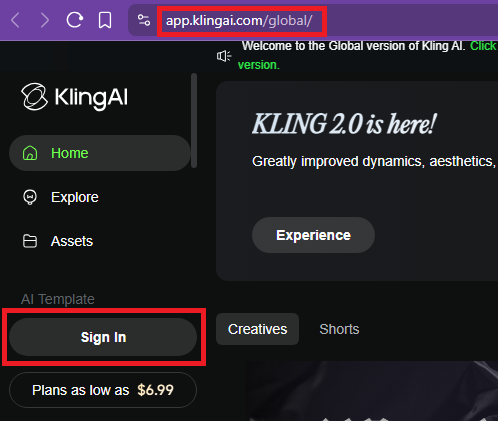
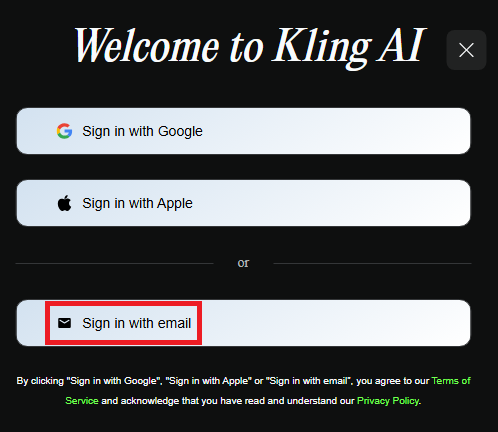
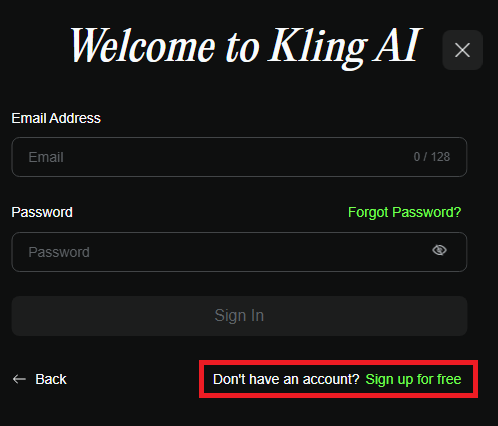
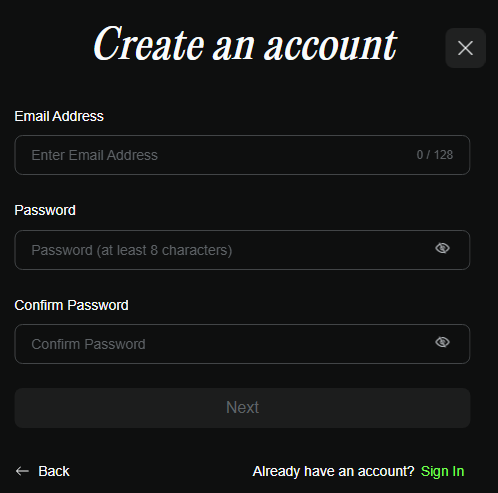
Navigate to [https://app.klingai.com/global/](https://app.klingai.com/global) and sign up with an email account. Our API does not support Gmail or Apple accounts. We strongly recommend creating a separate Kling AI account designated for API work.
## Configure Kling API account
Proceed to [POST /accounts](../api-kling-v1/post-kling-accounts) and configure the Kling API account to using `email` and `password`.
## Verify `email` and `password` values
This only verifies that `email` and `password` values are correct. To complete setup, you **MUST** proceed to [POST /accounts](../api-kling-v1/post-kling-accounts) and complete the configuration of the Kling API account using the verified `email` and `password` values.
=== URL: https://useapi.net/docs/api-kling-v1 ===
Document URL: https://useapi.net/docs/api-kling-v1
---
layout: default
title: Kling API v1
nav_order: 4000
has_children: true
permalink: /docs/api-kling-v1
---
# Kling API v1
April 18, 2025 (January 12, 2026)
This is an [experimental](../../docs/legal) API for [Kling AI](https://app.klingai.com/global), a generative artificial intelligence service developed by Chinese short video giant [Kuaishou Technology](https://www.kuaishou.com/en).
Kling AI is considered by many to be the [best AI model](https://artificialanalysis.ai/text-to-video/arena?tab=leaderboard&input=image), leading the pack with prompt adherence, video quality and unmatched consistency.
Our API support Kling models `O1`, `2.6`, `2.5`, `2.1`, `2.0`, `1.6` and `1.5` with optional audio generation for enhanced video experiences. Model `2.6` supports Native Audio generation and [Motion Control](../../blog/260106) (apply motion from video to image).
[Avatars 2.0](../../docs/api-kling-v1/get-kling-avatars) with AI-powered lip-sync video generation and TTS support. [Elements](../../docs/api-kling-v1/get-kling-elements) for creating reusable character/object references across O1 generations.
In contrast to the [official](https://klingai.com/global/dev/pricing) Kling API, which starts at $4,200/month Video Generation ($2,100/month Image Generation) and requires a 3-month subscription commitment, you can start using the API with a Free or [$10/month](https://app.klingai.com/global/membership/membership-plan) Standard plan and upgrade or [top up](https://app.klingai.com/global/membership/spirit-unit) your account as needed.
As a bonus, you can execute unlimited generations of:
* Speech generation (up to **5 minutes** long) via [POST tts/create](../../docs/api-kling-v1/post-kling-tts-create)
* Face detection via [POST images/recognize-faces](../../docs/api-kling-v1/post-kling-images-recognize-faces)
These features are available for all Kling subscription plans, including the **free** one.
Setup Kling
{: .no_toc }
April 18, 2025
## Table of contents
{: .no_toc .text-delta }
1. TOC
{:toc}
Approximately 2 minutes to complete setup steps.
---
## Create Kling AI account
Navigate to [https://app.klingai.com/global/](https://app.klingai.com/global) and sign up with an email account. Our API does not support Gmail or Apple accounts. We strongly recommend creating a separate Kling AI account designated for API work.




## Configure Kling API account
Proceed to [POST /accounts](../api-kling-v1/post-kling-accounts) and configure the Kling API account to using `email` and `password`.
## Verify `email` and `password` values
This only verifies that `email` and `password` values are correct. To complete setup, you **MUST** proceed to [POST /accounts](../api-kling-v1/post-kling-accounts) and complete the configuration of the Kling API account using the verified `email` and `password` values.
=== URL: https://useapi.net/docs/api-kling-v1 ===
Document URL: https://useapi.net/docs/api-kling-v1
---
layout: default
title: Kling API v1
nav_order: 4000
has_children: true
permalink: /docs/api-kling-v1
---
# Kling API v1
April 18, 2025 (January 12, 2026)
This is an [experimental](../../docs/legal) API for [Kling AI](https://app.klingai.com/global), a generative artificial intelligence service developed by Chinese short video giant [Kuaishou Technology](https://www.kuaishou.com/en).
Kling AI is considered by many to be the [best AI model](https://artificialanalysis.ai/text-to-video/arena?tab=leaderboard&input=image), leading the pack with prompt adherence, video quality and unmatched consistency.
Our API support Kling models `O1`, `2.6`, `2.5`, `2.1`, `2.0`, `1.6` and `1.5` with optional audio generation for enhanced video experiences. Model `2.6` supports Native Audio generation and [Motion Control](../../blog/260106) (apply motion from video to image).
[Avatars 2.0](../../docs/api-kling-v1/get-kling-avatars) with AI-powered lip-sync video generation and TTS support. [Elements](../../docs/api-kling-v1/get-kling-elements) for creating reusable character/object references across O1 generations.
In contrast to the [official](https://klingai.com/global/dev/pricing) Kling API, which starts at $4,200/month Video Generation ($2,100/month Image Generation) and requires a 3-month subscription commitment, you can start using the API with a Free or [$10/month](https://app.klingai.com/global/membership/membership-plan) Standard plan and upgrade or [top up](https://app.klingai.com/global/membership/spirit-unit) your account as needed.
As a bonus, you can execute unlimited generations of:
* Speech generation (up to **5 minutes** long) via [POST tts/create](../../docs/api-kling-v1/post-kling-tts-create)
* Face detection via [POST images/recognize-faces](../../docs/api-kling-v1/post-kling-images-recognize-faces)
These features are available for all Kling subscription plans, including the **free** one.
| Name | Cost $ | Credits | Single credit cost |
|---|---|---|---|
| Pro monthly (3000 credits per month) | $33 | 3000 | $0.01100 |
| Kling Model | Credits | Single generation cost |
|---|---|---|
| 2.6 Pro Native Audio 1080p 10sec | 70 | $0.77 |
| 2.6 Pro Native Audio 1080p 5sec | 35 | $0.39 |
| 2.6 Pro 1080p 10sec | 50 | $0.55 |
| 2.6 Pro 1080p 5sec | 25 | $0.28 |
| 2.6 Std 720p 10sec | 30 | $0.33 |
| 2.6 Std 720p 5sec | 15 | $0.17 |
| 2.5 Pro 1080p 10sec | 50 | $0.68 |
| 2.5 Pro 1080p 5sec | 25 | $0.34 |
| 2.1 Pro 1080p 10sec | 70 | $0.53 |
| 2.1 Pro 1080p 5sec | 35 | $0.27 |
| 2.1 Std 720p 10sec | 40 | $0.30 |
| 2.1 Std 720p 5sec | 20 | $0.15 |
| 2.x Master 1080p 10sec | 200 | $1.52 |
| 2.x Master 1080p 5sec | 100 | $0.76 |
| 1.6 Pro 1080p 10sec | 70 | $0.53 |
| 1.6 Pro 1080p 5sec | 35 | $0.27 |
| 1.6 Std 720p 10sec | 40 | $0.30 |
| 1.6 Std 720p 5sec | 20 | $0.15 |
| Motion Std 720p 10sec | 70 | $0.53 |
| Motion Std 720p 5sec | 35 | $0.27 |
| Motion Pro 1080p 10sec | 100 | $0.76 |
| Motion Pro 1080p 5sec | 50 | $0.38 |
| Video Extend | 20 | $0.22 |
| Video Add Sound | 2.5 | $0.025 |
| Effects Std | 20 | $0.22 |
| Effects Pro | 35 | $0.39 |
| LipSync 5sec | 5 | $0.06 |
| LipSync 10sec | 10 | $0.11 |
| Avatar 2.0 Pro (per sec) | 8 | $0.09 |
| Avatar 2.0 Std (per sec) | 4 | $0.04 |
| Virtual Try-On | 5 | $0.06 |
| KOLORS 1.x/2.x Image | 1 | $0.01 |
| O1 Image 1k | 1 | $0.01 |
| O1 Image 2k | 1 | $0.01 |
| O1 Video Pro 10sec | 70 | $0.77 |
| O1 Video Pro 5sec | 35 | $0.39 |
| O1 Video Std 10sec | 35 | $0.39 |
| O1 Video Std 5sec | 18 | $0.20 |
Discord Server
*  Telegram Channel
*
Telegram Channel
*  r/kling_api
=== URL: https://useapi.net/docs/api-kling-v1/del-kling-accounts-email ===
Document URL: https://useapi.net/docs/api-kling-v1/del-kling-accounts-email
---
layout: default
title:
r/kling_api
=== URL: https://useapi.net/docs/api-kling-v1/del-kling-accounts-email ===
Document URL: https://useapi.net/docs/api-kling-v1/del-kling-accounts-email
---
layout: default
title: DELETE accounts/email
parent: Kling API v1
nav_order: 130
---
## Delete Kling API account configuration for `email`
{: .no_toc }
April 18, 2025
## Table of contents
{: .no_toc .text-delta }
1. TOC
{:toc}
---
This endpoint removes a specific Kling account from your configuration.
{: .delete }
> **https://api.useapi.net/v1/kling/accounts/`email`**
The `email` value should correspond to an account configured previously via a [POST /accounts](https://useapi.net/docs/api-kling-v1/post-kling-accounts) request.
##### Request Headers
``` yaml
Authorization: Bearer {API token}
```
- `API token` is **required**, see [Setup useapi.net](../start-here/setup-useapi) for details.
##### Responses
{% tabs delete_account_Kling_v1_response %}
{% tab delete_account_Kling_v1_response 204 %}
204 No Content
Account successfully deleted.
{% endtab %}
{% tab delete_account_Kling_v1_response 401 %}
401 Unauthorized
```json
{
"error": "Unauthorized",
"code": 401
}
```
{% endtab %}
{% tab delete_account_Kling_v1_response 404 %}
404 Not Found
Account configuration not found.
{% endtab %}
{% endtabs %}
##### Examples
{% tabs delete_account_Kling_v1_example %}
{% tab delete_account_Kling_v1_example Curl %}
``` bash
curl -X DELETE https://api.useapi.net/v1/kling/accounts/DELETE avatars/avatarId
parent: Kling API v1
nav_order: 465
---
## Delete avatar
{: .no_toc }
January 12, 2026
## Table of contents
{: .no_toc .text-delta }
1. TOC
{:toc}
---
This endpoint deletes a specific avatar by its ID. Use [GET /avatars](https://useapi.net/docs/api-kling-v1/get-kling-avatars) to list your avatars and get their IDs.
Note: You can only delete personal avatars created via [POST /avatars](https://useapi.net/docs/api-kling-v1/post-kling-avatars). System template avatars cannot be deleted.
{: .delete }
> **https://api.useapi.net/v1/kling/avatars/`avatarId`?...**
##### Request Headers
``` yaml
Authorization: Bearer {API token}
```
- `API token` is **required**, see [Setup useapi.net](../start-here/setup-useapi) for details.
##### Path Parameters
- `avatarId` is **required**, the avatar ID to delete.
##### Query Parameters
- `email` is optional when only one [account](../api-kling-v1/get-kling-accounts) configured.
However, if you have multiple accounts configured, this parameter becomes **required**.
##### Responses
{% tabs avatars_avatarId_del_Kling_v1_response %}
{% tab avatars_avatarId_del_Kling_v1_response 200 %}
200 OK
```json
{
"deleted": null
}
```
A `null` value indicates successful deletion.
{% endtab %}
{% tab avatars_avatarId_del_Kling_v1_response 401 %}
401 Unauthorized
```json
{
"error": "Unauthorized",
"code": 401
}
```
{% endtab %}
{% tab avatars_avatarId_del_Kling_v1_response 404 %}
404 Not Found
```json
{
"error": "DELETE elements/elementId
parent: Kling API v1
nav_order: 428
---
## Delete element
{: .no_toc }
January 12, 2026
## Table of contents
{: .no_toc .text-delta }
1. TOC
{:toc}
---
This endpoint deletes a specific element by its ID. Use [GET /elements](https://useapi.net/docs/api-kling-v1/get-kling-elements) to list your elements and get their IDs.
{: .delete }
> **https://api.useapi.net/v1/kling/elements/`elementId`?...**
##### Request Headers
``` yaml
Authorization: Bearer {API token}
```
- `API token` is **required**, see [Setup useapi.net](../start-here/setup-useapi) for details.
##### Path Parameters
- `elementId` is **required**, the element ID to delete.
##### Query Parameters
- `email` is optional when only one [account](../api-kling-v1/get-kling-accounts) configured.
However, if you have multiple accounts configured, this parameter becomes **required**.
##### Responses
{% tabs elements_elementId_del_Kling_v1_response %}
{% tab elements_elementId_del_Kling_v1_response 200 %}
200 OK
```json
{
"deleted": 1
}
```
{% endtab %}
{% tab elements_elementId_del_Kling_v1_response 401 %}
401 Unauthorized
```json
{
"error": "Unauthorized",
"code": 401
}
```
{% endtab %}
{% tab elements_elementId_del_Kling_v1_response 404 %}
404 Not Found
```json
{
"error": "DELETE scheduler/task_id
parent: Kling API v1
nav_order: 520
---
## Cancel a running task
{: .no_toc }
April 18, 2025
## Table of contents
{: .no_toc .text-delta }
1. TOC
{:toc}
---
This endpoint cancels a running API task from being tracked by the scheduler. The task will still be executed by Kling, but the API will no longer track its progress.
{: .delete }
> **https://api.useapi.net/v1/kling/scheduler/`task_id`**
The `task_id` value should be a numeric identifier of the task you want to cancel. You can get task IDs from [GET /scheduler](https://useapi.net/docs/api-kling-v1/get-kling-scheduler).
##### Request Headers
``` yaml
Authorization: Bearer {API token}
```
- `API token` is **required**, see [Setup useapi.net](../start-here/setup-useapi) for details.
##### Responses
{% tabs scheduler_task_id_delete_Kling_v1_response %}
{% tab scheduler_task_id_delete_Kling_v1_response 204 %}
204 No Content
Task was successfully canceled.
{% endtab %}
{% tab scheduler_task_id_delete_Kling_v1_response 400 %}
400 Bad Request
```json
{
"error": "Error ..."
}
```
{% endtab %}
{% tab scheduler_task_id_delete_Kling_v1_response 401 %}
401 Unauthorized
```json
{
"error": "Unauthorized",
"code": 401
}
```
{% endtab %}
{% tab scheduler_task_id_delete_Kling_v1_response 404 %}
404 Not Found
```json
{
"error": "Unable to locate running task_id 123456789"
}
```
{% endtab %}
{% endtabs %}
##### Examples
{% tabs scheduler_task_id_delete_Kling_v1_example %}
{% tab scheduler_task_id_delete_Kling_v1_example Curl %}
``` bash
curl -X DELETE "https://api.useapi.net/v1/kling/scheduler/123456789" \
-H "Accept: application/json" \
-H "Authorization: Bearer …"
```
{% endtab %}
{% tab scheduler_task_id_delete_Kling_v1_example JavaScript %}
``` javascript
const token = "API token";
const taskId = "123456789";
const apiUrl = `https://api.useapi.net/v1/kling/scheduler/${taskId}`;
const response = await fetch(apiUrl, {
method: "DELETE",
headers: {
"Authorization": `Bearer ${token}`,
},
});
console.log("response", {status: response.status, statusText: response.statusText});
```
{% endtab %}
{% tab scheduler_task_id_delete_Kling_v1_example Python %}
``` python
import requests
token = "API token"
task_id = "123456789"
apiUrl = f"https://api.useapi.net/v1/kling/scheduler/{task_id}"
headers = {
"Authorization" : f"Bearer {token}"
}
response = requests.delete(apiUrl, headers=headers)
print(response.status_code, response.reason)
```
{% endtab %}
{% endtabs %}
=== URL: https://useapi.net/docs/api-kling-v1/del-kling-tasks-task_id ===
Document URL: https://useapi.net/docs/api-kling-v1/del-kling-tasks-task_id
---
layout: default
title: DELETE tasks/task_id
parent: Kling API v1
nav_order: 307
---
## Delete Kling Task
{: .no_toc }
October 7, 2025
## Table of contents
{: .no_toc .text-delta }
1. TOC
{:toc}
---
This endpoint deletes a specific task and all its associated works (outputs) by task ID. Deleted tasks and works cannot be recovered. If the task has multiple works (e.g., multiple variations), all of them will be deleted.
{: .delete }
> **https://api.useapi.net/v1/kling/tasks/`task_id`?…**
The `task_id` value should be a numeric identifier of the task you want to delete.
##### Request Headers
``` yaml
Authorization: Bearer {API token}
```
- `API token` is **required**, see [Setup useapi.net](../start-here/setup-useapi) for details.
##### Query Parameters
- `email` is optional when only one [account](../api-kling-v1/get-kling-accounts) configured.
However, if you have multiple accounts configured, this parameter becomes **required**.
##### Responses
{% tabs tasks_task_id_delete_Kling_v1_response %}
{% tab tasks_task_id_delete_Kling_v1_response 200 %}
200 OK
```json
{
"deleted": 1,
"workIds": [987654321]
}
```
The response indicates how many works were deleted and their IDs.
{% endtab %}
{% tab tasks_task_id_delete_Kling_v1_response 400 %}
400 Bad Request
```json
{
"error": "Invalid task_id parameter"
}
```
{% endtab %}
{% tab tasks_task_id_delete_Kling_v1_response 401 %}
401 Unauthorized
```json
{
"error": "Unauthorized",
"code": 401
}
```
{% endtab %}
{% tab tasks_task_id_delete_Kling_v1_response 404 %}
404 Not Found
Task was not found or has no associated works.
```json
{
"error": "No works found for task 123456789"
}
```
{% endtab %}
{% endtabs %}
##### Model
```typescript
{ // TypeScript, all fields are optional
deleted: number // Number of works deleted
workIds: number[] // Array of deleted work IDs
}
```
##### Examples
{% tabs tasks_task_id_delete_Kling_v1_example %}
{% tab tasks_task_id_delete_Kling_v1_example Curl %}
``` bash
curl -X DELETE "https://api.useapi.net/v1/kling/tasks/123456789?email=user@example.com" \
-H "Accept: application/json" \
-H "Authorization: Bearer …"
```
{% endtab %}
{% tab tasks_task_id_delete_Kling_v1_example JavaScript %}
``` javascript
const token = "API token";
const email = "Previously configured account email";
const taskId = "123456789";
const apiUrl = `https://api.useapi.net/v1/kling/tasks/${taskId}?email=${email}`;
const response = await fetch(apiUrl, {
method: "DELETE",
headers: {
"Authorization": `Bearer ${token}`,
},
});
const result = await response.json();
console.log("response", {response, result});
```
{% endtab %}
{% tab tasks_task_id_delete_Kling_v1_example Python %}
``` python
import requests
token = "API token"
email = "Previously configured account email"
task_id = "123456789"
apiUrl = f"https://api.useapi.net/v1/kling/tasks/{task_id}?email={email}"
headers = {
"Authorization" : f"Bearer {token}"
}
response = requests.delete(apiUrl, headers=headers)
print(response, response.json())
```
{% endtab %}
{% endtabs %}
=== URL: https://useapi.net/docs/api-kling-v1/get-kling-accounts-email ===
Document URL: https://useapi.net/docs/api-kling-v1/get-kling-accounts-email
---
layout: default
title: GET accounts/email
parent: Kling API v1
nav_order: 120
---
## Retrieve Kling API account configuration and balance for `email`
{: .no_toc }
April 18, 2025 (June 23, 2025)
## Table of contents
{: .no_toc .text-delta }
1. TOC
{:toc}
---
This endpoint retrieves the configuration and balance information for a specific Kling account.
{: .get }
> **https://api.useapi.net/v1/kling/accounts/`email`**
The `email` value should correspond to an account configured previously via a [POST /accounts](https://useapi.net/docs/api-kling-v1/post-kling-accounts) request.
##### Request Headers
``` yaml
Authorization: Bearer {API token}
```
- `API token` is **required**, see [Setup useapi.net](../start-here/setup-useapi) for details.
##### Responses
{% tabs account_email_Kling_v1_response %}
{% tab account_email_Kling_v1_response 200 %}
200 OK
```json
{
"email": "user@example.com",
"session": {
"userId": "user12345",
"ExpireTime": 123456789,
"ExpireTimeUTC": "2025-01-01T12:13:14.000Z"
},
"maxJobs": 5,
"password": "…secured…",
"balance": {
"points": [
{
"orderId": "123456789",
"type": "plan",
"amount": 66000,
"balance": 56000,
"startTime": 123456789,
"endTime": 123456789
}
],
"tickets": [],
"nextApplyTime": 123456789,
"total": 56000
}
}
```
{% endtab %}
{% tab account_email_Kling_v1_response 401 %}
401 Unauthorized
```json
{
"error": "Unauthorized",
"code": 401
}
```
{% endtab %}
{% tab account_email_Kling_v1_response 404 %}
404 Not Found
Account configuration not found. To create configuration use [POST /accounts](https://useapi.net/docs/api-kling-v1/post-kling-accounts).
{% endtab %}
{% endtabs %}
##### Model
```typescript
{ // TypeScript, all fields are optional
email: string
session: {
userId: string
ExpireTime: number
ExpireTimeUTC: string
}
maxJobs: number
password: string
balance: {
points: Array<{
orderId: string
type: string
amount: number
balance: number
startTime: number
endTime: number
}>
tickets: ArrayGET accounts
parent: Kling API v1
nav_order: 100
---
## Retrieve Kling API accounts configuration
{: .no_toc }
April 18, 2025
## Table of contents
{: .no_toc .text-delta }
1. TOC
{:toc}
---
For your convenience, you can specify your Kling configuration values under your Kling account. If you specify multiple Kling accounts, the API will automatically perform load balancing by randomly selecting an account with available capacity before making calls to Kling.
This endpoint retrieves the complete list of configured API accounts for Kling.
{: .get }
> **https://api.useapi.net/v1/kling/accounts**
##### Request Headers
``` yaml
Authorization: Bearer {API token}
Content-Type: application/json
# Alternatively you can use multipart/form-data
# Content-Type: multipart/form-data
```
- `API token` is **required**, see [Setup useapi.net](../start-here/setup-useapi) for details.
##### Responses
{% tabs account_Kling_v1_response %}
{% tab account_Kling_v1_response 200 %}
200 OK
```json
{
"GET assets/download
parent: Kling API v1
nav_order: 205
---
## Download Kling assets without watermarks
{: .no_toc }
April 18, 2025 (June 27, 2025)
## Table of contents
{: .no_toc .text-delta }
1. TOC
{:toc}
---
This endpoint allows you to download assets from your *paid* Kling account without watermarks by providing the work IDs.
{: .get }
> **https://api.useapi.net/v1/kling/assets/download?…**
##### Request Headers
``` yaml
Authorization: Bearer {API token}
```
- `API token` is **required**, see [Setup useapi.net](../start-here/setup-useapi) for details.
##### Query Parameters
- `email` is optional when only one [account](../api-kling-v1/get-kling-accounts) configured.
However, if you have multiple accounts configured, this parameter becomes **required**.
- `workIds` is **required**, specify the IDs of works to download.
Can be a single numeric string or a comma-separated list of numeric strings (e.g., "123456789" or "123456789,987654321").
These IDs can be obtained from the `workId` field in the `works` array returned by the [GET /assets](../api-kling-v1/get-kling-assets), [GET /tasks](../api-kling-v1/get-kling-tasks) or [GET /tasks/`task_id`](../api-kling-v1/get-kling-tasks-task_id) endpoint.
- `fileTypes` is optional, specify comma-separated file types you want to download (e.g., "MP4" or "MP4,WAV"). If not provided, all available files for the given workIds will be downloaded as a singe .zip file.
Supported file types: `MP4`, `MP3`, `WAV`, `PNG`.
**Note:** If a single `workId` is provided with a single `fileTypes` value, the cdnUrl will point to an actual asset file. If multiple `workIds` are provided or `fileTypes` is omitted or has multiple values, the cdnUrl will point to a .zip file containing all requested assets/files.
##### Responses
{% tabs assets_download_get_Kling_v1_response %}
{% tab assets_download_get_Kling_v1_response 200 %}
200 OK
```json
{
"cdnUrl": "https://kling.klingai.com/.../download_result.zip",
"status": "success"
}
```
{% endtab %}
{% tab assets_download_get_Kling_v1_response 400 %}
400 Bad Request
```json
{
"error": "Invalid parameters"
}
```
{% endtab %}
{% tab assets_download_get_Kling_v1_response 401 %}
401 Unauthorized
```json
{
"error": "Unauthorized",
"code": 401
}
```
{% endtab %}
{% endtabs %}
##### Model
```typescript
{ // TypeScript
cdnUrl: string // URL to download the asset(s), .zip for multiple workIds
status: string // "success" when successful
}
```
##### Examples
{% tabs assets_download_get_Kling_v1_example %}
{% tab assets_download_get_Kling_v1_example Curl %}
``` bash
curl "https://api.useapi.net/v1/kling/assets/download?email=user@example.com&workIds=123456789,987654321" \
-H "Accept: application/json" \
-H "Authorization: Bearer …"
```
{% endtab %}
{% tab assets_download_get_Kling_v1_example JavaScript %}
``` javascript
const token = "API token";
const email = "Previously configured account email";
const workIds = "123456789,987654321";
const apiUrl = `https://api.useapi.net/v1/kling/assets/download?email=${email}&workIds=${workIds}`;
const response = await fetch(apiUrl, {
headers: {
"Authorization": `Bearer ${token}`,
},
});
const result = await response.json();
console.log("response", {response, result});
```
{% endtab %}
{% tab assets_download_get_Kling_v1_example Python %}
``` python
import requests
token = "API token"
email = "Previously configured account email"
workIds = "123456789,987654321"
apiUrl = f"https://api.useapi.net/v1/kling/assets/download?email={email}&workIds={workIds}"
headers = {
"Authorization" : f"Bearer {token}"
}
response = requests.get(apiUrl, headers=headers)
print(response, response.json())
```
{% endtab %}
{% endtabs %}
=== URL: https://useapi.net/docs/api-kling-v1/get-kling-assets-uploaded ===
Document URL: https://useapi.net/docs/api-kling-v1/get-kling-assets-uploaded
---
layout: default
title: GET assets/uploaded
parent: Kling API v1
nav_order: 201
---
## Retrieve uploaded Kling assets
{: .no_toc }
August 8, 2025
## Table of contents
{: .no_toc .text-delta }
1. TOC
{:toc}
---
This endpoint retrieves assets that you have uploaded to your Kling account, as opposed to generated assets.
{: .get }
> **https://api.useapi.net/v1/kling/assets/uploaded/?…**
##### Request Headers
``` yaml
Authorization: Bearer {API token}
```
- `API token` is **required**, see [Setup useapi.net](../start-here/setup-useapi) for details.
##### Query Parameters
- `email` is optional when only one [account](../api-kling-v1/get-kling-accounts) configured.
However, if you have multiple accounts configured, this parameter becomes **required**.
- `pageNum` is optional, specify the page number to retrieve.
Default `1`.
- `pageSize` is optional, specify the number of items per page.
Default `20`.
- `contentType` is optional, type of content to retrieve.
Supported values: `video`, `image`, or `audio`.
- `fileName` is optional, filter by file name (keyword search).
##### Responses
{% tabs assets_uploaded_get_Kling_v1_response %}
{% tab assets_uploaded_get_Kling_v1_response 200 %}
200 OK
```json
{
"uploadAssetsList": [
{
"id": "1234567890",
"name": "abcdef12345.mp4",
"userId": 12345,
"contentType": "video",
"resource": {
"resource": "https://v15-kling.klingai.com/….mp4",
"height": 1080,
"width": 720,
"duration": 9040,
"resourceKey": ""
},
"cover": {
"resource": "https://v15-kling.klingai.com/…",
"height": 1080,
"width": 720,
"duration": 0,
"resourceKey": ""
},
"createTime": 1754630473303,
"updateTime": 1754630473303,
"favored": false,
"extraInfo": "{}",
"entrance": ""
},
{
"id": "1234567890",
"name": "abcdef12345.mp4",
"userId": 12345,
"contentType": "image",
"resource": {
"resource": "https://v15-kling.klingai.com/…",
"height": 1080,
"width": 720,
"duration": 0,
"resourceKey": ""
},
"cover": {
"resource": "",
"height": 1,
"width": 1,
"duration": 0,
"resourceKey": ""
},
"createTime": 1754627757354,
"updateTime": 1754627757354,
"favored": false,
"extraInfo": "{}",
"entrance": ""
}
]
}
```
{% endtab %}
{% tab assets_uploaded_get_Kling_v1_response 400 %}
400 Bad Request
```json
{
"error": "Invalid parameters"
}
```
{% endtab %}
{% tab assets_uploaded_get_Kling_v1_response 401 %}
401 Unauthorized
```json
{
"error": "Unauthorized",
"code": 401
}
```
{% endtab %}
{% endtabs %}
##### Model
```typescript
{ // TypeScript, all fields are optional
uploadAssetsList: {
id: string // Unique asset identifier
name: string // Generated unique filename
userId: number // User ID who uploaded the asset
contentType: string // "video", "image", or "audio"
resource: {
resource: string // URL of the uploaded asset
height: number // Height in pixels
width: number // Width in pixels
duration: number // Duration in milliseconds (0 for images)
resourceKey: string // Resource key (usually empty)
}
cover: {
resource: string // URL of cover image (empty for images)
height: number // Cover height (1 for images without cover)
width: number // Cover width (1 for images without cover)
duration: number // Cover duration (always 0)
resourceKey: string // Cover resource key (usually empty)
}
createTime: number // Upload timestamp
updateTime: number // Last update timestamp
favored: boolean // Whether asset is favorited
extraInfo: string // Extra information as JSON string
entrance: string // Entry point (usually empty)
}[]
}
```
##### Examples
{% tabs assets_uploaded_get_Kling_v1_example %}
{% tab assets_uploaded_get_Kling_v1_example Curl %}
``` bash
curl "https://api.useapi.net/v1/kling/assets/uploaded/?contentType=image" \
-H "Accept: application/json" \
-H "Authorization: Bearer …"
```
{% endtab %}
{% tab assets_uploaded_get_Kling_v1_example JavaScript %}
``` javascript
const token = "API token";
const apiUrl = `https://api.useapi.net/v1/kling/assets/uploaded/?contentType=image`;
const response = await fetch(apiUrl, {
headers: {
"Authorization": `Bearer ${token}`,
},
});
const result = await response.json();
console.log("response", {response, result});
```
{% endtab %}
{% tab assets_uploaded_get_Kling_v1_example Python %}
``` python
import requests
token = "API token"
apiUrl = f"https://api.useapi.net/v1/kling/assets/uploaded/?contentType=image"
headers = {
"Authorization" : f"Bearer {token}"
}
response = requests.get(apiUrl, headers=headers)
print(response, response.json())
```
{% endtab %}
{% endtabs %}
=== URL: https://useapi.net/docs/api-kling-v1/get-kling-assets ===
Document URL: https://useapi.net/docs/api-kling-v1/get-kling-assets
---
layout: default
title: GET assets
parent: Kling API v1
nav_order: 200
---
## Retrieve Kling assets
{: .no_toc }
April 18, 2025
## Table of contents
{: .no_toc .text-delta }
1. TOC
{:toc}
---
This endpoint retrieves generated assets from your Kling account.
{: .get }
> **https://api.useapi.net/v1/kling/assets/?…**
##### Request Headers
``` yaml
Authorization: Bearer {API token}
```
- `API token` is **required**, see [Setup useapi.net](../start-here/setup-useapi) for details.
##### Query Parameters
- `email` is optional when only one [account](../api-kling-v1/get-kling-accounts) configured.
However, if you have multiple accounts configured, this parameter becomes **required**.
- `pageNum` is optional, specify the page number to retrieve.
Default `1`.
- `pageSize` is optional, specify the number of items per page.
Default `40`.
- `contentType` is optional, type of content to retrieve.
Supported values: `video`, `image`, or `audio`.
##### Responses
{% tabs assets_get_Kling_v1_response %}
{% tab assets_get_Kling_v1_response 200 %}
200 OK
```json
{
"limitations": [
{
"type": "mmu_txt2img_aiweb",
"remaining": 10000,
"limit": 10000
},
{
"type": "m2v_txt2video_hq",
"remaining": 10000,
"limit": 10000
},
{
"type": "m2v_img2video_hq",
"remaining": 10000,
"limit": 10000
}
],
"history": [
{
"works": [
{
"workId": 123456789,
"workItemId": 0,
"taskId": 123456789,
"userId": 12345,
"type": "m2v_img2video_hq",
"status": 99,
"contentType": "video",
"resource": {
"resource": "https://s21-kling.klingai.com/....mp4",
"height": 1268,
"width": 724,
"duration": 5041,
"resourceKey": ""
},
"cover": {
"resource": "https://s21-kling.klingai.com/....jpg",
"height": 1268,
"width": 724,
"duration": 0,
"resourceKey": ""
},
"starNum": 0,
"cloneCount": 0,
"reportNum": 0,
"createTime": 1744858514515,
"taskInfo": {
"type": "m2v_img2video_hq",
"inputs": [
{
"name": "input",
"inputType": "URL",
"token": null,
"blobStorage": null,
"url": "https://s21-kling.klingai.com/....jpg",
"cover": null,
"fromWorkId": null,
"fromUploadId": null
}
],
"arguments": [
{
"name": "prompt",
"value": "A person dancing"
},
{
"name": "negative_prompt",
"value": ""
},
{
"name": "duration",
"value": "5"
},
{
"name": "kling_version",
"value": "2.0"
}
],
"extraArgs": {},
"callbackPayloads": [],
"scene": "NORMAL_CREATION"
},
"selfAttitude": "unknown",
"selfComment": {
"rate": 0,
"tags": [],
"content": "",
"prompts": []
},
"favored": false,
"starred": false,
"publishStatus": "unpublished",
"deleted": false,
"publishTime": 0,
"submitTime": 1744858514515,
"lipSyncStatus": 99,
"downloadInfo": {
"fileTypes": [
{
"type": "MP4",
"watermark": true
}
]
},
"allowPublish": true
}
],
"task": {
"id": 123456789,
"userId": 12345,
"type": "m2v_img2video_hq",
"scene": "NORMAL_CREATION",
"status": 99,
"taskInfo": {
"type": "m2v_img2video_hq",
"inputs": [
{
"name": "input",
"inputType": "URL",
"token": null,
"blobStorage": null,
"url": "https://s21-kling.klingai.com/....jpg",
"cover": null,
"fromWorkId": null,
"fromUploadId": null
}
],
"arguments": [
{
"name": "prompt",
"value": "A person dancing"
},
{
"name": "negative_prompt",
"value": ""
},
{
"name": "duration",
"value": "5"
},
{
"name": "kling_version",
"value": "2.0"
}
],
"extraArgs": {},
"callbackPayloads": [],
"scene": "NORMAL_CREATION"
},
"favored": false,
"deleted": false,
"viewed": true,
"createTime": 1744858514499,
"updateTime": 1744858823172,
"viewTime": 1744916388016
},
"etaTime": 0,
"etaTimeOverSla": false,
"queuingEtaTime": 0,
"originEtaTime": 0,
"originQueuingEtaTime": 0,
"currentTimestamp": 1744955215247
}
],
"userPoints": {
"points": [
{
"orderId": "123456789",
"type": "plan",
"amount": 300000,
"balance": 190500,
"startTime": 1744081611119,
"endTime": 1746760011119
}
],
"total": 190500
},
"userTickets": {
"ticket": [
{
"orderId": "123456789",
"type": "priority",
"packageType": "reward",
"amount": 1,
"balance": 1,
"startTime": 1744046060883,
"endTime": 1746724460883
},
{
"orderId": "123456789",
"type": "extend",
"packageType": "reward",
"amount": 2,
"balance": 2,
"startTime": 1744046060883,
"endTime": 1746724460883
},
{
"orderId": "123456789",
"type": "hq_5s",
"packageType": "reward",
"amount": 3,
"balance": 3,
"startTime": 1744046060883,
"endTime": 1746724460883
}
]
}
}
```
{% endtab %}
{% tab assets_get_Kling_v1_response 400 %}
400 Bad Request
```json
{
"error": "Invalid parameters"
}
```
{% endtab %}
{% tab assets_get_Kling_v1_response 401 %}
401 Unauthorized
```json
{
"error": "Unauthorized",
"code": 401
}
```
{% endtab %}
{% endtabs %}
##### Model
To download assets without watermarks, use the [GET /assets/download](../api-kling-v1/get-kling-assets-download) endpoint with the workId values found in the `works` array of the response.
```typescript
{ // TypeScript, all fields are optional
limitations: {
type: string
remaining: number
limit: number
}[]
history: {
works: {
workId: number
workItemId: number
taskId: number
userId: number
type: string
status: number
contentType: string
resource: {
resource: string
height: number
width: number
duration: number
resourceKey: string
}
cover: {
resource: string
height: number
width: number
duration: number
resourceKey: string
}
starNum: number
cloneCount: number
reportNum: number
createTime: number
taskInfo: {
type: string
inputs: {
name: string
inputType: string
token: string | null
blobStorage: string | null
url: string
cover: string | null
fromWorkId: number | null
fromUploadId: number | null
}[]
arguments: {
name: string
value: string
}[]
extraArgs: RecordGET avatars
parent: Kling API v1
nav_order: 450
---
## List avatars
{: .no_toc }
January 12, 2026
## Table of contents
{: .no_toc .text-delta }
1. TOC
{:toc}
---
This endpoint retrieves a list of avatars. You can list either your personal saved avatars or browse system-provided templates.
Avatars are digital characters that can be animated with lip-sync using [POST /avatars/video](https://useapi.net/docs/api-kling-v1/post-kling-avatars-video).
{: .get }
> **https://api.useapi.net/v1/kling/avatars/?...**
##### Request Headers
``` yaml
Authorization: Bearer {API token}
```
- `API token` is **required**, see [Setup useapi.net](../start-here/setup-useapi) for details.
##### Query Parameters
- `email` is optional when only one [account](../api-kling-v1/get-kling-accounts) configured.
However, if you have multiple accounts configured, this parameter becomes **required**.
- `type` is optional, the type of avatars to list.
Supported values: `personal` (default), `templates`.
- `personal`: Your saved avatars created via [POST /avatars](https://useapi.net/docs/api-kling-v1/post-kling-avatars)
- `templates`: System-provided avatar templates
##### Responses
{% tabs avatars_get_Kling_v1_response %}
{% tab avatars_get_Kling_v1_response 200 %}
200 OK
**Personal avatars response (type=personal):**
```json
[
{
"id": "123456789012",
"nickname": "My Fashion Avatar",
"prompt": "Elegant woman in professional attire",
"scene": "advertising_marketing",
"imageResources": [
{
"url": "https://s21-kling.klingai.com/ai-platform/.../avatar.jpg",
"sourceFrom": 2
}
],
"ttsSpeaker": "speaker_id_123",
"ttsSpeed": "1",
"ttsEmotionKey": "neutral",
"createTime": 1736640000000,
"updateTime": 1736640000000
}
]
```
**Templates response (type=templates):**
```json
[
{
"id": "12345",
"name": "Business Woman",
"imageResources": [
{
"url": "https://s21-kling.klingai.com/ai-platform/.../template.jpg"
}
],
"prompt": "Professional businesswoman in formal attire"
}
]
```
{% endtab %}
{% tab avatars_get_Kling_v1_response 401 %}
401 Unauthorized
```json
{
"error": "Unauthorized",
"code": 401
}
```
{% endtab %}
{% endtabs %}
##### Model
```typescript
Array<{
id: string
nickname?: string
name?: string
prompt: string
scene?: string
imageResources: {
url: string
sourceFrom?: number
}[]
ttsSpeaker?: string
ttsSpeed?: string
ttsEmotionKey?: string
createTime?: number
updateTime?: number
}>
```
##### Avatar ID Format
- **Personal avatars** have long IDs (more than 8 digits), e.g., `123456789012`
- **Template avatars** have short IDs (8 digits or fewer), e.g., `12345`
This distinction is used internally when generating avatar videos.
##### Examples
{% tabs avatars_get_Kling_v1_example %}
{% tab avatars_get_Kling_v1_example Curl %}
``` bash
curl "https://api.useapi.net/v1/kling/avatars/?email=user@example.com&type=personal" \
-H "Accept: application/json" \
-H "Authorization: Bearer ..."
```
{% endtab %}
{% tab avatars_get_Kling_v1_example JavaScript %}
``` javascript
const token = "API token";
const email = "Previously configured account email";
const apiUrl = `https://api.useapi.net/v1/kling/avatars/?email=${email}&type=personal`;
const response = await fetch(apiUrl, {
headers: {
"Authorization": `Bearer ${token}`,
},
});
const result = await response.json();
console.log("response", {response, result});
```
{% endtab %}
{% tab avatars_get_Kling_v1_example Python %}
``` python
import requests
token = "API token"
email = "Previously configured account email"
apiUrl = f"https://api.useapi.net/v1/kling/avatars/?email={email}&type=personal"
headers = {
"Authorization" : f"Bearer {token}"
}
response = requests.get(apiUrl, headers=headers)
print(response, response.json())
```
{% endtab %}
{% endtabs %}
=== URL: https://useapi.net/docs/api-kling-v1/get-kling-elements-elementId ===
Document URL: https://useapi.net/docs/api-kling-v1/get-kling-elements-elementId
---
layout: default
title: GET elements/elementId
parent: Kling API v1
nav_order: 424
---
## Retrieve element by ID
{: .no_toc }
January 12, 2026
## Table of contents
{: .no_toc .text-delta }
1. TOC
{:toc}
---
This endpoint retrieves details for a specific element by its ID. Use [GET /elements](https://useapi.net/docs/api-kling-v1/get-kling-elements) to list all your elements and get their IDs.
{: .get }
> **https://api.useapi.net/v1/kling/elements/`elementId`?...**
##### Request Headers
``` yaml
Authorization: Bearer {API token}
```
- `API token` is **required**, see [Setup useapi.net](../start-here/setup-useapi) for details.
##### Path Parameters
- `elementId` is **required**, the element ID to retrieve.
##### Query Parameters
- `email` is optional when only one [account](../api-kling-v1/get-kling-accounts) configured.
However, if you have multiple accounts configured, this parameter becomes **required**.
##### Responses
{% tabs elements_elementId_get_Kling_v1_response %}
{% tab elements_elementId_get_Kling_v1_response 200 %}
200 OK
```json
{
"element": {
"id": "u_123456789012345",
"name": "FashionLady ABC12",
"userId": 12345678,
"description": "Elegant woman in red dress",
"cover": {
"resource": "https://s21-kling.klingai.com/ai-platform/.../cover.jpg",
"width": 768,
"height": 1365,
"resourceKey": "cover",
"cover": true,
"slotKey": ""
},
"resources": [
{ "resource": ".../cover.jpg", "resourceKey": "cover", "cover": true, "slotKey": "" },
{ "resource": ".../side.png", "resourceKey": "secondary", "cover": false, "slotKey": "side" },
{ "resource": ".../back.png", "resourceKey": "secondary", "cover": false, "slotKey": "back" },
{ "resource": ".../top.png", "resourceKey": "secondary", "cover": false, "slotKey": "topView" }
],
"tagList": [],
"favored": false,
"official": false,
"createTime": 1736640000000,
"updateTime": 1736640000000
}
}
```
{% endtab %}
{% tab elements_elementId_get_Kling_v1_response 401 %}
401 Unauthorized
```json
{
"error": "Unauthorized",
"code": 401
}
```
{% endtab %}
{% tab elements_elementId_get_Kling_v1_response 404 %}
404 Not Found
```json
{
"error": "GET elements/tags
parent: Kling API v1
nav_order: 420
---
## Retrieve available element tags
{: .no_toc }
January 12, 2026
## Table of contents
{: .no_toc .text-delta }
1. TOC
{:toc}
---
This endpoint retrieves available element category tags. Tags are used to categorize elements when creating them via [POST /elements](https://useapi.net/docs/api-kling-v1/post-kling-elements) and for filtering when listing elements via [GET /elements](https://useapi.net/docs/api-kling-v1/get-kling-elements).
{: .get }
> **https://api.useapi.net/v1/kling/elements/tags/?...**
##### Request Headers
``` yaml
Authorization: Bearer {API token}
```
- `API token` is **required**, see [Setup useapi.net](../start-here/setup-useapi) for details.
##### Query Parameters
- `email` is optional when only one [account](../api-kling-v1/get-kling-accounts) configured.
However, if you have multiple accounts configured, this parameter becomes **required**.
##### Responses
{% tabs elements_tags_get_Kling_v1_response %}
{% tab elements_tags_get_Kling_v1_response 200 %}
200 OK
```json
{
"tagList": [
{
"id": "o_102",
"tagKey": "character",
"name": "Characters",
"official": true,
"type": "element"
},
{
"id": "o_103",
"tagKey": "animal",
"name": "Animals",
"official": true,
"type": "element"
},
{
"id": "o_104",
"tagKey": "prop",
"name": "Items",
"official": true,
"type": "element"
},
{
"id": "o_105",
"tagKey": "costume",
"name": "Costumes",
"official": true,
"type": "element"
},
{
"id": "o_106",
"tagKey": "scene",
"name": "Scenes",
"official": true,
"type": "element"
},
{
"id": "o_107",
"tagKey": "effect",
"name": "Effects",
"official": true,
"type": "element"
},
{
"id": "o_108",
"tagKey": "others",
"name": "Others",
"official": true,
"type": "element"
}
]
}
```
{% endtab %}
{% tab elements_tags_get_Kling_v1_response 401 %}
401 Unauthorized
```json
{
"error": "Unauthorized",
"code": 401
}
```
{% endtab %}
{% endtabs %}
##### Model
```typescript
{ // TypeScript, all fields are optional
tagList: {
id: string
tagKey: string
name: string
official: boolean
type: string
}[]
}
```
##### Examples
{% tabs elements_tags_get_Kling_v1_example %}
{% tab elements_tags_get_Kling_v1_example Curl %}
``` bash
curl "https://api.useapi.net/v1/kling/elements/tags/?email=user@example.com" \
-H "Accept: application/json" \
-H "Authorization: Bearer ..."
```
{% endtab %}
{% tab elements_tags_get_Kling_v1_example JavaScript %}
``` javascript
const token = "API token";
const email = "Previously configured account email";
const apiUrl = `https://api.useapi.net/v1/kling/elements/tags/?email=${email}`;
const response = await fetch(apiUrl, {
headers: {
"Authorization": `Bearer ${token}`,
},
});
const result = await response.json();
console.log("response", {response, result});
```
{% endtab %}
{% tab elements_tags_get_Kling_v1_example Python %}
``` python
import requests
token = "API token"
email = "Previously configured account email"
apiUrl = f"https://api.useapi.net/v1/kling/elements/tags/?email={email}"
headers = {
"Authorization" : f"Bearer {token}"
}
response = requests.get(apiUrl, headers=headers)
print(response, response.json())
```
{% endtab %}
{% endtabs %}
=== URL: https://useapi.net/docs/api-kling-v1/get-kling-elements ===
Document URL: https://useapi.net/docs/api-kling-v1/get-kling-elements
---
layout: default
title: GET elements
parent: Kling API v1
nav_order: 422
---
## List elements
{: .no_toc }
January 12, 2026
## Table of contents
{: .no_toc .text-delta }
1. TOC
{:toc}
---
This endpoint retrieves a list of your custom elements. Elements are saved character/object references that can be reused across multiple generations in [POST /images/omni](https://useapi.net/docs/api-kling-v1/post-kling-images-omni) and [POST /videos/omni](https://useapi.net/docs/api-kling-v1/post-kling-videos-omni) using the `@element_N` syntax.
{: .get }
> **https://api.useapi.net/v1/kling/elements/?...**
##### Request Headers
``` yaml
Authorization: Bearer {API token}
```
- `API token` is **required**, see [Setup useapi.net](../start-here/setup-useapi) for details.
##### Query Parameters
- `email` is optional when only one [account](../api-kling-v1/get-kling-accounts) configured.
However, if you have multiple accounts configured, this parameter becomes **required**.
- `pageNum` is optional, the page number to retrieve.
Default: `1`. Must be `1` or greater.
- `pageSize` is optional, the number of elements per page.
Range: `1` to `100`. Default: `50`.
- `tag` is optional, filter elements by tag.
Use [GET /elements/tags](https://useapi.net/docs/api-kling-v1/get-kling-elements-tags) to get available tags.
- `official` is optional, filter to show only official/system elements.
Default: `false`.
- `favored` is optional, filter to show only favored elements.
Default: `false`.
- `sortDirection` is optional, sort order for results.
Supported values: `ASC`, `DESC` (default).
##### Responses
{% tabs elements_get_Kling_v1_response %}
{% tab elements_get_Kling_v1_response 200 %}
200 OK
```json
{
"elementsList": [
{
"id": "u_123456789012345",
"name": "FashionLady ABC12",
"userId": 12345678,
"description": "Elegant woman in red dress",
"cover": {
"resource": "https://s21-kling.klingai.com/ai-platform/.../cover.jpg",
"width": 768,
"height": 1365,
"resourceKey": "cover",
"cover": true,
"slotKey": ""
},
"resources": [
{ "resource": ".../cover.jpg", "resourceKey": "cover", "cover": true, "slotKey": "" },
{ "resource": ".../side.png", "resourceKey": "secondary", "slotKey": "side" }
],
"tagList": [],
"favored": false,
"official": false,
"createTime": 1736640000000,
"updateTime": 1736640000000
}
],
"pageNum": 1,
"pageSize": 50,
"total": 3
}
```
{% endtab %}
{% tab elements_get_Kling_v1_response 401 %}
401 Unauthorized
```json
{
"error": "Unauthorized",
"code": 401
}
```
{% endtab %}
{% endtabs %}
##### Model
```typescript
{ // TypeScript, all fields are optional
elementsList: {
id: string
name: string
userId: number
description: string
cover: {
resource: string
width: number
height: number
resourceKey: string
cover: boolean
slotKey: string
}
resources: {
resource: string
width: number
height: number
resourceKey: string
cover: boolean
slotKey: string
}[]
tagList: object[]
createTime: number
updateTime: number
favored: boolean
official: boolean
}[]
pageNum: number
pageSize: number
total: number
}
```
##### Usage in Omni Endpoints
Once you have element IDs, you can reference them in [POST /images/omni](https://useapi.net/docs/api-kling-v1/post-kling-images-omni) and [POST /videos/omni](https://useapi.net/docs/api-kling-v1/post-kling-videos-omni):
```json
{
"prompt": "Character @element_1 walking through a beautiful garden",
"element_1": "u_123456789012345"
}
```
##### Examples
{% tabs elements_get_Kling_v1_example %}
{% tab elements_get_Kling_v1_example Curl %}
``` bash
curl "https://api.useapi.net/v1/kling/elements/?email=user@example.com&pageSize=10" \
-H "Accept: application/json" \
-H "Authorization: Bearer ..."
```
{% endtab %}
{% tab elements_get_Kling_v1_example JavaScript %}
``` javascript
const token = "API token";
const email = "Previously configured account email";
const apiUrl = `https://api.useapi.net/v1/kling/elements/?email=${email}&pageSize=10`;
const response = await fetch(apiUrl, {
headers: {
"Authorization": `Bearer ${token}`,
},
});
const result = await response.json();
console.log("response", {response, result});
```
{% endtab %}
{% tab elements_get_Kling_v1_example Python %}
``` python
import requests
token = "API token"
email = "Previously configured account email"
apiUrl = f"https://api.useapi.net/v1/kling/elements/?email={email}&pageSize=10"
headers = {
"Authorization" : f"Bearer {token}"
}
response = requests.get(apiUrl, headers=headers)
print(response, response.json())
```
{% endtab %}
{% endtabs %}
=== URL: https://useapi.net/docs/api-kling-v1/get-kling-scheduler-available ===
Document URL: https://useapi.net/docs/api-kling-v1/get-kling-scheduler-available
---
layout: default
title: GET scheduler/available
parent: Kling API v1
nav_order: 510
---
## Retrieve available capacity
{: .no_toc }
April 18, 2025
## Table of contents
{: .no_toc .text-delta }
1. TOC
{:toc}
---
This endpoint retrieves information about available capacity and currently running API tasks.
{: .get }
> **https://api.useapi.net/v1/kling/scheduler/available**
##### Request Headers
``` yaml
Authorization: Bearer {API token}
```
- `API token` is **required**, see [Setup useapi.net](../start-here/setup-useapi) for details.
##### Responses
{% tabs scheduler_available_get_Kling_v1_response %}
{% tab scheduler_available_get_Kling_v1_response 200 %}
200 OK
```json
{
"executing": [
{
"id": 123456789,
"email": "user1@example.com",
"started": "2025-04-18T12:34:56.789Z",
"elapsed": "03:45",
"replyUrl": "https://example.com/webhook",
"replyRef": "reference-id"
}
],
"available": [
{
"email": "user1@example.com",
"maxJobs": 5,
"executing": 1,
"available": 4
},
{
"email": "user2@example.com",
"maxJobs": 3,
"executing": 0,
"available": 3
}
]
}
```
{% endtab %}
{% tab scheduler_available_get_Kling_v1_response 400 %}
400 Bad Request
```json
{
"error": "Error ..."
}
```
{% endtab %}
{% tab scheduler_available_get_Kling_v1_response 401 %}
401 Unauthorized
```json
{
"error": "Unauthorized",
"code": 401
}
```
{% endtab %}
{% endtabs %}
##### Model
```typescript
{ // TypeScript, all fields are optional
executing: {
id: number // Task ID
email: string // Account email
started: string // ISO timestamp of when the task started
elapsed: string // Elapsed time in MM:SS format
replyUrl: string // Webhook URL to notify when the task completes
replyRef: string // Reference ID for the webhook
}[]
available: {
email: string // Kling account email
maxJobs: number // Maximum number of concurrent jobs configured
executing: number // Number of jobs currently executing
available: number // Number of available job slots
}[]
}
```
##### Examples
{% tabs scheduler_available_get_Kling_v1_example %}
{% tab scheduler_available_get_Kling_v1_example Curl %}
``` bash
curl "https://api.useapi.net/v1/kling/scheduler/available" \
-H "Accept: application/json" \
-H "Authorization: Bearer …"
```
{% endtab %}
{% tab scheduler_available_get_Kling_v1_example JavaScript %}
``` javascript
const token = "API token";
const apiUrl = "https://api.useapi.net/v1/kling/scheduler/available";
const response = await fetch(apiUrl, {
headers: {
"Authorization": `Bearer ${token}`,
},
});
const result = await response.json();
console.log("response", {response, result});
```
{% endtab %}
{% tab scheduler_available_get_Kling_v1_example Python %}
``` python
import requests
token = "API token"
apiUrl = "https://api.useapi.net/v1/kling/scheduler/available"
headers = {
"Authorization" : f"Bearer {token}"
}
response = requests.get(apiUrl, headers=headers)
print(response, response.json())
```
{% endtab %}
{% endtabs %}
=== URL: https://useapi.net/docs/api-kling-v1/get-kling-scheduler ===
Document URL: https://useapi.net/docs/api-kling-v1/get-kling-scheduler
---
layout: default
title: GET scheduler
parent: Kling API v1
nav_order: 500
---
## Retrieve running tasks
{: .no_toc }
April 18, 2025
## Table of contents
{: .no_toc .text-delta }
1. TOC
{:toc}
---
This endpoint retrieves information about currently running API tasks.
{: .get }
> **https://api.useapi.net/v1/kling/scheduler**
##### Request Headers
``` yaml
Authorization: Bearer {API token}
```
- `API token` is **required**, see [Setup useapi.net](../start-here/setup-useapi) for details.
##### Responses
{% tabs scheduler_get_Kling_v1_response %}
{% tab scheduler_get_Kling_v1_response 200 %}
200 OK
```json
[
{
"id": 123456789,
"email": "user@example.com",
"started": "2025-04-18T12:34:56.789Z",
"elapsed": "03:45",
"replyUrl": "https://example.com/webhook",
"replyRef": "reference-id"
},
{
"id": 987654321,
"email": "user@example.com",
"started": "2025-04-18T12:45:67.890Z",
"elapsed": "02:34",
"replyUrl": "https://example.com/webhook",
"replyRef": "reference-id-2"
}
]
```
{% endtab %}
{% tab scheduler_get_Kling_v1_response 400 %}
400 Bad Request
```json
{
"error": "Error ..."
}
```
{% endtab %}
{% tab scheduler_get_Kling_v1_response 401 %}
401 Unauthorized
```json
{
"error": "Unauthorized",
"code": 401
}
```
{% endtab %}
{% endtabs %}
##### Model
```typescript
{ // TypeScript, all fields are optional
id: number // Task ID
email: string // Account email
started: string // ISO timestamp of when the task started
elapsed: string // Elapsed time in MM:SS format
replyUrl: string // Webhook URL to notify when the task completes
replyRef: string // Reference ID for the webhook
}[]
```
##### Examples
{% tabs scheduler_get_Kling_v1_example %}
{% tab scheduler_get_Kling_v1_example Curl %}
``` bash
curl "https://api.useapi.net/v1/kling/scheduler" \
-H "Accept: application/json" \
-H "Authorization: Bearer …"
```
{% endtab %}
{% tab scheduler_get_Kling_v1_example JavaScript %}
``` javascript
const token = "API token";
const apiUrl = "https://api.useapi.net/v1/kling/scheduler";
const response = await fetch(apiUrl, {
headers: {
"Authorization": `Bearer ${token}`,
},
});
const result = await response.json();
console.log("response", {response, result});
```
{% endtab %}
{% tab scheduler_get_Kling_v1_example Python %}
``` python
import requests
token = "API token"
apiUrl = "https://api.useapi.net/v1/kling/scheduler"
headers = {
"Authorization" : f"Bearer {token}"
}
response = requests.get(apiUrl, headers=headers)
print(response, response.json())
```
{% endtab %}
{% endtabs %}
=== URL: https://useapi.net/docs/api-kling-v1/get-kling-tasks-task_id ===
Document URL: https://useapi.net/docs/api-kling-v1/get-kling-tasks-task_id
---
layout: default
title: GET tasks/task_id
parent: Kling API v1
nav_order: 305
---
## Retrieve specific Kling task
{: .no_toc }
April 18, 2025 (December 10, 2025)
## Table of contents
{: .no_toc .text-delta }
1. TOC
{:toc}
---
This endpoint retrieves information about a specific task by its ID.
{: .get }
> **https://api.useapi.net/v1/kling/tasks/`task_id`?…**
The `task_id` value should be a numeric identifier of the task you want to retrieve.
##### Request Headers
``` yaml
Authorization: Bearer {API token}
```
- `API token` is **required**, see [Setup useapi.net](../start-here/setup-useapi) for details.
##### Query Parameters
- `email` is optional when only one [account](../api-kling-v1/get-kling-accounts) configured.
However, if you have multiple accounts configured, this parameter becomes **required**.
##### Responses
{% tabs tasks_task_id_get_Kling_v1_response %}
{% tab tasks_task_id_get_Kling_v1_response 200 %}
200 OK
```json
{
"status": 99,
"status_name": "succeed",
"status_final": true,
"etaTime": 0,
"etaTimeOverSla": false,
"queuingEtaTime": 0,
"originEtaTime": 0,
"originQueuingEtaTime": 0,
"message": "success",
"task": {
"id": 123456789,
"userId": 12345,
"type": "m2v_img2video_hq",
"scene": "NORMAL_CREATION",
"status": 99,
"status_name": "succeed",
"status_final": true,
"taskInfo": {
"type": "m2v_img2video_hq",
"inputs": [
{
"name": "input",
"inputType": "URL",
"token": null,
"blobStorage": null,
"url": "https://s21-kling.klingai.com/....jpg",
"cover": null,
"fromWorkId": null
}
],
"arguments": [
{
"name": "prompt",
"value": "A person dancing"
},
{
"name": "negative_prompt",
"value": ""
},
{
"name": "duration",
"value": "5"
},
{
"name": "kling_version",
"value": "2.0"
}
],
"extraArgs": {},
"callbackPayloads": [],
"scene": "NORMAL_CREATION"
},
"favored": false,
"deleted": false,
"viewed": true,
"createTime": 1744858514499,
"updateTime": 1744858823172,
"viewTime": 1744916388016
},
"works": [
{
"workId": 123456789,
"workItemId": 0,
"taskId": 123456789,
"userId": 12345,
"type": "m2v_img2video_hq",
"status": 99,
"status_name": "succeed",
"status_final": true,
"contentType": "video",
"resource": {
"resource": "https://s21-kling.klingai.com/....mp4",
"height": 1268,
"width": 724,
"duration": 5041,
"resourceKey": ""
},
"cover": {
"resource": "https://s21-kling.klingai.com/....jpg",
"height": 1268,
"width": 724,
"duration": 0,
"resourceKey": ""
},
"starNum": 0,
"cloneCount": 0,
"reportNum": 0,
"createTime": 1744858514515,
"taskInfo": {
"type": "m2v_img2video_hq",
"inputs": [
{
"name": "input",
"inputType": "URL",
"token": null,
"blobStorage": null,
"url": "https://s21-kling.klingai.com/....jpg",
"cover": null,
"fromWorkId": null,
"fromUploadId": null
}
],
"arguments": [
{
"name": "prompt",
"value": "A person dancing"
},
{
"name": "negative_prompt",
"value": ""
},
{
"name": "duration",
"value": "5"
},
{
"name": "kling_version",
"value": "2.0"
}
],
"extraArgs": {},
"callbackPayloads": [],
"scene": "NORMAL_CREATION"
},
"selfAttitude": "unknown",
"selfComment": {
"rate": 0,
"tags": [],
"content": "",
"prompts": []
},
"favored": false,
"starred": false,
"publishStatus": "unpublished",
"deleted": false,
"publishTime": 0,
"submitTime": 1744858514515,
"lipSyncStatus": 99,
"downloadInfo": {
"fileTypes": [
{
"type": "MP4",
"watermark": true
}
]
},
"allowPublish": true
}
],
"currentTimestamp": 1744955215247
}
```
{% endtab %}
{% tab tasks_task_id_get_Kling_v1_response 400 %}
400 Bad Request
```json
{
"error": "Invalid task_id parameter"
}
```
{% endtab %}
{% tab tasks_task_id_get_Kling_v1_response 401 %}
401 Unauthorized
```json
{
"error": "Unauthorized",
"code": 401
}
```
{% endtab %}
{% tab tasks_task_id_get_Kling_v1_response 404 %}
404 Not Found
Task was either deleted or failed due to moderation, or your account did not have enough credits. Check your KLING account balance [GET accounts/`email`](../api-kling-v1/get-kling-accounts-email)
```json
{
"error": "Sorry, the requested resource was not found (VALID.ResourceNotFound)",
"message": "Not Found"
}
```
{% endtab %}
{% endtabs %}
##### Model
List of known `status` values:
| status | status_name | status_final | Notes |
|--------|-------------|---------------|------------------------------------------------|
| 5 | submitted | false | |
| 6 | failed | true | Change the input prompt and try again |
| 7 | failed | true | The input prompt contains sensitive words |
| 9 | failed | true | Change the input prompt and try again |
| 10 | processing | false | |
| 50 | failed | true | Change the input prompt and try again |
| 53 | failed | true | Your account does not support this feature |
| 54 | failed | true | The queue for the free plan is busy now |
| 58 | failed | true | The queue for your plan is busy now. Wait until running tasks are completed and retry, or upgrade your plan. |
| 99 | succeed | true | |
Calculate estimated time left in milliseconds as `etaTime - currentTimestamp`. When the task is complete, `etaTime` will be `0`.
To download assets without watermarks, use the [GET /assets/download](../api-kling-v1/get-kling-assets-download) endpoint with the workId values found in the `works` array of the response.
```typescript
{ // TypeScript, all fields are optional
status: number
status_name: string
status_final: boolean
etaTime: number
etaTimeOverSla: boolean
queuingEtaTime: number
originEtaTime: number
originQueuingEtaTime: number
message: string
task: {
id: number
userId: number
type: string
scene: string
status: number
status_name: string
status_final: boolean
taskInfo: {
type: string
inputs: {
name: string
inputType: string
token: string | null
blobStorage: string | null
url: string
cover: string | null
fromWorkId: number | null
}[]
arguments: {
name: string
value: string
}[]
extraArgs: RecordGET tasks
parent: Kling API v1
nav_order: 300
---
## Retrieve Kling tasks
{: .no_toc }
April 18, 2025
## Table of contents
{: .no_toc .text-delta }
1. TOC
{:toc}
---
This endpoint retrieves a list of tasks from your Kling account.
{: .get }
> **https://api.useapi.net/v1/kling/tasks/?…**
##### Request Headers
``` yaml
Authorization: Bearer {API token}
```
- `API token` is **required**, see [Setup useapi.net](../start-here/setup-useapi) for details.
##### Query Parameters
- `email` is optional when only one [account](../api-kling-v1/get-kling-accounts) configured.
However, if you have multiple accounts configured, this parameter becomes **required**.
- `contentType` is optional, filter tasks by content type.
Supported values: `video`, `image`, or `audio`.
- `pageSize` is optional, specify the number of tasks to return.
- `createdBefore` is optional, timestamp (in milliseconds) to get tasks created before this time.
Cannot be used with `createdAfter`.
- `createdAfter` is optional, timestamp (in milliseconds) to get tasks created after this time.
Cannot be used with `createdBefore`.
##### Responses
{% tabs tasks_get_Kling_v1_response %}
{% tab tasks_get_Kling_v1_response 200 %}
200 OK
```json
{
"history": [
{
"works": [
{
"workId": 123456789,
"workItemId": 0,
"taskId": 123456789,
"userId": 12345,
"type": "m2v_img2video_hq",
"status": 99,
"status_name": "succeed",
"status_final": true
"contentType": "video",
"resource": {
"resource": "https://s21-kling.klingai.com/....mp4",
"height": 1268,
"width": 724,
"duration": 5041,
"resourceKey": ""
},
"cover": {
"resource": "https://s21-kling.klingai.com/....jpg",
"height": 1268,
"width": 724,
"duration": 0,
"resourceKey": ""
},
"starNum": 0,
"cloneCount": 0,
"reportNum": 0,
"createTime": 1744858514515,
"taskInfo": {
"type": "m2v_img2video_hq",
"inputs": [
{
"name": "input",
"inputType": "URL",
"token": null,
"blobStorage": null,
"url": "https://s21-kling.klingai.com/....jpg",
"cover": null,
"fromWorkId": null,
"fromUploadId": null
}
],
"arguments": [
{
"name": "prompt",
"value": "A person dancing"
},
{
"name": "negative_prompt",
"value": ""
},
{
"name": "duration",
"value": "5"
},
{
"name": "kling_version",
"value": "2.0"
}
],
"extraArgs": {},
"callbackPayloads": [],
"scene": "NORMAL_CREATION"
},
"selfAttitude": "unknown",
"selfComment": {
"rate": 0,
"tags": [],
"content": "",
"prompts": []
},
"favored": false,
"starred": false,
"publishStatus": "unpublished",
"deleted": false,
"publishTime": 0,
"submitTime": 1744858514515,
"lipSyncStatus": 99,
"downloadInfo": {
"fileTypes": [
{
"type": "MP4",
"watermark": true
}
]
},
"allowPublish": true
}
],
"task": {
"id": 123456789,
"userId": 12345,
"type": "m2v_img2video_hq",
"scene": "NORMAL_CREATION",
"status": 99,
"status_name": "succeed",
"status_final": true
"taskInfo": {
"type": "m2v_img2video_hq",
"inputs": [
{
"name": "input",
"inputType": "URL",
"token": null,
"blobStorage": null,
"url": "https://s21-kling.klingai.com/....jpg",
"cover": null,
"fromWorkId": null,
"fromUploadId": null
}
],
"arguments": [
{
"name": "prompt",
"value": "A person dancing"
},
{
"name": "negative_prompt",
"value": ""
},
{
"name": "duration",
"value": "5"
},
{
"name": "kling_version",
"value": "2.0"
}
],
"extraArgs": {},
"callbackPayloads": [],
"scene": "NORMAL_CREATION"
},
"favored": false,
"deleted": false,
"viewed": true,
"createTime": 1744858514499,
"updateTime": 1744858823172,
"viewTime": 1744916388016
},
"etaTime": 0,
"etaTimeOverSla": false,
"queuingEtaTime": 0,
"originEtaTime": 0,
"originQueuingEtaTime": 0,
"currentTimestamp": 1744955215247
}
],
"userPoints": {
"total": 190500
},
"userTickets": {
"ticket": [
{
"orderId": "123456789",
"type": "priority",
"packageType": "reward",
"amount": 1,
"balance": 1,
"startTime": 1744046060883,
"endTime": 1746724460883
}
]
}
}
```
{% endtab %}
{% tab tasks_get_Kling_v1_response 400 %}
400 Bad Request
```json
{
"error": "createdAfter and createdBefore cannot be used together"
}
```
{% endtab %}
{% tab tasks_get_Kling_v1_response 401 %}
401 Unauthorized
```json
{
"error": "Unauthorized",
"code": 401
}
```
{% endtab %}
{% endtabs %}
##### Model
List of known `status` values:
| status | status_name | status_final | Notes |
|--------|-------------|---------------|------------------------------------------------|
| 5 | submitted | false | |
| 6 | failed | true | Change the input prompt and try again |
| 7 | failed | true | The input prompt contains sensitive words |
| 9 | failed | true | Change the input prompt and try again |
| 10 | processing | false | |
| 50 | failed | true | Change the input prompt and try again |
| 53 | failed | true | Your account does not support this feature |
| 54 | failed | true | The queue for the free plan is busy now |
| 58 | failed | true | The queue for your plan is busy now. Wait until running tasks are completed and retry, or upgrade your plan. |
| 99 | succeed | true | |
To download assets without watermarks, use the [GET /assets/download](../api-kling-v1/get-kling-assets-download) endpoint with the workId values found in the `works` array of the response.
```typescript
{ // TypeScript, all fields are optional
history: {
works: {
workId: number
workItemId: number
taskId: number
userId: number
type: string
status: number
status_name: string
status_final: boolean
contentType: string
resource: {
resource: string
height: number
width: number
duration: number
resourceKey: string
}
cover: {
resource: string
height: number
width: number
duration: number
resourceKey: string
}
starNum: number
cloneCount: number
reportNum: number
createTime: number
taskInfo: {
type: string
inputs: {
name: string
inputType: string
token: string | null
blobStorage: string | null
url: string
cover: string | null
fromWorkId: number | null
fromUploadId: number | null
}[]
arguments: {
name: string
value: string
}[]
extraArgs: RecordGET tts/voices
parent: Kling API v1
nav_order: 470
---
## Retrieve available TTS voices
{: .no_toc }
April 18, 2025
## Table of contents
{: .no_toc .text-delta }
1. TOC
{:toc}
---
This endpoint retrieves a list of available text-to-speech voices from Kling.
{: .get }
> **https://api.useapi.net/v1/kling/tts/voices?…**
##### Request Headers
``` yaml
Authorization: Bearer {API token}
```
- `API token` is **required**, see [Setup useapi.net](../start-here/setup-useapi) for details.
##### Query Parameters
- `email` is optional when only one [account](../api-kling-v1/get-kling-accounts) configured.
However, if you have multiple accounts configured, this parameter becomes **required**.
##### Responses
{% tabs tts_voices_get_Kling_v1_response %}
{% tab tts_voices_get_Kling_v1_response 200 %}
200 OK
```json
{
"ttsList": [
{
"name": "Voice Name 1",
"speakerId": "voice_id_1",
"exampleUrl": "https://s21-kling.klingai.com/....mp3",
"new": false,
"emotions": [
{
"name": "Happy",
"key": "happy",
"enable": true
},
{
"name": "Sad",
"key": "sad",
"enable": true
}
]
},
{
"name": "Voice Name 2",
"speakerId": "voice_id_2",
"exampleUrl": "https://s21-kling.klingai.com/....mp3",
"new": true,
"emotions": []
}
],
"lastSpeakerId": "voice_id_1",
"typeList": ["en", "zh"]
}
```
{% endtab %}
{% tab tts_voices_get_Kling_v1_response 401 %}
401 Unauthorized
```json
{
"error": "Unauthorized",
"code": 401
}
```
{% endtab %}
{% endtabs %}
##### Model
```typescript
{ // TypeScript, all fields are optional
ttsList: {
name: string
speakerId: string
exampleUrl: string
new: boolean
emotions: {
name: string
key: string
enable: boolean
}[]
}[]
lastSpeakerId: string
typeList: string[]
}
```
##### Examples
{% tabs tts_voices_get_Kling_v1_example %}
{% tab tts_voices_get_Kling_v1_example Curl %}
``` bash
curl "https://api.useapi.net/v1/kling/tts/voices?email=user@example.com" \
-H "Accept: application/json" \
-H "Authorization: Bearer …"
```
{% endtab %}
{% tab tts_voices_get_Kling_v1_example JavaScript %}
``` javascript
const token = "API token";
const email = "Previously configured account email";
const apiUrl = `https://api.useapi.net/v1/kling/tts/voices?email=${email}`;
const response = await fetch(apiUrl, {
headers: {
"Authorization": `Bearer ${token}`,
},
});
const result = await response.json();
console.log("response", {response, result});
```
{% endtab %}
{% tab tts_voices_get_Kling_v1_example Python %}
``` python
import requests
token = "API token"
email = "Previously configured account email"
apiUrl = f"https://api.useapi.net/v1/kling/tts/voices?email={email}"
headers = {
"Authorization" : f"Bearer {token}"
}
response = requests.get(apiUrl, headers=headers)
print(response, response.json())
```
{% endtab %}
{% endtabs %}
=== URL: https://useapi.net/docs/api-kling-v1/get-kling-videos-effects ===
Document URL: https://useapi.net/docs/api-kling-v1/get-kling-videos-effects
---
layout: default
title: GET videos/effects
parent: Kling API v1
nav_order: 320
---
## Get Available Video Effects
{: .no_toc }
April 18, 2025 (July 25, 2025)
## Table of contents
{: .no_toc .text-delta }
1. TOC
{:toc}
---
This endpoint retrieves a list of available special effects that can be applied to videos when using the [POST /videos/image2video-effects](https://useapi.net/docs/api-kling-v1/post-kling-videos-image2video-effects) endpoint.
{: .get }
> **https://api.useapi.net/v1/kling/videos/effects/?...**
##### Request Headers
``` yaml
Authorization: Bearer {API token}
```
- `API token` is **required**, see [Setup useapi.net](../start-here/setup-useapi) for details.
##### Query Parameters
- `email` is optional when only one [account](../api-kling-v1/get-kling-accounts) configured.
However, if you have multiple accounts configured, this parameter becomes **required**.
##### Responses
{% tabs videos_effects_get_Kling_v1_response %}
{% tab videos_effects_get_Kling_v1_response 200 %}
200 OK
```json
[
{
"name": "rocket",
"caption": "RocketRocket",
"hot": true,
"minimalKrnVersion": 20250416,
"supportedModelMode": ["std", "pro"],
"compositedSchema": {
"preprocess": {
"taskType": "",
"taskVersion": "",
"defaultPrompt": "",
"requireInputs": [
{
"inputType": "URL",
"contentType": "IMAGE",
"optional": false,
"contentName": "image"
}
]
},
"process": {
"taskType": "m2v_img2video_se_hq",
"taskVersion": "1.6",
"defaultPrompt": "emits dazzling white smoke and orange Mach rings from the bottom, and it begins to rise into the air...",
"requireInputs": [
{
"inputType": "URL",
"contentType": "IMAGE",
"optional": false,
"contentName": "image"
}
]
}
},
"videoUrl": "https://v21-kling.klingai.com/bs2/upload-ylab-stunt-sgp/kling/ai_se/火箭升空-原-海-视频.gif",
"coverUrl": "https://s21-kling.klingai.com/bs2/upload-ylab-stunt-sgp/kling/ai_se/火箭升空-原-海-封面.jpg",
"webVideoUrl": "https://v21-kling.klingai.com/bs2/upload-ylab-stunt-sgp/kling/ai_se/火箭升空-原-海-视频.mp4",
"effectSupported": true,
"promptSupported": true
},
{
"name": "spinoff",
"caption": "DizzyDizzy",
"hot": false,
"minimalKrnVersion": 400,
"supportedModelMode": ["pro"],
"videoUrl": "https://v21-kling.klingai.com/bs2/upload-ylab-stunt-sgp/kling/ai_se/魔力转圈圈-视频.gif",
"coverUrl": "https://s21-kling.klingai.com/bs2/upload-ylab-stunt-sgp/kling/ai_se/魔力转圈圈-封面.png",
"webVideoUrl": "https://v21-kling.klingai.com/bs2/upload-ylab-stunt-sgp/kling/ai_se/魔力转圈圈-视频-compress.mp4",
"effectSupported": false,
"promptSupported": false
}
]
```
{% endtab %}
{% tab videos_effects_get_Kling_v1_response 401 %}
401 Unauthorized
```json
{
"error": "Unauthorized",
"code": 401
}
```
{% endtab %}
{% endtabs %}
The response contains an array of available effects that can be used with the [POST /videos/image2video-effects](https://useapi.net/docs/api-kling-v1/post-kling-videos-image2video-effects) endpoint.
Each effect now includes additional flags:
- `effectSupported`: Indicates if the effect is supported by the current endpoint (false means it requires image preprocessing)
- `promptSupported`: Indicates if the effect accepts custom prompts (false means it uses only default prompts)
##### Model
```typescript
{ // TypeScript, all fields are optional
name: string // Effect name identifier (used in requests)
caption: string // Display name for the effect
hot: boolean // Whether this is a featured effect
minimalKrnVersion?: number // Minimum kernel version required
supportedModelMode?: string[] // Supported model modes ("std", "pro")
effectSupported?: boolean // Whether effect is supported (false = requires preprocessing)
promptSupported?: boolean // Whether effect accepts custom prompts
compositedSchema?: { // Legacy schema information
preprocess?: {
taskType: string
taskVersion: string
defaultPrompt: string
requireInputs: Array<{
inputType: string
contentType: string
optional: boolean
contentName: string
}>
}
process?: {
taskType: string
taskVersion: string
defaultPrompt: string
requireInputs: Array<{
inputType: string
contentType: string
optional: boolean
contentName: string
}>
}
}
videoUrl: string // Preview video URL for the effect
coverUrl: string // Cover image URL for the effect
webVideoUrl: string // Web-optimized preview video URL
}
```
##### Usage Notes
- **effectSupported**: Only effects with `effectSupported: true` can be used with the [POST /videos/image2video-effects](https://useapi.net/docs/api-kling-v1/post-kling-videos-image2video-effects) endpoint
- **promptSupported**: Effects with `promptSupported: true` accept custom prompts; others use built-in defaults
- **supportedModelMode**: Check which quality modes (std/pro) are available for each effect
- Use the effect's `name` value when making requests to the [POST /videos/image2video-effects](https://useapi.net/docs/api-kling-v1/post-kling-videos-image2video-effects) endpoint
##### Examples
{% tabs videos_effects_get_Kling_v1_example %}
{% tab videos_effects_get_Kling_v1_example Curl %}
``` bash
curl -X GET "https://api.useapi.net/v1/kling/videos/effects?email=user@example.com" \
-H "Authorization: Bearer …"
```
{% endtab %}
{% tab videos_effects_get_Kling_v1_example JavaScript %}
``` javascript
const token = "API token";
const email = "Previously configured account email";
const apiUrl = "https://api.useapi.net/v1/kling/videos/effects";
const response = await fetch(`${apiUrl}?email=${email}`, {
method: "GET",
headers: {
"Authorization": `Bearer ${token}`,
}
});
const result = await response.json();
console.log("response", {response, result});
```
{% endtab %}
{% tab videos_effects_get_Kling_v1_example Python %}
``` python
import requests
token = "API token"
email = "Previously configured account email"
apiUrl = "https://api.useapi.net/v1/kling/videos/effects"
headers = {
"Authorization" : f"Bearer {token}"
}
params = {
"email": email
}
response = requests.get(apiUrl, headers=headers, params=params)
print(response, response.json())
```
{% endtab %}
{% endtabs %}
=== URL: https://useapi.net/docs/api-kling-v1/get-kling-videos-motions ===
Document URL: https://useapi.net/docs/api-kling-v1/get-kling-videos-motions
---
layout: default
title: GET videos/motions
parent: Kling API v1
nav_order: 325
---
## Get Available Motions
{: .no_toc }
October 7, 2025 (January 6, 2026)
## Table of contents
{: .no_toc .text-delta }
1. TOC
{:toc}
---
This endpoint retrieves a list of available motion assets. Official motion videos can be used as `motionUrl` in [POST /videos/motion-create](https://useapi.net/docs/api-kling-v1/post-kling-videos-motion-create). Uses Kling v2.6 modality asset API.
{: .get }
> **https://api.useapi.net/v1/kling/videos/motions?...**
##### Request Headers
``` yaml
Authorization: Bearer {API token}
```
- `API token` is **required**, see [Setup useapi.net](../start-here/setup-useapi) for details.
##### Query Parameters
- `email` is optional when only one [account](../api-kling-v1/get-kling-accounts) configured.
However, if you have multiple accounts configured, this parameter becomes **required**.
- `mine` is optional, boolean value.
When `true`, retrieves user's own motion assets.
When `false` or omitted, retrieves official Kling motion templates.
**Notes:**
- Use the `url` field as `motionUrl` when making requests to motion-create
- Official motions are pre-processed motion videos provided by Kling
- User motions are videos previously uploaded via [POST /assets](https://useapi.net/docs/api-kling-v1/post-kling-assets) - use `resourceUrl` from upload response
##### Responses
{% tabs videos_motions_get_Kling_v1_response %}
{% tab videos_motions_get_Kling_v1_response 200 %}
200 OK
```json
[
{
"assetId": "motion_12345",
"assetType": "MOTION",
"url": "https://v15-kling.klingai.com/bs2/upload-ylab-stunt-sgp/.../motion.mp4",
"coverUrl": "https://s15-kling.klingai.com/.../cover.jpg",
"duration": 5760,
"width": 720,
"height": 1280,
"hasAudio": true,
"createTime": 1767669665000
}
]
```
{% endtab %}
{% tab videos_motions_get_Kling_v1_response 401 %}
401 Unauthorized
```json
{
"error": "Unauthorized",
"code": 401
}
```
{% endtab %}
{% endtabs %}
##### Model
```typescript
Array<{ // TypeScript, all fields are optional
assetId: string // Unique asset identifier
assetType: string // "MOTION"
url: string // URL to the motion video - use as motionUrl in motion-create
coverUrl?: string // URL to the cover/thumbnail image
duration?: number // Duration in milliseconds
width?: number // Video width in pixels
height?: number // Video height in pixels
hasAudio?: boolean // Whether the motion has audio
createTime?: number // Creation timestamp
}>
```
##### Examples
{% tabs videos_motions_get_Kling_v1_example %}
{% tab videos_motions_get_Kling_v1_example Curl %}
``` bash
# Get official motions
curl -X GET "https://api.useapi.net/v1/kling/videos/motions?email=user@example.com" \
-H "Authorization: Bearer ..."
# Get user motions
curl -X GET "https://api.useapi.net/v1/kling/videos/motions?email=user@example.com&mine=true" \
-H "Authorization: Bearer ..."
```
{% endtab %}
{% tab videos_motions_get_Kling_v1_example JavaScript %}
``` javascript
const token = "API token";
const email = "Previously configured account email";
const mine = false; // false for official, true for user
const apiUrl = "https://api.useapi.net/v1/kling/videos/motions";
const response = await fetch(`${apiUrl}?email=${email}&mine=${mine}`, {
method: "GET",
headers: {
"Authorization": `Bearer ${token}`,
}
});
const result = await response.json();
console.log("response", {response, result});
```
{% endtab %}
{% tab videos_motions_get_Kling_v1_example Python %}
``` python
import requests
token = "API token"
email = "Previously configured account email"
apiUrl = "https://api.useapi.net/v1/kling/videos/motions"
headers = {
"Authorization" : f"Bearer {token}"
}
params = {
"email": email,
"mine": False # False for official, True for user
}
response = requests.get(apiUrl, headers=headers, params=params)
print(response, response.json())
```
{% endtab %}
{% endtabs %}
=== URL: https://useapi.net/docs/api-kling-v1/post-kling-accounts ===
Document URL: https://useapi.net/docs/api-kling-v1/post-kling-accounts
---
layout: default
title: POST accounts
parent: Kling API v1
nav_order: 110
---
## Create/update Kling API account
{: .no_toc }
April 18, 2025 (Jun 19, 2025)
## Table of contents
{: .no_toc .text-delta }
1. TOC
{:toc}
---
This endpoint adds or updates a Kling account in your configuration. The API will automatically login to verify your credentials.
{: .post }
> **https://api.useapi.net/v1/kling/accounts**
##### Request Headers
``` yaml
Authorization: Bearer {API token}
Content-Type: application/json
# Alternatively you can use multipart/form-data
# Content-Type: multipart/form-data
```
- `API token` is **required**, see [Setup useapi.net](../start-here/setup-useapi) for details.
##### Request Body
```json
{
"email": "user@example.com",
"password": "your-password",
"maxJobs": 50
}
```
- `email` and `password` are **required**.
Please see [Setup Kling](../start-here/setup-kling) for details.
- `maxJobs` is **required**, specify maximum number of concurrent jobs (`1`-`50`)
##### Responses
{% tabs input_Kling_v1_response %}
{% tab input_Kling_v1_response 201 %}
201 Created
```json
{
"email": "user@example.com",
"session": {
"userId": "user12345",
"ExpireTime": 123456789,
"ExpireTimeUTC": "2025-01-01T12:13:14.000Z"
},
"maxJobs": 50,
"password": "…secured…"
}
```
{% endtab %}
{% tab input_Kling_v1_response 400 %}
400 Bad Request
```json
{
"error": "Account does not exist or password is incorrect"
}
```
{% endtab %}
{% tab input_Kling_v1_response 401 %}
401 Unauthorized
```json
{
"error": "Unauthorized",
"code": 401
}
```
{% endtab %}
{% tab input_Kling_v1_response 402 %}
402 Payment Required
```json
{
"error": "Subscription required",
"code": 402
}
```
{% endtab %}
{% endtabs %}
##### Model
```typescript
{ // TypeScript, all fields are optional
email: string
session: {
userId: string
ExpireTime: number
ExpireTimeUTC: string
}
maxJobs: number
password: string
error: string
}
```
##### Examples
{% tabs input_Kling_v1_example %}
{% tab input_Kling_v1_example Curl %}
``` bash
curl -X POST https://api.useapi.net/v1/kling/accounts \
-H "Content-Type: application/json" \
-H "Authorization: Bearer …" \
-d '{"email": "user@example.com", "password": "your-password", "maxJobs": 50}'
```
{% endtab %}
{% tab input_Kling_v1_example JavaScript %}
``` javascript
const token = "API token";
const apiUrl = "https://api.useapi.net/v1/kling/accounts";
const response = await fetch(apiUrl, {
method: "POST",
headers: {
"Content-Type": "application/json",
"Authorization": `Bearer ${token}`,
},
body: JSON.stringify({
email: "user@example.com",
password: "your-password",
maxJobs: 50
})
});
const result = await response.json();
console.log("response", {response, result});
```
{% endtab %}
{% tab input_Kling_v1_example Python %}
``` python
import requests
token = "API token"
apiUrl = "https://api.useapi.net/v1/kling/accounts"
headers = {
"Content-Type": "application/json",
"Authorization" : f"Bearer {token}"
}
data = {
"email": "user@example.com",
"password": "your-password",
"maxJobs": 50
}
response = requests.post(apiUrl, headers=headers, json=data)
print(response, response.json())
```
{% endtab %}
{% endtabs %}
=== URL: https://useapi.net/docs/api-kling-v1/post-kling-assets ===
Document URL: https://useapi.net/docs/api-kling-v1/post-kling-assets
---
layout: default
title: POST assets
parent: Kling API v1
nav_order: 210
---
## Upload asset to Kling
{: .no_toc }
April 18, 2025 (October 1, 2025)
## Table of contents
{: .no_toc .text-delta }
1. TOC
{:toc}
---
This endpoint uploads an asset to your Kling account for later use in image and video generation.
{: .post }
> **https://api.useapi.net/v1/kling/assets/?…**
##### Request Headers
``` yaml
Authorization: Bearer {API token}
Content-Type: select from the table below
```
- `API token` is **required**, see [Setup useapi.net](../start-here/setup-useapi) for details.
- `Content-Type` is **required**, select from the table below:
| Content-Type | File Extension | Max Size | Notes |
| ------------------- | -------------- | -------- | ----- |
| image/png | png | 10MB | Minimum dimensions of 300px |
| image/jpeg | jpg/jpeg | 10MB | Minimum dimensions of 300px |
| video/mp4 | mp4 | 100MB | 720p/1080p resolution, 10s max |
| video/quicktime | mov | 100MB | 720p/1080p resolution, 10s max |
| audio/wav | wav | 20MB | 30 seconds max |
| audio/wave | wav | 20MB | 30 seconds max |
| audio/mpeg | mp3 | 20MB | 30 seconds max |
| audio/mp4 | m4a | 20MB | 30 seconds max |
| audio/flac | flac | 20MB | 30 seconds max |
| audio/aac | aac | 20MB | 30 seconds max |
| audio/ogg | ogg | 20MB | 30 seconds max |
##### Query Parameters
- `email` is optional when only one [account](../api-kling-v1/get-kling-accounts) configured.
However, if you have multiple accounts configured, this parameter becomes **required**.
##### Responses
{% tabs assets_post_Kling_v1_response %}
{% tab assets_post_Kling_v1_response 200 %}
200 OK
```json
{
"status": 3,
"url": "https://s21-kling.klingai.com/....jpg",
"message": "",
"fileName": "abc123def456789.jpg"
}
```
{% endtab %}
{% tab assets_post_Kling_v1_response 400 %}
400 Bad Request
```json
{
"error": "Content-Type {content-type} is not supported. Valid values: image/png,image/jpeg,video/mp4,video/quicktime,audio/wav,audio/wave,audio/mpeg,audio/mp4,audio/flac,audio/aac,audio/ogg"
}
```
{% endtab %}
{% tab assets_post_Kling_v1_response 401 %}
401 Unauthorized
```json
{
"error": "Unauthorized",
"code": 401
}
```
{% endtab %}
{% tab assets_post_Kling_v1_response 500 %}
500 Internal Server Error
Kling uses a `500` response to indicate moderation and other issues with the input. It may be hard to separate actual 500 errors from moderation errors, so use the `error` field text and your best judgement to tell them apart, since the `message` field most often has very generic and perhaps misleading text.
```json
{
"error": "The content you uploaded appears to violate the community guidelines. (CM_EXT.POther)",
"message": "Service busy (CM_EXT.POther)"
}
```
{% endtab %}
{% endtabs %}
You can retrieve uploaded asset details via [GET assets/uploaded/?fileName=`fileName`](https://useapi.net/docs/api-kling-v1/get-kling-assets-uploaded).
##### Model
```typescript
{ // TypeScript, all fields are optional
status: number // 3 = success for image, 1 = success for video
url: string // URL of the uploaded asset for image/audio
message: string // Status message or error
error: string
fileName?: string // Generated unique filename
resourceUrl?: string // URL of the processed file (video)
coverUrl?: string // URL of the cover image (video)
cover?: {
resource: string // URL of the cover
height: number // Height in pixels
width: number // Width in pixels
duration: number // Duration in milliseconds (for video)
resourceKey: string // Resource key
}
}
```
##### Examples
{% tabs assets_post_Kling_v1_example %}
{% tab assets_post_Kling_v1_example Curl %}
``` bash
curl "https://api.useapi.net/v1/kling/assets/?email=user@example.com" \
-H "Authorization: Bearer …" \
-H "Content-Type: image/jpeg" \
--data-binary @/path/to/your/image.jpg
```
{% endtab %}
{% tab assets_post_Kling_v1_example JavaScript %}
``` javascript
const token = "API token";
const email = "Previously configured account email";
const apiUrl = `https://api.useapi.net/v1/kling/assets/?email=${email}`;
let blob;
/*
// Example 1: Fetch image from URL
const imageUrl = "https://example.com/image.jpg";
const responseImage = await fetch(imageUrl);
blob = await responseImage.blob();
*/
/*
// Example 2: Load image from local file (Node.js)
const fsp = require('fs').promises;
const imageFileName = "./image.jpg";
blob = new Blob([await fsp.readFile(imageFileName)]);
*/
/*
// Example 3: Load from input file html element
//
const imageFile = document.getElementById(`image-file`);
if (imageFile.files[0])
blob = imageFile.files[0];
*/
const response = await fetch(apiUrl, {
method: "POST",
headers: {
"Authorization": `Bearer ${token}`,
"Content-Type": "image/jpeg"
},
body: blob
});
const result = await response.json();
console.log("response", {response, result});
```
{% endtab %}
{% tab assets_post_Kling_v1_example Python %}
``` python
import requests
token = "API token"
email = "Previously configured account email"
apiUrl = f"https://api.useapi.net/v1/kling/assets/?email={email}"
headers = {
'Authorization': f'Bearer {token}',
'Content-Type': 'image/jpeg'
}
# Example: Load image from local file
image_file_path = "./image.jpg"
with open(image_file_path, 'rb') as image_file:
file_content = image_file.read()
response = requests.post(apiUrl, headers=headers, data=file_content)
print(response, response.json())
```
{% endtab %}
{% endtabs %}
=== URL: https://useapi.net/docs/api-kling-v1/post-kling-avatars-video ===
Document URL: https://useapi.net/docs/api-kling-v1/post-kling-avatars-video
---
layout: default
title: POST avatars/video
parent: Kling API v1
nav_order: 460
---
## Generate avatar video
{: .no_toc }
January 12, 2026
## Table of contents
{: .no_toc .text-delta }
1. TOC
{:toc}
---
This endpoint generates a lip-sync video from an avatar image and audio. The avatar speaks with realistic lip movements synchronized to the provided audio or generated text-to-speech.
You can use either:
- A saved avatar from [POST /avatars](https://useapi.net/docs/api-kling-v1/post-kling-avatars) or system templates
- A direct image URL
For audio, you can provide either:
- A pre-recorded audio file URL (upload via [POST /assets](https://useapi.net/docs/api-kling-v1/post-kling-assets))
- Text that will be converted to speech using TTS
{: .post }
> **https://api.useapi.net/v1/kling/avatars/video**
##### Request Headers
``` yaml
Authorization: Bearer {API token}
Content-Type: application/json
```
- `API token` is **required**, see [Setup useapi.net](../start-here/setup-useapi) for details.
##### Request Body
```json
{
"email": "user@example.com",
"avatarId": "123456789012",
"text": "Hello, welcome to our product demo!",
"speakerId": "speaker_id_123"
}
```
- `email` is optional when only one [account](../api-kling-v1/get-kling-accounts) configured.
However, if you have multiple accounts configured, this parameter becomes **required**.
###### Avatar Source (one required)
Provide either `avatarId` or `imageUrl`, not both:
- `avatarId` is the ID of a saved avatar.
Use [GET /avatars](https://useapi.net/docs/api-kling-v1/get-kling-avatars) to list your personal avatars or browse system templates.
When using an avatar, its saved `prompt` and TTS settings are used as defaults.
- `imageUrl` is a direct URL to an avatar image.
You can upload images using [POST /assets](https://useapi.net/docs/api-kling-v1/post-kling-assets) and use the returned URL here.
###### Audio Source (one required)
Provide either `audioUrl` or `text`, not both:
- `audioUrl` is a URL to a pre-recorded audio file.
You can upload audio using [POST /assets](https://useapi.net/docs/api-kling-v1/post-kling-assets) and use the returned URL here.
- `text` is the text to be converted to speech.
Maximum length: 5000 characters.
Requires `speakerId` to be provided.
###### TTS Options (when using text)
These options apply when providing `text` for text-to-speech:
- `speakerId` is **required** when using `text`.
Use [GET /tts/voices](https://useapi.net/docs/api-kling-v1/get-kling-tts-voices) to get available speaker IDs.
If using an `avatarId`, the avatar's saved `ttsSpeaker` is used as default.
- `speed` is optional, speech speed.
Range: `0.8` to `2.0`. Default: `1`.
If using an `avatarId`, the avatar's saved `ttsSpeed` is used as default.
- `emotion` is optional, speech emotion.
Supported values: `neutral` (default), `happy`, `angry`, `sad`, `fearful`, `disgusted`, `surprised`.
Not all emotions are available for all speakers. Check [GET /tts/voices](https://useapi.net/docs/api-kling-v1/get-kling-tts-voices) for each speaker's supported emotions.
If using an `avatarId`, the avatar's saved `ttsEmotionKey` is used as default.
###### Video Options
- `prompt` is optional, description of the avatar's behavior/appearance.
Maximum length: 2000 characters.
If using an `avatarId`, the avatar's saved `prompt` is used as default.
Default: "Natural speaking".
- `mode` is optional, the video generation mode.
Supported values: `std` (default), `pro`.
###### Scheduler Parameters
- `maxJobs` is optional, range from `1` to `50`.
Specifies the maximum number of concurrent jobs.
- `replyUrl` is optional, a callback URL to receive generation progress and result.
See [GET /tasks/`task_id`](https://useapi.net/docs/api-kling-v1/get-kling-tasks-task_id#model) for response model.
- `replyRef` is optional, a reference identifier for the callback.
##### Responses
{% tabs avatars_video_post_Kling_v1_response %}
{% tab avatars_video_post_Kling_v1_response 200 %}
200 OK
```json
{
"task": {
"id": 123456789,
"userId": 12345,
"type": "m2v_img2digital",
"scene": "NORMAL_CREATION",
"status": 5,
"status_name": "submitted",
"status_final": false,
"taskInfo": {
"type": "m2v_img2digital",
"inputs": [
{
"name": "image",
"inputType": "URL",
"url": "https://s21-kling.klingai.com/ai-platform/.../avatar.jpg"
},
{
"name": "audio",
"inputType": "URL",
"url": "https://s21-kling.klingai.com/ai-platform/.../audio.mp3"
}
],
"arguments": [
{ "name": "prompt", "value": "Natural speaking" },
{ "name": "upload_method", "value": "MY_AVATAR" },
{ "name": "duration", "value": "5.234" },
{ "name": "model_mode", "value": "std" }
]
},
"createTime": 1736640000000,
"updateTime": 1736640000000
},
"status": 5,
"status_name": "submitted",
"status_final": false
}
```
{% endtab %}
{% tab avatars_video_post_Kling_v1_response 400 %}
400 Bad Request
```json
{
"error": "POST avatars
parent: Kling API v1
nav_order: 455
---
## Create avatar
{: .no_toc }
January 12, 2026
## Table of contents
{: .no_toc .text-delta }
1. TOC
{:toc}
---
This endpoint creates a new avatar from an image. Avatars are digital characters that can be animated with lip-sync using [POST /avatars/video](https://useapi.net/docs/api-kling-v1/post-kling-avatars-video).
Most fields are optional and will be automatically populated using AI if not provided. The AI analyzes your image to suggest an appropriate nickname, description, scene, and TTS settings.
{: .post }
> **https://api.useapi.net/v1/kling/avatars**
##### Request Headers
``` yaml
Authorization: Bearer {API token}
Content-Type: application/json
```
- `API token` is **required**, see [Setup useapi.net](../start-here/setup-useapi) for details.
##### Request Body
```json
{
"email": "user@example.com",
"imageUrl": "https://s21-kling.klingai.com/ai-platform/xxx/xxx.jpg"
}
```
- `email` is optional when only one [account](../api-kling-v1/get-kling-accounts) configured.
However, if you have multiple accounts configured, this parameter becomes **required**.
- `imageUrl` is **required**, the URL of the avatar image.
You can upload images using [POST /assets](https://useapi.net/docs/api-kling-v1/post-kling-assets) and use the returned URL here.
###### Optional Parameters (AI Auto-Populated)
The following fields will be automatically filled by AI if not provided:
- `nickname` is optional, display name for the avatar.
Maximum length: 30 characters.
- `prompt` is optional, description/prompt for the avatar.
Maximum length: 2000 characters.
Used as the default prompt when generating avatar videos.
- `scene` is optional, the avatar's use case category.
Supported values: `all`, `social_media`, `entertainment`, `advertising_marketing` (default), `business`, `education`, `virtual_idol`.
- `ttsSpeaker` is optional, the TTS speaker ID for voice.
Use [GET /tts/voices](https://useapi.net/docs/api-kling-v1/get-kling-tts-voices) to get available speaker IDs.
AI will recommend an appropriate voice if not provided.
- `ttsSpeed` is optional, speech speed.
Range: `0.8` to `2.0`. Default: `1`.
- `ttsEmotionKey` is optional, speech emotion.
Supported values: `neutral` (default), `happy`, `angry`, `sad`, `fearful`, `disgusted`, `surprised`.
Note: Not all emotions are available for all speakers. Check [GET /tts/voices](https://useapi.net/docs/api-kling-v1/get-kling-tts-voices) for each speaker's supported emotions.
##### Responses
{% tabs avatars_post_Kling_v1_response %}
{% tab avatars_post_Kling_v1_response 200 %}
200 OK
```json
{
"id": "300137233318846",
"status": "SUCCESS"
}
```
Use [GET /avatars](https://useapi.net/docs/api-kling-v1/get-kling-avatars) to retrieve the full avatar details after creation.
{% endtab %}
{% tab avatars_post_Kling_v1_response 400 %}
400 Bad Request
```json
{
"error": "POST elements
parent: Kling API v1
nav_order: 426
---
## Create element
{: .no_toc }
January 12, 2026
## Table of contents
{: .no_toc .text-delta }
1. TOC
{:toc}
---
This endpoint creates one or more elements from a cover image. Elements are saved character/object references that can be reused across multiple generations in [POST /images/omni](https://useapi.net/docs/api-kling-v1/post-kling-images-omni) and [POST /videos/omni](https://useapi.net/docs/api-kling-v1/post-kling-videos-omni) using the `@element_N` syntax.
The `generateViews` option uses AI to create multiple variations of your element with different angles, which can produce up to 3 separate elements from a single image. You can review the results and delete ones you don't like using [DELETE /elements/`elementId`](https://useapi.net/docs/api-kling-v1/del-kling-elements-elementId).
{: .post }
> **https://api.useapi.net/v1/kling/elements**
##### Request Headers
``` yaml
Authorization: Bearer {API token}
Content-Type: application/json
```
- `API token` is **required**, see [Setup useapi.net](../start-here/setup-useapi) for details.
##### Request Body
```json
{
"email": "user@example.com",
"name": "MyCharacter",
"coverImage": "https://s21-kling.klingai.com/ai-platform/xxx/xxx.jpg",
"tag": "character"
}
```
- `email` is optional when only one [account](../api-kling-v1/get-kling-accounts) configured.
However, if you have multiple accounts configured, this parameter becomes **required**.
- `name` is **required**, the base name for the element.
Maximum length: 15 characters.
A 5-character random suffix is automatically appended (e.g., "MyChar" becomes "MyChar ABC12").
- `coverImage` is **required**, the URL of the primary image for the element.
You can upload images using [POST /assets](https://useapi.net/docs/api-kling-v1/post-kling-assets) and use the returned URL here.
- `description` is optional, a text description of the element.
Maximum length: 100 characters.
If not provided, a description is automatically generated from the image using AI.
- `tag` is optional, the category tag for the element.
Use [GET /elements/tags](https://useapi.net/docs/api-kling-v1/get-kling-elements-tags) to get available tags.
Accepts either `id` or `tagKey` (e.g., "1" or "character").
If not provided, the tag is automatically detected from the image using AI.
###### Secondary Images (Manual)
You can optionally provide additional angle/view images:
- `extraImage1` is optional, URL of first additional view.
- `extraImage2` is optional, URL of second additional view.
- `extraImage3` is optional, URL of third additional view.
Maximum 3 secondary images allowed.
Cannot be used together with `generateViews`.
###### Auto-Generate Views
- `generateViews` is optional, set to `true` to have AI generate 3 multi-angle variations.
When enabled, the system generates different views of your element automatically.
This can create **up to 3 separate elements**, one for each variation group.
Cannot be used together with `extraImage1/2/3`.
This call can take up to 60 seconds to complete since generation takes time.
##### Responses
{% tabs elements_post_Kling_v1_response %}
{% tab elements_post_Kling_v1_response 200 %}
200 OK
**Standard response (without generateViews):**
```json
{
"elements": [
{
"id": "u_123456789012345",
"name": "MyCharacter ABC12",
"userId": 12345678,
"description": "AI-generated description of the character",
"cover": {
"resource": "https://s21-kling.klingai.com/ai-platform/.../cover.jpg",
"width": 768,
"height": 1365,
"resourceKey": "cover",
"cover": true,
"slotKey": ""
},
"resources": [
{
"resource": "https://s21-kling.klingai.com/ai-platform/.../cover.jpg",
"width": 768,
"height": 1365,
"resourceKey": "cover",
"cover": true,
"slotKey": ""
}
],
"tagList": [],
"createTime": 1736640000000,
"updateTime": 1736640000000,
"favored": false,
"official": false
}
],
"count": 1
}
```
**Response with generateViews (creates up to 3 separate elements, each with 4 views):**
```json
{
"elements": [
{
"id": "u_123456789012345",
"name": "MyCharacter ABC12",
"userId": 12345678,
"description": "AI-generated description",
"cover": {
"resource": "https://s21-kling.klingai.com/ai-platform/.../cover.jpg",
"resourceKey": "cover",
"cover": true,
"slotKey": ""
},
"resources": [
{ "resource": ".../cover.jpg", "resourceKey": "cover", "cover": true, "slotKey": "" },
{ "resource": ".../side.png", "resourceKey": "secondary", "cover": false, "slotKey": "side" },
{ "resource": ".../back.png", "resourceKey": "secondary", "cover": false, "slotKey": "back" },
{ "resource": ".../top.png", "resourceKey": "secondary", "cover": false, "slotKey": "topView" }
],
"tagList": []
},
{
"id": "u_234567890123456",
"name": "MyCharacter DEF34",
"description": "AI-generated description",
"resources": [
{ "resource": ".../cover.jpg", "resourceKey": "cover", "cover": true, "slotKey": "" },
{ "resource": ".../side.png", "resourceKey": "secondary", "cover": false, "slotKey": "side" },
{ "resource": ".../back.png", "resourceKey": "secondary", "cover": false, "slotKey": "back" },
{ "resource": ".../top.png", "resourceKey": "secondary", "cover": false, "slotKey": "topView" }
],
"tagList": []
}
],
"count": 2
}
```
{% endtab %}
{% tab elements_post_Kling_v1_response 400 %}
400 Bad Request
```json
{
"error": "POST …/kolors-elements
parent: Kling API v1
nav_order: 313
---
## Generate Images with KOLORS Elements
{: .no_toc }
July 18, 2025 (October 31, 2025)
## Table of contents
{: .no_toc .text-delta }
1. TOC
{:toc}
---
This endpoint generates images using Kling's KOLORS v2.1 with multiple image elements (up to 4 subject images, plus optional scene and style images) that will appear as elements in the generated image. This allows for more complex compositions with multiple reference images.
{: .post }
> **https://api.useapi.net/v1/kling/images/kolors-elements**
##### Request Headers
``` yaml
Authorization: Bearer {API token}
Content-Type: application/json
# Alternatively you can use multipart/form-data
# Content-Type: multipart/form-data
```
- `API token` is **required**, see [Setup useapi.net](../start-here/setup-useapi) for details.
##### Request Body
```json
{
"email": "user@example.com",
"prompt": "A digital art gallery with modern paintings and sculptures on display",
"subjectImage1": "https://example.com/painting1.jpg",
"subjectImage2": "https://example.com/sculpture1.jpg",
"subjectImage3": "https://example.com/painting2.jpg",
"subjectImage4": "https://example.com/decoration.jpg",
"sceneImage": "https://example.com/gallery-background.jpg",
"styleImage": "https://example.com/art-style.jpg",
"aspect_ratio": "16:9",
"imageCount": 1,
"replyUrl": "https://your-callback-url.com/webhook",
"replyRef": "your-reference-id"
}
```
- `email` is optional when only one [account](../api-kling-v1/get-kling-accounts) configured.
However, if you have multiple accounts configured, this parameter becomes **required**.
- `prompt` is optional, the text description of the image to generate.
Maximum length: 2500 characters.
- `subjectImage1`, `subjectImage2`, `subjectImage3` and `subjectImage4` are optional URLs to subject images that will appear as elements in the generated image.
Images can be uploaded using [POST /assets](https://useapi.net/docs/api-kling-v1/post-kling-assets) and the returned URLs can be used here.
- `sceneImage` is optional, URL to a scene/background image.
Image can be uploaded using [POST /assets](https://useapi.net/docs/api-kling-v1/post-kling-assets) and the returned URLs can be used here.
- `styleImage` is optional, URL to a style reference image.
Image can be uploaded using [POST /assets](https://useapi.net/docs/api-kling-v1/post-kling-assets) and the returned URLs can be used here.
- `aspect_ratio` is optional, the aspect ratio of the generated image.
Supported values: `1:1`, `16:9` (default), `4:3`, `3:2`, `2:3`, `3:4`, `9:16`, `21:9`.
- `imageCount` is optional, the number of images to generate.
Range: `1` to `9`. Default: `1`.
- `maxJobs` is optional, range from `1` to `50`.
Specifies the maximum number of concurrent jobs.
- `replyUrl` is optional, a callback URL to receive generation progress and result.
See [GET /tasks/`task_id`](https://useapi.net/docs/api-kling-v1/get-kling-tasks-task_id#model) for response model.
- `replyRef` is optional, a reference identifier for the callback.
**Note:** At least two images must be provided (any combination of subjectImage1-4, sceneImage, or styleImage).
##### Responses
{% tabs images_kolors_elements_post_Kling_v1_response %}
{% tab images_kolors_elements_post_Kling_v1_response 200 %}
200 OK
```json
{
"task": {
"id": 123456789,
"userId": 12345,
"type": "mmu_multi_img2img_aiweb",
"scene": "NORMAL_CREATION",
"status": 5,
"status_name": "submitted",
"status_final": false,
"taskInfo": {
"type": "mmu_multi_img2img_aiweb",
"inputs": [
{
"name": "subject_image_0",
"inputType": "URL",
"token": null,
"blobStorage": null,
"url": "https://example.com/painting1.jpg",
"cover": null,
"fromWorkId": null
},
{
"name": "raw_subject_image_0",
"inputType": "URL",
"token": null,
"blobStorage": null,
"url": "https://example.com/painting1.jpg",
"cover": null,
"fromWorkId": null
},
{
"name": "subject_image_1",
"inputType": "URL",
"token": null,
"blobStorage": null,
"url": "https://example.com/sculpture1.jpg",
"cover": null,
"fromWorkId": null
},
{
"name": "scene_image",
"inputType": "URL",
"token": null,
"blobStorage": null,
"url": "https://example.com/gallery-background.jpg",
"cover": null,
"fromWorkId": null
}
],
"arguments": [
{
"name": "prompt",
"value": "A digital art gallery with modern paintings and sculptures on display"
},
{
"name": "aspect_ratio",
"value": "16:9"
},
{
"name": "imageCount",
"value": "1"
},
{
"name": "kolors_version",
"value": "2.1"
},
{
"name": "img_resolution",
"value": "1k"
},
{
"name": "style",
"value": "默认"
},
{
"name": "imageList",
"value": "[{\"top\":0,\"left\":0,\"width\":1,\"height\":1},{\"top\":0,\"left\":0,\"width\":1,\"height\":1}]"
},
{
"name": "biz",
"value": "klingai"
}
],
"extraArgs": {},
"callbackPayloads": [],
"scene": "NORMAL_CREATION"
},
"favored": false,
"deleted": false,
"viewed": false,
"createTime": 1745376611075,
"updateTime": 1745376611075
},
"works": [],
"status": 5,
"status_name": "submitted",
"status_final": false,
"message": "",
"limitation": {
"type": "mmu_multi_img2img_aiweb",
"remaining": 10000,
"limit": 10000
},
"userPoints": {
"points": [],
"total": 0
},
"userTickets": {
"ticket": []
},
"editProject": null
}
```
{% endtab %}
{% tab images_kolors_elements_post_Kling_v1_response 400 %}
400 Bad Request
```json
{
"error": "At least two images must be provided"
}
```
{% endtab %}
{% tab images_kolors_elements_post_Kling_v1_response 401 %}
401 Unauthorized
```json
{
"error": "Unauthorized",
"code": 401
}
```
{% endtab %}
{% tab images_kolors_elements_post_Kling_v1_response 404 %}
404 Not Found
Kling was unable to locate one of the referenced assets. Make sure to use [POST /assets](https://useapi.net/docs/api-kling-v1/post-kling-assets) to upload assets.
```json
{
"error": "Sorry, the requested resource was not found (VALID.ResourceNotFound)",
"message": "Not Found"
}
```
{% endtab %}
{% tab images_kolors_elements_post_Kling_v1_response 500 %}
500 Internal Server Error
Kling uses a `500` response to indicate moderation and other issues with the input. It may be hard to separate actual 500 errors from moderation errors, so use the `error` field text and your best judgement to tell them apart, since the `message` field most often has very generic and perhaps misleading text.
```json
{
"error": "The content you uploaded appears to violate the community guidelines. (CM_EXT.POther)",
"message": "Service busy (CM_EXT.POther)"
}
```
{% endtab %}
{% endtabs %}
When successful, the response includes a task ID which can be used to check the status using [GET /tasks/`task_id`](https://useapi.net/docs/api-kling-v1/get-kling-tasks-task_id).
##### Model
```typescript
{ // TypeScript, all fields are optional
task: {
id: number
userId: number
type: string
scene: string
status: number
status_name: 'submitted' | 'failed' | 'processing' | 'succeed'
status_final: boolean
taskInfo: {
type: string
inputs: Array<{
name: string
inputType: string
token: string | null
blobStorage: any | null
url: string
cover: string | null
fromWorkId: number | null
}>
arguments: Array<{
name: string
value: string
}>
extraArgs: RecordPOST images/kolors
parent: Kling API v1
nav_order: 312
---
## Generate Images with KOLORS
{: .no_toc }
April 24, 2025 (October 1, 2025)
## Table of contents
{: .no_toc .text-delta }
1. TOC
{:toc}
---
This endpoint generates images using Kling's KOLORS. It supports KOLORS v2.1 for text-to-image, KOLORS v2.0 for restyle and KOLORS v1.5 for face and subject references.
{: .post }
> **https://api.useapi.net/v1/kling/images/kolors**
##### Request Headers
``` yaml
Authorization: Bearer {API token}
Content-Type: application/json
# Alternatively you can use multipart/form-data
# Content-Type: multipart/form-data
```
- `API token` is **required**, see [Setup useapi.net](../start-here/setup-useapi) for details.
##### Request Body
```json
{
"email": "user@example.com",
"prompt": "Portrait of a woman with blue eyes, detailed, photorealistic",
"reference": "face",
"imageReference": "https://example.com/face.jpg",
"faceStrength": 65,
"faceNo": 1,
"aspect_ratio": "16:9",
"imageCount": 1
}
```
- `email` is optional when only one [account](../api-kling-v1/get-kling-accounts) configured.
However, if you have multiple accounts configured, this parameter becomes **required**.
- `prompt` is **required**, the text description of the image to generate.
Maximum length: 2500 characters.
- `reference` is optional, the type of reference to use.
Supported values:
- `none` (default, uses KOLORS v2.1)
- `subject` (uses KOLORS v1.5)
- `face` (uses KOLORS v1.5)
- `restyle` (uses KOLORS v2.0)
- `imageReference` is required if `reference` is not `none`, the URL of the reference image.
You can upload images using [POST /assets](https://useapi.net/docs/api-kling-v1/post-kling-assets) and use the returned URL here.
- `aspect_ratio` is optional, the aspect ratio of the generated image. Not supported by `restyle` reference type.
Supported values: `1:1`, `16:9` (default), `4:3`, `3:2`, `2:3`, `3:4`, `9:16`, `21:9`.
- `imageCount` is optional, the number of images to generate.
Range: `1` to `9`. Default: `1`.
- `faceStrength` is optional, the strength of face similarity for both `face` and `subject` reference types.
Range: `1` to `100`. Default: `65`.
- `subjectStrength` is optional, the strength of subject similarity for `subject` reference type.
Range: `1` to `100`. Default: `50`.
- `faceNo` is optional, the index of the face to use in multi-face images for `face` reference type.
Default: `1`. You can use [POST /images/recognize-faces](https://useapi.net/docs/api-kling-v1/post-kling-images-recognize-faces) to detect faces in an image.
- `maxJobs` is optional, range from `1` to `50`.
Specifies the maximum number of concurrent jobs.
- `replyUrl` is optional, a callback URL to receive generation progress and result.
See [GET /tasks/`task_id`](https://useapi.net/docs/api-kling-v1/get-kling-tasks-task_id#model) for response model.
- `replyRef` is optional, a reference identifier for the callback.
##### Responses
{% tabs images_kolors_post_Kling_v1_response %}
{% tab images_kolors_post_Kling_v1_response 200 %}
200 OK
```json
{
"task": {
"id": 123456789,
"userId": 12345,
"type": "mmu_img2img_aiweb",
"scene": "NORMAL_CREATION",
"status": 5,
"status_name": "submitted",
"status_final": false,
"taskInfo": {
"type": "mmu_img2img_aiweb",
"inputs": [
{
"name": "input",
"inputType": "URL",
"token": null,
"blobStorage": null,
"url": "https://example.com/face.jpg",
"cover": null,
"fromWorkId": null
},
{
"name": "feature",
"inputType": "URL",
"token": null,
"blobStorage": null,
"url": "https://s21-kling.klingai.com/....jpg",
"cover": null,
"fromWorkId": null
}
],
"arguments": [
{
"name": "prompt",
"value": "Portrait of a woman with blue eyes, detailed, photorealistic"
},
{
"name": "aspect_ratio",
"value": "16:9"
},
{
"name": "imageCount",
"value": "1"
},
{
"name": "kolors_version",
"value": "1.5"
},
{
"name": "fidelity",
"value": "0.65"
},
{
"name": "style",
"value": "默认"
},
{
"name": "faceBound",
"value": "{\"x\":120,\"y\":80,\"width\":200,\"height\":240}"
},
{
"name": "referenceType",
"value": "mmu_img2img_aiweb_v15_character"
},
{
"name": "biz",
"value": "klingai"
}
],
"extraArgs": {},
"callbackPayloads": [
{
"name": "face_count",
"value": "1"
},
{
"name": "referenceImageWidth",
"value": "724"
},
{
"name": "referenceImageHeight",
"value": "1268"
}
],
"scene": "NORMAL_CREATION"
},
"favored": false,
"deleted": false,
"viewed": false,
"createTime": 1745376611075,
"updateTime": 1745376611075
},
"works": [],
"status": 5,
"status_name": "submitted",
"status_final": false,
"message": "",
"limitation": {
"type": "mmu_img2img_aiweb",
"remaining": 10000,
"limit": 10000
},
"userPoints": {
"points": [],
"total": 0
},
"userTickets": {
"ticket": []
},
"editProject": null
}
```
{% endtab %}
{% tab images_kolors_post_Kling_v1_response 400 %}
400 Bad Request
```json
{
"error": "reference \"face\" does not support subjectStrength"
}
```
{% endtab %}
{% tab images_kolors_post_Kling_v1_response 401 %}
401 Unauthorized
```json
{
"error": "Unauthorized",
"code": 401
}
```
{% endtab %}
{% tab images_kolors_post_Kling_v1_response 404 %}
404 Not Found
Kling was unable to locate one of the referenced assets. Make sure to use [POST /assets](https://useapi.net/docs/api-kling-v1/post-kling-assets) to upload assets.
```json
{
"error": "Sorry, the requested resource was not found (VALID.ResourceNotFound)",
"message": "Not Found"
}
```
{% endtab %}
{% tab images_kolors_post_Kling_v1_response 500 %}
500 Internal Server Error
Kling uses a `500` response to indicate moderation and other issues with the input. It may be hard to separate actual 500 errors from moderation errors, so use the `error` field text and your best judgement to tell them apart, since the `message` field most often has very generic and perhaps misleading text.
```json
{
"error": "The content you uploaded appears to violate the community guidelines. (CM_EXT.POther)",
"message": "Service busy (CM_EXT.POther)"
}
```
{% endtab %}
{% endtabs %}
When successful, the response includes a task ID which can be used to check the status using [GET /tasks/`task_id`](https://useapi.net/docs/api-kling-v1/get-kling-tasks-task_id).
##### Model
```typescript
{ // TypeScript, all fields are optional
task: {
id: number
userId: number
type: string
scene: string
status: number
status_name: 'submitted' | 'failed' | 'processing' | 'succeed'
status_final: boolean
taskInfo: {
type: string
inputs: Array<{
name: string
inputType: string
token: string | null
blobStorage: any | null
url: string
cover: string | null
fromWorkId: number | null
}>
arguments: Array<{
name: string
value: string
}>
extraArgs: RecordPOST images/omni
parent: Kling API v1
nav_order: 310
---
## Generate Images with O1 (Omni)
{: .no_toc }
December 10, 2025 (January 12, 2026)
## Table of contents
{: .no_toc .text-delta }
1. TOC
{:toc}
---
This endpoint generates images using Kling's O1 (Omni) model. It supports text-to-image generation with up to 10 reference images and/or saved elements that can be referenced in your prompt.
{: .post }
> **https://api.useapi.net/v1/kling/images/omni**
##### Request Headers
``` yaml
Authorization: Bearer {API token}
Content-Type: application/json
# Alternatively you can use multipart/form-data
# Content-Type: multipart/form-data
```
- `API token` is **required**, see [Setup useapi.net](../start-here/setup-useapi) for details.
##### Request Body
```json
{
"email": "user@example.com",
"prompt": "A woman @image_1 dancing elegantly in a ballroom",
"resolution": "2k",
"aspect_ratio": "16:9",
"imageCount": 1,
"image_1": "https://s21-kling.klingai.com/ai-platform/xxx/xxx.jpg"
}
```
- `email` is optional when only one [account](../api-kling-v1/get-kling-accounts) configured.
However, if you have multiple accounts configured, this parameter becomes **required**.
- `prompt` is **required**, the text description of the image to generate.
Maximum length: 1700 characters.
Use `@image_1`, `@image_2`, etc. to reference images in your prompt.
Use `@element_1`, `@element_2`, etc. (or `@object_1`, etc.) to reference saved elements.
- `omni_version` is optional, the O1 model version to use.
Supported values: `o1` (default).
- `resolution` is optional, the resolution of the generated image.
Supported values: `1k` (default), `2k`.
- `aspect_ratio` is optional, the aspect ratio of the generated image.
Supported values: `16:9` (default), `9:16`, `1:1`, `4:3`, `3:4`, `3:2`, `2:3`, `21:9`.
- `imageCount` is optional, the number of images to generate.
Range: `1` to `9`. Default: `1`.
- `unlimited` is optional, enables unlimited generation mode for eligible Pro and above accounts (subscribed prior December 15, 2025).
Default: `false`.
###### Reference Images
- `image_1` through `image_10` are optional, URLs of reference images.
You can upload images using [POST /assets](https://useapi.net/docs/api-kling-v1/post-kling-assets).
Reference in prompt using `@image_1`, `@image_2`, etc.
###### Saved Elements
- `element_1` through `element_10` are optional, IDs of saved elements.
Create elements using [POST /elements](https://useapi.net/docs/api-kling-v1/post-kling-elements).
Reference in prompt using `@element_1` or `@object_1`, etc.
**Note:** Images and elements share the same pool of 10 slots. Combined total cannot exceed 10.
###### Prompt Reference Syntax
| Input Type | Prompt Syntax | Example |
|------------|---------------|---------|
| Images | `@image_1`, `@image_2`, ... | `"A woman @image_1 in a ballroom"` |
| Elements | `@element_1` or `@object_1`, ... | `"Character @element_1 sitting..."` |
###### Scheduler Parameters
- `maxJobs` is optional, range from `1` to `50`.
Specifies the maximum number of concurrent jobs.
- `replyUrl` is optional, a callback URL to receive generation progress and result.
See [GET /tasks/`task_id`](https://useapi.net/docs/api-kling-v1/get-kling-tasks-task_id#model) for response model.
- `replyRef` is optional, a reference identifier for the callback.
##### Responses
{% tabs images_omni_post_Kling_v1_response %}
{% tab images_omni_post_Kling_v1_response 200 %}
200 OK
```json
{
"task": {
"id": 123456789,
"userId": 12345,
"type": "mmu_omni_image",
"scene": "NORMAL_CREATION",
"status": 5,
"status_name": "submitted",
"status_final": false,
"taskInfo": {
"type": "mmu_omni_image",
"inputs": [
{
"name": "image_1",
"inputType": "URL",
"token": null,
"blobStorage": null,
"url": "https://s21-kling.klingai.com/ai-platform/xxx/xxx.jpg",
"cover": null,
"fromWorkId": null
}
],
"arguments": [
{
"name": "prompt",
"value": "A woman Image1 dancing elegantly in a ballroom"
},
{
"name": "rich_prompt",
"value": "A woman <<POST images/recognize-faces
parent: Kling API v1
nav_order: 314
---
## Detect Faces in Images
{: .no_toc }
April 24, 2025 (October 1, 2025)
## Table of contents
{: .no_toc .text-delta }
1. TOC
{:toc}
---
This endpoint detects faces in the provided image and returns face information, including positions and features. This is useful for identifying facial features prior to using them with [POST /images/kolors](https://useapi.net/docs/api-kling-v1/post-kling-images-kolors) with the `face` reference type.
You can execute an unlimited number of face detections for **free**. This feature is available for all Kling subscription plans, including the free one.
{: .post }
> **https://api.useapi.net/v1/kling/images/recognize-faces**
##### Request Headers
``` yaml
Authorization: Bearer {API token}
Content-Type: application/json
# Alternatively you can use multipart/form-data
# Content-Type: multipart/form-data
```
- `API token` is **required**, see [Setup useapi.net](../start-here/setup-useapi) for details.
##### Request Body
```json
{
"email": "user@example.com",
"imageReference": "https://example.com/image.jpg"
}
```
- `email` is optional when only one [account](../api-kling-v1/get-kling-accounts) configured.
However, if you have multiple accounts configured, this parameter becomes **required**.
- `imageReference` is **required**, the URL of the image to analyze.
You can upload images using [POST /assets](https://useapi.net/docs/api-kling-v1/post-kling-assets) and use the returned URL here.
##### Responses
{% tabs images_recognize_faces_post_Kling_v1_response %}
{% tab images_recognize_faces_post_Kling_v1_response 200 %}
200 OK
```json
{
"status": 0,
"message": "",
"faceItems": [
{
"name": "face_0",
"resources": [
{
"name": "face",
"type": "image",
"url": "https://s21-kling.klingai.com/...face_0.jpg",
"marginTop": 0,
"countInRow": 1
},
{
"name": "face_feature",
"type": "image",
"url": "https://s21-kling.klingai.com/...face_feature_0.jpg",
"marginTop": 0,
"countInRow": 1
}
],
"arguments": [
{
"name": "face_bound",
"value": "{\"x\":120,\"y\":80,\"width\":200,\"height\":240}"
}
]
}
],
"mediaInfo": {
"type": "image",
"duration": 0,
"width": 724,
"height": 1268
}
}
```
{% endtab %}
{% tab images_recognize_faces_post_Kling_v1_response 400 %}
400 Bad Request
```json
{
"error": "Parameter imageReference is required"
}
```
{% endtab %}
{% tab images_recognize_faces_post_Kling_v1_response 401 %}
401 Unauthorized
```json
{
"error": "Unauthorized",
"code": 401
}
```
{% endtab %}
{% tab images_recognize_faces_post_Kling_v1_response 500 %}
500 Internal Server Error
Kling uses a `500` response to indicate moderation and other issues with the input. It may be hard to separate actual 500 errors from moderation errors, so use the `error` field text and your best judgement to tell them apart, since the `message` field most often has very generic and perhaps misleading text.
```json
{
"error": "The content you uploaded appears to violate the community guidelines. (CM_EXT.POther)",
"message": "Service busy (CM_EXT.POther)"
}
```
{% endtab %}
{% endtabs %}
If the response contains `faceItems`, it means faces were detected in the image. Each face is listed with its position and features. The response will include:
- `status`: 0 indicates success
- `faceItems`: An array of detected faces, each with:
- `resources`: Face images and feature information
- `arguments`: Contains face bounding box coordinates
- `mediaInfo`: Information about the original image
##### Model
```typescript
{ // TypeScript, all fields are optional
status: number // 0 for success
message: string // Empty string on success, error message otherwise
error: string
faceItems?: {
name: string // Face identifier (e.g., "face_0")
resources: {
name: string // Resource type identifier (e.g., "face", "face_feature")
type: string // Resource type (typically "image")
url: string // URL to the resource
marginTop: number // Display margin
countInRow: number // Display count in row
}[]
arguments: {
name: string // Argument name (e.g., "face_bound")
value: string // JSON string with facial bounds coordinates
}[]
}[]
mediaInfo: {
type: string // Media type (typically "image")
duration: number // Duration for video (0 for image)
width: number // Image width in pixels
height: number // Image height in pixels
}
}
```
##### Examples
{% tabs images_recognize_faces_post_Kling_v1_example %}
{% tab images_recognize_faces_post_Kling_v1_example Curl %}
``` bash
curl -X POST "https://api.useapi.net/v1/kling/images/recognize-faces" \
-H "Content-Type: application/json" \
-H "Authorization: Bearer …" \
-d '{
"email": "user@example.com",
"imageReference": "https://example.com/image.jpg"
}'
```
{% endtab %}
{% tab images_recognize_faces_post_Kling_v1_example JavaScript %}
``` javascript
const token = "API token";
const email = "Previously configured account email";
const apiUrl = "https://api.useapi.net/v1/kling/images/recognize-faces";
const response = await fetch(apiUrl, {
method: "POST",
headers: {
"Content-Type": "application/json",
"Authorization": `Bearer ${token}`,
},
body: JSON.stringify({
email: email,
imageReference: "https://example.com/image.jpg"
})
});
const result = await response.json();
console.log("response", {response, result});
```
{% endtab %}
{% tab images_recognize_faces_post_Kling_v1_example Python %}
``` python
import requests
token = "API token"
email = "Previously configured account email"
apiUrl = "https://api.useapi.net/v1/kling/images/recognize-faces"
headers = {
"Content-Type": "application/json",
"Authorization" : f"Bearer {token}"
}
data = {
"email": email,
"imageReference": "https://example.com/image.jpg"
}
response = requests.post(apiUrl, headers=headers, json=data)
print(response, response.json())
```
{% endtab %}
{% endtabs %}
=== URL: https://useapi.net/docs/api-kling-v1/post-kling-images-upscale ===
Document URL: https://useapi.net/docs/api-kling-v1/post-kling-images-upscale
---
layout: default
title: POST images/upscale
parent: Kling API v1
nav_order: 316
---
## Upscale Images
{: .no_toc }
April 24, 2025 (October 1, 2025)
## Table of contents
{: .no_toc .text-delta }
1. TOC
{:toc}
---
This endpoint upscales previously generated images to higher resolution. It takes a task ID and work ID from a completed task, and creates a new upscaled version of the specified image.
{: .post }
> **https://api.useapi.net/v1/kling/images/upscale**
##### Request Headers
``` yaml
Authorization: Bearer {API token}
Content-Type: application/json
# Alternatively you can use multipart/form-data
# Content-Type: multipart/form-data
```
- `API token` is **required**, see [Setup useapi.net](../start-here/setup-useapi) for details.
##### Request Body
```json
{
"email": "user@example.com",
"task_id": "123456789",
"workId": "987654321"
}
```
- `email` is optional when only one [account](../api-kling-v1/get-kling-accounts) configured.
However, if you have multiple accounts configured, this parameter becomes **required**.
- `task_id` is **required**, the ID of a completed task that generated the image.
Must be in the `succeed` status, which can be checked using [GET /tasks/`task_id`](https://useapi.net/docs/api-kling-v1/get-kling-tasks-task_id).
- `workId` is **required**, the ID of the specific image from the task to upscale.
Can be found in the `works` array of the [GET /tasks/`task_id`](https://useapi.net/docs/api-kling-v1/get-kling-tasks-task_id) response.
- `maxJobs` is optional, range from `1` to `50`.
Specifies the maximum number of concurrent jobs.
- `replyUrl` is optional, a callback URL to receive generation progress and result.
See [GET /tasks/`task_id`](https://useapi.net/docs/api-kling-v1/get-kling-tasks-task_id#model) for response model.
- `replyRef` is optional, a reference identifier for the callback.
##### Responses
{% tabs images_upscale_post_Kling_v1_response %}
{% tab images_upscale_post_Kling_v1_response 200 %}
200 OK
```json
{
"task": {
"id": 123456789,
"userId": 12345,
"type": "mmu_image_upscale_aiweb",
"scene": "NORMAL_CREATION",
"status": 5,
"status_name": "submitted",
"status_final": false,
"taskInfo": {
"type": "mmu_image_upscale_aiweb",
"inputs": [
{
"name": "input",
"inputType": "URL",
"token": null,
"blobStorage": null,
"url": "https://s21-kling.klingai.com/....jpg",
"cover": null,
"fromWorkId": 987654321
}
],
"arguments": [
{
"name": "biz",
"value": "klingai"
},
{
"name": "__initialType",
"value": "mmu_img2img_aiweb"
},
{
"name": "__initialPrompt",
"value": "Portrait of a woman with blue eyes"
}
],
"extraArgs": {},
"callbackPayloads": [],
"scene": "NORMAL_CREATION"
},
"favored": false,
"deleted": false,
"viewed": false,
"createTime": 1745376611075,
"updateTime": 1745376611075
},
"works": [],
"status": 5,
"status_name": "submitted",
"status_final": false,
"message": "",
"limitation": {
"type": "mmu_image_upscale_aiweb",
"remaining": 10000,
"limit": 10000
},
"userPoints": {
"points": [],
"total": 0
},
"userTickets": {
"ticket": []
},
"editProject": null
}
```
{% endtab %}
{% tab images_upscale_post_Kling_v1_response 400 %}
400 Bad Request
```json
{
"error": "Task 123456789 is not completed"
}
```
{% endtab %}
{% tab images_upscale_post_Kling_v1_response 401 %}
401 Unauthorized
```json
{
"error": "Unauthorized",
"code": 401
}
```
{% endtab %}
{% tab images_upscale_post_Kling_v1_response 500 %}
500 Internal Server Error
Kling uses a `500` response to indicate moderation and other issues with the input. It may be hard to separate actual 500 errors from moderation errors, so use the `error` field text and your best judgement to tell them apart, since the `message` field most often has very generic and perhaps misleading text.
```json
{
"error": "The content you uploaded appears to violate the community guidelines. (CM_EXT.POther)",
"message": "Service busy (CM_EXT.POther)"
}
```
{% endtab %}
{% endtabs %}
When successful, the response includes a task ID which can be used to check the status using [GET /tasks/`task_id`](https://useapi.net/docs/api-kling-v1/get-kling-tasks-task_id).
##### Model
```typescript
{ // TypeScript, all fields are optional
task: {
id: number
userId: number
type: string
scene: string
status: number
status_name: 'submitted' | 'failed' | 'processing' | 'succeed'
status_final: boolean
taskInfo: {
type: string
inputs: Array<{
name: string
inputType: string
token: string | null
blobStorage: any | null
url: string
cover: string | null
fromWorkId: number | null
}>
arguments: Array<{
name: string
value: string
}>
extraArgs: RecordPOST images/virtual-try-on
parent: Kling API v1
nav_order: 310
---
## Virtual Try-On
{: .no_toc }
April 18, 2025 (October 1, 2025)
## Table of contents
{: .no_toc .text-delta }
1. TOC
{:toc}
---
This endpoint allows you to create virtual try-on images with Kling AI by providing a human image and clothing items.
{: .post }
> **https://api.useapi.net/v1/kling/images/virtual-try-on**
##### Request Headers
``` yaml
Authorization: Bearer {API token}
Content-Type: application/json
# Alternatively you can use multipart/form-data
# Content-Type: multipart/form-data
```
- `API token` is **required**, see [Setup useapi.net](../start-here/setup-useapi) for details.
##### Request Body
```json
{
"email": "user@example.com",
"humanImage": "https://example.com/person.jpg",
"dressInput": "https://example.com/dress.jpg",
"imageCount": 2,
"replyUrl": "https://your-callback-url.com/webhook",
"replyRef": "your-reference-id"
}
```
- `email` is optional when only one [account](../api-kling-v1/get-kling-accounts) configured.
However, if you have multiple accounts configured, this parameter becomes **required**.
- `humanImage` is **required**, URL to the image of a person.
Must be a valid http/https URL. Images can be uploaded using [POST /assets](https://useapi.net/docs/api-kling-v1/post-kling-assets) and the returned URLs can be used here.
- `dressInput` URL to a full-dress image to try on.
Incompatible with upperInput and lowerInput. Images can be uploaded using [POST /assets](https://useapi.net/docs/api-kling-v1/post-kling-assets).
- `upperInput` URL to an upper garment image.
Incompatible with dressInput. Images can be uploaded using [POST /assets](https://useapi.net/docs/api-kling-v1/post-kling-assets).
- `lowerInput` URL to a lower garment image.
Incompatible with dressInput. Images can be uploaded using [POST /assets](https://useapi.net/docs/api-kling-v1/post-kling-assets).
- `imageCount` is optional, range from `1` to `4`.
Default is `1`.
- `maxJobs` is optional, range from `1` to `50`.
Specifies the maximum number of concurrent jobs.
- `replyUrl` is optional, a callback URL to receive generation progress and result.
See [GET /tasks/`task_id`](https://useapi.net/docs/api-kling-v1/get-kling-tasks-task_id#model) for response model.
- `replyRef` is optional, a reference identifier for the callback.
**Note:** You must provide at least one of: `dressInput`, `upperInput`, or `lowerInput`.
##### Responses
{% tabs images_virtual_try_on_post_Kling_v1_response %}
{% tab images_virtual_try_on_post_Kling_v1_response 200 %}
200 OK
```json
{
"task": {
"id": 123456789,
"userId": 12345,
"type": "mmu_img2img_aitryon",
"scene": "NORMAL_CREATION",
"status": 5,
"status_name": "submitted",
"status_final": false,
"taskInfo": {
"type": "mmu_img2img_aitryon",
"inputs": [
{
"name": "humanImage",
"inputType": "URL",
"token": null,
"blobStorage": null,
"url": "https://example.com/person.jpg",
"cover": null,
"fromWorkId": null
},
{
"name": "dressInput",
"inputType": "URL",
"token": null,
"blobStorage": null,
"url": "https://example.com/dress.jpg",
"cover": null,
"fromWorkId": null
}
],
"arguments": [
{
"name": "personType",
"value": "Female"
},
{
"name": "imageCount",
"value": "2"
}
],
"extraArgs": {},
"callbackPayloads": [],
"scene": "NORMAL_CREATION"
},
"favored": false,
"deleted": false,
"viewed": false,
"createTime": 1745376611075,
"updateTime": 1745376611075
},
"works": [],
"status": 5,
"status_name": "submitted",
"status_final": false,
"message": "",
"limitation": {
"type": "mmu_img2img_aitryon",
"remaining": 10000,
"limit": 10000
},
"userPoints": {
"points": [],
"total": 0
},
"userTickets": {
"ticket": []
},
"editProject": null
}
```
{% endtab %}
{% tab images_virtual_try_on_post_Kling_v1_response 400 %}
400 Bad Request
```json
{
"error": "At least one of dressInput, upperInput or lowerInput must be provided"
}
```
{% endtab %}
{% tab images_virtual_try_on_post_Kling_v1_response 401 %}
401 Unauthorized
```json
{
"error": "Unauthorized",
"code": 401
}
```
{% endtab %}
{% tab images_virtual_try_on_post_Kling_v1_response 404 %}
404 Not Found
Kling was unable to locate one of the referenced assets. Make sure to use [POST /assets](https://useapi.net/docs/api-kling-v1/post-kling-assets) to upload assets.
```json
{
"error": "Sorry, the requested resource was not found (VALID.ResourceNotFound)",
"message": "Not Found"
}
```
{% endtab %}
{% tab images_virtual_try_on_post_Kling_v1_response 500 %}
500 Internal Server Error
Kling uses a `500` response to indicate moderation and other issues with the input. It may be hard to separate actual 500 errors from moderation errors, so use the `error` field text and your best judgement to tell them apart, since the `message` field most often has very generic and perhaps misleading text.
```json
{
"error": "The content you uploaded appears to violate the community guidelines. (CM_EXT.POther)",
"message": "Service busy (CM_EXT.POther)"
}
```
{% endtab %}
{% endtabs %}
When successful, the response includes a task ID which can be used to check the status using [GET /tasks/`task_id`](https://useapi.net/docs/api-kling-v1/get-kling-tasks-task_id).
##### Model
```typescript
{ // TypeScript, all fields are optional
task: {
id: number
userId: number
type: string
scene: string
status: number
status_name: 'submitted' | 'failed' | 'processing' | 'succeed'
status_final: boolean
taskInfo: {
type: string
inputs: Array<{
name: string
inputType: string
token: string | null
blobStorage: any | null
url: string
cover: string | null
fromWorkId: number | null
}>
arguments: Array<{
name: string
value: string
}>
extraArgs: RecordPOST tts/create
parent: Kling API v1
nav_order: 475
---
## Generate speech from text
{: .no_toc }
April 18, 2025 (December 15, 2025)
## Table of contents
{: .no_toc .text-delta }
1. TOC
{:toc}
---
This endpoint generates speech up to **5 minutes** long from text using Kling's text-to-speech technology.
You can execute an unlimited number of TTS generations for **free**. This feature is available for all Kling subscription plans, including the free one.
{: .post }
> **https://api.useapi.net/v1/kling/tts/create**
##### Request Headers
``` yaml
Authorization: Bearer {API token}
Content-Type: application/json
# Alternatively you can use multipart/form-data
# Content-Type: multipart/form-data
```
- `API token` is **required**, see [Setup useapi.net](../start-here/setup-useapi) for details.
##### Request Body
```json
{
"email": "user@example.com",
"speakerId": "speakerId",
"text": "Text to be converted to speech",
"speed": 1.0,
"emotion": "happy"
}
```
- `email` is optional when only one [account](../api-kling-v1/get-kling-accounts) configured.
However, if you have multiple accounts configured, this parameter becomes **required**.
- `speakerId` is **required**, a valid speakerId from [GET /tts/voices](https://useapi.net/docs/api-kling-v1/get-kling-tts-voices).
- `text` is **required**, the text to be converted to speech.
- `speed` is optional, range from `0.8` to `2.0`.
Default is `1.0`.
- `emotion` is optional, must be one of the supported emotion keys for the selected voice.
##### Responses
{% tabs tts_create_post_Kling_v1_response %}
{% tab tts_create_post_Kling_v1_response 200 %}
200 OK
```json
{
"resource": "https://s21-kling.klingai.com/....mp3",
"status": 99,
"duration": 195621,
"status_name": "succeed",
"status_final": true
}
```
{% endtab %}
{% tab tts_create_post_Kling_v1_response 400 %}
400 Bad Request
```json
{
"error": "POST videos/add-sound
parent: Kling API v1
nav_order: 385
---
## Add sound to Kling video
{: .no_toc }
August 8, 2025 (October 1, 2025)
## Table of contents
{: .no_toc .text-delta }
1. TOC
{:toc}
---
This endpoint generates sound for an existing video using Kling's AI audio generation capabilities.
Video can't be shorter than 3 seconds or longer than 20 seconds.
{: .post }
> **https://api.useapi.net/v1/kling/videos/add-sound**
##### Request Headers
``` yaml
Authorization: Bearer {API token}
Content-Type: application/json
# Alternatively you can use multipart/form-data
# Content-Type: multipart/form-data
```
- `API token` is **required**, see [Setup useapi.net](../start-here/setup-useapi) for details.
##### Request Body
``` json
{
"video": "https://s21-kling.klingai.com/....mp4",
"replyUrl": "https://my.domain.com/webhook-endpoint-kling",
"replyRef": "my-id-1234"
}
```
- `email` is optional when only one [account](../api-kling-v1/get-kling-accounts) configured.
However, if you have multiple accounts configured, this parameter becomes **required**.
- `video` is **required**, the URL of the video to add sound to.
Video can be uploaded using [POST /assets](https://useapi.net/docs/api-kling-v1/post-kling-assets) and the returned URL can be used here.
Video can't be shorter than 3 seconds or longer than 20 seconds.
- `cropVideoOriginalSound` is optional, whether to preserve the original video's sound.
Default `false` (original sound will be replaced).
- `maxJobs` is optional, the maximum number of concurrent Kling jobs.
- `replyUrl` is optional, a URL to receive webhooks when the video is completed.
See [useapi.net Webhooks](../../webhooks).
- `replyRef` is optional, include a custom reference to identify the job.
Passed as-is to the `replyUrl` webhook.
##### Responses
{% tabs videos_add_sound_post_Kling_v1_response %}
{% tab videos_add_sound_post_Kling_v1_response 200 %}
200 OK
```json
{
"task": {
"id": 1234567890,
"userId": 12345,
"type": "kwave_video2audio",
"scene": "NORMAL_CREATION",
"status": 5,
"taskInfo": {
"type": "kwave_video2audio",
"inputs": [
{
"name": "video",
"inputType": "URL",
"token": null,
"blobStorage": null,
"url": "https://v15-kling.klingai.com/…",
"cover": null,
"fromWorkId": null,
"fromUploadId": null
}
],
"arguments": [
{
"name": "biz",
"value": "klingai"
},
{
"name": "imageCount",
"value": "1"
},
{
"name": "duration",
"value": "20"
}
],
"extraArgs": {},
"callbackPayloads": [
{
"name": "video2audio_payloads",
"resources": [
{
"name": "originalVideoUrl",
"type": "VIDEO",
"url": "https://v15-kling.klingai.com/…"
}
],
"arguments": [
{
"name": "cropVideoOriginalSound",
"value": "false"
}
]
}
],
"scene": "NORMAL_CREATION"
},
"favored": false,
"deleted": false,
"viewed": false,
"createTime": 1754630611379,
"updateTime": 1754630611379,
"viewTime": 0,
"status_name": "submitted",
"status_final": false
},
"works": [],
"status": 5,
"message": "",
"limitation": null,
"userPoints": {
"points": [
{
"orderId": "1234567890",
"type": "reward",
"amount": 26600,
"balance": 3150,
"startTime": 1754406534079,
"endTime": 1757084934079
}
],
"total": 113390
},
"userTickets": {
"ticket": [
{
"orderId": "1234456789",
"type": "priority",
"packageType": "reward",
"amount": 1,
"balance": 1,
"startTime": 1754406534079,
"endTime": 1757084934079
}
]
},
"editProject": null,
"status_name": "submitted",
"status_final": false
}
```
{% endtab %}
{% tab videos_add_sound_post_Kling_v1_response 400 %}
400 Bad Request
```json
{
"error": "Invalid video URL format"
}
```
{% endtab %}
{% tab videos_add_sound_post_Kling_v1_response 401 %}
401 Unauthorized
```json
{
"error": "Unauthorized",
"code": 401
}
```
{% endtab %}
{% tab videos_add_sound_post_Kling_v1_response 404 %}
404 Not Found
Kling was unable to locate one of the referenced assets. Make sure to use [POST /assets](https://useapi.net/docs/api-kling-v1/post-kling-assets) to upload assets.
```json
{
"error": "Sorry, the requested resource was not found (VALID.ResourceNotFound)",
"message": "Not Found"
}
```
{% endtab %}
{% tab videos_add_sound_post_Kling_v1_response 500 %}
500 Internal Server Error
Kling uses a `500` response to indicate moderation and other issues with the input. It may be hard to separate actual 500 errors from moderation errors, so use the `error` field text and your best judgement to tell them apart, since the `message` field most often has very generic and perhaps misleading text.
```json
{
"error": "The content you uploaded appears to violate the community guidelines. (CM_EXT.POther)",
"message": "Service busy (CM_EXT.POther)"
}
```
{% endtab %}
{% endtabs %}
When successful, the response includes a task ID which can be used to check the status using [GET /tasks/`task_id`](https://useapi.net/docs/api-kling-v1/get-kling-tasks-task_id).
##### Model
```typescript
{ // TypeScript, all fields are optional
task: {
id: number // Unique task identifier
userId: number // User ID
type: string // Task type: "kwave_video2audio"
scene: string // Scene type: "NORMAL_CREATION"
status: number // Task status
taskInfo: {
type: string // Task type
inputs: {
name: string // Input name: "video"
inputType: string // Input type: "URL"
token: string | null
blobStorage: string | null
url: string // Video URL
cover: string | null
fromWorkId: number | null
fromUploadId: number | null
}[]
arguments: {
name: string // Argument name
value: string // Argument value
}[]
extraArgs: RecordPOST videos/extend
parent: Kling API v1
nav_order: 370
---
## Extend an Existing Video
{: .no_toc }
April 18, 2025 (October 1, 2025)
## Table of contents
{: .no_toc .text-delta }
1. TOC
{:toc}
---
This endpoint extends a previously generated video, continuing the animation from where it left off.
{: .post }
> **https://api.useapi.net/v1/kling/videos/extend**
##### Request Headers
``` yaml
Authorization: Bearer {API token}
Content-Type: application/json
# Alternatively you can use multipart/form-data
# Content-Type: multipart/form-data
```
- `API token` is **required**, see [Setup useapi.net](../start-here/setup-useapi) for details.
##### Request Body
```json
{
"email": "user@example.com",
"task_id": "12345678",
"prompt": "Continue with the mountain landscape, now showing a sunset",
"negative_prompt": "people, low quality, distorted",
"cfg_scale": 0.5,
"replyUrl": "https://your-callback-url.com/webhook",
"replyRef": "your-reference-id"
}
```
- `email` is optional when only one [account](../api-kling-v1/get-kling-accounts) configured.
However, if you have multiple accounts configured, this parameter becomes **required**.
- `task_id` is **required**, the ID of a completed video generation task to extend.
You can get a list of your tasks from [GET /tasks](https://useapi.net/docs/api-kling-v1/get-kling-tasks).
- `prompt` is optional, text description to guide the extended video generation.
Maximum length: 2500 characters.
- `negative_prompt` is optional, what not to include in the generated video.
Maximum length: 2500 characters.
- `cfg_scale` is optional, guidance scale for video extension.
Range: `0` to `1`. Default: `0.5`.
- `enable_audio` is optional, add sound effects.
Supported values: `false` (default) or `true`.
- `maxJobs` is optional, range from `1` to `50`.
Specifies the maximum number of concurrent jobs.
- `replyUrl` is optional, a callback URL to receive generation progress and result.
See [GET /tasks/`task_id`](https://useapi.net/docs/api-kling-v1/get-kling-tasks-task_id#model) for response model.
- `replyRef` is optional, a reference identifier for the callback.
**Note:** The task specified by `task_id` must be in the `succeed` status for the extension to work.
##### Responses
{% tabs videos_extend_post_Kling_v1_response %}
{% tab videos_extend_post_Kling_v1_response 200 %}
200 OK
```json
{
"task": {
"id": 123456789,
"userId": 12345,
"type": "m2v_extend_video",
"scene": "NORMAL_CREATION",
"status": 5,
"status_name": "submitted",
"status_final": false,
"taskInfo": {
"type": "m2v_extend_video",
"inputs": [
{
"name": "input",
"inputType": "URL",
"token": null,
"blobStorage": null,
"url": "https://s21-kling.klingai.com/video12345.mp4",
"cover": null,
"fromWorkId": 12345678
}
],
"arguments": [
{
"name": "prompt",
"value": "Continue with the mountain landscape, now showing a sunset"
},
{
"name": "negative_prompt",
"value": "people, low quality, distorted"
},
{
"name": "cfg",
"value": "0.5"
},
{
"name": "__initialType",
"value": "m2v_txt2video_hq"
},
{
"name": "__initialPrompt",
"value": "A majestic mountain landscape with snow-capped peaks and flowing rivers"
},
{
"name": "kling_version",
"value": "1.6"
}
],
"extraArgs": {},
"callbackPayloads": [],
"scene": "NORMAL_CREATION"
},
"favored": false,
"deleted": false,
"viewed": false,
"createTime": 1745376611075,
"updateTime": 1745376611075
},
"works": [],
"status": 5,
"status_name": "submitted",
"status_final": false,
"message": "",
"limitation": {
"type": "m2v_extend_video",
"remaining": 10000,
"limit": 10000
},
"userPoints": {
"points": [],
"total": 0
},
"userTickets": {
"ticket": []
},
"editProject": null
}
```
{% endtab %}
{% tab videos_extend_post_Kling_v1_response 400 %}
400 Bad Request
```json
{
"error": "Task is not completed"
}
```
{% endtab %}
{% tab videos_extend_post_Kling_v1_response 401 %}
401 Unauthorized
```json
{
"error": "Unauthorized",
"code": 401
}
```
{% endtab %}
{% tab videos_extend_post_Kling_v1_response 500 %}
500 Internal Server Error
Kling uses a `500` response to indicate moderation and other issues with the input. It may be hard to separate actual 500 errors from moderation errors, so use the `error` field text and your best judgement to tell them apart, since the `message` field most often has very generic and perhaps misleading text.
```json
{
"error": "The content you uploaded appears to violate the community guidelines. (CM_EXT.POther)",
"message": "Service busy (CM_EXT.POther)"
}
```
{% endtab %}
{% endtabs %}
When successful, the response includes a task ID which can be used to check the status using [GET /tasks/`task_id`](https://useapi.net/docs/api-kling-v1/get-kling-tasks-task_id).
##### Model
```typescript
{ // TypeScript, all fields are optional
task: {
id: number
userId: number
type: string
scene: string
status: number
status_name: 'submitted' | 'failed' | 'processing' | 'succeed'
status_final: boolean
taskInfo: {
type: string
inputs: Array<{
name: string
inputType: string
token: string | null
blobStorage: any | null
url: string
cover: string | null
fromWorkId: number | null
}>
arguments: Array<{
name: string
value: string
}>
extraArgs: RecordPOST …/image2video-effects
parent: Kling API v1
nav_order: 360
---
## Create Video From Image with Effects
{: .no_toc }
April 18, 2025 (October 1, 2025)
## Table of contents
{: .no_toc .text-delta }
1. TOC
{:toc}
---
This endpoint generates a video from an image using special effects.
{: .post }
> **https://api.useapi.net/v1/kling/videos/image2video-effects**
##### Request Headers
``` yaml
Authorization: Bearer {API token}
Content-Type: application/json
# Alternatively you can use multipart/form-data
# Content-Type: multipart/form-data
```
- `API token` is **required**, see [Setup useapi.net](../start-here/setup-useapi) for details.
##### Request Body
```json
{
"email": "user@example.com",
"effect": "rocket",
"image": "https://example.com/image.jpg",
"prompt": "A detailed description for the effect",
"mode": "std",
"replyUrl": "https://your-callback-url.com/webhook",
"replyRef": "your-reference-id"
}
```
- `email` is optional when only one [account](../api-kling-v1/get-kling-accounts) configured.
However, if you have multiple accounts configured, this parameter becomes **required**.
- `effect` is **required**, the name of the effect to apply.
Get available effects from [GET /videos/effects](https://useapi.net/docs/api-kling-v1/get-kling-videos-effects).
- `image` is **required**, URL to the image to animate.
Image can be uploaded using [POST /assets](https://useapi.net/docs/api-kling-v1/post-kling-assets) and the returned URLs can be used here.
- `prompt` is optional, text description to guide the effect.
Some effects support custom prompts while others use default prompts. Maximum length: 2500 characters.
- `mode` is optional, generation quality mode. Accepted values: `std` (standard), `pro` (professional).
Defaults to `std`. Not all effects support all modes - check the effect details from [GET /videos/effects](https://useapi.net/docs/api-kling-v1/get-kling-videos-effects).
- `maxJobs` is optional, range from `1` to `50`.
Specifies the maximum number of concurrent jobs.
- `replyUrl` is optional, a callback URL to receive generation progress and result.
See [GET /tasks/`task_id`](https://useapi.net/docs/api-kling-v1/get-kling-tasks-task_id#model) for response model.
- `replyRef` is optional, a reference identifier for the callback.
**Notes:**
- Different effects have different capabilities. Check the response from [GET /videos/effects](https://useapi.net/docs/api-kling-v1/get-kling-videos-effects) to see if an effect supports custom prompts and which modes are available.
- Effects marked as `effectSupported: false` require image preprocessing and are not yet supported.
- Effects with `promptSupported: true` accept custom prompts, while others use built-in default prompts.
- The `mode` parameter allows selection between standard and professional quality where supported.
##### Responses
{% tabs videos_image2video_effects_post_Kling_v1_response %}
{% tab videos_image2video_effects_post_Kling_v1_response 200 %}
200 OK
```json
{
"task": {
"id": 123456789,
"userId": 12345,
"type": "m2v_img2video_se_hq",
"scene": "NORMAL_CREATION",
"status": 5,
"status_name": "submitted",
"status_final": false,
"taskInfo": {
"type": "m2v_img2video_se_hq",
"inputs": [
{
"name": "input",
"inputType": "URL",
"token": null,
"blobStorage": null,
"url": "https://example.com/image.jpg",
"cover": null,
"fromWorkId": null,
"fromUploadId": null
}
],
"arguments": [
{
"name": "special_effect",
"value": "expansion"
},
{
"name": "prompt",
"value": "A detailed description for the effect"
},
{
"name": "kling_version",
"value": "1.6"
},
{
"name": "model_mode",
"value": "std"
},
{
"name": "seStepName",
"value": "seSubmit"
},
{
"name": "biz",
"value": "klingai"
}
],
"extraArgs": {},
"callbackPayloads": [],
"scene": "NORMAL_CREATION"
},
"favored": false,
"deleted": false,
"viewed": false,
"createTime": 1753424884354,
"updateTime": 1753424884354,
"viewTime": 0
},
"works": [],
"status": 5,
"status_name": "submitted",
"status_final": false,
"message": "",
"limitation": null,
"userPoints": {
"points": [
{
"orderId": "…",
"type": "recharge",
"amount": 66000,
"balance": 25540,
"startTime": 1752894669788,
"endTime": 1815966669788
}
],
"total": 25540
},
"userTickets": {
"ticket": [
{
"orderId": "…",
"type": "priority",
"packageType": "reward",
"amount": 1,
"balance": 1,
"startTime": 1751329144926,
"endTime": 1754007544926
}
]
},
"editProject": null
}
```
{% endtab %}
{% tab videos_image2video_effects_post_Kling_v1_response 400 %}
400 Bad Request
```json
{
"error": "Effect rocket not found. Supported effects: cartoon,cyberpunk,spinoff"
}
```
{% endtab %}
{% tab videos_image2video_effects_post_Kling_v1_response 401 %}
401 Unauthorized
```json
{
"error": "Unauthorized",
"code": 401
}
```
{% endtab %}
{% tab videos_image2video_effects_post_Kling_v1_response 404 %}
404 Not Found
Kling was unable to locate one of the referenced assets. Make sure to use [POST /assets](https://useapi.net/docs/api-kling-v1/post-kling-assets) to upload assets.
```json
{
"error": "Sorry, the requested resource was not found (VALID.ResourceNotFound)",
"message": "Not Found"
}
```
{% endtab %}
{% tab videos_image2video_effects_post_Kling_v1_response 500 %}
500 Internal Server Error
Kling uses a `500` response to indicate moderation and other issues with the input. It may be hard to separate actual 500 errors from moderation errors, so use the `error` field text and your best judgement to tell them apart, since the `message` field most often has very generic and perhaps misleading text.
```json
{
"error": "The content you uploaded appears to violate the community guidelines. (CM_EXT.POther)",
"message": "Service busy (CM_EXT.POther)"
}
```
{% endtab %}
{% endtabs %}
When successful, the response includes a task ID which can be used to check the status using [GET /tasks/`task_id`](https://useapi.net/docs/api-kling-v1/get-kling-tasks-task_id).
##### Model
```typescript
{ // TypeScript, all fields are optional
task: {
id: number
userId: number
type: string
scene: string
status: number
status_name: 'submitted' | 'failed' | 'processing' | 'succeed'
status_final: boolean
taskInfo: {
type: string
inputs: Array<{
name: string
inputType: string
token: string | null
blobStorage: any | null
url: string
cover: string | null
fromWorkId: number | null
}>
arguments: Array<{
name: string
value: string
}>
extraArgs: RecordPOST …/image2video-elements
parent: Kling API v1
nav_order: 350
---
## Create Video From Multiple Images
{: .no_toc }
April 18, 2025 (October 1, 2025)
## Table of contents
{: .no_toc .text-delta }
1. TOC
{:toc}
---
This endpoint generates a video from multiple images (up to 4) that will appear as elements in the video.
{: .post }
> **https://api.useapi.net/v1/kling/videos/image2video-elements**
##### Request Headers
``` yaml
Authorization: Bearer {API token}
Content-Type: application/json
# Alternatively you can use multipart/form-data
# Content-Type: multipart/form-data
```
- `API token` is **required**, see [Setup useapi.net](../start-here/setup-useapi) for details.
##### Request Body
```json
{
"email": "user@example.com",
"prompt": "A museum gallery with artwork on display",
"image_0": "https://example.com/image1.jpg",
"image_1": "https://example.com/image2.jpg",
"image_2": "https://example.com/image3.jpg",
"image_3": "https://example.com/image4.jpg",
"negative_prompt": "low quality, blurry, distorted",
"duration": "5",
"aspect_ratio": "16:9",
"model_name": "kling-v1-6",
"mode": "std",
"replyUrl": "https://your-callback-url.com/webhook",
"replyRef": "your-reference-id"
}
```
- `email` is optional when only one [account](../api-kling-v1/get-kling-accounts) configured.
However, if you have multiple accounts configured, this parameter becomes **required**.
- `prompt` is **required**, text description of the video to generate.
Maximum length: 2500 characters.
- `image_0` to `image_3` are URLs to images that will appear in the video. At least one image must be provided.
Images can be uploaded using [POST /assets](https://useapi.net/docs/api-kling-v1/post-kling-assets) and the returned URLs can be used here.
- `negative_prompt` is optional, what not to include in the generated video.
Maximum length: 2500 characters.
- `duration` is optional, length of the video in seconds.
Supported values: `5` (default) or `10`.
- `aspect_ratio` is optional, the video aspect ratio.
Supported values: `16:9` (default), `9:16`, `1:1`.
- `model_name` is optional, the AI model version to use.
Supported values: `kling-v1-6` (default).
Note: `kling-v2-x` currently is not supported for this endpoint.
- `mode` is optional, quality level.
Supported values: `std` (standard, default) or `pro` (higher quality, slower generation).
- `enable_audio` is optional, add sound effects.
Supported values: `false` (default) or `true`.
- `maxJobs` is optional, range from `1` to `50`.
Specifies the maximum number of concurrent jobs.
- `replyUrl` is optional, a callback URL to receive generation progress and result.
See [GET /tasks/`task_id`](https://useapi.net/docs/api-kling-v1/get-kling-tasks-task_id#model) for response model.
- `replyRef` is optional, a reference identifier for the callback.
**Note:** At least one of `image_0`, `image_1`, `image_2`, or `image_3` must be provided.
##### Responses
{% tabs videos_image2video_elements_post_Kling_v1_response %}
{% tab videos_image2video_elements_post_Kling_v1_response 200 %}
200 OK
```json
{
"task": {
"id": 123456789,
"userId": 12345,
"type": "m2v_img2video_hq",
"scene": "NORMAL_CREATION",
"status": 5,
"status_name": "submitted",
"status_final": false,
"taskInfo": {
"type": "m2v_img2video_hq",
"inputs": [
{
"name": "ref_img_0",
"inputType": "URL",
"token": null,
"blobStorage": null,
"url": "https://example.com/image1.jpg",
"cover": null,
"fromWorkId": null
},
{
"name": "raw_ref_img_0",
"inputType": "URL",
"token": null,
"blobStorage": null,
"url": "https://example.com/image1.jpg",
"cover": null,
"fromWorkId": null
},
{
"name": "ref_img_1",
"inputType": "URL",
"token": null,
"blobStorage": null,
"url": "https://example.com/image2.jpg",
"cover": null,
"fromWorkId": null
},
{
"name": "raw_ref_img_1",
"inputType": "URL",
"token": null,
"blobStorage": null,
"url": "https://example.com/image2.jpg",
"cover": null,
"fromWorkId": null
}
],
"arguments": [
{
"name": "prompt",
"value": "A museum gallery with artwork on display"
},
{
"name": "negative_prompt",
"value": "low quality, blurry, distorted"
},
{
"name": "duration",
"value": "5"
},
{
"name": "aspect_ratio",
"value": "16:9"
},
{
"name": "kling_version",
"value": "1.6"
},
{
"name": "imageList",
"value": "[{\"top\":0,\"left\":0,\"width\":1,\"height\":1},{\"top\":0,\"left\":0,\"width\":1,\"height\":1}]"
}
],
"extraArgs": {},
"callbackPayloads": [],
"scene": "NORMAL_CREATION"
},
"favored": false,
"deleted": false,
"viewed": false,
"createTime": 1745376611075,
"updateTime": 1745376611075
},
"works": [],
"status": 5,
"status_name": "submitted",
"status_final": false,
"message": "",
"limitation": {
"type": "m2v_img2video_hq",
"remaining": 10000,
"limit": 10000
},
"userPoints": {
"points": [],
"total": 0
},
"userTickets": {
"ticket": []
},
"editProject": null
}
```
{% endtab %}
{% tab videos_image2video_elements_post_Kling_v1_response 400 %}
400 Bad Request
```json
{
"error": "At least one image (image_0, image_1, image_2 or image_3) is required"
}
```
{% endtab %}
{% tab videos_image2video_elements_post_Kling_v1_response 401 %}
401 Unauthorized
```json
{
"error": "Unauthorized",
"code": 401
}
```
{% endtab %}
{% tab videos_image2video_elements_post_Kling_v1_response 404 %}
404 Not Found
Kling was unable to locate one of the referenced assets. Make sure to use [POST /assets](https://useapi.net/docs/api-kling-v1/post-kling-assets) to upload assets.
```json
{
"error": "Sorry, the requested resource was not found (VALID.ResourceNotFound)",
"message": "Not Found"
}
```
{% endtab %}
{% tab videos_image2video_elements_post_Kling_v1_response 500 %}
500 Internal Server Error
Kling uses a `500` response to indicate moderation and other issues with the input. It may be hard to separate actual 500 errors from moderation errors, so use the `error` field text and your best judgement to tell them apart, since the `message` field most often has very generic and perhaps misleading text.
```json
{
"error": "The content you uploaded appears to violate the community guidelines. (CM_EXT.POther)",
"message": "Service busy (CM_EXT.POther)"
}
```
{% endtab %}
{% endtabs %}
When successful, the response includes a task ID which can be used to check the status using [GET /tasks/`task_id`](https://useapi.net/docs/api-kling-v1/get-kling-tasks-task_id).
##### Model
```typescript
{ // TypeScript, all fields are optional
task: {
id: number
userId: number
type: string
scene: string
status: number
status_name: 'submitted' | 'failed' | 'processing' | 'succeed'
status_final: boolean
taskInfo: {
type: string
inputs: Array<{
name: string
inputType: string
token: string | null
blobStorage: any | null
url: string
cover: string | null
fromWorkId: number | null
}>
arguments: Array<{
name: string
value: string
}>
extraArgs: RecordPOST …/image2video-frames
parent: Kling API v1
nav_order: 340
---
## Create Video From Image Frames
{: .no_toc }
April 18, 2025 (December 5, 2025)
## Table of contents
{: .no_toc .text-delta }
1. TOC
{:toc}
---
This endpoint generates a video from one or two images (start and end frames).
| Model | Start FramePOST videos/lipsync
parent: Kling API v1
nav_order: 380
---
## Apply Lip Sync to Video
{: .no_toc }
April 18, 2025 (October 1, 2025)
## Table of contents
{: .no_toc .text-delta }
1. TOC
{:toc}
---
This endpoint applies lip sync to a video using an audio file, making the character in the video appear to speak the audio.
Video cannot be longer than 60 seconds.
We suggest using PixVerse Lip Sync [POST pixverse/videos/lipsync](../api-pixverse-v2/post-pixverse-videos-lipsync) for longer videos. PixVerse can lip sync videos over 60 seconds long and has much more relaxed requirements for character face visibility.
{: .post }
> **https://api.useapi.net/v1/kling/videos/lipsync**
##### Request Headers
``` yaml
Authorization: Bearer {API token}
Content-Type: application/json
# Alternatively you can use multipart/form-data
# Content-Type: multipart/form-data
```
- `API token` is **required**, see [Setup useapi.net](../start-here/setup-useapi) for details.
##### Request Body
```json
{
"email": "user@example.com",
"video": "https://example.com/video.mp4",
"audio": "https://example.com/audio.mp3",
"replyUrl": "https://your-callback-url.com/webhook",
"replyRef": "your-reference-id"
}
```
- `email` is optional when only one [account](../api-kling-v1/get-kling-accounts) configured.
However, if you have multiple accounts configured, this parameter becomes **required**.
- `video` is **required**, URL to the video that contains a face to sync with.
Video cannot be longer than 60 seconds.
Video can be uploaded using [POST /assets](https://useapi.net/docs/api-kling-v1/post-kling-assets) and the returned URL can be used here.
- `audio` is **required**, URL to the audio file containing speech.
Audio can be uploaded using [POST /assets](https://useapi.net/docs/api-kling-v1/post-kling-assets) and the returned URL can be used here.
- `maxJobs` is optional, range from `1` to `50`.
Specifies the maximum number of concurrent jobs.
- `replyUrl` is optional, a callback URL to receive generation progress and result.
See [GET /tasks/`task_id`](https://useapi.net/docs/api-kling-v1/get-kling-tasks-task_id#model) for response model.
- `replyRef` is optional, a reference identifier for the callback.
**Notes:**
- The video should contain a clear frontal view of a face with lip movements.
- Supported audio formats include MP3, WAV, and other common audio formats.
- If the audio is shorter than the video, the excess video will be muted.
If it's longer, the excess audio will be discarded.
##### Responses
{% tabs videos_lipsync_post_Kling_v1_response %}
{% tab videos_lipsync_post_Kling_v1_response 200 %}
200 OK
```json
{
"task": {
"id": 123456789,
"userId": 12345,
"type": "m2v_video_lip_sync",
"scene": "NORMAL_CREATION",
"status": 5,
"status_name": "submitted",
"status_final": false,
"taskInfo": {
"type": "m2v_video_lip_sync",
"inputs": [
{
"name": "video",
"inputType": "URL",
"token": null,
"blobStorage": null,
"url": "https://example.com/video.mp4",
"cover": null,
"fromWorkId": null
},
{
"name": "audio",
"inputType": "URL",
"token": null,
"blobStorage": null,
"url": "https://example.com/audio.mp3",
"cover": null,
"fromWorkId": null
}
],
"arguments": [
{
"name": "__filename",
"value": "audio.mp3"
},
{
"name": "__isLocalAudio",
"value": "true"
},
{
"name": "biz",
"value": "klingai"
}
],
"extraArgs": {},
"callbackPayloads": [],
"scene": "NORMAL_CREATION"
},
"favored": false,
"deleted": false,
"viewed": false,
"createTime": 1745376611075,
"updateTime": 1745376611075
},
"works": [],
"status": 5,
"status_name": "submitted",
"status_final": false,
"message": "",
"limitation": {
"type": "m2v_video_lip_sync",
"remaining": 10000,
"limit": 10000
},
"userPoints": {
"points": [],
"total": 0
},
"userTickets": {
"ticket": []
},
"editProject": null
}
```
{% endtab %}
{% tab videos_lipsync_post_Kling_v1_response 400 %}
400 Bad Request
```json
{
"error": "Parameter video is required"
}
```
{% endtab %}
{% tab videos_lipsync_post_Kling_v1_response 401 %}
401 Unauthorized
```json
{
"error": "Unauthorized",
"code": 401
}
```
{% endtab %}
{% tab videos_lipsync_post_Kling_v1_response 404 %}
404 Not Found
Kling was unable to locate one of the referenced assets. Make sure to use [POST /assets](https://useapi.net/docs/api-kling-v1/post-kling-assets) to upload assets.
```json
{
"error": "Sorry, the requested resource was not found (VALID.ResourceNotFound)",
"message": "Not Found"
}
```
{% endtab %}
{% tab videos_lipsync_post_Kling_v1_response 500 %}
500 Internal Server Error
Kling uses a `500` response to indicate moderation and other issues with the input. It may be hard to separate actual 500 errors from moderation errors, so use the `error` field text and your best judgement to tell them apart, since the `message` field most often has very generic and perhaps misleading text.
```json
{
"error": "The content you uploaded appears to violate the community guidelines. (CM_EXT.POther)",
"message": "Service busy (CM_EXT.POther)"
}
```
{% endtab %}
{% endtabs %}
When successful, the response includes a task ID which can be used to check the status using [GET /tasks/`task_id`](https://useapi.net/docs/api-kling-v1/get-kling-tasks-task_id).
##### Model
```typescript
{ // TypeScript, all fields are optional
task: {
id: number
userId: number
type: string
scene: string
status: number
status_name: 'submitted' | 'failed' | 'processing' | 'succeed'
status_final: boolean
taskInfo: {
type: string
inputs: Array<{
name: string
inputType: string
token: string | null
blobStorage: any | null
url: string
cover: string | null
fromWorkId: number | null
}>
arguments: Array<{
name: string
value: string
}>
extraArgs: RecordPOST videos/motion-create
parent: Kling API v1
nav_order: 390
---
## Create Video from Motion and Image
{: .no_toc }
October 7, 2025 (January 6, 2026)
## Table of contents
{: .no_toc .text-delta }
1. TOC
{:toc}
---
This endpoint applies motion from a reference video to a static image, creating an animated video where the character in the image performs the motion. Uses Kling v2.6 motion control API.
{: .post }
> **https://api.useapi.net/v1/kling/videos/motion-create**
##### Request Headers
``` yaml
Authorization: Bearer {API token}
Content-Type: application/json
# Alternatively you can use multipart/form-data
# Content-Type: multipart/form-data
```
- `API token` is **required**, see [Setup useapi.net](../start-here/setup-useapi) for details.
##### Request Body
```json
{
"email": "user@example.com",
"imageUrl": "https://example.com/person.jpg",
"motionUrl": "https://example.com/dance-video.mp4",
"prompt": "Person dancing energetically",
"keepAudio": true,
"motionDirection": "motion_direction",
"mode": "std",
"replyUrl": "https://your-callback-url.com/webhook",
"replyRef": "your-reference-id"
}
```
- `email` is optional when only one [account](../api-kling-v1/get-kling-accounts) configured.
However, if you have multiple accounts configured, this parameter becomes **required**.
- `imageUrl` is **required**, URL to the image containing the person.
The person's body and pose should be clearly visible.
Must be uploaded via [POST /assets](https://useapi.net/docs/api-kling-v1/post-kling-assets) first - use the `url` field from the response.
- `motionUrl` is **required**, URL to the motion reference video.
The video provides the motion that will be applied to the person in the image.
Use [GET /videos/motions](https://useapi.net/docs/api-kling-v1/get-kling-videos-motions) to retrieve official Kling motions or your previously uploaded motions.
To upload a new motion video, use [POST /assets](https://useapi.net/docs/api-kling-v1/post-kling-assets) - use the `resourceUrl` field from the response.
- `prompt` is optional, string up to 2500 characters.
Text description to guide the video generation.
- `keepAudio` is optional, boolean.
When `true`, preserves the original audio from the motion video.
Default: `false`
- `motionDirection` is optional, must be `motion_direction` or `image_direction`.
- `motion_direction` (default): The generated video follows the motion from the reference video
- `image_direction`: The generated video follows the pose/direction from the source image
- `mode` is optional, must be `std` or `pro`.
Generation quality mode. Pro mode provides higher quality but costs more.
Default: `std`
- `maxJobs` is optional, range from `1` to `50`.
Specifies the maximum number of concurrent jobs.
- `replyUrl` is optional, a callback URL to receive generation progress and result.
See [GET /tasks/`task_id`](https://useapi.net/docs/api-kling-v1/get-kling-tasks-task_id#model) for response model.
- `replyRef` is optional, a reference identifier for the callback.
**Notes:**
- The image must contain at least one clearly visible person with detectable pose
- The endpoint validates the image before processing - returns error if no character detected
- Video duration is automatically detected from the motion video
- Uses Kling v2.6 `m2v_motion_control` API
##### Responses
{% tabs videos_motion_create_post_Kling_v1_response %}
{% tab videos_motion_create_post_Kling_v1_response 200 %}
200 OK
```json
{
"task": {
"id": 299640525521807,
"userId": 23555898,
"type": "m2v_motion_control",
"scene": "NORMAL_CREATION",
"status": 5,
"status_name": "submitted",
"status_final": false,
"taskInfo": {
"type": "m2v_motion_control",
"inputs": [
{
"name": "video",
"inputType": "URL",
"url": "https://example.com/dance-video.mp4",
"cover": ""
},
{
"name": "image",
"inputType": "URL",
"url": "https://example.com/person.jpg",
"fromWorkId": null
}
],
"arguments": [
{ "name": "biz", "value": "klingai" },
{ "name": "prompt", "value": "Person dancing energetically" },
{ "name": "duration", "value": 5.76 },
{ "name": "imageCount", "value": 1 },
{ "name": "kling_version", "value": "2.6" },
{ "name": "keep_original_sound", "value": false },
{ "name": "motion_direction", "value": "motion_direction" },
{ "name": "model_mode", "value": "std" }
],
"callbackPayloads": [
{ "name": "motionFrom", "value": "UPLOAD" }
]
},
"createTime": 1767669665000,
"updateTime": 1767669665000
},
"works": [],
"status": 5,
"status_name": "submitted",
"status_final": false,
"message": ""
}
```
{% endtab %}
{% tab videos_motion_create_post_Kling_v1_response 400 %}
400 Bad Request
Image validation failed - no detectable character in image:
```json
{
"status": 1,
"message": "MOTION.PIC_NOT_MATCHED"
}
```
Missing required parameter:
```json
{
"error": "Parameter imageUrl is required"
}
```
Insufficient credits:
```json
{
"error": {
"type": "TASK.PointNotEnough",
"detail": "Credit are insufficient, please top up and try again."
}
}
```
{% endtab %}
{% tab videos_motion_create_post_Kling_v1_response 401 %}
401 Unauthorized
```json
{
"error": "Unauthorized",
"code": 401
}
```
{% endtab %}
{% tab videos_motion_create_post_Kling_v1_response 500 %}
500 Internal Server Error
Kling uses a `500` response to indicate moderation and other issues with the input.
```json
{
"error": "The content you uploaded appears to violate the community guidelines. (CM_EXT.POther)",
"message": "Service busy (CM_EXT.POther)"
}
```
{% endtab %}
{% endtabs %}
When successful, the response includes a task ID which can be used to check the status using [GET /tasks/`task_id`](https://useapi.net/docs/api-kling-v1/get-kling-tasks-task_id).
##### Model
```typescript
{ // TypeScript, all fields are optional
task: {
id: number
userId: number
type: string // "m2v_motion_control"
scene: string
status: number
status_name: 'submitted' | 'failed' | 'processing' | 'succeed'
status_final: boolean
taskInfo: {
type: string
inputs: Array<{
name: string
inputType: string
url: string
cover?: string
fromWorkId?: number | null
}>
arguments: Array<{
name: string
value: string | number | boolean
}>
callbackPayloads: Array<{
name: string
value: string
}>
}
createTime: number
updateTime: number
}
works: ArrayPOST videos/motion-upload
nav_order: 385
nav_exclude: true
---
## Upload Custom Motion
{: .no_toc }
October 7, 2025 (January 6, 2026)
This endpoint is no longer used.
## Table of contents
{: .no_toc .text-delta }
1. TOC
{:toc}
---
This endpoint allows you to upload a custom video to extract motion data from it. The extracted motion can then be used with the [POST /videos/motion-create](https://useapi.net/docs/api-kling-v1/post-kling-videos-motion-create) endpoint to apply the motion to different images.
{: .post }
> **https://api.useapi.net/v1/kling/videos/motion-upload**
##### Request Headers
``` yaml
Authorization: Bearer {API token}
Content-Type: application/json
# Alternatively you can use multipart/form-data
# Content-Type: multipart/form-data
```
- `API token` is **required**, see [Setup useapi.net](../start-here/setup-useapi) for details.
##### Request Body
```json
{
"email": "user@example.com",
"resourceUrl": "https://s21-kling.klingai.com/.../video.mp4",
"coverUrl": "https://s21-kling.klingai.com/.../image.jpg",
"replyUrl": "https://your-callback-url.com/webhook",
"replyRef": "your-reference-id"
}
```
- `email` is optional when only one [account](../api-kling-v1/get-kling-accounts) configured.
However, if you have multiple accounts configured, this parameter becomes **required**.
- `resourceUrl` is **required**, URL to the video containing the motion to extract.
Video should show a person performing the motion you want to capture.
Must be uploaded via [POST /assets](https://useapi.net/docs/api-kling-v1/post-kling-assets) first - use the `resourceUrl` field from the response.
- `coverUrl` is **required**, URL to a cover image for the motion.
Must be uploaded via [POST /assets](https://useapi.net/docs/api-kling-v1/post-kling-assets) first - use the `coverUrl` field from the response.
- `maxJobs` is optional, range from `1` to `50`.
Specifies the maximum number of concurrent jobs.
- `replyUrl` is optional, a callback URL to receive generation progress and result.
See [GET /tasks/`task_id`](https://useapi.net/docs/api-kling-v1/get-kling-tasks-task_id#model) for response model.
- `replyRef` is optional, a reference identifier for the callback.
**Notes:**
- The video **must be between 2 and 10 seconds long**, otherwise it will be rejected
- The video should contain a clear view of a person performing the desired motion
- The system will extract the motion data (BVH and binary formats) from the video
- Once processed, the motion will appear in your user motions list ([GET /videos/motions](https://useapi.net/docs/api-kling-v1/get-kling-videos-motions) with `mine=true`)
- To delete a user-uploaded motion, use [DELETE /tasks/`task_id`](https://useapi.net/docs/api-kling-v1/del-kling-tasks-task_id) with the motion's `taskId` from the motions list
##### Responses
{% tabs videos_motion_upload_post_Kling_v1_response %}
{% tab videos_motion_upload_post_Kling_v1_response 200 %}
200 OK
```json
{
"task": {
"id": 123456789,
"userId": 12345,
"type": "motion_control_motion_process",
"scene": "MOTION_EXTRACTION",
"status": 5,
"status_name": "submitted",
"status_final": false,
"taskInfo": {
"type": "motion_control_motion_process",
"inputs": [
{
"name": "input",
"inputType": "URL",
"token": null,
"blobStorage": null,
"url": "https://s21-kling.klingai.com/.../video.mp4",
"cover": "https://s21-kling.klingai.com/.../image.jpg",
"fromWorkId": 0,
"fromUploadId": ""
}
],
"arguments": [
{
"name": "prompt",
"value": ""
},
{
"name": "motionType",
"value": "video2motion"
},
{
"name": "biz",
"value": "klingai"
}
],
"extraArgs": {},
"callbackPayloads": [],
"scene": "MOTION_EXTRACTION"
},
"favored": false,
"deleted": false,
"viewed": false,
"createTime": 1745376611075,
"updateTime": 1745376611075
},
"works": [],
"status": 5,
"status_name": "submitted",
"status_final": false,
"message": "",
"limitation": {
"type": "motion_control_motion_process",
"remaining": 10000,
"limit": 10000
},
"userPoints": {
"points": [],
"total": 0
},
"userTickets": {
"ticket": []
},
"editProject": null
}
```
{% endtab %}
{% tab videos_motion_upload_post_Kling_v1_response 400 %}
400 Bad Request
```json
{
"error": "Parameter resourceUrl is required"
}
```
{% endtab %}
{% tab videos_motion_upload_post_Kling_v1_response 401 %}
401 Unauthorized
```json
{
"error": "Unauthorized",
"code": 401
}
```
{% endtab %}
{% tab videos_motion_upload_post_Kling_v1_response 404 %}
404 Not Found
Kling was unable to locate one of the referenced assets. Make sure to use [POST /assets](https://useapi.net/docs/api-kling-v1/post-kling-assets) to upload assets.
```json
{
"error": "Sorry, the requested resource was not found (VALID.ResourceNotFound)",
"message": "Not Found"
}
```
{% endtab %}
{% tab videos_motion_upload_post_Kling_v1_response 500 %}
500 Internal Server Error
Kling uses a `500` response to indicate moderation and other issues with the input. It may be hard to separate actual 500 errors from moderation errors, so use the `error` field text and your best judgement to tell them apart, since the `message` field most often has very generic and perhaps misleading text.
```json
{
"error": "The content you uploaded appears to violate the community guidelines. (CM_EXT.POther)",
"message": "Service busy (CM_EXT.POther)"
}
```
{% endtab %}
{% endtabs %}
When successful, the response includes a task ID which can be used to check the status using [GET /tasks/`task_id`](https://useapi.net/docs/api-kling-v1/get-kling-tasks-task_id). Once processing completes, the extracted motion will be available in [GET /videos/motions](https://useapi.net/docs/api-kling-v1/get-kling-videos-motions) with `mine=true`.
##### Model
```typescript
{ // TypeScript, all fields are optional
task: {
id: number
userId: number
type: string
scene: string
status: number
status_name: 'submitted' | 'failed' | 'processing' | 'succeed'
status_final: boolean
taskInfo: {
type: string
inputs: Array<{
name: string
inputType: string
token: string | null
blobStorage: any | null
url: string
cover: string | null
fromWorkId: number
fromUploadId: string
}>
arguments: Array<{
name: string
value: string
}>
extraArgs: RecordPOST videos/omni
parent: Kling API v1
nav_order: 330
---
## Generate Videos with O1 (Omni)
{: .no_toc }
December 11, 2025 (January 12, 2026)
## Table of contents
{: .no_toc .text-delta }
1. TOC
{:toc}
---
This endpoint generates videos using Kling's O1 (Omni) model. It supports multiple workflows for different use cases:
- **Default workflow**: Text-to-video with optional image/element references
- **Frames workflow**: Generate video between start and end frame images
- **Video Reference workflow**: Use a reference video to guide generation style
- **Video Transform workflow**: Transform/modify a reference video
{: .post }
> **https://api.useapi.net/v1/kling/videos/omni**
##### Request Headers
``` yaml
Authorization: Bearer {API token}
Content-Type: application/json
# Alternatively you can use multipart/form-data
# Content-Type: multipart/form-data
```
- `API token` is **required**, see [Setup useapi.net](../start-here/setup-useapi) for details.
##### Request Body
```json
{
"email": "user@example.com",
"prompt": "A woman @image_1 dancing elegantly in a ballroom",
"duration": "5",
"aspect_ratio": "16:9",
"count": 1,
"image_1": "https://s21-kling.klingai.com/ai-platform/xxx/xxx.jpg"
}
```
- `email` is optional when only one [account](../api-kling-v1/get-kling-accounts) configured.
However, if you have multiple accounts configured, this parameter becomes **required**.
- `prompt` is **required**, the text description of the video to generate.
Maximum length: 1700 characters.
Use `@image_1`, `@image_2`, etc. to reference images in your prompt.
Use `@element_1`, `@element_2`, etc. (or `@object_1`, etc.) to reference saved elements.
Use `@video_1` to reference a video in your prompt.
- `omni_version` is optional, the O1 model version to use.
Supported values: `o1` (default).
- `mode` is optional, the generation mode.
Supported values: `std` (default), `pro`.
###### Workflow Selection
The workflow is automatically determined based on which inputs you provide:
| Inputs Provided | Workflow |
|-----------------|----------|
| `frame_start` (with optional `frame_end`) | Frames |
| `video_1` with `video_mode=reference` (default) | Video Reference |
| `video_1` with `video_mode=transform` | Video Transform |
| Images/elements only (or text-only) | Default |
###### Default Workflow (Images/Elements)
Use images and/or saved elements as references in your prompt.
- `image_1` through `image_7` are optional, URLs of reference images.
You can upload images using [POST /assets](https://useapi.net/docs/api-kling-v1/post-kling-assets).
Reference in prompt using `@image_1`, `@image_2`, etc.
- `element_1` through `element_7` are optional, IDs of saved elements.
Create elements using [POST /elements](https://useapi.net/docs/api-kling-v1/post-kling-elements).
Reference in prompt using `@element_1` or `@object_1`, etc.
**Note:** Images and elements share the same pool of 7 slots. Combined total cannot exceed 7.
###### Frames Workflow
Generate video that transitions between a start frame and optional end frame.
- `frame_start` is required for frames workflow, URL of the start frame image.
Internally mapped to `image_1`.
- `frame_end` is optional, URL of the end frame image.
Internally mapped to `image_2`.
Cannot be used without `frame_start`.
**Restrictions:** When using frames workflow, `image_N`, `element_N`, and `video_1` are not allowed.
###### Video Reference/Transform Workflow
Use a reference video to guide generation or transform it directly.
- `video_1` is optional, URL of a reference video.
You can upload videos using [POST /assets](https://useapi.net/docs/api-kling-v1/post-kling-assets).
Reference in prompt using `@video_1`.
Video must be 3-10 seconds long.
- `video_mode` is optional, how to use the video reference.
Supported values: `reference` (default), `transform`.
- `reference`: Video guides the style/motion of generated content
- `transform`: Video is directly transformed/modified
- `keep_audio` is optional, whether to keep audio from the reference video.
Default: `true`.
Only applies when `video_1` is provided.
**Note:** When using `video_1`, you can still include up to 4 images/elements (combined).
###### Duration Support Matrix
Duration availability depends on the workflow and inputs:
| Scenario | Allowed Durations | Notes |
|----------|-------------------|-------|
| Text-only (no inputs) | `5`, `10` | Restricted set |
| Single start frame only | `5`, `10` | Restricted set |
| Images/elements provided | `3`, `4`, `5`, `6`, `7`, `8`, `9`, `10` | Full range |
| Both frames (start + end) | `3`, `4`, `5`, `6`, `7`, `8`, `9`, `10` | Full range |
| With `video_1` | **Locked** to video length | Cannot be changed |
- `duration` is optional, the duration in seconds.
Default: `5`.
**VIP required** for durations `7`-`10`.
When `video_1` is provided, duration is auto-detected and cannot be overridden.
###### Aspect Ratio Support Matrix
| Workflow | Allowed Values | Default |
|----------|---------------|---------|
| Default (no video/frames) | `16:9`, `9:16`, `1:1` | `16:9` |
| Frames workflow | `auto` only | `auto` |
| Video Reference/Transform | `auto` only | `auto` |
- `aspect_ratio` is optional.
When using `frame_start` or `video_1`, aspect ratio must be `auto` (forced automatically).
For default workflow, `auto` is NOT allowed.
###### Input Limits Matrix
| Workflow | Max Images | Max Elements | Max Combined | Max Video |
|----------|------------|--------------|--------------|-----------|
| Default | 7 | 7 | 7 | 0 |
| Frames | 0 | 0 | 0 | 0 |
| Video Reference | 4 | 4 | 4 | 1 |
| Video Transform | 4 | 4 | 4 | 1 |
###### Other Parameters
- `count` is optional, the number of videos to generate.
Range: `1` to `4`. Default: `1`.
**VIP required** for counts `2`-`4`.
- `maxJobs` is optional, range from `1` to `50`.
Specifies the maximum number of concurrent jobs.
- `replyUrl` is optional, a callback URL to receive generation progress and result.
See [GET /tasks/`task_id`](https://useapi.net/docs/api-kling-v1/get-kling-tasks-task_id#model) for response model.
- `replyRef` is optional, a reference identifier for the callback.
##### Prompt Reference Syntax
Reference your inputs in the prompt using these patterns:
| Input Type | Prompt Syntax | Example |
|------------|---------------|---------|
| Images | `@image_1`, `@image_2`, ... | `"A woman @image_1 dancing..."` |
| Elements | `@element_1` or `@object_1`, ... | `"Character @element_1 walks..."` |
| Frames | `@image_1`, `@image_2` | `"Scene transitions from @image_1 to @image_2"` |
| Video | `@video_1` | `"Scene like @video_1 but in winter"` |
##### Responses
{% tabs videos_omni_post_Kling_v1_response %}
{% tab videos_omni_post_Kling_v1_response 200 %}
200 OK
```json
{
"task": {
"id": 123456789,
"userId": 12345,
"type": "m2v_omni_video",
"scene": "NORMAL_CREATION",
"status": 5,
"status_name": "submitted",
"status_final": false,
"taskInfo": {
"type": "m2v_omni_video",
"inputs": [
{
"name": "image_1",
"inputType": "URL",
"token": null,
"blobStorage": null,
"url": "https://s21-kling.klingai.com/ai-platform/xxx/xxx.jpg",
"cover": null,
"fromWorkId": null
}
],
"arguments": [
{
"name": "prompt",
"value": "A woman Image1 dancing elegantly in a ballroom"
},
{
"name": "rich_prompt",
"value": "A woman <<POST videos/text2video
parent: Kling API v1
nav_order: 330
---
## Create Video From Text
{: .no_toc }
April 18, 2025 (December 4, 2025)
## Table of contents
{: .no_toc .text-delta }
1. TOC
{:toc}
---
This endpoint generates a video based on a text prompt.
{: .post }
> **https://api.useapi.net/v1/kling/videos/text2video**
##### Request Headers
``` yaml
Authorization: Bearer {API token}
Content-Type: application/json
# Alternatively you can use multipart/form-data
# Content-Type: multipart/form-data
```
- `API token` is **required**, see [Setup useapi.net](../start-here/setup-useapi) for details.
##### Request Body
```json
{
"email": "user@example.com",
"prompt": "A majestic mountain landscape with snow-capped peaks and flowing rivers",
"negative_prompt": "people, buildings, text, low quality",
"duration": "10",
"model_name": "kling-v2-1-master",
"aspect_ratio": "16:9",
"replyUrl": "https://your-callback-url.com/webhook",
"replyRef": "your-reference-id"
}
```
- `email` is optional when only one [account](../api-kling-v1/get-kling-accounts) configured.
However, if you have multiple accounts configured, this parameter becomes **required**.
- `prompt` is **required**, the text description of the video to generate.
Maximum length: 2500 characters.
- `negative_prompt` is optional, what not to include in the generated video. Model `2.5` do not support this parameter.
Maximum length: 2500 characters.
- `cfg_scale` is optional, guidance scale for text-to-video generation. Models `2.x` do not support this parameter.
Range: `0` to `1`. Default: `0.5`.
- `duration` is optional, length of the video in seconds.
Supported values: `5` (default) or `10`.
- `model_name` is optional, the AI model version to use.
Supported values: `kling-v2-6`, `kling-v2-5`, `kling-v2-1-master`, `kling-v1-6` (default), `kling-v1-5`.
- `aspect_ratio` is optional, the video aspect ratio.
Supported values: `16:9` (default), `9:16`, `1:1`.
- `mode` is optional, quality level. Models `2.1 Master` and `2.5` currently does not support this parameter.
Supported values: `std` (standard, default) or `pro` (higher quality, slower generation).
Model `2.6` supports both modes, but `pro` is required when `enable_audio` is `true`.
- `enable_audio` is optional, add sound effects (Native Audio for model `2.6`).
Supported values: `false` (default) or `true`.
Model `2.6` with `enable_audio: true` requires `mode: pro`.
- `maxJobs` is optional, range from `1` to `50`.
Specifies the maximum number of concurrent jobs.
- `replyUrl` is optional, a callback URL to receive generation progress and result.
See [GET /tasks/`task_id`](https://useapi.net/docs/api-kling-v1/get-kling-tasks-task_id#model) for response model.
- `replyRef` is optional, a reference identifier for the callback.
##### Responses
{% tabs videos_text2video_post_Kling_v1_response %}
{% tab videos_text2video_post_Kling_v1_response 200 %}
200 OK
```json
{
"task": {
"id": 123456789,
"userId": 12345,
"type": "m2v_txt2video_hq",
"scene": "NORMAL_CREATION",
"status": 5,
"status_name": "submitted",
"status_final": false,
"taskInfo": {
"type": "m2v_txt2video_hq",
"inputs": [],
"arguments": [
{
"name": "prompt",
"value": "A majestic mountain landscape with snow-capped peaks and flowing rivers"
},
{
"name": "negative_prompt",
"value": "people, buildings, text, low quality"
},
{
"name": "cfg",
"value": "0.5"
},
{
"name": "duration",
"value": "5"
},
{
"name": "kling_version",
"value": "1.6"
},
{
"name": "aspect_ratio",
"value": "16:9"
}
],
"extraArgs": {},
"callbackPayloads": [],
"scene": "NORMAL_CREATION"
},
"favored": false,
"deleted": false,
"viewed": false,
"createTime": 1745376611075,
"updateTime": 1745376611075
},
"works": [],
"status": 5,
"status_name": "submitted",
"status_final": false,
"message": "",
"limitation": {
"type": "m2v_txt2video_hq",
"remaining": 10000,
"limit": 10000
},
"userPoints": {
"points": [],
"total": 0
},
"userTickets": {
"ticket": []
},
"editProject": null
}
```
{% endtab %}
{% tab videos_text2video_post_Kling_v1_response 400 %}
400 Bad Request
```json
{
"error": "Parameter prompt is required"
}
```
{% endtab %}
{% tab videos_text2video_post_Kling_v1_response 401 %}
401 Unauthorized
```json
{
"error": "Unauthorized",
"code": 401
}
```
{% endtab %}
{% tab videos_text2video_post_Kling_v1_response 500 %}
500 Internal Server Error
Kling uses a `500` response to indicate moderation and other issues with the input. It may be hard to separate actual 500 errors from moderation errors, so use the `error` field text and your best judgement to tell them apart, since the `message` field most often has very generic and perhaps misleading text.
```json
{
"error": "The content you uploaded appears to violate the community guidelines. (CM_EXT.POther)",
"message": "Service busy (CM_EXT.POther)"
}
```
{% endtab %}
{% endtabs %}
When successful, the response includes a task ID which can be used to check the status using [GET /tasks/`task_id`](https://useapi.net/docs/api-kling-v1/get-kling-tasks-task_id).
##### Model
```typescript
{ // TypeScript, all fields are optional
task: {
id: number
userId: number
type: string
scene: string
status: number
status_name: 'submitted' | 'failed' | 'processing' | 'succeed'
status_final: boolean
taskInfo: {
type: string
inputs: Array<{
name: string
inputType: string
token: string | null
blobStorage: any | null
url: string
cover: string | null
fromWorkId: number | null
}>
arguments: Array<{
name: string
value: string
}>
extraArgs: Record