=== URL: https://useapi.net/docs/start-here/setup-midjourney ===
Document URL: https://useapi.net/docs/start-here/setup-midjourney
---
layout: default
title: Setup Midjourney
parent: Start Here
nav_order: 200
---
# Setup Midjourney
{: .no_toc }
December 2023 (January 14, 2026)
## Table of contents
{: .no_toc .text-delta }
1. TOC
{:toc}
Approximately 10 minutes to complete setup steps.
---
Please review our Midjourney [Q&A](../../docs/questions-and-answers#how-to-avoid-midjourney-bans) section before proceeding. Since the original release back in 2023, we have compiled a list of helpful hints that will help you avoid Midjourney bans.
If you're located outside of North America we strongly suggest using [Opera](https://www.opera.com/) with `VPN` option turned on and VPN region set to Americas to avoid Discord triggering your account tokens reset along with password reset.
## Create Discord account
You need a [Discord](https://discord.com) account to interact with [Midjourney Discord Bot](https://discord.com/discovery/applications/936929561302675456). Create a [new account](https://discord.com/register) if you don't have one already.
Please note that even if you have an existing Discord account, we **strongly** recommend creating a separate Discord account specifically designated for use with the useapi.net API.
Brand new/fresh Discord accounts have a higher chance of being banned when running high Midjourney generation loads. Consider purchasing aged Discord accounts (2-3 years old) from marketplaces like [z2u.com](https://www.z2u.com/) for around $1-3 each. Aged accounts are significantly less likely to trigger automated bans.
## Purchase Midjourney subscription
Follow the [official instructions](https://docs.midjourney.com/docs/plans) to purchase a subscription. We suggest starting with the **Basic Plan**. You can always upgrade later, once you are satisfied with initial testing and ready to scale up.
It is **important** not to use the Midjourney account set up for API access for any purposes other than its intended use, such as executing `/imagine` or any other Midjourney commands _manually_ or in conjunction with _any other_ automation tools. The useapi.net API internally tracks the usage of the Midjourney account, including the number of currently active executions. Using it for other activities may cause the API to function incorrectly.
Please skip this step if you already have a Midjourney subscription.
## Locate Midjourney Direct Messages `channel`
The Midjourney Direct Messages channel value is not required for setup and is only needed for reference.
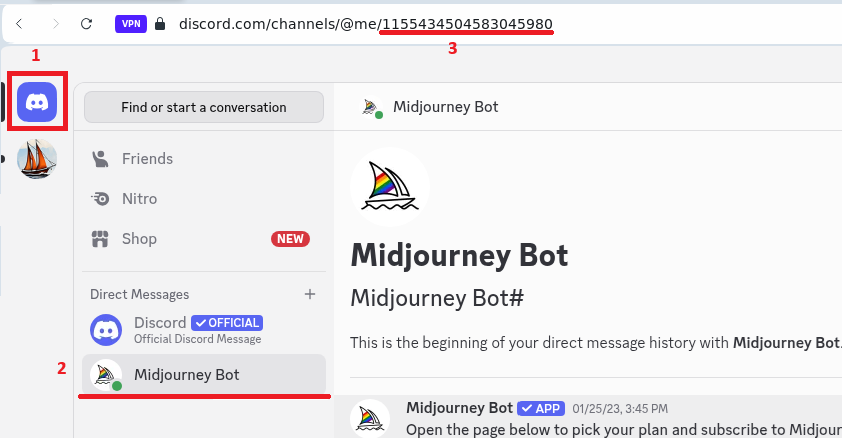
Select Direct Messages (DMs) in Discord `1`:
* Locate Midjourney Bot `2`.
* Copy the value of the channel from the URL `3`.
This is your `channel`, the API will use this channel to communicate with the Midjourney Discord bot.
If you have trouble locating the Midjourney Direct Messages channel, refer to the official [documentation](https://docs.midjourney.com/hc/en-us/articles/32637339216013-Discord-Direct-Messages).
## Locate Discord `token`
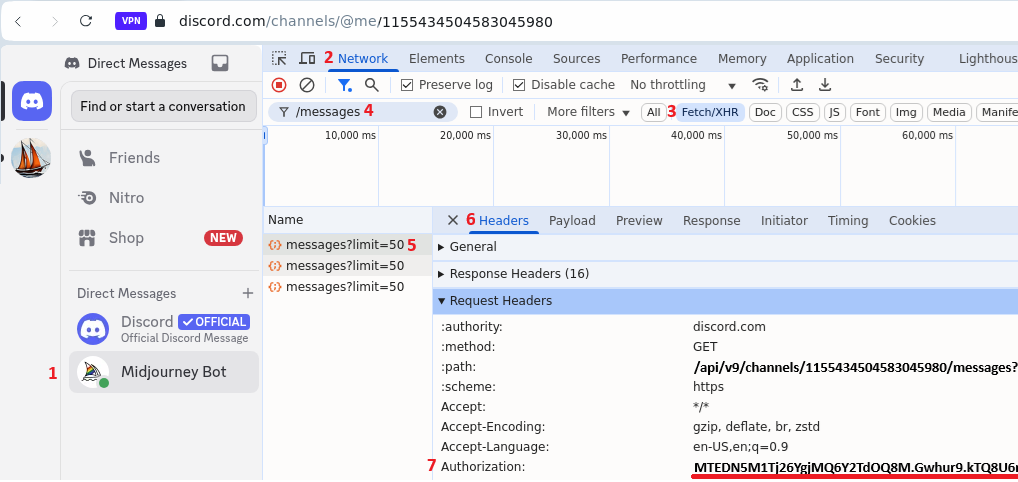
Select Direct Messages (DMs) in Discord `1`.
Refresh your browser page.
Once the page is fully loaded, open [Developer Tools](https://developer.chrome.com/docs/devtools) via [keyboard shortcuts](https://developer.chrome.com/docs/devtools/shortcuts): Mac `Command+Option+I` or Windows `F12` or `Control+Shift+I`.
Select Developer Tools » Network `2`:
* Make sure that `All` or `Fetch/XHR` is selected `3`.
* Type `/messages` in the filter box `4` and hit Enter.
* Select the first `messages?limit...` HTTP call entry as shown below `5`, and click on that entry.
* Select the "Headers" tab `6`.
* Locate Request Headers » Authorization `7` and copy its value.
This is your `token`.
If you have trouble locating the Discord token, there are many tutorials describing how to obtain Discord tokens. Please refer to the following links below for additional guidance:
- [How to Find Your Discord Token](https://discordhelp.net/discord-token)
- [How To Get Your Discord Token](https://pcstrike.com/how-to-get-discord-token/)
- [How to get Discord Token](https://linuxhint.com/get-discord-token/)
Keep in mind that anyone with a Discord token can have **full access** to your Discord account, so please keep it **safe** and **secure**. To reset your Discord token, simply change your Discord password.
## Configure Midjourney API account
Feel free to use the optional [Verify](#verify-channel-and-token-values) feature below to ensure that the retrieved `token` value above is correct before proceeding.
Proceed to [POST /accounts](../api-midjourney-v3/post-midjourney-accounts) and configure the Midjourney API account using the `token` value retrieved above. Once the configuration is posted, you can start using the Midjourney API immediately.
## Verify `token` values
Once all the above steps are completed, you should have the following:
- Discord `token`
- Midjourney Direct Messages `channel` (the channel value is not required for setup and is only needed for reference).
This only verifies that the `token` value is correct and the Midjourney bot is configured. To complete setup, you **MUST** proceed to [POST /accounts](../api-midjourney-v3/post-midjourney-accounts) and complete the configuration of the Midjourney API account using the `token` values retrieved above.
=== URL: https://useapi.net/docs/api-midjourney-v3/captcha-solver ===
Document URL: https://useapi.net/docs/api-midjourney-v3/captcha-solver
---
layout: default
title: 🔓 CAPTCHA Solver
parent: Midjourney API v3
nav_order: 5000
---
# CAPTCHA Solver
{: .no_toc }
December 8, 2025
## Table of contents
{: .no_toc .text-delta }
1. TOC
{:toc}
---
Our API includes an **automated CAPTCHA solver** at no additional cost with your subscription.
## What Triggers CAPTCHA Challenges
Midjourney Discord bot may present CAPTCHA challenges when it detects unusual activity patterns:
- Too many generations in a short period of time
- Recently created Discord accounts are more likely to be challenged
- Active connections from different geographical locations for the same account
## How It Works
When a CAPTCHA is detected:
1. The generation that triggered the CAPTCHA fails with a `596` error. The Midjourney account is locked and updated with an error message explaining that a CAPTCHA was detected. All subsequent API calls for this account will return `596` until the CAPTCHA solver unlocks the account or you manually resolve it via [POST /accounts/reset](https://useapi.net/docs/api-midjourney-v3/post-midjourney-accounts-reset)
2. You receive a notification email immediately
3. The CAPTCHA solver is triggered automatically
4. A second email is sent either:
- Confirming the solver successfully cleared the CAPTCHA and unlocked the account, or
- Asking you to solve it manually (rare cases)
The entire process takes 60-90 seconds. Based on our in-house testing, we expect the success rate to be close to 100%.
👉 We strongly recommend setting your Discord account language to **English**. Our CAPTCHA solver is primarily tested with English and may not work as reliably with other languages.
## Important: Preventing Excessive CAPTCHAs
While our CAPTCHA solver will handle challenges automatically, **frequent CAPTCHAs indicate you are pushing the account too hard**. Continued aggressive usage patterns may lead to **permanent account bans** by Discord/Midjourney.
To avoid problems:
### Add More Accounts
If you're hitting CAPTCHAs frequently, consider adding more Midjourney accounts to spread the load. Our API supports [multiple accounts](https://useapi.net/docs/api-midjourney-v3/setup-multiple-midjourney-accounts) with automatic load balancing.
### Handle 596 Errors Gracefully
When you receive a `596` error response, it indicates account issues (often CAPTCHA-related). Consider a 10-15 minute cooloff period before retrying. If you have multiple accounts configured, our load balancer will automatically switch to a different one.
### Recommended Practices
- Spread load across multiple accounts
- Add random delays between generations
- If you run mostly `--relax` generations, execute `--fast` once in a while
## No Additional Cost
The CAPTCHA solver is **included free** with your useapi.net subscription. There are no per-solve charges or hidden fees.
=== URL: https://useapi.net/docs/api-midjourney-v3/delete-midjourney-accounts-channel ===
Document URL: https://useapi.net/docs/api-midjourney-v3/delete-midjourney-accounts-channel
---
layout: default
title: DELETE accounts/channel
parent: Midjourney API v3
nav_order: 400
---
## Delete Channel Configuration
{: .no_toc }
October 27, 2025
## Table of contents
{: .no_toc .text-delta }
1. TOC
{:toc}
---
Delete a configured Midjourney channel. This removes the channel from your account configuration.
**Warning:** This action cannot be undone. All running jobs for this channel will continue, but you won't be able to create new jobs until you reconfigure the channel.
{: .delete }
> **https://api.useapi.net/v3/midjourney/accounts/`channel`**
### Request Headers
``` yaml
Authorization: Bearer {API token}
```
- `API token` is **required**, see [Setup useapi.net](../start-here/setup-useapi) for details.
### Path Parameters
- `channel` is **required**. The Discord channel ID to delete.
### Responses
{% tabs v3_delete_accounts_response %}
{% tab v3_delete_accounts_response 204 %}
204 No Content
Channel deleted successfully.
**No Content** (empty response body)
{% endtab %}
{% tab v3_delete_accounts_response 401 %}
401 Unauthorized
Invalid API token.
```json
{
"error": "Unauthorized"
}
```
{% endtab %}
{% tab v3_delete_accounts_response 404 %}
404 Not Found
Channel not found or not configured.
**No Content** (empty response body)
{% endtab %}
{% endtabs %}
### Examples
{% tabs v3_delete_accounts_example %}
{% tab v3_delete_accounts_example Curl %}
``` bash
curl -X DELETE \
-H "Authorization: Bearer YOUR_API_TOKEN" \
"https://api.useapi.net/v3/midjourney/accounts/1234567890123456789"
```
{% endtab %}
{% tab v3_delete_accounts_example JavaScript %}
``` javascript
const token = 'YOUR_API_TOKEN';
const channelId = '1234567890123456789';
const response = await fetch(`https://api.useapi.net/v3/midjourney/accounts/${channelId}`, {
method: 'DELETE',
headers: {
'Authorization': `Bearer ${token}`
}
});
if (response.status === 204) {
console.log('Channel deleted successfully');
} else {
console.error('Failed to delete channel:', response.status);
}
```
{% endtab %}
{% tab v3_delete_accounts_example Python %}
``` python
import requests
token = 'YOUR_API_TOKEN'
channel_id = '1234567890123456789'
response = requests.delete(
f'https://api.useapi.net/v3/midjourney/accounts/{channel_id}',
headers={'Authorization': f'Bearer {token}'}
)
if response.status_code == 204:
print('Channel deleted successfully')
else:
print(f'Failed to delete channel: {response.status_code}')
```
{% endtab %}
{% endtabs %}
### Try It
=== URL: https://useapi.net/docs/api-midjourney-v3/delete-midjourney-jobs-jobid ===
Document URL: https://useapi.net/docs/api-midjourney-v3/delete-midjourney-jobs-jobid
---
layout: default
title: DELETE jobs/jobid
parent: Midjourney API v3
nav_order: 1900
---
## Cancel Running Job
{: .no_toc }
October 27, 2025
## Table of contents
{: .no_toc .text-delta }
1. TOC
{:toc}
---
Cancel a running job by ID.
**Only running jobs can be cancelled:**
- Status must be: `created`, `started`, or `progress`
- Cannot cancel: `completed`, `failed`, or `moderated` jobs
**Job will be marked as failed:**
- Status updated to `failed`
- Error message: "Job cancelled by user"
- Job removed from running jobs list and will not longer returned by [GET /jobs](https://useapi.net/docs/api-midjourney-v3/get-midjourney-jobs)
**Discord cleanup:**
- The API does not delete the Discord message
- Message remains in your Midjourney DM (direct messages) channel
{: .delete }
> **https://api.useapi.net/v3/midjourney/jobs/`jobid`**
### Request Headers
``` yaml
Authorization: Bearer {API token}
```
- `API token` is **required**, see [Setup useapi.net](../start-here/setup-useapi) for details.
### Path Parameters
- `jobid` is **required**. The job ID to cancel.
### Responses
{% tabs v3_delete_job_response %}
{% tab v3_delete_job_response 204 %}
204 No Content
Job cancelled successfully.
**No Content** (empty response body)
The job status has been updated to `failed` and removed from running jobs list.
{% endtab %}
{% tab v3_delete_job_response 401 %}
401 Unauthorized
Invalid API token.
```json
{
"error": "Unauthorized"
}
```
{% endtab %}
{% tab v3_delete_job_response 404 %}
404 Not Found
Job not found.
```json
{
"error": "Job not found"
}
```
{% endtab %}
{% tab v3_delete_job_response 410 %}
410 Gone
Job expired (older than 62 days).
```json
{
"error": "Job j1023... has expired"
}
```
{% endtab %}
{% endtabs %}
### Examples
{% tabs v3_delete_job_example %}
{% tab v3_delete_job_example Curl %}
``` bash
curl -X DELETE \
-H "Authorization: Bearer YOUR_API_TOKEN" \
"https://api.useapi.net/v3/midjourney/jobs/j1023141520123456789i-u12345-c1234567890123456789-bot:midjourney"
```
{% endtab %}
{% tab v3_delete_job_example JavaScript %}
``` javascript
const jobId = 'j1023141520123456789i-u12345-c1234567890123456789-bot:midjourney';
const response = await fetch(
`https://api.useapi.net/v3/midjourney/jobs/${jobId}`,
{
method: 'DELETE',
headers: {
'Authorization': 'Bearer YOUR_API_TOKEN'
}
}
);
if (response.status === 204) {
console.log('Job cancelled successfully');
} else {
console.error('Failed to cancel job:', response.status);
}
```
{% endtab %}
{% tab v3_delete_job_example Python %}
``` python
import requests
job_id = 'j1023141520123456789i-u12345-c1234567890123456789-bot:midjourney'
response = requests.delete(
f'https://api.useapi.net/v3/midjourney/jobs/{job_id}',
headers={'Authorization': 'Bearer YOUR_API_TOKEN'}
)
if response.status_code == 204:
print('Job cancelled successfully')
else:
print(f'Failed to cancel job: {response.status_code}')
```
{% endtab %}
{% endtabs %}
### Try It
=== URL: https://useapi.net/docs/api-midjourney-v3/demo ===
Document URL: https://useapi.net/docs/api-midjourney-v3/demo
---
layout: default
title: 🎨 Live Demo
parent: Midjourney API v3
nav_order: 190
---
=== URL: https://useapi.net/docs/api-midjourney-v3/get-midjourney-accounts-channel ===
Document URL: https://useapi.net/docs/api-midjourney-v3/get-midjourney-accounts-channel
---
layout: default
title: GET accounts/channel
parent: Midjourney API v3
nav_order: 350
---
## Get Channel Configuration
{: .no_toc }
October 27, 2025
## Table of contents
{: .no_toc .text-delta }
1. TOC
{:toc}
---
Get configuration details for a specific Midjourney channel.
{: .get }
> **https://api.useapi.net/v3/midjourney/accounts/`channel`**
### Request Headers
``` yaml
Authorization: Bearer {API token}
```
- `API token` is **required**, see [Setup useapi.net](../start-here/setup-useapi) for details.
### Path Parameters
- `channel` is **required**. The Discord channel ID to query.
### Responses
{% tabs v3_get_accounts_channel_response %}
{% tab v3_get_accounts_channel_response 200 %}
200 OK
Channel configuration found and returned.
```json
{
"discord": "MTI...xyz",
"channel": "1234567890123456789",
"maxJobs": 3,
"maxImageJobs": 3,
"maxVideoJobs": 3,
"replyUrl": "https://your-server.com/webhook"
}
```
**Note:** Discord tokens are redacted for security (first 3 and last 3 characters shown).
If a channel has an `error` field, it requires attention:
- Use [POST /accounts/reset](https://useapi.net/docs/api-midjourney-v3/post-midjourney-accounts-reset) to clear the error
- Check your Discord account for moderation messages or CAPTCHA challenges
{% endtab %}
{% tab v3_get_accounts_channel_response 401 %}
401 Unauthorized
Invalid API token.
```json
{
"error": "Unauthorized"
}
```
{% endtab %}
{% tab v3_get_accounts_channel_response 404 %}
404 Not Found
Channel not found or not configured.
**No Content** (empty response body)
{% endtab %}
{% endtabs %}
### Model
```typescript
{
discord: string // Discord token (redacted)
channel: string // Discord channel ID
maxJobs: number // Max total concurrent jobs
maxImageJobs: number // Max concurrent image jobs
maxVideoJobs: number // Max concurrent video jobs
replyUrl?: string // Webhook URL for callbacks
error?: string // Error message (if channel has issues)
}
```
### Examples
{% tabs v3_get_accounts_channel_example %}
{% tab v3_get_accounts_channel_example Curl %}
``` bash
curl -H "Authorization: Bearer YOUR_API_TOKEN" \
"https://api.useapi.net/v3/midjourney/accounts/1234567890123456789"
```
{% endtab %}
{% tab v3_get_accounts_channel_example JavaScript %}
``` javascript
const token = 'YOUR_API_TOKEN';
const channelId = '1234567890123456789';
const response = await fetch(`https://api.useapi.net/v3/midjourney/accounts/${channelId}`, {
headers: {
'Authorization': `Bearer ${token}`
}
});
const channelConfig = await response.json();
console.log('Channel config:', channelConfig);
```
{% endtab %}
{% tab v3_get_accounts_channel_example Python %}
``` python
import requests
token = 'YOUR_API_TOKEN'
channel_id = '1234567890123456789'
headers = {'Authorization': f'Bearer {token}'}
response = requests.get(
f'https://api.useapi.net/v3/midjourney/accounts/{channel_id}',
headers=headers
)
print('Channel config:', response.json())
```
{% endtab %}
{% endtabs %}
### Try It
=== URL: https://useapi.net/docs/api-midjourney-v3/get-midjourney-accounts ===
Document URL: https://useapi.net/docs/api-midjourney-v3/get-midjourney-accounts
---
layout: default
title: GET accounts
parent: Midjourney API v3
nav_order: 300
---
## List All Configured Channels
{: .no_toc }
October 27, 2025
## Table of contents
{: .no_toc .text-delta }
1. TOC
{:toc}
---
List all configured Midjourney channels for your account.
**To get a specific channel:** Use [GET /accounts/:channel](https://useapi.net/docs/api-midjourney-v3/get-midjourney-accounts-channel).
{: .get }
> **https://api.useapi.net/v3/midjourney/accounts**
### Request Headers
``` yaml
Authorization: Bearer {API token}
```
- `API token` is **required**, see [Setup useapi.net](../start-here/setup-useapi) for details.
### Responses
{% tabs v3_get_accounts_response %}
{% tab v3_get_accounts_response 200 %}
200 OK
Returns a map of all configured channels, keyed by channel ID.
```json
{
"1234567890123456789": {
"discord": "MTI...xyz",
"channel": "1234567890123456789",
"maxJobs": 3,
"maxImageJobs": 3,
"maxVideoJobs": 3,
"replyUrl": "https://your-server.com/webhook"
},
"9876543210987654321": {
"discord": "ABC...def",
"channel": "9876543210987654321",
"maxJobs": 5,
"maxImageJobs": 5,
"maxVideoJobs": 3,
"error": "Pending mod message"
}
}
```
**Note:** Discord tokens are redacted for security (first 3 and last 3 characters shown).
If a channel has an `error` field, it requires attention:
- Use [POST /accounts/reset](https://useapi.net/docs/api-midjourney-v3/post-midjourney-accounts-reset) to clear the error
- Check your Discord account for moderation messages or CAPTCHA challenges
{% endtab %}
{% tab v3_get_accounts_response 401 %}
401 Unauthorized
Invalid API token.
```json
{
"error": "Unauthorized"
}
```
{% endtab %}
{% tab v3_get_accounts_response 404 %}
404 Not Found
No channels configured.
**No Content** (empty response body)
{% endtab %}
{% endtabs %}
### Model
```typescript
// Map of channel ID to channel configuration
{
[channelId: string]: {
discord: string // Discord token (redacted)
channel: string // Discord channel ID
maxJobs: number // Max total concurrent jobs
maxImageJobs: number // Max concurrent image jobs
maxVideoJobs: number // Max concurrent video jobs
replyUrl?: string // Webhook URL for callbacks
error?: string // Error message (if channel has issues)
}
}
```
### Examples
{% tabs v3_get_accounts_example %}
{% tab v3_get_accounts_example Curl %}
``` bash
curl -H "Authorization: Bearer YOUR_API_TOKEN" \
"https://api.useapi.net/v3/midjourney/accounts"
```
{% endtab %}
{% tab v3_get_accounts_example JavaScript %}
``` javascript
const token = 'YOUR_API_TOKEN';
const response = await fetch('https://api.useapi.net/v3/midjourney/accounts', {
headers: {
'Authorization': `Bearer ${token}`
}
});
const channels = await response.json();
console.log('Configured channels:', channels);
```
{% endtab %}
{% tab v3_get_accounts_example Python %}
``` python
import requests
token = 'YOUR_API_TOKEN'
headers = {'Authorization': f'Bearer {token}'}
response = requests.get('https://api.useapi.net/v3/midjourney/accounts', headers=headers)
print('All channels:', response.json())
```
{% endtab %}
{% endtabs %}
### Try It
=== URL: https://useapi.net/docs/api-midjourney-v3/get-midjourney-jobs-jobid ===
Document URL: https://useapi.net/docs/api-midjourney-v3/get-midjourney-jobs-jobid
---
layout: default
title: GET jobs/jobid
parent: Midjourney API v3
nav_order: 1800
---
## Retrieve Job Status and Results
{: .no_toc }
October 27, 2025
## Table of contents
{: .no_toc .text-delta }
1. TOC
{:toc}
---
{: .get }
> **https://api.useapi.net/v3/midjourney/jobs/`jobid`**
### Request Headers
``` yaml
Authorization: Bearer {API token}
```
- `API token` is **required**, see [Setup useapi.net](../start-here/setup-useapi) for details.
### Path Parameters
- `jobid` is **required**. The job ID to query.
### Responses
{% tabs v3_get_job_response %}
{% tab v3_get_job_response 200 %}
200 OK
Job found and returned successfully.
```json
{
"jobid": "j1023141520123456789i-u12345-c1234567890123456789-bot:midjourney",
"verb": "imagine",
"status": "completed",
"created": "2025-10-23T14:15:20.123Z",
"updated": "2025-10-23T14:16:45.789Z",
"request": {
"prompt": "a cat in a hat --ar 16:9"
},
"response": {
"content": "**a cat in a hat** - <@user> (100%) (fast)",
"progress_percent": 100,
"attachments": [
{
"url": "https://cdn.discordapp.com/attachments/.../image.png",
"proxy_url": "https://media.discordapp.net/...",
"filename": "image.png",
"width": 1920,
"height": 1080
}
],
"buttons": ["U1", "U2", "U3", "U4", "V1", "V2", "V3", "V4", "🔄"],
"imageUx": [
{"id": 1, "url": "https://cdn.midjourney.com/.../0_0.jpeg"},
{"id": 2, "url": "https://cdn.midjourney.com/.../0_1.jpeg"},
{"id": 3, "url": "https://cdn.midjourney.com/.../0_2.jpeg"},
{"id": 4, "url": "https://cdn.midjourney.com/.../0_3.jpeg"}
],
"children": {},
"executeOnce": {}
}
}
```
{% endtab %}
{% tab v3_get_job_response 401 %}
401 Unauthorized
Invalid API token.
```json
{
"error": "Unauthorized"
}
```
{% endtab %}
{% tab v3_get_job_response 402 %}
402 Payment Required
```json
{
"error": "Account has no subscription or subscription expired"
}
```
{% endtab %}
{% tab v3_get_job_response 404 %}
404 Not Found
Job not found.
```json
{
"error": "Job not found"
}
```
{% endtab %}
{% tab v3_get_job_response 410 %}
410 Gone
Job expired (older than 62 days).
```json
{
"error": "Job j1023... has expired"
}
```
{% endtab %}
{% endtabs %}
### Model
```typescript
{
// Top-level metadata (always returned to customer)
jobid: string
verb: 'imagine' | 'button' | 'describe' | 'blend' | 'seed' | 'info' |
'fast' | 'relax' | 'turbo' | 'variability' | 'remix'
jobType?: 'image' | 'video'
status: 'created' | 'started' | 'progress' | 'completed' | 'failed' | 'moderated'
created: string // ISO 8601 timestamp
updated?: string // ISO 8601 timestamp
error?: string
errorDetails?: string
code?: number // HTTP response status code
// Original request parameters (returned to customer)
request: {
prompt?: string
button?: 'U1' | 'U2' | 'U3' | 'U4' | 'V1' | 'V2' |
'V3' | 'V4' | '⬅️' | '➡️' | '⬆️' | '⬇️' |
'Vary (Region)' | 'Vary (Strong)' | 'Vary (Subtle)' | 'Zoom Out 1.5x' | 'Zoom Out 2x' | 'Upscale (2x)' |
'Upscale (4x)' | 'Upscale (Subtle)' | 'Upscale (Creative)' | 'Redo Upscale (2x)' | 'Redo Upscale (4x)' | 'Redo Upscale (Subtle)' |
'Redo Upscale (Creative)' | 'Make Square' | 'Make Variations' | 'Remaster' | 'Custom Zoom' | '🔄' |
'Animate (Low motion)' | 'Animate (High motion)' | 'Extend (Low motion)' | 'Extend (High motion)'
mask?: string
describeUrl?: string
blendUrls?: string[]
blendDimensions?: 'Portrait' | 'Square' | 'Landscape'
jobId?: string // Parent job ID for button/seed commands
channel?: string
maxJobs?: number
replyUrl?: string
replyRef?: string
stream?: boolean
}
// Discord response (returned to customer when available)
// NOTE: This is essentially Discord's message format
response?: {
id?: string
content?: string
timestamp?: string
progress_percent?: number // Numeric progress (0-100) extracted from content
settings?: { // Settings state for /settings, /remix, /variability, /info commands
// Model version
version?: string // e.g., "7", "6.1", "niji 6", "default"
// Stylization
stylize?: number // Stylization value: 50, 100, 250, 750
raw?: boolean // RAW mode
// Personalization
personalization?: boolean // Personalization mode
// Privacy
public?: boolean // Public mode (true) or Private mode (false)
// Remix and Variation
remix?: boolean // Remix mode
variability?: boolean // Variation mode: true = High/Strong, false = Low/Subtle
// Speed modes
relax?: boolean // Relax mode
fast?: boolean // Fast mode
turbo?: boolean // Turbo mode
// Suffix
suffix?: string // Current suffix applied to prompts (e.g., " --v 7 --s 250")
}
// Available buttons (populated at job completion)
buttons?: Array<'U1' | 'U2' | 'U3' | 'U4' |
'V1' | 'V2' | 'V3' | 'V4' |
'⬅️' | '➡️' | '⬆️' | '⬇️' |
'Vary (Region)' | 'Vary (Strong)' | 'Vary (Subtle)' |
'Zoom Out 1.5x' | 'Zoom Out 2x' | 'Upscale (2x)' |
'Upscale (4x)' | 'Upscale (Subtle)' | 'Upscale (Creative)' |
'Redo Upscale (2x)' | 'Redo Upscale (4x)' | 'Redo Upscale (Subtle)' |
'Redo Upscale (Creative)' | 'Make Square' | 'Make Variations' |
'Remaster' | 'Custom Zoom' | '🔄' |
'Animate (Low motion)' | 'Animate (High motion)' |
'Extend (Low motion)' | 'Extend (High motion)'>
videoUx?: Array<{ id: number, url: string }> // Video upscale URLs (populated at job completion)
imageUx?: Array<{ id: number, url: string }> // Image upscale URLs (populated at job completion)
executeOnce?: Partial> // ExecuteOnce button tracking
children?: Record // Child jobs tracking
attachments?: Array<{
id: string
filename: string
url: string
proxy_url: string
size: number
width?: number
height?: number
content_type?: string
}>
embeds?: Array<{
title?: string
description?: string
color?: number
}>
components?: Array<{
type: number
components: Array<{
type: number
style: number
label?: string
emoji?: { name: string }
custom_id?: string
disabled?: boolean
url?: string
}>
}>
}
}
```
##### `response` object
The `response` object is an enhanced version of a Discord message. All standard Discord message fields are included by default. See [Discord Message Object](https://discord.com/developers/docs/resources/message#message-object) for reference.
- `content` - Midjourney message text. Contains useful information for settings jobs (current settings display) and moderation events (ban/CAPTCHA warnings).
- `progress_percent` - Numeric progress (0-100) extracted from content
- `imageUx` / `videoUx` - Array of individual media assets from the grid. Each contains `id` (1-4) and `url` (direct CDN link from `https://cdn.midjourney.com`). Use [GET /proxy/cdn-midjourney](../../docs/api-midjourney-v3/get-proxy-cdn-midjourney) to retrieve these assets via useapi.net proxy.
- `attachments` - Discord attachments array with full metadata (`url`, `proxy_url`, `width`, `height`, `filename`)
- `settings` - Settings state returned by settings commands. Different commands return different subsets:
- `/settings` - Returns complete settings: `version`, `stylize`, `raw`, `personalization`, `public`, `remix`, `variability`, `turbo`, `fast`, `relax`, `suffix`
- `/info`, `/fast`, `/relax`, `/turbo` - Returns speed modes only: `fast`, `relax`, `turbo`
- `/remix` - Returns `remix` only
- `/variability` - Returns `variability` only
- `executeOnce` - ExecuteOnce button tracking (U1-U4 buttons can only be executed once)
- `children` - Child jobs tracking
For image/video jobs, use `imageUx`/`videoUx` to access individual grid cells, or `attachments[0]` for the complete grid image. The `proxy_url` in attachments may be preferred as it provides Discord's CDN caching.
##### Job Statuses • `status`
| Status | Description |
|--------|-------------|
| `created` | Job created, not yet started |
| `started` | Job started processing |
| `progress` | Job in progress (check `response.progress_percent`) |
| `completed` | Job finished successfully |
| `failed` | Job failed (see `error`, `errorDetails`, and `code` fields for error code and details) |
| `moderated` | Content moderation (see `error`, `errorDetails`, `code` fields, and check `response.embeds` for moderation details) |
##### Job Types • `jobType`
| Type | Description | Endpoints |
|------|-------------|-----------|
| `image` | Image generation jobs | **imagine** (without `--video` flag), **blend**, **button** (U1-U4, V1-V4, variations, upscales, zoom, etc.) |
| `video` | Video generation jobs | **imagine** (with `--video` flag), **button** (Animate Low/High motion, Extend Low/High motion, or any button on a video parent job) |
| *undefined* | Settings and info commands (no jobType tracking) | **describe**, **seed**, **settings**, **info**, **fast**, **relax**, **turbo**, **remix**, **variability** |
### Examples
{% tabs v3_get_job_example %}
{% tab v3_get_job_example Curl %}
``` bash
curl -H "Authorization: Bearer YOUR_API_TOKEN" \
"https://api.useapi.net/v3/midjourney/jobs/j1023141520123456789i-u12345-c1234567890123456789-bot:midjourney"
```
{% endtab %}
{% tab v3_get_job_example JavaScript %}
``` javascript
const response = await fetch(
'https://api.useapi.net/v3/midjourney/jobs/j1023141520123456789i-u12345-c1234567890123456789-bot:midjourney',
{
headers: {'Authorization': 'Bearer YOUR_API_TOKEN'}
}
);
const job = await response.json();
console.log('Job status:', job.status);
console.log('Job response:', job.response);
```
{% endtab %}
{% tab v3_get_job_example Python %}
``` python
import requests
response = requests.get(
'https://api.useapi.net/v3/midjourney/jobs/j1023141520123456789i-u12345-c1234567890123456789-bot:midjourney',
headers={'Authorization': 'Bearer YOUR_API_TOKEN'}
)
job = response.json()
print('Job status:', job['status'])
print('Job response:', job.get('response'))
```
{% endtab %}
{% endtabs %}
### Try It
=== URL: https://useapi.net/docs/api-midjourney-v3/get-midjourney-jobs ===
Document URL: https://useapi.net/docs/api-midjourney-v3/get-midjourney-jobs
---
layout: default
title: GET jobs
parent: Midjourney API v3
nav_order: 1700
---
## List Running Jobs
{: .no_toc }
October 27, 2025
## Table of contents
{: .no_toc .text-delta }
1. TOC
{:toc}
---
List all currently running jobs for your account.
{: .get }
> **https://api.useapi.net/v3/midjourney/jobs**
### Request Headers
``` yaml
Authorization: Bearer {API token}
```
- `API token` is **required**, see [Setup useapi.net](../start-here/setup-useapi) for details.
### Responses
{% tabs v3_get_jobs_response %}
{% tab v3_get_jobs_response 200 %}
200 OK
List of running jobs returned successfully.
Returns only jobs with status `created`, `started`, or `progress`. Completed and failed jobs are not included. Use [DELETE /jobs/`jobid`](https://useapi.net/docs/api-midjourney-v3/delete-midjourney-jobs-jobid) to cancel a running job by ID.
```json
{
"total": 2,
"images": 2,
"videos": 0,
"channels": {
"1234567890123456789": {
"total": 2,
"images": 2,
"videos": 0,
"maxJobs": 3,
"maxImageJobs": 3,
"maxVideoJobs": 3,
"jobs": [
{
"jobId": "j1023141520123456789i-u12345-c1234567890123456789-bot:midjourney",
"channel": "1234567890123456789",
"jobType": "image",
"created": "2025-10-23T14:15:20.123Z",
"elapsed": "00:32"
},
{
"jobId": "j1023141525987654321i-u12345-c1234567890123456789-bot:midjourney",
"channel": "1234567890123456789",
"jobType": "image",
"created": "2025-10-23T14:15:25.987Z",
"elapsed": "00:27"
}
]
}
}
}
```
{% endtab %}
{% tab v3_get_jobs_response 401 %}
401 Unauthorized
Invalid API token.
```json
{
"error": "Unauthorized"
}
```
{% endtab %}
{% endtabs %}
### Model
```typescript
{
total: number // Total number of running jobs
images: number // Number of running image jobs
videos: number // Number of running video jobs
channels: Record
}>
}
```
### Examples
{% tabs v3_get_jobs_example %}
{% tab v3_get_jobs_example Curl %}
``` bash
curl -H "Authorization: Bearer YOUR_API_TOKEN" \
"https://api.useapi.net/v3/midjourney/jobs"
```
{% endtab %}
{% tab v3_get_jobs_example JavaScript %}
``` javascript
const response = await fetch('https://api.useapi.net/v3/midjourney/jobs', {
headers: {
'Authorization': 'Bearer YOUR_API_TOKEN'
}
});
const result = await response.json();
console.log(`${result.total} jobs running (${result.images} images, ${result.videos} videos)`);
for (const [channelId, channelData] of Object.entries(result.channels)) {
console.log(`Channel ${channelId}: ${channelData.total} jobs`);
for (const job of channelData.jobs) {
console.log(` ${job.jobId}: ${job.jobType} (${job.elapsed})`);
}
}
```
{% endtab %}
{% tab v3_get_jobs_example Python %}
``` python
import requests
response = requests.get(
'https://api.useapi.net/v3/midjourney/jobs',
headers={'Authorization': 'Bearer YOUR_API_TOKEN'}
)
result = response.json()
print(f"{result['total']} jobs running ({result['images']} images, {result['videos']} videos)")
for channel_id, channel_data in result['channels'].items():
print(f"Channel {channel_id}: {channel_data['total']} jobs")
for job in channel_data['jobs']:
print(f" {job['jobId']}: {job['jobType']} ({job['elapsed']})")
```
{% endtab %}
{% endtabs %}
### Try It
=== URL: https://useapi.net/docs/api-midjourney-v3/get-proxy-cdn-midjourney ===
Document URL: https://useapi.net/docs/api-midjourney-v3/get-proxy-cdn-midjourney
---
layout: default
title: GET proxy/cdn-midjourney
parent: Midjourney API v3
nav_order: 2300
---
## Proxy asset retrieval from https://cdn.midjourney.com
{: .no_toc }
October 27, 2025
## Table of contents
{: .no_toc .text-delta }
1. TOC
{:toc}
---
This endpoint allows you to fetch images and videos from `https://cdn.midjourney.com/` through the useapi.net proxy. Use it to retrieve `imageUx` and `videoUx` URLs returned by
[GET /jobs/jobid](https://useapi.net/docs/api-midjourney-v3/get-midjourney-jobs-jobid) or any other assets hosted on `https://cdn.midjourney.com/`.
The Midjourney CDN requires standard browser headers—specifically the `User-Agent` header—to serve assets. Without it, Cloudflare will block the request. This proxy endpoint adds these headers automatically.
##### Alternative: Direct CDN Access
You can skip the proxy and fetch assets directly from `https://cdn.midjourney.com/` by including the necessary headers:
{% tabs direct_cdn_access %}
{% tab direct_cdn_access Curl %}
``` bash
curl "https://cdn.midjourney.com/example-image.jpg" \
-H "User-Agent: Mozilla/5.0 (Windows NT 10.0; Win64; x64) AppleWebKit/537.36 (KHTML, like Gecko) Chrome/139.0.0.0 Safari/537.36" \
-H "Accept: */*" \
-H "Accept-Encoding: gzip, deflate, br" \
-H "Connection: keep-alive" \
--output image.jpg
```
{% endtab %}
{% tab direct_cdn_access JavaScript %}
``` javascript
const cdnUrl = "https://cdn.midjourney.com/example-image.jpg";
const headers = new Headers();
headers.set('User-Agent', 'Mozilla/5.0 (Windows NT 10.0; Win64; x64) AppleWebKit/537.36 (KHTML, like Gecko) Chrome/139.0.0.0 Safari/537.36');
headers.set('Accept', '*/*');
headers.set('Accept-Encoding', 'gzip, deflate, br');
headers.set('Connection', 'keep-alive');
const response = await fetch(cdnUrl, { headers });
const blob = await response.blob();
// Save to file (Node.js)
const fs = require('fs');
const buffer = await blob.arrayBuffer();
fs.writeFileSync('image.jpg', Buffer.from(buffer));
```
{% endtab %}
{% tab direct_cdn_access Python %}
``` python
import requests
cdnUrl = "https://cdn.midjourney.com/example-image.jpg"
headers = {
'User-Agent': 'Mozilla/5.0 (Windows NT 10.0; Win64; x64) AppleWebKit/537.36 (KHTML, like Gecko) Chrome/139.0.0.0 Safari/537.36',
'Accept': '*/*',
'Accept-Encoding': 'gzip, deflate, br',
'Connection': 'keep-alive'
}
response = requests.get(cdnUrl, headers=headers)
# Save image/video content
with open('image.jpg', 'wb') as f:
f.write(response.content)
```
{% endtab %}
{% endtabs %}
**Note:** The `User-Agent` header is critical—without it, Cloudflare will block your request.
---
{: .get }
> **https://api.useapi.net/v1/proxy/cdn-midjourney/?cdnUrl=`https://cdn.midjourney.com/…`**
##### Request Headers
``` yaml
Authorization: Bearer {API token}
```
- `API token` is **required**, see [Setup useapi.net](../start-here/setup-useapi) for details.
##### Query Parameter
- `cdnUrl` is **required** and must be a valid asset URL starting with `https://cdn.midjourney.com/`
##### Responses
{% tabs proxy_cdn_midjourney_response %}
{% tab proxy_cdn_midjourney_response 200 %}
200 OK
Returns the proxied content from the Midjourney CDN with appropriate headers.
{% endtab %}
{% tab proxy_cdn_midjourney_response 400 %}
400 Bad Request
```json
{
"error": "",
"code": 400
}
```
{% endtab %}
{% tab proxy_cdn_midjourney_response 401 %}
401 Unauthorized
```json
{
"error": "Unauthorized",
"code": 401
}
```
{% endtab %}
{% tab proxy_cdn_midjourney_response 403 %}
403 Forbidden
Cloudflare may occasionally block requests even with proper headers. This is typically temporary and can be resolved with retry logic.
**Recommendation:** Implement retry logic with exponential backoff when encountering 403 errors, or better yet, implement your own direct CDN access using the headers shown in the "Alternative: Direct CDN Access" section above for greater control and reliability.
{% endtab %}
{% endtabs %}
##### Examples
{% tabs get_proxy_cdn_midjourney_example %}
{% tab get_proxy_cdn_midjourney_example Curl %}
``` bash
curl -H "Authorization: Bearer …" \
"https://api.useapi.net/v1/proxy/cdn-midjourney/?cdnUrl=https://cdn.midjourney.com/example-image.jpg"
```
{% endtab %}
{% tab get_proxy_cdn_midjourney_example JavaScript %}
``` javascript
const cdnUrl = "https://cdn.midjourney.com/example-image.jpg";
const apiUrl = `https://api.useapi.net/v1/proxy/cdn-midjourney/`;
const api_token = "API token";
const response = await fetch(`${apiUrl}?cdnUrl=${encodeURIComponent(cdnUrl)}`, {
method: 'GET',
headers: {
'Authorization': `Bearer ${api_token}`
}
});
const result = await response.blob(); // For image/video content
console.log("response", {response, result});
```
{% endtab %}
{% tab get_proxy_cdn_midjourney_example Python %}
``` python
import requests
cdnUrl = "https://cdn.midjourney.com/example-image.jpg"
apiUrl = f"https://api.useapi.net/v1/proxy/cdn-midjourney/"
api_token = "API token"
headers = {
"Authorization": f"Bearer {api_token}"
}
params = {
"cdnUrl": cdnUrl
}
response = requests.get(apiUrl, headers=headers, params=params)
print(response.status_code, response.headers)
# Save image/video content
with open('image.jpg', 'wb') as f:
f.write(response.content)
```
{% endtab %}
{% endtabs %}
=== URL: https://useapi.net/docs/api-midjourney-v3/index ===
Document URL: https://useapi.net/docs/api-midjourney-v3/index
---
layout: default
title: Midjourney API v3
nav_order: 1000
has_children: true
permalink: /docs/api-midjourney-v3
---
# Midjourney API v3
October 27, 2025 (December 8, 2025)
This is the next-generation [experimental](../../docs/legal) API for the [Midjourney Discord Bot](https://discord.com/invite/midjourney) by [Midjourney](https://www.midjourney.com).
See [What's New in v3](https://useapi.net/docs/api-midjourney-v3/what-new) for new features and migration guide.
The **entire** Midjourney Discord Bot functionality is supported, including **video generation**, [seed](https://docs.midjourney.com/docs/seeds) retrieval, [variations mode](https://docs.midjourney.com/docs/variations), [remix mode](https://docs.midjourney.com/docs/remix), and everything else the Midjourney Discord Bot offers.
Our experimental API uses intelligent logic to prevent potential issues with Discord and Midjourney, such as bans, CAPTCHA challenges, or excessive requests. API comes with an automated [CAPTCHA solver](https://useapi.net/docs/api-midjourney-v3/captcha-solver) at no additional cost.
We fully support the ability to use multiple Midjourney accounts, complete with automated load balancing.
[Setup Midjourney](../../docs/start-here/setup-midjourney)
[Postman collection](https://www.postman.com/useapinet/useapi-net/collection) (January 20, 2026)
[Quick Start Guide](../../docs/api-midjourney-v3/quick-start)
[Q&A](../../docs/questions-and-answers#how-to-avoid-runway-account-suspension)
Articles:
* 🎨 [Live Demo](/assets/midjourney-v3/)
Developer Community:
* Discord Server
* Telegram Channel
* r/midjourney_api
=== URL: https://useapi.net/docs/api-midjourney-v3/post-midjourney-accounts-reset ===
Document URL: https://useapi.net/docs/api-midjourney-v3/post-midjourney-accounts-reset
---
layout: default
title: POST accounts/reset/channel
parent: Midjourney API v3
nav_order: 500
---
## Reset Channel After Moderation
{: .no_toc }
October 27, 2025
## Table of contents
{: .no_toc .text-delta }
1. TOC
{:toc}
---
Clear error state from a channel configuration. Use this after resolving moderation issues or CAPTCHA challenges in your Discord account.
When the API detects moderation messages or CAPTCHA challenges (596 error), it sets an error state on the channel and sends you an email notification. After clearing the issue in Discord, use this endpoint to reset the channel.
{: .post }
> **https://api.useapi.net/v3/midjourney/accounts/reset/`channel`**
### Request Headers
``` yaml
Authorization: Bearer {API token}
```
- `API token` is **required**, see [Setup useapi.net](../start-here/setup-useapi) for details.
### Path Parameters
- `channel` is **required**. The Discord channel ID to reset.
##### When to Use This Endpoint
Use this endpoint when:
1. You receive a 596 error (moderation/CAPTCHA detected)
2. You get an email notification about channel issues
3. [GET /accounts](https://useapi.net/docs/api-midjourney-v3/get-midjourney-accounts) shows an `error` field for the channel
**Before resetting:**
1. Log into your Discord account
2. Check Midjourney DM for pending moderation messages
3. Complete any CAPTCHA challenges
4. Acknowledge any warnings from Midjourney
**After resolving the issue in Discord:**
- Call this endpoint to clear the error state
- The channel will be available for new jobs
### Responses
{% tabs v3_post_accounts_reset_response %}
{% tab v3_post_accounts_reset_response 204 %}
204 No Content
Error cleared successfully. Channel is ready for use.
**No Content** (empty response body)
{% endtab %}
{% tab v3_post_accounts_reset_response 401 %}
401 Unauthorized
Invalid API token.
```json
{
"error": "Unauthorized"
}
```
{% endtab %}
{% tab v3_post_accounts_reset_response 404 %}
404 Not Found
Channel not found or not configured.
**No Content** (empty response body)
{% endtab %}
{% endtabs %}
### Examples
{% tabs v3_post_accounts_reset_example %}
{% tab v3_post_accounts_reset_example Curl %}
``` bash
curl -X POST \
-H "Authorization: Bearer YOUR_API_TOKEN" \
"https://api.useapi.net/v3/midjourney/accounts/reset/1234567890123456789"
```
{% endtab %}
{% tab v3_post_accounts_reset_example JavaScript %}
``` javascript
const token = 'YOUR_API_TOKEN';
const channelId = '1234567890123456789';
const response = await fetch(
`https://api.useapi.net/v3/midjourney/accounts/reset/${channelId}`,
{
method: 'POST',
headers: {
'Authorization': `Bearer ${token}`
}
}
);
if (response.status === 204) {
console.log('Channel reset successfully');
} else {
console.error('Failed to reset channel:', response.status);
}
```
{% endtab %}
{% tab v3_post_accounts_reset_example Python %}
``` python
import requests
token = 'YOUR_API_TOKEN'
channel_id = '1234567890123456789'
response = requests.post(
f'https://api.useapi.net/v3/midjourney/accounts/reset/{channel_id}',
headers={'Authorization': f'Bearer {token}'}
)
if response.status_code == 204:
print('Channel reset successfully')
else:
print(f'Failed to reset channel: {response.status_code}')
```
{% endtab %}
{% endtabs %}
### Try It
=== URL: https://useapi.net/docs/api-midjourney-v3/post-midjourney-accounts ===
Document URL: https://useapi.net/docs/api-midjourney-v3/post-midjourney-accounts
---
layout: default
title: POST accounts
parent: Midjourney API v3
nav_order: 200
---
## Configure Midjourney Channel
{: .no_toc }
October 27, 2025
## Table of contents
{: .no_toc .text-delta }
1. TOC
{:toc}
---
Configure your Midjourney Discord channel for API access. The API automatically discovers your Midjourney DM (direct messages) channel from your Discord token.
**Multiple accounts supported:** Configure multiple Discord accounts with automatic load balancing.
**Important:** Same Discord account cannot be used for both v2 and v3 APIs simultaneously. If you have the account configured in v2, [delete it from v2](../../docs/api-v2/del-account-midjourney-channel) first before configuring in v3. See [Migration from v2](https://useapi.net/docs/api-midjourney-v3/quick-start#migration-from-v2) for details.
{: .post }
> **https://api.useapi.net/v3/midjourney/accounts**
### Request Headers
``` yaml
Authorization: Bearer {API token}
Content-Type: application/json
```
- `API token` is **required**, see [Setup useapi.net](../start-here/setup-useapi) for details.
### Request Body
```json
{
"discord": "Discord token",
"maxJobs": 3,
"maxImageJobs": 3,
"maxVideoJobs": 3,
"replyUrl": "https://your-server.com/webhook"
}
```
- `discord` is **required**. Your Discord bot token. See [Setup Midjourney](../start-here/setup-midjourney) for details.
- `maxJobs` is optional (default: 3). Maximum total concurrent jobs (all types combined) per channel.
Must be between 1 and 15. Should match your Midjourney subscription plan [Maximum Concurrent Jobs](https://docs.midjourney.com/docs/plans#plan-comparison).
**Important:** Specifying a higher number than your subscription supports will prevent API from functioning properly.
- `maxImageJobs` is optional (default: 3). Maximum concurrent image generation jobs.
Must be between 1 and 12. Must be ≤ `maxJobs`.
- `maxVideoJobs` is optional (default: 3). Maximum concurrent video generation jobs.
Must be between 1 and 12. Must be ≤ `maxJobs`.
- `replyUrl` is optional. Webhook URL for real-time job event callbacks.
All job events will be POST-ed to this URL as they occur. Maximum length 2048 characters.
### Responses
{% tabs v3_post_accounts_response %}
{% tab v3_post_accounts_response 201 %}
201 Created
New channel configuration created successfully.
```json
{
"discord": "MTI...xyz",
"channel": "1234567890123456789",
"maxJobs": 3,
"maxImageJobs": 3,
"maxVideoJobs": 3,
"replyUrl": "https://your-server.com/webhook"
}
```
- `channel` is automatically discovered from your Discord token (Midjourney DM (direct messages) channel ID).
{% endtab %}
{% tab v3_post_accounts_response 200 %}
200 OK
Existing channel configuration updated successfully.
```json
{
"discord": "MTI...xyz",
"channel": "1234567890123456789",
"maxJobs": 5,
"maxImageJobs": 5,
"maxVideoJobs": 3,
"replyUrl": "https://your-server.com/webhook"
}
```
{% endtab %}
{% tab v3_post_accounts_response 400 %}
400 Bad Request
Validation error (missing/invalid parameters).
```json
{
"error": "Required parameter discord is missing or empty"
}
```
{% endtab %}
{% tab v3_post_accounts_response 401 %}
401 Unauthorized
Invalid API token or Discord token.
```json
{
"error": "Unauthorized"
}
```
{% endtab %}
{% tab v3_post_accounts_response 402 %}
402 Payment Required
Subscription expired or insufficient credits.
```json
{
"error": "Account has no subscription or subscription expired"
}
```
{% endtab %}
{% tab v3_post_accounts_response 409 %}
409 Conflict
v2 API configuration detected for this channel. v2 and v3 are [incompatible](../../docs/api-midjourney-v3/quick-start#prerequisites).
```json
{
"error": "Legacy v2 Midjourney configuration detected for channel 1234567890123456789. v2 and v3 APIs are incompatible and cannot coexist. Please delete the v2 configuration first: DELETE https://api.useapi.net/v2/midjourney/account/1234567890123456789 (requires Authorization header with your API key). After deletion, you can configure this channel for v3."
}
```
{% endtab %}
{% endtabs %}
### Model
```typescript
{ // TypeScript, all fields are optional
discord: string // Discord token (first 3 and last 3 chars shown)
channel: string // Discord channel ID (auto-discovered)
maxJobs: number // Max total concurrent jobs
maxImageJobs: number // Max concurrent image jobs
maxVideoJobs: number // Max concurrent video jobs
replyUrl?: string // Webhook URL for callbacks
error?: string // Error message (if failed)
}
```
### Examples
{% tabs v3_post_accounts_example %}
{% tab v3_post_accounts_example Curl %}
``` bash
curl -H "Accept: application/json" \
-H "Content-Type: application/json" \
-H "Authorization: Bearer YOUR_API_TOKEN" \
-X POST "https://api.useapi.net/v3/midjourney/accounts" \
-d '{
"discord": "YOUR_DISCORD_TOKEN",
"maxJobs": 3,
"maxImageJobs": 3,
"maxVideoJobs": 3,
"replyUrl": "https://your-server.com/webhook"
}'
```
{% endtab %}
{% tab v3_post_accounts_example JavaScript %}
``` javascript
const apiUrl = 'https://api.useapi.net/v3/midjourney/accounts';
const token = 'YOUR_API_TOKEN';
const discord = 'YOUR_DISCORD_TOKEN';
const response = await fetch(apiUrl, {
method: 'POST',
headers: {
'Authorization': `Bearer ${token}`,
'Content-Type': 'application/json'
},
body: JSON.stringify({
discord: discord,
maxJobs: 3,
maxImageJobs: 3,
maxVideoJobs: 3,
replyUrl: 'https://your-server.com/webhook'
})
});
const result = await response.json();
console.log('Channel configured:', result);
```
{% endtab %}
{% tab v3_post_accounts_example Python %}
``` python
import requests
apiUrl = 'https://api.useapi.net/v3/midjourney/accounts'
token = 'YOUR_API_TOKEN'
discord = 'YOUR_DISCORD_TOKEN'
headers = {
'Content-Type': 'application/json',
'Authorization': f'Bearer {token}'
}
body = {
'discord': discord,
'maxJobs': 3,
'maxImageJobs': 3,
'maxVideoJobs': 3,
'replyUrl': 'https://your-server.com/webhook'
}
response = requests.post(apiUrl, headers=headers, json=body)
print(response.status_code, response.json())
```
{% endtab %}
{% endtabs %}
### Try It
=== URL: https://useapi.net/docs/api-midjourney-v3/post-midjourney-jobs-blend ===
Document URL: https://useapi.net/docs/api-midjourney-v3/post-midjourney-jobs-blend
---
layout: default
title: POST jobs/blend
parent: Midjourney API v3
nav_order: 900
---
## Midjourney /blend Command
{: .no_toc }
October 27, 2025 (January 5, 2026)
## Table of contents
{: .no_toc .text-delta }
1. TOC
{:toc}
---
Blend 2-5 images together using Midjourney's [/blend](https://docs.midjourney.com/docs/blend) command.
{: .post }
> **https://api.useapi.net/v3/midjourney/jobs/blend**
### Request Headers
``` yaml
Authorization: Bearer {API token}
Content-Type: application/json
# Alternatively you can use multipart/form-data (required for Blob content uploads).
# Content-Type: multipart/form-data
```
### Request Body
```json
{
"imageUrl_1": "https://example.com/image1.jpg",
"imageUrl_2": "https://example.com/image2.jpg",
"imageUrl_3": "https://example.com/image3.jpg",
"blendDimensions": "Square",
"stream": true
}
```
### Parameters
- `channel` is optional. Discord channel ID to use. See [GET /accounts](https://useapi.net/docs/api-midjourney-v3/get-midjourney-accounts) for configured channels.
If not provided, API automatically selects available channel with capacity.
Specify when you want to use a specific configured channel.
- `imageUrl_1` and `imageUrl_2` **OR** `imageBlob_1` and `imageBlob_2` are **required**.
Minimum 2 images, maximum 5 images.
Can mix URLs and blobs (e.g., `imageUrl_1` + `imageBlob_2`).
Cannot specify both URL and blob for same number (e.g., both `imageUrl_1` and `imageBlob_1`).
Maximum file size: 10 MB per image (applies to both URL content and blob uploads).
- `imageUrl_3`, `imageUrl_4`, `imageUrl_5` are optional.
Maximum file size: 10 MB per image.
- `imageBlob_3`, `imageBlob_4`, `imageBlob_5` are optional.
Maximum file size: 10 MB per image.
- `blendDimensions` is optional. One of: `Portrait`, `Square`, `Landscape`.
Default: `Square`.
- `stream` is optional (default: `true`).
- `true` - Returns `Content-Type: text/event-stream` with live progress events. See [SSE Streaming Guide](https://useapi.net/docs/api-midjourney-v3/sse-streaming-guide)
- `false` - Returns `Content-Type: application/json` with initial job state. Use [GET /jobs/jobid](https://useapi.net/docs/api-midjourney-v3/get-midjourney-jobs-jobid) to retrieve updates and results
- `replyUrl` is optional. Webhook URL for real-time job event callbacks.
All job events POST-ed to this URL as they occur.
Maximum length 1024 characters.
- `replyRef` is optional. Your reference ID stored with job.
Returned in all responses and callbacks as `response.replyRef`.
Maximum length 1024 characters.
- `replyLevel` is optional (default: `all`). Controls which status changes trigger webhook callbacks.
- `all` - Every status change (created, started, progress, completed, failed, moderated)
- `standard` - Job lifecycle only (created + final states, no progress updates)
- `minimal` - Final outcome only (completed, failed, moderated)
### Response • JSON • `stream: false`
Response with `content-type: application/json`.
{% tabs v3_post_blend_json_response %}
{% tab v3_post_blend_json_response 201 %}
201 Created
Job created successfully.
Use returned `jobid` with [GET /jobs/jobid](https://useapi.net/docs/api-midjourney-v3/get-midjourney-jobs-jobid) to poll status, or wait for webhook callbacks if `replyUrl` provided.
```json
{
"jobid": "j1024182621211758921i-u12345-c1234567890987654321-bot:midjourney",
"verb": "blend",
"jobType": "image",
"status": "created",
"created": "2025-10-24T18:26:21.223Z",
"request": {
"replyUrl": "https://api-callback.matthieu.leblanc.workers.dev/",
"replyRef": "2025-10-24T18:26:14.578Z",
"stream": false,
"blendUrls": [
"blob_0",
"blob_1"
],
"blendDimensions": "Portrait"
}
}
```
{% endtab %}
{% tab v3_post_blend_json_response 400 %}
400 Bad Request
```json
{
"error": "At least 2 images are required for blend"
}
```
{% endtab %}
{% tab v3_post_blend_json_response 401 %}
401 Unauthorized
```json
{
"error": "Unauthorized"
}
```
{% endtab %}
{% tab v3_post_blend_json_response 402 %}
402 Payment Required
```json
{
"error": "Account has no subscription or subscription expired"
}
```
{% endtab %}
{% tab v3_post_blend_json_response 429 %}
429 Too Many Requests
Channel at capacity or rate limited. Wait 10-30 seconds and retry.
```json
{
"error": "Channel 1234567890123456789 is busy executing 3 image jobs"
}
```
{% endtab %}
{% tab v3_post_blend_json_response 596 %}
596 Pending Moderation
Channel has pending moderation/CAPTCHA. Email notification sent. Log into Discord and address moderation message/CAPTCHA. Execute [POST /accounts/channel/reset](https://useapi.net/docs/api-midjourney-v3/post-midjourney-accounts-reset).
```json
{
"error": "All configured Midjourney channels (2) have errors (pending moderation, CAPTCHA, etc.). Please resolve channel issues before making new requests."
}
```
{% endtab %}
{% endtabs %}
### Response • SSE Stream • `stream: true`
Returns `content-type: text/event-stream` with real-time job progress events.
See [SSE Streaming Guide](https://useapi.net/docs/api-midjourney-v3/sse-streaming-guide) for implementation details.
See [Job Response Model](https://useapi.net/docs/api-midjourney-v3/get-midjourney-jobs-jobid#model) for complete `job` response object structure.
```bash
data: {"event":"initialized","message":"Stream initialized","jobId":"j1024182641690580089i-u12345-c1234567890987654321-bot:midjourney","seq":0,"ts":"18:26:44.331"}
data: {"event":"midjourney_created","job":{"jobid":"j1024182641690580089i-u12345-c1234567890987654321-bot:midjourney","verb":"blend","jobType":"image","status":"created","created":"2025-10-24T18:26:41.706Z","request":{"replyUrl":"https://api-callback.matthieu.leblanc.workers.dev/","replyRef":"2025-10-24T18:26:37.641Z","blendUrls":["blob_0","blob_1"],"blendDimensions":"Portrait"},"updated":"2025-10-24T18:26:46.184Z"},"seq":11,"ts":"18:26:46.197"}
data: {"event":"midjourney_progress","job":{"jobid":"j1024182641690580089i-u12345-c1234567890987654321-bot:midjourney","verb":"blend","jobType":"image","status":"progress","created":"2025-10-24T18:26:41.706Z","request":{"replyUrl":"https://api-callback.matthieu.leblanc.workers.dev/","replyRef":"2025-10-24T18:26:37.641Z","blendUrls":["blob_0","blob_1"],"blendDimensions":"Portrait"},"updated":"2025-10-24T18:26:47.562Z","response":{"webhook_id":"936929561302675456","type":20,"tts":false,"timestamp":"2025-10-24T18:26:47.461000+00:00","position":0,"pinned":false,"nonce":"1025182641690580089","mentions":[{"username":"matthieu_leblanc_975","public_flags":0,"primary_guild":null,"id":"9876543210123456789","global_name":null,"display_name_styles":null,"discriminator":"0","collectibles":null,"clan":null,"avatar_decoration_data":null,"avatar":null}],"mention_roles":[],"mention_everyone":false,"interaction_metadata":{"user":{"username":"matthieu_leblanc_975","public_flags":0,"primary_guild":null,"id":"9876543210123456789","global_name":null,"display_name_styles":null,"discriminator":"0","collectibles":null,"clan":null,"avatar_decoration_data":null,"avatar":null},"type":2,"name":"blend","id":"1431710596566487262","command_type":1,"authorizing_integration_owners":{"0":"0"}},"interaction":{"user":{"username":"matthieu_leblanc_975","public_flags":0,"primary_guild":null,"id":"9876543210123456789","global_name":null,"display_name_styles":null,"discriminator":"0","collectibles":null,"clan":null,"avatar_decoration_data":null,"avatar":null},"type":2,"name":"blend","id":"1431710596566487262"},"id":"1431710602199306372","flags":0,"embeds":[],"edited_timestamp":null,"content":"** --ar 2:3 --v 7.0 --s 250** - <@9876543210123456789> (Waiting to start)","components":[],"channel_type":1,"channel_id":"1234567890987654321","author":{"username":"Midjourney Bot","public_flags":589824,"primary_guild":null,"id":"936929561302675456","global_name":null,"display_name_styles":null,"discriminator":"9282","collectibles":null,"clan":null,"bot":true,"avatar_decoration_data":null,"avatar":"b9c7b4c65e3c66f246b9a6741bd3cbe5"},"attachments":[],"application_id":"936929561302675456"}},"seq":14,"ts":"18:26:47.574"}
data: {"event":"midjourney_progress","job":{"jobid":"j1024182641690580089i-u12345-c1234567890987654321-bot:midjourney","verb":"blend","jobType":"image","status":"progress","created":"2025-10-24T18:26:41.706Z","request":{"replyUrl":"https://api-callback.matthieu.leblanc.workers.dev/","replyRef":"2025-10-24T18:26:37.641Z","blendUrls":["blob_0","blob_1"],"blendDimensions":"Portrait"},"updated":"2025-10-24T18:27:23.989Z","response":{"webhook_id":"936929561302675456","type":20,"tts":false,"timestamp":"2025-10-24T18:26:47.461000+00:00","position":0,"pinned":false,"mentions":[{"username":"matthieu_leblanc_975","public_flags":0,"primary_guild":null,"id":"9876543210123456789","global_name":null,"display_name_styles":null,"discriminator":"0","collectibles":null,"clan":null,"avatar_decoration_data":null,"avatar":null}],"mention_roles":[],"mention_everyone":false,"interaction_metadata":{"user":{"username":"matthieu_leblanc_975","public_flags":0,"primary_guild":null,"id":"9876543210123456789","global_name":null,"display_name_styles":null,"discriminator":"0","collectibles":null,"clan":null,"avatar_decoration_data":null,"avatar":null},"type":2,"name":"blend","id":"1431710596566487262","command_type":1,"authorizing_integration_owners":{"0":"0"}},"interaction":{"user":{"username":"matthieu_leblanc_975","public_flags":0,"primary_guild":null,"id":"9876543210123456789","global_name":null,"display_name_styles":null,"discriminator":"0","collectibles":null,"clan":null,"avatar_decoration_data":null,"avatar":null},"type":2,"name":"blend","id":"1431710596566487262"},"id":"1431710602199306372","flags":0,"embeds":[],"edited_timestamp":"2025-10-24T18:27:23.870654+00:00","content":"** --ar 2:3 --v 7.0 --s 250** - <@9876543210123456789> (35%) (relaxed)","components":[],"channel_type":1,"channel_id":"1234567890987654321","author":{"username":"Midjourney Bot","public_flags":589824,"primary_guild":null,"id":"936929561302675456","global_name":null,"display_name_styles":null,"discriminator":"9282","collectibles":null,"clan":null,"bot":true,"avatar_decoration_data":null,"avatar":"b9c7b4c65e3c66f246b9a6741bd3cbe5"},"attachments":[],"application_id":"936929561302675456","progress_percent":35}},"seq":27,"ts":"18:27:24.053"}
data: {"event":"midjourney_progress","job":{"jobid":"j1024182641690580089i-u12345-c1234567890987654321-bot:midjourney","verb":"blend","jobType":"image","status":"progress","created":"2025-10-24T18:26:41.706Z","request":{"replyUrl":"https://api-callback.matthieu.leblanc.workers.dev/","replyRef":"2025-10-24T18:26:37.641Z","blendUrls":["blob_0","blob_1"],"blendDimensions":"Portrait"},"updated":"2025-10-24T18:27:27.113Z","response":{"webhook_id":"936929561302675456","type":20,"tts":false,"timestamp":"2025-10-24T18:26:47.461000+00:00","position":0,"pinned":false,"mentions":[{"username":"matthieu_leblanc_975","public_flags":0,"primary_guild":null,"id":"9876543210123456789","global_name":null,"display_name_styles":null,"discriminator":"0","collectibles":null,"clan":null,"avatar_decoration_data":null,"avatar":null}],"mention_roles":[],"mention_everyone":false,"interaction_metadata":{"user":{"username":"matthieu_leblanc_975","public_flags":0,"primary_guild":null,"id":"9876543210123456789","global_name":null,"display_name_styles":null,"discriminator":"0","collectibles":null,"clan":null,"avatar_decoration_data":null,"avatar":null},"type":2,"name":"blend","id":"1431710596566487262","command_type":1,"authorizing_integration_owners":{"0":"0"}},"interaction":{"user":{"username":"matthieu_leblanc_975","public_flags":0,"primary_guild":null,"id":"9876543210123456789","global_name":null,"display_name_styles":null,"discriminator":"0","collectibles":null,"clan":null,"avatar_decoration_data":null,"avatar":null},"type":2,"name":"blend","id":"1431710596566487262"},"id":"1431710602199306372","flags":0,"embeds":[],"edited_timestamp":"2025-10-24T18:27:26.896125+00:00","content":"** --ar 2:3 --v 7.0 --s 250** - <@9876543210123456789> (39%) (relaxed)","components":[],"channel_type":1,"channel_id":"1234567890987654321","author":{"username":"Midjourney Bot","public_flags":589824,"primary_guild":null,"id":"936929561302675456","global_name":null,"display_name_styles":null,"discriminator":"9282","collectibles":null,"clan":null,"bot":true,"avatar_decoration_data":null,"avatar":"b9c7b4c65e3c66f246b9a6741bd3cbe5"},"attachments":[{"width":340,"url":"https://cdn.discordapp.com/attachments/1234567890987654321/123456789098765767/xxxxxxxx-xxxx-xxxx-xxxx-8194e3f4fa1b_grid_0.webp","size":26968,"proxy_url":"https://media.discordapp.net/attachments/1234567890987654321/123456789098765767/xxxxxxxx-xxxx-xxxx-xxxx-8194e3f4fa1b_grid_0.webp","placeholder_version":1,"placeholder":"5wcODQCHdouIZ3f3eI8Iea9n9YxF","id":"1431710767656472767","height":512,"filename":"xxxxxxxx-xxxx-xxxx-xxxx-8194e3f4fa1b_grid_0.webp","content_type":"image/webp","content_scan_version":2}],"application_id":"936929561302675456","progress_percent":39}},"seq":29,"ts":"18:27:27.130"}
data: {"event":"midjourney_progress","job":{"jobid":"j1024182641690580089i-u12345-c1234567890987654321-bot:midjourney","verb":"blend","jobType":"image","status":"progress","created":"2025-10-24T18:26:41.706Z","request":{"replyUrl":"https://api-callback.matthieu.leblanc.workers.dev/","replyRef":"2025-10-24T18:26:37.641Z","blendUrls":["blob_0","blob_1"],"blendDimensions":"Portrait"},"updated":"2025-10-24T18:27:30.414Z","response":{"webhook_id":"936929561302675456","type":20,"tts":false,"timestamp":"2025-10-24T18:26:47.461000+00:00","position":0,"pinned":false,"mentions":[{"username":"matthieu_leblanc_975","public_flags":0,"primary_guild":null,"id":"9876543210123456789","global_name":null,"display_name_styles":null,"discriminator":"0","collectibles":null,"clan":null,"avatar_decoration_data":null,"avatar":null}],"mention_roles":[],"mention_everyone":false,"interaction_metadata":{"user":{"username":"matthieu_leblanc_975","public_flags":0,"primary_guild":null,"id":"9876543210123456789","global_name":null,"display_name_styles":null,"discriminator":"0","collectibles":null,"clan":null,"avatar_decoration_data":null,"avatar":null},"type":2,"name":"blend","id":"1431710596566487262","command_type":1,"authorizing_integration_owners":{"0":"0"}},"interaction":{"user":{"username":"matthieu_leblanc_975","public_flags":0,"primary_guild":null,"id":"9876543210123456789","global_name":null,"display_name_styles":null,"discriminator":"0","collectibles":null,"clan":null,"avatar_decoration_data":null,"avatar":null},"type":2,"name":"blend","id":"1431710596566487262"},"id":"1431710602199306372","flags":0,"embeds":[],"edited_timestamp":"2025-10-24T18:27:30.156828+00:00","content":"** --ar 2:3 --v 7.0 --s 250** - <@9876543210123456789> (47%) (relaxed)","components":[],"channel_type":1,"channel_id":"1234567890987654321","author":{"username":"Midjourney Bot","public_flags":589824,"primary_guild":null,"id":"936929561302675456","global_name":null,"display_name_styles":null,"discriminator":"9282","collectibles":null,"clan":null,"bot":true,"avatar_decoration_data":null,"avatar":"b9c7b4c65e3c66f246b9a6741bd3cbe5"},"attachments":[{"width":340,"url":"https://cdn.discordapp.com/attachments/1234567890987654321/123456789098765392/xxxxxxxx-xxxx-xxxx-xxxx-8194e3f4fa1b_grid_0.webp","size":44286,"proxy_url":"https://media.discordapp.net/attachments/1234567890987654321/123456789098765392/xxxxxxxx-xxxx-xxxx-xxxx-8194e3f4fa1b_grid_0.webp","placeholder_version":1,"placeholder":"6AcSBQCIh3yIaHf4h4o4aPpTpY9W","id":"1431710781409329392","height":512,"filename":"xxxxxxxx-xxxx-xxxx-xxxx-8194e3f4fa1b_grid_0.webp","content_type":"image/webp","content_scan_version":2}],"application_id":"936929561302675456","progress_percent":47}},"seq":31,"ts":"18:27:30.442"}
data: {"event":"midjourney_progress","job":{"jobid":"j1024182641690580089i-u12345-c1234567890987654321-bot:midjourney","verb":"blend","jobType":"image","status":"progress","created":"2025-10-24T18:26:41.706Z","request":{"replyUrl":"https://api-callback.matthieu.leblanc.workers.dev/","replyRef":"2025-10-24T18:26:37.641Z","blendUrls":["blob_0","blob_1"],"blendDimensions":"Portrait"},"updated":"2025-10-24T18:27:33.551Z","response":{"webhook_id":"936929561302675456","type":20,"tts":false,"timestamp":"2025-10-24T18:26:47.461000+00:00","position":0,"pinned":false,"mentions":[{"username":"matthieu_leblanc_975","public_flags":0,"primary_guild":null,"id":"9876543210123456789","global_name":null,"display_name_styles":null,"discriminator":"0","collectibles":null,"clan":null,"avatar_decoration_data":null,"avatar":null}],"mention_roles":[],"mention_everyone":false,"interaction_metadata":{"user":{"username":"matthieu_leblanc_975","public_flags":0,"primary_guild":null,"id":"9876543210123456789","global_name":null,"display_name_styles":null,"discriminator":"0","collectibles":null,"clan":null,"avatar_decoration_data":null,"avatar":null},"type":2,"name":"blend","id":"1431710596566487262","command_type":1,"authorizing_integration_owners":{"0":"0"}},"interaction":{"user":{"username":"matthieu_leblanc_975","public_flags":0,"primary_guild":null,"id":"9876543210123456789","global_name":null,"display_name_styles":null,"discriminator":"0","collectibles":null,"clan":null,"avatar_decoration_data":null,"avatar":null},"type":2,"name":"blend","id":"1431710596566487262"},"id":"1431710602199306372","flags":0,"embeds":[],"edited_timestamp":"2025-10-24T18:27:33.255487+00:00","content":"** --ar 2:3 --v 7.0 --s 250** - <@9876543210123456789> (59%) (relaxed)","components":[],"channel_type":1,"channel_id":"1234567890987654321","author":{"username":"Midjourney Bot","public_flags":589824,"primary_guild":null,"id":"936929561302675456","global_name":null,"display_name_styles":null,"discriminator":"9282","collectibles":null,"clan":null,"bot":true,"avatar_decoration_data":null,"avatar":"b9c7b4c65e3c66f246b9a6741bd3cbe5"},"attachments":[{"width":340,"url":"https://cdn.discordapp.com/attachments/1234567890987654321/123456789098765277/xxxxxxxx-xxxx-xxxx-xxxx-8194e3f4fa1b_grid_0.webp","size":51560,"proxy_url":"https://media.discordapp.net/attachments/1234567890987654321/123456789098765277/xxxxxxxx-xxxx-xxxx-xxxx-8194e3f4fa1b_grid_0.webp","placeholder_version":1,"placeholder":"6AcSBQCId3x4aIf4eIo4aPpitW94","id":"1431710794378121277","height":512,"filename":"xxxxxxxx-xxxx-xxxx-xxxx-8194e3f4fa1b_grid_0.webp","content_type":"image/webp","content_scan_version":2}],"application_id":"936929561302675456","progress_percent":59}},"seq":33,"ts":"18:27:33.563"}
data: {"event":"midjourney_progress","job":{"jobid":"j1024182641690580089i-u12345-c1234567890987654321-bot:midjourney","verb":"blend","jobType":"image","status":"progress","created":"2025-10-24T18:26:41.706Z","request":{"replyUrl":"https://api-callback.matthieu.leblanc.workers.dev/","replyRef":"2025-10-24T18:26:37.641Z","blendUrls":["blob_0","blob_1"],"blendDimensions":"Portrait"},"updated":"2025-10-24T18:27:38.129Z","response":{"webhook_id":"936929561302675456","type":20,"tts":false,"timestamp":"2025-10-24T18:26:47.461000+00:00","position":0,"pinned":false,"mentions":[{"username":"matthieu_leblanc_975","public_flags":0,"primary_guild":null,"id":"9876543210123456789","global_name":null,"display_name_styles":null,"discriminator":"0","collectibles":null,"clan":null,"avatar_decoration_data":null,"avatar":null}],"mention_roles":[],"mention_everyone":false,"interaction_metadata":{"user":{"username":"matthieu_leblanc_975","public_flags":0,"primary_guild":null,"id":"9876543210123456789","global_name":null,"display_name_styles":null,"discriminator":"0","collectibles":null,"clan":null,"avatar_decoration_data":null,"avatar":null},"type":2,"name":"blend","id":"1431710596566487262","command_type":1,"authorizing_integration_owners":{"0":"0"}},"interaction":{"user":{"username":"matthieu_leblanc_975","public_flags":0,"primary_guild":null,"id":"9876543210123456789","global_name":null,"display_name_styles":null,"discriminator":"0","collectibles":null,"clan":null,"avatar_decoration_data":null,"avatar":null},"type":2,"name":"blend","id":"1431710596566487262"},"id":"1431710602199306372","flags":0,"embeds":[],"edited_timestamp":"2025-10-24T18:27:36.580758+00:00","content":"** --ar 2:3 --v 7.0 --s 250** - <@9876543210123456789> (71%) (relaxed)","components":[],"channel_type":1,"channel_id":"1234567890987654321","author":{"username":"Midjourney Bot","public_flags":589824,"primary_guild":null,"id":"936929561302675456","global_name":null,"display_name_styles":null,"discriminator":"9282","collectibles":null,"clan":null,"bot":true,"avatar_decoration_data":null,"avatar":"b9c7b4c65e3c66f246b9a6741bd3cbe5"},"attachments":[{"width":340,"url":"https://cdn.discordapp.com/attachments/1234567890987654321/123456789098765456/xxxxxxxx-xxxx-xxxx-xxxx-8194e3f4fa1b_grid_0.webp","size":54612,"proxy_url":"https://media.discordapp.net/attachments/1234567890987654321/123456789098765456/xxxxxxxx-xxxx-xxxx-xxxx-8194e3f4fa1b_grid_0.webp","placeholder_version":1,"placeholder":"6AcSBQCIh3x4aIf4iIo3aPxiw29X","id":"1431710808341221456","height":512,"filename":"xxxxxxxx-xxxx-xxxx-xxxx-8194e3f4fa1b_grid_0.webp","content_type":"image/webp","content_scan_version":2}],"application_id":"936929561302675456","progress_percent":71}},"seq":35,"ts":"18:27:38.143"}
data: {"event":"midjourney_progress","job":{"jobid":"j1024182641690580089i-u12345-c1234567890987654321-bot:midjourney","verb":"blend","jobType":"image","status":"progress","created":"2025-10-24T18:26:41.706Z","request":{"replyUrl":"https://api-callback.matthieu.leblanc.workers.dev/","replyRef":"2025-10-24T18:26:37.641Z","blendUrls":["blob_0","blob_1"],"blendDimensions":"Portrait"},"updated":"2025-10-24T18:27:39.990Z","response":{"webhook_id":"936929561302675456","type":20,"tts":false,"timestamp":"2025-10-24T18:26:47.461000+00:00","position":0,"pinned":false,"mentions":[{"username":"matthieu_leblanc_975","public_flags":0,"primary_guild":null,"id":"9876543210123456789","global_name":null,"display_name_styles":null,"discriminator":"0","collectibles":null,"clan":null,"avatar_decoration_data":null,"avatar":null}],"mention_roles":[],"mention_everyone":false,"interaction_metadata":{"user":{"username":"matthieu_leblanc_975","public_flags":0,"primary_guild":null,"id":"9876543210123456789","global_name":null,"display_name_styles":null,"discriminator":"0","collectibles":null,"clan":null,"avatar_decoration_data":null,"avatar":null},"type":2,"name":"blend","id":"1431710596566487262","command_type":1,"authorizing_integration_owners":{"0":"0"}},"interaction":{"user":{"username":"matthieu_leblanc_975","public_flags":0,"primary_guild":null,"id":"9876543210123456789","global_name":null,"display_name_styles":null,"discriminator":"0","collectibles":null,"clan":null,"avatar_decoration_data":null,"avatar":null},"type":2,"name":"blend","id":"1431710596566487262"},"id":"1431710602199306372","flags":0,"embeds":[],"edited_timestamp":"2025-10-24T18:27:39.664947+00:00","content":"** --ar 2:3 --v 7.0 --s 250** - <@9876543210123456789> (87%) (relaxed)","components":[],"channel_type":1,"channel_id":"1234567890987654321","author":{"username":"Midjourney Bot","public_flags":589824,"primary_guild":null,"id":"936929561302675456","global_name":null,"display_name_styles":null,"discriminator":"9282","collectibles":null,"clan":null,"bot":true,"avatar_decoration_data":null,"avatar":"b9c7b4c65e3c66f246b9a6741bd3cbe5"},"attachments":[{"width":340,"url":"https://cdn.discordapp.com/attachments/1234567890987654321/123456789098765240/xxxxxxxx-xxxx-xxxx-xxxx-8194e3f4fa1b_grid_0.webp","size":60402,"proxy_url":"https://media.discordapp.net/attachments/1234567890987654321/123456789098765240/xxxxxxxx-xxxx-xxxx-xxxx-8194e3f4fa1b_grid_0.webp","placeholder_version":1,"placeholder":"6AcOBQCIh3x4aIf4iIo3aPxRwn9H","id":"1431710821267804240","height":512,"filename":"xxxxxxxx-xxxx-xxxx-xxxx-8194e3f4fa1b_grid_0.webp","content_type":"image/webp","content_scan_version":2}],"application_id":"936929561302675456","progress_percent":87}},"seq":37,"ts":"18:27:40.003"}
data: {"event":"midjourney_completed","job":{"jobid":"j1024182641690580089i-u12345-c1234567890987654321-bot:midjourney","verb":"blend","jobType":"image","status":"completed","created":"2025-10-24T18:26:41.706Z","request":{"replyUrl":"https://api-callback.matthieu.leblanc.workers.dev/","replyRef":"2025-10-24T18:26:37.641Z","blendUrls":["blob_0","blob_1"],"blendDimensions":"Portrait"},"updated":"2025-10-24T18:27:44.488Z","response":{"type":0,"tts":false,"timestamp":"2025-10-24T18:27:44.118000+00:00","pinned":false,"nonce":"14759609867849107127","mentions":[{"username":"matthieu_leblanc_975","public_flags":0,"primary_guild":null,"id":"9876543210123456789","global_name":null,"display_name_styles":null,"discriminator":"0","collectibles":null,"clan":null,"avatar_decoration_data":null,"avatar":null}],"mention_roles":[],"mention_everyone":false,"id":"1431710839836250177","flags":0,"embeds":[],"edited_timestamp":null,"content":"** --ar 2:3 --v 7.0 --s 250** - <@9876543210123456789> (relaxed)","components":[{"type":1,"id":1,"components":[{"type":2,"style":2,"label":"U1","id":2,"custom_id":"MJ::JOB::upsample::1::xxxxxxxx-xxxx-xxxx-xxxx-8194e3f4fa1b"},{"type":2,"style":2,"label":"U2","id":3,"custom_id":"MJ::JOB::upsample::2::xxxxxxxx-xxxx-xxxx-xxxx-8194e3f4fa1b"},{"type":2,"style":2,"label":"U3","id":4,"custom_id":"MJ::JOB::upsample::3::xxxxxxxx-xxxx-xxxx-xxxx-8194e3f4fa1b"},{"type":2,"style":2,"label":"U4","id":5,"custom_id":"MJ::JOB::upsample::4::xxxxxxxx-xxxx-xxxx-xxxx-8194e3f4fa1b"},{"type":2,"style":2,"id":6,"emoji":{"name":"🔄"},"custom_id":"MJ::JOB::reroll::0::xxxxxxxx-xxxx-xxxx-xxxx-8194e3f4fa1b::SOLO"}]},{"type":1,"id":7,"components":[{"type":2,"style":2,"label":"V1","id":8,"custom_id":"MJ::JOB::variation::1::xxxxxxxx-xxxx-xxxx-xxxx-8194e3f4fa1b"},{"type":2,"style":2,"label":"V2","id":9,"custom_id":"MJ::JOB::variation::2::xxxxxxxx-xxxx-xxxx-xxxx-8194e3f4fa1b"},{"type":2,"style":2,"label":"V3","id":10,"custom_id":"MJ::JOB::variation::3::xxxxxxxx-xxxx-xxxx-xxxx-8194e3f4fa1b"},{"type":2,"style":2,"label":"V4","id":11,"custom_id":"MJ::JOB::variation::4::xxxxxxxx-xxxx-xxxx-xxxx-8194e3f4fa1b"},{"url":"https://www.midjourney.com/jobs/xxxxxxxx-xxxx-xxxx-xxxx-8194e3f4fa1b","type":2,"style":5,"label":"","id":12}]}],"channel_type":1,"channel_id":"1234567890987654321","author":{"username":"Midjourney Bot","public_flags":589824,"primary_guild":null,"id":"936929561302675456","global_name":null,"display_name_styles":null,"discriminator":"9282","collectibles":null,"clan":null,"bot":true,"avatar_decoration_data":null,"avatar":"b9c7b4c65e3c66f246b9a6741bd3cbe5"},"attachments":[{"width":1792,"url":"https://cdn.discordapp.com/attachments/1234567890987654321/123456789098765936/matthieu_leblanc_975_None_xxxxxxxx-xxxx-xxxx-xxxx-8194e3f4fa1b.png","size":5358165,"proxy_url":"https://media.discordapp.net/attachments/1234567890987654321/123456789098765936/matthieu_leblanc_975_None_xxxxxxxx-xxxx-xxxx-xxxx-8194e3f4fa1b.png","placeholder_version":1,"placeholder":"6AcOBQCIh3x4aIf4iIo3aPxAsm9H","id":"1431710839530061936","height":2688,"filename":"matthieu_leblanc_975_None_xxxxxxxx-xxxx-xxxx-xxxx-8194e3f4fa1b.png","content_type":"image/png","content_scan_version":2}],"buttons":["U1","U2","U3","U4","🔄","V1","V2","V3","V4"],"imageUx":[{"id":1,"url":"https://cdn.midjourney.com/xxxxxxxx-xxxx-xxxx-xxxx-8194e3f4fa1b/0_0.jpeg"},{"id":2,"url":"https://cdn.midjourney.com/xxxxxxxx-xxxx-xxxx-xxxx-8194e3f4fa1b/0_1.jpeg"},{"id":3,"url":"https://cdn.midjourney.com/xxxxxxxx-xxxx-xxxx-xxxx-8194e3f4fa1b/0_2.jpeg"},{"id":4,"url":"https://cdn.midjourney.com/xxxxxxxx-xxxx-xxxx-xxxx-8194e3f4fa1b/0_3.jpeg"}]},"code":200},"seq":39,"ts":"18:27:44.502"}
```
### Model
See [Job Response Model](https://useapi.net/docs/api-midjourney-v3/get-midjourney-jobs-jobid#model) for complete response structure.
### Examples
The examples below show the JSON response format (`stream: false`). For real-time SSE streaming examples, see the [SSE Streaming Guide](https://useapi.net/docs/api-midjourney-v3/sse-streaming-guide).
{% tabs v3_post_blend_example %}
{% tab v3_post_blend_example Curl %}
``` bash
# With URLs
curl -H "Authorization: Bearer YOUR_API_TOKEN" \
-H "Content-Type: application/json" \
-X POST "https://api.useapi.net/v3/midjourney/jobs/blend" \
-d '{"imageUrl_1":"https://example.com/1.jpg","imageUrl_2":"https://example.com/2.jpg","blendDimensions":"Square","stream":false}'
```
{% endtab %}
{% tab v3_post_blend_example JavaScript %}
``` javascript
const response = await fetch('https://api.useapi.net/v3/midjourney/jobs/blend', {
method: 'POST',
headers: {
'Authorization': 'Bearer YOUR_API_TOKEN',
'Content-Type': 'application/json'
},
body: JSON.stringify({
imageUrl_1: 'https://example.com/1.jpg',
imageUrl_2: 'https://example.com/2.jpg',
blendDimensions: 'Square',
stream: false
})
});
const result = await response.json();
console.log('Job created:', result.jobid);
// Poll for completion using GET /jobs/jobid
// Or use webhook with replyUrl parameter
```
{% endtab %}
{% tab v3_post_blend_example Python %}
``` python
import requests
response = requests.post(
'https://api.useapi.net/v3/midjourney/jobs/blend',
headers={'Authorization': 'Bearer YOUR_API_TOKEN'},
json={
'imageUrl_1': 'https://example.com/1.jpg',
'imageUrl_2': 'https://example.com/2.jpg',
'blendDimensions': 'Square',
'stream': False
}
)
result = response.json()
print('Job created:', result['jobid'])
# Poll for completion using GET /jobs/jobid
# Or use webhook with replyUrl parameter
```
{% endtab %}
{% endtabs %}
### Try It
=== URL: https://useapi.net/docs/api-midjourney-v3/post-midjourney-jobs-button ===
Document URL: https://useapi.net/docs/api-midjourney-v3/post-midjourney-jobs-button
---
layout: default
title: POST jobs/button
parent: Midjourney API v3
nav_order: 700
---
## Execute Midjourney Buttons
{: .no_toc }
October 27, 2025 (January 5, 2026)
## Table of contents
{: .no_toc .text-delta }
1. TOC
{:toc}
---
Execute button actions on completed Midjourney jobs (upscale, variations, zoom, pan, reroll, etc.).
**Execute-Once Pattern:** U1-U4 upscale buttons can only be executed once per job. Subsequent requests return the existing child job immediately.
{: .post }
> **https://api.useapi.net/v3/midjourney/jobs/button**
### Request Headers
``` yaml
Authorization: Bearer {API token}
Content-Type: application/json
# Alternatively you can use multipart/form-data (required for Blob content uploads).
# Content-Type: multipart/form-data
```
- `API token` is **required**, see [Setup useapi.net](../start-here/setup-useapi) for details.
### Request Body
```json
{
"jobId": "j1023141520123456789i-u12345-c1234567890123456789-bot:midjourney",
"button": "U1",
"stream": true,
"replyUrl": "https://your-server.com/webhook",
"replyRef": "your-reference-id"
}
```
### Parameters
- `jobId` is **required**. Parent job ID from completed imagine/button job.
Must be a valid v3 job ID format.
Parent job must have `status: "completed"`.
- `button` is **required**. Button label to execute from the parent job's `response.buttons` array.
Only buttons available in completed parent job can be used.
See [Supported Buttons](#supported-buttons) below.
- `mask` is **optional**. Required only for `Vary (Region)` button.
See [Vary Region Mask Editor](../api-midjourney-v3/vary-region-mask-editor) for details.
- `prompt` is **optional**. Required for `Custom Zoom` button.
When [Remix mode](https://useapi.net/docs/api-midjourney-v3/post-midjourney-jobs-remix) is active, variation buttons (`V1`, `V2`, `V3`, `V4`, `Vary (Region)`, `Vary (Strong)`, `Vary (Subtle)`), pan buttons (`⬅️`, `➡️`, `⬆️`, `⬇️`), and `🔄` (Reroll) also accept a prompt. If not provided, the original prompt will be used.
- `stream` is optional (default: `true`).
- `true` - Returns `Content-Type: text/event-stream` with live progress events. See [SSE Streaming Guide](https://useapi.net/docs/api-midjourney-v3/sse-streaming-guide)
- `false` - Returns `Content-Type: application/json` with initial job state. Use [GET /jobs/jobid](https://useapi.net/docs/api-midjourney-v3/get-midjourney-jobs-jobid) to retrieve updates and results
- `replyUrl` is optional. Webhook URL for real-time job event callbacks.
All job events POST-ed to this URL as they occur.
Maximum length 1024 characters.
- `replyRef` is optional. Your reference ID stored with job.
Returned in all responses and callbacks as `response.replyRef`.
Maximum length 1024 characters.
- `replyLevel` is optional (default: `all`). Controls which status changes trigger webhook callbacks.
- `all` - Every status change (created, started, progress, completed, failed, moderated)
- `standard` - Job lifecycle only (created + final states, no progress updates)
- `minimal` - Final outcome only (completed, failed, moderated)
**Note:** Button job executes in the same channel as the parent job.
### Supported Buttons
**Upscale (Execute-Once):**
- `U1`, `U2`, `U3`, `U4` - Upscale one of four grid images
- **Note:** Can only be executed once per parent job. Subsequent requests return existing child job.
**Variations:**
- `V1`, `V2`, `V3`, `V4` - Create variations of one of four grid images
- `Make Variations` - Create variations
- `Vary (Strong)` - Strong variation
- `Vary (Subtle)` - Subtle variation
- `Vary (Region)` - Regional variation (requires `mask` parameter)
**Zoom:**
- `Zoom Out 1.5x` - Zoom out 1.5x
- `Zoom Out 2x` - Zoom out 2x
- `Custom Zoom` - Custom zoom (prompts for parameters)
**Pan:**
- `⬅️`, `➡️`, `⬆️`, `⬇️` - Pan in direction
**Upscale Quality:**
- `Upscale (2x)`, `Upscale (4x)` - Upscale resolution
- `Upscale (Subtle)`, `Upscale (Creative)` - Upscale variants
- `Redo Upscale (2x)`, `Redo Upscale (4x)` - Redo upscale
- `Redo Upscale (Subtle)`, `Redo Upscale (Creative)` - Redo upscale variants
**Video:**
- `Animate (Low motion)`, `Animate (High motion)` - Animate image
- `Extend (Low motion)`, `Extend (High motion)` - Extend video
**Other:**
- `🔄` - Reroll (regenerate with same prompt)
- `Make Square` - Make image square
- `Remaster` - Remaster image
### Response • JSON • `stream: false`
Response with `content-type: application/json`.
{% tabs v3_post_button_json_response %}
{% tab v3_post_button_json_response 200 %}
200 OK
Execute-once button (U1-U4) already executed - returning existing child job.
**Note:** U1-U4 buttons return existing child job on subsequent executions (no 409 error).
{% endtab %}
{% tab v3_post_button_json_response 201 %}
201 Created
New button job created.
Use returned `jobid` with [GET /jobs/jobid](https://useapi.net/docs/api-midjourney-v3/get-midjourney-jobs-jobid) to poll status, or wait for webhook callbacks if `replyUrl` provided.
```json
{
"jobid": "j1024182422328516474i-u12345-c1234567890987654321-bot:midjourney",
"verb": "button",
"jobType": "image",
"status": "created",
"created": "2025-10-24T18:24:22.340Z",
"request": {
"replyUrl": "https://api-callback.matthieu.leblanc.workers.dev/",
"replyRef": "2025-10-24T18:24:21.243Z",
"stream": false,
"button": "U1",
"jobId": "j1024181441023299840i-u12345-c1234567890987654321-bot:midjourney"
}
}
```
{% endtab %}
{% tab v3_post_button_json_response 400 %}
400 Bad Request
```json
{
"error": "jobId is required"
}
```
{% endtab %}
{% tab v3_post_button_json_response 401 %}
401 Unauthorized
```json
{
"error": "Unauthorized"
}
```
{% endtab %}
{% tab v3_post_button_json_response 402 %}
402 Payment Required
```json
{
"error": "Account has no subscription or subscription expired"
}
```
{% endtab %}
{% tab v3_post_button_json_response 404 %}
404 Not Found
```json
{
"error": "Parent job not found"
}
```
{% endtab %}
{% tab v3_post_button_json_response 410 %}
410 Gone
Parent job is older than 62 days.
```json
{
"error": "Parent job has expired"
}
```
{% endtab %}
{% tab v3_post_button_json_response 429 %}
429 Too Many Requests
Channel at capacity or rate limited. Wait 10-30 seconds and retry.
```json
{
"error": "Channel 1234567890123456789 is busy executing 3 image jobs"
}
```
{% endtab %}
{% tab v3_post_button_json_response 596 %}
596 Pending Moderation
Channel has pending moderation/CAPTCHA. Email notification sent. Log into Discord and address moderation message/CAPTCHA. Execute [POST /accounts/channel/reset](https://useapi.net/docs/api-midjourney-v3/post-midjourney-accounts-reset).
```json
{
"error": "All configured Midjourney channels (2) have errors (pending moderation, CAPTCHA, etc.). Please resolve channel issues before making new requests."
}
```
{% endtab %}
{% endtabs %}
### Response • SSE Stream • `stream: true`
Returns `content-type: text/event-stream` with real-time job progress events.
See [SSE Streaming Guide](https://useapi.net/docs/api-midjourney-v3/sse-streaming-guide) for implementation details.
See [Job Response Model](https://useapi.net/docs/api-midjourney-v3/get-midjourney-jobs-jobid#model) for complete `job` response object structure.
```bash
data: {"event":"initialized","message":"Stream initialized","jobId":"j1024182444310873122i-u12345-c1234567890987654321-bot:midjourney","seq":0,"ts":"18:24:44.373"}
data: {"event":"midjourney_created","job":{"jobid":"j1024182444310873122i-u12345-c1234567890987654321-bot:midjourney","verb":"button","jobType":"image","status":"created","created":"2025-10-24T18:24:44.325Z","request":{"replyUrl":"https://api-callback.matthieu.leblanc.workers.dev/","replyRef":"2025-10-24T18:24:43.248Z","button":"U2","jobId":"j1024181441023299840i-u12345-c1234567890987654321-bot:midjourney"},"updated":"2025-10-24T18:24:45.449Z"},"seq":12,"ts":"18:24:45.474"}
data: {"event":"midjourney_progress","job":{"jobid":"j1024182444310873122i-u12345-c1234567890987654321-bot:midjourney","verb":"button","jobType":"image","status":"progress","created":"2025-10-24T18:24:44.325Z","request":{"replyUrl":"https://api-callback.matthieu.leblanc.workers.dev/","replyRef":"2025-10-24T18:24:43.248Z","button":"U2","jobId":"j1024181441023299840i-u12345-c1234567890987654321-bot:midjourney"},"updated":"2025-10-24T18:24:46.039Z","response":{"content":"Upscaling image #2 with **cat in the hat --v 7.0 --s 250** - <@9876543210123456789> (Waiting to start)"}},"seq":14,"ts":"18:24:46.050"}
data: {"event":"midjourney_completed","job":{"jobid":"j1024182444310873122i-u12345-c1234567890987654321-bot:midjourney","verb":"button","jobType":"image","status":"completed","created":"2025-10-24T18:24:44.325Z","request":{"replyUrl":"https://api-callback.matthieu.leblanc.workers.dev/","replyRef":"2025-10-24T18:24:43.248Z","button":"U2","jobId":"j1024181441023299840i-u12345-c1234567890987654321-bot:midjourney"},"updated":"2025-10-24T18:24:47.155Z","response":{"content":"**cat in the hat --v 7.0 --s 250** - Image #2 <@9876543210123456789>","attachments":[{"url":"https://cdn.discordapp.com/attachments/1234567890987654321/123456789098765027/matthieu_leblanc_975_cat_in_the_hat_xxxxxxxx-xxxx-xxxx-xxxx-e994e697adb0.png","width":1024,"height":1024}],"buttons":["Upscale (Subtle)","Upscale (Creative)","Vary (Subtle)","Vary (Strong)","Vary (Region)","Zoom Out 2x","Zoom Out 1.5x","Custom Zoom","⬅️","➡️","⬆️","⬇️","Animate (High motion)","Animate (Low motion)"]},"code":200},"seq":17,"ts":"18:24:47.170"}
```
### Model
See [Job Response Model](https://useapi.net/docs/api-midjourney-v3/get-midjourney-jobs-jobid#model) for complete response structure.
### Examples
The examples below show the JSON response format (`stream: false`). For real-time SSE streaming examples, see the [SSE Streaming Guide](https://useapi.net/docs/api-midjourney-v3/sse-streaming-guide).
{% tabs v3_post_button_example %}
{% tab v3_post_button_example Curl %}
``` bash
curl -H "Authorization: Bearer YOUR_API_TOKEN" \
-H "Content-Type: application/json" \
-X POST "https://api.useapi.net/v3/midjourney/jobs/button" \
-d '{"jobId":"j1023141520123456789i-u12345-c1234567890123456789-bot:midjourney","button":"U1","stream":false}'
```
{% endtab %}
{% tab v3_post_button_example JavaScript %}
``` javascript
const response = await fetch('https://api.useapi.net/v3/midjourney/jobs/button', {
method: 'POST',
headers: {
'Authorization': 'Bearer YOUR_API_TOKEN',
'Content-Type': 'application/json'
},
body: JSON.stringify({
jobId: 'j1023141520123456789i-u12345-c1234567890123456789-bot:midjourney',
button: 'U1',
stream: false
})
});
const result = await response.json();
console.log('Job created:', result.jobid);
// Poll for completion using GET /jobs/jobid
// Or use webhook with replyUrl parameter
```
{% endtab %}
{% tab v3_post_button_example Python %}
``` python
import requests
response = requests.post(
'https://api.useapi.net/v3/midjourney/jobs/button',
headers={'Authorization': 'Bearer YOUR_API_TOKEN'},
json={
'jobId': 'j1023141520123456789i-u12345-c1234567890123456789-bot:midjourney',
'button': 'U1',
'stream': False
}
)
result = response.json()
print('Job created:', result['jobid'])
// Poll for completion using GET /jobs/jobid
// Or use webhook with replyUrl parameter
```
{% endtab %}
{% endtabs %}
### Try It
=== URL: https://useapi.net/docs/api-midjourney-v3/post-midjourney-jobs-describe ===
Document URL: https://useapi.net/docs/api-midjourney-v3/post-midjourney-jobs-describe
---
layout: default
title: POST jobs/describe
parent: Midjourney API v3
nav_order: 800
---
## Midjourney /describe Command
{: .no_toc }
October 27, 2025 (January 5, 2026)
## Table of contents
{: .no_toc .text-delta }
1. TOC
{:toc}
---
Generate text prompts from an image using Midjourney's [/describe](https://docs.midjourney.com/docs/explore-prompting) command. Returns 4 prompt suggestions.
{: .post }
> **https://api.useapi.net/v3/midjourney/jobs/describe**
### Request Headers
``` yaml
Authorization: Bearer {API token}
Content-Type: application/json
# Alternatively you can use multipart/form-data (required for Blob content uploads).
# Content-Type: multipart/form-data
```
### Request Body
```json
{
"imageUrl": "https://example.com/image.jpg",
"stream": true,
"replyUrl": "https://your-server.com/webhook"
}
```
### Parameters
- `channel` is optional. Discord channel ID to use. See [GET /accounts](https://useapi.net/docs/api-midjourney-v3/get-midjourney-accounts) for configured channels.
If not provided, API automatically selects available channel with capacity.
Specify when you want to use a specific configured channel.
- `imageUrl` **OR** `imageBlob` is **required** (mutually exclusive).
- `imageUrl` - URL to image. Maximum file size: 10 MB.
- `imageBlob` - Image file upload, use `Content-Type: multipart/form-data`. Maximum file size: 10 MB.
- `stream` is optional (default: `true`).
- `true` - Returns `Content-Type: text/event-stream` with live progress events. See [SSE Streaming Guide](https://useapi.net/docs/api-midjourney-v3/sse-streaming-guide)
- `false` - Returns `Content-Type: application/json` with initial job state. Use [GET /jobs/jobid](https://useapi.net/docs/api-midjourney-v3/get-midjourney-jobs-jobid) to retrieve updates and results
- `replyUrl` is optional. Webhook URL for real-time job event callbacks.
All job events POST-ed to this URL as they occur.
Maximum length 1024 characters.
- `replyRef` is optional. Your reference ID stored with job.
Returned in all responses and callbacks as `response.replyRef`.
Maximum length 1024 characters.
- `replyLevel` is optional (default: `all`). Controls which status changes trigger webhook callbacks.
- `all` - Every status change (created, started, progress, completed, failed, moderated)
- `standard` - Job lifecycle only (created + final states, no progress updates)
- `minimal` - Final outcome only (completed, failed, moderated)
### Response • JSON • `stream: false`
Response with `content-type: application/json`.
{% tabs v3_post_describe_json_response %}
{% tab v3_post_describe_json_response 201 %}
201 Created
Job created successfully.
Use returned `jobid` with [GET /jobs/jobid](https://useapi.net/docs/api-midjourney-v3/get-midjourney-jobs-jobid) to poll status, or wait for webhook callbacks if `replyUrl` provided.
```json
{
"jobid": "j1024182321776001078-u12345-c1234567890987654321-bot:midjourney",
"verb": "describe",
"status": "created",
"created": "2025-10-24T18:23:21.776Z",
"request": {
"replyUrl": "https://api-callback.matthieu.leblanc.workers.dev/",
"replyRef": "2025-10-24T18:23:19.669Z",
"stream": false,
"describeUrl": "blob"
}
}
```
{% endtab %}
{% tab v3_post_describe_json_response 400 %}
400 Bad Request
```json
{
"error": "Either imageUrl or imageBlob is required"
}
```
{% endtab %}
{% tab v3_post_describe_json_response 401 %}
401 Unauthorized
```json
{
"error": "Unauthorized"
}
```
{% endtab %}
{% tab v3_post_describe_json_response 402 %}
402 Payment Required
```json
{
"error": "Account has no subscription or subscription expired"
}
```
{% endtab %}
{% tab v3_post_describe_json_response 596 %}
596 Pending Moderation
Channel has pending moderation/CAPTCHA. Email notification sent. Log into Discord and address moderation message/CAPTCHA. Execute [POST /accounts/channel/reset](https://useapi.net/docs/api-midjourney-v3/post-midjourney-accounts-reset).
```json
{
"error": "All configured Midjourney channels (2) have errors (pending moderation, CAPTCHA, etc.). Please resolve channel issues before making new requests."
}
```
{% endtab %}
{% endtabs %}
### Response • SSE Stream • `stream: true`
Returns `content-type: text/event-stream` with real-time job progress events.
See [SSE Streaming Guide](https://useapi.net/docs/api-midjourney-v3/sse-streaming-guide) for implementation details.
See [Job Response Model](https://useapi.net/docs/api-midjourney-v3/get-midjourney-jobs-jobid#model) for complete `job` response object structure.
```bash
data: {"event":"initialized","message":"Stream initialized","jobId":"j1024182234526029456-u12345-c1234567890987654321-bot:midjourney","seq":0,"ts":"18:22:35.843"}
data: {"event":"midjourney_created","job":{"jobid":"j1024182234526029456-u12345-c1234567890987654321-bot:midjourney","verb":"describe","status":"created","created":"2025-10-24T18:22:34.526Z","request":{"replyUrl":"https://api-callback.matthieu.leblanc.workers.dev/","replyRef":"2025-10-24T18:22:31.696Z","describeUrl":"blob"},"updated":"2025-10-24T18:22:37.785Z"},"seq":12,"ts":"18:22:37.805"}
data: {"event":"midjourney_progress","job":{"jobid":"j1024182234526029456-u12345-c1234567890987654321-bot:midjourney","verb":"describe","status":"progress","created":"2025-10-24T18:22:34.526Z","request":{"replyUrl":"https://api-callback.matthieu.leblanc.workers.dev/","replyRef":"2025-10-24T18:22:31.696Z","describeUrl":"blob"},"updated":"2025-10-24T18:22:38.704Z","response":{"content":"","components":[]}},"seq":14,"ts":"18:22:38.715"}
data: {"event":"midjourney_completed","job":{"jobid":"j1024182234526029456-u12345-c1234567890987654321-bot:midjourney","verb":"describe","status":"completed","created":"2025-10-24T18:22:34.526Z","request":{"replyUrl":"https://api-callback.matthieu.leblanc.workers.dev/","replyRef":"2025-10-24T18:22:31.696Z","describeUrl":"blob"},"updated":"2025-10-24T18:22:42.510Z","response":{"embeds":[{"description":"1️⃣ a vintage bmw motorcycle from the early showa era, with an engine visible through its side panels and two wheels on a white background. the bike is black in color, showcasing classic japanese design elements such as chrome accents and leather seats. it's positioned at eye level to highlight details like brand logos and steel frame construction. --ar 16:9\n\n2️⃣ a vintage bmw motorcycle from the early 1920s, displayed on a white background, showcasing its classic design and powerful engine. the image was created using focus stacking, a photographic technique that combines multiple images taken at different focus distances to achieve a greater depth of field. the photograph was taken with provia, a type of color reversal film known for its vivid and accurate color reproduction. --ar 16:9\n\n3️⃣ a vintage bmw motorcycle from the early 20th century, black with silver accents and a leather seat, displayed on a white background, high resolution, captured with a canon eos camera, studio lighting, product photography, minimalistic style, focusing on the intricate details of the engine and frame, side view, perspective angle. --ar 16:9\n\n4️⃣ a vintage bmw motorcycle with an engine, a black body, and chrome details on the side stands against a white background. the bike is centered in the frame, showcasing its classic design with two front wheels and one rear wheel. it has a leather seat, steel handlebar levers, and visible details from right to left, in the style of bmw. --ar 16:9"}],"content":"1️⃣ a vintage bmw motorcycle from the early showa era...[abbreviated for brevity]","components":[{"components":[{"custom_id":"MJ::Job::PicReader::1"},{"custom_id":"MJ::Job::PicReader::2"},{"custom_id":"MJ::Job::PicReader::3"},{"custom_id":"MJ::Job::PicReader::4"},{"custom_id":"MJ::Picread::Retry"}]},{"components":[{"custom_id":"MJ::Job::PicReader::all"}]}]},"code":200},"seq":17,"ts":"18:22:42.524"}
```
### Model
See [Job Response Model](https://useapi.net/docs/api-midjourney-v3/get-midjourney-jobs-jobid#model) for complete response structure.
### Examples
The examples below show the JSON response format (`stream: false`). For real-time SSE streaming examples, see the [SSE Streaming Guide](https://useapi.net/docs/api-midjourney-v3/sse-streaming-guide).
{% tabs v3_post_describe_example %}
{% tab v3_post_describe_example Curl %}
``` bash
# With URL
curl -H "Authorization: Bearer YOUR_API_TOKEN" \
-H "Content-Type: application/json" \
-X POST "https://api.useapi.net/v3/midjourney/jobs/describe" \
-d '{"imageUrl":"https://example.com/image.jpg","stream":false}'
# With file upload
curl -H "Authorization: Bearer YOUR_API_TOKEN" \
-F "imageBlob=@image.jpg" \
-F "stream=false" \
"https://api.useapi.net/v3/midjourney/jobs/describe"
```
{% endtab %}
{% tab v3_post_describe_example JavaScript %}
``` javascript
// With URL
const response = await fetch('https://api.useapi.net/v3/midjourney/jobs/describe', {
method: 'POST',
headers: {
'Authorization': 'Bearer YOUR_API_TOKEN',
'Content-Type': 'application/json'
},
body: JSON.stringify({
imageUrl: 'https://example.com/image.jpg',
stream: false
})
});
const result = await response.json();
console.log('Job created:', result.jobid);
// Poll for completion using GET /jobs/jobid
// Or use webhook with replyUrl parameter
```
{% endtab %}
{% tab v3_post_describe_example Python %}
``` python
import requests
# With URL
response = requests.post(
'https://api.useapi.net/v3/midjourney/jobs/describe',
headers={'Authorization': 'Bearer YOUR_API_TOKEN'},
json={
'imageUrl': 'https://example.com/image.jpg',
'stream': False
}
)
result = response.json()
print('Job created:', result['jobid'])
# Poll for completion using GET /jobs/jobid
# Or use webhook with replyUrl parameter
```
{% endtab %}
{% endtabs %}
### Try It
=== URL: https://useapi.net/docs/api-midjourney-v3/post-midjourney-jobs-fast ===
Document URL: https://useapi.net/docs/api-midjourney-v3/post-midjourney-jobs-fast
---
layout: default
title: POST jobs/fast
parent: Midjourney API v3
nav_order: 1200
---
## Switch to Fast Mode
{: .no_toc }
October 27, 2025 (January 5, 2026)
## Table of contents
{: .no_toc .text-delta }
1. TOC
{:toc}
---
Switch Midjourney account to [Fast mode](https://docs.midjourney.com/docs/fast-mode) using the /fast command.
{: .post }
> **https://api.useapi.net/v3/midjourney/jobs/fast**
### Request Headers
``` yaml
Authorization: Bearer {API token}
Content-Type: application/json
# Alternatively you can use multipart/form-data (required for Blob content uploads).
# Content-Type: multipart/form-data
```
### Request Body
```json
{
"channel": "1234567890123456789"
}
```
### Parameters
- `channel` is optional if only one Midjourney account is configured under [GET /accounts](https://useapi.net/docs/api-midjourney-v3/get-midjourney-accounts). You **must** specify the channel when you have multiple accounts setup and wish to use a specific account from the configured list.
- `stream` is optional (default: `true`).
- `true` - Returns `Content-Type: text/event-stream` with live progress events. See [SSE Streaming Guide](https://useapi.net/docs/api-midjourney-v3/sse-streaming-guide)
- `false` - Returns `Content-Type: application/json` with initial job state. Use [GET /jobs/jobid](https://useapi.net/docs/api-midjourney-v3/get-midjourney-jobs-jobid) to retrieve updates and results
- `replyUrl` is optional. Webhook URL for real-time job event callbacks.
All job events POST-ed to this URL as they occur.
Maximum length 1024 characters.
- `replyRef` is optional. Your reference ID stored with job.
Returned in all responses and callbacks as `response.replyRef`.
Maximum length 1024 characters.
- `replyLevel` is optional (default: `all`). Controls which status changes trigger webhook callbacks.
- `all` - Every status change (created, started, progress, completed, failed, moderated)
- `standard` - Job lifecycle only (created + final states, no progress updates)
- `minimal` - Final outcome only (completed, failed, moderated)
### Response • JSON • `stream: false`
Response with `content-type: application/json`.
{% tabs v3_post_fast_json_response %}
{% tab v3_post_fast_json_response 201 %}
201 Created
Job created successfully.
Use returned `jobid` with [GET /jobs/jobid](https://useapi.net/docs/api-midjourney-v3/get-midjourney-jobs-jobid) to poll status, or wait for webhook callbacks if `replyUrl` provided.
Mode setting will be available in `response.settings.fast` when job completes.
```json
{
"jobid": "j1024181945741973836-u12345-c1234567890987654321-bot:midjourney",
"verb": "fast",
"status": "created",
"created": "2025-10-24T18:19:45.741Z",
"request": {
"replyUrl": "https://api-callback.matthieu.leblanc.workers.dev/",
"replyRef": "2025-10-24T18:19:44.656Z",
"stream": false
}
}
```
{% endtab %}
{% tab v3_post_fast_json_response 400 %}
400 Bad Request
Validation error.
```json
{
"error": "Parameter prompt is required"
}
```
{% endtab %}
{% tab v3_post_fast_json_response 401 %}
401 Unauthorized
```json
{
"error": "Unauthorized"
}
```
{% endtab %}
{% tab v3_post_fast_json_response 402 %}
402 Payment Required
```json
{
"error": "Account has no subscription or subscription expired"
}
```
{% endtab %}
{% tab v3_post_fast_json_response 596 %}
596 Pending Moderation
Channel has pending moderation/CAPTCHA. Email notification sent. Log into Discord and address moderation message/CAPTCHA. Execute [POST /accounts/channel/reset](https://useapi.net/docs/api-midjourney-v3/post-midjourney-accounts-reset).
```json
{
"error": "All configured Midjourney channels (2) have errors (pending moderation, CAPTCHA, etc.). Please resolve channel issues before making new requests."
}
```
{% endtab %}
{% endtabs %}
### Response • SSE Stream • `stream: true`
Returns `content-type: text/event-stream` with real-time job progress events.
See [SSE Streaming Guide](https://useapi.net/docs/api-midjourney-v3/sse-streaming-guide) for implementation details.
See [Job Response Model](https://useapi.net/docs/api-midjourney-v3/get-midjourney-jobs-jobid#model) for complete `job` response object structure.
```bash
data: {"event":"initialized","message":"Stream initialized","jobId":"j1024181957527528075-u12345-c1234567890987654321-bot:midjourney","seq":0,"ts":"18:19:57.544"}
data: {"event":"midjourney_created","job":{"jobid":"j1024181957527528075-u12345-c1234567890987654321-bot:midjourney","verb":"fast","status":"created","created":"2025-10-24T18:19:57.527Z","request":{"replyUrl":"https://api-callback.matthieu.leblanc.workers.dev/","replyRef":"2025-10-24T18:19:56.466Z"},"updated":"2025-10-24T18:19:59.396Z"},"seq":11,"ts":"18:19:59.409"}
data: {"event":"midjourney_progress","job":{"jobid":"j1024181957527528075-u12345-c1234567890987654321-bot:midjourney","verb":"fast","status":"progress","created":"2025-10-24T18:19:57.527Z","request":{"replyUrl":"https://api-callback.matthieu.leblanc.workers.dev/","replyRef":"2025-10-24T18:19:56.466Z"},"updated":"2025-10-24T18:19:59.541Z","response":{"webhook_id":"936929561302675456","type":20,"tts":false,"timestamp":"2025-10-24T18:19:59.472000+00:00","position":0,"pinned":false,"nonce":"1025181957527528075","mentions":[],"mention_roles":[],"mention_everyone":false,"interaction_metadata":{"user":{"username":"matthieu_leblanc_975","public_flags":0,"primary_guild":null,"id":"9876543210123456789","global_name":null,"display_name_styles":null,"discriminator":"0","collectibles":null,"clan":null,"avatar_decoration_data":null,"avatar":null},"type":2,"name":"fast","id":"1431708889895669880","command_type":1,"authorizing_integration_owners":{"0":"0"}},"interaction":{"user":{"username":"matthieu_leblanc_975","public_flags":0,"primary_guild":null,"id":"9876543210123456789","global_name":null,"display_name_styles":null,"discriminator":"0","collectibles":null,"clan":null,"avatar_decoration_data":null,"avatar":null},"type":2,"name":"fast","id":"1431708889895669880"},"id":"1431708890969542676","flags":192,"embeds":[],"edited_timestamp":null,"content":"","components":[],"channel_type":1,"channel_id":"1234567890987654321","author":{"username":"Midjourney Bot","public_flags":589824,"primary_guild":null,"id":"936929561302675456","global_name":null,"display_name_styles":null,"discriminator":"9282","collectibles":null,"clan":null,"bot":true,"avatar_decoration_data":null,"avatar":"b9c7b4c65e3c66f246b9a6741bd3cbe5"},"attachments":[],"application_id":"936929561302675456"}},"seq":15,"ts":"18:19:59.562"}
data: {"event":"midjourney_completed","job":{"jobid":"j1024181957527528075-u12345-c1234567890987654321-bot:midjourney","verb":"fast","status":"completed","created":"2025-10-24T18:19:57.527Z","request":{"replyUrl":"https://api-callback.matthieu.leblanc.workers.dev/","replyRef":"2025-10-24T18:19:56.466Z"},"updated":"2025-10-24T18:20:00.078Z","response":{"webhook_id":"936929561302675456","type":20,"tts":false,"timestamp":"2025-10-24T18:19:59.472000+00:00","position":0,"pinned":false,"mentions":[],"mention_roles":[],"mention_everyone":false,"interaction_metadata":{"user":{"username":"matthieu_leblanc_975","public_flags":0,"primary_guild":null,"id":"9876543210123456789","global_name":null,"display_name_styles":null,"discriminator":"0","collectibles":null,"clan":null,"avatar_decoration_data":null,"avatar":null},"type":2,"name":"fast","id":"1431708889895669880","command_type":1,"authorizing_integration_owners":{"0":"0"}},"interaction":{"user":{"username":"matthieu_leblanc_975","public_flags":0,"primary_guild":null,"id":"9876543210123456789","global_name":null,"display_name_styles":null,"discriminator":"0","collectibles":null,"clan":null,"avatar_decoration_data":null,"avatar":null},"type":2,"name":"fast","id":"1431708889895669880"},"id":"1431708890969542676","flags":64,"embeds":[],"edited_timestamp":null,"content":"Done! Note that once you exhaust your fast hours, you can purchase more on the website: . To conserve your fast hours, use `/relax` to switch back to relax mode.","components":[],"channel_type":1,"channel_id":"1234567890987654321","author":{"username":"Midjourney Bot","public_flags":589824,"primary_guild":null,"id":"936929561302675456","global_name":null,"display_name_styles":null,"discriminator":"9282","collectibles":null,"clan":null,"bot":true,"avatar_decoration_data":null,"avatar":"b9c7b4c65e3c66f246b9a6741bd3cbe5"},"attachments":[],"application_id":"936929561302675456","settings":{"relax":false,"fast":true,"turbo":false}},"code":200},"seq":17,"ts":"18:20:00.096"}
```
### Model
See [Job Response Model](https://useapi.net/docs/api-midjourney-v3/get-midjourney-jobs-jobid#model) for complete response structure.
Speed mode settings will be available in `response.settings` when job completes:
```typescript
settings?: {
relax?: boolean // Relax mode
fast?: boolean // Fast mode
turbo?: boolean // Turbo mode
}
```
### Examples
The examples below show the JSON response format (`stream: false`). For real-time SSE streaming examples, see the [SSE Streaming Guide](https://useapi.net/docs/api-midjourney-v3/sse-streaming-guide).
{% tabs v3_post_fast_example %}
{% tab v3_post_fast_example Curl %}
``` bash
curl -H "Authorization: Bearer YOUR_API_TOKEN" \
-H "Content-Type: application/json" \
-X POST "https://api.useapi.net/v3/midjourney/jobs/fast" \
-d '{"stream":false}'
```
{% endtab %}
{% tab v3_post_fast_example JavaScript %}
``` javascript
const response = await fetch('https://api.useapi.net/v3/midjourney/jobs/fast', {
method: 'POST',
headers: {
'Authorization': 'Bearer YOUR_API_TOKEN',
'Content-Type': 'application/json'
},
body: JSON.stringify({
stream: false
})
});
const result = await response.json();
console.log('Job created:', result.jobid);
// Poll for completion using GET /jobs/jobid
// Or use webhook with replyUrl parameter
```
{% endtab %}
{% tab v3_post_fast_example Python %}
``` python
import requests
response = requests.post(
'https://api.useapi.net/v3/midjourney/jobs/fast',
headers={'Authorization': 'Bearer YOUR_API_TOKEN'},
json={'stream': False}
)
result = response.json()
print('Job created:', result['jobid'])
# Poll for completion using GET /jobs/jobid
# Or use webhook with replyUrl parameter
```
{% endtab %}
{% endtabs %}
### Try It
=== URL: https://useapi.net/docs/api-midjourney-v3/post-midjourney-jobs-imagine ===
Document URL: https://useapi.net/docs/api-midjourney-v3/post-midjourney-jobs-imagine
---
layout: default
title: POST jobs/imagine
parent: Midjourney API v3
nav_order: 600
---
## Midjourney [/imagine](https://docs.midjourney.com/docs/quick-start#5-use-the-imagine-command) command
{: .no_toc }
October 27, 2025 (January 5, 2026)
## Table of contents
{: .no_toc .text-delta }
1. TOC
{:toc}
---
Generate images or videos from text prompts using Midjourney's [/imagine](https://docs.midjourney.com/docs/quick-start#5-use-the-imagine-command) command.
We provide full support for **video generation**, including all video-specific parameters such as `--video`, `--motion low`, `--motion high`, `--raw`, `--loop`, and `--end`. See [official documentation](https://docs.midjourney.com/hc/en-us/articles/37460773864589-Video) for details.
Your current [Midjourney Settings and Presets](https://docs.midjourney.com/docs/settings-and-presets) will be used.
{: .post }
> **https://api.useapi.net/v3/midjourney/jobs/imagine**
### Request Headers
``` yaml
Authorization: Bearer {API token}
Content-Type: application/json
# Alternatively you can use multipart/form-data (required for Blob content uploads).
# Content-Type: multipart/form-data
```
- `API token` is **required**, see [Setup useapi.net](../start-here/setup-useapi) for details.
### Request Body
```json
{
"prompt": "a cat in a hat --ar 16:9",
"stream": true,
"channel": "1234567890123456789",
"replyUrl": "https://your-server.com/webhook",
"replyRef": "your-reference-id"
}
```
### Parameters
- `channel` is optional. Discord channel ID to use. See [GET /accounts](https://useapi.net/docs/api-midjourney-v3/get-midjourney-accounts) for configured channels.
If not provided, API automatically selects available channel with capacity.
Specify when you want to use a specific configured channel.
- `prompt` is **required**. Midjourney [/imagine](https://docs.midjourney.com/docs/quick-start#5-use-the-imagine-command) prompt.
Maximum length 5000 characters.
- `stream` is optional (default: `true`).
- `true` - Returns `Content-Type: text/event-stream` with live progress events. See [SSE Streaming Guide](https://useapi.net/docs/api-midjourney-v3/sse-streaming-guide)
- `false` - Returns `Content-Type: application/json` with initial job state. Use [GET /jobs/jobid](https://useapi.net/docs/api-midjourney-v3/get-midjourney-jobs-jobid) to retrieve updates and results
- `replyUrl` is optional. Webhook URL for real-time job event callbacks.
All job events POST-ed to this URL as they occur.
Maximum length 1024 characters.
- `replyRef` is optional. Your reference ID stored with job.
Returned in all responses and callbacks as `response.replyRef`.
Maximum length 1024 characters.
- `replyLevel` is optional (default: `all`). Controls which status changes trigger webhook callbacks.
- `all` - Every status change (created, started, progress, completed, failed, moderated)
- `standard` - Job lifecycle only (created + final states, no progress updates)
- `minimal` - Final outcome only (completed, failed, moderated)
### Response • JSON • `stream: false`
Response with `content-type: application/json`.
{% tabs v3_post_imagine_json_response %}
{% tab v3_post_imagine_json_response 201 %}
201 Created
Job created successfully.
Use returned `jobid` with [GET /jobs/jobid](https://useapi.net/docs/api-midjourney-v3/get-midjourney-jobs-jobid) to poll status, or wait for webhook callbacks if `replyUrl` provided.
```json
{
"jobid": "j1024181105489769750i-u12345-c1234567890987654321-bot:midjourney",
"verb": "imagine",
"jobType": "image",
"status": "created",
"created": "2025-10-24T18:11:05.501Z",
"request": {
"replyUrl": "https://api-callback.matthieu.leblanc.workers.dev/",
"replyRef": "2025-10-24T18:11:04.335Z",
"stream": false,
"prompt": "cat in the hat"
}
}
```
{% endtab %}
{% tab v3_post_imagine_json_response 400 %}
400 Bad Request
Validation error.
```json
{
"error": "Parameter prompt is required"
}
```
{% endtab %}
{% tab v3_post_imagine_json_response 401 %}
401 Unauthorized
```json
{
"error": "Unauthorized"
}
```
{% endtab %}
{% tab v3_post_imagine_json_response 402 %}
402 Payment Required
```json
{
"error": "Account has no subscription or subscription expired"
}
```
{% endtab %}
{% tab v3_post_imagine_json_response 429 %}
429 Too Many Requests
Channel at capacity or rate limited. Wait 10-30 seconds and retry.
```json
{
"error": "Channel 1234567890123456789 is busy executing 3 image jobs"
}
```
{% endtab %}
{% tab v3_post_imagine_json_response 596 %}
596 Pending Moderation
Channel has pending moderation/CAPTCHA. Email notification sent. Log into Discord and address moderation message/CAPTCHA. Execute [POST /accounts/channel/reset](https://useapi.net/docs/api-midjourney-v3/post-midjourney-accounts-reset).
```json
{
"error": "All configured Midjourney channels (2) have errors (pending moderation, CAPTCHA, etc.). Please resolve channel issues before making new requests."
}
```
{% endtab %}
{% endtabs %}
### Response • SSE Stream • `stream: true`
Returns `content-type: text/event-stream` with real-time job progress events.
See [SSE Streaming Guide](https://useapi.net/docs/api-midjourney-v3/sse-streaming-guide) for implementation details.
See [Job Response Model](https://useapi.net/docs/api-midjourney-v3/get-midjourney-jobs-jobid#model) for complete `job` response object structure.
```bash
data: {"event":"initialized","message":"Stream initialized","jobId":"j1024181125701303160i-u12345-c1234567890987654321-bot:midjourney","seq":0,"ts":"18:11:25.857"}
data: {"event":"midjourney_created","job":{"jobid":"j1024181125701303160i-u12345-c1234567890987654321-bot:midjourney","verb":"imagine","jobType":"image","status":"created","created":"2025-10-24T18:11:25.829Z","request":{"replyUrl":"https://api-callback.matthieu.leblanc.workers.dev/","replyRef":"2025-10-24T18:11:24.573Z","prompt":"cat in the hat"},"updated":"2025-10-24T18:11:26.898Z"},"seq":12,"ts":"18:11:26.919"}
data: {"event":"midjourney_progress","job":{"jobid":"j1024181125701303160i-u12345-c1234567890987654321-bot:midjourney","verb":"imagine","jobType":"image","status":"progress","created":"2025-10-24T18:11:25.829Z","request":{"replyUrl":"https://api-callback.matthieu.leblanc.workers.dev/","replyRef":"2025-10-24T18:11:24.573Z","prompt":"cat in the hat"},"updated":"2025-10-24T18:11:32.286Z","response":{"webhook_id":"936929561302675456","type":20,"content":"**cat in the hat --v 7.0 --s 250** - <@9876543210123456789> (0%) (turbo)","progress_percent":0}},"seq":17,"ts":"18:11:32.297"}
data: {"event":"midjourney_progress","job":{"jobid":"j1024181125701303160i-u12345-c1234567890987654321-bot:midjourney","verb":"imagine","jobType":"image","status":"progress","created":"2025-10-24T18:11:25.829Z","request":{"replyUrl":"https://api-callback.matthieu.leblanc.workers.dev/","replyRef":"2025-10-24T18:11:24.573Z","prompt":"cat in the hat"},"updated":"2025-10-24T18:11:35.462Z","response":{"webhook_id":"936929561302675456","type":20,"content":"**cat in the hat --v 7.0 --s 250** - <@9876543210123456789> (15%) (turbo)","progress_percent":15}},"seq":24,"ts":"18:11:35.556"}
data: {"event":"midjourney_progress","job":{"jobid":"j1024181125701303160i-u12345-c1234567890987654321-bot:midjourney","verb":"imagine","jobType":"image","status":"progress","created":"2025-10-24T18:11:25.829Z","request":{"replyUrl":"https://api-callback.matthieu.leblanc.workers.dev/","replyRef":"2025-10-24T18:11:24.573Z","prompt":"cat in the hat"},"updated":"2025-10-24T18:11:36.172Z","response":{"webhook_id":"936929561302675456","type":20,"content":"**cat in the hat --v 7.0 --s 250** - <@9876543210123456789> (38%) (turbo)","attachments":[{"url":"https://cdn.discordapp.com/attachments/1234567890987654321/123456789098765172/xxxxxxxx-xxxx-xxxx-xxxx-bbd798ffcb5d_grid_0.webp","width":512,"height":512}],"progress_percent":38}},"seq":26,"ts":"18:11:36.190"}
data: {"event":"midjourney_progress","job":{"jobid":"j1024181125701303160i-u12345-c1234567890987654321-bot:midjourney","verb":"imagine","jobType":"image","status":"progress","created":"2025-10-24T18:11:25.829Z","request":{"replyUrl":"https://api-callback.matthieu.leblanc.workers.dev/","replyRef":"2025-10-24T18:11:24.573Z","prompt":"cat in the hat"},"updated":"2025-10-24T18:11:39.699Z","response":{"webhook_id":"936929561302675456","type":20,"content":"**cat in the hat --v 7.0 --s 250** - <@9876543210123456789> (96%) (turbo)","attachments":[{"url":"https://cdn.discordapp.com/attachments/1234567890987654321/123456789098765842/xxxxxxxx-xxxx-xxxx-xxxx-bbd798ffcb5d_grid_0.webp","width":512,"height":512}],"progress_percent":96}},"seq":32,"ts":"18:11:39.724"}
data: {"event":"midjourney_completed","job":{"jobid":"j1024181125701303160i-u12345-c1234567890987654321-bot:midjourney","verb":"imagine","jobType":"image","status":"completed","created":"2025-10-24T18:11:25.829Z","request":{"replyUrl":"https://api-callback.matthieu.leblanc.workers.dev/","replyRef":"2025-10-24T18:11:24.573Z","prompt":"cat in the hat"},"updated":"2025-10-24T18:11:42.798Z","response":{"type":0,"content":"**cat in the hat --v 7.0 --s 250** - <@9876543210123456789> (turbo)","components":[{"type":1,"components":[{"type":2,"style":2,"label":"U1","custom_id":"MJ::JOB::upsample::1::xxxxxxxx-xxxx-xxxx-xxxx-bbd798ffcb5d"},{"type":2,"style":2,"label":"U2","custom_id":"MJ::JOB::upsample::2::xxxxxxxx-xxxx-xxxx-xxxx-bbd798ffcb5d"}]}],"attachments":[{"url":"https://cdn.discordapp.com/attachments/1234567890987654321/123456789098765624/matthieu_leblanc_975_cat_in_the_hat_xxxxxxxx-xxxx-xxxx-xxxx-bbd798ffcb5d.png","width":2048,"height":2048}],"buttons":["U1","U2","U3","U4","🔄","V1","V2","V3","V4"],"imageUx":[{"id":1,"url":"https://cdn.midjourney.com/xxxxxxxx-xxxx-xxxx-xxxx-bbd798ffcb5d/0_0.jpeg"},{"id":2,"url":"https://cdn.midjourney.com/xxxxxxxx-xxxx-xxxx-xxxx-bbd798ffcb5d/0_1.jpeg"},{"id":3,"url":"https://cdn.midjourney.com/xxxxxxxx-xxxx-xxxx-xxxx-bbd798ffcb5d/0_2.jpeg"},{"id":4,"url":"https://cdn.midjourney.com/xxxxxxxx-xxxx-xxxx-xxxx-bbd798ffcb5d/0_3.jpeg"}]},"code":200},"seq":34,"ts":"18:11:42.818"}
```
### Model
See [Job Response Model](https://useapi.net/docs/api-midjourney-v3/get-midjourney-jobs-jobid#model) for complete `job` response object structure.
### Examples
The examples below show the JSON response format (`stream: false`). For real-time SSE streaming examples, see the [SSE Streaming Guide](https://useapi.net/docs/api-midjourney-v3/sse-streaming-guide).
{% tabs v3_post_imagine_example %}
{% tab v3_post_imagine_example Curl %}
``` bash
curl -H "Authorization: Bearer YOUR_API_TOKEN" \
-H "Content-Type: application/json" \
-X POST "https://api.useapi.net/v3/midjourney/jobs/imagine" \
-d '{"prompt":"a cat in a hat","stream":false}'
```
{% endtab %}
{% tab v3_post_imagine_example JavaScript %}
``` javascript
const response = await fetch('https://api.useapi.net/v3/midjourney/jobs/imagine', {
method: 'POST',
headers: {
'Authorization': 'Bearer YOUR_API_TOKEN',
'Content-Type': 'application/json'
},
body: JSON.stringify({
prompt: 'a cat in a hat',
stream: false
})
});
const result = await response.json();
console.log('Job created:', result.jobid);
// Poll for completion using GET /jobs/jobid
// Or use webhook with replyUrl parameter
```
{% endtab %}
{% tab v3_post_imagine_example Python %}
``` python
import requests
response = requests.post(
'https://api.useapi.net/v3/midjourney/jobs/imagine',
headers={'Authorization': 'Bearer YOUR_API_TOKEN'},
json={
'prompt': 'a cat in a hat',
'stream': False
}
)
result = response.json()
print('Job created:', result['jobid'])
# Poll for completion using GET /jobs/jobid
# Or use webhook with replyUrl parameter
```
{% endtab %}
{% endtabs %}
### Try It
=== URL: https://useapi.net/docs/api-midjourney-v3/post-midjourney-jobs-info ===
Document URL: https://useapi.net/docs/api-midjourney-v3/post-midjourney-jobs-info
---
layout: default
title: POST jobs/info
parent: Midjourney API v3
nav_order: 1100
---
## Get Midjourney Account Info
{: .no_toc }
October 27, 2025 (January 5, 2026)
## Table of contents
{: .no_toc .text-delta }
1. TOC
{:toc}
---
Get Midjourney account information using the [/info](https://docs.midjourney.com/docs/info) command. Returns subscription details, fast time remaining, job mode, and current settings.
{: .post }
> **https://api.useapi.net/v3/midjourney/jobs/info**
### Request Headers
``` yaml
Authorization: Bearer {API token}
Content-Type: application/json
# Alternatively you can use multipart/form-data (required for Blob content uploads).
# Content-Type: multipart/form-data
```
### Request Body
```json
{
"channel": "1234567890123456789"
}
```
### Parameters
- `channel` is optional if only one Midjourney account is configured under [GET /accounts](https://useapi.net/docs/api-midjourney-v3/get-midjourney-accounts). You **must** specify the channel when you have multiple accounts setup and wish to use a specific account from the configured list.
- `stream` is optional (default: `true`).
- `true` - Returns `Content-Type: text/event-stream` with live progress events. See [SSE Streaming Guide](https://useapi.net/docs/api-midjourney-v3/sse-streaming-guide)
- `false` - Returns `Content-Type: application/json` with initial job state. Use [GET /jobs/jobid](https://useapi.net/docs/api-midjourney-v3/get-midjourney-jobs-jobid) to retrieve updates and results
- `replyUrl` is optional. Webhook URL for real-time job event callbacks.
All job events POST-ed to this URL as they occur.
Maximum length 1024 characters.
- `replyRef` is optional. Your reference ID stored with job.
Returned in all responses and callbacks as `response.replyRef`.
Maximum length 1024 characters.
- `replyLevel` is optional (default: `all`). Controls which status changes trigger webhook callbacks.
- `all` - Every status change (created, started, progress, completed, failed, moderated)
- `standard` - Job lifecycle only (created + final states, no progress updates)
- `minimal` - Final outcome only (completed, failed, moderated)
### Response • JSON • `stream: false`
Response with `content-type: application/json`.
{% tabs v3_post_info_json_response %}
{% tab v3_post_info_json_response 201 %}
201 Created
Job created successfully.
Use returned `jobid` with [GET /jobs/jobid](https://useapi.net/docs/api-midjourney-v3/get-midjourney-jobs-jobid) to poll status, or wait for webhook callbacks if `replyUrl` provided.
Account settings will be available in `response.settings` when job completes.
```json
{
"jobid": "j1024181848571921040-u12345-c1234567890987654321-bot:midjourney",
"verb": "info",
"status": "created",
"created": "2025-10-24T18:18:48.571Z",
"request": {
"replyUrl": "https://api-callback.matthieu.leblanc.workers.dev/",
"replyRef": "2025-10-24T18:18:47.224Z",
"stream": false
}
}
```
{% endtab %}
{% tab v3_post_info_json_response 400 %}
400 Bad Request
```json
{
"error": "channel parameter is required when multiple channels (3) are configured"
}
```
{% endtab %}
{% tab v3_post_info_json_response 401 %}
401 Unauthorized
```json
{
"error": "Unauthorized"
}
```
{% endtab %}
{% tab v3_post_info_json_response 402 %}
402 Payment Required
```json
{
"error": "Account has no subscription or subscription expired"
}
```
{% endtab %}
{% tab v3_post_info_json_response 596 %}
596 Pending Moderation
Channel has pending moderation/CAPTCHA. Email notification sent. Log into Discord and address moderation message/CAPTCHA. Execute [POST /accounts/channel/reset](https://useapi.net/docs/api-midjourney-v3/post-midjourney-accounts-reset).
```json
{
"error": "All configured Midjourney channels (2) have errors (pending moderation, CAPTCHA, etc.). Please resolve channel issues before making new requests."
}
```
{% endtab %}
{% endtabs %}
### Response • SSE Stream • `stream: true`
Returns `content-type: text/event-stream` with real-time job progress events.
See [SSE Streaming Guide](https://useapi.net/docs/api-midjourney-v3/sse-streaming-guide) for implementation details.
See [Job Response Model](https://useapi.net/docs/api-midjourney-v3/get-midjourney-jobs-jobid#model) for complete `job` response object structure.
```bash
data: {"event":"initialized","message":"Stream initialized","jobId":"j1024181909456319196-u12345-c1234567890987654321-bot:midjourney","seq":0,"ts":"18:19:09.469"}
data: {"event":"midjourney_created","job":{"jobid":"j1024181909456319196-u12345-c1234567890987654321-bot:midjourney","verb":"info","status":"created","created":"2025-10-24T18:19:09.456Z","request":{"replyUrl":"https://api-callback.matthieu.leblanc.workers.dev/","replyRef":"2025-10-24T18:19:08.457Z"},"updated":"2025-10-24T18:19:10.420Z"},"seq":12,"ts":"18:19:10.443"}
data: {"event":"midjourney_progress","job":{"jobid":"j1024181909456319196-u12345-c1234567890987654321-bot:midjourney","verb":"info","status":"progress","created":"2025-10-24T18:19:09.456Z","request":{"replyUrl":"https://api-callback.matthieu.leblanc.workers.dev/","replyRef":"2025-10-24T18:19:08.457Z"},"updated":"2025-10-24T18:19:10.976Z","response":{"webhook_id":"936929561302675456","type":20,"tts":false,"timestamp":"2025-10-24T18:19:10.865000+00:00","position":0,"pinned":false,"nonce":"1025181909456319196","mentions":[],"mention_roles":[],"mention_everyone":false,"interaction_metadata":{"user":{"username":"matthieu_leblanc_975","public_flags":0,"primary_guild":null,"id":"9876543210123456789","global_name":null,"display_name_styles":null,"discriminator":"0","collectibles":null,"clan":null,"avatar_decoration_data":null,"avatar":null},"type":2,"name":"info","id":"1431708684915839209","command_type":1,"authorizing_integration_owners":{"0":"0"}},"interaction":{"user":{"username":"matthieu_leblanc_975","public_flags":0,"primary_guild":null,"id":"9876543210123456789","global_name":null,"display_name_styles":null,"discriminator":"0","collectibles":null,"clan":null,"avatar_decoration_data":null,"avatar":null},"type":2,"name":"info","id":"1431708684915839209"},"id":"1431708687097008169","flags":192,"embeds":[],"edited_timestamp":null,"content":"","components":[],"channel_type":1,"channel_id":"1234567890987654321","author":{"username":"Midjourney Bot","public_flags":589824,"primary_guild":null,"id":"936929561302675456","global_name":null,"display_name_styles":null,"discriminator":"9282","collectibles":null,"clan":null,"bot":true,"avatar_decoration_data":null,"avatar":"b9c7b4c65e3c66f246b9a6741bd3cbe5"},"attachments":[],"application_id":"936929561302675456"}},"seq":14,"ts":"18:19:10.989"}
data: {"event":"midjourney_completed","job":{"jobid":"j1024181909456319196-u12345-c1234567890987654321-bot:midjourney","verb":"info","status":"completed","created":"2025-10-24T18:19:09.456Z","request":{"replyUrl":"https://api-callback.matthieu.leblanc.workers.dev/","replyRef":"2025-10-24T18:19:08.457Z"},"updated":"2025-10-24T18:19:11.339Z","response":{"webhook_id":"936929561302675456","type":20,"tts":false,"timestamp":"2025-10-24T18:19:10.865000+00:00","position":0,"pinned":false,"mentions":[],"mention_roles":[],"mention_everyone":false,"interaction_metadata":{"user":{"username":"matthieu_leblanc_975","public_flags":0,"primary_guild":null,"id":"9876543210123456789","global_name":null,"display_name_styles":null,"discriminator":"0","collectibles":null,"clan":null,"avatar_decoration_data":null,"avatar":null},"type":2,"name":"info","id":"1431708684915839209","command_type":1,"authorizing_integration_owners":{"0":"0"}},"interaction":{"user":{"username":"matthieu_leblanc_975","public_flags":0,"primary_guild":null,"id":"9876543210123456789","global_name":null,"display_name_styles":null,"discriminator":"0","collectibles":null,"clan":null,"avatar_decoration_data":null,"avatar":null},"type":2,"name":"info","id":"1431708684915839209"},"id":"1431708687097008169","flags":64,"embeds":[{"type":"rich","title":"Your info - matthieu_leblanc_975","id":"1431708688757817458","description":"**User ID**: xxxxxxxx-xxxx-xxxx-xxxx-399f36ef42de\n**Subscription**: Standard (Active yearly, renews next on )\n**Job Mode**: Relaxed\n**Visibility Mode**: Public\n**Fast Time Remaining**: 9.34/15.0 hours (62.27%)\n**Ranking Count**: 200\n**Lifetime Usage**: 970 images\n**Fast Usage**: 609 images\n**Turbo Usage**: 23 images\n**Relaxed Usage**: 338 images\n\n**Queued Jobs (fast)**: 0\n**Queued Jobs (relax)**: 0\n**Running Jobs**: None","content_scan_version":0,"color":0}],"edited_timestamp":null,"content":"**User ID**: xxxxxxxx-xxxx-xxxx-xxxx-399f36ef42de\n**Subscription**: Standard (Active yearly, renews next on )\n**Job Mode**: Relaxed\n**Visibility Mode**: Public\n**Fast Time Remaining**: 9.34/15.0 hours (62.27%)\n**Ranking Count**: 200\n**Lifetime Usage**: 970 images\n**Fast Usage**: 609 images\n**Turbo Usage**: 23 images\n**Relaxed Usage**: 338 images\n\n**Queued Jobs (fast)**: 0\n**Queued Jobs (relax)**: 0\n**Running Jobs**: None","components":[{"type":1,"id":1,"components":[{"url":"https://www.midjourney.com/imagine","type":2,"style":5,"label":"Go to your feed","id":2}]}],"channel_type":1,"channel_id":"1234567890987654321","author":{"username":"Midjourney Bot","public_flags":589824,"primary_guild":null,"id":"936929561302675456","global_name":null,"display_name_styles":null,"discriminator":"9282","collectibles":null,"clan":null,"bot":true,"avatar_decoration_data":null,"avatar":"b9c7b4c65e3c66f246b9a6741bd3cbe5"},"attachments":[],"application_id":"936929561302675456","settings":{"relax":true,"fast":false,"turbo":false}},"code":200},"seq":17,"ts":"18:19:11.354"}
```
### Model
See [Job Response Model](https://useapi.net/docs/api-midjourney-v3/get-midjourney-jobs-jobid#model) for complete response structure.
Speed mode settings will be available in `response.settings` when job completes:
```typescript
settings?: {
relax?: boolean // Relax mode
fast?: boolean // Fast mode
turbo?: boolean // Turbo mode
}
```
### Examples
The examples below show the JSON response format (`stream: false`). For real-time SSE streaming examples, see the [SSE Streaming Guide](https://useapi.net/docs/api-midjourney-v3/sse-streaming-guide).
{% tabs v3_post_info_example %}
{% tab v3_post_info_example Curl %}
``` bash
curl -H "Authorization: Bearer YOUR_API_TOKEN" \
-H "Content-Type: application/json" \
-X POST "https://api.useapi.net/v3/midjourney/jobs/info" \
-d '{"stream":false}'
```
{% endtab %}
{% tab v3_post_info_example JavaScript %}
``` javascript
const response = await fetch('https://api.useapi.net/v3/midjourney/jobs/info', {
method: 'POST',
headers: {
'Authorization': 'Bearer YOUR_API_TOKEN',
'Content-Type': 'application/json'
},
body: JSON.stringify({
stream: false
})
});
const result = await response.json();
console.log('Job created:', result.jobid);
console.log('Account mode:', result.response.settings);
// { relax: false, fast: true, turbo: false }
// Poll for completion using GET /jobs/jobid
// Or use webhook with replyUrl parameter
```
{% endtab %}
{% tab v3_post_info_example Python %}
``` python
import requests
response = requests.post(
'https://api.useapi.net/v3/midjourney/jobs/info',
headers={'Authorization': 'Bearer YOUR_API_TOKEN'},
json={'stream': False}
)
result = response.json()
print('Job created:', result['jobid'])
print('Account mode:', result['response']['settings'])
# Poll for completion using GET /jobs/jobid
# Or use webhook with replyUrl parameter
```
{% endtab %}
{% endtabs %}
### Try It
=== URL: https://useapi.net/docs/api-midjourney-v3/post-midjourney-jobs-relax ===
Document URL: https://useapi.net/docs/api-midjourney-v3/post-midjourney-jobs-relax
---
layout: default
title: POST jobs/relax
parent: Midjourney API v3
nav_order: 1300
---
## Switch to Relax Mode
{: .no_toc }
October 27, 2025 (January 5, 2026)
## Table of contents
{: .no_toc .text-delta }
1. TOC
{:toc}
---
Switch Midjourney account to [Relax mode](https://docs.midjourney.com/docs/relax-mode) using the /relax command.
{: .post }
> **https://api.useapi.net/v3/midjourney/jobs/relax**
### Request Headers
``` yaml
Authorization: Bearer {API token}
Content-Type: application/json
# Alternatively you can use multipart/form-data (required for Blob content uploads).
# Content-Type: multipart/form-data
```
### Request Body
```json
{
"channel": "1234567890123456789"
}
```
### Parameters
- `channel` is optional if only one Midjourney account is configured under [GET /accounts](https://useapi.net/docs/api-midjourney-v3/get-midjourney-accounts). You **must** specify the channel when you have multiple accounts setup and wish to use a specific account from the configured list.
- `stream` is optional (default: `true`).
- `true` - Returns `Content-Type: text/event-stream` with live progress events. See [SSE Streaming Guide](https://useapi.net/docs/api-midjourney-v3/sse-streaming-guide)
- `false` - Returns `Content-Type: application/json` with initial job state. Use [GET /jobs/jobid](https://useapi.net/docs/api-midjourney-v3/get-midjourney-jobs-jobid) to retrieve updates and results
- `replyUrl` is optional. Webhook URL for real-time job event callbacks.
All job events POST-ed to this URL as they occur.
Maximum length 1024 characters.
- `replyRef` is optional. Your reference ID stored with job.
Returned in all responses and callbacks as `response.replyRef`.
Maximum length 1024 characters.
- `replyLevel` is optional (default: `all`). Controls which status changes trigger webhook callbacks.
- `all` - Every status change (created, started, progress, completed, failed, moderated)
- `standard` - Job lifecycle only (created + final states, no progress updates)
- `minimal` - Final outcome only (completed, failed, moderated)
### Response • JSON • `stream: false`
Response with `content-type: application/json`.
{% tabs v3_post_relax_json_response %}
{% tab v3_post_relax_json_response 201 %}
201 Created
Job created successfully.
Use returned `jobid` with [GET /jobs/jobid](https://useapi.net/docs/api-midjourney-v3/get-midjourney-jobs-jobid) to poll status, or wait for webhook callbacks if `replyUrl` provided.
Mode setting will be available in `response.settings.relax` when job completes.
```json
{
"jobid": "j1024181730288780346-u12345-c1234567890987654321-bot:midjourney",
"verb": "relax",
"status": "created",
"created": "2025-10-24T18:17:30.288Z",
"request": {
"replyUrl": "https://api-callback.matthieu.leblanc.workers.dev/",
"replyRef": "2025-10-24T18:17:29.230Z",
"stream": false
}
}
```
{% endtab %}
{% tab v3_post_relax_json_response 400 %}
400 Bad Request
Validation error.
```json
{
"error": "Parameter prompt is required"
}
```
{% endtab %}
{% tab v3_post_relax_json_response 401 %}
401 Unauthorized
```json
{
"error": "Unauthorized"
}
```
{% endtab %}
{% tab v3_post_relax_json_response 402 %}
402 Payment Required
```json
{
"error": "Account has no subscription or subscription expired"
}
```
{% endtab %}
{% tab v3_post_relax_json_response 596 %}
596 Pending Moderation
Channel has pending moderation/CAPTCHA. Email notification sent. Log into Discord and address moderation message/CAPTCHA. Execute [POST /accounts/channel/reset](https://useapi.net/docs/api-midjourney-v3/post-midjourney-accounts-reset).
```json
{
"error": "All configured Midjourney channels (2) have errors (pending moderation, CAPTCHA, etc.). Please resolve channel issues before making new requests."
}
```
{% endtab %}
{% endtabs %}
### Response • SSE Stream • `stream: true`
Returns `content-type: text/event-stream` with real-time job progress events.
See [SSE Streaming Guide](https://useapi.net/docs/api-midjourney-v3/sse-streaming-guide) for implementation details.
See [Job Response Model](https://useapi.net/docs/api-midjourney-v3/get-midjourney-jobs-jobid#model) for complete `job` response object structure.
```bash
data: {"event":"initialized","message":"Stream initialized","jobId":"j1024181745044609922-u12345-c1234567890987654321-bot:midjourney","seq":0,"ts":"18:17:45.057"}
data: {"event":"midjourney_created","job":{"jobid":"j1024181745044609922-u12345-c1234567890987654321-bot:midjourney","verb":"relax","status":"created","created":"2025-10-24T18:17:45.044Z","request":{"replyUrl":"https://api-callback.matthieu.leblanc.workers.dev/","replyRef":"2025-10-24T18:17:44.027Z"},"updated":"2025-10-24T18:17:46.175Z"},"seq":12,"ts":"18:17:46.185"}
data: {"event":"midjourney_progress","job":{"jobid":"j1024181745044609922-u12345-c1234567890987654321-bot:midjourney","verb":"relax","status":"progress","created":"2025-10-24T18:17:45.044Z","request":{"replyUrl":"https://api-callback.matthieu.leblanc.workers.dev/","replyRef":"2025-10-24T18:17:44.027Z"},"updated":"2025-10-24T18:17:46.445Z","response":{"webhook_id":"936929561302675456","type":20,"tts":false,"timestamp":"2025-10-24T18:17:46.251000+00:00","position":0,"pinned":false,"nonce":"1025181745044609922","mentions":[],"mention_roles":[],"mention_everyone":false,"interaction_metadata":{"user":{"username":"matthieu_leblanc_975","public_flags":0,"primary_guild":null,"id":"9876543210123456789","global_name":null,"display_name_styles":null,"discriminator":"0","collectibles":null,"clan":null,"avatar_decoration_data":null,"avatar":null},"type":2,"name":"relax","id":"1431708331008987248","command_type":1,"authorizing_integration_owners":{"0":"0"}},"interaction":{"user":{"username":"matthieu_leblanc_975","public_flags":0,"primary_guild":null,"id":"9876543210123456789","global_name":null,"display_name_styles":null,"discriminator":"0","collectibles":null,"clan":null,"avatar_decoration_data":null,"avatar":null},"type":2,"name":"relax","id":"1431708331008987248"},"id":"1431708332200165436","flags":192,"embeds":[],"edited_timestamp":null,"content":"","components":[],"channel_type":1,"channel_id":"1234567890987654321","author":{"username":"Midjourney Bot","public_flags":589824,"primary_guild":null,"id":"936929561302675456","global_name":null,"display_name_styles":null,"discriminator":"9282","collectibles":null,"clan":null,"bot":true,"avatar_decoration_data":null,"avatar":"b9c7b4c65e3c66f246b9a6741bd3cbe5"},"attachments":[],"application_id":"936929561302675456"}},"seq":14,"ts":"18:17:46.467"}
data: {"event":"midjourney_completed","job":{"jobid":"j1024181745044609922-u12345-c1234567890987654321-bot:midjourney","verb":"relax","status":"completed","created":"2025-10-24T18:17:45.044Z","request":{"replyUrl":"https://api-callback.matthieu.leblanc.workers.dev/","replyRef":"2025-10-24T18:17:44.027Z"},"updated":"2025-10-24T18:17:46.944Z","response":{"webhook_id":"936929561302675456","type":20,"tts":false,"timestamp":"2025-10-24T18:17:46.251000+00:00","position":0,"pinned":false,"mentions":[],"mention_roles":[],"mention_everyone":false,"interaction_metadata":{"user":{"username":"matthieu_leblanc_975","public_flags":0,"primary_guild":null,"id":"9876543210123456789","global_name":null,"display_name_styles":null,"discriminator":"0","collectibles":null,"clan":null,"avatar_decoration_data":null,"avatar":null},"type":2,"name":"relax","id":"1431708331008987248","command_type":1,"authorizing_integration_owners":{"0":"0"}},"interaction":{"user":{"username":"matthieu_leblanc_975","public_flags":0,"primary_guild":null,"id":"9876543210123456789","global_name":null,"display_name_styles":null,"discriminator":"0","collectibles":null,"clan":null,"avatar_decoration_data":null,"avatar":null},"type":2,"name":"relax","id":"1431708331008987248"},"id":"1431708332200165436","flags":64,"embeds":[],"edited_timestamp":null,"content":"Done! Your jobs now do not consume fast-hours, but might take a little longer. You can always switch back with `/fast`","components":[],"channel_type":1,"channel_id":"1234567890987654321","author":{"username":"Midjourney Bot","public_flags":589824,"primary_guild":null,"id":"936929561302675456","global_name":null,"display_name_styles":null,"discriminator":"9282","collectibles":null,"clan":null,"bot":true,"avatar_decoration_data":null,"avatar":"b9c7b4c65e3c66f246b9a6741bd3cbe5"},"attachments":[],"application_id":"936929561302675456","settings":{"relax":true,"fast":false,"turbo":false}},"code":200},"seq":17,"ts":"18:17:46.955"}
```
### Model
See [Job Response Model](https://useapi.net/docs/api-midjourney-v3/get-midjourney-jobs-jobid#model) for complete response structure.
Speed mode settings will be available in `response.settings` when job completes:
```typescript
settings?: {
relax?: boolean // Relax mode
fast?: boolean // Fast mode
turbo?: boolean // Turbo mode
}
```
### Examples
The examples below show the JSON response format (`stream: false`). For real-time SSE streaming examples, see the [SSE Streaming Guide](https://useapi.net/docs/api-midjourney-v3/sse-streaming-guide).
{% tabs v3_post_relax_example %}
{% tab v3_post_relax_example Curl %}
``` bash
curl -H "Authorization: Bearer YOUR_API_TOKEN" \
-H "Content-Type: application/json" \
-X POST "https://api.useapi.net/v3/midjourney/jobs/relax" \
-d '{"stream":false}'
```
{% endtab %}
{% tab v3_post_relax_example JavaScript %}
``` javascript
const response = await fetch('https://api.useapi.net/v3/midjourney/jobs/relax', {
method: 'POST',
headers: {
'Authorization': 'Bearer YOUR_API_TOKEN',
'Content-Type': 'application/json'
},
body: JSON.stringify({
stream: false
})
});
const result = await response.json();
console.log('Job created:', result.jobid);
// Poll for completion using GET /jobs/jobid
// Or use webhook with replyUrl parameter
```
{% endtab %}
{% tab v3_post_relax_example Python %}
``` python
import requests
response = requests.post(
'https://api.useapi.net/v3/midjourney/jobs/relax',
headers={'Authorization': 'Bearer YOUR_API_TOKEN'},
json={'stream': False}
)
result = response.json()
print('Job created:', result['jobid'])
# Poll for completion using GET /jobs/jobid
# Or use webhook with replyUrl parameter
```
{% endtab %}
{% endtabs %}
### Try It
=== URL: https://useapi.net/docs/api-midjourney-v3/post-midjourney-jobs-remix ===
Document URL: https://useapi.net/docs/api-midjourney-v3/post-midjourney-jobs-remix
---
layout: default
title: POST jobs/remix
parent: Midjourney API v3
nav_order: 1600
---
## Toggle Remix Mode
{: .no_toc }
October 27, 2025 (January 5, 2026)
## Table of contents
{: .no_toc .text-delta }
1. TOC
{:toc}
---
Toggle Midjourney [Remix mode](https://docs.midjourney.com/docs/remix) using the /settings command. Remix mode allows you to change prompts and parameters when creating variations.
{: .post }
> **https://api.useapi.net/v3/midjourney/jobs/remix**
### Request Headers
``` yaml
Authorization: Bearer {API token}
Content-Type: application/json
# Alternatively you can use multipart/form-data (required for Blob content uploads).
# Content-Type: multipart/form-data
```
### Request Body
```json
{
"channel": "1234567890123456789"
}
```
### Parameters
- `channel` is optional if only one Midjourney account is configured under [GET /accounts](https://useapi.net/docs/api-midjourney-v3/get-midjourney-accounts). You **must** specify the channel when you have multiple accounts setup and wish to use a specific account from the configured list.
- `stream` is optional (default: `true`).
- `true` - Returns `Content-Type: text/event-stream` with live progress events. See [SSE Streaming Guide](https://useapi.net/docs/api-midjourney-v3/sse-streaming-guide)
- `false` - Returns `Content-Type: application/json` with initial job state. Use [GET /jobs/jobid](https://useapi.net/docs/api-midjourney-v3/get-midjourney-jobs-jobid) to retrieve updates and results
- `replyUrl` is optional. Webhook URL for real-time job event callbacks.
All job events POST-ed to this URL as they occur.
Maximum length 1024 characters.
- `replyRef` is optional. Your reference ID stored with job.
Returned in all responses and callbacks as `response.replyRef`.
Maximum length 1024 characters.
- `replyLevel` is optional (default: `all`). Controls which status changes trigger webhook callbacks.
- `all` - Every status change (created, started, progress, completed, failed, moderated)
- `standard` - Job lifecycle only (created + final states, no progress updates)
- `minimal` - Final outcome only (completed, failed, moderated)
### Response • JSON • `stream: false`
Response with `content-type: application/json`.
{% tabs v3_post_remix_json_response %}
{% tab v3_post_remix_json_response 201 %}
201 Created
Job created successfully.
Use returned `jobid` with [GET /jobs/jobid](https://useapi.net/docs/api-midjourney-v3/get-midjourney-jobs-jobid) to poll status, or wait for webhook callbacks if `replyUrl` provided.
Remix mode setting will be available in `response.settings.remix` when job completes.
```json
{
"jobid": "j1024181607209142270-u12345-c1234567890987654321-bot:midjourney",
"verb": "remix",
"status": "created",
"created": "2025-10-24T18:16:07.209Z",
"request": {
"replyUrl": "https://api-callback.matthieu.leblanc.workers.dev/",
"replyRef": "2025-10-24T18:16:06.162Z",
"stream": false
}
}
```
{% endtab %}
{% tab v3_post_remix_json_response 400 %}
400 Bad Request
Validation error.
```json
{
"error": "Parameter prompt is required"
}
```
{% endtab %}
{% tab v3_post_remix_json_response 401 %}
401 Unauthorized
```json
{
"error": "Unauthorized"
}
```
{% endtab %}
{% tab v3_post_remix_json_response 402 %}
402 Payment Required
```json
{
"error": "Account has no subscription or subscription expired"
}
```
{% endtab %}
{% tab v3_post_remix_json_response 596 %}
596 Pending Moderation
Channel has pending moderation/CAPTCHA. Email notification sent. Log into Discord and address moderation message/CAPTCHA. Execute [POST /accounts/channel/reset](https://useapi.net/docs/api-midjourney-v3/post-midjourney-accounts-reset).
```json
{
"error": "All configured Midjourney channels (2) have errors (pending moderation, CAPTCHA, etc.). Please resolve channel issues before making new requests."
}
```
{% endtab %}
{% endtabs %}
### Response • SSE Stream • `stream: true`
Returns `content-type: text/event-stream` with real-time job progress events.
See [SSE Streaming Guide](https://useapi.net/docs/api-midjourney-v3/sse-streaming-guide) for implementation details.
See [Job Response Model](https://useapi.net/docs/api-midjourney-v3/get-midjourney-jobs-jobid#model) for complete `job` response object structure.
```bash
data: {"event":"initialized","message":"Stream initialized","jobId":"j1024181618938667002-u12345-c1234567890987654321-bot:midjourney","seq":0,"ts":"18:16:18.953"}
data: {"event":"midjourney_created","job":{"jobid":"j1024181618938667002-u12345-c1234567890987654321-bot:midjourney","verb":"remix","status":"created","created":"2025-10-24T18:16:18.938Z","request":{"replyUrl":"https://api-callback.matthieu.leblanc.workers.dev/","replyRef":"2025-10-24T18:16:17.931Z"},"updated":"2025-10-24T18:16:19.992Z"},"seq":11,"ts":"18:16:20.003"}
data: {"event":"midjourney_progress","job":{"jobid":"j1024181618938667002-u12345-c1234567890987654321-bot:midjourney","verb":"remix","status":"progress","created":"2025-10-24T18:16:18.938Z","request":{"replyUrl":"https://api-callback.matthieu.leblanc.workers.dev/","replyRef":"2025-10-24T18:16:17.931Z"},"updated":"2025-10-24T18:16:20.131Z","response":{"webhook_id":"936929561302675456","type":20,"tts":false,"timestamp":"2025-10-24T18:16:20.054000+00:00","position":0,"pinned":false,"nonce":"1025181618938667002","mentions":[],"mention_roles":[],"mention_everyone":false,"interaction_metadata":{"user":{"username":"matthieu_leblanc_975","public_flags":0,"primary_guild":null,"id":"9876543210123456789","global_name":null,"display_name_styles":null,"discriminator":"0","collectibles":null,"clan":null,"avatar_decoration_data":null,"avatar":null},"type":2,"name":"prefer remix","id":"1431707970152169662","command_type":1,"authorizing_integration_owners":{"0":"0"}},"interaction":{"user":{"username":"matthieu_leblanc_975","public_flags":0,"primary_guild":null,"id":"9876543210123456789","global_name":null,"display_name_styles":null,"discriminator":"0","collectibles":null,"clan":null,"avatar_decoration_data":null,"avatar":null},"type":2,"name":"prefer remix","id":"1431707970152169662"},"id":"1431707970663616715","flags":192,"embeds":[],"edited_timestamp":null,"content":"","components":[],"channel_type":1,"channel_id":"1234567890987654321","author":{"username":"Midjourney Bot","public_flags":589824,"primary_guild":null,"id":"936929561302675456","global_name":null,"display_name_styles":null,"discriminator":"9282","collectibles":null,"clan":null,"bot":true,"avatar_decoration_data":null,"avatar":"b9c7b4c65e3c66f246b9a6741bd3cbe5"},"attachments":[],"application_id":"936929561302675456"}},"seq":15,"ts":"18:16:20.151"}
data: {"event":"midjourney_completed","job":{"jobid":"j1024181618938667002-u12345-c1234567890987654321-bot:midjourney","verb":"remix","status":"completed","created":"2025-10-24T18:16:18.938Z","request":{"replyUrl":"https://api-callback.matthieu.leblanc.workers.dev/","replyRef":"2025-10-24T18:16:17.931Z"},"updated":"2025-10-24T18:16:20.298Z","response":{"webhook_id":"936929561302675456","type":20,"tts":false,"timestamp":"2025-10-24T18:16:20.054000+00:00","position":0,"pinned":false,"mentions":[],"mention_roles":[],"mention_everyone":false,"interaction_metadata":{"user":{"username":"matthieu_leblanc_975","public_flags":0,"primary_guild":null,"id":"9876543210123456789","global_name":null,"display_name_styles":null,"discriminator":"0","collectibles":null,"clan":null,"avatar_decoration_data":null,"avatar":null},"type":2,"name":"prefer remix","id":"1431707970152169662","command_type":1,"authorizing_integration_owners":{"0":"0"}},"interaction":{"user":{"username":"matthieu_leblanc_975","public_flags":0,"primary_guild":null,"id":"9876543210123456789","global_name":null,"display_name_styles":null,"discriminator":"0","collectibles":null,"clan":null,"avatar_decoration_data":null,"avatar":null},"type":2,"name":"prefer remix","id":"1431707970152169662"},"id":"1431707970663616715","flags":64,"embeds":[],"edited_timestamp":null,"content":"Remix mode turned on! Clicking the variation buttons will now give you a chance to edit your prompt! You can always turn this off by running `/prefer remix` again.","components":[],"channel_type":1,"channel_id":"1234567890987654321","author":{"username":"Midjourney Bot","public_flags":589824,"primary_guild":null,"id":"936929561302675456","global_name":null,"display_name_styles":null,"discriminator":"9282","collectibles":null,"clan":null,"bot":true,"avatar_decoration_data":null,"avatar":"b9c7b4c65e3c66f246b9a6741bd3cbe5"},"attachments":[],"application_id":"936929561302675456","settings":{"remix":true}},"code":200},"seq":17,"ts":"18:16:20.314"}
```
### Model
See [Job Response Model](https://useapi.net/docs/api-midjourney-v3/get-midjourney-jobs-jobid#model) for complete response structure.
Remix mode setting will be available in `response.settings` when job completes:
```typescript
settings?: {
remix?: boolean // Remix mode
}
```
### Examples
The examples below show the JSON response format (`stream: false`). For real-time SSE streaming examples, see the [SSE Streaming Guide](https://useapi.net/docs/api-midjourney-v3/sse-streaming-guide).
{% tabs v3_post_remix_example %}
{% tab v3_post_remix_example Curl %}
``` bash
curl -H "Authorization: Bearer YOUR_API_TOKEN" \
-H "Content-Type: application/json" \
-X POST "https://api.useapi.net/v3/midjourney/jobs/remix" \
-d '{"stream":false}'
```
{% endtab %}
{% tab v3_post_remix_example JavaScript %}
``` javascript
const response = await fetch('https://api.useapi.net/v3/midjourney/jobs/remix', {
method: 'POST',
headers: {
'Authorization': 'Bearer YOUR_API_TOKEN',
'Content-Type': 'application/json'
},
body: JSON.stringify({
stream: false
})
});
const result = await response.json();
console.log('Job created:', result.jobid);
// Poll for completion using GET /jobs/jobid
// Or use webhook with replyUrl parameter
```
{% endtab %}
{% tab v3_post_remix_example Python %}
``` python
import requests
response = requests.post(
'https://api.useapi.net/v3/midjourney/jobs/remix',
headers={'Authorization': 'Bearer YOUR_API_TOKEN'},
json={'stream': False}
)
result = response.json()
print('Job created:', result['jobid'])
# Poll for completion using GET /jobs/jobid
# Or use webhook with replyUrl parameter
```
{% endtab %}
{% endtabs %}
### Try It
=== URL: https://useapi.net/docs/api-midjourney-v3/post-midjourney-jobs-seed ===
Document URL: https://useapi.net/docs/api-midjourney-v3/post-midjourney-jobs-seed
---
layout: default
title: POST jobs/seed
parent: Midjourney API v3
nav_order: 1000
---
## Get Midjourney Seed
{: .no_toc }
October 27, 2025 (January 5, 2026)
## Table of contents
{: .no_toc .text-delta }
1. TOC
{:toc}
---
Retrieve the [seed](https://docs.midjourney.com/docs/seeds) and **four separate upscaled** images for the following completed jobs:
* [jobs/imagine](post-midjourney-jobs-imagine)
* [jobs/button](post-midjourney-jobs-button)
* [jobs/blend](post-midjourney-jobs-blend)
Please note that video generation jobs are not supported.
{: .post }
> **https://api.useapi.net/v3/midjourney/jobs/seed**
### Request Headers
``` yaml
Authorization: Bearer {API token}
Content-Type: application/json
# Alternatively you can use multipart/form-data (required for Blob content uploads).
# Content-Type: multipart/form-data
```
### Request Body
```json
{
"jobId": "j1023141520123456789i-u12345-c1234567890123456789-bot:midjourney"
}
```
### Parameters
- `jobId` is **required**. Parent job ID from completed image job.
Job must have:
- `status: "completed"`
- `jobType: "image"` (not video)
- Message ID present
- `stream` is optional (default: `true`).
- `true` - Returns `Content-Type: text/event-stream` with live progress events. See [SSE Streaming Guide](https://useapi.net/docs/api-midjourney-v3/sse-streaming-guide)
- `false` - Returns `Content-Type: application/json` with initial job state. Use [GET /jobs/jobid](https://useapi.net/docs/api-midjourney-v3/get-midjourney-jobs-jobid) to retrieve updates and results
- `replyUrl` is optional. Webhook URL for real-time job event callbacks.
All job events POST-ed to this URL as they occur.
Maximum length 1024 characters.
- `replyRef` is optional. Your reference ID stored with job.
Returned in all responses and callbacks as `response.replyRef`.
Maximum length 1024 characters.
- `replyLevel` is optional (default: `all`). Controls which status changes trigger webhook callbacks.
- `all` - Every status change (created, started, progress, completed, failed, moderated)
- `standard` - Job lifecycle only (created + final states, no progress updates)
- `minimal` - Final outcome only (completed, failed, moderated)
### Response • JSON • `stream: false`
Response with `content-type: application/json`.
{% tabs v3_post_seed_json_response %}
{% tab v3_post_seed_json_response 201 %}
201 Created
Job created successfully.
Use returned `jobid` with [GET /jobs/jobid](https://useapi.net/docs/api-midjourney-v3/get-midjourney-jobs-jobid) to poll status, or wait for webhook callbacks if `replyUrl` provided.
```json
{
"jobid": "j1024181534748808540-u12345-c1234567890987654321-bot:midjourney",
"verb": "seed",
"status": "created",
"created": "2025-10-24T18:15:34.748Z",
"request": {
"replyUrl": "https://api-callback.matthieu.leblanc.workers.dev/",
"replyRef": "2025-10-24T18:15:33.608Z",
"stream": false,
"jobId": "j1024181441023299840i-u12345-c1234567890987654321-bot:midjourney"
}
}
```
{% endtab %}
{% tab v3_post_seed_json_response 400 %}
400 Bad Request
```json
{
"error": "Parent job status is \"progress\", must be \"completed\" to get seed"
}
```
{% endtab %}
{% tab v3_post_seed_json_response 401 %}
401 Unauthorized
```json
{
"error": "Unauthorized"
}
```
{% endtab %}
{% tab v3_post_seed_json_response 402 %}
402 Payment Required
```json
{
"error": "Account has no subscription or subscription expired"
}
```
{% endtab %}
{% tab v3_post_seed_json_response 404 %}
404 Not Found
```json
{
"error": "Parent job not found"
}
```
{% endtab %}
{% tab v3_post_seed_json_response 410 %}
410 Gone
Parent job expired (older than 62 days).
```json
{
"error": "Parent job has expired"
}
```
{% endtab %}
{% tab v3_post_seed_json_response 596 %}
596 Pending Moderation
Channel has pending moderation/CAPTCHA. Email notification sent. Log into Discord and address moderation message/CAPTCHA. Execute [POST /accounts/channel/reset](https://useapi.net/docs/api-midjourney-v3/post-midjourney-accounts-reset).
```json
{
"error": "All configured Midjourney channels (2) have errors (pending moderation, CAPTCHA, etc.). Please resolve channel issues before making new requests."
}
```
{% endtab %}
{% endtabs %}
### Response • SSE Stream • `stream: true`
Returns `content-type: text/event-stream` with real-time job progress events.
See [SSE Streaming Guide](https://useapi.net/docs/api-midjourney-v3/sse-streaming-guide) for implementation details.
See [Job Response Model](https://useapi.net/docs/api-midjourney-v3/get-midjourney-jobs-jobid#model) for complete `job` response object structure.
```bash
data: {"event":"initialized","message":"Stream initialized","jobId":"j1024181334913815452-u12345-c1234567890987654321-bot:midjourney","seq":0,"ts":"18:13:34.977"}
data: {"event":"midjourney_completed","job":{"jobid":"j1024181334913815452-u12345-c1234567890987654321-bot:midjourney","verb":"seed","status":"completed","created":"2025-10-24T18:13:34.913Z","request":{"replyUrl":"https://api-callback.matthieu.leblanc.workers.dev/","replyRef":"2025-10-24T18:13:33.684Z","jobId":"j1024181125701303160i-u12345-c1234567890987654321-bot:midjourney"},"response":{"content":"**cat in the hat --v 7.0 --s 250**\n**Job ID**: xxxxxxxx-xxxx-xxxx-xxxx-bbd798ffcb5d\n**seed** 3937070146","attachments":[{"url":"https://cdn.discordapp.com/attachments/1234567890987654321/123456789098765124/anonymous_cat_in_the_hat_0_xxxxxxxx-xxxx-xxxx-xxxx-bbd798ffcb5d.png","width":1024,"height":1024},{"url":"https://cdn.discordapp.com/attachments/1234567890987654321/123456789098765936/anonymous_cat_in_the_hat_1_xxxxxxxx-xxxx-xxxx-xxxx-bbd798ffcb5d.png","width":1024,"height":1024},{"url":"https://cdn.discordapp.com/attachments/1234567890987654321/123456789098765279/anonymous_cat_in_the_hat_2_xxxxxxxx-xxxx-xxxx-xxxx-bbd798ffcb5d.png","width":1024,"height":1024},{"url":"https://cdn.discordapp.com/attachments/1234567890987654321/123456789098765203/anonymous_cat_in_the_hat_3_xxxxxxxx-xxxx-xxxx-xxxx-bbd798ffcb5d.png","width":1024,"height":1024}]},"code":200,"updated":"2025-10-24T18:13:38.213Z"},"seq":16,"ts":"18:13:38.226"}
```
### Model
See [Job Response Model](https://useapi.net/docs/api-midjourney-v3/get-midjourney-jobs-jobid#model) for complete response structure.
### Examples
The examples below show the JSON response format (`stream: false`). For real-time SSE streaming examples, see the [SSE Streaming Guide](https://useapi.net/docs/api-midjourney-v3/sse-streaming-guide).
{% tabs v3_post_seed_example %}
{% tab v3_post_seed_example Curl %}
``` bash
curl -H "Authorization: Bearer YOUR_API_TOKEN" \
-H "Content-Type: application/json" \
-X POST "https://api.useapi.net/v3/midjourney/jobs/seed" \
-d '{"jobId":"j1023141520123456789i-u12345-c1234567890123456789-bot:midjourney","stream":false}'
```
{% endtab %}
{% tab v3_post_seed_example JavaScript %}
``` javascript
const response = await fetch('https://api.useapi.net/v3/midjourney/jobs/seed', {
method: 'POST',
headers: {
'Authorization': 'Bearer YOUR_API_TOKEN',
'Content-Type': 'application/json'
},
body: JSON.stringify({
jobId: 'j1023141520123456789i-u12345-c1234567890123456789-bot:midjourney',
stream: false
})
});
const result = await response.json();
console.log('Seed:', result.response.seed);
// Use seed in next imagine prompt
const nextJob = await fetch('https://api.useapi.net/v3/midjourney/jobs/imagine', {
method: 'POST',
headers: {
'Authorization': 'Bearer YOUR_API_TOKEN',
'Content-Type': 'application/json'
},
body: JSON.stringify({
prompt: `a cat in a hat --seed ${result.response.seed}`,
stream: false
})
});
```
{% endtab %}
{% tab v3_post_seed_example Python %}
``` python
import requests
response = requests.post(
'https://api.useapi.net/v3/midjourney/jobs/seed',
headers={'Authorization': 'Bearer YOUR_API_TOKEN'},
json={
'jobId': 'j1023141520123456789i-u12345-c1234567890123456789-bot:midjourney',
'stream': False
}
)
result = response.json()
seed = result['response']['seed']
print(f'Seed: {seed}')
# Use seed in next imagine prompt
next_job = requests.post(
'https://api.useapi.net/v3/midjourney/jobs/imagine',
headers={'Authorization': 'Bearer YOUR_API_TOKEN'},
json={
'prompt': f'a cat in a hat --seed {seed}',
'stream': False
}
)
```
{% endtab %}
{% endtabs %}
### Try It
=== URL: https://useapi.net/docs/api-midjourney-v3/post-midjourney-jobs-settings ===
Document URL: https://useapi.net/docs/api-midjourney-v3/post-midjourney-jobs-settings
---
layout: default
title: POST jobs/settings
parent: Midjourney API v3
nav_order: 1090
---
## Midjourney Settings
{: .no_toc }
October 27, 2025 (January 5, 2026)
## Table of contents
{: .no_toc .text-delta }
1. TOC
{:toc}
---
Open the Midjourney settings panel using the [/settings](https://docs.midjourney.com/docs/settings-and-presets) command. Returns current settings including model version, stylization, RAW mode, personalization, privacy mode, remix mode, variation mode, speed modes, and the current suffix applied to prompts.
{: .post }
> **https://api.useapi.net/v3/midjourney/jobs/settings**
### Request Headers
``` yaml
Authorization: Bearer {API token}
Content-Type: application/json
# Alternatively you can use multipart/form-data (required for Blob content uploads).
# Content-Type: multipart/form-data
```
### Request Body
```json
{
"channel": "1234567890123456789"
}
```
### Parameters
- `channel` is optional if only one Midjourney account is configured under [GET /accounts](https://useapi.net/docs/api-midjourney-v3/get-midjourney-accounts). You **must** specify the channel when you have multiple accounts setup and wish to use a specific account from the configured list.
- `stream` is optional (default: `true`).
- `true` - Returns `Content-Type: text/event-stream` with live progress events. See [SSE Streaming Guide](https://useapi.net/docs/api-midjourney-v3/sse-streaming-guide)
- `false` - Returns `Content-Type: application/json` with initial job state. Use [GET /jobs/jobid](https://useapi.net/docs/api-midjourney-v3/get-midjourney-jobs-jobid) to retrieve updates and results
- `replyUrl` is optional. Webhook URL for real-time job event callbacks.
All job events POST-ed to this URL as they occur.
Maximum length 1024 characters.
- `replyRef` is optional. Your reference ID stored with job.
Returned in all responses and callbacks as `response.replyRef`.
Maximum length 1024 characters.
- `replyLevel` is optional (default: `all`). Controls which status changes trigger webhook callbacks.
- `all` - Every status change (created, started, progress, completed, failed, moderated)
- `standard` - Job lifecycle only (created + final states, no progress updates)
- `minimal` - Final outcome only (completed, failed, moderated)
### Response • JSON • `stream: false`
Response with `content-type: application/json`.
{% tabs v3_post_settings_json_response %}
{% tab v3_post_settings_json_response 201 %}
201 Created
Job created successfully.
Use returned `jobid` with [GET /jobs/jobid](https://useapi.net/docs/api-midjourney-v3/get-midjourney-jobs-jobid) to poll status, or wait for webhook callbacks if `replyUrl` provided.
Current settings will be available in `response.settings` when job completes.
```json
{
"jobid": "j1024181848571921040-u12345-c1234567890987654321-bot:midjourney",
"verb": "settings",
"status": "created",
"created": "2025-10-24T18:18:48.571Z",
"request": {
"replyUrl": "https://api-callback.matthieu.leblanc.workers.dev/",
"replyRef": "2025-10-24T18:18:47.224Z",
"stream": false
}
}
```
{% endtab %}
{% tab v3_post_settings_json_response 400 %}
400 Bad Request
```json
{
"error": "channel parameter is required when multiple channels (3) are configured"
}
```
{% endtab %}
{% tab v3_post_settings_json_response 401 %}
401 Unauthorized
```json
{
"error": "Unauthorized"
}
```
{% endtab %}
{% tab v3_post_settings_json_response 402 %}
402 Payment Required
```json
{
"error": "Account has no subscription or subscription expired"
}
```
{% endtab %}
{% tab v3_post_settings_json_response 596 %}
596 Pending Moderation
Channel has pending moderation/CAPTCHA. Email notification sent. Log into Discord and address moderation message/CAPTCHA. Execute [POST /accounts/channel/reset](https://useapi.net/docs/api-midjourney-v3/post-midjourney-accounts-reset).
```json
{
"error": "All configured Midjourney channels (2) have errors (pending moderation, CAPTCHA, etc.). Please resolve channel issues before making new requests."
}
```
{% endtab %}
{% endtabs %}
### Response • SSE Stream • `stream: true`
Returns `content-type: text/event-stream` with real-time job progress events.
See [SSE Streaming Guide](https://useapi.net/docs/api-midjourney-v3/sse-streaming-guide) for implementation details.
See [Job Response Model](https://useapi.net/docs/api-midjourney-v3/get-midjourney-jobs-jobid#model) for complete `job` response object structure.
```bash
data: {"event":"initialized","message":"Stream initialized","jobId":"j1024181909456319196-u12345-c1234567890987654321-bot:midjourney","seq":0,"ts":"18:19:09.469"}
data: {"event":"midjourney_created","job":{"jobid":"j1024181909456319196-u12345-c1234567890987654321-bot:midjourney","verb":"settings","status":"created","created":"2025-10-24T18:19:09.456Z","request":{"replyUrl":"https://api-callback.matthieu.leblanc.workers.dev/","replyRef":"2025-10-24T18:19:08.457Z"},"updated":"2025-10-24T18:19:10.420Z"},"seq":12,"ts":"18:19:10.443"}
data: {"event":"midjourney_progress","job":{"jobid":"j1024181909456319196-u12345-c1234567890987654321-bot:midjourney","verb":"settings","status":"progress","created":"2025-10-24T18:19:09.456Z","request":{"replyUrl":"https://api-callback.matthieu.leblanc.workers.dev/","replyRef":"2025-10-24T18:19:08.457Z"},"updated":"2025-10-24T18:19:10.976Z","response":{"webhook_id":"936929561302675456","type":20,"tts":false,"timestamp":"2025-10-24T18:19:10.865000+00:00","position":0,"pinned":false,"nonce":"1025181909456319196","mentions":[],"mention_roles":[],"mention_everyone":false,"interaction_metadata":{"user":{"username":"matthieu_leblanc_975","public_flags":0,"primary_guild":null,"id":"9876543210123456789","global_name":null,"display_name_styles":null,"discriminator":"0","collectibles":null,"clan":null,"avatar_decoration_data":null,"avatar":null},"type":2,"name":"settings","id":"1431708684915839209","command_type":1,"authorizing_integration_owners":{"0":"0"}},"interaction":{"user":{"username":"matthieu_leblanc_975","public_flags":0,"primary_guild":null,"id":"9876543210123456789","global_name":null,"display_name_styles":null,"discriminator":"0","collectibles":null,"clan":null,"avatar_decoration_data":null,"avatar":null},"type":2,"name":"settings","id":"1431708684915839209"},"id":"1431708687097008169","flags":192,"embeds":[],"edited_timestamp":null,"content":"","components":[],"channel_type":1,"channel_id":"1234567890987654321","author":{"username":"Midjourney Bot","public_flags":589824,"primary_guild":null,"id":"936929561302675456","global_name":null,"display_name_styles":null,"discriminator":"9282","collectibles":null,"clan":null,"bot":true,"avatar_decoration_data":null,"avatar":"b9c7b4c65e3c66f246b9a6741bd3cbe5"},"attachments":[],"application_id":"936929561302675456"}},"seq":14,"ts":"18:19:10.989"}
data: {"event":"midjourney_completed","job":{"jobid":"j1024181909456319196-u12345-c1234567890987654321-bot:midjourney","verb":"settings","status":"completed","created":"2025-10-24T18:19:09.456Z","request":{"replyUrl":"https://api-callback.matthieu.leblanc.workers.dev/","replyRef":"2025-10-24T18:19:08.457Z"},"updated":"2025-10-24T18:19:11.339Z","response":{"webhook_id":"936929561302675456","type":20,"tts":false,"timestamp":"2025-10-24T18:19:10.865000+00:00","position":0,"pinned":false,"mentions":[],"mention_roles":[],"mention_everyone":false,"interaction_metadata":{"user":{"username":"matthieu_leblanc_975","public_flags":0,"primary_guild":null,"id":"9876543210123456789","global_name":null,"display_name_styles":null,"discriminator":"0","collectibles":null,"clan":null,"avatar_decoration_data":null,"avatar":null},"type":2,"name":"settings","id":"1431708684915839209","command_type":1,"authorizing_integration_owners":{"0":"0"}},"interaction":{"user":{"username":"matthieu_leblanc_975","public_flags":0,"primary_guild":null,"id":"9876543210123456789","global_name":null,"display_name_styles":null,"discriminator":"0","collectibles":null,"clan":null,"avatar_decoration_data":null,"avatar":null},"type":2,"name":"settings","id":"1431708684915839209"},"id":"1431708687097008169","flags":64,"embeds":[],"edited_timestamp":null,"content":"Adjust your settings here. Current suffix: ` --v 7 --s 250`","components":[{"type":1,"id":1,"components":[{"type":3,"placeholder":"Select a version","options":[{"value":"default","label":"Use the default model (V7)","description":"(default)"},{"value":"7","label":"Midjourney Model V7","emoji":{"name":"7️⃣"},"default":true},{"value":"6.1","label":"Midjourney Model V6.1","emoji":{"name":"6️⃣"}},{"value":"6","label":"Midjourney Model V6.0","emoji":{"name":"6️⃣"}},{"value":"niji 6","label":"Niji Model V6","emoji":{"name":"🌈"}},{"value":"5.2","label":"Midjourney Model V5.2","emoji":{"name":"5️⃣"}},{"value":"5.1","label":"Midjourney Model V5.1","emoji":{"name":"5️⃣"}},{"value":"niji 5","label":"Niji Model V5","emoji":{"name":"🍎"}},{"value":"5","label":"Midjourney Model V5.0","emoji":{"name":"5️⃣"}},{"value":"niji 4","label":"Niji Model V4","emoji":{"name":"🌈"}},{"value":"4","label":"Midjourney Model V4","emoji":{"name":"4️⃣"}},{"value":"3","label":"Midjourney Model V3","emoji":{"name":"3️⃣"}},{"value":"2","label":"Midjourney Model V2","emoji":{"name":"2️⃣"}},{"value":"1","label":"Midjourney Model V1","emoji":{"name":"1️⃣"}}],"min_values":1,"max_values":1,"id":2,"custom_id":"MJ::Settings::VersionSelector"}]},{"type":1,"id":3,"components":[{"type":2,"style":2,"label":"RAW Mode","id":4,"emoji":{"name":"🔧"},"custom_id":"MJ::Settings::Style::raw"},{"type":2,"style":2,"label":"Stylize low","id":5,"emoji":{"name":"🖌️"},"custom_id":"MJ::Settings::Stylization::50"},{"type":2,"style":2,"label":"Stylize med","id":6,"emoji":{"name":"🖌️"},"custom_id":"MJ::Settings::Stylization::100"},{"type":2,"style":3,"label":"Stylize high","id":7,"emoji":{"name":"🖌️"},"custom_id":"MJ::Settings::Stylization::250"},{"type":2,"style":2,"label":"Stylize very high","id":8,"emoji":{"name":"🖌️"},"custom_id":"MJ::Settings::Stylization::750"}]},{"type":1,"id":9,"components":[{"type":2,"style":2,"label":"Personalization","id":10,"emoji":{"name":"🙋"},"custom_id":"MJ::Settings::PersonalizedStyle"},{"type":2,"style":3,"label":"Public mode","id":11,"emoji":{"name":"🧍"},"custom_id":"MJ::Settings::PrivateMode::off"},{"type":2,"style":3,"label":"Remix mode","id":12,"emoji":{"name":"🎛️"},"custom_id":"MJ::Settings::RemixMode"},{"type":2,"style":3,"label":"Strong Variation Mode","id":13,"emoji":{"name":"🎨"},"custom_id":"MJ::Settings::HighVariabilityMode::1"},{"type":2,"style":2,"label":"Subtle Variation Mode","id":14,"emoji":{"name":"🎨"},"custom_id":"MJ::Settings::HighVariabilityMode::0"}]},{"type":1,"id":15,"components":[{"type":2,"style":2,"label":"Turbo mode","id":16,"emoji":{"name":"⚡"},"custom_id":"MJ::Settings::TurboMode"},{"type":2,"style":2,"label":"Fast mode","id":17,"emoji":{"name":"🐇"},"custom_id":"MJ::Settings::FastMode"},{"type":2,"style":3,"label":"Relax mode","id":18,"emoji":{"name":"🐢"},"custom_id":"MJ::Settings::RelaxMode"},{"type":2,"style":2,"label":"Reset Settings","id":19,"custom_id":"MJ::Settings::ResetSettings"}]}],"channel_type":1,"channel_id":"1234567890987654321","author":{"username":"Midjourney Bot","public_flags":589824,"primary_guild":null,"id":"936929561302675456","global_name":null,"display_name_styles":null,"discriminator":"9282","collectibles":null,"clan":null,"bot":true,"avatar_decoration_data":null,"avatar":"b9c7b4c65e3c66f246b9a6741bd3cbe5"},"attachments":[],"application_id":"936929561302675456","settings":{"version":"7","raw":false,"stylize":250,"personalization":false,"public":true,"remix":true,"variability":true,"turbo":false,"fast":false,"relax":true,"suffix":"--v 7 --s 250"}},"code":200},"seq":17,"ts":"18:19:11.354"}
```
### Model
See [Job Response Model](https://useapi.net/docs/api-midjourney-v3/get-midjourney-jobs-jobid#model) for complete response structure.
Current settings will be available in `response.settings` when job completes:
```typescript
settings?: {
version?: string // Model version: "7", "6.1", "niji 6", "default"
raw?: boolean // RAW mode
stylize?: number // Stylization value: 50, 100, 250, 750
personalization?: boolean // Personalization mode
public?: boolean // Public mode (true) or Private mode (false)
remix?: boolean // Remix mode
variability?: boolean // Variation mode: true = High/Strong, false = Low/Subtle
turbo?: boolean // Turbo mode
fast?: boolean // Fast mode
relax?: boolean // Relax mode
suffix?: string // Current suffix applied to prompts (e.g., "--v 7 --s 250")
}
```
### Examples
The examples below show the JSON response format (`stream: false`). For real-time SSE streaming examples, see the [SSE Streaming Guide](https://useapi.net/docs/api-midjourney-v3/sse-streaming-guide).
{% tabs v3_post_settings_example %}
{% tab v3_post_settings_example Curl %}
``` bash
curl -H "Authorization: Bearer YOUR_API_TOKEN" \
-H "Content-Type: application/json" \
-X POST "https://api.useapi.net/v3/midjourney/jobs/settings" \
-d '{"stream":false}'
```
{% endtab %}
{% tab v3_post_settings_example JavaScript %}
``` javascript
const response = await fetch('https://api.useapi.net/v3/midjourney/jobs/settings', {
method: 'POST',
headers: {
'Authorization': 'Bearer YOUR_API_TOKEN',
'Content-Type': 'application/json'
},
body: JSON.stringify({
stream: false
})
});
const result = await response.json();
console.log('Job created:', result.jobid);
console.log('Settings:', result.response.settings);
// { version: "7", raw: false, stylize: 250, personalization: false, public: true, remix: true, variability: true, turbo: false, fast: false, relax: true, suffix: "--v 7 --s 250" }
// Poll for completion using GET /jobs/jobid
// Or use webhook with replyUrl parameter
```
{% endtab %}
{% tab v3_post_settings_example Python %}
``` python
import requests
response = requests.post(
'https://api.useapi.net/v3/midjourney/jobs/settings',
headers={'Authorization': 'Bearer YOUR_API_TOKEN'},
json={'stream': False}
)
result = response.json()
print('Job created:', result['jobid'])
print('Settings:', result['response']['settings'])
# Poll for completion using GET /jobs/jobid
# Or use webhook with replyUrl parameter
```
{% endtab %}
{% endtabs %}
### Try It
=== URL: https://useapi.net/docs/api-midjourney-v3/post-midjourney-jobs-turbo ===
Document URL: https://useapi.net/docs/api-midjourney-v3/post-midjourney-jobs-turbo
---
layout: default
title: POST jobs/turbo
parent: Midjourney API v3
nav_order: 1400
---
## Switch to Turbo Mode
{: .no_toc }
October 27, 2025 (January 5, 2026)
## Table of contents
{: .no_toc .text-delta }
1. TOC
{:toc}
---
Switch Midjourney account to Turbo mode using the /turbo command.
{: .post }
> **https://api.useapi.net/v3/midjourney/jobs/turbo**
### Request Headers
``` yaml
Authorization: Bearer {API token}
Content-Type: application/json
# Alternatively you can use multipart/form-data (required for Blob content uploads).
# Content-Type: multipart/form-data
```
### Request Body
```json
{
"channel": "1234567890123456789"
}
```
### Parameters
- `channel` is optional if only one Midjourney account is configured under [GET /accounts](https://useapi.net/docs/api-midjourney-v3/get-midjourney-accounts). You **must** specify the channel when you have multiple accounts setup and wish to use a specific account from the configured list.
- `stream` is optional (default: `true`).
- `true` - Returns `Content-Type: text/event-stream` with live progress events. See [SSE Streaming Guide](https://useapi.net/docs/api-midjourney-v3/sse-streaming-guide)
- `false` - Returns `Content-Type: application/json` with initial job state. Use [GET /jobs/jobid](https://useapi.net/docs/api-midjourney-v3/get-midjourney-jobs-jobid) to retrieve updates and results
- `replyUrl` is optional. Webhook URL for real-time job event callbacks.
All job events POST-ed to this URL as they occur.
Maximum length 1024 characters.
- `replyRef` is optional. Your reference ID stored with job.
Returned in all responses and callbacks as `response.replyRef`.
Maximum length 1024 characters.
- `replyLevel` is optional (default: `all`). Controls which status changes trigger webhook callbacks.
- `all` - Every status change (created, started, progress, completed, failed, moderated)
- `standard` - Job lifecycle only (created + final states, no progress updates)
- `minimal` - Final outcome only (completed, failed, moderated)
### Response • JSON • `stream: false`
Response with `content-type: application/json`.
{% tabs v3_post_turbo_json_response %}
{% tab v3_post_turbo_json_response 201 %}
201 Created
Job created successfully.
Use returned `jobid` with [GET /jobs/jobid](https://useapi.net/docs/api-midjourney-v3/get-midjourney-jobs-jobid) to poll status, or wait for webhook callbacks if `replyUrl` provided.
Mode setting will be available in `response.settings.turbo` when job completes.
```json
{
"jobid": "j1024172410167793966-u12345-c1234567890987654321-bot:midjourney",
"verb": "turbo",
"status": "created",
"created": "2025-10-24T17:24:10.167Z",
"request": {
"replyUrl": "https://api-callback.matthieu.leblanc.workers.dev/",
"replyRef": "2025-10-24T17:24:09.116Z",
"stream": false
}
}
```
{% endtab %}
{% tab v3_post_turbo_json_response 400 %}
400 Bad Request
Validation error.
```json
{
"error": "Parameter prompt is required"
}
```
{% endtab %}
{% tab v3_post_turbo_json_response 401 %}
401 Unauthorized
```json
{
"error": "Unauthorized"
}
```
{% endtab %}
{% tab v3_post_turbo_json_response 402 %}
402 Payment Required
```json
{
"error": "Account has no subscription or subscription expired"
}
```
{% endtab %}
{% tab v3_post_turbo_json_response 596 %}
596 Pending Moderation
Channel has pending moderation/CAPTCHA. Email notification sent. Log into Discord and address moderation message/CAPTCHA. Execute [POST /accounts/channel/reset](https://useapi.net/docs/api-midjourney-v3/post-midjourney-accounts-reset).
```json
{
"error": "All configured Midjourney channels (2) have errors (pending moderation, CAPTCHA, etc.). Please resolve channel issues before making new requests."
}
```
{% endtab %}
{% endtabs %}
### Response • SSE Stream • `stream: true`
Returns `content-type: text/event-stream` with real-time job progress events.
See [SSE Streaming Guide](https://useapi.net/docs/api-midjourney-v3/sse-streaming-guide) for implementation details.
See [Job Response Model](https://useapi.net/docs/api-midjourney-v3/get-midjourney-jobs-jobid#model) for complete `job` response object structure.
```bash
data: {"event":"initialized","message":"Stream initialized","jobId":"j1024172426467483135-u12345-c1234567890987654321-bot:midjourney","seq":0,"ts":"17:24:26.481"}
data: {"event":"midjourney_created","job":{"jobid":"j1024172426467483135-u12345-c1234567890987654321-bot:midjourney","verb":"turbo","status":"created","created":"2025-10-24T17:24:26.467Z","request":{"replyUrl":"https://api-callback.matthieu.leblanc.workers.dev/","replyRef":"2025-10-24T17:24:25.528Z"},"updated":"2025-10-24T17:24:27.576Z"},"seq":11,"ts":"17:24:27.591"}
data: {"event":"midjourney_progress","job":{"jobid":"j1024172426467483135-u12345-c1234567890987654321-bot:midjourney","verb":"turbo","status":"progress","created":"2025-10-24T17:24:26.467Z","request":{"replyUrl":"https://api-callback.matthieu.leblanc.workers.dev/","replyRef":"2025-10-24T17:24:25.528Z"},"updated":"2025-10-24T17:24:27.725Z","response":{"webhook_id":"936929561302675456","type":20,"tts":false,"timestamp":"2025-10-24T17:24:27.643000+00:00","position":0,"pinned":false,"nonce":"1025172426467483135","mentions":[],"mention_roles":[],"mention_everyone":false,"interaction_metadata":{"user":{"username":"matthieu_leblanc_975","public_flags":0,"primary_guild":null,"id":"9876543210123456789","global_name":null,"display_name_styles":null,"discriminator":"0","collectibles":null,"clan":null,"avatar_decoration_data":null,"avatar":null},"type":2,"name":"turbo","id":"1431694915691216896","command_type":1,"authorizing_integration_owners":{"0":"0"}},"interaction":{"user":{"username":"matthieu_leblanc_975","public_flags":0,"primary_guild":null,"id":"9876543210123456789","global_name":null,"display_name_styles":null,"discriminator":"0","collectibles":null,"clan":null,"avatar_decoration_data":null,"avatar":null},"type":2,"name":"turbo","id":"1431694915691216896"},"id":"1431694916265836564","flags":192,"embeds":[],"edited_timestamp":null,"content":"","components":[],"channel_type":1,"channel_id":"1234567890987654321","author":{"username":"Midjourney Bot","public_flags":589824,"primary_guild":null,"id":"936929561302675456","global_name":null,"display_name_styles":null,"discriminator":"9282","collectibles":null,"clan":null,"bot":true,"avatar_decoration_data":null,"avatar":"b9c7b4c65e3c66f246b9a6741bd3cbe5"},"attachments":[],"application_id":"936929561302675456"}},"seq":15,"ts":"17:24:27.740"}
data: {"event":"midjourney_completed","job":{"jobid":"j1024172426467483135-u12345-c1234567890987654321-bot:midjourney","verb":"turbo","status":"completed","created":"2025-10-24T17:24:26.467Z","request":{"replyUrl":"https://api-callback.matthieu.leblanc.workers.dev/","replyRef":"2025-10-24T17:24:25.528Z"},"updated":"2025-10-24T17:24:28.314Z","response":{"webhook_id":"936929561302675456","type":20,"tts":false,"timestamp":"2025-10-24T17:24:27.643000+00:00","position":0,"pinned":false,"mentions":[],"mention_roles":[],"mention_everyone":false,"interaction_metadata":{"user":{"username":"matthieu_leblanc_975","public_flags":0,"primary_guild":null,"id":"9876543210123456789","global_name":null,"display_name_styles":null,"discriminator":"0","collectibles":null,"clan":null,"avatar_decoration_data":null,"avatar":null},"type":2,"name":"turbo","id":"1431694915691216896","command_type":1,"authorizing_integration_owners":{"0":"0"}},"interaction":{"user":{"username":"matthieu_leblanc_975","public_flags":0,"primary_guild":null,"id":"9876543210123456789","global_name":null,"display_name_styles":null,"discriminator":"0","collectibles":null,"clan":null,"avatar_decoration_data":null,"avatar":null},"type":2,"name":"turbo","id":"1431694915691216896"},"id":"1431694916265836564","flags":64,"embeds":[],"edited_timestamp":null,"content":"**Turbo mode enabled!** Your jobs will cost around 2x more than on `/fast` mode. Note that once you exhaust your fast hours, you can always purchase more on the website: . To conserve your fast hours, use `/relax` to switch back to relax mode.","components":[],"channel_type":1,"channel_id":"1234567890987654321","author":{"username":"Midjourney Bot","public_flags":589824,"primary_guild":null,"id":"936929561302675456","global_name":null,"display_name_styles":null,"discriminator":"9282","collectibles":null,"clan":null,"bot":true,"avatar_decoration_data":null,"avatar":"b9c7b4c65e3c66f246b9a6741bd3cbe5"},"attachments":[],"application_id":"936929561302675456","settings":{"relax":false,"fast":false,"turbo":true}},"code":200},"seq":17,"ts":"17:24:28.334"}
```
### Model
See [Job Response Model](https://useapi.net/docs/api-midjourney-v3/get-midjourney-jobs-jobid#model) for complete response structure.
Speed mode settings will be available in `response.settings` when job completes:
```typescript
settings?: {
relax?: boolean // Relax mode
fast?: boolean // Fast mode
turbo?: boolean // Turbo mode
}
```
### Examples
The examples below show the JSON response format (`stream: false`). For real-time SSE streaming examples, see the [SSE Streaming Guide](https://useapi.net/docs/api-midjourney-v3/sse-streaming-guide).
{% tabs v3_post_turbo_example %}
{% tab v3_post_turbo_example Curl %}
``` bash
curl -H "Authorization: Bearer YOUR_API_TOKEN" \
-H "Content-Type: application/json" \
-X POST "https://api.useapi.net/v3/midjourney/jobs/turbo" \
-d '{"stream":false}'
```
{% endtab %}
{% tab v3_post_turbo_example JavaScript %}
``` javascript
const response = await fetch('https://api.useapi.net/v3/midjourney/jobs/turbo', {
method: 'POST',
headers: {
'Authorization': 'Bearer YOUR_API_TOKEN',
'Content-Type': 'application/json'
},
body: JSON.stringify({
stream: false
})
});
const result = await response.json();
console.log('Job created:', result.jobid);
// Poll for completion using GET /jobs/jobid
// Or use webhook with replyUrl parameter
```
{% endtab %}
{% tab v3_post_turbo_example Python %}
``` python
import requests
response = requests.post(
'https://api.useapi.net/v3/midjourney/jobs/turbo',
headers={'Authorization': 'Bearer YOUR_API_TOKEN'},
json={'stream': False}
)
result = response.json()
print('Job created:', result['jobid'])
# Poll for completion using GET /jobs/jobid
# Or use webhook with replyUrl parameter
```
{% endtab %}
{% endtabs %}
### Try It
=== URL: https://useapi.net/docs/api-midjourney-v3/post-midjourney-jobs-variability ===
Document URL: https://useapi.net/docs/api-midjourney-v3/post-midjourney-jobs-variability
---
layout: default
title: POST jobs/variability
parent: Midjourney API v3
nav_order: 1500
---
## Toggle Variability Mode
{: .no_toc }
October 27, 2025 (January 5, 2026)
## Table of contents
{: .no_toc .text-delta }
1. TOC
{:toc}
---
Toggle Midjourney [Variability mode](https://docs.midjourney.com/docs/variations) using the /settings command.
{: .post }
> **https://api.useapi.net/v3/midjourney/jobs/variability**
### Request Headers
``` yaml
Authorization: Bearer {API token}
Content-Type: application/json
# Alternatively you can use multipart/form-data (required for Blob content uploads).
# Content-Type: multipart/form-data
```
### Request Body
```json
{
"channel": "1234567890123456789"
}
```
### Parameters
- `channel` is optional if only one Midjourney account is configured under [GET /accounts](https://useapi.net/docs/api-midjourney-v3/get-midjourney-accounts). You **must** specify the channel when you have multiple accounts setup and wish to use a specific account from the configured list.
- `stream` is optional (default: `true`).
- `true` - Returns `Content-Type: text/event-stream` with live progress events. See [SSE Streaming Guide](https://useapi.net/docs/api-midjourney-v3/sse-streaming-guide)
- `false` - Returns `Content-Type: application/json` with initial job state. Use [GET /jobs/jobid](https://useapi.net/docs/api-midjourney-v3/get-midjourney-jobs-jobid) to retrieve updates and results
- `replyUrl` is optional. Webhook URL for real-time job event callbacks.
All job events POST-ed to this URL as they occur.
Maximum length 1024 characters.
- `replyRef` is optional. Your reference ID stored with job.
Returned in all responses and callbacks as `response.replyRef`.
Maximum length 1024 characters.
- `replyLevel` is optional (default: `all`). Controls which status changes trigger webhook callbacks.
- `all` - Every status change (created, started, progress, completed, failed, moderated)
- `standard` - Job lifecycle only (created + final states, no progress updates)
- `minimal` - Final outcome only (completed, failed, moderated)
### Response • JSON • `stream: false`
Response with `content-type: application/json`.
{% tabs v3_post_variability_json_response %}
{% tab v3_post_variability_json_response 201 %}
201 Created
Job created successfully.
Use returned `jobid` with [GET /jobs/jobid](https://useapi.net/docs/api-midjourney-v3/get-midjourney-jobs-jobid) to poll status, or wait for webhook callbacks if `replyUrl` provided.
Variability mode setting will be available in `response.settings.variability` when job completes.
```json
{
"jobid": "j1024172338875473191-u12345-c1234567890987654321-bot:midjourney",
"verb": "variability",
"status": "created",
"created": "2025-10-24T17:23:38.875Z",
"request": {
"replyUrl": "https://api-callback.matthieu.leblanc.workers.dev/",
"replyRef": "2025-10-24T17:23:37.902Z",
"stream": false
}
}
```
{% endtab %}
{% tab v3_post_variability_json_response 400 %}
400 Bad Request
Validation error.
```json
{
"error": "Parameter prompt is required"
}
```
{% endtab %}
{% tab v3_post_variability_json_response 401 %}
401 Unauthorized
```json
{
"error": "Unauthorized"
}
```
{% endtab %}
{% tab v3_post_variability_json_response 402 %}
402 Payment Required
```json
{
"error": "Account has no subscription or subscription expired"
}
```
{% endtab %}
{% tab v3_post_variability_json_response 596 %}
596 Pending Moderation
Channel has pending moderation/CAPTCHA. Email notification sent. Log into Discord and address moderation message/CAPTCHA. Execute [POST /accounts/channel/reset](https://useapi.net/docs/api-midjourney-v3/post-midjourney-accounts-reset).
```json
{
"error": "All configured Midjourney channels (2) have errors (pending moderation, CAPTCHA, etc.). Please resolve channel issues before making new requests."
}
```
{% endtab %}
{% endtabs %}
### Response • SSE Stream • `stream: true`
Returns `content-type: text/event-stream` with real-time job progress events.
See [SSE Streaming Guide](https://useapi.net/docs/api-midjourney-v3/sse-streaming-guide) for implementation details.
See [Job Response Model](https://useapi.net/docs/api-midjourney-v3/get-midjourney-jobs-jobid#model) for complete `job` response object structure.
```bash
data: {"event":"initialized","message":"Stream initialized","jobId":"j1024172301713382376-u12345-c1234567890987654321-bot:midjourney","seq":0,"ts":"17:23:01.728"}
data: {"event":"midjourney_created","job":{"jobid":"j1024172301713382376-u12345-c1234567890987654321-bot:midjourney","verb":"variability","status":"created","created":"2025-10-24T17:23:01.713Z","request":{"replyUrl":"https://api-callback.matthieu.leblanc.workers.dev/","replyRef":"2025-10-24T17:23:00.301Z"},"updated":"2025-10-24T17:23:02.780Z"},"seq":16,"ts":"17:23:02.794"}
data: {"event":"midjourney_progress","job":{"jobid":"j1024172301713382376-u12345-c1234567890987654321-bot:midjourney","verb":"variability","status":"progress","created":"2025-10-24T17:23:01.713Z","request":{"replyUrl":"https://api-callback.matthieu.leblanc.workers.dev/","replyRef":"2025-10-24T17:23:00.301Z"},"updated":"2025-10-24T17:23:02.973Z","response":{"webhook_id":"936929561302675456","type":20,"tts":false,"timestamp":"2025-10-24T17:23:02.917000+00:00","position":0,"pinned":false,"nonce":"1025172301713382376","mentions":[],"mention_roles":[],"mention_everyone":false,"interaction_metadata":{"user":{"username":"matthieu_leblanc_975","public_flags":0,"primary_guild":null,"id":"9876543210123456789","global_name":null,"display_name_styles":null,"discriminator":"0","collectibles":null,"clan":null,"avatar_decoration_data":null,"avatar":null},"type":2,"name":"prefer variability","id":"1431694560119095357","command_type":1,"authorizing_integration_owners":{"0":"0"}},"interaction":{"user":{"username":"matthieu_leblanc_975","public_flags":0,"primary_guild":null,"id":"9876543210123456789","global_name":null,"display_name_styles":null,"discriminator":"0","collectibles":null,"clan":null,"avatar_decoration_data":null,"avatar":null},"type":2,"name":"prefer variability","id":"1431694560119095357"},"id":"1431694560899366922","flags":192,"embeds":[],"edited_timestamp":null,"content":"","components":[],"channel_type":1,"channel_id":"1234567890987654321","author":{"username":"Midjourney Bot","public_flags":589824,"primary_guild":null,"id":"936929561302675456","global_name":null,"display_name_styles":null,"discriminator":"9282","collectibles":null,"clan":null,"bot":true,"avatar_decoration_data":null,"avatar":"b9c7b4c65e3c66f246b9a6741bd3cbe5"},"attachments":[],"application_id":"936929561302675456"}},"seq":18,"ts":"17:23:02.987"}
data: {"event":"midjourney_completed","job":{"jobid":"j1024172301713382376-u12345-c1234567890987654321-bot:midjourney","verb":"variability","status":"completed","created":"2025-10-24T17:23:01.713Z","request":{"replyUrl":"https://api-callback.matthieu.leblanc.workers.dev/","replyRef":"2025-10-24T17:23:00.301Z"},"updated":"2025-10-24T17:23:03.611Z","response":{"webhook_id":"936929561302675456","type":20,"tts":false,"timestamp":"2025-10-24T17:23:02.917000+00:00","position":0,"pinned":false,"mentions":[],"mention_roles":[],"mention_everyone":false,"interaction_metadata":{"user":{"username":"matthieu_leblanc_975","public_flags":0,"primary_guild":null,"id":"9876543210123456789","global_name":null,"display_name_styles":null,"discriminator":"0","collectibles":null,"clan":null,"avatar_decoration_data":null,"avatar":null},"type":2,"name":"prefer variability","id":"1431694560119095357","command_type":1,"authorizing_integration_owners":{"0":"0"}},"interaction":{"user":{"username":"matthieu_leblanc_975","public_flags":0,"primary_guild":null,"id":"9876543210123456789","global_name":null,"display_name_styles":null,"discriminator":"0","collectibles":null,"clan":null,"avatar_decoration_data":null,"avatar":null},"type":2,"name":"prefer variability","id":"1431694560119095357"},"id":"1431694560899366922","flags":64,"embeds":[],"edited_timestamp":null,"content":"Strong variability mode turned on! Clicking the variation buttons will now make your variations stronger! You can always turn this off by running `/prefer variability` again.","components":[],"channel_type":1,"channel_id":"1234567890987654321","author":{"username":"Midjourney Bot","public_flags":589824,"primary_guild":null,"id":"936929561302675456","global_name":null,"display_name_styles":null,"discriminator":"9282","collectibles":null,"clan":null,"bot":true,"avatar_decoration_data":null,"avatar":"b9c7b4c65e3c66f246b9a6741bd3cbe5"},"attachments":[],"application_id":"936929561302675456","settings":{"variability":true}},"code":200},"seq":21,"ts":"17:23:03.624"}
```
### Model
See [Job Response Model](https://useapi.net/docs/api-midjourney-v3/get-midjourney-jobs-jobid#model) for complete response structure.
Variability mode setting will be available in `response.settings` when job completes:
```typescript
settings?: {
variability?: boolean // Variation mode: true = High/Strong, false = Low/Subtle
}
```
### Examples
The examples below show the JSON response format (`stream: false`). For real-time SSE streaming examples, see the [SSE Streaming Guide](https://useapi.net/docs/api-midjourney-v3/sse-streaming-guide).
{% tabs v3_post_variability_example %}
{% tab v3_post_variability_example Curl %}
``` bash
curl -H "Authorization: Bearer YOUR_API_TOKEN" \
-H "Content-Type: application/json" \
-X POST "https://api.useapi.net/v3/midjourney/jobs/variability" \
-d '{"stream":false}'
```
{% endtab %}
{% tab v3_post_variability_example JavaScript %}
``` javascript
const response = await fetch('https://api.useapi.net/v3/midjourney/jobs/variability', {
method: 'POST',
headers: {
'Authorization': 'Bearer YOUR_API_TOKEN',
'Content-Type': 'application/json'
},
body: JSON.stringify({
stream: false
})
});
const result = await response.json();
console.log('Job created:', result.jobid);
// Poll for completion using GET /jobs/jobid
// Or use webhook with replyUrl parameter
```
{% endtab %}
{% tab v3_post_variability_example Python %}
``` python
import requests
response = requests.post(
'https://api.useapi.net/v3/midjourney/jobs/variability',
headers={'Authorization': 'Bearer YOUR_API_TOKEN'},
json={'stream': False}
)
result = response.json()
print('Job created:', result['jobid'])
# Poll for completion using GET /jobs/jobid
# Or use webhook with replyUrl parameter
```
{% endtab %}
{% endtabs %}
### Try It
=== URL: https://useapi.net/docs/api-midjourney-v3/quick-start ===
Document URL: https://useapi.net/docs/api-midjourney-v3/quick-start
---
layout: default
title: 🚀 Quick Start
parent: Midjourney API v3
nav_order: 160
---
## Quick Start
{: .no_toc }
October 27, 2025
## Table of contents
{: .no_toc .text-delta }
1. TOC
{:toc}
---
## Prerequisites
Before you begin, make sure you have:
* Active subscription - [Subscribe](../../docs/start-here/setup-useapi#subscription)
* Midjourney Discord account - [Setup Midjourney](../../docs/start-here/setup-midjourney)
**Important:** Same Discord account cannot be used for both v2 and v3 APIs simultaneously. If you have the account configured in v2, [delete it from v2](../../docs/api-v2/del-account-midjourney-channel) first before configuring in v3. See [Migration from v2](#migration-from-v2) for details.
## Configure Your Channel
```bash
curl -X POST "https://api.useapi.net/v3/midjourney/accounts" \
-H "Authorization: Bearer YOUR_API_TOKEN" \
-H "Content-Type: application/json" \
-d '{
"discord": "YOUR_DISCORD_TOKEN",
"maxJobs": 3,
"maxImageJobs": 3,
"maxVideoJobs": 3
}'
```
See [POST /accounts](https://useapi.net/docs/api-midjourney-v3/post-midjourney-accounts) for full documentation.
## Generate with Real-time SSE
See [SSE Streaming Guide](https://useapi.net/docs/api-midjourney-v3/sse-streaming-guide) for complete implementation.
## Generate with Webhook Callback
```bash
curl -X POST "https://api.useapi.net/v3/midjourney/jobs/imagine" \
-H "Authorization: Bearer YOUR_API_TOKEN" \
-H "Content-Type: application/json" \
-d '{
"prompt": "a cat in a hat",
"stream": false,
"replyUrl": "https://your-server.com/webhook"
}'
```
All job events will be POST-ed to your webhook URL in real-time.
## Migration from v2
**Important:** Same Discord account cannot be used for both v2 and v3 APIs simultaneously.
To migrate:
1. [Delete your Midjourney account from v2 API](../../docs/api-v2/del-account-midjourney-channel)
2. [Configure the account in v3 API](https://useapi.net/docs/api-midjourney-v3/post-midjourney-accounts)
3. Update your code to use [v3 endpoints](.)
4. Enable `stream: true` for real-time updates (recommended)
See account management endpoints:
- [POST /accounts](https://useapi.net/docs/api-midjourney-v3/post-midjourney-accounts) - Configure channel
- [GET /accounts](https://useapi.net/docs/api-midjourney-v3/get-midjourney-accounts) - List channels
- [DELETE /accounts/channel](https://useapi.net/docs/api-midjourney-v3/delete-midjourney-accounts-channel) - Remove channel
## Next Steps
- Explore [What's New in v3](https://useapi.net/docs/api-midjourney-v3/what-new) features
- Check [SSE Streaming Guide](https://useapi.net/docs/api-midjourney-v3/sse-streaming-guide) for real-time updates
=== URL: https://useapi.net/docs/api-midjourney-v3/setup-multiple-midjourney-accounts ===
Document URL: https://useapi.net/docs/api-midjourney-v3/setup-multiple-midjourney-accounts
---
layout: default
title: ⚙️ Setup multiple accounts
parent: Midjourney API v3
nav_order: 4000
---
## How to use multiple Midjourney accounts
{: .no_toc }
October 27, 2025
You may configure as many Discord/Midjourney accounts as desired. If more than one account is configured under [GET /accounts](https://useapi.net/docs/api-midjourney-v3/get-midjourney-accounts), the API will retrieve a list of available accounts, determine which have the capacity to execute the job, and randomly select an available account, thereby effectively acting as a load balancer.
To take advantage of saved configurations and account load balancing, please follow these simple steps:
- Gather your Midjourney account(s) information as outlined at [Setup Midjourney](../start-here/setup-midjourney).
- Post your configuration(s) using the [POST /accounts](https://useapi.net/docs/api-midjourney-v3/post-midjourney-accounts) endpoint.
To see all your currently configured Midjourney accounts, please use the [GET /accounts](https://useapi.net/docs/api-midjourney-v3/get-midjourney-accounts) endpoint.
##### Wait there's more…
What if you want to use multiple Midjourney accounts but prefer to implement your own tracking and load balancing logic? Good news – that's still possible! Just continue providing the `channel` parameter with each API call, and our API will use the specified account. This gives you full control over which account handles each request, allowing you to implement custom load balancing or routing logic based on your specific needs.
Feel free to [reach out to us](../support) if you have any questions or concerns.
=== URL: https://useapi.net/docs/api-midjourney-v3/sse-streaming-guide ===
Document URL: https://useapi.net/docs/api-midjourney-v3/sse-streaming-guide
---
layout: default
title: ⚡SSE Streaming Guide
parent: Midjourney API v3
nav_order: 170
---
## Real-Time SSE Streaming Guide
{: .no_toc }
October 27, 2025 (November 26, 2025)
## Table of contents
{: .no_toc .text-delta }
1. TOC
{:toc}
---
This guide explains how to implement real-time [Server-Sent Events (SSE)](https://developer.mozilla.org/en-US/docs/Web/API/Server-sent_events) streaming for Midjourney v3 API.
## What is SSE Streaming?
SSE streaming provides **real-time** job updates as events occur. When you set `stream: true`, the API returns a persistent connection that sends job progress events as they happen.
### Benefits
- Instant progress updates (no polling required)
- Real-time progress percentages
- Live status changes (created → started → progress → completed/failed/moderated)
- Lower latency than polling
### Connection Stability Requirements
You **must** keep the SSE connection open until the job completes. If you disconnect prematurely (before receiving `completed`, `failed`, or `moderated` status):
- Job becomes **stuck in `progress` status**
- Consumes one of your available job slots
- Prevents new jobs from starting if you're at your concurrent limit
- Remains stuck for **14 minutes** until automatic timeout
To fix stuck jobs call [DELETE /jobs/`jobId`](delete-midjourney-jobs-jobid) to free the job slot right away. Without manual cleanup, you must wait 14 minutes for automatic timeout.
**Common causes:** Closing browser/Postman, network interruptions, application crashes.
**Alternatives if connection stability is a concern:**
- Use webhooks: `stream: false` + `replyUrl` for fire-and-forget workflows
- Use polling: `stream: false` + `GET /jobs/{jobId}` for better connection control
## SSE Event Format
SSE responses use the `text/event-stream` content type. Each line starts with `data:` followed by a JSON object:
```
data: {"event":"initialized","message":"Stream initialized","jobId":"j1024...","seq":0,"ts":"22:41:58.458"}
data: {"event":"midjourney_created","job":{"jobid":"j1024...","verb":"imagine","status":"created",...},"seq":1,"ts":"22:41:59.123"}
data: {"event":"midjourney_progress","job":{"jobid":"j1024...","status":"progress","response":{"progress_percent":15},...},"seq":5,"ts":"22:42:10.456"}
data: {"event":"midjourney_completed","job":{"jobid":"j1024...","status":"completed","response":{...},...},"seq":8,"ts":"22:42:25.789"}
```
The following events are sent in `event` field during job execution:
| Event | Description | When Sent |
|-------|-------------|-----------|
| `initialized` | Stream initialized | First event when connection opens |
| `midjourney_created` | Job created and queued | Immediately after job creation |
| `midjourney_started` | Job processing started | When Midjourney begins processing |
| `midjourney_progress` | Progress update | During job execution (includes `progress_percent`) |
| `midjourney_completed` | Job completed successfully | When job finishes with results |
| `midjourney_failed` | Job failed | On error or timeout |
| `midjourney_moderated` | Content moderation | When prompt is flagged by Midjourney |
| `error` | General error | On unexpected errors |
### Initialized Event • `event : initialized`
```typescript
{
event: "initialized"
message: string // "Stream initialized"
jobId: string // Job ID
seq: number // Sequence number (starts at 0)
ts: string // Timestamp (HH:MM:SS.mmm)
}
```
### Job Lifecycle Events • `event : midjourney_*`
All other events contain the full `job` object. See [Job Response Model](https://useapi.net/docs/api-midjourney-v3/get-midjourney-jobs-jobid#model) for complete response structure.
### Examples
{% tabs sse_example %}
{% tab sse_example Curl %}
``` bash
curl -N -H "Authorization: Bearer YOUR_API_TOKEN" \
-H "Content-Type: application/json" \
-X POST "https://api.useapi.net/v3/midjourney/jobs/imagine" \
-d '{"prompt":"a cat in a hat","stream":true}'
```
**Note:** The `-N` flag disables buffering for real-time streaming.
{% endtab %}
{% tab sse_example JavaScript %}
``` javascript
async function streamMidjourneyJob(prompt) {
const response = await fetch('https://api.useapi.net/v3/midjourney/jobs/imagine', {
method: 'POST',
headers: {
'Authorization': 'Bearer YOUR_API_TOKEN',
'Content-Type': 'application/json'
},
body: JSON.stringify({
prompt: prompt,
stream: true
})
});
const reader = response.body.getReader();
const decoder = new TextDecoder('utf-8');
let buffer = '';
while (true) {
const { done, value } = await reader.read();
if (done) break;
buffer += decoder.decode(value, { stream: true });
const lines = buffer.split('\n');
buffer = lines.pop(); // Keep incomplete line in buffer
for (const line of lines) {
if (line.startsWith('data:')) {
const data = line.slice(5).trim();
try {
const eventData = JSON.parse(data);
console.log('Event:', eventData.event);
// Handle initialized event
if (eventData.event === 'initialized') {
console.log('Stream initialized for job:', eventData.jobId);
continue;
}
// Handle job lifecycle events
const job = eventData.job;
if (!job) continue;
console.log('Job status:', job.status);
if (job.status === 'progress') {
console.log(`Progress: ${job.response?.progress_percent}%`);
} else if (job.status === 'completed') {
console.log('Job completed!', job.response);
// Extract media URLs
if (job.response?.attachments) {
job.response.attachments.forEach(att => {
console.log('Attachment:', att.url);
});
}
if (job.response?.imageUx) {
job.response.imageUx.forEach(img => {
console.log(`Image ${img.id}:`, img.url);
});
}
if (job.response?.videoUx) {
job.response.videoUx.forEach(vid => {
console.log(`Video ${vid.id}:`, vid.url);
});
}
} else if (job.status === 'failed') {
console.error('Job failed:', job.error);
} else if (job.status === 'moderated') {
console.error('Job moderated:', job.error);
}
} catch (e) {
console.error('Failed to parse event data:', e);
}
}
}
}
}
// Usage
streamMidjourneyJob('a cat in a hat');
```
{% endtab %}
{% tab sse_example Python %}
``` python
import requests
import json
def stream_midjourney_job(prompt):
url = 'https://api.useapi.net/v3/midjourney/jobs/imagine'
headers = {
'Authorization': 'Bearer YOUR_API_TOKEN',
'Content-Type': 'application/json'
}
payload = {
'prompt': prompt,
'stream': True
}
response = requests.post(url, headers=headers, json=payload, stream=True)
for line in response.iter_lines():
if not line:
continue
line_str = line.decode('utf-8')
if line_str.startswith('data:'):
data_str = line_str[5:].strip()
try:
event_data = json.loads(data_str)
print(f"Event: {event_data.get('event')}")
# Handle initialized event
if event_data.get('event') == 'initialized':
print(f"Stream initialized for job: {event_data.get('jobId')}")
continue
# Handle job lifecycle events
job = event_data.get('job')
if not job:
continue
print(f"Job status: {job.get('status')}")
if job.get('status') == 'progress':
progress = job.get('response', {}).get('progress_percent', 0)
print(f'Progress: {progress}%')
elif job.get('status') == 'completed':
print('Job completed!', job.get('response'))
# Extract media URLs
attachments = job.get('response', {}).get('attachments', [])
for att in attachments:
print(f"Attachment: {att['url']}")
image_ux = job.get('response', {}).get('imageUx', [])
for img in image_ux:
print(f"Image {img['id']}: {img['url']}")
video_ux = job.get('response', {}).get('videoUx', [])
for vid in video_ux:
print(f"Video {vid['id']}: {vid['url']}")
elif job.get('status') == 'failed':
print(f"Job failed: {job.get('error')}")
elif job.get('status') == 'moderated':
print(f"Job moderated: {job.get('error')}")
except json.JSONDecodeError as e:
print(f'Failed to parse event data: {e}')
# Usage
stream_midjourney_job('a cat in a hat')
```
{% endtab %}
{% endtabs %}
## Best Practices
* **Event Handling**
- Always check `job.status` field to determine event type
- Handle all possible statuses: created, started, progress, completed, failed, moderated
* **Progress Updates**
- Extract `job.response.progress_percent` for visual feedback (if provided - not always present)
- Update UI in real-time as events arrive
* **Media Extraction**
- Access `job.response.buttons` for available actions
- Parse `job.response.attachments` for generated images/videos
- Use `job.response.imageUx` and `job.response.videoUx` for upscaled media from `https://cdn.midjourney.com`. See [GET /proxy/cdn-midjourney](../../docs/api-midjourney-v3/get-proxy-cdn-midjourney) to retrieve `imageUx`/`videoUx` assets via useapi.net proxy
* **Error Handling**
- Always implement proper error handling for SSE streams
- Check response status before processing stream
- Catch JSON parse errors gracefully
- Implement retry logic or fall back to polling (GET /jobs/jobid) if SSE fails
## Alternative: Webhook Callbacks
If you prefer server-to-server notifications instead of client SSE streams, use the `replyUrl` parameter whit `stream: false`:
```json
{
"prompt": "a cat in a hat",
"stream": false,
"replyUrl": "https://your-server.com/webhook"
}
```
All job events will be **POST**ed to your webhook URL in real-time using `content: application/json` format, see [Job Response Model](https://useapi.net/docs/api-midjourney-v3/get-midjourney-jobs-jobid#model) for complete job events structure.
=== URL: https://useapi.net/docs/api-midjourney-v3/vary-region-mask-editor ===
Document URL: https://useapi.net/docs/api-midjourney-v3/vary-region-mask-editor
---
layout: default
title: 🖌️ Vary Region mask editor
parent: Midjourney API v3
nav_order: 3000
---
## Simple Vary Region (inpaint) mask editor
{: .no_toc }
October 27, 2025
Midjourney inpainting [Vary Region](https://docs.midjourney.com/docs/vary-region) and [Vary Region + Remix](https://docs.midjourney.com/docs/vary-region-remix) button require a base64-encoded black and white mask image. The generated base64 mask value is used by the [POST /jobs/button](https://useapi.net/docs/api-midjourney-v3/post-midjourney-jobs-button#request-body) button `Vary (Region)` param `mask`.
{% raw %}
{% endraw %}
Source code
Copy the code provided below into a `
=== URL: https://useapi.net/docs/api-midjourney-v3/what-new ===
Document URL: https://useapi.net/docs/api-midjourney-v3/what-new
---
layout: default
title: 🆕 What's New in v3
parent: Midjourney API v3
nav_order: 150
---
## What's New in v3
{: .no_toc }
October 27, 2025
## Table of contents
{: .no_toc .text-delta }
1. TOC
{:toc}
---
### Real-time SSE Streaming
Get instant progress updates with `stream: true`:
- No polling required - events arrive in real-time
- Live progress percentages as jobs execute
- Immediate status notifications (created → started → progress → completed/moderated/failed)
- See [SSE Streaming Guide](https://useapi.net/docs/api-midjourney-v3/sse-streaming-guide) for implementation details
### Real-time Webhook Callbacks
Receive job events at your server with `replyUrl`:
- Works with **both** `stream: true` and `stream: false`
- All events POST-ed instantly to your webhook URL
- Ideal for server-to-server integrations
- No client connection required
### Flexible Request Formats
Send requests as JSON or multipart/form-data:
- `Content-Type: application/json` - Simple JSON payloads
- `Content-Type: multipart/form-data` - File uploads (describe, blend)
### Settings Command Support
Full support for Midjourney settings commands with structured response parsing:
- [POST /jobs/settings](https://useapi.net/docs/api-midjourney-v3/post-midjourney-jobs-settings) - View all current settings (version, stylize, RAW, personalization, public/private, remix, variability, speed modes, suffix)
- [POST /jobs/info](https://useapi.net/docs/api-midjourney-v3/post-midjourney-jobs-info) - Account info with speed mode settings
- [POST /jobs/fast](https://useapi.net/docs/api-midjourney-v3/post-midjourney-jobs-fast), [/relax](https://useapi.net/docs/api-midjourney-v3/post-midjourney-jobs-relax), [/turbo](https://useapi.net/docs/api-midjourney-v3/post-midjourney-jobs-turbo) - Toggle speed modes
- [POST /jobs/remix](https://useapi.net/docs/api-midjourney-v3/post-midjourney-jobs-remix), [/variability](https://useapi.net/docs/api-midjourney-v3/post-midjourney-jobs-variability) - Toggle mode settings
- All settings responses include `response.settings` object with explicit values
### Separate Image/Video Quotas
Better resource management with independent limits:
- `maxImageJobs` - Concurrent image generation limit
- `maxVideoJobs` - Concurrent video generation limit
- Optimized for mixed workloads
### Execute-Once Pattern
U1-U4 upscale buttons and seed retrieval can only be executed once per job:
- Prevents accidental duplicate upscales and redundant seed requests
- Subsequent requests return existing result immediately
- Cleaner job tracking and efficient resource usage
### Parent-Child Job Tracking
Jobs automatically track their children:
- `response.children` shows all child jobs
- Easy navigation through job hierarchies
- Track imagine → upscale → variations workflows
### Enhanced Error Handling
More specific HTTP status codes:
- `410` - Job expired (older than 62 days)
- `596` - Moderation/CAPTCHA required (with email notification)
### Classic Polling Available
Traditional polling still supported via [GET /jobs/jobid](https://useapi.net/docs/api-midjourney-v3/get-midjourney-jobs-jobid):
- Use as fallback when SSE/webhooks unavailable
- Returns same job data as SSE events
- Last resort approach - prefer SSE or webhooks
=== URL: https://useapi.net/docs/questions-and-answers ===
Document URL: https://useapi.net/docs/questions-and-answers
---
title: Q&A
nav_order: 110000
layout: home
---
# Questions and Answers
{: .no_toc }
4 min read • September 2023 (January 14, 2026)
## Table of contents
{: .no_toc .text-delta }
1. TOC
{:toc}
---
### How to avoid Midjourney bans?
Using automation is against Discord and Midjourney's Terms of Service, so you need to plan accordingly and have backup account(s) ready.
* The best practice is to create several new Discord accounts and join the Midjourney Discord server. These accounts should be used exclusively for API work and nothing else. We strongly recommend using a VPN to prevent your personal data/IP addresses from being leaked. You can use the [Opera](https://www.opera.com/download) browser with built-in VPN or the [Brave](https://brave.com/download) browser with [Tor support](https://support.brave.com/hc/en-us/articles/360018121491-What-is-a-Private-Window-with-Tor-Connectivity).
* Brand new/fresh Discord accounts have a significantly higher chance of being banned when running high Midjourney generation loads. Consider purchasing aged Discord accounts (2-3 years old) from marketplaces like [z2u.com](https://www.z2u.com/) for around $1-3 each. Aged accounts appear more legitimate and are less likely to trigger automated bans.
* When creating accounts in bulk, make sure to restart Opera/Brave so that your IP is different every time, since Discord tracks and records the IP addresses used to create new accounts. Make sure to log in to the Discord accounts designated for API use through a VPN. When creating new email and Discord accounts, use names closely resembling real names - something that does not look suspicious.
* Once a Discord account is created, join the Midjourney Discord [server](https://discord.com/invite/midjourney) and follow the [instructions](https://useapi.net/docs/start-here/setup-midjourney) to create your own server and invite the Midjourney bot. If you're planning to use this account, you can proceed with a Midjourney subscription. It's a good idea to create several Discord accounts with the Midjourney setup, as described above early on, this will *"age"* them and make them less suspicious later on when you need to subscribe to Midjourney.
* When paying for a Midjourney subscription use a virtual credit card number (provided by most major credit card companies) or services like [Privacy.com](https://privacy.com). Make sure to use a credit card name and address that resemble an actual address and name. Use a *different name and address* for every new Midjourney subscription. Midjourney has access to all payment details and will cross-check banned accounts' payment information to ban newly created accounts if a match is found.
* If your account gets banned, file a charge dispute with your credit card company. Since Midjourney cannot produce any evidence of you violating the ToS, the bank will fully refund your payment. Our customers have reported a 100% success rate of getting their money back, though it may take some time.
* When using the API, try to simulate real users. Avoid running generations 24/7 by establishing quiet hours (for example, you can use two or three accounts and rotate them every 12/8 hours). Midjourney seems to specifically target accounts with a large number of `--relax` usage, so try to limit those generations to a reasonable number (<300 generations/day). If you heavily rely on `--relax`, execute at least one fast generation for every NN relax generations.
* Do not post public links to Discord/Midjourney CDN attachments, they contain your Discord account number and can be used to trace back to your account.
* Sharing cross-account `--p` codes is not safe. You risk all accounts using the same `--p` codes being banned by Midjourney.
* Do not run multiple requests with the same or similar prompts (e.g., "My test prompt 1", "My test prompt 2", and so on). Midjourney analyzes prompts and will force your Discord account token to expire when this kind of situation is detected. You will have to reset your Discord password manually before you can continue operating.
* Adjust [maxJobs](../docs/api-v2/post-account-midjourney) parameter to be one less than the maximum possible. For example, for the [Pro Plan](https://docs.midjourney.com/docs/plans) with a maximum of 12 concurrent jobs, set `maxJobs` to 11 or even 10.
* If you ever receive a [504](../docs/api-v2/post-jobs-imagine#responses) response code, it means your `maxJobs` is set to a value higher than your account plan supports. Adjust it accordingly.
* Finally, monitor for [596](../docs/api-v2/post-jobs-imagine#responses) response codes and ensure you check your API email. The API will proactively warn you if you have pending moderation messages or if Midjourney issues a CAPTCHA request.
### How to avoid Runway account suspension?
Using automation is against Runway's Terms of Service, so you need to plan accordingly and have backup account(s) ready.
* The best practice is to create several stand-by Runway accounts. These accounts should be used exclusively for API work and nothing else. We strongly recommend using a VPN to prevent your personal data/IP addresses from being leaked. You can use the [Opera](https://www.opera.com/download) browser with a built-in VPN or the [Brave](https://brave.com/download) browser with [Tor support](https://support.brave.com/hc/en-us/articles/360018121491-What-is-a-Private-Window-with-Tor-Connectivity).
* When creating accounts in bulk, make sure to restart Opera/Brave so that your IP is different every time. When creating new emails and Runway accounts, use names that closely resemble real names—something that does not look suspicious.
* Once a new Runway account is created, you will have a few free credits with which you can test the API. After testing, log out and leave the account alone until you are ready to activate the [Unlimited plan](https://runwayml.com/pricing) (the only subscription plan that makes sense to pay for).
* When paying for a Runway subscription, use a virtual credit card number (provided by most major credit card companies) or services like [Privacy.com](https://privacy.com). Make sure to use a credit card name and address that resemble an actual name and address. Use a *different name and address* for every new Runway subscription. Runway has access to all payment details and can cross-check banned accounts' payment information to ban newly created accounts if a match is found.
* If your account gets suspended, file a charge dispute with your credit card company. Since Runway cannot produce any evidence of you violating the ToS, the bank will fully refund your payment. Our customers have reported a 100% success rate of getting their money back, though it may take some time.
* When using the API, try to simulate real users. Avoid running generations 24/7 by establishing quiet hours (for example, you can use two or three accounts and rotate them every 12 to 8 hours). Avoid calling API endpoints too frequently, and consider using the `replyUrl` webhook to retrieve results, as this will ensure the least intrusive operation.
* Finally, monitor your API email—the one you used to subscribe to useapi.net services. The API will proactively warn you if your Runway account has any issues.
### Do you validate a user's text/image prompts to ensure they are passing AI services' safety requirements?
It is common practice for AI services to ban users for violating prompt guidelines (for example, see Midjourney PG13 [requirements](https://docs.midjourney.com/docs/community-guidelines)). Our API does not perform any prompt pre-validations, it will return a [422](../docs/api-v2/post-jobs-imagine#responses) status code if the job is moderated by Midjourney, and similar checks apply for the other AI APIs we offer.
Generally speaking, if you're planning to use the API for a public Telegram bot (which is one of the popular use cases) or in similar scenarios where you do not control the quality of the prompt, it might be a good idea to use a combination of a ban/stop word list along with [OpenAI ChatGPT](https://openai.com/api/pricing) or [Google Gemini](https://ai.google.dev/pricing) to check if the prompts meet safety requirements. [Gemini](https://ai.google.dev/pricing) offers a free tier with some RPM (requests per minute) limitations.
We also offer LLM models, specifically `MiniMax-Text-01`, a fast instructional multimodal model that is free to use and can validate both text and images for safety. Please see [POST minimax/llm](../docs/api-minimax-v1/post-minimax-llm).
### How is your experimental Runway API different from the official Runway API?
Official [Runway API](https://docs.dev.runwayml.com) currently only supports Gen-3 Alpha Turbo. The cost for Gen-3 Alpha Turbo 10-second generation is [$0.50](https://docs.dev.runwayml.com/usage/billing).
Our [experimental Runway API](https://useapi.net/docs/api-runwayml-v1) is a reverse-engineered version of [runwayml.com](https://runwayml.com). It fully supports **all** features of Gen-3 Alpha, Gen-3 Alpha Turbo, Act-One, Video to Video, Super-Slow Motion, Gen-2, the LipSync feature, and [more](https://useapi.net/docs/api-runwayml-v1). When used along with the Runway [Unlimited plan](https://runwayml.com/pricing), it allows you to run several hundred generations each day.
On average, you can expect the following numbers for Gen-3 Alpha Turbo 10-second generation:
- 1 generation is completed within 25 seconds
- 10 generations take about 4 minutes to complete
- 30 generations take about 12 minutes to complete
- 150 generations take about one hour to complete
If you generate 200+ videos, the official API will cost you $0.50 per generation, so 200 generations cost about $100. This means the $95 [Unlimited plan](https://runwayml.com/pricing), combined with our $15/month subscription, will pay for itself by the **first day**, most often within the first few hours.
We provide an API for all the features available at [runwayml.com](https://runwayml.com), including Gen-3 Alpha, Act-One, video-to-video (with extend and expand), Frames, and many more. The official Runway API only supports [Gen-3 Alpha Turbo](https://docs.dev.runwayml.com/).
### How is your experimental MiniMax API different from the official MiniMax API?
Official [MiniMax API](https://intl.minimaxi.com/document/video_generation) costs $0.43…$0.65 [link](https://www.minimaxi.com/en/price) per single 6-second-long generation.
Our [experimental MiniMax API](https://useapi.net/docs/api-minimax-v1) is a reverse-engineered version of the MiniMax/HailuoAI websites. It does not cost you anything to generate as many videos as you wish, thanks to a flat monthly [subscription](https://useapi.net/docs/subscription) fee. You can link as many [paid](https://hailuoai.video/subscribe) or free MiniMax/HailuoAI accounts to our API as you wish.
With [Unlimited](https://hailuoai.video/subscribe) Hailuo AI plan or [Standard](https://hailuoai.video/subscribe) plan for first day, you can expect the following numbers:
- 1 generation completed within 2 minutes
- 10 generations take about 20 minutes to complete
- 30 generations take about an hour to complete
If you generate 250+ videos, the official API will cost you $0.43 per generation, so 250 generations total about $107.50. This means the $95 [Unlimited](https://hailuoai.video/subscribe) plan, combined with our $15/month subscription, will pay for itself by the **first day**.
When using free [hailuoai.video](https://hailuoai.video) account, it costs one credit to generate a single image, and you can generate up to four images at once. With a daily free top-up of 100 credits, a free hailuoai.video account can generate 100 images per day – up to 3K images per month.
### Do you support [n8n](https://n8n.io) workflow automation?
Please consider the [n8n-nodes-useapi](https://github.com/lvalics/n8n-nodes-useapi) package by [lvalics](https://github.com/lvalics).
### How POST raw content to [runwayml/assets](https://useapi.net/docs/api-runwayml-v1/post-runwayml-assets) and [minimax/files](https://useapi.net/docs/api-minimax-v1/post-minimax-files) using Make.com and similar nocode tools?
We recommend using module called [0codekit](https://www.make.com/en/integrations/onesaas) to run JavaScript and return a result.
0codekit JavaScript example
```js
async function fetchFromURLandPOST(imageURL, name) {
const apiToken = ""; // https://useapi.net/docs/start-here/setup-useapi
// Runway https://useapi.net/docs/api-runwayml-v1/post-runwayml-assets
const apiUrl = `https://api.useapi.net/v1/runwayml/assets/?name=${name}`;
// MiniMax https://useapi.net/docs/api-minimax-v1/post-minimax-files
// const apiUrl = `https://api.useapi.net/v1/minimax/files/`;
try {
// Fetch the image from the URL
const responseImage = await fetch(imageURL);
if (!responseImage.ok)
throw new Error(`Failed to fetch ${imageURL}: ${responseImage.statusText}`);
// Convert the response to a Blob
const blob = await responseImage.blob();
// Prepare headers for the POST request
const headers = {
"Authorization": `Bearer ${apiToken}`,
"Content-Type": blob.type,
};
// Make the POST request with the blob as the body
const response = await fetch(apiUrl, {
method: "POST",
headers: headers,
body: blob,
});
const result = await response.json();
return { data: result };
} catch (error) {
return { error: error.message };
}
}
// Calling the function
result = await fetchFromURLandPOST("https:\\website.com\image.jpeg", "my_image");
```
 Midjourney API v3
October 27, 2025 (December 8, 2025)
This is the next-generation [experimental](../../docs/legal) API for the [Midjourney Discord Bot](https://discord.com/invite/midjourney) by [Midjourney](https://www.midjourney.com).
See [What's New in v3](https://useapi.net/docs/api-midjourney-v3/what-new) for new features and migration guide.
The **entire** Midjourney Discord Bot functionality is supported, including **video generation**, [seed](https://docs.midjourney.com/docs/seeds) retrieval, [variations mode](https://docs.midjourney.com/docs/variations), [remix mode](https://docs.midjourney.com/docs/remix), and everything else the Midjourney Discord Bot offers.
Our experimental API uses intelligent logic to prevent potential issues with Discord and Midjourney, such as bans, CAPTCHA challenges, or excessive requests. API comes with an automated [CAPTCHA solver](https://useapi.net/docs/api-midjourney-v3/captcha-solver) at no additional cost.
We fully support the ability to use multiple Midjourney accounts, complete with automated load balancing.
[Setup Midjourney](../../docs/start-here/setup-midjourney)
[Postman collection](https://www.postman.com/useapinet/useapi-net/collection) (January 20, 2026)
[Quick Start Guide](../../docs/api-midjourney-v3/quick-start)
[Q&A](../../docs/questions-and-answers#how-to-avoid-runway-account-suspension)
Articles:
* 🎨 [Live Demo](/assets/midjourney-v3/)
Developer Community:
*
Midjourney API v3
October 27, 2025 (December 8, 2025)
This is the next-generation [experimental](../../docs/legal) API for the [Midjourney Discord Bot](https://discord.com/invite/midjourney) by [Midjourney](https://www.midjourney.com).
See [What's New in v3](https://useapi.net/docs/api-midjourney-v3/what-new) for new features and migration guide.
The **entire** Midjourney Discord Bot functionality is supported, including **video generation**, [seed](https://docs.midjourney.com/docs/seeds) retrieval, [variations mode](https://docs.midjourney.com/docs/variations), [remix mode](https://docs.midjourney.com/docs/remix), and everything else the Midjourney Discord Bot offers.
Our experimental API uses intelligent logic to prevent potential issues with Discord and Midjourney, such as bans, CAPTCHA challenges, or excessive requests. API comes with an automated [CAPTCHA solver](https://useapi.net/docs/api-midjourney-v3/captcha-solver) at no additional cost.
We fully support the ability to use multiple Midjourney accounts, complete with automated load balancing.
[Setup Midjourney](../../docs/start-here/setup-midjourney)
[Postman collection](https://www.postman.com/useapinet/useapi-net/collection) (January 20, 2026)
[Quick Start Guide](../../docs/api-midjourney-v3/quick-start)
[Q&A](../../docs/questions-and-answers#how-to-avoid-runway-account-suspension)
Articles:
* 🎨 [Live Demo](/assets/midjourney-v3/)
Developer Community:
*  Discord Server
*
Discord Server
*  Telegram Channel
*
Telegram Channel
*  r/midjourney_api
=== URL: https://useapi.net/docs/api-midjourney-v3/post-midjourney-accounts-reset ===
Document URL: https://useapi.net/docs/api-midjourney-v3/post-midjourney-accounts-reset
---
layout: default
title:
r/midjourney_api
=== URL: https://useapi.net/docs/api-midjourney-v3/post-midjourney-accounts-reset ===
Document URL: https://useapi.net/docs/api-midjourney-v3/post-midjourney-accounts-reset
---
layout: default
title: