=== URL: https://useapi.net/docs/start-here/setup-mureka ===
Document URL: https://useapi.net/docs/start-here/setup-mureka
---
layout: default
title: Setup Mureka
parent: Start Here
nav_order: 250
---
#  Setup Mureka
{: .no_toc }
December 2, 2024 (January 19, 2026)
{: .note }
> Looking for the [legacy setup method](https://useapi.net/docs/start-here/setup-mureka-legacy)?
## Table of contents
{: .no_toc .text-delta }
1. TOC
{:toc}
Approximately 10 minutes to complete setup steps.
---
[Mureka AI](https://www.mureka.ai), a **music generation** service from Chinese tech giant Kunlun Tech featuring proprietary SkyMusic 2.0 model and positioned to compete with [Suno](https://www.suno.com) and [Udio](https://www.udio.com). Mureka AI creates unique songs based on user-provided lyrics or description (AI-generated lyrics), selected musical styles, and references to specific vocals and songs, including those uploaded by the user.
### Create Gmail account
We *strongly recommend* creating a separate new Gmail account designated to be used with the API. When creating the account make sure to turn on [2-Step Verification](https://support.google.com/accounts/answer/185839) authorization using [Google Authenticator](https://support.google.com/accounts/answer/1066447).
### Clear all browser cookies
Launch Chromium-based web-browser of your choice (eg [Opera](https://www.opera.com/), [Brave](https://brave.com/), [Chromium](https://www.chromium.org/) or [Chrome](https://www.google.com/chrome/)) and clear **all** cookies.
It is very important that you start absolutely fresh and obtain fresh Google cookies.
We suggest using [Opera](https://www.opera.com/) with `VPN` option turned on and VPN region set to Americas.
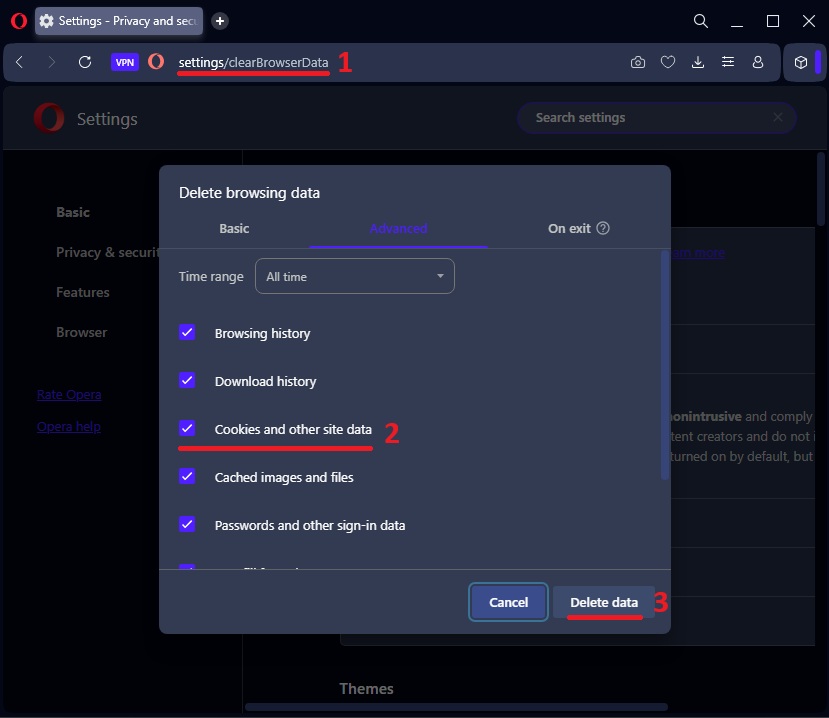
1. Open a new browser tab
2. Click on the address bar and type `opera://settings/clearBrowserData` (or `chrome://settings/clearBrowserData` for Chrome) `1`
3. Press `Enter` to navigate to the settings page
4. Set `Time range` to `All time`
5. Check `Cookies and other site data` `2`
6. Click `Delete data` `3`
### Navigate to Mureka and login with Google
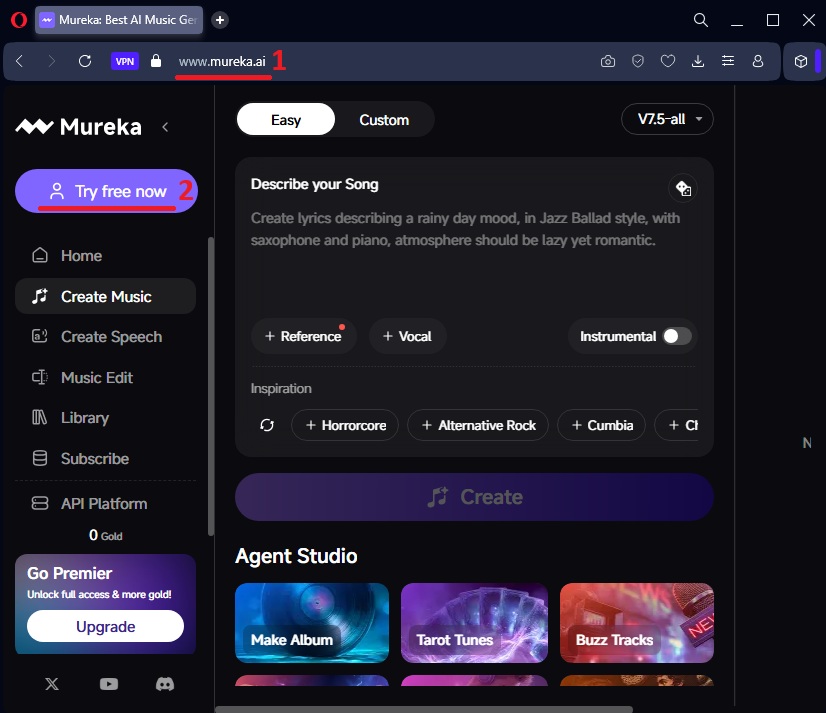
* Navigate to [https://www.mureka.ai](https://www.mureka.ai) `1`
* Click on `Try free now` button `2`
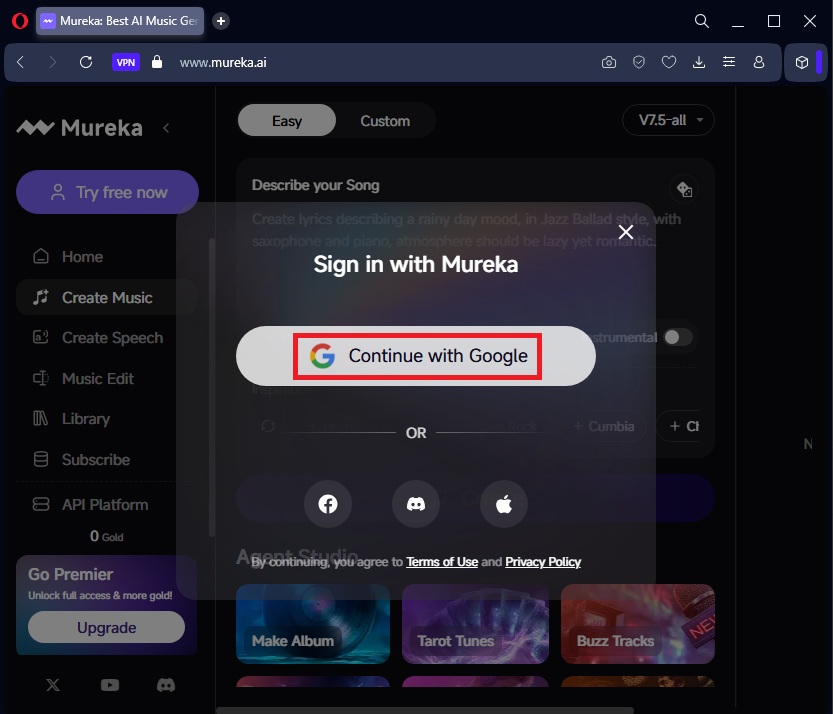
* Click `Continue with Google` button
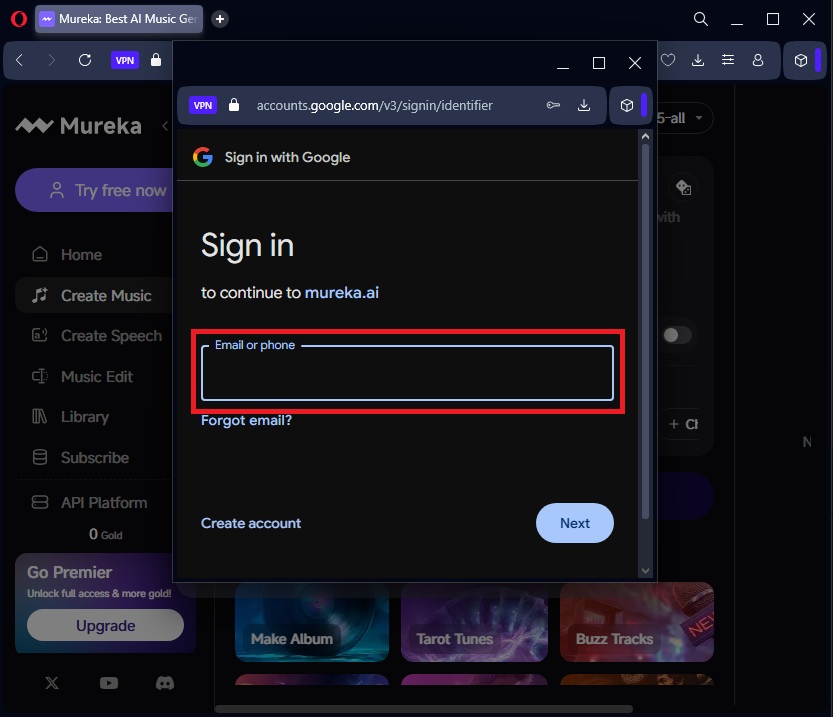
* Enter your Google email created earlier
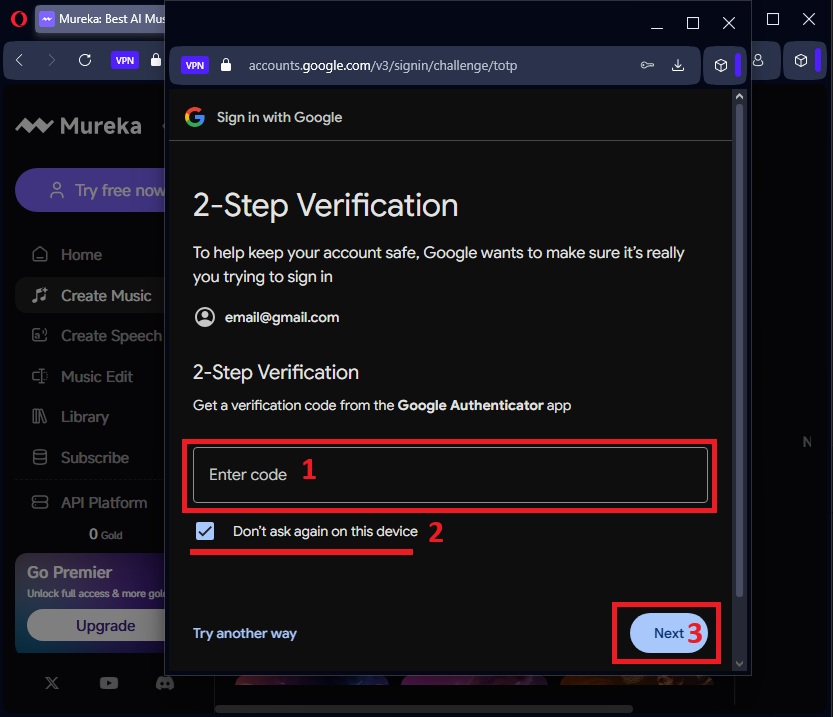
* Enter 2-Step Verification code `1`
* Make sure to check `Don't ask again on this device` `2` - this is **very important**
* Click `Next` `3`
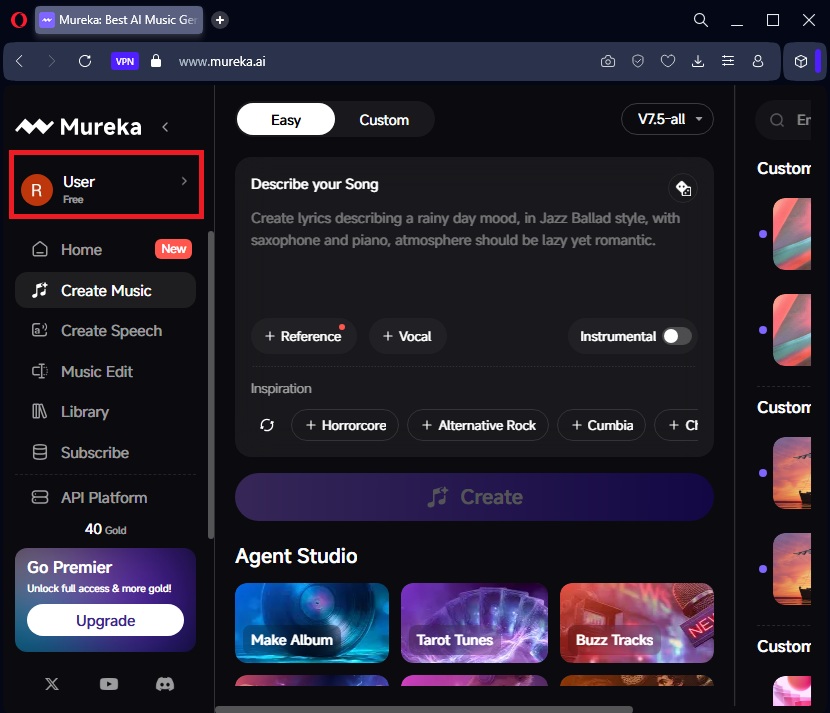
Once successfully logged in you should see your user profile in the sidebar
### Navigate to Google Account
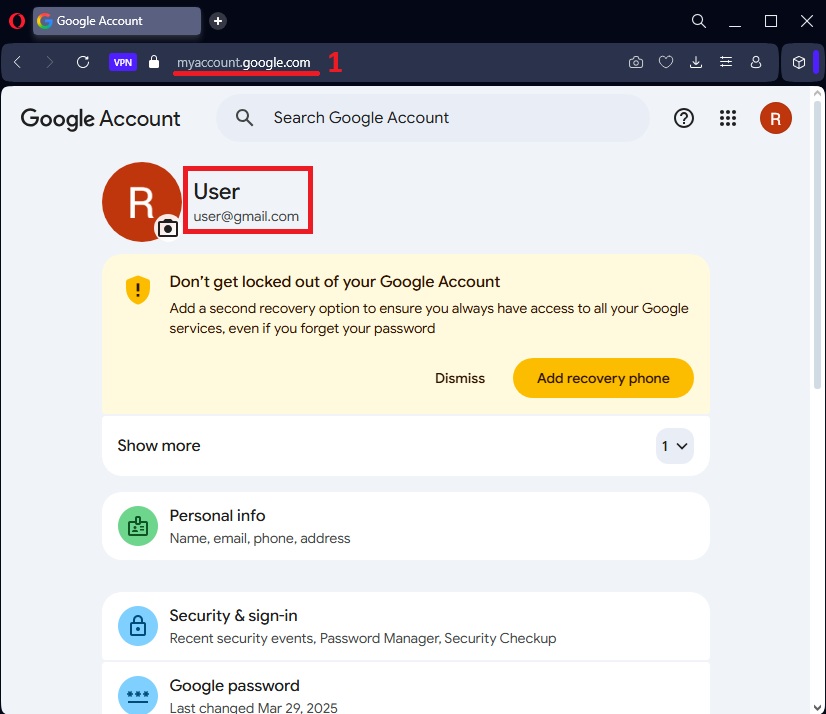
* Click on the address bar
* Type or paste `myaccount.google.com` `1`
* Press `Enter` to navigate
### Copy `__Secure-3PSID` cookie
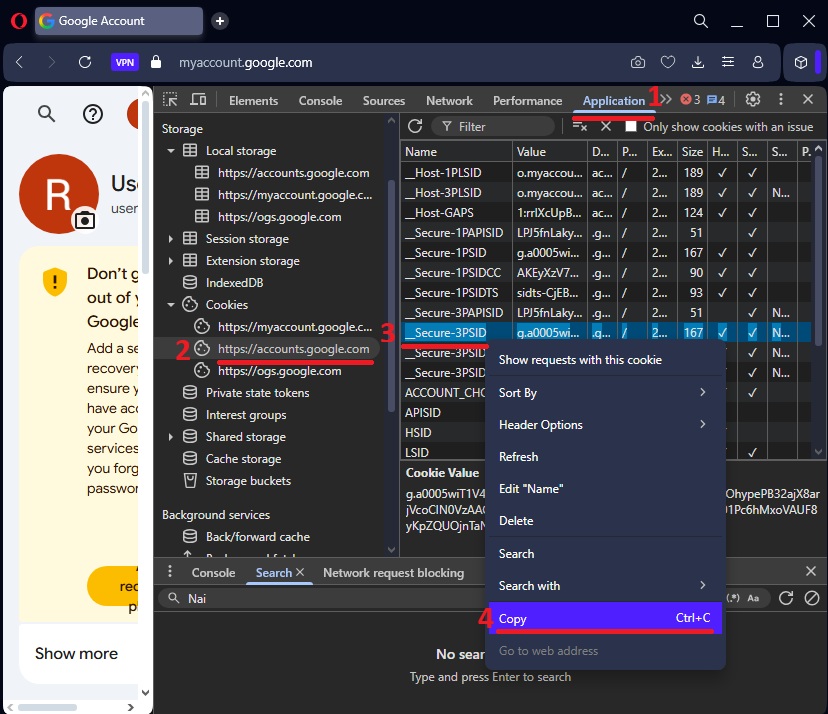
Now we need to open Developer Tools to copy the cookie:
1. Press `F12` key on your keyboard (or `Control+Shift+I` on Windows, `Command+Option+I` on Mac)
2. A panel will open on the right side or bottom of your browser - this is Developer Tools
3. Look at the top of this panel and find the word `Application` - click on it `1`
4. On the left side of the panel, find `Cookies` - click the small arrow next to it to expand
5. Click on `https://accounts.google.com/` `2`
6. A list of cookies will appear on the right side
7. Scroll through the list and find the cookie named `__Secure-3PSID`
8. Click once on that row to select it (the row will become highlighted) `3`
9. Right-click on the highlighted row
10. A menu will appear - click on `Copy` `4`
Your copied cookie will look similar to this (tab-separated values):
```
__Secure-3PSID g.a0...secured...076 .google.com / 2027-02-23T04:38:16.033Z 167 ✓ ✓ None High
```
We redacted values in the screenshot for security, your actual cookie value will be a long string (~170 characters).
### Configure Mureka API account
This is a **REQUIRED** step, you **MUST** complete it in order to use your Mureka account via our API.
This step uses [POST /accounts](../api-mureka-v1/post-mureka-accounts) endpoint to configure your account with automatic token refresh.
Use the form below to verify and configure your account. Paste the copied cookie into the `sessionCookie` field.
**Option 1: Paste the full tab-separated cookie line** (as copied from DevTools):
```
__Secure-3PSID g.a0...secured...076 .google.com / 2027-02-23T04:38:16.033Z 167 ✓ ✓ None High
```
**Option 2: Paste minimal JSON format** (if you prefer):
```json
{"value": "g.a0...secured...076", "expires": "2027-02-23T04:38:16.033Z"}
```
You should receive HTTP `200` if all steps above were executed properly.
⚠️ Once completed, make sure to [clear all browser cookies](#clear-all-browser-cookies) to ensure that this session will no longer be active in the browser and fully managed by API.
=== URL: https://useapi.net/docs/api-mureka-v1 ===
Document URL: https://useapi.net/docs/api-mureka-v1
---
layout: default
title: Mureka API v1
nav_order: 7000
has_children: true
permalink: /docs/api-mureka-v1
---
# Mureka API v1
December 2, 2024 (January 27, 2026)
This is [experimental](../../docs/legal) API for for the [Mureka AI](https://www.mureka.ai), a music generation service from Chinese tech giant Kunlun Tech featuring proprietary SkyMusic 2.0 model and positioned to compete with [Suno](https://www.suno.com) and [Udio](https://www.udio.com). Mureka AI creates unique songs based on user-provided lyrics or description (AI-generated lyrics), selected musical styles, and references to specific vocals and songs, including those uploaded by the user.
Our API also provides comprehensive **TTS/speech generation** capabilities with custom voice cloning from audio samples and multi-turn conversations using multiple voices.
Our API supports **all** functionality of [Mureka AI](https://www.mureka.ai), including Pro subscription features such as the ability to upload and use custom soundtracks for reference, and to upload and use melodies (motifs).
Mureka supports up to **10 concurrent generations** per account in **near real-time** fashion, with an average generation time of 45 seconds (each generation produces two songs). Generated songs can be up to 5 minutes long depending on your lyrics.
Currently, two [web subscription](https://www.mureka.ai/subscribe) plans are supported:
| Plan | Price | Songs | Speech |
|------|-------|-------|--------|
| **Pro** | $9/month | 500 songs | 250 min |
| **Premier** | $27/month | 2,000 songs | 1,000 min |
Cost breakdown:
| Plan | Cost/Song | Cost/Speech Min |
|------|-----------|-----------------|
| **Pro** | 1.8¢ | 3.6¢ |
| **Premier** | 1.35¢ | 2.7¢ |
Supported models: `V8` (default), `O2`, `V7.6`, `V7.5`
* Song/speech allowances are **shared** (songs OR speech minutes)
* Downloading instrumentals and stems is **free**
* Lyrics generation is **free**
Credit top-ups available at $48 for 1600 credits.
Compare the above with the official API, which starts at [$1000/m with 5 concurrent generations](https://platform.mureka.ai/pricing) at a rate of `3¢/song`. The official API also charges for lyrics generation and stems download.
[Setup Mureka](../../docs/start-here/setup-mureka)
[Postman collection](https://www.postman.com/useapinet/useapi-net/collection) (January 20, 2026)
Examples:
* [Mureka V8](../../blog/260127m)
* [Mureka O2 & V7.6](../../blog/251128)
* [Mureka TTS/Speech](../../blog/250818)
Articles:
* [Mureka API Music Samples](../../docs/articles/mureka-music-samples)
Developer Community:
*
Setup Mureka
{: .no_toc }
December 2, 2024 (January 19, 2026)
{: .note }
> Looking for the [legacy setup method](https://useapi.net/docs/start-here/setup-mureka-legacy)?
## Table of contents
{: .no_toc .text-delta }
1. TOC
{:toc}
Approximately 10 minutes to complete setup steps.
---
[Mureka AI](https://www.mureka.ai), a **music generation** service from Chinese tech giant Kunlun Tech featuring proprietary SkyMusic 2.0 model and positioned to compete with [Suno](https://www.suno.com) and [Udio](https://www.udio.com). Mureka AI creates unique songs based on user-provided lyrics or description (AI-generated lyrics), selected musical styles, and references to specific vocals and songs, including those uploaded by the user.
### Create Gmail account
We *strongly recommend* creating a separate new Gmail account designated to be used with the API. When creating the account make sure to turn on [2-Step Verification](https://support.google.com/accounts/answer/185839) authorization using [Google Authenticator](https://support.google.com/accounts/answer/1066447).
### Clear all browser cookies
Launch Chromium-based web-browser of your choice (eg [Opera](https://www.opera.com/), [Brave](https://brave.com/), [Chromium](https://www.chromium.org/) or [Chrome](https://www.google.com/chrome/)) and clear **all** cookies.
It is very important that you start absolutely fresh and obtain fresh Google cookies.
We suggest using [Opera](https://www.opera.com/) with `VPN` option turned on and VPN region set to Americas.
1. Open a new browser tab
2. Click on the address bar and type `opera://settings/clearBrowserData` (or `chrome://settings/clearBrowserData` for Chrome) `1`
3. Press `Enter` to navigate to the settings page
4. Set `Time range` to `All time`
5. Check `Cookies and other site data` `2`
6. Click `Delete data` `3`

### Navigate to Mureka and login with Google
* Navigate to [https://www.mureka.ai](https://www.mureka.ai) `1`
* Click on `Try free now` button `2`

* Click `Continue with Google` button

* Enter your Google email created earlier

* Enter 2-Step Verification code `1`
* Make sure to check `Don't ask again on this device` `2` - this is **very important**
* Click `Next` `3`

Once successfully logged in you should see your user profile in the sidebar

### Navigate to Google Account
* Click on the address bar
* Type or paste `myaccount.google.com` `1`
* Press `Enter` to navigate

### Copy `__Secure-3PSID` cookie
Now we need to open Developer Tools to copy the cookie:
1. Press `F12` key on your keyboard (or `Control+Shift+I` on Windows, `Command+Option+I` on Mac)
2. A panel will open on the right side or bottom of your browser - this is Developer Tools
3. Look at the top of this panel and find the word `Application` - click on it `1`
4. On the left side of the panel, find `Cookies` - click the small arrow next to it to expand
5. Click on `https://accounts.google.com/` `2`
6. A list of cookies will appear on the right side
7. Scroll through the list and find the cookie named `__Secure-3PSID`
8. Click once on that row to select it (the row will become highlighted) `3`
9. Right-click on the highlighted row
10. A menu will appear - click on `Copy` `4`

Your copied cookie will look similar to this (tab-separated values):
```
__Secure-3PSID g.a0...secured...076 .google.com / 2027-02-23T04:38:16.033Z 167 ✓ ✓ None High
```
We redacted values in the screenshot for security, your actual cookie value will be a long string (~170 characters).
### Configure Mureka API account
This is a **REQUIRED** step, you **MUST** complete it in order to use your Mureka account via our API.
This step uses [POST /accounts](../api-mureka-v1/post-mureka-accounts) endpoint to configure your account with automatic token refresh.
Use the form below to verify and configure your account. Paste the copied cookie into the `sessionCookie` field.
**Option 1: Paste the full tab-separated cookie line** (as copied from DevTools):
```
__Secure-3PSID g.a0...secured...076 .google.com / 2027-02-23T04:38:16.033Z 167 ✓ ✓ None High
```
**Option 2: Paste minimal JSON format** (if you prefer):
```json
{"value": "g.a0...secured...076", "expires": "2027-02-23T04:38:16.033Z"}
```
You should receive HTTP `200` if all steps above were executed properly.
⚠️ Once completed, make sure to [clear all browser cookies](#clear-all-browser-cookies) to ensure that this session will no longer be active in the browser and fully managed by API.
=== URL: https://useapi.net/docs/api-mureka-v1 ===
Document URL: https://useapi.net/docs/api-mureka-v1
---
layout: default
title: Mureka API v1
nav_order: 7000
has_children: true
permalink: /docs/api-mureka-v1
---
# Mureka API v1
December 2, 2024 (January 27, 2026)
This is [experimental](../../docs/legal) API for for the [Mureka AI](https://www.mureka.ai), a music generation service from Chinese tech giant Kunlun Tech featuring proprietary SkyMusic 2.0 model and positioned to compete with [Suno](https://www.suno.com) and [Udio](https://www.udio.com). Mureka AI creates unique songs based on user-provided lyrics or description (AI-generated lyrics), selected musical styles, and references to specific vocals and songs, including those uploaded by the user.
Our API also provides comprehensive **TTS/speech generation** capabilities with custom voice cloning from audio samples and multi-turn conversations using multiple voices.
Our API supports **all** functionality of [Mureka AI](https://www.mureka.ai), including Pro subscription features such as the ability to upload and use custom soundtracks for reference, and to upload and use melodies (motifs).
Mureka supports up to **10 concurrent generations** per account in **near real-time** fashion, with an average generation time of 45 seconds (each generation produces two songs). Generated songs can be up to 5 minutes long depending on your lyrics.
Currently, two [web subscription](https://www.mureka.ai/subscribe) plans are supported:
| Plan | Price | Songs | Speech |
|------|-------|-------|--------|
| **Pro** | $9/month | 500 songs | 250 min |
| **Premier** | $27/month | 2,000 songs | 1,000 min |
Cost breakdown:
| Plan | Cost/Song | Cost/Speech Min |
|------|-----------|-----------------|
| **Pro** | 1.8¢ | 3.6¢ |
| **Premier** | 1.35¢ | 2.7¢ |
Supported models: `V8` (default), `O2`, `V7.6`, `V7.5`
* Song/speech allowances are **shared** (songs OR speech minutes)
* Downloading instrumentals and stems is **free**
* Lyrics generation is **free**
Credit top-ups available at $48 for 1600 credits.
Compare the above with the official API, which starts at [$1000/m with 5 concurrent generations](https://platform.mureka.ai/pricing) at a rate of `3¢/song`. The official API also charges for lyrics generation and stems download.
[Setup Mureka](../../docs/start-here/setup-mureka)
[Postman collection](https://www.postman.com/useapinet/useapi-net/collection) (January 20, 2026)
Examples:
* [Mureka V8](../../blog/260127m)
* [Mureka O2 & V7.6](../../blog/251128)
* [Mureka TTS/Speech](../../blog/250818)
Articles:
* [Mureka API Music Samples](../../docs/articles/mureka-music-samples)
Developer Community:
*  Discord Server
*
Discord Server
*  Telegram Channel
*
Telegram Channel
*  r/murekaai_api
=== URL: https://useapi.net/docs/api-mureka-v1/del-mureka-accounts-account ===
Document URL: https://useapi.net/docs/api-mureka-v1/del-mureka-accounts-account
---
layout: default
title:
r/murekaai_api
=== URL: https://useapi.net/docs/api-mureka-v1/del-mureka-accounts-account ===
Document URL: https://useapi.net/docs/api-mureka-v1/del-mureka-accounts-account
---
layout: default
title: DEL accounts/account
parent: Mureka API v1
nav_order: 400
---
## Delete Mureka API account
{: .no_toc }
December 2, 2024
## Table of contents
{: .no_toc .text-delta }
1. TOC
{:toc}
---
{: .delete }
> **https://api.useapi.net/v1/mureka/accounts/`account`**
The `account` value should correspond to an account configured previously via a [POST /accounts](post-mureka-accounts) request.
##### Request Headers
``` yaml
Authorization: Bearer {API token}
```
- `API token` is **required**, see [Setup useapi.net](../start-here/setup-useapi) for details.
##### Responses
{% tabs del_account_Mureka_response %}
{% tab del_account_Mureka_response 204 %}
204 No Content
{% endtab %}
{% tab del_account_Mureka_response 401 %}
401 Unauthorized
```json
{
"error": "Unauthorized",
"code": 401
}
```
{% endtab %}
{% tab del_account_Mureka_response 404 %}
404 Not Found
{% endtab %}
{% endtabs %}
##### Model
```typescript
{ // TypeScript, all fields are optional
error: string,
errorDetails: string,
code: number
}
```
##### Examples
{% tabs del_account_Mureka_example %}
{% tab del_account_Mureka_example Curl %}
``` bash
curl -H "Accept: application/json" \
-H "Content-Type: application/json" \
-H "Authorization: Bearer …" \
-X DELETE https://api.useapi.net/v1/mureka/accounts/
```
{% endtab %}
{% tab del_account_Mureka_example JavaScript %}
``` javascript
const account = "Previously configured account";
const apiUrl = `https://api.useapi.net/v1/mureka/accounts/${channnel}`;
const token = "API token";
const data = {
method: 'DELETE',
headers: {
'Authorization': `Bearer ${token}`,
'Content-Type': 'application/json' }
};
const response = await fetch(apiUrl, data);
const result = await response.json();
console.log("response", {response, result});
```
{% endtab %}
{% tab del_account_Mureka_example Python %}
``` python
import requests
account = "Previously configured account"
apiUrl = f"https://api.useapi.net/v1/mureka/accounts/{account}"
token = "API token"
headers = {
"Content-Type": "application/json",
"Authorization" : f"Bearer {token}"
}
response = requests.delete(apiUrl, headers=headers)
print(response, response.json())
```
{% endtab %}
{% endtabs %}
=== URL: https://useapi.net/docs/api-mureka-v1/del-mureka-files-vocal ===
Document URL: https://useapi.net/docs/api-mureka-v1/del-mureka-files-vocal
---
layout: default
title: DEL files/vocal
parent: Mureka API v1
nav_order: 2000
---
## Delete vocal
{: .no_toc }
January 15, 2025
## Table of contents
{: .no_toc .text-delta }
1. TOC
{:toc}
---
Delete vocal which was uploaded using [POST files/vocal](../api-mureka-v1/post-mureka-files-vocal).
{: .delete }
> **https://api.useapi.net/v1/mureka/files/vocal/?…**
##### Request Headers
``` yaml
Authorization: Bearer {API token}
Content-Type: application/json
```
- `API token` is **required**, see [Setup useapi.net](../start-here/setup-useapi) for details.
##### Query Parameters
- `account` is optional when only one [account](../api-mureka-v1/get-mureka-accounts) configured. However, if you have multiple accounts configured, this parameter becomes **required**.
- `id` is **required**, to see full list of uploaded vocals use [GET music/vocals/?mine=true](../api-mureka-v1/get-mureka-music-vocals).
##### Responses
{% tabs del_Mureka_files_response %}
{% tab del_Mureka_files_response 200 %}
200 OK
{% endtab %}
{% tab del_Mureka_files_response 400 %}
400 Bad Request
```json
{
"error": "",
"code": 400
}
```
{% endtab %}
{% tab del_Mureka_files_response 401 %}
401 Unauthorized
```json
{
"error": "Unauthorized",
"code": 401
}
```
{% endtab %}
{% tab del_Mureka_files_response 596 %}
596 Account Error
Returned when the account has an error state preventing API calls.
```json
{
"error": "Session refresh failed 2026-01-19T14:31:15.000Z, manual update required",
"code": "REFRESH_FAILED"
}
```
Possible error codes:
- `ACCOUNT_ERROR` - Account has a blocking error
- `REFRESH_FAILED` - Automatic token refresh failed
- `REFRESH_IN_PROGRESS` - Token refresh already in progress, retry shortly
- `SESSION_EXPIRED` - Session expired and no auto-refresh available
- `COOKIE_EXPIRED` - Google cookie has expired
To resolve, update your account configuration via [POST /accounts](https://useapi.net/docs/api-mureka-v1/post-mureka-accounts).
{% endtab %}
{% endtabs %}
##### Examples
{% tabs del_Mureka_files_example %}
{% tab del_Mureka_files_example Curl %}
``` bash
curl -H "Accept: application/json" \
-H "Content-Type: application/json" \
-H "Authorization: Bearer …" \
-X DELETE https://api.useapi.net/v1/mureka/files/vocal/?account=&id=
```
{% endtab %}
{% tab del_Mureka_files_example JavaScript %}
``` javascript
const account = 123456789;
const id = 98765432;
const apiUrl = `https://api.useapi.net/v1/mureka/files/vocal/?account=${account}&id=${id}`;
const token = "API token";
const data = {
method: 'DELETE',
headers: {
'Authorization': `Bearer ${token}`,
'Content-Type': 'application/json' }
};
const response = await fetch(apiUrl, data);
const result = await response.json();
console.log("response", {response, result});
```
{% endtab %}
{% tab del_Mureka_files_example Python %}
``` python
import requests
account = 123456789
id = 98765432
apiUrl = f"https://api.useapi.net/v1/mureka/files/vocal/?account={account}&id={id}"
token = "API token"
headers = {
"Content-Type": "application/json",
"Authorization" : f"Bearer {token}"
}
response = requests.delete(apiUrl, headers=headers)
print(response, response.json())
```
{% endtab %}
{% endtabs %}
=== URL: https://useapi.net/docs/api-mureka-v1/del-mureka-files ===
Document URL: https://useapi.net/docs/api-mureka-v1/del-mureka-files
---
layout: default
title: DEL files
parent: Mureka API v1
nav_order: 1850
---
## Delete track
{: .no_toc }
December 13, 2024
## Table of contents
{: .no_toc .text-delta }
1. TOC
{:toc}
---
Delete track which was uploaded using [POST /files](../api-mureka-v1/post-mureka-files).
{: .delete }
> **https://api.useapi.net/v1/mureka/files/?…**
##### Request Headers
``` yaml
Authorization: Bearer {API token}
Content-Type: application/json
```
- `API token` is **required**, see [Setup useapi.net](../start-here/setup-useapi) for details.
##### Query Parameters
- `account` is optional when only one [account](../api-mureka-v1/get-mureka-accounts) configured. However, if you have multiple accounts configured, this parameter becomes **required**.
- `id` is **required**, to see full list of uploaded tracks use [GET /files](../api-mureka-v1/get-mureka-files).
##### Responses
{% tabs del_Mureka_files_response %}
{% tab del_Mureka_files_response 200 %}
200 OK
{% endtab %}
{% tab del_Mureka_files_response 400 %}
400 Bad Request
```json
{
"error": "",
"code": 400
}
```
{% endtab %}
{% tab del_Mureka_files_response 401 %}
401 Unauthorized
```json
{
"error": "Unauthorized",
"code": 401
}
```
{% endtab %}
{% tab del_Mureka_files_response 596 %}
596 Account Error
Returned when the account has an error state preventing API calls.
```json
{
"error": "Session refresh failed 2026-01-19T14:31:15.000Z, manual update required",
"code": "REFRESH_FAILED"
}
```
Possible error codes:
- `ACCOUNT_ERROR` - Account has a blocking error
- `REFRESH_FAILED` - Automatic token refresh failed
- `REFRESH_IN_PROGRESS` - Token refresh already in progress, retry shortly
- `SESSION_EXPIRED` - Session expired and no auto-refresh available
- `COOKIE_EXPIRED` - Google cookie has expired
To resolve, update your account configuration via [POST /accounts](https://useapi.net/docs/api-mureka-v1/post-mureka-accounts).
{% endtab %}
{% endtabs %}
##### Examples
{% tabs del_Mureka_files_example %}
{% tab del_Mureka_files_example Curl %}
``` bash
curl -H "Accept: application/json" \
-H "Content-Type: application/json" \
-H "Authorization: Bearer …" \
-X DELETE https://api.useapi.net/v1/mureka/files/?account=&id=
```
{% endtab %}
{% tab del_Mureka_files_example JavaScript %}
``` javascript
const account = 123456789;
const id = 98765432;
const apiUrl = `https://api.useapi.net/v1/mureka/files/?account=${account}&id=${id}`;
const token = "API token";
const data = {
method: 'DELETE',
headers: {
'Authorization': `Bearer ${token}`,
'Content-Type': 'application/json' }
};
const response = await fetch(apiUrl, data);
const result = await response.json();
console.log("response", {response, result});
```
{% endtab %}
{% tab del_Mureka_files_example Python %}
``` python
import requests
account = 123456789
id = 98765432
apiUrl = f"https://api.useapi.net/v1/mureka/files/?account={account}&id={id}"
token = "API token"
headers = {
"Content-Type": "application/json",
"Authorization" : f"Bearer {token}"
}
response = requests.delete(apiUrl, headers=headers)
print(response, response.json())
```
{% endtab %}
{% endtabs %}
=== URL: https://useapi.net/docs/api-mureka-v1/del-mureka-music-song_id ===
Document URL: https://useapi.net/docs/api-mureka-v1/del-mureka-music-song_id
---
layout: default
title: DEL music/song_id
parent: Mureka API v1
nav_order: 1500
---
## Delete song
{: .no_toc }
December 2, 2024
## Table of contents
{: .no_toc .text-delta }
1. TOC
{:toc}
---
{: .delete }
> **https://api.useapi.net/v1/mureka/music/`song_id`**
The `song_id` value returned by one of the following endpoints:
* [GET /music](get-mureka-music)
* [POST /music/create](post-mureka-music-create)
* [POST /music/create-advanced](post-mureka-music-create-advanced)
* [POST /music/create-instrumental](post-mureka-music-create-instrumental)
##### Request Headers
``` yaml
Authorization: Bearer {API token}
Content-Type: application/json
```
- `API token` is **required**, see [Setup useapi.net](../start-here/setup-useapi) for details.
##### Responses
{% tabs del_Mureka_music_song_id_response %}
{% tab del_Mureka_music_song_id_response 200 %}
200 OK
```json
{}
```
{% endtab %}
{% tab del_Mureka_music_song_id_response 400 %}
400 Bad Request
```json
{
"error": "",
"code": 400
}
```
{% endtab %}
{% tab del_Mureka_music_song_id_response 401 %}
401 Unauthorized
```json
{
"error": "Unauthorized",
"code": 401
}
```
{% endtab %}
{% tab del_Mureka_music_song_id_response 596 %}
596 Account Error
Returned when the account has an error state preventing API calls.
```json
{
"error": "Session refresh failed 2026-01-19T14:31:15.000Z, manual update required",
"code": "REFRESH_FAILED"
}
```
Possible error codes:
- `ACCOUNT_ERROR` - Account has a blocking error
- `REFRESH_FAILED` - Automatic token refresh failed
- `REFRESH_IN_PROGRESS` - Token refresh already in progress, retry shortly
- `SESSION_EXPIRED` - Session expired and no auto-refresh available
- `COOKIE_EXPIRED` - Google cookie has expired
To resolve, update your account configuration via [POST /accounts](https://useapi.net/docs/api-mureka-v1/post-mureka-accounts).
{% endtab %}
{% endtabs %}
##### Model
```typescript
{}
```
##### Examples
{% tabs del_Mureka_music_song_id_example %}
{% tab del_Mureka_music_song_id_example Curl %}
``` bash
curl -H "Accept: application/json" \
-H "Content-Type: application/json" \
-H "Authorization: Bearer …" \
-X DELETE https://api.useapi.net/v1/mureka/accounts/
```
{% endtab %}
{% tab del_Mureka_music_song_id_example JavaScript %}
``` javascript
const song_id = 123456789;
const apiUrl = `https://api.useapi.net/v1/mureka/accounts/${song_id}`;
const token = "API token";
const data = {
method: 'DELETE',
headers: {
'Authorization': `Bearer ${token}`,
'Content-Type': 'application/json' }
};
const response = await fetch(apiUrl, data);
const result = await response.json();
console.log("response", {response, result});
```
{% endtab %}
{% tab del_Mureka_music_song_id_example Python %}
``` python
import requests
song_id = 123456789
apiUrl = f"https://api.useapi.net/v1/mureka/accounts/{song_id}"
token = "API token"
headers = {
"Content-Type": "application/json",
"Authorization" : f"Bearer {token}"
}
response = requests.delete(apiUrl, headers=headers)
print(response, response.json())
```
{% endtab %}
{% endtabs %}
=== URL: https://useapi.net/docs/api-mureka-v1/del-mureka-speech-voice ===
Document URL: https://useapi.net/docs/api-mureka-v1/del-mureka-speech-voice
---
layout: default
title: DELETE speech/voice
parent: Mureka API v1
nav_order: 2400
---
## Delete speech voice
{: .no_toc }
August 18, 2025
## Table of contents
{: .no_toc .text-delta }
1. TOC
{:toc}
---
This endpoint permanently deletes a custom cloned voice from your Mureka account. Once deleted, the voice cannot be recovered and can no longer be used for speech generation. Use this to clean up unwanted voice clones or manage your voice library.
{: .delete }
> **https://api.useapi.net/v1/mureka/speech/voice?…**
##### Request Headers
``` yaml
Authorization: Bearer {API token}
Content-Type: application/json
```
- `API token` is **required**, see [Setup useapi.net](../start-here/setup-useapi) for details.
##### Query Parameters
- `account` is optional when only one [account](../api-mureka-v1/get-mureka-accounts) configured. However, if you have multiple accounts configured, this parameter becomes **required**.
- `voice_id` is **required**. The ID of the voice to delete.
Get voice IDs from [GET /speech/voices](https://useapi.net/docs/api-mureka-v1/get-mureka-speech-voices).
##### Responses
{% tabs del_speech_voice_Mureka_speech_response %}
{% tab del_speech_voice_Mureka_speech_response 200 %}
200 OK
```json
{}
```
{% endtab %}
{% tab del_speech_voice_Mureka_speech_response 400 %}
400 Bad Request
```json
{
"error": "",
"code": 400
}
```
{% endtab %}
{% tab del_speech_voice_Mureka_speech_response 401 %}
401 Unauthorized
```json
{
"error": "Unauthorized",
"code": 401
}
```
{% endtab %}
{% tab del_speech_voice_Mureka_speech_response 596 %}
596 Account Error
Returned when the account has an error state preventing API calls.
```json
{
"error": "Session refresh failed 2026-01-19T14:31:15.000Z, manual update required",
"code": "REFRESH_FAILED"
}
```
Possible error codes:
- `ACCOUNT_ERROR` - Account has a blocking error
- `REFRESH_FAILED` - Automatic token refresh failed
- `REFRESH_IN_PROGRESS` - Token refresh already in progress, retry shortly
- `SESSION_EXPIRED` - Session expired and no auto-refresh available
- `COOKIE_EXPIRED` - Google cookie has expired
To resolve, update your account configuration via [POST /accounts](https://useapi.net/docs/api-mureka-v1/post-mureka-accounts).
{% endtab %}
{% endtabs %}
##### Examples
{% tabs del_speech_voice_Mureka_speech_example %}
{% tab del_speech_voice_Mureka_speech_example Curl %}
``` bash
curl -X DELETE "https://api.useapi.net/v1/mureka/speech/voice?voice_id=12345678901234" \
-H "Accept: application/json" \
-H "Authorization: Bearer …"
```
{% endtab %}
{% tab del_speech_voice_Mureka_speech_example JavaScript %}
``` javascript
const token = "API token";
const voiceId = "Voice ID to delete";
const apiUrl = `https://api.useapi.net/v1/mureka/speech/voice?voice_id=${voiceId}`;
const response = await fetch(apiUrl, {
method: "DELETE",
headers: {
"Authorization": `Bearer ${token}`,
},
});
const result = await response.json();
console.log("response", {response, result});
```
{% endtab %}
{% tab del_speech_voice_Mureka_speech_example Python %}
``` python
import requests
token = "API token"
voice_id = "Voice ID to delete"
apiUrl = f"https://api.useapi.net/v1/mureka/speech/voice?voice_id={voice_id}"
headers = {
"Content-Type": "application/json",
"Authorization" : f"Bearer {token}"
}
response = requests.delete(apiUrl, headers=headers)
print(response, response.json())
```
{% endtab %}
{% endtabs %}
=== URL: https://useapi.net/docs/api-mureka-v1/del-mureka-speech ===
Document URL: https://useapi.net/docs/api-mureka-v1/del-mureka-speech
---
layout: default
title: DELETE speech
parent: Mureka API v1
nav_order: 2170
---
## Delete speech
{: .no_toc }
August 18, 2025
## Table of contents
{: .no_toc .text-delta }
1. TOC
{:toc}
---
This endpoint permanently deletes a specific speech recording from your Mureka account. Once deleted, the speech audio file and metadata cannot be recovered. Use this to clean up unwanted recordings or manage storage in your account.
{: .delete }
> **https://api.useapi.net/v1/mureka/speech/?…**
##### Request Headers
``` yaml
Authorization: Bearer {API token}
Content-Type: application/json
```
- `API token` is **required**, see [Setup useapi.net](../start-here/setup-useapi) for details.
##### Query Parameters
- `account` is optional when only one [account](../api-mureka-v1/get-mureka-accounts) configured. However, if you have multiple accounts configured, this parameter becomes **required**.
- `id` is **required**. The ID of the speech to delete.
Get speech IDs from [GET /speech](https://useapi.net/docs/api-mureka-v1/get-mureka-speech).
##### Responses
{% tabs del_speech_Mureka_speech_response %}
{% tab del_speech_Mureka_speech_response 200 %}
200 OK
```json
{}
```
{% endtab %}
{% tab del_speech_Mureka_speech_response 400 %}
400 Bad Request
```json
{
"error": "",
"code": 400
}
```
{% endtab %}
{% tab del_speech_Mureka_speech_response 401 %}
401 Unauthorized
```json
{
"error": "Unauthorized",
"code": 401
}
```
{% endtab %}
{% tab del_speech_Mureka_speech_response 596 %}
596 Account Error
Returned when the account has an error state preventing API calls.
```json
{
"error": "Session refresh failed 2026-01-19T14:31:15.000Z, manual update required",
"code": "REFRESH_FAILED"
}
```
Possible error codes:
- `ACCOUNT_ERROR` - Account has a blocking error
- `REFRESH_FAILED` - Automatic token refresh failed
- `REFRESH_IN_PROGRESS` - Token refresh already in progress, retry shortly
- `SESSION_EXPIRED` - Session expired and no auto-refresh available
- `COOKIE_EXPIRED` - Google cookie has expired
To resolve, update your account configuration via [POST /accounts](https://useapi.net/docs/api-mureka-v1/post-mureka-accounts).
{% endtab %}
{% endtabs %}
##### Examples
{% tabs del_speech_Mureka_speech_example %}
{% tab del_speech_Mureka_speech_example Curl %}
``` bash
curl -X DELETE "https://api.useapi.net/v1/mureka/speech/?id=23456789012345" \
-H "Accept: application/json" \
-H "Authorization: Bearer …"
```
{% endtab %}
{% tab del_speech_Mureka_speech_example JavaScript %}
``` javascript
const token = "API token";
const speechId = "Speech ID to delete";
const apiUrl = `https://api.useapi.net/v1/mureka/speech/?id=${speechId}`;
const response = await fetch(apiUrl, {
method: "DELETE",
headers: {
"Authorization": `Bearer ${token}`,
},
});
const result = await response.json();
console.log("response", {response, result});
```
{% endtab %}
{% tab del_speech_Mureka_speech_example Python %}
``` python
import requests
token = "API token"
speech_id = "Speech ID to delete"
apiUrl = f"https://api.useapi.net/v1/mureka/speech/?id={speech_id}"
headers = {
"Content-Type": "application/json",
"Authorization" : f"Bearer {token}"
}
response = requests.delete(apiUrl, headers=headers)
print(response, response.json())
```
{% endtab %}
{% endtabs %}
=== URL: https://useapi.net/docs/api-mureka-v1/get-mureka-accounts-account ===
Document URL: https://useapi.net/docs/api-mureka-v1/get-mureka-accounts-account
---
layout: default
title: GET accounts/account
parent: Mureka API v1
nav_order: 200
---
## Retrieve Mureka API account configuration for `account`
{: .no_toc }
December 2, 2024 (January 20, 2026)
## Table of contents
{: .no_toc .text-delta }
1. TOC
{:toc}
---
[Setup Mureka](../../docs/start-here/setup-mureka)
{: .get }
> **https://api.useapi.net/v1/mureka/accounts/`account`**
The `account` value should correspond to an account configured previously via a [POST /accounts](post-mureka-accounts) request.
##### Request Headers
``` yaml
Authorization: Bearer {API token}
Content-Type: application/json
```
- `API token` is **required**, see [Setup useapi.net](../start-here/setup-useapi) for details.
##### Responses
{% tabs get_account_Mureka_account_response %}
{% tab get_account_Mureka_account_response 200 %}
200 OK
```json
{
"account": "123456789",
"token": "abc…secured…xyz",
"updated": 1724514995,
"updatedUTC": "2024-10-24T15:56:35.000Z",
"tokenIssuedDaysAgo": 30,
"hasAutoRefresh": true,
"email": "user@gmail.com",
"sessionCookie": {
"name": "__Secure-3PSID",
"value": "g.a000abc…secured…12345",
"domain": ".google.com",
"path": "/",
"expires": "2026-02-15T12:00:00.000Z",
"httpOnly": true,
"secure": true,
"sameSite": "None",
"added": "2026-01-15T10:30:00.000Z"
}
}
```
{% endtab %}
{% tab get_account_Mureka_account_response 401 %}
401 Unauthorized
```json
{
"error": "Unauthorized",
"code": 401
}
```
{% endtab %}
{% tab get_account_Mureka_account_response 404 %}
404 Not Found
Configuration not found. To create configuration use [POST /accounts](https://useapi.net/docs/api-mureka-v1/post-mureka-accounts).
{% endtab %}
{% endtabs %}
##### Model
```typescript
{ // TypeScript, all fields are optional
account: string
token: string
updated: number
updatedUTC: string
tokenIssuedDaysAgo: number
hasAutoRefresh: boolean
email?: string
sessionCookie?: {
name: string
value: string
domain: string
path: string
expires: string
httpOnly: boolean
secure: boolean
sameSite: string
added?: string
}
error?: string
}
```
##### Examples
{% tabs get_account_Mureka_account_example %}
{% tab get_account_Mureka_account_example Curl %}
``` bash
curl https://api.useapi.net/v1/mureka/accounts/ \
-H "Accept: application/json" \
-H "Authorization: Bearer …"
```
{% endtab %}
{% tab get_account_Mureka_account_example JavaScript %}
``` javascript
const token = "API token";
const account = "Previously configured account";
const apiUrl = `https://api.useapi.net/v1/mureka/accounts/${account}`;
const response = await fetch(apiUrl, {
headers: {
"Authorization": `Bearer ${token}`,
},
});
const result = await response.json();
console.log("response", {response, result});
```
{% endtab %}
{% tab get_account_Mureka_account_example Python %}
``` python
import requests
token = "API token"
account = "Previously configured account"
apiUrl = f"https://api.useapi.net/v1/mureka/accounts/{account}"
headers = {
"Content-Type": "application/json",
"Authorization" : f"Bearer {token}"
}
response = requests.get(apiUrl, headers=headers)
print(response, response.json())
```
{% endtab %}
{% endtabs %}
=== URL: https://useapi.net/docs/api-mureka-v1/get-mureka-accounts ===
Document URL: https://useapi.net/docs/api-mureka-v1/get-mureka-accounts
---
layout: default
title: GET accounts
parent: Mureka API v1
nav_order: 100
---
## Retrieve Mureka API accounts configuration
{: .no_toc }
December 2, 2024 (January 20, 2026)
## Table of contents
{: .no_toc .text-delta }
1. TOC
{:toc}
---
This endpoint retrieves the complete list of configured API accounts for Mureka.
[Setup Mureka](../../docs/start-here/setup-mureka)
{: .get }
> **https://api.useapi.net/v1/mureka/accounts**
##### Request Headers
``` yaml
Authorization: Bearer {API token}
Content-Type: application/json
```
- `API token` is **required**, see [Setup useapi.net](../start-here/setup-useapi) for details.
##### Responses
{% tabs account_Mureka_response %}
{% tab account_Mureka_response 200 %}
200 OK
```json
{
"123456789": {
"account": "123456789",
"token": "abc…secured…xyz",
"updated": 1724514995,
"updatedUTC": "2024-10-24T15:56:35.000Z",
"tokenIssuedDaysAgo": 29,
"hasAutoRefresh": true,
"email": "user@gmail.com",
"sessionCookie": {
"name": "__Secure-3PSID",
"value": "g.a000abc…secured…12345",
"domain": ".google.com",
"path": "/",
"expires": "2026-02-15T12:00:00.000Z",
"httpOnly": true,
"secure": true,
"sameSite": "None",
"added": "2026-01-15T10:30:00.000Z"
}
},
"987654321": {
"account": "987654321",
"token": "def…secured…uvw",
"updated": 1724514995,
"updatedUTC": "2024-10-24T15:56:35.000Z",
"tokenIssuedDaysAgo": 1,
"hasAutoRefresh": false,
"error": "Session refresh failed 2026-01-19T14:31:15.000Z, manual update required"
}
}
```
{% endtab %}
{% tab account_Mureka_response 401 %}
401 Unauthorized
```json
{
"error": "Unauthorized",
"code": 401
}
```
{% endtab %}
{% tab account_Mureka_response 404 %}
404 Not Found
Configuration not found. To create configuration use [POST /accounts](https://useapi.net/docs/api-mureka-v1/post-mureka-accounts).
{% endtab %}
{% endtabs %}
##### Model
```typescript
{ // TypeScript, all fields are optional
[account: string]: {
account: string
token: string
updated: number
updatedUTC: string
tokenIssuedDaysAgo: number
hasAutoRefresh: boolean
email?: string
sessionCookie?: {
name: string
value: string
domain: string
path: string
expires: string
httpOnly: boolean
secure: boolean
sameSite: string
added?: string
}
error?: string
}
}
```
##### Examples
{% tabs account_Mureka_example %}
{% tab account_Mureka_example Curl %}
``` bash
curl https://api.useapi.net/v1/mureka/accounts \
-H "Accept: application/json" \
-H "Authorization: Bearer …"
```
{% endtab %}
{% tab account_Mureka_example JavaScript %}
``` javascript
const token = "API token";
const apiUrl = "https://api.useapi.net/v1/mureka/accounts";
const response = await fetch(apiUrl, {
headers: {
"Authorization": `Bearer ${token}`,
},
});
const result = await response.json();
console.log("response", {response, result});
```
{% endtab %}
{% tab account_Mureka_example Python %}
``` python
import requests
token = "API token"
apiUrl = "https://api.useapi.net/v1/mureka/accounts"
headers = {
"Content-Type": "application/json",
"Authorization" : f"Bearer {token}"
}
response = requests.get(apiUrl, headers=headers)
print(response, response.json())
```
{% endtab %}
{% endtabs %}
=== URL: https://useapi.net/docs/api-mureka-v1/get-mureka-files-youtube ===
Document URL: https://useapi.net/docs/api-mureka-v1/get-mureka-files-youtube
---
layout: default
title: GET files/youtube
parent: Mureka API v1
nav_order: 1700
---
## Retrieve soundtrack from YouTube url
{: .no_toc }
December 13, 2024
## Table of contents
{: .no_toc .text-delta }
1. TOC
{:toc}
---
This endpoint will return a link to the YouTube video soundtrack. You can download it, adjust if needed, and upload it to your track collection using [POST /files](../api-mureka-v1/post-mureka-files).
{: .get }
> **https://api.useapi.net/v1/mureka/files/youtube/?…**
##### Request Headers
``` yaml
Authorization: Bearer {API token}
Content-Type: application/json
```
- `API token` is **required**, see [Setup useapi.net](../start-here/setup-useapi) for details.
##### Query Parameters
- `account` is optional when only one [account](../api-mureka-v1/get-mureka-accounts) configured. However, if you have multiple accounts configured, this parameter becomes **required**.
- `url` is **required**. Provide the YouTube url link for which you want to retrieve the soundtrack.
##### Responses
{% tabs get_Mureka_files_youtube_response %}
{% tab get_Mureka_files_youtube_response 200 %}
200 OK
```json
{
"name": "",
"cos_url": "https://...mp3",
"duration": 21000
}
```
{% endtab %}
{% tab get_Mureka_files_youtube_response 400 %}
400 Bad Request
```json
{
"error": "",
"code": 400
}
```
{% endtab %}
{% tab get_Mureka_files_youtube_response 401 %}
401 Unauthorized
```json
{
"error": "Unauthorized",
"code": 401
}
```
{% endtab %}
{% tab get_Mureka_files_youtube_response 596 %}
596 Account Error
Returned when the account has an error state preventing API calls.
```json
{
"error": "Session refresh failed 2026-01-19T14:31:15.000Z, manual update required",
"code": "REFRESH_FAILED"
}
```
Possible error codes:
- `ACCOUNT_ERROR` - Account has a blocking error
- `REFRESH_FAILED` - Automatic token refresh failed
- `REFRESH_IN_PROGRESS` - Token refresh already in progress, retry shortly
- `SESSION_EXPIRED` - Session expired and no auto-refresh available
- `COOKIE_EXPIRED` - Google cookie has expired
To resolve, update your account configuration via [POST /accounts](https://useapi.net/docs/api-mureka-v1/post-mureka-accounts).
{% endtab %}
{% endtabs %}
##### Model
```typescript
{ // TypeScript, all fields are optional
name: string
cos_url: string
duration: number
}
```
##### Examples
{% tabs get_Mureka_files_youtube_example %}
{% tab get_Mureka_files_youtube_example Curl %}
``` bash
curl "https://api.useapi.net/v1/mureka/files/youtube/?account=account&url=" \
-H "Accept: application/json" \
-H "Authorization: Bearer …"
```
{% endtab %}
{% tab get_Mureka_files_youtube_example JavaScript %}
``` javascript
const token = "API token";
const account = "Previously configured account";
const url = "YouTube video url";
const apiUrl = `https://api.useapi.net/v1/mureka/files/youtube/?account=${account}&url=${url}`;
const response = await fetch(apiUrl, {
headers: {
"Authorization": `Bearer ${token}`,
},
});
const result = await response.json();
console.log("response", {response, result});
```
{% endtab %}
{% tab get_Mureka_files_youtube_example Python %}
``` python
import requests
token = "API token"
account = "Previously configured account"
url = "YouTube video url"
apiUrl = f"https://api.useapi.net/v1/mureka/files/youtube/?account={account}&url={url}"
headers = {
"Content-Type": "application/json",
"Authorization" : f"Bearer {token}"
}
response = requests.get(apiUrl, headers=headers)
print(response, response.json())
```
{% endtab %}
{% endtabs %}
=== URL: https://useapi.net/docs/api-mureka-v1/get-mureka-files ===
Document URL: https://useapi.net/docs/api-mureka-v1/get-mureka-files
---
layout: default
title: GET files
parent: Mureka API v1
nav_order: 1600
---
## Retrieve your reference tracks
{: .no_toc }
December 13, 2024
## Table of contents
{: .no_toc .text-delta }
1. TOC
{:toc}
---
Retrieve full list of track uploaded using [POST /files](../api-mureka-v1/post-mureka-files). Keep in mind that all uploaded files will be visible to all users of Mureka.ai website.
Use `id` value to reference a track when using the parameter `ref_id` of [POST /music/create-advanced](../api-mureka-v1/post-mureka-music-create-advanced).
{: .get }
> **https://api.useapi.net/v1/mureka/files/?…**
##### Request Headers
``` yaml
Authorization: Bearer {API token}
Content-Type: application/json
```
- `API token` is **required**, see [Setup useapi.net](../start-here/setup-useapi) for details.
##### Query Parameters
- `account` is optional when only one [account](../api-mureka-v1/get-mureka-accounts) configured. However, if you have multiple accounts configured, this parameter becomes **required**.
- `last_id` is optional. Use it to retrieve the next page of data. To do so, set its value to the `last_id` returned in the previous response when the `more` field in that response is `true`.
##### Responses
{% tabs get_Mureka_files_response %}
{% tab get_Mureka_files_response 200 %}
200 OK
```json
{
"list": [
{
"id": 1122334455,
"url": "https://.mp3",
"duration_milliseconds": 30000,
"mood": "relaxed",
"title": "",
"genre": "afrobeat",
"username": ""
},
{
"id": 66778899,
"url": "https://.mp3",
"duration_milliseconds": 30000,
"mood": "restless",
"title": "",
"genre": "rock",
"username": ""
}
],
"last_id": 77665544332211,
"more": true
}
```
{% endtab %}
{% tab get_Mureka_files_response 400 %}
400 Bad Request
```json
{
"error": "",
"code": 400
}
```
{% endtab %}
{% tab get_Mureka_files_response 401 %}
401 Unauthorized
```json
{
"error": "Unauthorized",
"code": 401
}
```
{% endtab %}
{% tab get_Mureka_files_response 596 %}
596 Account Error
Returned when the account has an error state preventing API calls.
```json
{
"error": "Session refresh failed 2026-01-19T14:31:15.000Z, manual update required",
"code": "REFRESH_FAILED"
}
```
Possible error codes:
- `ACCOUNT_ERROR` - Account has a blocking error
- `REFRESH_FAILED` - Automatic token refresh failed
- `REFRESH_IN_PROGRESS` - Token refresh already in progress, retry shortly
- `SESSION_EXPIRED` - Session expired and no auto-refresh available
- `COOKIE_EXPIRED` - Google cookie has expired
To resolve, update your account configuration via [POST /accounts](https://useapi.net/docs/api-mureka-v1/post-mureka-accounts).
{% endtab %}
{% endtabs %}
##### Model
```typescript
{ // TypeScript, all fields are optional
list: {
id: number
url: string
duration_milliseconds: number
mood: string
title: string
genre: string
username: string
}[]
last_id: number
more: boolean
}
```
##### Examples
{% tabs get_Mureka_files_example %}
{% tab get_Mureka_files_example Curl %}
``` bash
curl "https://api.useapi.net/v1/mureka/files/?account=account" \
-H "Accept: application/json" \
-H "Authorization: Bearer …"
```
{% endtab %}
{% tab get_Mureka_files_example JavaScript %}
``` javascript
const token = "API token";
const account = "Previously configured account";
const apiUrl = `https://api.useapi.net/v1/mureka/files/?account=${account}`;
const response = await fetch(apiUrl, {
headers: {
"Authorization": `Bearer ${token}`,
},
});
const result = await response.json();
console.log("response", {response, result});
```
{% endtab %}
{% tab get_Mureka_files_example Python %}
``` python
import requests
token = "API token"
account = "Previously configured account"
apiUrl = f"https://api.useapi.net/v1/mureka/files/?account={account}"
headers = {
"Content-Type": "application/json",
"Authorization" : f"Bearer {token}"
}
response = requests.get(apiUrl, headers=headers)
print(response, response.json())
```
{% endtab %}
{% endtabs %}
=== URL: https://useapi.net/docs/api-mureka-v1/get-mureka-jobs-jobid ===
Document URL: https://useapi.net/docs/api-mureka-v1/get-mureka-jobs-jobid
---
layout: default
title: GET jobs/jobid
parent: Mureka API v1
nav_order: 2460
---
## Retrieve Job Status
{: .no_toc }
January 21, 2026
## Table of contents
{: .no_toc .text-delta }
1. TOC
{:toc}
---
Retrieve the status and details of a specific music or speech generation job by its job ID.
This endpoint is particularly useful when using `async` mode for music or speech generation, or when tracking job progress via webhooks using the `replyUrl` parameter.
Job IDs are returned from:
* [POST /music/create](https://useapi.net/docs/api-mureka-v1/post-mureka-music-create)
* [POST /music/create-instrumental](https://useapi.net/docs/api-mureka-v1/post-mureka-music-create-instrumental)
* [POST /music/create-advanced](https://useapi.net/docs/api-mureka-v1/post-mureka-music-create-advanced)
* [POST /music/extend](https://useapi.net/docs/api-mureka-v1/post-mureka-music-extend)
* [POST /music/regenerate](https://useapi.net/docs/api-mureka-v1/post-mureka-music-regenerate)
* [POST /speech](https://useapi.net/docs/api-mureka-v1/post-mureka-speech)
Jobs are retained for 7 days after creation. Jobs older than 7 days will return a 404 error.
To get a summary of all running jobs, use [GET /jobs](https://useapi.net/docs/api-mureka-v1/get-mureka-jobs).
{: .get }
> **https://api.useapi.net/v1/mureka/jobs/`jobid`**
##### Request Headers
``` yaml
Authorization: Bearer {API token}
```
- `API token` is **required**, see [Setup useapi.net](../start-here/setup-useapi) for details.
##### Path Parameters
- `jobid` is **required**, the unique job identifier.
##### Responses
{% tabs get_mureka_jobs_jobid_response %}
{% tab get_mureka_jobs_jobid_response 200 %}
200 OK
Returns the job record with current status and details.
**Music job (completed):**
```json
{
"jobid": "j0121061432017475905m-u777-a12345678901234-bot:mureka",
"verb": "music/create",
"jobType": "music",
"status": "completed",
"created": "2026-01-20T12:34:56.789Z",
"updated": "2026-01-20T12:35:42.123Z",
"request": {
"account": "12345678901234",
"prompt": "Upbeat electronic dance track",
"model": "V7.6",
"async": true,
"replyUrl": "https://your-domain.com/webhook",
"replyRef": "my-custom-ref-123"
},
"response": {
"feed_id": 11223344,
"state": 3,
"songs": [
{
"song_id": "user:777-mureka:123456789-song:33445566",
"title": "Upbeat Dance",
"version": "1",
"duration_milliseconds": 234567,
"mp3_url": "https://...mp3",
"cover": "https://...png"
},
{
"song_id": "user:777-mureka:123456789-song:33445567",
"title": "Upbeat Dance",
"version": "2",
"duration_milliseconds": 234890,
"mp3_url": "https://...mp3",
"cover": "https://...png"
}
]
}
}
```
**Speech job (completed):**
```json
{
"jobid": "j0121061456745673364t-u777-a12345678901234-bot:mureka",
"verb": "speech",
"jobType": "tts",
"status": "completed",
"created": "2026-01-20T12:40:00.000Z",
"updated": "2026-01-20T12:40:25.000Z",
"request": {
"account": "12345678901234",
"text": "Hello, this is a test speech.",
"voice_id": 12345,
"async": true
},
"response": {
"title": "Hello, this is a test speech.",
"mp3_url": "https://...mp3",
"duration_milliseconds": 5000,
"state": 3
}
}
```
**Job still processing:**
```json
{
"jobid": "j0121061432017475905m-u777-a12345678901234-bot:mureka",
"verb": "music/create",
"jobType": "music",
"status": "created",
"created": "2026-01-20T12:34:56.789Z",
"request": {
"account": "12345678901234",
"prompt": "Upbeat electronic dance track",
"async": true
}
}
```
**Job failed:**
```json
{
"jobid": "j0121061432017475905m-u777-a12345678901234-bot:mureka",
"verb": "music/create",
"jobType": "music",
"status": "failed",
"created": "2026-01-20T12:34:56.789Z",
"updated": "2026-01-20T12:35:10.000Z",
"request": {
"account": "12345678901234",
"prompt": "Test prompt",
"async": true
},
"error": "Content policy violation",
"code": 400
}
```
{% endtab %}
{% tab get_mureka_jobs_jobid_response 400 %}
400 Bad Request
Invalid job ID format.
```json
{
"error": "Invalid job ID: Missing required component"
}
```
{% endtab %}
{% tab get_mureka_jobs_jobid_response 401 %}
401 Unauthorized
Invalid API token.
```json
{
"error": "Unauthorized",
"code": 401
}
```
{% endtab %}
{% tab get_mureka_jobs_jobid_response 403 %}
403 Forbidden
Job belongs to a different user.
```json
{
"error": "Unauthorized access to job"
}
```
{% endtab %}
{% tab get_mureka_jobs_jobid_response 404 %}
404 Not Found
Job not found or has expired (jobs are retained for 7 days).
```json
{
"error": "Job not found"
}
```
{% endtab %}
{% endtabs %}
##### Model
{% tabs get_mureka_jobs_jobid_model %}
{% tab get_mureka_jobs_jobid_model Music Job %}
Music generation job structure.
```typescript
{
jobid: string // Unique job identifier
verb: 'music/create' | 'music/create-instrumental' | 'music/create-advanced' | 'music/regenerate' | 'music/extend'
jobType: 'music' // Job type
status: 'created' | 'completed' | 'failed'
created: string // ISO 8601 creation timestamp
updated?: string // ISO 8601 last update timestamp
request: {
account?: string // Mureka account ID
prompt?: string // Text prompt (for create endpoints)
title?: string // Song title
lyrics?: string // Lyrics (for create-advanced, extend)
song_id?: string // Source song ID (for extend, regenerate)
start_milliseconds?: number // Start position (for regenerate)
model?: string // AI model used
instrumental_model?: string // Instrumental model (for create-instrumental)
ref_id?: string // Reference track ID
vocal_id?: string // Vocal library ID
motif_id?: string // Motif ID
mood?: string // Mood tag
genre?: string // Genre tag
vocal_gender?: string // Vocal gender (male, female)
async?: boolean // Fire-and-forget mode
replyUrl?: string // Webhook URL for callbacks
replyRef?: string // Custom reference for callbacks
}
response?: { // Present when completed
feed_id: number
state: number
songs: Array<{
song_id: string
title: string
version: string
duration_milliseconds: number
generate_at: number
genres: string[]
moods: string[]
mp3_url: string
share_key: string
cover: string
share_link: string
}>
}
error?: string // Error message (if failed)
errorDetails?: string // Additional error details
code?: number // HTTP status code (if failed)
}
```
{% endtab %}
{% tab get_mureka_jobs_jobid_model Speech Job %}
Speech generation job structure.
```typescript
{
jobid: string // Unique job identifier
verb: 'speech' // Job verb
jobType: 'tts' // Job type
status: 'created' | 'completed' | 'failed'
created: string // ISO 8601 creation timestamp
updated?: string // ISO 8601 last update timestamp
request: {
account?: string // Mureka account ID
title?: string // Speech title
text?: string // Text to convert to speech
voice_id?: number // Voice ID
conversation?: Array<{voice_id: number, text: string}> // Multi-speaker conversation
async?: boolean // Fire-and-forget mode
replyUrl?: string // Webhook URL for callbacks
replyRef?: string // Custom reference for callbacks
}
response?: { // Present when completed
title: string
preview: string
cover: string
mp3_url: string
id: number
duration_milliseconds: number
audio_quality: number
state: number
}
error?: string // Error message (if failed)
errorDetails?: string // Additional error details
code?: number // HTTP status code (if failed)
}
```
{% endtab %}
{% endtabs %}
##### Examples
{% tabs get_mureka_jobs_jobid_examples %}
{% tab get_mureka_jobs_jobid_examples Curl %}
```bash
# Get job status
curl "https://api.useapi.net/v1/mureka/jobs/j0121061432017475905m-u777-a12345678901234-bot:mureka" \
-H "Authorization: Bearer {API token}"
# Poll for completion (check every 5 seconds)
while true; do
STATUS=$(curl -s "https://api.useapi.net/v1/mureka/jobs/j0121061432017475905m-u777-a12345678901234-bot:mureka" \
-H "Authorization: Bearer {API token}" | jq -r '.status')
echo "Status: $STATUS"
if [[ "$STATUS" == "completed" || "$STATUS" == "failed" ]]; then
break
fi
sleep 5
done
```
{% endtab %}
{% tab get_mureka_jobs_jobid_examples JavaScript %}
```javascript
const token = "API token";
const jobid = "j0121061432017475905m-u777-a12345678901234-bot:mureka";
// Get job status
async function getJobStatus(jobid) {
const response = await fetch(`https://api.useapi.net/v1/mureka/jobs/${jobid}`, {
headers: {
"Authorization": `Bearer ${token}`
}
});
if (!response.ok) {
throw new Error(`HTTP ${response.status}: ${await response.text()}`);
}
return await response.json();
}
// Poll until completion
async function waitForCompletion(jobid, intervalMs = 5000) {
while (true) {
const job = await getJobStatus(jobid);
console.log(`Status: ${job.status}`);
if (job.status === "completed") {
console.log("Job completed!", job.response);
return job;
}
if (job.status === "failed") {
console.error("Job failed:", job.error);
throw new Error(job.error);
}
await new Promise(resolve => setTimeout(resolve, intervalMs));
}
}
// Usage
const job = await waitForCompletion(jobid);
// Access song URLs (for music jobs)
if (job.jobType === "music" && job.response?.songs) {
job.response.songs.forEach((song, i) => {
console.log(`Song ${i + 1}: ${song.mp3_url}`);
});
}
// Access audio URL (for speech jobs)
if (job.jobType === "tts" && job.response?.mp3_url) {
console.log(`Speech audio: ${job.response.mp3_url}`);
}
```
{% endtab %}
{% tab get_mureka_jobs_jobid_examples Python %}
```python
import requests
import time
token = "API token"
jobid = "j0121061432017475905m-u777-a12345678901234-bot:mureka"
# Get job status
def get_job_status(jobid: str) -> dict:
response = requests.get(
f"https://api.useapi.net/v1/mureka/jobs/{jobid}",
headers={"Authorization": f"Bearer {token}"}
)
response.raise_for_status()
return response.json()
# Poll until completion
def wait_for_completion(jobid: str, interval_sec: int = 5) -> dict:
while True:
job = get_job_status(jobid)
print(f"Status: {job['status']}")
if job["status"] == "completed":
print("Job completed!", job["response"])
return job
if job["status"] == "failed":
raise Exception(f"Job failed: {job.get('error')}")
time.sleep(interval_sec)
# Usage
job = wait_for_completion(jobid)
# Access song URLs (for music jobs)
if job["jobType"] == "music" and job.get("response", {}).get("songs"):
for i, song in enumerate(job["response"]["songs"]):
print(f"Song {i + 1}: {song['mp3_url']}")
# Access audio URL (for speech jobs)
if job["jobType"] == "tts" and job.get("response", {}).get("mp3_url"):
print(f"Speech audio: {job['response']['mp3_url']}")
```
{% endtab %}
{% endtabs %}
=== URL: https://useapi.net/docs/api-mureka-v1/get-mureka-jobs ===
Document URL: https://useapi.net/docs/api-mureka-v1/get-mureka-jobs
---
layout: default
title: GET jobs
parent: Mureka API v1
nav_order: 2450
---
## List Running Jobs
{: .no_toc }
January 21, 2026
## Table of contents
{: .no_toc .text-delta }
1. TOC
{:toc}
---
Retrieve a summary of all currently running jobs for your user account. This endpoint is useful for monitoring active music and speech generation jobs across all your configured Mureka accounts.
Jobs are retained for 7 days after creation. Running jobs are tracked separately and show real-time elapsed time.
{: .get }
> **https://api.useapi.net/v1/mureka/jobs**
##### Request Headers
``` yaml
Authorization: Bearer {API token}
```
- `API token` is **required**, see [Setup useapi.net](../start-here/setup-useapi) for details.
##### Responses
{% tabs get_mureka_jobs_response %}
{% tab get_mureka_jobs_response 200 %}
200 OK
Returns summary of running jobs grouped by account.
```json
{
"total": 3,
"music": 2,
"tts": 1,
"accounts": {
"12345678901234": {
"total": 3,
"music": 2,
"tts": 1,
"jobs": [
{
"jobid": "j0121061456745673364t-u777-a12345678901234-bot:mureka",
"verb": "speech",
"elapsed": "00:00"
},
{
"jobid": "j0121061432017475905m-u777-a12345678901234-bot:mureka",
"verb": "music/create",
"elapsed": "00:24"
},
{
"jobid": "j0121061447693272611m-u777-a12345678901234-bot:mureka",
"verb": "music/create-advanced",
"elapsed": "00:09"
}
]
}
},
"availableAccounts": [
"98765432109876",
"12345678901234"
]
}
```
{% endtab %}
{% tab get_mureka_jobs_response 401 %}
401 Unauthorized
Invalid API token.
```json
{
"error": "Unauthorized",
"code": 401
}
```
{% endtab %}
{% endtabs %}
##### Model
```typescript
{
total: number // Total number of running jobs
music: number // Number of music generation jobs
tts: number // Number of speech (TTS) jobs
accounts: {
[accountId: string]: {
total: number // Jobs for this account
music: number // Music jobs for this account
tts: number // TTS jobs for this account
jobs: Array<{
jobid: string // Unique job identifier
verb: 'music/create' | 'music/create-instrumental' | 'music/create-advanced' | 'music/regenerate' | 'music/extend' | 'speech'
elapsed: string // Human-readable elapsed time (e.g., "45s", "1m 23s")
}>
}
}
availableAccounts: string[] // List of configured account IDs
}
```
##### Examples
{% tabs get_mureka_jobs_example %}
{% tab get_mureka_jobs_example Curl %}
``` bash
curl "https://api.useapi.net/v1/mureka/jobs" \
-H "Authorization: Bearer {API token}"
```
{% endtab %}
{% tab get_mureka_jobs_example JavaScript %}
``` javascript
const token = "API token";
const apiUrl = "https://api.useapi.net/v1/mureka/jobs";
const response = await fetch(apiUrl, {
headers: {
"Authorization": `Bearer ${token}`
}
});
const result = await response.json();
console.log("Running jobs:", result.total);
console.log("Music jobs:", result.music);
console.log("TTS jobs:", result.tts);
// Check jobs per account
for (const [accountId, data] of Object.entries(result.accounts)) {
console.log(`Account ${accountId}: ${data.total} jobs`);
data.jobs.forEach(job => {
console.log(` - ${job.jobid} (${job.verb}) running for ${job.elapsed}`);
});
}
```
{% endtab %}
{% tab get_mureka_jobs_example Python %}
``` python
import requests
token = "API token"
api_url = "https://api.useapi.net/v1/mureka/jobs"
headers = {
"Authorization": f"Bearer {token}"
}
response = requests.get(api_url, headers=headers)
result = response.json()
print(f"Running jobs: {result['total']}")
print(f"Music jobs: {result['music']}")
print(f"TTS jobs: {result['tts']}")
# Check jobs per account
for account_id, data in result['accounts'].items():
print(f"Account {account_id}: {data['total']} jobs")
for job in data['jobs']:
print(f" - {job['jobid']} ({job['verb']}) running for {job['elapsed']}")
```
{% endtab %}
{% endtabs %}
=== URL: https://useapi.net/docs/api-mureka-v1/get-mureka-music-moods-and-genres ===
Document URL: https://useapi.net/docs/api-mureka-v1/get-mureka-music-moods-and-genres
---
layout: default
title: GET music/moods-and-genres
parent: Mureka API v1
nav_order: 800
---
## Retrieve a list of supported Genres, Moods and Vocals
{: .no_toc }
December 2, 2024
## Table of contents
{: .no_toc .text-delta }
1. TOC
{:toc}
---
{: .get }
> **https://api.useapi.net/v1/mureka/music/moods-and-genres/?…**
##### Request Headers
``` yaml
Authorization: Bearer {API token}
Content-Type: application/json
```
- `API token` is **required**, see [Setup useapi.net](../start-here/setup-useapi) for details.
##### Query Parameters
- `account` is optional when only one [account](../api-mureka-v1/get-mureka-accounts) configured. However, if you have multiple accounts configured, this parameter becomes **required**.
##### Responses
{% tabs get_music_Mureka_music_moods-and-genres_response %}
{% tab get_music_Mureka_music_moods-and-genres_response 200 %}
200 OK
```json
{
"genres": [
{
"tag": "pop",
"cover": "cos-prod/res/image/Pop@4x.png"
},
{
"tag": "",
"cover": ""
},
{
"tag": "",
"cover": ""
}
],
"moods": [
{
"tag": "relaxed"
},
{
"tag": ""
},
{
"tag": ""
}
],
"vocals": [
{
"tag": "female vocal"
},
{
"tag": "male vocal"
}
]
}
```
{% endtab %}
{% tab get_music_Mureka_music_moods-and-genres_response 400 %}
400 Bad Request
```json
{
"error": "",
"code": 400
}
```
{% endtab %}
{% tab get_music_Mureka_music_moods-and-genres_response 401 %}
401 Unauthorized
```json
{
"error": "Unauthorized",
"code": 401
}
```
{% endtab %}
{% tab get_music_Mureka_music_moods-and-genres_response 596 %}
596 Account Error
Returned when the account has an error state preventing API calls.
```json
{
"error": "Session refresh failed 2026-01-19T14:31:15.000Z, manual update required",
"code": "REFRESH_FAILED"
}
```
Possible error codes:
- `ACCOUNT_ERROR` - Account has a blocking error
- `REFRESH_FAILED` - Automatic token refresh failed
- `REFRESH_IN_PROGRESS` - Token refresh already in progress, retry shortly
- `SESSION_EXPIRED` - Session expired and no auto-refresh available
- `COOKIE_EXPIRED` - Google cookie has expired
To resolve, update your account configuration via [POST /accounts](https://useapi.net/docs/api-mureka-v1/post-mureka-accounts).
{% endtab %}
{% endtabs %}
##### Model
```typescript
{ // TypeScript, all fields are optional
genres: { tag: string, cover?: string }[]
moods: { tag: string }[]
vocals: { tag: string }[]
}
```
##### Examples
{% tabs get_music_Mureka_music_moods-and-genres_example %}
{% tab get_music_Mureka_music_moods-and-genres_example Curl %}
``` bash
curl "https://api.useapi.net/v1/mureka/music/moods-and-genres/?account=account" \
-H "Accept: application/json" \
-H "Authorization: Bearer …"
```
{% endtab %}
{% tab get_music_Mureka_music_moods-and-genres_example JavaScript %}
``` javascript
const token = "API token";
const account = "Previously configured account";
const apiUrl = `https://api.useapi.net/v1/mureka/music/moods-and-genres/?account=${account}`;
const response = await fetch(apiUrl, {
headers: {
"Authorization": `Bearer ${token}`,
},
});
const result = await response.json();
console.log("response", {response, result});
```
{% endtab %}
{% tab get_music_Mureka_music_moods-and-genres_example Python %}
``` python
import requests
token = "API token"
account = "Previously configured account"
apiUrl = f"https://api.useapi.net/v1/mureka/music/moods-and-genres/?account={account}"
headers = {
"Content-Type": "application/json",
"Authorization" : f"Bearer {token}"
}
response = requests.get(apiUrl, headers=headers)
print(response, response.json())
```
{% endtab %}
{% endtabs %}
=== URL: https://useapi.net/docs/api-mureka-v1/get-mureka-music-refs ===
Document URL: https://useapi.net/docs/api-mureka-v1/get-mureka-music-refs
---
layout: default
title: GET music/refs
parent: Mureka API v1
nav_order: 1000
---
## Retrieve a list of reference songs
{: .no_toc }
December 2, 2024
## Table of contents
{: .no_toc .text-delta }
1. TOC
{:toc}
---
{: .get }
> **https://api.useapi.net/v1/mureka/music/refs/?…**
##### Request Headers
``` yaml
Authorization: Bearer {API token}
Content-Type: application/json
```
- `API token` is **required**, see [Setup useapi.net](../start-here/setup-useapi) for details.
##### Query Parameters
- `account` is optional when only one [account](../api-mureka-v1/get-mureka-accounts) configured. However, if you have multiple accounts configured, this parameter becomes **required**.
- `mood` is optional. Filter songs by mood, to retrieve list supported moods use [GET music/moods-and-genres](../api-mureka-v1/get-mureka-music-moods-and-genres).
- `genre` is optional. Filter songs by genre, to retrieve list supported genres use [GET music/moods-and-genres](../api-mureka-v1/get-mureka-music-moods-and-genres).
- `last_id` is optional. Use it to retrieve the next page of data. To do so, set its value to the `last_id` returned in the previous response when the `more` field in that response is `true`.
##### Responses
{% tabs get_music_Mureka_music_refs_response %}
{% tab get_music_Mureka_music_refs_response 200 %}
200 OK
```json
{
"list": [
{
"id": 1122334455,
"url": "https://.mp3",
"duration_milliseconds": 30000,
"mood": "relaxed",
"title": "",
"genre": "afrobeat",
"username": ""
},
{
"id": 66778899,
"url": "https://.mp3",
"duration_milliseconds": 30000,
"mood": "restless",
"title": "",
"genre": "rock",
"username": ""
}
],
"last_id": 77665544332211,
"more": true
}
```
{% endtab %}
{% tab get_music_Mureka_music_refs_response 400 %}
400 Bad Request
```json
{
"error": "",
"code": 400
}
```
{% endtab %}
{% tab get_music_Mureka_music_refs_response 401 %}
401 Unauthorized
```json
{
"error": "Unauthorized",
"code": 401
}
```
{% endtab %}
{% tab get_music_Mureka_music_refs_response 596 %}
596 Account Error
Returned when the account has an error state preventing API calls.
```json
{
"error": "Session refresh failed 2026-01-19T14:31:15.000Z, manual update required",
"code": "REFRESH_FAILED"
}
```
Possible error codes:
- `ACCOUNT_ERROR` - Account has a blocking error
- `REFRESH_FAILED` - Automatic token refresh failed
- `REFRESH_IN_PROGRESS` - Token refresh already in progress, retry shortly
- `SESSION_EXPIRED` - Session expired and no auto-refresh available
- `COOKIE_EXPIRED` - Google cookie has expired
To resolve, update your account configuration via [POST /accounts](https://useapi.net/docs/api-mureka-v1/post-mureka-accounts).
{% endtab %}
{% endtabs %}
##### Model
```typescript
{ // TypeScript, all fields are optional
list: {
id: number
url: string
duration_milliseconds: number
mood: string
title: string
genre: string
username: string
}[]
last_id: number
more: boolean
}
```
##### Examples
{% tabs get_music_Mureka_music_refs_example %}
{% tab get_music_Mureka_music_refs_example Curl %}
``` bash
curl "https://api.useapi.net/v1/mureka/music/refs/?account=account" \
-H "Accept: application/json" \
-H "Authorization: Bearer …"
```
{% endtab %}
{% tab get_music_Mureka_music_refs_example JavaScript %}
``` javascript
const token = "API token";
const account = "Previously configured account";
const apiUrl = `https://api.useapi.net/v1/mureka/music/refs/?account=${account}`;
const response = await fetch(apiUrl, {
headers: {
"Authorization": `Bearer ${token}`,
},
});
const result = await response.json();
console.log("response", {response, result});
```
{% endtab %}
{% tab get_music_Mureka_music_refs_example Python %}
``` python
import requests
token = "API token"
account = "Previously configured account"
apiUrl = f"https://api.useapi.net/v1/mureka/music/refs/?account={account}"
headers = {
"Content-Type": "application/json",
"Authorization" : f"Bearer {token}"
}
response = requests.get(apiUrl, headers=headers)
print(response, response.json())
```
{% endtab %}
{% endtabs %}
=== URL: https://useapi.net/docs/api-mureka-v1/get-mureka-music-song_id ===
Document URL: https://useapi.net/docs/api-mureka-v1/get-mureka-music-song_id
---
layout: default
title: GET music/song_id
parent: Mureka API v1
nav_order: 700
---
## Retrieve generated song lyrics and other details
{: .no_toc }
December 2, 2024 (March 31, 2025)
## Table of contents
{: .no_toc .text-delta }
1. TOC
{:toc}
---
{: .get }
> **https://api.useapi.net/v1/mureka/music/`song_id`**
The `song_id` value returned by one of the following endpoints:
* [GET /music](get-mureka-music)
* [POST /music/create](post-mureka-music-create)
* [POST /music/create-advanced](post-mureka-music-create-advanced)
* [POST /music/create-instrumental](post-mureka-music-create-instrumental)
##### Request Headers
``` yaml
Authorization: Bearer {API token}
Content-Type: application/json
```
- `API token` is **required**, see [Setup useapi.net](../start-here/setup-useapi) for details.
##### Responses
{% tabs get_music_Mureka_music_song_id_response %}
{% tab get_music_Mureka_music_song_id_response 200 %}
200 OK
```json
{
"song": {
"song_id": "user:777-mureka:987654321-song:123456789",
"title": "",
"version": "1",
"duration_milliseconds": 1234567,
"generate_at": 123456789,
"genres": [
"rock",
"metal"
],
"moods": [
"majestic",
"romantic",
"mysterious"
],
"mp3_url": "https://.mp3",
"share_key": "",
"machine_audit_state": 1,
"credit_type": 1,
"cover": "https://.png",
"lyrics": [
{
"rows": [
{
"start": 1,
"end": 100,
"text": "lyrics here"
},
{
"start": 200,
"end": 300,
"text": "lyrics continues"
}
]
}
],
"video": {},
"share_link": "https://"
},
"user": {
"id": "987654321",
"user_id": 987654321,
"stage_name": "",
"profile_image": "https://.png"
},
"feed_id": 998877665544332211,
"conn_id": "…",
"state": 3,
"generation_method": 1,
"model": "O1"
}
```
{% endtab %}
{% tab get_music_Mureka_music_song_id_response 400 %}
400 Bad Request
```json
{
"error": "",
"code": 400
}
```
{% endtab %}
{% tab get_music_Mureka_music_song_id_response 401 %}
401 Unauthorized
```json
{
"error": "Unauthorized",
"code": 401
}
```
{% endtab %}
{% tab get_music_Mureka_music_song_id_response 404 %}
404 Not Found
```json
{
"error": "The song has been deleted"
}
```
{% endtab %}
{% tab get_music_Mureka_music_song_id_response 596 %}
596 Account Error
Returned when the account has an error state preventing API calls.
```json
{
"error": "Session refresh failed 2026-01-19T14:31:15.000Z, manual update required",
"code": "REFRESH_FAILED"
}
```
Possible error codes:
- `ACCOUNT_ERROR` - Account has a blocking error
- `REFRESH_FAILED` - Automatic token refresh failed
- `REFRESH_IN_PROGRESS` - Token refresh already in progress, retry shortly
- `SESSION_EXPIRED` - Session expired and no auto-refresh available
- `COOKIE_EXPIRED` - Google cookie has expired
To resolve, update your account configuration via [POST /accounts](https://useapi.net/docs/api-mureka-v1/post-mureka-accounts).
{% endtab %}
{% endtabs %}
##### Model
```typescript
{ // TypeScript, all fields are optional
song: {
song_id: number
title: string
version: string
duration_milliseconds: number
generate_at: number
genres: string[]
moods: string[]
mp3_url: string
share_key: string
share_link: string
machine_audit_state: number
credit_type: number
cover: string
lyrics: {
seg_type: number
user_input_tag: string
start?: number
end?: number
rows?: {
start?: number
end?: number
text: string
}[]
}[]
video?: {
video_url: string
video_cover_url: string
video_id: number
}
}
user: {
id: string
user_id: number
stage_name: string
profile_image: string
}
feed_id: number
conn_id: string
state: number
generation_method: number
model: string
}
```
##### Examples
{% tabs get_music_Mureka_music_song_id_example %}
{% tab get_music_Mureka_music_song_id_example Curl %}
``` bash
curl "https://api.useapi.net/v1/mureka/music/song_id" \
-H "Accept: application/json" \
-H "Authorization: Bearer …"
```
{% endtab %}
{% tab get_music_Mureka_music_song_id_example JavaScript %}
``` javascript
const token = "API token";
const song_id = "song_id";
const apiUrl = `https://api.useapi.net/v1/mureka/music/${song_id}`;
const response = await fetch(apiUrl, {
headers: {
"Authorization": `Bearer ${token}`,
},
});
const result = await response.json();
console.log("response", {response, result});
```
{% endtab %}
{% tab get_music_Mureka_music_song_id_example Python %}
``` python
import requests
token = "API token"
song_id = "song_id"
apiUrl = f"https://api.useapi.net/v1/mureka/music/{song_id}"
headers = {
"Content-Type": "application/json",
"Authorization" : f"Bearer {token}"
}
response = requests.get(apiUrl, headers=headers)
print(response, response.json())
```
{% endtab %}
{% endtabs %}
=== URL: https://useapi.net/docs/api-mureka-v1/get-mureka-music-vocals ===
Document URL: https://useapi.net/docs/api-mureka-v1/get-mureka-music-vocals
---
layout: default
title: GET music/vocals
parent: Mureka API v1
nav_order: 900
---
## Retrieve a list of vocal samples including the ones you uploaded
{: .no_toc }
December 2, 2024 (January 15, 2025)
## Table of contents
{: .no_toc .text-delta }
1. TOC
{:toc}
---
{: .get }
> **https://api.useapi.net/v1/mureka/music/vocals/?…**
##### Request Headers
``` yaml
Authorization: Bearer {API token}
Content-Type: application/json
```
- `API token` is **required**, see [Setup useapi.net](../start-here/setup-useapi) for details.
##### Query Parameters
- `account` is optional when only one [account](../api-mureka-v1/get-mureka-accounts) configured. However, if you have multiple accounts configured, this parameter becomes **required**.
- `last_id` is optional. Use it to retrieve the next page of data. To do so, set its value to the `last_id` returned in the previous response when the `more` field in that response is `true`.
- `mine` is optional. Set to `true` to retrieve list of vocals uploaded via [POST files/vocal](../api-mureka-v1/post-mureka-files-vocal).
Supported values: `true`, `false` (default).
##### Responses
{% tabs get_music_Mureka_music_vocals_response %}
{% tab get_music_Mureka_music_vocals_response 200 %}
200 OK
```json
{
"list": [
{
"id": 47235584950273,
"url": "https://...mp3",
"duration_milliseconds": 40731,
"gender": 2,
"title": "James",
"created_at": 1735202082,
"username": "Star_Boy",
"background_url": "https://...jpg"
},
{
"id": 48696156946433,
"url": "https://...mp3",
"duration_milliseconds": 49059,
"gender": 2,
"title": "Bella",
"created_at": 1735898537,
"username": "ZenZephyr",
"background_url": "https://...jpeg"
}
],
"last_id": 1726311196088,
"more": true
}
```
{% endtab %}
{% tab get_music_Mureka_music_vocals_response 400 %}
400 Bad Request
```json
{
"error": "",
"code": 400
}
```
{% endtab %}
{% tab get_music_Mureka_music_vocals_response 401 %}
401 Unauthorized
```json
{
"error": "Unauthorized",
"code": 401
}
```
{% endtab %}
{% tab get_music_Mureka_music_vocals_response 596 %}
596 Account Error
Returned when the account has an error state preventing API calls.
```json
{
"error": "Session refresh failed 2026-01-19T14:31:15.000Z, manual update required",
"code": "REFRESH_FAILED"
}
```
Possible error codes:
- `ACCOUNT_ERROR` - Account has a blocking error
- `REFRESH_FAILED` - Automatic token refresh failed
- `REFRESH_IN_PROGRESS` - Token refresh already in progress, retry shortly
- `SESSION_EXPIRED` - Session expired and no auto-refresh available
- `COOKIE_EXPIRED` - Google cookie has expired
To resolve, update your account configuration via [POST /accounts](https://useapi.net/docs/api-mureka-v1/post-mureka-accounts).
{% endtab %}
{% endtabs %}
##### Model
```typescript
{ // TypeScript, all fields are optional
list: {
id: number
url: string
duration_milliseconds: number
gender: number
title: string
created_at: number
username: string
background_url: string
}[]
last_id: number
more: boolean
}
```
##### Examples
{% tabs get_music_Mureka_music_vocals_example %}
{% tab get_music_Mureka_music_vocals_example Curl %}
``` bash
curl "https://api.useapi.net/v1/mureka/music/vocals/?account=account" \
-H "Accept: application/json" \
-H "Authorization: Bearer …"
```
{% endtab %}
{% tab get_music_Mureka_music_vocals_example JavaScript %}
``` javascript
const token = "API token";
const account = "Previously configured account";
const apiUrl = `https://api.useapi.net/v1/mureka/music/vocals/?account=${account}`;
const response = await fetch(apiUrl, {
headers: {
"Authorization": `Bearer ${token}`,
},
});
const result = await response.json();
console.log("response", {response, result});
```
{% endtab %}
{% tab get_music_Mureka_music_vocals_example Python %}
``` python
import requests
token = "API token"
account = "Previously configured account"
apiUrl = f"https://api.useapi.net/v1/mureka/music/vocals/?account={account}"
headers = {
"Content-Type": "application/json",
"Authorization" : f"Bearer {token}"
}
response = requests.get(apiUrl, headers=headers)
print(response, response.json())
```
{% endtab %}
{% endtabs %}
=== URL: https://useapi.net/docs/api-mureka-v1/get-mureka-music ===
Document URL: https://useapi.net/docs/api-mureka-v1/get-mureka-music
---
layout: default
title: GET music
parent: Mureka API v1
nav_order: 600
---
## Retrieve generated music
{: .no_toc }
December 2, 2024 (March 31, 2025)
## Table of contents
{: .no_toc .text-delta }
1. TOC
{:toc}
---
{: .get }
> **https://api.useapi.net/v1/mureka/music/?…**
##### Request Headers
``` yaml
Authorization: Bearer {API token}
Content-Type: application/json
```
- `API token` is **required**, see [Setup useapi.net](../start-here/setup-useapi) for details.
##### Query Parameters
- `account` is optional when only one [account](../api-mureka-v1/get-mureka-accounts) configured. However, if you have multiple accounts configured, this parameter becomes **required**.
- `last_id` is optional. Use it to retrieve the next page of data. To do so, set its value to the `last_id` returned in the previous response when the `more` field in that response is `true`.
- `expand` is optiona. Set it to `true` if you want to retrieve complete song details.
Supported values: `true`, `false` (default).
##### Responses
{% tabs get_music_Mureka_music_response %}
{% tab get_music_Mureka_music_response 200 %}
200 OK
```json
{
"list": [
{
"feed_id": 111222333,
"state": 3,
"songs": [
{
"song_id": "user:777-mureka:123456789-song:111122222",
"title": "",
"version": "1",
"duration_milliseconds": 123456,
"generate_at": 123456789,
"genres": [
"rock",
"metal"
],
"moods": [
"majestic",
"romantic",
"mysterious"
],
"mp3_url": "https://.mp3",
"share_key": "",
"machine_audit_state": 1,
"credit_type": 1,
"cover": "https://.png",
"share_link": "https://"
},
{
"song_id": "user:777-mureka:123456789-song:33334444",
"title": "",
"version": "1",
"duration_milliseconds": 223456,
"generate_at": 223456789,
"genres": [
"rock",
"metal"
],
"moods": [
"quirky",
"relaxed",
"mysterious"
],
"mp3_url": "https://.mp3",
"share_key": "",
"machine_audit_state": 1,
"credit_type": 1,
"cover": "https://.png",
"share_link": "https://"
}
],
"conn_id": "…",
"is_accelerated": true,
"generation_method": 1,
"model": "V6"
},
{
"feed_id": 444555666,
"state": 3,
"songs": [
{
"song_id": "user:777-mureka:123456789-song:55556666",
"title": "",
"version": "1",
"duration_milliseconds": 123456,
"generate_at": 123456789,
"genres": [
"latin",
"world-music"
],
"moods": [
"calm",
"romantic",
"happy"
],
"mp3_url": "https://.mp3",
"share_key": "",
"machine_audit_state": 1,
"credit_type": 1,
"cover": "https://.png",
"share_link": "https://"
},
{
"song_id": "user:777-mureka:123456789-song:77778888",
"title": "",
"version": "1",
"duration_milliseconds": 223456,
"generate_at": 223456789,
"genres": [
"pop",
"indie"
],
"moods": [
"majestic",
"inspired",
"quirky"
],
"mp3_url": "https://.mp3",
"share_key": "",
"machine_audit_state": 1,
"credit_type": 1,
"cover": "https://.png",
"share_link": "https://"
}
],
"conn_id": "…",
"is_accelerated": true,
"generation_method": 1,
"model": "O1"
}
],
"last_id": 123456789,
"more": true,
"total": 9623
}
```
{% endtab %}
{% tab get_music_Mureka_music_response 400 %}
400 Bad Request
```json
{
"error": "",
"code": 400
}
```
{% endtab %}
{% tab get_music_Mureka_music_response 401 %}
401 Unauthorized
```json
{
"error": "Unauthorized",
"code": 401
}
```
{% endtab %}
{% tab get_music_Mureka_music_response 596 %}
596 Account Error
Returned when the account has an error state preventing API calls.
```json
{
"error": "Session refresh failed 2026-01-19T14:31:15.000Z, manual update required",
"code": "REFRESH_FAILED"
}
```
Possible error codes:
- `ACCOUNT_ERROR` - Account has a blocking error
- `REFRESH_FAILED` - Automatic token refresh failed
- `REFRESH_IN_PROGRESS` - Token refresh already in progress, retry shortly
- `SESSION_EXPIRED` - Session expired and no auto-refresh available
- `COOKIE_EXPIRED` - Google cookie has expired
To resolve, update your account configuration via [POST /accounts](https://useapi.net/docs/api-mureka-v1/post-mureka-accounts).
{% endtab %}
{% endtabs %}
##### Model
```typescript
{ // TypeScript, all fields are optional
list: {
feed_id: number
state: number
songs: {
song_id: number
title: string
version: string
duration_milliseconds: number
generate_at: number
genres: string[]
moods: string[]
mp3_url: string
share_key: string
share_link: string
machine_audit_state: number
wave_list: number[]
credit_type: number
cover: string
is_played?: boolean
is_liked?: boolean
video?: {
video_url: string
video_cover_url: string
video_id: number
}
}[]
is_accelerated: boolean
conn_id: string
generation_method: number
model: string
}[]
last_id: number
total: number
}
```
##### Examples
{% tabs get_music_Mureka_music_example %}
{% tab get_music_Mureka_music_example Curl %}
``` bash
curl "https://api.useapi.net/v1/mureka/music/?account=account" \
-H "Accept: application/json" \
-H "Authorization: Bearer …"
```
{% endtab %}
{% tab get_music_Mureka_music_example JavaScript %}
``` javascript
const token = "API token";
const account = "Previously configured account";
const apiUrl = `https://api.useapi.net/v1/mureka/music/?account=${account}`;
const response = await fetch(apiUrl, {
headers: {
"Authorization": `Bearer ${token}`,
},
});
const result = await response.json();
console.log("response", {response, result});
```
{% endtab %}
{% tab get_music_Mureka_music_example Python %}
``` python
import requests
token = "API token"
account = "Previously configured account"
apiUrl = f"https://api.useapi.net/v1/mureka/music/?account={account}"
headers = {
"Content-Type": "application/json",
"Authorization" : f"Bearer {token}"
}
response = requests.get(apiUrl, headers=headers)
print(response, response.json())
```
{% endtab %}
{% endtabs %}
=== URL: https://useapi.net/docs/api-mureka-v1/get-mureka-profile ===
Document URL: https://useapi.net/docs/api-mureka-v1/get-mureka-profile
---
layout: default
title: GET profile
parent: Mureka API v1
nav_order: 450
---
## Retrieve your [mureka.ai](https://www.mureka.ai) account information and remaining credits
{: .no_toc }
December 2, 2024
## Table of contents
{: .no_toc .text-delta }
1. TOC
{:toc}
---
{: .get }
> **https://api.useapi.net/v1/mureka/profile/?…**
##### Request Headers
``` yaml
Authorization: Bearer {API token}
Content-Type: application/json
```
- `API token` is **required**, see [Setup useapi.net](../start-here/setup-useapi) for details.
##### Query Parameters
- `account` is optional when only one [account](../api-mureka-v1/get-mureka-accounts) configured. However, if you have multiple accounts configured, this parameter becomes **required**.
##### Responses
{% tabs get_profile_Mureka_profile_response %}
{% tab get_profile_Mureka_profile_response 200 %}
200 OK
```json
{
"user": {
"id": "987654321",
"user_id": 987654321,
"stage_name": "useapi.net",
"profile_image": "https://static-cos.mureka.ai/cos-prod/image/default.png",
"is_vip": true,
"vip_level": 7,
"created_on": 123456789,
"sid": 123456789,
"register_ip": "192.168.0.1",
"vip_start": 123456789,
"vip_end": 123456789,
"vip_name": "Pro Plan",
"vip_level_name": "pro",
"vip_period_name": "yearly",
"created_on_UTC": "2024-10-27T16:09:54.000Z",
"vip_start_UTC": "2024-10-27T16:23:15.000Z",
"vip_end_UTC": "2024-11-27T22:23:15.000Z"
},
"credits": 15879,
"feed_list_count": 9272
}
```
{% endtab %}
{% tab get_profile_Mureka_profile_response 400 %}
400 Bad Request
```json
{
"error": "",
"code": 400
}
```
{% endtab %}
{% tab get_profile_Mureka_profile_response 401 %}
401 Unauthorized
```json
{
"error": "Unauthorized",
"code": 401
}
```
{% endtab %}
{% tab get_profile_Mureka_profile_response 596 %}
596 Account Error
Returned when the account has an error state preventing API calls.
```json
{
"error": "Session refresh failed 2026-01-19T14:31:15.000Z, manual update required",
"code": "REFRESH_FAILED"
}
```
Possible error codes:
- `ACCOUNT_ERROR` - Account has a blocking error
- `REFRESH_FAILED` - Automatic token refresh failed
- `REFRESH_IN_PROGRESS` - Token refresh already in progress, retry shortly
- `SESSION_EXPIRED` - Session expired and no auto-refresh available
- `COOKIE_EXPIRED` - Google cookie has expired
To resolve, update your account configuration via [POST /accounts](https://useapi.net/docs/api-mureka-v1/post-mureka-accounts).
{% endtab %}
{% endtabs %}
##### Model
```typescript
{ // TypeScript, all fields are optional
user: {
id: string
user_id: number
stage_name: string
profile_image: string
is_vip: boolean
vip_level: number
created_on: number
sid: number
register_ip: string
vip_start: number
vip_end: number
vip_name: string
vip_level_name: string
vip_period_name: string
}
credits: number
feed_list_count: number
}
```
##### Examples
{% tabs get_profile_Mureka_profile_example %}
{% tab get_profile_Mureka_profile_example Curl %}
``` bash
curl "https://api.useapi.net/v1/mureka/profile/?account=account" \
-H "Accept: application/json" \
-H "Authorization: Bearer …"
```
{% endtab %}
{% tab get_profile_Mureka_profile_example JavaScript %}
``` javascript
const token = "API token";
const account = "Previously configured account";
const apiUrl = `https://api.useapi.net/v1/mureka/profile/?account=${account}`;
const response = await fetch(apiUrl, {
headers: {
"Authorization": `Bearer ${token}`,
},
});
const result = await response.json();
console.log("response", {response, result});
```
{% endtab %}
{% tab get_profile_Mureka_profile_example Python %}
``` python
import requests
token = "API token"
account = "Previously configured account"
apiUrl = f"https://api.useapi.net/v1/mureka/profile/?account={account}"
headers = {
"Content-Type": "application/json",
"Authorization" : f"Bearer {token}"
}
response = requests.get(apiUrl, headers=headers)
print(response, response.json())
```
{% endtab %}
{% endtabs %}
=== URL: https://useapi.net/docs/api-mureka-v1/get-mureka-speech-voices ===
Document URL: https://useapi.net/docs/api-mureka-v1/get-mureka-speech-voices
---
layout: default
title: GET speech/voices
parent: Mureka API v1
nav_order: 2200
---
## Retrieve speech voices
{: .no_toc }
August 18, 2025
## Table of contents
{: .no_toc .text-delta }
1. TOC
{:toc}
---
This endpoint retrieves available voices for speech generation, including both built-in voices and your custom cloned voices. Use the `cloned` parameter to filter for only cloned voices created via [POST /speech/voice](https://useapi.net/docs/api-mureka-v1/post-mureka-speech-voice). Use pagination with the `last_id` parameter and `more` field to browse through all available voices. Voices include preview audio for testing before use.
{: .get }
> **https://api.useapi.net/v1/mureka/speech/voices/?…**
##### Request Headers
``` yaml
Authorization: Bearer {API token}
Content-Type: application/json
```
- `API token` is **required**, see [Setup useapi.net](../start-here/setup-useapi) for details.
##### Query Parameters
- `account` is optional when only one [account](../api-mureka-v1/get-mureka-accounts) configured. However, if you have multiple accounts configured, this parameter becomes **required**.
- `last_id` is optional. Use it to retrieve the next page of data.
Set its value to the `last_id` returned in the previous response.
- `cloned` is optional. Filter voices by type.
Set to `true` for only cloned voices, `false` for built-in voices, or omit for all voices.
Supported values: `true`, `false`.
##### Responses
{% tabs get_speech_voices_Mureka_speech_response %}
{% tab get_speech_voices_Mureka_speech_response 200 %}
200 OK
```json
{
"list": [
{
"id": 12345678901234,
"user_id": 23456789012345,
"title": "Sarah",
"cover": "https://static-cos.mureka.ai/cos-prod/res/cover/….png",
"mp3_url": "https://static-cos.mureka.ai/cos-prod/tts-v2/….mp3",
"language": "en",
"created_at": 1755483687,
"description": "Professional female voice",
"duration_milliseconds": 12520,
"source_type": 2,
"machine_audit_state": 1
},
{
"id": 34567890123456,
"user_id": 23456789012345,
"title": "Michael",
"cover": "https://static-cos.mureka.ai/cos-prod/res/cover/….png",
"mp3_url": "https://static-cos.mureka.ai/cos-prod/tts-v2/….mp3",
"language": "en",
"created_at": 1755483619,
"description": "Deep male narrator",
"duration_milliseconds": 13680,
"source_type": 2,
"machine_audit_state": 1
}
],
"last_id": 1755483619964
}
```
{% endtab %}
{% tab get_speech_voices_Mureka_speech_response 400 %}
400 Bad Request
```json
{
"error": "",
"code": 400
}
```
{% endtab %}
{% tab get_speech_voices_Mureka_speech_response 401 %}
401 Unauthorized
```json
{
"error": "Unauthorized",
"code": 401
}
```
{% endtab %}
{% tab get_speech_voices_Mureka_speech_response 596 %}
596 Account Error
Returned when the account has an error state preventing API calls.
```json
{
"error": "Session refresh failed 2026-01-19T14:31:15.000Z, manual update required",
"code": "REFRESH_FAILED"
}
```
Possible error codes:
- `ACCOUNT_ERROR` - Account has a blocking error
- `REFRESH_FAILED` - Automatic token refresh failed
- `REFRESH_IN_PROGRESS` - Token refresh already in progress, retry shortly
- `SESSION_EXPIRED` - Session expired and no auto-refresh available
- `COOKIE_EXPIRED` - Google cookie has expired
To resolve, update your account configuration via [POST /accounts](https://useapi.net/docs/api-mureka-v1/post-mureka-accounts).
{% endtab %}
{% endtabs %}
##### Model
```typescript
{ // TypeScript, all fields are optional
list: {
id: number
user_id: number
title: string
cover: string
mp3_url: string
language: string
created_at: number
description: string
duration_milliseconds: number
source_type?: number
machine_audit_state: number
}[]
last_id: number
more?: boolean
}
```
##### Examples
{% tabs get_speech_voices_Mureka_speech_example %}
{% tab get_speech_voices_Mureka_speech_example Curl %}
``` bash
curl "https://api.useapi.net/v1/mureka/speech/voices/?cloned=true" \
-H "Accept: application/json" \
-H "Authorization: Bearer …"
```
{% endtab %}
{% tab get_speech_voices_Mureka_speech_example JavaScript %}
``` javascript
const token = "API token";
const apiUrl = "https://api.useapi.net/v1/mureka/speech/voices/?cloned=true";
const response = await fetch(apiUrl, {
headers: {
"Authorization": `Bearer ${token}`,
},
});
const result = await response.json();
console.log("response", {response, result});
```
{% endtab %}
{% tab get_speech_voices_Mureka_speech_example Python %}
``` python
import requests
token = "API token"
apiUrl = "https://api.useapi.net/v1/mureka/speech/voices/?cloned=true"
headers = {
"Content-Type": "application/json",
"Authorization" : f"Bearer {token}"
}
response = requests.get(apiUrl, headers=headers)
print(response, response.json())
```
{% endtab %}
{% endtabs %}
=== URL: https://useapi.net/docs/api-mureka-v1/get-mureka-speech ===
Document URL: https://useapi.net/docs/api-mureka-v1/get-mureka-speech
---
layout: default
title: GET speech
parent: Mureka API v1
nav_order: 2100
---
## Retrieve generated speech
{: .no_toc }
August 18, 2025
## Table of contents
{: .no_toc .text-delta }
1. TOC
{:toc}
---
This endpoint retrieves a list of previously generated speech recordings from your Mureka account. Use pagination with the `last_id` parameter to browse through all your speech history. The `more` field indicates whether additional pages are available. Each response includes the generated audio URLs, titles, and metadata for easy playback and management.
{: .get }
> **https://api.useapi.net/v1/mureka/speech/?…**
##### Request Headers
``` yaml
Authorization: Bearer {API token}
Content-Type: application/json
```
- `API token` is **required**, see [Setup useapi.net](../start-here/setup-useapi) for details.
##### Query Parameters
- `account` is optional when only one [account](../api-mureka-v1/get-mureka-accounts) configured. However, if you have multiple accounts configured, this parameter becomes **required**.
- `last_id` is optional. Use it to retrieve the next page of data.
Set its value to the `last_id` returned in the previous response.
##### Responses
{% tabs get_speech_Mureka_speech_response %}
{% tab get_speech_Mureka_speech_response 200 %}
200 OK
```json
{
"list": [
{
"title": "Morning Conversation",
"preview": "Good morning! How are you doing today? I hope you're having a wonderful start to your day.",
"cover": "https://static-cos.mureka.ai/cos-prod/res/cover/….png",
"mp3_url": "https://static-cos.mureka.ai/cos-prod/tts-v2/….mp3",
"id": 23456789012345,
"duration_milliseconds": 8500,
"audio_quality": 2,
"state": 3
},
{
"title": "Evening Reflection",
"preview": "As the day comes to an end, let's take a moment to reflect on all the good things that happened.",
"cover": "https://static-cos.mureka.ai/cos-prod/res/cover/….png",
"mp3_url": "https://static-cos.mureka.ai/cos-prod/tts-v2/….mp3",
"id": 34567890123456,
"duration_milliseconds": 12300,
"audio_quality": 2,
"state": 3
}
],
"last_id": 1755483687,
"more": true
}
```
{% endtab %}
{% tab get_speech_Mureka_speech_response 400 %}
400 Bad Request
```json
{
"error": "",
"code": 400
}
```
{% endtab %}
{% tab get_speech_Mureka_speech_response 401 %}
401 Unauthorized
```json
{
"error": "Unauthorized",
"code": 401
}
```
{% endtab %}
{% tab get_speech_Mureka_speech_response 596 %}
596 Account Error
Returned when the account has an error state preventing API calls.
```json
{
"error": "Session refresh failed 2026-01-19T14:31:15.000Z, manual update required",
"code": "REFRESH_FAILED"
}
```
Possible error codes:
- `ACCOUNT_ERROR` - Account has a blocking error
- `REFRESH_FAILED` - Automatic token refresh failed
- `REFRESH_IN_PROGRESS` - Token refresh already in progress, retry shortly
- `SESSION_EXPIRED` - Session expired and no auto-refresh available
- `COOKIE_EXPIRED` - Google cookie has expired
To resolve, update your account configuration via [POST /accounts](https://useapi.net/docs/api-mureka-v1/post-mureka-accounts).
{% endtab %}
{% endtabs %}
##### Model
```typescript
{ // TypeScript, all fields are optional
list: {
title: string
preview: string
cover: string
mp3_url: string
id: number
duration_milliseconds: number
audio_quality: number
state: number
}[]
last_id: number
more?: boolean
}
```
##### Examples
{% tabs get_speech_Mureka_speech_example %}
{% tab get_speech_Mureka_speech_example Curl %}
``` bash
curl "https://api.useapi.net/v1/mureka/speech/" \
-H "Accept: application/json" \
-H "Authorization: Bearer …"
```
{% endtab %}
{% tab get_speech_Mureka_speech_example JavaScript %}
``` javascript
const token = "API token";
const apiUrl = "https://api.useapi.net/v1/mureka/speech/";
const response = await fetch(apiUrl, {
headers: {
"Authorization": `Bearer ${token}`,
},
});
const result = await response.json();
console.log("response", {response, result});
```
{% endtab %}
{% tab get_speech_Mureka_speech_example Python %}
``` python
import requests
token = "API token"
apiUrl = "https://api.useapi.net/v1/mureka/speech/"
headers = {
"Content-Type": "application/json",
"Authorization" : f"Bearer {token}"
}
response = requests.get(apiUrl, headers=headers)
print(response, response.json())
```
{% endtab %}
{% endtabs %}
=== URL: https://useapi.net/docs/api-mureka-v1/post-mureka-accounts-account ===
Document URL: https://useapi.net/docs/api-mureka-v1/post-mureka-accounts-account
---
layout: default
title: POST accounts/account
nav_exclude: true
---
## Create or update Mureka API account configuration (Legacy)
{: .no_toc }
December 2, 2024 (January 20, 2026)
## Table of contents
{: .no_toc .text-delta }
1. TOC
{:toc}
---
{: .note }
> This is the legacy method that requires manual token renewal every 30 days. We recommend using [POST /accounts](https://useapi.net/docs/api-mureka-v1/post-mureka-accounts) with Google cookies for **automatic token refresh**.
See [Setup Mureka (Legacy)](../start-here/setup-mureka-legacy) for details.
{: .post }
> **https://api.useapi.net/v1/mureka/accounts/`account`**
##### Request Headers
``` yaml
Authorization: Bearer {API token}
Content-Type: application/json
```
- `API token` is **required**, see [Setup useapi.net](../start-here/setup-useapi) for details.
##### Request Body
```json
{
"account": "Mureka account",
"token": "Mureka token",
}
```
- `account` and `token` are **required**. Please see [Setup Mureka](../start-here/setup-mureka) for details.
- `account` value specified in the request body **must match** the account value specified in the URL path https://api.useapi.net/v1/mureka/accounts/`account`.
##### Responses
{% tabs post_account_Mureka_response %}
{% tab post_account_Mureka_response 201 %}
201 Created
```json
{
"updated": 1724514995,
"account": "123456789",
"token": "",
"updatedUTC": "2024-10-24T15:56:35.000Z",
"email": "user@gmail.com"
}
```
{% endtab %}
{% tab post_account_Mureka_response 400 %}
400 Bad Request
```json
{
"error": "",
"code": 400
}
```
{% endtab %}
{% tab post_account_Mureka_response 401 %}
401 Unauthorized
```json
{
"error": "Wrong username/password combination.",
"code": 401
}
```
{% endtab %}
{% endtabs %}
##### Model
```typescript
{ // TypeScript, all fields are optional
account: string
token: string
updated: number
updatedUTC: string
email?: string
error: string
code: number
}
```
##### Examples
{% tabs post_account_Mureka_example %}
{% tab post_account_Mureka_example Curl %}
``` bash
curl -H "Accept: application/json" \
-H "Content-Type: application/json" \
-H "Authorization: Bearer …" \
-X POST https://api.useapi.net/v1/mureka/accounts/ \
-d '{"account": "…", "token": "…"}'
```
{% endtab %}
{% tab post_account_Mureka_example JavaScript %}
``` javascript
const account = "Mureka account";
const token = "Mureka token";
const apiUrl = `https://api.useapi.net/v1/mureka/accounts/${account}`;
const api_token = "API token";
const data = {
method: 'POST',
headers: {
'Authorization': `Bearer ${api_token}`,
'Content-Type': 'application/json' }
};
data.body = JSON.stringify({
account, token
});
const response = await fetch(apiUrl, data);
const result = await response.json();
console.log("response", {response, result});
```
{% endtab %}
{% tab post_account_Mureka_example Python %}
``` python
import requests
account = "Mureka account"
token = "Mureka token"
apiUrl = f"https://api.useapi.net/v1/mureka/accounts/{account}"
api_token = "API token"
headers = {
"Content-Type": "application/json",
"Authorization" : f"Bearer {api_token}"
}
body = {
"account": f"{account}",
"token": f"{token}"
}
response = requests.post(apiUrl, headers=headers, json=body)
print(response, response.json())
```
{% endtab %}
{% endtabs %}
=== URL: https://useapi.net/docs/api-mureka-v1/post-mureka-accounts ===
Document URL: https://useapi.net/docs/api-mureka-v1/post-mureka-accounts
---
layout: default
title: POST accounts
parent: Mureka API v1
nav_order: 299
---
## Configure Mureka API account with auto-refresh
{: .no_toc }
January 19, 2026 (January 20, 2026)
## Table of contents
{: .no_toc .text-delta }
1. TOC
{:toc}
---
Configure your Mureka account for API access using Google OAuth cookies. This method enables **automatic token refresh** - when your Mureka session expires, the API will automatically refresh it using Google One Tap authentication.
See [Setup Mureka](../start-here/setup-mureka) for detailed instructions.
{: .note }
> Looking for the [legacy method](https://useapi.net/docs/api-mureka-v1/post-mureka-accounts-account) with manual token setup?
{: .post }
> **https://api.useapi.net/v1/mureka/accounts**
##### Request Headers
``` yaml
Authorization: Bearer {API token}
Content-Type: application/json
# Alternatively you can use multipart/form-data
# Content-Type: multipart/form-data
```
- `API token` is **required**, see [Setup useapi.net](../start-here/setup-useapi) for details.
##### Request Body
**Option 1: Tab-separated format** (paste cookie as copied from DevTools)
```
{
"sessionCookie": "__Secure-3PSIDg.a0...secured...076.google.com/2027-02-23T04:38:16.033Z167✓✓NoneHigh"
}
```
Where `` represents actual tab characters as copied from Chrome DevTools.
**Option 2: Minimal JSON format**
```json
{
"sessionCookie": {"value": "g.a0...secured...076", "expires": "2027-02-23T04:38:16.033Z"}
}
```
- `sessionCookie` is **required**. The `__Secure-3PSID` cookie from `accounts.google.com`. Accepts:
- Tab-separated format (copied directly from Chrome DevTools)
- Minimal JSON: `{"value": "g.a0...secured...076", "expires": "2027-02-23T04:38:16.033Z"}`
- Full JSON cookie object
##### Responses
{% tabs post_account_Mureka_session_response %}
{% tab post_account_Mureka_session_response 200 %}
200 OK
Account configured successfully with auto-refresh enabled.
```json
{
"64532357578753": {
"account": "64532357578753",
"token": "JfE...secured...2sWc",
"hasAutoRefresh": true,
"tokenIssuedDaysAgo": 0,
"updatedUTC": "2026-01-19T04:38:16.000Z",
"email": "user@gmail.com",
"sessionCookie": {
"name": "__Secure-3PSID",
"value": "g.a0005wi...secured...90076",
"domain": ".google.com",
"path": "/",
"expires": "2027-02-23T04:38:16.033Z",
"httpOnly": true,
"secure": true,
"sameSite": "None",
"added": "2026-01-19T04:38:16.000Z"
},
"user": {
"id": "64532357578753",
"name": "User",
"avatar": "https://...",
"gold": 40,
"vip_type": 2
}
}
}
```
{% endtab %}
{% tab post_account_Mureka_session_response 400 %}
400 Bad Request
Cookie validation failed or expired.
```json
{
"error": "Google cookie expired on 2025-01-19T04:38:16.033Z. Please provide a fresh cookie.",
"code": 597
}
```
Or if the cookie is not found:
```json
{
"error": "Required cookie __Secure-3PSID not found in sessionCookie",
"code": 400
}
```
{% endtab %}
{% tab post_account_Mureka_session_response 401 %}
401 Unauthorized
```json
{
"error": "Unauthorized",
"code": 401
}
```
{% endtab %}
{% endtabs %}
##### Model
```typescript
{ // TypeScript, all fields are optional
[account: string]: {
account: string
token: string
hasAutoRefresh: boolean
tokenIssuedDaysAgo: number
updatedUTC: string
email?: string
sessionCookie: {
name: string
value: string
domain: string
path: string
expires: string
httpOnly: boolean
secure: boolean
sameSite: string
added: string
}
user: {
id: string
name: string
avatar: string
gold: number
vip_type: number
}
}
error: string
code: number
}
```
##### Automatic Token Refresh
When configured with this endpoint, your Mureka account benefits from **automatic token refresh**:
- The `__Secure-3PSID` Google cookie is valid for approximately **13 months**
- When your Mureka session token expires (typically after 30 days), the API **automatically** refreshes it using Google One Tap
- You will receive email notifications when:
- A token refresh is initiated
- The refresh succeeds
- The refresh fails (manual re-setup required)
If automatic refresh fails (e.g., Google invalidated the cookie), you will need to repeat the [setup process](../start-here/setup-mureka) with fresh cookies.
##### Examples
{% tabs post_account_Mureka_session_example %}
{% tab post_account_Mureka_session_example Curl %}
``` bash
curl -H "Accept: application/json" \
-H "Content-Type: application/json" \
-H "Authorization: Bearer …" \
-X POST https://api.useapi.net/v1/mureka/accounts \
-d '{"sessionCookie": {"value": "g.a0...YOUR_COOKIE_VALUE...076", "expires": "2027-02-23T04:38:16.033Z"}}'
```
{% endtab %}
{% tab post_account_Mureka_session_example JavaScript %}
``` javascript
const apiUrl = 'https://api.useapi.net/v1/mureka/accounts';
const api_token = "API token";
// Option 1: Tab-separated format (paste directly from DevTools)
// const sessionCookie = "paste tab-separated cookie row from DevTools here";
// Option 2: Minimal JSON format
const sessionCookie = {value: "g.a0...secured...076", expires: "2027-02-23T04:38:16.033Z"};
const response = await fetch(apiUrl, {
method: 'POST',
headers: {
'Authorization': `Bearer ${api_token}`,
'Content-Type': 'application/json'
},
body: JSON.stringify({ sessionCookie })
});
const result = await response.json();
console.log("response", {response, result});
```
{% endtab %}
{% tab post_account_Mureka_session_example Python %}
``` python
import requests
apiUrl = "https://api.useapi.net/v1/mureka/accounts"
api_token = "API token"
# Option 1: Tab-separated format (paste directly from DevTools)
# sessionCookie = "paste tab-separated cookie row from DevTools here"
# Option 2: Minimal JSON format
sessionCookie = {"value": "g.a0...secured...076", "expires": "2027-02-23T04:38:16.033Z"}
headers = {
"Content-Type": "application/json",
"Authorization": f"Bearer {api_token}"
}
body = {
"sessionCookie": sessionCookie
}
response = requests.post(apiUrl, headers=headers, json=body)
print(response, response.json())
```
{% endtab %}
{% endtabs %}
=== URL: https://useapi.net/docs/api-mureka-v1/post-mureka-files-motif ===
Document URL: https://useapi.net/docs/api-mureka-v1/post-mureka-files-motif
---
layout: default
title: POST files/motif
parent: Mureka API v1
nav_order: 1900
---
## Upload mp3 melody (motif) track
{: .no_toc }
December 13, 2024
## Table of contents
{: .no_toc .text-delta }
1. TOC
{:toc}
---
Upload mp3 audio file up to 5GB in size. Use `id` value to reference uploaded melody when using the parameter `motif_id` of [POST /music/create-advanced](../api-mureka-v1/post-mureka-music-create-advanced). Uploaded file will not be visible for other users of the Mureka.ai
[POST raw content using Make.com and similar nocode tools.](../questions-and-answers.html#how-post-raw-content-to-runwaymlassets-and-minimaxfiles-using-makecom-and-similar-nocode-tools)
{: .post }
> **https://api.useapi.net/v1/mureka/files/motif/?…**
##### Request Headers
``` yaml
Authorization: Bearer {API token}
Content-Type: audio/mpeg
```
- `API token` is **required**, see [Setup useapi.net](../start-here/setup-useapi) for details.
- `Content-Type` is **required**, only `audio/mpeg ` supported.
##### Query Parameters
- `account` is optional when only one [account](../api-mureka-v1/get-mureka-accounts) configured. However, if you have multiple accounts configured, this parameter becomes **required**.
##### Responses
{% tabs post_files_Mureka_v1_files_response %}
{% tab post_files_Mureka_v1_files_response 200 %}
200 OK
The response contains an `id` that you can use to reference the uploaded melody when using the parameter `motif_id` of [POST /music/create-advanced](../api-mureka-v1/post-mureka-music-create-advanced).
```json
{
"id": "user:777-mureka:987654321-file:123456789",
"url": "https://.mp3",
"duration_milliseconds": 50000
}
```
{% endtab %}
{% tab post_files_Mureka_v1_files_response 400 %}
400 Bad Request
```json
{
"error": "",
"code": 400
}
```
{% endtab %}
{% tab post_files_Mureka_v1_files_response 401 %}
401 Unauthorized
```json
{
"error": "Unauthorized",
"code": 401
}
```
{% endtab %}
{% tab post_files_Mureka_v1_files_response 596 %}
596 Account Error
Returned when the account has an error state preventing API calls.
```json
{
"error": "Session refresh failed 2026-01-19T14:31:15.000Z, manual update required",
"code": "REFRESH_FAILED"
}
```
Possible error codes:
- `ACCOUNT_ERROR` - Account has a blocking error
- `REFRESH_FAILED` - Automatic token refresh failed
- `REFRESH_IN_PROGRESS` - Token refresh already in progress, retry shortly
- `SESSION_EXPIRED` - Session expired and no auto-refresh available
- `COOKIE_EXPIRED` - Google cookie has expired
To resolve, update your account configuration via [POST /accounts](https://useapi.net/docs/api-mureka-v1/post-mureka-accounts).
{% endtab %}
{% endtabs %}
##### Model
```typescript
{ // TypeScript, all fields are optional
id: string
url: string
duration_milliseconds: number
}
```
##### Examples
{% tabs post_files_Mureka_v1_files_example %}
{% tab post_files_Mureka_v1_files_example Curl %}
``` bash
curl "https://api.useapi.net/v1/mureka/files/motif/?account=" \
-H "Authorization: Bearer …" \
-H "Content-Type: audio/mpeg" \
--data-binary /path/to/your/audio.mp3
```
{% endtab %}
{% tab post_files_Mureka_v1_files_example JavaScript %}
``` javascript
const token = "API token";
const account = "Previously configured account account";
const apiUrl = `https://api.useapi.net/v1/mureka/files/motif/?account=${account}`;
let blob;
/*
// Example 1: Fetch audio from URL
const url = "https://upload.wikimedia.org/wikipedia/commons/7/7d/sound.mp3";
const response = await fetch(url);
blob = await responseImage.blob();
*/
/*
// Example 2: Load audio from local file (Blob)
const fsp = require('fs').promises;
const fileName = "./music.mp3";
blob = new Blob([await fsp.readFile(fileName)]);
*/
/*
// Example 3: Load from input file html element
//
const musicFile = document.getElementById(`music-file`);
if (musicFile.files[0])
blob = musicFile.files[0]);
*/
const response = await fetch(apiUrl, {
method: "POST"
headers: {
"Authorization": `Bearer ${token}`,
},
body: blob
});
const result = await response.json();
console.log("response", {response, result});
```
{% endtab %}
{% tab post_files_Mureka_v1_files_example Python %}
``` python
import requests
token = "API token"
account = "Previously configured account account"
apiUrl = f"https://api.useapi.net/v1/mureka/files/motif/?account={account}"
headers = {
'Authorization': f'Bearer {token}',
'Content-Type': 'audio/mpeg'
}
# # Example 1: Fetch audio from URL
# url = "https://upload.wikimedia.org/wikipedia/commons/7/7d/audio.mp3"
# response_audio = requests.get(url)
# file_content = response_audio.content
# # Example 2: Load audio from local file
# audio_file_path = "./audio.mp3"
# with open(audio_file_path, 'rb') as audio_file:
# file_content = audio_file.read()
response = requests.post(api_url, headers=headers, data=file_content)
print(response, response.json())
```
{% endtab %}
{% endtabs %}
=== URL: https://useapi.net/docs/api-mureka-v1/post-mureka-files-vocal ===
Document URL: https://useapi.net/docs/api-mureka-v1/post-mureka-files-vocal
---
layout: default
title: POST files/vocal
parent: Mureka API v1
nav_order: 1950
---
## Upload mp3 vocal
{: .no_toc }
January 15, 2025
## Table of contents
{: .no_toc .text-delta }
1. TOC
{:toc}
---
Upload mp3 audio file up to 5GB in size. Use `id` value to reference uploaded vocal when using the parameter `vocal_id` of [POST /music/create-advanced](../api-mureka-v1/post-mureka-music-create-advanced). Uploaded file will not be visible for other users of the Mureka.ai
[POST raw content using Make.com and similar nocode tools.](../questions-and-answers.html#how-post-raw-content-to-runwaymlassets-and-minimaxfiles-using-makecom-and-similar-nocode-tools)
{: .post }
> **https://api.useapi.net/v1/mureka/files/vocal/?…**
##### Request Headers
``` yaml
Authorization: Bearer {API token}
Content-Type: audio/mpeg
```
- `API token` is **required**, see [Setup useapi.net](../start-here/setup-useapi) for details.
- `Content-Type` is **required**, only `audio/mpeg ` supported.
##### Query Parameters
- `account` is optional when only one [account](../api-mureka-v1/get-mureka-accounts) configured. However, if you have multiple accounts configured, this parameter becomes **required**.
- `title` is **required**. Provide name for your vocal.
##### Responses
{% tabs post_Mureka_v1_files_vocal_response %}
{% tab post_Mureka_v1_files_vocal_response 200 %}
200 OK
The response contains an `id` that you can use to reference the uploaded melody when using the parameter `vocal_id` of [POST /music/create-advanced](../api-mureka-v1/post-mureka-music-create-advanced).
```json
{
"id": 1234567890,
"title": "vocal name",
"url": "https://.mp3",
"duration_milliseconds": 50000
}
```
{% endtab %}
{% tab post_Mureka_v1_files_vocal_response 400 %}
400 Bad Request
```json
{
"error": "",
"code": 400
}
```
{% endtab %}
{% tab post_Mureka_v1_files_vocal_response 401 %}
401 Unauthorized
```json
{
"error": "Unauthorized",
"code": 401
}
```
{% endtab %}
{% tab post_Mureka_v1_files_vocal_response 596 %}
596 Account Error
Returned when the account has an error state preventing API calls.
```json
{
"error": "Session refresh failed 2026-01-19T14:31:15.000Z, manual update required",
"code": "REFRESH_FAILED"
}
```
Possible error codes:
- `ACCOUNT_ERROR` - Account has a blocking error
- `REFRESH_FAILED` - Automatic token refresh failed
- `REFRESH_IN_PROGRESS` - Token refresh already in progress, retry shortly
- `SESSION_EXPIRED` - Session expired and no auto-refresh available
- `COOKIE_EXPIRED` - Google cookie has expired
To resolve, update your account configuration via [POST /accounts](https://useapi.net/docs/api-mureka-v1/post-mureka-accounts).
{% endtab %}
{% endtabs %}
##### Model
```typescript
{ // TypeScript, all fields are optional
id: number
title: string
url: string
duration_milliseconds: number
}
```
##### Examples
{% tabs post_Mureka_v1_files_vocal_example %}
{% tab post_Mureka_v1_files_vocal_example Curl %}
``` bash
curl "https://api.useapi.net/v1/mureka/files/vocal/?account=" \
-H "Authorization: Bearer …" \
-H "Content-Type: audio/mpeg" \
--data-binary /path/to/your/audio.mp3
```
{% endtab %}
{% tab post_Mureka_v1_files_vocal_example JavaScript %}
``` javascript
const token = "API token";
const account = "Previously configured account account";
const apiUrl = `https://api.useapi.net/v1/mureka/files/vocal/?account=${account}`;
let blob;
/*
// Example 1: Fetch audio from URL
const url = "https://upload.wikimedia.org/wikipedia/commons/7/7d/sound.mp3";
const response = await fetch(url);
blob = await responseImage.blob();
*/
/*
// Example 2: Load audio from local file (Blob)
const fsp = require('fs').promises;
const fileName = "./music.mp3";
blob = new Blob([await fsp.readFile(fileName)]);
*/
/*
// Example 3: Load from input file html element
//
const musicFile = document.getElementById(`music-file`);
if (musicFile.files[0])
blob = musicFile.files[0]);
*/
const response = await fetch(apiUrl, {
method: "POST"
headers: {
"Authorization": `Bearer ${token}`,
},
body: blob
});
const result = await response.json();
console.log("response", {response, result});
```
{% endtab %}
{% tab post_Mureka_v1_files_vocal_example Python %}
``` python
import requests
token = "API token"
account = "Previously configured account account"
apiUrl = f"https://api.useapi.net/v1/mureka/files/vocal/?account={account}"
headers = {
'Authorization': f'Bearer {token}',
'Content-Type': 'audio/mpeg'
}
# # Example 1: Fetch audio from URL
# url = "https://upload.wikimedia.org/wikipedia/commons/7/7d/audio.mp3"
# response_audio = requests.get(url)
# file_content = response_audio.content
# # Example 2: Load audio from local file
# audio_file_path = "./audio.mp3"
# with open(audio_file_path, 'rb') as audio_file:
# file_content = audio_file.read()
response = requests.post(api_url, headers=headers, data=file_content)
print(response, response.json())
```
{% endtab %}
{% endtabs %}
=== URL: https://useapi.net/docs/api-mureka-v1/post-mureka-files ===
Document URL: https://useapi.net/docs/api-mureka-v1/post-mureka-files
---
layout: default
title: POST files
parent: Mureka API v1
nav_order: 1800
---
## Upload mp3 audio track to your music collection
{: .no_toc }
December 13, 2024
## Table of contents
{: .no_toc .text-delta }
1. TOC
{:toc}
---
Upload mp3 audio file up to 5GB in size. Files uploaded using this endpoint will be visible to all users of Mureka.ai website. To retrieve a full list of all your uploaded tracks use [GET /files](../api-mureka-v1/get-mureka-files).
[POST raw content using Make.com and similar nocode tools.](../questions-and-answers.html#how-post-raw-content-to-runwaymlassets-and-minimaxfiles-using-makecom-and-similar-nocode-tools)
{: .post }
> **https://api.useapi.net/v1/mureka/files/?…**
##### Request Headers
``` yaml
Authorization: Bearer {API token}
Content-Type: audio/mpeg
```
- `API token` is **required**, see [Setup useapi.net](../start-here/setup-useapi) for details.
- `Content-Type` is **required**, only `audio/mpeg ` supported.
##### Query Parameters
- `account` is optional when only one [account](../api-mureka-v1/get-mureka-accounts) configured. However, if you have multiple accounts configured, this parameter becomes **required**.
- `title` is **required**.
- `genre` is **required**. Provide the genre of your track. See supported values using [GET /music/moods-and-genres](../api-mureka-v1/get-mureka-music-moods-and-genres).
- `mood` is **required**. Provide the mood of your track. See supported values using [GET /music/moods-and-genres](../api-mureka-v1/get-mureka-music-moods-and-genres).
- `url` is optional. Provide the original YouTube url if applicable.
##### Responses
{% tabs post_files_Mureka_v1_files_response %}
{% tab post_files_Mureka_v1_files_response 200 %}
200 OK
The response contains an `id` that you can use to reference the uploaded audio file when using the parameter `ref_id` of [POST /music/create-advanced](../api-mureka-v1/post-mureka-music-create-advanced).
```json
{
"id": 1122334455,
"url": "https://.mp3",
"duration_milliseconds": 30000,
"mood": "relaxed",
"title": "",
"genre": "afrobeat"
}
```
{% endtab %}
{% tab post_files_Mureka_v1_files_response 400 %}
400 Bad Request
```json
{
"error": "",
"code": 400
}
```
{% endtab %}
{% tab post_files_Mureka_v1_files_response 401 %}
401 Unauthorized
```json
{
"error": "Unauthorized",
"code": 401
}
```
{% endtab %}
{% tab post_files_Mureka_v1_files_response 596 %}
596 Account Error
Returned when the account has an error state preventing API calls.
```json
{
"error": "Session refresh failed 2026-01-19T14:31:15.000Z, manual update required",
"code": "REFRESH_FAILED"
}
```
Possible error codes:
- `ACCOUNT_ERROR` - Account has a blocking error
- `REFRESH_FAILED` - Automatic token refresh failed
- `REFRESH_IN_PROGRESS` - Token refresh already in progress, retry shortly
- `SESSION_EXPIRED` - Session expired and no auto-refresh available
- `COOKIE_EXPIRED` - Google cookie has expired
To resolve, update your account configuration via [POST /accounts](https://useapi.net/docs/api-mureka-v1/post-mureka-accounts).
{% endtab %}
{% endtabs %}
##### Model
```typescript
{ // TypeScript, all fields are optional
id: number
url: string
duration_milliseconds: number
mood: string
title: string
genre: string
}
```
##### Examples
{% tabs post_files_Mureka_v1_files_example %}
{% tab post_files_Mureka_v1_files_example Curl %}
``` bash
curl "https://api.useapi.net/v1/mureka/files/?account=&title=&genre=<genre>&mood=<mood>" \
-H "Authorization: Bearer …" \
-H "Content-Type: audio/mpeg" \
--data-binary /path/to/your/audio.mp3
```
{% endtab %}
{% tab post_files_Mureka_v1_files_example JavaScript %}
``` javascript
const token = "API token";
const account = "Previously configured account account";
const title = "song title";
const mood = "song mood";
const genre = "song genre";
const apiUrl = `https://api.useapi.net/v1/mureka/files/?account=${account}&title=${title}&genre=${genre}&mood=${mood}`;
let blob;
/*
// Example 1: Fetch audio from URL
const url = "https://upload.wikimedia.org/wikipedia/commons/7/7d/sound.mp3";
const response = await fetch(url);
blob = await responseImage.blob();
*/
/*
// Example 2: Load audio from local file (Blob)
const fsp = require('fs').promises;
const fileName = "./music.mp3";
blob = new Blob([await fsp.readFile(fileName)]);
*/
/*
// Example 3: Load from input file html element
// <input id="music-file" type="file">
const musicFile = document.getElementById(`music-file`);
if (musicFile.files[0])
blob = musicFile.files[0]);
*/
const response = await fetch(apiUrl, {
method: "POST"
headers: {
"Authorization": `Bearer ${token}`,
},
body: blob
});
const result = await response.json();
console.log("response", {response, result});
```
{% endtab %}
{% tab post_files_Mureka_v1_files_example Python %}
``` python
import requests
token = "API token"
account = "Previously configured account account"
title = "song title"
mood = "song mood"
genre = "song genre"
apiUrl = f"https://api.useapi.net/v1/mureka/files/?account={account}&title={title}&genre={genre}&mood={mood}"
headers = {
'Authorization': f'Bearer {token}',
'Content-Type': 'audio/mpeg'
}
# # Example 1: Fetch audio from URL
# url = "https://upload.wikimedia.org/wikipedia/commons/7/7d/audio.mp3"
# response_audio = requests.get(url)
# file_content = response_audio.content
# # Example 2: Load audio from local file
# audio_file_path = "./audio.mp3"
# with open(audio_file_path, 'rb') as audio_file:
# file_content = audio_file.read()
response = requests.post(api_url, headers=headers, data=file_content)
print(response, response.json())
```
{% endtab %}
{% endtabs %}
=== URL: https://useapi.net/docs/api-mureka-v1/post-mureka-music-create-advanced ===
Document URL: https://useapi.net/docs/api-mureka-v1/post-mureka-music-create-advanced
---
layout: default
title: <code class="language-plaintext highlighter-rouge background-method-post">POST</code> music/create-advanced
parent: Mureka API v1
nav_order: 1200
---
## Create a song using custom lyrics, styles, vocals and reference song
{: .no_toc }
<small>December 2, 2024 (January 27, 2026)</small>
## Table of contents
{: .no_toc .text-delta }
1. TOC
{:toc}
---
Mureka supports up to **10 parallel generations** per account in **near real-time** fashion, with an average generation time of 45 seconds (each generation produces two songs). Generated songs can be up to 5 minutes long depending on your lyrics.
{: .post }
> **https://api.useapi.net/v1/mureka/music/create-advanced**
##### Request Headers
``` yaml
Authorization: Bearer {API token}
Content-Type: application/json
# Alternatively you can use multipart/form-data
# Content-Type: multipart/form-data
```
- `API token` is **required**, see [Setup useapi.net](../start-here/setup-useapi) for details.
##### Request Body
```json
{
"account": "Optional Mureka API account",
"lyrics": "Required song lyrics",
"title": "Optional song title",
}
```
- `account` is optional when only one [account](../api-mureka-v1/get-mureka-accounts) is configured or if the `motif_id` parameter is provided. However, if you have multiple accounts configured and the `motif_id` parameter is not provided, this parameter becomes **required**.
- `lyrics` is **required**. Lyrics for the song.
Maximum length: 5000 characters.
- `title` is optional. Song title.
Maximum length: 50 characters.
- `desc` is optional. To guide song generation, provide a comma-separated list of genres, moods, and desired vocals. See supported values using [GET /music/moods-and-genres](../api-mureka-v1/get-mureka-music-moods-and-genres). This parameter is not compatible with parameters `ref_id`, `vocal_id` or `motif_id`.
Example: `pop, electronic, happy, female vocal`"
Maximum length: 1000 characters.
- `vocal_id` is optional. Specify the desired vocal. See supported vocals using [GET /music/vocals](../api-mureka-v1/get-mureka-music-vocals).
- `ref_id` is optional. Create songs inspired by a reference track. See available tracks using [GET /music/refs](../api-mureka-v1/get-mureka-music-refs). You can upload your own track using [POST /files](../api-mureka-v1/post-mureka-files). To see a list of tracks you have already uploaded, use [GET /files](../api-mureka-v1/get-mureka-files).
- `motif_id` is optional. Create songs inspired by a melody idea to kickstart your song. Upload the melody using [POST /files/motif](../api-mureka-v1/post-files-motif) and use the returned `id` value. This parameter is not compatible with parameters `ref_id`, `vocal_id` or `desc`.
- `model` is optional.
Supported values: `V8` (default), `O2`, `V7.6`, `V7.5`.
- `vocal_gender` is optional. Specify desired vocal gender.
Supported values: `female`, `male`.
Note: `V7`, `O1`, `V6`, and `V5.5` are retired models that now redirect to `V7.6`.
- `async` is optional, enables fire-and-forget mode (default: `false`).
When `true`, returns immediately with `201 Created` and job metadata. Poll [GET /jobs/`jobid`](https://useapi.net/docs/api-mureka-v1/get-mureka-jobs-jobid) for completion status. Useful for avoiding long request timeouts since music generation takes 30-90 seconds.
- `replyUrl` is optional, webhook URL for job status callbacks.
Receives POST requests with job status updates (`created`, `completed`, `failed`). The JSON payload shape matches [GET /jobs/`jobid`](https://useapi.net/docs/api-mureka-v1/get-mureka-jobs-jobid) response.
- `replyRef` is optional, custom reference string passed back in webhook callbacks.
Useful for tracking jobs on your end.
##### Responses
{% tabs post_Mureka_music_create-advanced_response %}
{% tab post_Mureka_music_create-advanced_response <span class="http-status-good">200</span> %}
<a href="https://developer.mozilla.org/en-US/docs/Web/HTTP/Status/200" rel="noreferrer" target="_blank"><span class="http-status-good">200 OK</span></a>
```json
{
"jobid": "j0121061432017475905m-u777-a12345678901234-bot:mureka",
"feed_id": 11223344,
"state": 3,
"songs": [
{
"song_id": "user:777-mureka:123456789-song:33445566",
"title": "<title>",
"version": "1",
"duration_milliseconds": 234567,
"generate_at": 12345677,
"genres": [
"electronic",
"indie"
],
"moods": [
"quirky",
"angry",
"restless"
],
"mp3_url": "https://<download link>.mp3",
"share_key": "<share key>",
"recall": true,
"machine_audit_state": 4,
"credit_type": 1,
"cover": "https://<cover image>.png",
"share_link": "https://<share link>"
},
{
"song_id": "user:777-mureka:123456789-song:33445566",
"title": "<title>",
"version": "2",
"duration_milliseconds": 1234567,
"generate_at": 12345667,
"genres": [
"electronic",
"world-music"
],
"moods": [
"dark",
"quirky",
"energetic"
],
"mp3_url": "https://<download link>.mp3",
"share_key": "<share key>",
"machine_audit_state": 1,
"credit_type": 1,
"cover": "https://<cover image>.png",
"share_link": "https://<share link>"
}
]
}
```
{% endtab %}
{% tab post_Mureka_music_create-advanced_response <span class="http-status-good">201</span> %}
<a href="https://developer.mozilla.org/en-US/docs/Web/HTTP/Status/201" rel="noreferrer" target="_blank"><span class="http-status-good">201 Created</span></a>
Job created in async mode (`async: true`). Music generation is processing in the background.
Use [GET /jobs/`jobid`](https://useapi.net/docs/api-mureka-v1/get-mureka-jobs-jobid) to poll for completion status.
```json
{
"jobid": "j0121061432017475905m-u777-a12345678901234-bot:mureka",
"verb": "music/create-advanced",
"jobType": "music",
"status": "created",
"created": "2026-01-20T12:34:56.789Z",
"request": {
"account": "12345678901234",
"lyrics": "Your song lyrics here",
"title": "My Song",
"model": "V7.6",
"async": true,
"replyUrl": "https://your-domain.com/webhook",
"replyRef": "my-custom-ref-123"
}
}
```
{% endtab %}
{% tab post_Mureka_music_create-advanced_response <span class="http-status-bad">400</span> %}
<a href="https://developer.mozilla.org/en-US/docs/Web/HTTP/Status/400" rel="noreferrer" target="_blank"><span class="http-status-bad">400 Bad Request</span></a>
```json
{
"error": "<Error message>",
"code": 400
}
```
{% endtab %}
{% tab post_Mureka_music_create-advanced_response <span class="http-status-bad">401</span> %}
<a href="https://developer.mozilla.org/en-US/docs/Web/HTTP/Status/401" rel="noreferrer" target="_blank"><span class="http-status-bad">401 Unauthorized</span></a>
```json
{
"error": "Wrong username/password combination.",
"code": 401
}
```
{% endtab %}
{% tab post_Mureka_music_create-advanced_response <span class="http-status-bad">429</span> %}
<a href="https://developer.mozilla.org/en-US/docs/Web/HTTP/Status/429" rel="noreferrer" target="_blank"><span class="http-status-bad">429 Too Many Requests</span></a>
* Rate limit exceeded.
Endpoint called too frequently. Wait at least 3 seconds before making another call.
```json
{
"code": 9008,
"msg": "Too frequently, please try again later."
}
```
* Concurrent job limit exceeded.
All job slots are taken (typically 10 concurrent generations per account). Wait at least 5 seconds before retrying.
```json
{
"error": "Generate multiple task exceed limit. (6323)"
}
```
{% endtab %}
{% tab post_Mureka_music_create-advanced_response <span class="http-status-bad">596</span> %}
<span class="http-status-bad">596 Account Error</span>
Returned when the account has an error state preventing API calls.
```json
{
"error": "Session refresh failed 2026-01-19T14:31:15.000Z, manual update required",
"code": "REFRESH_FAILED"
}
```
Possible error codes:
- `ACCOUNT_ERROR` - Account has a blocking error
- `REFRESH_FAILED` - Automatic token refresh failed
- `REFRESH_IN_PROGRESS` - Token refresh already in progress, retry shortly
- `SESSION_EXPIRED` - Session expired and no auto-refresh available
- `COOKIE_EXPIRED` - Google cookie has expired
To resolve, update your account configuration via [POST /accounts](https://useapi.net/docs/api-mureka-v1/post-mureka-accounts).
{% endtab %}
{% endtabs %}
##### Model
{% tabs post_Mureka_music_create_advanced_model %}
{% tab post_Mureka_music_create_advanced_model <span class="http-status-good">200</span> OK (Sync) %}
Music generation completed. Returns full song data with MP3 URLs.
```typescript
{
jobid: string // Job identifier (for later lookup)
feed_id: number
state: number
songs?: {
song_id: string
title: string
version: string
duration_milliseconds: number
generate_at: number
genres: string[]
moods: string[]
mp3_url: string
share_key: string
machine_audit_state: number
credit_type: number
cover: string
share_link: string
}[]
error?: string
code?: number
msg?: string
}
```
{% endtab %}
{% tab post_Mureka_music_create_advanced_model <span class="http-status-good">201</span> Created (Async) %}
Job created and processing in background. Structure matches [GET /jobs/`jobid`](https://useapi.net/docs/api-mureka-v1/get-mureka-jobs-jobid) response.
```typescript
{
jobid: string // Job identifier
verb: 'music/create-advanced' // Job verb
jobType: 'music' // Job type
status: 'created' // Job status
created: string // ISO 8601 timestamp
request: {
account?: string
lyrics: string
title?: string
desc?: string
vocal_id?: string
ref_id?: string
motif_id?: string
model?: string
vocal_gender?: string
async: true
replyUrl?: string
replyRef?: string
}
}
```
{% endtab %}
{% tab post_Mureka_music_create_advanced_model <span class="http-status-bad">Error</span> %}
Error response structure (applies to both sync and async modes).
```typescript
{
jobid?: string // Present for job-related errors
error: string // Error summary message
code?: number // HTTP status code or error code
msg?: string // Additional error message
}
```
{% endtab %}
{% endtabs %}
##### Examples
{% tabs post_Mureka_music_create-advanced_example %}
{% tab post_Mureka_music_create-advanced_example Curl %}
``` bash
curl -H "Accept: application/json" \
-H "Content-Type: application/json" \
-H "Authorization: Bearer …" \
-X POST https://api.useapi.net/v1/mureka/music/create-advanced \
-d '{"account": "…", "lyrics": "…"}'
```
{% endtab %}
{% tab post_Mureka_music_create-advanced_example JavaScript %}
``` javascript
const account = "Mureka account";
const lyrics = "<Your song lyrics here>";
const apiUrl = `https://api.useapi.net/v1/mureka/music/create-advanced`;
const api_token = "API token";
const data = {
method: 'POST',
headers: {
'Authorization': `Bearer ${api_token}`,
'Content-Type': 'application/json' }
};
data.body = JSON.stringify({
account, lyrics
});
const response = await fetch(apiUrl, data);
const result = await response.json();
console.log("response", {response, result});
```
{% endtab %}
{% tab post_Mureka_music_create-advanced_example Python %}
``` python
import requests
account = "Mureka account"
lyrics = "<Your song lyrics here>"
apiUrl = f"https://api.useapi.net/v1/mureka/music/create-advanced"
api_token = "API token"
headers = {
"Content-Type": "application/json",
"Authorization" : f"Bearer {api_token}"
}
body = {
"account": f"{account}",
"lyrics": f"{lyrics}"
}
response = requests.post(apiUrl, headers=headers, json=body)
print(response, response.json())
```
{% endtab %}
{% endtabs %}
=== URL: https://useapi.net/docs/api-mureka-v1/post-mureka-music-create-instrumental ===
Document URL: https://useapi.net/docs/api-mureka-v1/post-mureka-music-create-instrumental
---
layout: default
title: <code class="language-plaintext highlighter-rouge background-method-post">POST</code> music/create-instrumental
parent: Mureka API v1
nav_order: 1210
---
## Create instrumental music
{: .no_toc }
<small>March 31, 2025 (January 27, 2026)</small>
## Table of contents
{: .no_toc .text-delta }
1. TOC
{:toc}
---
Mureka supports up to **10 parallel generations** per account in **near real-time** fashion, with an average generation time of 45 seconds (each generation produces two songs). Generated songs can be up to 5 minutes long depending on your prompt.
{: .post }
> **https://api.useapi.net/v1/mureka/music/create-instrumental**
##### Request Headers
``` yaml
Authorization: Bearer {API token}
Content-Type: application/json
# Alternatively you can use multipart/form-data
# Content-Type: multipart/form-data
```
- `API token` is **required**, see [Setup useapi.net](../start-here/setup-useapi) for details.
##### Request Body
```json
{
"account": "Optional Mureka API account",
"prompt": "Ambient electronic with soft pads, great for nature walks and peaceful moments."
}
```
- `account` is optional when only one [account](../api-mureka-v1/get-mureka-accounts) is configured or if the `motif_id` parameter is provided. However, if you have multiple accounts configured and the `motif_id` parameter is not provided, this parameter becomes **required**.
- `prompt` is optional. Describe your instrumental music.
Maximum length: 1000 characters.
- `title` is optional. Song title.
Maximum length: 50 characters.
- `ref_id` is optional. Create music inspired by a reference track. See available tracks using [GET /music/refs](../api-mureka-v1/get-mureka-music-refs). You can upload your own track using [POST /files](../api-mureka-v1/post-mureka-files). To see a list of tracks you have already uploaded, use [GET /files](../api-mureka-v1/get-mureka-files).
- `model` is optional.
Supported values: `V8` (default), `O2`, `V7.6`, `V7.5`.
Note: `V7`, `O1`, `V6`, and `V5.5` are retired models that now redirect to `V7.6`.
- `async` is optional, enables fire-and-forget mode (default: `false`).
When `true`, returns immediately with `201 Created` and job metadata. Poll [GET /jobs/`jobid`](https://useapi.net/docs/api-mureka-v1/get-mureka-jobs-jobid) for completion status. Useful for avoiding long request timeouts since music generation takes 30-90 seconds.
- `replyUrl` is optional, webhook URL for job status callbacks.
Receives POST requests with job status updates (`created`, `completed`, `failed`). The JSON payload shape matches [GET /jobs/`jobid`](https://useapi.net/docs/api-mureka-v1/get-mureka-jobs-jobid) response.
- `replyRef` is optional, custom reference string passed back in webhook callbacks.
Useful for tracking jobs on your end.
##### Responses
{% tabs post_Mureka_music_create-instrumental_response %}
{% tab post_Mureka_music_create-instrumental_response <span class="http-status-good">200</span> %}
<a href="https://developer.mozilla.org/en-US/docs/Web/HTTP/Status/200" rel="noreferrer" target="_blank"><span class="http-status-good">200 OK</span></a>
```json
{
"jobid": "j0121061432017475905m-u777-a12345678901234-bot:mureka",
"feed_id": 11223344,
"state": 3,
"songs": [
{
"song_id": "user:777-mureka:123456789-song:33445566",
"title": "<title>",
"version": "1",
"duration_milliseconds": 234567,
"generate_at": 12345677,
"genres": [
"electronic",
"indie"
],
"moods": [
"quirky",
"angry",
"restless"
],
"mp3_url": "https://<download link>.mp3",
"share_key": "<share key>",
"recall": true,
"machine_audit_state": 4,
"credit_type": 1,
"cover": "https://<cover image>.png",
"share_link": "https://<share link>"
},
{
"song_id": "user:777-mureka:123456789-song:33445566",
"title": "<title>",
"version": "2",
"duration_milliseconds": 1234567,
"generate_at": 12345667,
"genres": [
"electronic",
"world-music"
],
"moods": [
"dark",
"quirky",
"energetic"
],
"mp3_url": "https://<download link>.mp3",
"share_key": "<share key>",
"machine_audit_state": 1,
"credit_type": 1,
"cover": "https://<cover image>.png",
"share_link": "https://<share link>"
}
]
}
```
{% endtab %}
{% tab post_Mureka_music_create-instrumental_response <span class="http-status-good">201</span> %}
<a href="https://developer.mozilla.org/en-US/docs/Web/HTTP/Status/201" rel="noreferrer" target="_blank"><span class="http-status-good">201 Created</span></a>
Job created in async mode (`async: true`). Music generation is processing in the background.
Use [GET /jobs/`jobid`](https://useapi.net/docs/api-mureka-v1/get-mureka-jobs-jobid) to poll for completion status.
```json
{
"jobid": "j0121061432017475905m-u777-a12345678901234-bot:mureka",
"verb": "music/create-instrumental",
"jobType": "music",
"status": "created",
"created": "2026-01-20T12:34:56.789Z",
"request": {
"account": "12345678901234",
"prompt": "Ambient electronic with soft pads",
"model": "V7.6",
"async": true,
"replyUrl": "https://your-domain.com/webhook",
"replyRef": "my-custom-ref-123"
}
}
```
{% endtab %}
{% tab post_Mureka_music_create-instrumental_response <span class="http-status-bad">400</span> %}
<a href="https://developer.mozilla.org/en-US/docs/Web/HTTP/Status/400" rel="noreferrer" target="_blank"><span class="http-status-bad">400 Bad Request</span></a>
```json
{
"error": "<Error message>",
"code": 400
}
```
{% endtab %}
{% tab post_Mureka_music_create-instrumental_response <span class="http-status-bad">401</span> %}
<a href="https://developer.mozilla.org/en-US/docs/Web/HTTP/Status/401" rel="noreferrer" target="_blank"><span class="http-status-bad">401 Unauthorized</span></a>
```json
{
"error": "Wrong username/password combination.",
"code": 401
}
```
{% endtab %}
{% tab post_Mureka_music_create-instrumental_response <span class="http-status-bad">429</span> %}
<a href="https://developer.mozilla.org/en-US/docs/Web/HTTP/Status/429" rel="noreferrer" target="_blank"><span class="http-status-bad">429 Too Many Requests</span></a>
* Rate limit exceeded.
Endpoint called too frequently. Wait at least 3 seconds before making another call.
```json
{
"code": 9008,
"msg": "Too frequently, please try again later."
}
```
* Concurrent job limit exceeded.
All job slots are taken (typically 10 concurrent generations per account). Wait at least 5 seconds before retrying.
```json
{
"error": "Generate multiple task exceed limit. (6323)"
}
```
{% endtab %}
{% tab post_Mureka_music_create-instrumental_response <span class="http-status-bad">596</span> %}
<span class="http-status-bad">596 Account Error</span>
Returned when the account has an error state preventing API calls.
```json
{
"error": "Session refresh failed 2026-01-19T14:31:15.000Z, manual update required",
"code": "REFRESH_FAILED"
}
```
Possible error codes:
- `ACCOUNT_ERROR` - Account has a blocking error
- `REFRESH_FAILED` - Automatic token refresh failed
- `REFRESH_IN_PROGRESS` - Token refresh already in progress, retry shortly
- `SESSION_EXPIRED` - Session expired and no auto-refresh available
- `COOKIE_EXPIRED` - Google cookie has expired
To resolve, update your account configuration via [POST /accounts](https://useapi.net/docs/api-mureka-v1/post-mureka-accounts).
{% endtab %}
{% endtabs %}
##### Model
{% tabs post_Mureka_music_create_instrumental_model %}
{% tab post_Mureka_music_create_instrumental_model <span class="http-status-good">200</span> OK (Sync) %}
Music generation completed. Returns full song data with MP3 URLs.
```typescript
{
jobid: string // Job identifier (for later lookup)
feed_id: number
state: number
songs?: {
song_id: string
title: string
version: string
duration_milliseconds: number
generate_at: number
genres: string[]
moods: string[]
mp3_url: string
share_key: string
machine_audit_state: number
credit_type: number
cover: string
share_link: string
}[]
error?: string
code?: number
msg?: string
}
```
{% endtab %}
{% tab post_Mureka_music_create_instrumental_model <span class="http-status-good">201</span> Created (Async) %}
Job created and processing in background. Structure matches [GET /jobs/`jobid`](https://useapi.net/docs/api-mureka-v1/get-mureka-jobs-jobid) response.
```typescript
{
jobid: string // Job identifier
verb: 'music/create-instrumental' // Job verb
jobType: 'music' // Job type
status: 'created' // Job status
created: string // ISO 8601 timestamp
request: {
account?: string
prompt?: string
title?: string
ref_id?: string
model?: string
async: true
replyUrl?: string
replyRef?: string
}
}
```
{% endtab %}
{% tab post_Mureka_music_create_instrumental_model <span class="http-status-bad">Error</span> %}
Error response structure (applies to both sync and async modes).
```typescript
{
jobid?: string // Present for job-related errors
error: string // Error summary message
code?: number // HTTP status code or error code
msg?: string // Additional error message
rawData?: string // Raw error data (if available)
}
```
{% endtab %}
{% endtabs %}
##### Examples
{% tabs post_Mureka_music_create-instrumental_example %}
{% tab post_Mureka_music_create-instrumental_example Curl %}
``` bash
curl -H "Accept: application/json" \
-H "Content-Type: application/json" \
-H "Authorization: Bearer …" \
-X POST https://api.useapi.net/v1/mureka/music/create-instrumental \
-d '{"account": "…", "prompt": "…"}'
```
{% endtab %}
{% tab post_Mureka_music_create-instrumental_example JavaScript %}
``` javascript
const account = "Mureka account";
const prompt = "<Your music prompt here>";
const apiUrl = `https://api.useapi.net/v1/mureka/music/create-instrumental`;
const api_token = "API token";
const data = {
method: 'POST',
headers: {
'Authorization': `Bearer ${api_token}`,
'Content-Type': 'application/json' }
};
data.body = JSON.stringify({
account, prompt
});
const response = await fetch(apiUrl, data);
const result = await response.json();
console.log("response", {response, result});
```
{% endtab %}
{% tab post_Mureka_music_create-instrumental_example Python %}
``` python
import requests
account = "Mureka account"
prompt = "<Your music prompt here>"
apiUrl = f"https://api.useapi.net/v1/mureka/music/create-instrumental"
api_token = "API token"
headers = {
"Content-Type": "application/json",
"Authorization" : f"Bearer {api_token}"
}
body = {
"account": f"{account}",
"prompt": f"{prompt}"
}
response = requests.post(apiUrl, headers=headers, json=body)
print(response, response.json())
```
{% endtab %}
{% endtabs %}
=== URL: https://useapi.net/docs/api-mureka-v1/post-mureka-music-create ===
Document URL: https://useapi.net/docs/api-mureka-v1/post-mureka-music-create
---
layout: default
title: <code class="language-plaintext highlighter-rouge background-method-post">POST</code> music/create
parent: Mureka API v1
nav_order: 1100
---
## Create a song using AI-generated lyrics based on your prompt
{: .no_toc }
<small>December 2, 2024 (January 27, 2026)</small>
## Table of contents
{: .no_toc .text-delta }
1. TOC
{:toc}
---
Mureka supports up to **10 parallel generations** per account in **near real-time** fashion, with an average generation time of 45 seconds (each generation produces two songs). Generated songs can be up to 5 minutes long depending on your lyrics.
{: .post }
> **https://api.useapi.net/v1/mureka/music/create**
##### Request Headers
``` yaml
Authorization: Bearer {API token}
Content-Type: application/json
# Alternatively you can use multipart/form-data
# Content-Type: multipart/form-data
```
- `API token` is **required**, see [Setup useapi.net](../start-here/setup-useapi) for details.
##### Request Body
```json
{
"account": "Optional Mureka API account",
"prompt": "Optional text prompt"
}
```
- `account` is optional when only one [account](../api-mureka-v1/get-mureka-accounts) configured. However, if you have multiple music configured, this parameter becomes **required**.
- `prompt` is optional. Use it to guide AI to generate desired lyrics. If omitted AI will generate some random lyrics.
Maximum length: 3000 characters.
- `model` is optional.
Supported values: `V8` (default), `O2`, `V7.6`, `V7.5`.
Note: `V7`, `O1`, `V6`, and `V5.5` are retired models that now redirect to `V7.6`.
- `async` is optional, enables fire-and-forget mode (default: `false`).
When `true`, returns immediately with `201 Created` and job metadata. Poll [GET /jobs/`jobid`](https://useapi.net/docs/api-mureka-v1/get-mureka-jobs-jobid) for completion status. Useful for avoiding long request timeouts since music generation takes 30-90 seconds.
- `replyUrl` is optional, webhook URL for job status callbacks.
Receives POST requests with job status updates (`created`, `completed`, `failed`). The JSON payload shape matches [GET /jobs/`jobid`](https://useapi.net/docs/api-mureka-v1/get-mureka-jobs-jobid) response.
- `replyRef` is optional, custom reference string passed back in webhook callbacks.
Useful for tracking jobs on your end.
##### Responses
{% tabs post_Mureka_music_create_response %}
{% tab post_Mureka_music_create_response <span class="http-status-good">200</span> %}
<a href="https://developer.mozilla.org/en-US/docs/Web/HTTP/Status/200" rel="noreferrer" target="_blank"><span class="http-status-good">200 OK</span></a>
```json
{
"jobid": "j0121061432017475905m-u777-a12345678901234-bot:mureka",
"feed_id": 11223344,
"state": 3,
"songs": [
{
"song_id": "user:777-mureka:123456789-song:33445566",
"title": "<title>",
"version": "1",
"duration_milliseconds": 234567,
"generate_at": 12345677,
"genres": [
"electronic",
"indie"
],
"moods": [
"quirky",
"angry",
"restless"
],
"mp3_url": "https://<download link>.mp3",
"share_key": "<share key>",
"recall": true,
"machine_audit_state": 4,
"credit_type": 1,
"cover": "https://<cover image>.png",
"share_link": "https://<share link>"
},
{
"song_id": "user:777-mureka:123456789-song:33445566",
"title": "<title>",
"version": "2",
"duration_milliseconds": 1234567,
"generate_at": 12345667,
"genres": [
"electronic",
"world-music"
],
"moods": [
"dark",
"quirky",
"energetic"
],
"mp3_url": "https://<download link>.mp3",
"share_key": "<share key>",
"machine_audit_state": 1,
"credit_type": 1,
"cover": "https://<cover image>.png",
"share_link": "https://<share link>"
}
]
}
```
{% endtab %}
{% tab post_Mureka_music_create_response <span class="http-status-good">201</span> %}
<a href="https://developer.mozilla.org/en-US/docs/Web/HTTP/Status/201" rel="noreferrer" target="_blank"><span class="http-status-good">201 Created</span></a>
Job created in async mode (`async: true`). Music generation is processing in the background.
Use [GET /jobs/`jobid`](https://useapi.net/docs/api-mureka-v1/get-mureka-jobs-jobid) to poll for completion status.
```json
{
"jobid": "j0121061432017475905m-u777-a12345678901234-bot:mureka",
"verb": "music/create",
"jobType": "music",
"status": "created",
"created": "2026-01-20T12:34:56.789Z",
"request": {
"account": "12345678901234",
"prompt": "Silly song about Santa",
"model": "V7.6",
"async": true,
"replyUrl": "https://your-domain.com/webhook",
"replyRef": "my-custom-ref-123"
}
}
```
{% endtab %}
{% tab post_Mureka_music_create_response <span class="http-status-bad">400</span> %}
<a href="https://developer.mozilla.org/en-US/docs/Web/HTTP/Status/400" rel="noreferrer" target="_blank"><span class="http-status-bad">400 Bad Request</span></a>
```json
{
"error": "<Error message>",
"code": 400
}
```
{% endtab %}
{% tab post_Mureka_music_create_response <span class="http-status-bad">401</span> %}
<a href="https://developer.mozilla.org/en-US/docs/Web/HTTP/Status/401" rel="noreferrer" target="_blank"><span class="http-status-bad">401 Unauthorized</span></a>
```json
{
"error": "Wrong username/password combination.",
"code": 401
}
```
{% endtab %}
{% tab post_Mureka_music_create_response <span class="http-status-bad">429</span> %}
<a href="https://developer.mozilla.org/en-US/docs/Web/HTTP/Status/429" rel="noreferrer" target="_blank"><span class="http-status-bad">429 Too Many Requests</span></a>
* Rate limit exceeded.
Endpoint called too frequently. Wait at least 3 seconds before making another call.
```json
{
"code": 9008,
"msg": "Too frequently, please try again later."
}
```
* Concurrent job limit exceeded.
All job slots are taken (typically 10 concurrent generations per account). Wait at least 5 seconds before retrying.
```json
{
"error": "Generate multiple task exceed limit. (6323)"
}
```
{% endtab %}
{% tab post_Mureka_music_create_response <span class="http-status-bad">596</span> %}
<span class="http-status-bad">596 Account Error</span>
Returned when the account has an error state preventing API calls.
```json
{
"error": "Session refresh failed 2026-01-19T14:31:15.000Z, manual update required",
"code": "REFRESH_FAILED"
}
```
Possible error codes:
- `ACCOUNT_ERROR` - Account has a blocking error
- `REFRESH_FAILED` - Automatic token refresh failed
- `REFRESH_IN_PROGRESS` - Token refresh already in progress, retry shortly
- `SESSION_EXPIRED` - Session expired and no auto-refresh available
- `COOKIE_EXPIRED` - Google cookie has expired
To resolve, update your account configuration via [POST /accounts](https://useapi.net/docs/api-mureka-v1/post-mureka-accounts).
{% endtab %}
{% endtabs %}
##### Model
{% tabs post_Mureka_music_create_model %}
{% tab post_Mureka_music_create_model <span class="http-status-good">200</span> OK (Sync) %}
Music generation completed. Returns full song data with MP3 URLs.
```typescript
{
jobid: string // Job identifier (for later lookup)
feed_id: number
state: number
songs?: {
song_id: string
title: string
version: string
duration_milliseconds: number
generate_at: number
genres: string[]
moods: string[]
mp3_url: string
share_key: string
machine_audit_state: number
credit_type: number
cover: string
share_link: string
}[]
error?: string
code?: number
msg?: string
}
```
{% endtab %}
{% tab post_Mureka_music_create_model <span class="http-status-good">201</span> Created (Async) %}
Job created and processing in background. Structure matches [GET /jobs/`jobid`](https://useapi.net/docs/api-mureka-v1/get-mureka-jobs-jobid) response.
```typescript
{
jobid: string // Job identifier
verb: 'music/create' // Job verb
jobType: 'music' // Job type
status: 'created' // Job status
created: string // ISO 8601 timestamp
request: {
account?: string
prompt?: string
model?: string
async: true
replyUrl?: string
replyRef?: string
}
}
```
{% endtab %}
{% tab post_Mureka_music_create_model <span class="http-status-bad">Error</span> %}
Error response structure (applies to both sync and async modes).
```typescript
{
jobid?: string // Present for job-related errors
error: string // Error summary message
code?: number // HTTP status code or error code
msg?: string // Additional error message
rawData?: string // Raw error data (if available)
}
```
{% endtab %}
{% endtabs %}
##### Examples
{% tabs post_Mureka_music_create_example %}
{% tab post_Mureka_music_create_example Curl %}
``` bash
curl -H "Accept: application/json" \
-H "Content-Type: application/json" \
-H "Authorization: Bearer …" \
-X POST https://api.useapi.net/v1/mureka/music/create \
-d '{"account": "…", "prompt": "…"}'
```
{% endtab %}
{% tab post_Mureka_music_create_example JavaScript %}
``` javascript
const account = "Mureka account";
const prompt = "Silly song about Santa";
const apiUrl = `https://api.useapi.net/v1/mureka/music/create`;
const api_token = "API token";
const data = {
method: 'POST',
headers: {
'Authorization': `Bearer ${api_token}`,
'Content-Type': 'application/json' }
};
data.body = JSON.stringify({
account, prompt
});
const response = await fetch(apiUrl, data);
const result = await response.json();
console.log("response", {response, result});
```
{% endtab %}
{% tab post_Mureka_music_create_example Python %}
``` python
import requests
account = "Mureka account"
prompt = "Silly song about Santa"
apiUrl = f"https://api.useapi.net/v1/mureka/music/create"
api_token = "API token"
headers = {
"Content-Type": "application/json",
"Authorization" : f"Bearer {api_token}"
}
body = {
"account": f"{account}",
"prompt": f"{prompt}"
}
response = requests.post(apiUrl, headers=headers, json=body)
print(response, response.json())
```
{% endtab %}
{% endtabs %}
=== URL: https://useapi.net/docs/api-mureka-v1/post-mureka-music-download ===
Document URL: https://useapi.net/docs/api-mureka-v1/post-mureka-music-download
---
layout: default
title: <code class="language-plaintext highlighter-rouge background-method-post">POST</code> music/download
parent: Mureka API v1
nav_order: 1220
---
## Download the song license and stems
{: .no_toc }
<small>March 31, 2025</small>
## Table of contents
{: .no_toc .text-delta }
1. TOC
{:toc}
---
{: .post }
> **https://api.useapi.net/v1/mureka/music/download**
##### Request Headers
``` yaml
Authorization: Bearer {API token}
Content-Type: application/json
# Alternatively you can use multipart/form-data
# Content-Type: multipart/form-data
```
- `API token` is **required**, see [Setup useapi.net](../start-here/setup-useapi) for details.
##### Request Body
```json
{
"song_id": 123456789,
"type": "stem"
}
```
- `song_id` is **required**.
The `song_id` value returned by one of the following endpoints:
* [GET /music](get-mureka-music)
* [POST /music/create](post-mureka-music-create)
* [POST /music/create-advanced](post-mureka-music-create-advanced)
* [POST /music/create-instrumental](post-mureka-music-create-instrumental)
* [POST /music/download](post-mureka-music-download)
* [POST /music/regenerate](post-mureka-music-regenerate)
- `type` is **required**. Supported values: `stem`, `license`
##### Responses
{% tabs post_Mureka_music_download_response %}
{% tab post_Mureka_music_download_response <span class="http-status-good">200</span> %}
<a href="https://developer.mozilla.org/en-US/docs/Web/HTTP/Status/200" rel="noreferrer" target="_blank"><span class="http-status-good">200 OK</span></a>
```json
{
"oss_key": "https://static-cos.mureka.ai/…zip",
"paid_state": 1
}
```
{% endtab %}
{% tab post_Mureka_music_download_response <span class="http-status-bad">400</span> %}
<a href="https://developer.mozilla.org/en-US/docs/Web/HTTP/Status/400" rel="noreferrer" target="_blank"><span class="http-status-bad">400 Bad Request</span></a>
```json
{
"error": "<Error message>",
"code": 400
}
```
{% endtab %}
{% tab post_Mureka_music_download_response <span class="http-status-bad">401</span> %}
<a href="https://developer.mozilla.org/en-US/docs/Web/HTTP/Status/401" rel="noreferrer" target="_blank"><span class="http-status-bad">401 Unauthorized</span></a>
```json
{
"error": "Wrong username/password combination.",
"code": 401
}
```
{% endtab %}
{% tab post_Mureka_music_download_response <span class="http-status-bad">596</span> %}
<span class="http-status-bad">596 Account Error</span>
Returned when the account has an error state preventing API calls.
```json
{
"error": "Session refresh failed 2026-01-19T14:31:15.000Z, manual update required",
"code": "REFRESH_FAILED"
}
```
Possible error codes:
- `ACCOUNT_ERROR` - Account has a blocking error
- `REFRESH_FAILED` - Automatic token refresh failed
- `REFRESH_IN_PROGRESS` - Token refresh already in progress, retry shortly
- `SESSION_EXPIRED` - Session expired and no auto-refresh available
- `COOKIE_EXPIRED` - Google cookie has expired
To resolve, update your account configuration via [POST /accounts](https://useapi.net/docs/api-mureka-v1/post-mureka-accounts).
{% endtab %}
{% endtabs %}
##### Model
```typescript
{ // TypeScript, all fields are optional
oss_key: string
paid_state: number
}
```
##### Examples
{% tabs post_Mureka_music_download_example %}
{% tab post_Mureka_music_download_example Curl %}
``` bash
curl -H "Accept: application/json" \
-H "Content-Type: application/json" \
-H "Authorization: Bearer …" \
-X POST https://api.useapi.net/v1/mureka/music/download \
-d '{"song_id": …, "type": "stem"}'
```
{% endtab %}
{% tab post_Mureka_music_download_example JavaScript %}
``` javascript
const song_id = 123456789;
const type = "stem";
const apiUrl = `https://api.useapi.net/v1/mureka/music/download`;
const api_token = "API token";
const data = {
method: 'POST',
headers: {
'Authorization': `Bearer ${api_token}`,
'Content-Type': 'application/json' }
};
data.body = JSON.stringify({
song_id, type
});
const response = await fetch(apiUrl, data);
const result = await response.json();
console.log("response", {response, result});
```
{% endtab %}
{% tab post_Mureka_music_download_example Python %}
``` python
import requests
song_id = 123456789
type = "stem"
apiUrl = f"https://api.useapi.net/v1/mureka/music/download"
api_token = "API token"
headers = {
"Content-Type": "application/json",
"Authorization" : f"Bearer {api_token}"
}
body = {
"song_id": song_id,
"type": f"{type}"
}
response = requests.post(apiUrl, headers=headers, json=body)
print(response, response.json())
```
{% endtab %}
{% endtabs %}
=== URL: https://useapi.net/docs/api-mureka-v1/post-mureka-music-extend ===
Document URL: https://useapi.net/docs/api-mureka-v1/post-mureka-music-extend
---
layout: default
title: <code class="language-plaintext highlighter-rouge background-method-post">POST</code> music/extend
parent: Mureka API v1
nav_order: 1230
---
## Extend song
{: .no_toc }
<small>December 13, 2024 (January 21, 2026)</small>
## Table of contents
{: .no_toc .text-delta }
1. TOC
{:toc}
---
{: .post }
> **https://api.useapi.net/v1/mureka/music/extend**
##### Request Headers
``` yaml
Authorization: Bearer {API token}
Content-Type: application/json
# Alternatively you can use multipart/form-data
# Content-Type: multipart/form-data
```
- `API token` is **required**, see [Setup useapi.net](../start-here/setup-useapi) for details.
##### Request Body
```json
{
"song_id": 123456789,
"lyrics": "required lyrics to extend your original song"
}
```
- `song_id` is **required**.
The `song_id` value returned by one of the following endpoints:
* [GET /music](get-mureka-music)
* [POST /music/create](post-mureka-music-create)
* [POST /music/create-advanced](post-mureka-music-create-advanced)
* [POST /music/create-instrumental](post-mureka-music-create-instrumental)
* [POST /music/extend](post-mureka-music-extend)
* [POST /music/regenerate](post-mureka-music-regenerate)
- `lyrics` is **required**. Lyrics for the song extension.
Maximum length: 3000 characters.
- `async` is optional, enables fire-and-forget mode (default: `false`).
When `true`, returns immediately with `201 Created` and job metadata. Poll [GET /jobs/`jobid`](https://useapi.net/docs/api-mureka-v1/get-mureka-jobs-jobid) for completion status. Useful for avoiding long request timeouts since music generation takes 30-90 seconds.
- `replyUrl` is optional, webhook URL for job status callbacks.
Receives POST requests with job status updates (`created`, `completed`, `failed`). The JSON payload shape matches [GET /jobs/`jobid`](https://useapi.net/docs/api-mureka-v1/get-mureka-jobs-jobid) response.
- `replyRef` is optional, custom reference string passed back in webhook callbacks.
Useful for tracking jobs on your end.
##### Responses
{% tabs post_Mureka_music_extend_response %}
{% tab post_Mureka_music_extend_response <span class="http-status-good">200</span> %}
<a href="https://developer.mozilla.org/en-US/docs/Web/HTTP/Status/200" rel="noreferrer" target="_blank"><span class="http-status-good">200 OK</span></a>
```json
{
"jobid": "j0121061432017475905m-u777-a12345678901234-bot:mureka",
"feed_id": 11223344,
"state": 3,
"songs": [
{
"song_id": "user:777-mureka:123456789-song:33445566",
"title": "<title>",
"version": "1...1",
"is_regenerate": true,
"regenerate_from": 123456,
"duration_milliseconds": 234567,
"generate_at": 12345677,
"genres": [
"electronic",
"indie"
],
"moods": [
"quirky",
"angry",
"restless"
],
"mp3_url": "https://<download link>.mp3",
"share_key": "<share key>",
"recall": true,
"machine_audit_state": 1,
"credit_type": 1,
"cover": "https://<cover image>.png",
"share_link": "https://<share link>"
},
{
"song_id": "user:777-mureka:123456789-song:33445566",
"title": "<title>",
"version": "1...2",
"is_regenerate": true,
"regenerate_from": 123456,
"duration_milliseconds": 1234567,
"generate_at": 12345667,
"genres": [
"electronic",
"world-music"
],
"moods": [
"dark",
"quirky",
"energetic"
],
"mp3_url": "https://<download link>.mp3",
"share_key": "<share key>",
"machine_audit_state": 1,
"credit_type": 1,
"cover": "https://<cover image>.png",
"share_link": "https://<share link>"
}
]
}
```
{% endtab %}
{% tab post_Mureka_music_extend_response <span class="http-status-good">201</span> %}
<a href="https://developer.mozilla.org/en-US/docs/Web/HTTP/Status/201" rel="noreferrer" target="_blank"><span class="http-status-good">201 Created</span></a>
Job created in async mode (`async: true`). Music extension is processing in the background.
Use [GET /jobs/`jobid`](https://useapi.net/docs/api-mureka-v1/get-mureka-jobs-jobid) to poll for completion status.
```json
{
"jobid": "j0121061432017475905m-u777-a12345678901234-bot:mureka",
"verb": "music/extend",
"jobType": "music",
"status": "created",
"created": "2026-01-20T12:34:56.789Z",
"request": {
"account": "12345678901234",
"song_id": "user:777-mureka:123456789-song:33445566",
"lyrics": "New verse lyrics here",
"async": true,
"replyUrl": "https://your-domain.com/webhook",
"replyRef": "my-custom-ref-123"
}
}
```
{% endtab %}
{% tab post_Mureka_music_extend_response <span class="http-status-bad">400</span> %}
<a href="https://developer.mozilla.org/en-US/docs/Web/HTTP/Status/400" rel="noreferrer" target="_blank"><span class="http-status-bad">400 Bad Request</span></a>
```json
{
"error": "<Error message>",
"code": 400
}
```
{% endtab %}
{% tab post_Mureka_music_extend_response <span class="http-status-bad">401</span> %}
<a href="https://developer.mozilla.org/en-US/docs/Web/HTTP/Status/401" rel="noreferrer" target="_blank"><span class="http-status-bad">401 Unauthorized</span></a>
```json
{
"error": "Wrong username/password combination.",
"code": 401
}
```
{% endtab %}
{% tab post_Mureka_music_extend_response <span class="http-status-bad">429</span> %}
<a href="https://developer.mozilla.org/en-US/docs/Web/HTTP/Status/429" rel="noreferrer" target="_blank"><span class="http-status-bad">429 Too Many Requests</span></a>
* Rate limit exceeded.
Endpoint called too frequently. Wait at least 3 seconds before making another call.
```json
{
"code": 9008,
"msg": "Too frequently, please try again later."
}
```
* Concurrent job limit exceeded.
All job slots are taken (typically 10 concurrent generations per account). Wait at least 5 seconds before retrying.
```json
{
"error": "Generate multiple task exceed limit. (6323)"
}
```
{% endtab %}
{% tab post_Mureka_music_extend_response <span class="http-status-bad">596</span> %}
<span class="http-status-bad">596 Account Error</span>
Returned when the account has an error state preventing API calls.
```json
{
"error": "Session refresh failed 2026-01-19T14:31:15.000Z, manual update required",
"code": "REFRESH_FAILED"
}
```
Possible error codes:
- `ACCOUNT_ERROR` - Account has a blocking error
- `REFRESH_FAILED` - Automatic token refresh failed
- `REFRESH_IN_PROGRESS` - Token refresh already in progress, retry shortly
- `SESSION_EXPIRED` - Session expired and no auto-refresh available
- `COOKIE_EXPIRED` - Google cookie has expired
To resolve, update your account configuration via [POST /accounts](https://useapi.net/docs/api-mureka-v1/post-mureka-accounts).
{% endtab %}
{% endtabs %}
##### Model
{% tabs post_Mureka_music_extend_model %}
{% tab post_Mureka_music_extend_model <span class="http-status-good">200</span> OK (Sync) %}
Music extension completed. Returns full song data with MP3 URLs.
```typescript
{
jobid: string // Job identifier (for later lookup)
feed_id: number
state: number
songs?: {
song_id: string
title: string
version: string
is_regenerate: boolean
regenerate_from: number
duration_milliseconds: number
generate_at: number
genres: string[]
moods: string[]
mp3_url: string
share_key: string
machine_audit_state: number
credit_type: number
cover: string
share_link: string
}[]
error?: string
code?: number
msg?: string
}
```
{% endtab %}
{% tab post_Mureka_music_extend_model <span class="http-status-good">201</span> Created (Async) %}
Job created and processing in background. Structure matches [GET /jobs/`jobid`](https://useapi.net/docs/api-mureka-v1/get-mureka-jobs-jobid) response.
```typescript
{
jobid: string // Job identifier
verb: 'music/extend' // Job verb
jobType: 'music' // Job type
status: 'created' // Job status
created: string // ISO 8601 timestamp
request: {
account?: string
song_id: string
lyrics: string
async: true
replyUrl?: string
replyRef?: string
}
}
```
{% endtab %}
{% tab post_Mureka_music_extend_model <span class="http-status-bad">Error</span> %}
Error response structure (applies to both sync and async modes).
```typescript
{
jobid?: string // Present for job-related errors
error: string // Error summary message
code?: number // HTTP status code or error code
msg?: string // Additional error message
rawData?: string // Raw error data (if available)
}
```
{% endtab %}
{% endtabs %}
##### Examples
{% tabs post_Mureka_music_extend_example %}
{% tab post_Mureka_music_extend_example Curl %}
``` bash
curl -H "Accept: application/json" \
-H "Content-Type: application/json" \
-H "Authorization: Bearer …" \
-X POST https://api.useapi.net/v1/mureka/music/extend \
-d '{"song_id": …, "lyrics": "…"}'
```
{% endtab %}
{% tab post_Mureka_music_extend_example JavaScript %}
``` javascript
const song_id = 123456789;
const lyrics = "place your lyrics here";
const apiUrl = `https://api.useapi.net/v1/mureka/music/extend`;
const api_token = "API token";
const data = {
method: 'POST',
headers: {
'Authorization': `Bearer ${api_token}`,
'Content-Type': 'application/json' }
};
data.body = JSON.stringify({
song_id, lyrics
});
const response = await fetch(apiUrl, data);
const result = await response.json();
console.log("response", {response, result});
```
{% endtab %}
{% tab post_Mureka_music_extend_example Python %}
``` python
import requests
song_id = 123456789
lyrics = "place your lyrics here"
apiUrl = f"https://api.useapi.net/v1/mureka/music/extend"
api_token = "API token"
headers = {
"Content-Type": "application/json",
"Authorization" : f"Bearer {api_token}"
}
body = {
"song_id": song_id,
"lyrics": f"{lyrics}"
}
response = requests.post(apiUrl, headers=headers, json=body)
print(response, response.json())
```
{% endtab %}
{% endtabs %}
=== URL: https://useapi.net/docs/api-mureka-v1/post-mureka-music-lyrics-generate ===
Document URL: https://useapi.net/docs/api-mureka-v1/post-mureka-music-lyrics-generate
---
layout: default
title: <code class="language-plaintext highlighter-rouge background-method-post">POST</code> music/lyrics-generate
parent: Mureka API v1
nav_order: 1300
---
## Create an AI-generated lyrics based on your prompt
{: .no_toc }
<small>December 2, 2024 (October 3, 2025)</small>
## Table of contents
{: .no_toc .text-delta }
1. TOC
{:toc}
---
{: .post }
> **https://api.useapi.net/v1/mureka/music/lyrics-generate**
##### Request Headers
``` yaml
Authorization: Bearer {API token}
Content-Type: application/json
# Alternatively you can use multipart/form-data
# Content-Type: multipart/form-data
```
- `API token` is **required**, see [Setup useapi.net](../start-here/setup-useapi) for details.
##### Request Body
```json
{
"account": "Optional Mureka API account",
"prompt": "Optional text prompt"
}
```
- `account` is optional when only one [account](../api-mureka-v1/get-mureka-accounts) configured. However, if you have multiple music configured, this parameter becomes **required**.
- `prompt` is optional. Use it to guide AI to generate desired lyrics. If omitted AI will generate some random lyrics.
##### Responses
{% tabs post_Mureka_music_lyrics-generate_response %}
{% tab post_Mureka_music_lyrics-generate_response <span class="http-status-good">200</span> %}
<a href="https://developer.mozilla.org/en-US/docs/Web/HTTP/Status/200" rel="noreferrer" target="_blank"><span class="http-status-good">200 OK</span></a>
```json
{
"lyrics": "<lyrics generated by AI based on your optional prompt>"
}
```
{% endtab %}
{% tab post_Mureka_music_lyrics-generate_response <span class="http-status-bad">400</span> %}
<a href="https://developer.mozilla.org/en-US/docs/Web/HTTP/Status/400" rel="noreferrer" target="_blank"><span class="http-status-bad">400 Bad Request</span></a>
```json
{
"error": "<Error message>",
"code": 400
}
```
{% endtab %}
{% tab post_Mureka_music_lyrics-generate_response <span class="http-status-bad">401</span> %}
<a href="https://developer.mozilla.org/en-US/docs/Web/HTTP/Status/401" rel="noreferrer" target="_blank"><span class="http-status-bad">401 Unauthorized</span></a>
```json
{
"error": "Wrong username/password combination.",
"code": 401
}
```
{% endtab %}
{% tab post_Mureka_music_lyrics-generate_response <span class="http-status-bad">429</span> %}
<a href="https://developer.mozilla.org/en-US/docs/Web/HTTP/Status/429" rel="noreferrer" target="_blank"><span class="http-status-bad">429 Too Many Requests</span></a>
Rate limit exceeded. Endpoint called too frequently. Wait at least 1 second before making another call.
```json
{
"code": 9008,
"msg": "Too frequently, please try again later."
}
```
{% endtab %}
{% tab post_Mureka_music_lyrics-generate_response <span class="http-status-bad">596</span> %}
<span class="http-status-bad">596 Account Error</span>
Returned when the account has an error state preventing API calls.
```json
{
"error": "Session refresh failed 2026-01-19T14:31:15.000Z, manual update required",
"code": "REFRESH_FAILED"
}
```
Possible error codes:
- `ACCOUNT_ERROR` - Account has a blocking error
- `REFRESH_FAILED` - Automatic token refresh failed
- `REFRESH_IN_PROGRESS` - Token refresh already in progress, retry shortly
- `SESSION_EXPIRED` - Session expired and no auto-refresh available
- `COOKIE_EXPIRED` - Google cookie has expired
To resolve, update your account configuration via [POST /accounts](https://useapi.net/docs/api-mureka-v1/post-mureka-accounts).
{% endtab %}
{% endtabs %}
##### Model
```typescript
{ // TypeScript, all fields are optional
lyrics: string
error?: string
code?: number
msg?: string
}
```
##### Examples
{% tabs post_Mureka_music_lyrics-generate_example %}
{% tab post_Mureka_music_lyrics-generate_example Curl %}
``` bash
curl -H "Accept: application/json" \
-H "Content-Type: application/json" \
-H "Authorization: Bearer …" \
-X POST https://api.useapi.net/v1/mureka/music/lyrics-generate \
-d '{"account": "…", "prompt": "…"}'
```
{% endtab %}
{% tab post_Mureka_music_lyrics-generate_example JavaScript %}
``` javascript
const account = "Mureka account";
const prompt = "Silly song about Santa";
const apiUrl = `https://api.useapi.net/v1/mureka/music/lyrics-generate`;
const api_token = "API token";
const data = {
method: 'POST',
headers: {
'Authorization': `Bearer ${api_token}`,
'Content-Type': 'application/json' }
};
data.body = JSON.stringify({
account, prompt
});
const response = await fetch(apiUrl, data);
const result = await response.json();
console.log("response", {response, result});
```
{% endtab %}
{% tab post_Mureka_music_lyrics-generate_example Python %}
``` python
import requests
account = "Mureka account"
prompt = "Silly song about Santa"
apiUrl = f"https://api.useapi.net/v1/mureka/music/lyrics-generate"
api_token = "API token"
headers = {
"Content-Type": "application/json",
"Authorization" : f"Bearer {api_token}"
}
body = {
"account": f"{account}",
"prompt": f"{prompt}"
}
response = requests.post(apiUrl, headers=headers, json=body)
print(response, response.json())
```
{% endtab %}
{% endtabs %}
=== URL: https://useapi.net/docs/api-mureka-v1/post-mureka-music-regenerate ===
Document URL: https://useapi.net/docs/api-mureka-v1/post-mureka-music-regenerate
---
layout: default
title: <code class="language-plaintext highlighter-rouge background-method-post">POST</code> music/regenerate
parent: Mureka API v1
nav_order: 1250
---
## Regenerate song
{: .no_toc }
<small>December 13, 2024 (January 21, 2026)</small>
## Table of contents
{: .no_toc .text-delta }
1. TOC
{:toc}
---
{: .post }
> **https://api.useapi.net/v1/mureka/music/regenerate**
##### Request Headers
``` yaml
Authorization: Bearer {API token}
Content-Type: application/json
# Alternatively you can use multipart/form-data
# Content-Type: multipart/form-data
```
- `API token` is **required**, see [Setup useapi.net](../start-here/setup-useapi) for details.
##### Request Body
```json
{
"song_id": 123456789,
"start_milliseconds": 123456
}
```
- `song_id` is **required**.
The `song_id` value returned by one of the following endpoints:
* [GET /music](get-mureka-music)
* [POST /music/create](post-mureka-music-create)
* [POST /music/create-advanced](post-mureka-music-create-advanced)
* [POST /music/create-instrumental](post-mureka-music-create-instrumental)
* [POST /music/extend](post-mureka-music-extend)
* [POST /music/regenerate](post-mureka-music-regenerate)
- `start_milliseconds` is **required**. Define a starting point for the extension.
- `async` is optional, enables fire-and-forget mode (default: `false`).
When `true`, returns immediately with `201 Created` and job metadata. Poll [GET /jobs/`jobid`](https://useapi.net/docs/api-mureka-v1/get-mureka-jobs-jobid) for completion status. Useful for avoiding long request timeouts since music generation takes 30-90 seconds.
- `replyUrl` is optional, webhook URL for job status callbacks.
Receives POST requests with job status updates (`created`, `completed`, `failed`). The JSON payload shape matches [GET /jobs/`jobid`](https://useapi.net/docs/api-mureka-v1/get-mureka-jobs-jobid) response.
- `replyRef` is optional, custom reference string passed back in webhook callbacks.
Useful for tracking jobs on your end.
##### Responses
{% tabs post_Mureka_music_regenerate_response %}
{% tab post_Mureka_music_regenerate_response <span class="http-status-good">200</span> %}
<a href="https://developer.mozilla.org/en-US/docs/Web/HTTP/Status/200" rel="noreferrer" target="_blank"><span class="http-status-good">200 OK</span></a>
```json
{
"jobid": "j0121061432017475905m-u777-a12345678901234-bot:mureka",
"feed_id": 11223344,
"state": 3,
"songs": [
{
"song_id": "user:777-mureka:123456789-song:33445566",
"title": "<title>",
"version": "1.1.1",
"is_regenerate": true,
"regenerate_from": 123456,
"duration_milliseconds": 234567,
"generate_at": 12345677,
"genres": [
"electronic",
"indie"
],
"moods": [
"quirky",
"angry",
"restless"
],
"mp3_url": "https://<download link>.mp3",
"share_key": "<share key>",
"recall": true,
"machine_audit_state": 1,
"credit_type": 1,
"cover": "https://<cover image>.png",
"share_link": "https://<share link>"
},
{
"song_id": "user:777-mureka:123456789-song:33445566",
"title": "<title>",
"version": "1.1.2",
"is_regenerate": true,
"regenerate_from": 123456,
"duration_milliseconds": 1234567,
"generate_at": 12345667,
"genres": [
"electronic",
"world-music"
],
"moods": [
"dark",
"quirky",
"energetic"
],
"mp3_url": "https://<download link>.mp3",
"share_key": "<share key>",
"machine_audit_state": 1,
"credit_type": 1,
"cover": "https://<cover image>.png",
"share_link": "https://<share link>"
}
]
}
```
{% endtab %}
{% tab post_Mureka_music_regenerate_response <span class="http-status-good">201</span> %}
<a href="https://developer.mozilla.org/en-US/docs/Web/HTTP/Status/201" rel="noreferrer" target="_blank"><span class="http-status-good">201 Created</span></a>
Job created in async mode (`async: true`). Music regeneration is processing in the background.
Use [GET /jobs/`jobid`](https://useapi.net/docs/api-mureka-v1/get-mureka-jobs-jobid) to poll for completion status.
```json
{
"jobid": "j0121061432017475905m-u777-a12345678901234-bot:mureka",
"verb": "music/regenerate",
"jobType": "music",
"status": "created",
"created": "2026-01-20T12:34:56.789Z",
"request": {
"account": "12345678901234",
"song_id": "user:777-mureka:123456789-song:33445566",
"start_milliseconds": 123456,
"async": true,
"replyUrl": "https://your-domain.com/webhook",
"replyRef": "my-custom-ref-123"
}
}
```
{% endtab %}
{% tab post_Mureka_music_regenerate_response <span class="http-status-bad">400</span> %}
<a href="https://developer.mozilla.org/en-US/docs/Web/HTTP/Status/400" rel="noreferrer" target="_blank"><span class="http-status-bad">400 Bad Request</span></a>
```json
{
"error": "<Error message>",
"code": 400
}
```
{% endtab %}
{% tab post_Mureka_music_regenerate_response <span class="http-status-bad">401</span> %}
<a href="https://developer.mozilla.org/en-US/docs/Web/HTTP/Status/401" rel="noreferrer" target="_blank"><span class="http-status-bad">401 Unauthorized</span></a>
```json
{
"error": "Wrong username/password combination.",
"code": 401
}
```
{% endtab %}
{% tab post_Mureka_music_regenerate_response <span class="http-status-bad">429</span> %}
<a href="https://developer.mozilla.org/en-US/docs/Web/HTTP/Status/429" rel="noreferrer" target="_blank"><span class="http-status-bad">429 Too Many Requests</span></a>
* Rate limit exceeded.
Endpoint called too frequently. Wait at least 3 seconds before making another call.
```json
{
"code": 9008,
"msg": "Too frequently, please try again later."
}
```
* Concurrent job limit exceeded.
All job slots are taken (typically 10 concurrent generations per account). Wait at least 5 seconds before retrying.
```json
{
"error": "Generate multiple task exceed limit. (6323)"
}
```
{% endtab %}
{% tab post_Mureka_music_regenerate_response <span class="http-status-bad">596</span> %}
<span class="http-status-bad">596 Account Error</span>
Returned when the account has an error state preventing API calls.
```json
{
"error": "Session refresh failed 2026-01-19T14:31:15.000Z, manual update required",
"code": "REFRESH_FAILED"
}
```
Possible error codes:
- `ACCOUNT_ERROR` - Account has a blocking error
- `REFRESH_FAILED` - Automatic token refresh failed
- `REFRESH_IN_PROGRESS` - Token refresh already in progress, retry shortly
- `SESSION_EXPIRED` - Session expired and no auto-refresh available
- `COOKIE_EXPIRED` - Google cookie has expired
To resolve, update your account configuration via [POST /accounts](https://useapi.net/docs/api-mureka-v1/post-mureka-accounts).
{% endtab %}
{% endtabs %}
##### Model
{% tabs post_Mureka_music_regenerate_model %}
{% tab post_Mureka_music_regenerate_model <span class="http-status-good">200</span> OK (Sync) %}
Music regeneration completed. Returns full song data with MP3 URLs.
```typescript
{
jobid: string // Job identifier (for later lookup)
feed_id: number
state: number
songs?: {
song_id: string
title: string
version: string
is_regenerate: boolean
regenerate_from: number
duration_milliseconds: number
generate_at: number
genres: string[]
moods: string[]
mp3_url: string
share_key: string
machine_audit_state: number
credit_type: number
cover: string
share_link: string
}[]
error?: string
code?: number
msg?: string
}
```
{% endtab %}
{% tab post_Mureka_music_regenerate_model <span class="http-status-good">201</span> Created (Async) %}
Job created and processing in background. Structure matches [GET /jobs/`jobid`](https://useapi.net/docs/api-mureka-v1/get-mureka-jobs-jobid) response.
```typescript
{
jobid: string // Job identifier
verb: 'music/regenerate' // Job verb
jobType: 'music' // Job type
status: 'created' // Job status
created: string // ISO 8601 timestamp
request: {
account?: string
song_id: string
start_milliseconds: number
async: true
replyUrl?: string
replyRef?: string
}
}
```
{% endtab %}
{% tab post_Mureka_music_regenerate_model <span class="http-status-bad">Error</span> %}
Error response structure (applies to both sync and async modes).
```typescript
{
jobid?: string // Present for job-related errors
error: string // Error summary message
code?: number // HTTP status code or error code
msg?: string // Additional error message
rawData?: string // Raw error data (if available)
}
```
{% endtab %}
{% endtabs %}
##### Examples
{% tabs post_Mureka_music_regenerate_example %}
{% tab post_Mureka_music_regenerate_example Curl %}
``` bash
curl -H "Accept: application/json" \
-H "Content-Type: application/json" \
-H "Authorization: Bearer …" \
-X POST https://api.useapi.net/v1/mureka/music/regenerate \
-d '{"song_id": …, "start_milliseconds": …}'
```
{% endtab %}
{% tab post_Mureka_music_regenerate_example JavaScript %}
``` javascript
const song_id = 123456789;
const start_milliseconds = 123456;
const apiUrl = `https://api.useapi.net/v1/mureka/music/regenerate`;
const api_token = "API token";
const data = {
method: 'POST',
headers: {
'Authorization': `Bearer ${api_token}`,
'Content-Type': 'application/json' }
};
data.body = JSON.stringify({
song_id, start_milliseconds
});
const response = await fetch(apiUrl, data);
const result = await response.json();
console.log("response", {response, result});
```
{% endtab %}
{% tab post_Mureka_music_regenerate_example Python %}
``` python
import requests
song_id = 123456789
start_milliseconds = 123456
apiUrl = f"https://api.useapi.net/v1/mureka/music/regenerate"
api_token = "API token"
headers = {
"Content-Type": "application/json",
"Authorization" : f"Bearer {api_token}"
}
body = {
"song_id": song_id,
"lyrics": start_milliseconds
}
response = requests.post(apiUrl, headers=headers, json=body)
print(response, response.json())
```
{% endtab %}
{% endtabs %}
=== URL: https://useapi.net/docs/api-mureka-v1/post-mureka-music-vidoe-generate ===
Document URL: https://useapi.net/docs/api-mureka-v1/post-mureka-music-vidoe-generate
---
layout: default
title: <code class="language-plaintext highlighter-rouge background-method-post">POST</code> music/video-generate
parent: Mureka API v1
nav_order: 1400
---
## Create an AI-generated video for your song
{: .no_toc }
<small>December 2, 2024 (October 3, 2025)</small>
## Table of contents
{: .no_toc .text-delta }
1. TOC
{:toc}
---
{: .post }
> **https://api.useapi.net/v1/mureka/music/video-generate**
##### Request Headers
``` yaml
Authorization: Bearer {API token}
Content-Type: application/json
# Alternatively you can use multipart/form-data
# Content-Type: multipart/form-data
```
- `API token` is **required**, see [Setup useapi.net](../start-here/setup-useapi) for details.
##### Request Body
```json
{
"song_id": 123456789
}
```
- `song_id` is **required**.
The `song_id` value returned by one of the following endpoints:
* [GET /music](get-mureka-music)
* [POST /music/create](post-mureka-music-create)
* [POST /music/create-advanced](post-mureka-music-create-advanced)
##### Responses
{% tabs post_Mureka_music_video-generate_response %}
{% tab post_Mureka_music_video-generate_response <span class="http-status-good">200</span> %}
<a href="https://developer.mozilla.org/en-US/docs/Web/HTTP/Status/200" rel="noreferrer" target="_blank"><span class="http-status-good">200 OK</span></a>
```json
{
"video_url": "https://<download link>.mp4",
"video_cover_url": "https://<cover image>.png",
"video_id": 112233445566
}
```
{% endtab %}
{% tab post_Mureka_music_video-generate_response <span class="http-status-bad">400</span> %}
<a href="https://developer.mozilla.org/en-US/docs/Web/HTTP/Status/400" rel="noreferrer" target="_blank"><span class="http-status-bad">400 Bad Request</span></a>
```json
{
"error": "<Error message>",
"code": 400
}
```
{% endtab %}
{% tab post_Mureka_music_video-generate_response <span class="http-status-bad">401</span> %}
<a href="https://developer.mozilla.org/en-US/docs/Web/HTTP/Status/401" rel="noreferrer" target="_blank"><span class="http-status-bad">401 Unauthorized</span></a>
```json
{
"error": "Wrong username/password combination.",
"code": 401
}
```
{% endtab %}
{% tab post_Mureka_music_video-generate_response <span class="http-status-bad">429</span> %}
<a href="https://developer.mozilla.org/en-US/docs/Web/HTTP/Status/429" rel="noreferrer" target="_blank"><span class="http-status-bad">429 Too Many Requests</span></a>
* Rate limit exceeded.
Endpoint called too frequently. Wait at least 3 seconds before making another call.
```json
{
"code": 9008,
"msg": "Too frequently, please try again later."
}
```
* Concurrent job limit exceeded.
All job slots are taken (typically 10 concurrent generations per account). Wait at least 5 seconds before retrying.
```json
{
"error": "Generate multiple task exceed limit. (6323)"
}
```
{% endtab %}
{% tab post_Mureka_music_video-generate_response <span class="http-status-bad">596</span> %}
<span class="http-status-bad">596 Account Error</span>
Returned when the account has an error state preventing API calls.
```json
{
"error": "Session refresh failed 2026-01-19T14:31:15.000Z, manual update required",
"code": "REFRESH_FAILED"
}
```
Possible error codes:
- `ACCOUNT_ERROR` - Account has a blocking error
- `REFRESH_FAILED` - Automatic token refresh failed
- `REFRESH_IN_PROGRESS` - Token refresh already in progress, retry shortly
- `SESSION_EXPIRED` - Session expired and no auto-refresh available
- `COOKIE_EXPIRED` - Google cookie has expired
To resolve, update your account configuration via [POST /accounts](https://useapi.net/docs/api-mureka-v1/post-mureka-accounts).
{% endtab %}
{% endtabs %}
##### Model
```typescript
{ // TypeScript, all fields are optional
video_url: string
video_cover_url: string
video_id: number
error?: string
code?: number
msg?: string
}
```
##### Examples
{% tabs post_Mureka_music_video-generate_example %}
{% tab post_Mureka_music_video-generate_example Curl %}
``` bash
curl -H "Accept: application/json" \
-H "Content-Type: application/json" \
-H "Authorization: Bearer …" \
-X POST https://api.useapi.net/v1/mureka/music/video-generate \
-d '{"song_id": …}'
```
{% endtab %}
{% tab post_Mureka_music_video-generate_example JavaScript %}
``` javascript
const song_id = 123456789;
const apiUrl = `https://api.useapi.net/v1/mureka/music/video-generate`;
const api_token = "API token";
const data = {
method: 'POST',
headers: {
'Authorization': `Bearer ${api_token}`,
'Content-Type': 'application/json' }
};
data.body = JSON.stringify({
song_id
});
const response = await fetch(apiUrl, data);
const result = await response.json();
console.log("response", {response, result});
```
{% endtab %}
{% tab post_Mureka_music_video-generate_example Python %}
``` python
import requests
song_id = 123456789
apiUrl = f"https://api.useapi.net/v1/mureka/music/video-generate"
api_token = "API token"
headers = {
"Content-Type": "application/json",
"Authorization" : f"Bearer {api_token}"
}
body = {
"song_id": song_id
}
response = requests.post(apiUrl, headers=headers, json=body)
print(response, response.json())
```
{% endtab %}
{% endtabs %}
=== URL: https://useapi.net/docs/api-mureka-v1/post-mureka-speech-voice ===
Document URL: https://useapi.net/docs/api-mureka-v1/post-mureka-speech-voice
---
layout: default
title: <code class="language-plaintext highlighter-rouge background-method-post">POST</code> speech/voice
parent: Mureka API v1
nav_order: 2300
---
## Clone voice for speech
{: .no_toc }
<small>August 18, 2025</small>
## Table of contents
{: .no_toc .text-delta }
1. TOC
{:toc}
---
This endpoint creates a custom voice clone by uploading an audio sample. The cloned voice can then be used for speech generation via [POST /speech](https://useapi.net/docs/api-mureka-v1/post-mureka-speech). Upload clear, high-quality audio MP3 samples (10-60 seconds) for best results. Voice cloning typically takes 60-90 seconds to process.
{: .post }
> **https://api.useapi.net/v1/mureka/speech/voice?…**
##### Request Headers
``` yaml
Authorization: Bearer {API token}
Content-Type: audio/mpeg
```
- `API token` is **required**, see [Setup useapi.net](../start-here/setup-useapi) for details.
##### Query Parameters
- `account` is optional when only one [account](../api-mureka-v1/get-mureka-accounts) configured. However, if you have multiple accounts configured, this parameter becomes **required**.
- `title` is **required**. Voice title.
Length: 1-50 characters.
- `desc` is **required**. Voice description.
Length: 1-500 characters.
- `lang` is **required**. Language code for the voice.
Supported values: `en` (English), `zh-Hans` (Simplified Chinese), `zh-Hant` (Traditional Chinese), `ja` (Japanese), `ko` (Korean), `es` (Spanish), `pt` (Portuguese), `de` (German), `fr` (French), `it` (Italian), `ru` (Russian).
##### Request Body
Binary audio file content.
Supported format: MP3 only (`audio/mpeg` content type).
Recommended: 10-60 seconds of clear speech for optimal cloning quality.
##### Responses
{% tabs post_speech_voice_Mureka_speech_response %}
{% tab post_speech_voice_Mureka_speech_response <span class="http-status-good">200</span> %}
<a href="https://developer.mozilla.org/en-US/docs/Web/HTTP/Status/200" rel="noreferrer" target="_blank"><span class="http-status-good">200 OK</span></a>
```json
{
"id": 12345678901234,
"user_id": 23456789012345,
"title": "Custom Voice",
"cover": "https://static-cos.mureka.ai/cos-prod/res/cover/….png",
"mp3_url": "https://static-cos.mureka.ai/cos-prod/tts-v2/….mp3",
"language": "en",
"created_at": 1755483687,
"description": "Custom cloned voice description",
"duration_milliseconds": 12520,
"machine_audit_state": 1
}
```
{% endtab %}
{% tab post_speech_voice_Mureka_speech_response <span class="http-status-bad">400</span> %}
<a href="https://developer.mozilla.org/en-US/docs/Web/HTTP/Status/400" rel="noreferrer" target="_blank"><span class="http-status-bad">400 Bad Request</span></a>
```json
{
"error": "<Error message>",
"code": 400
}
```
{% endtab %}
{% tab post_speech_voice_Mureka_speech_response <span class="http-status-bad">401</span> %}
<a href="https://developer.mozilla.org/en-US/docs/Web/HTTP/Status/401" rel="noreferrer" target="_blank"><span class="http-status-bad">401 Unauthorized</span></a>
```json
{
"error": "Unauthorized",
"code": 401
}
```
{% endtab %}
{% tab post_speech_voice_Mureka_speech_response <span class="http-status-bad">596</span> %}
<span class="http-status-bad">596 Account Error</span>
Returned when the account has an error state preventing API calls.
```json
{
"error": "Session refresh failed 2026-01-19T14:31:15.000Z, manual update required",
"code": "REFRESH_FAILED"
}
```
Possible error codes:
- `ACCOUNT_ERROR` - Account has a blocking error
- `REFRESH_FAILED` - Automatic token refresh failed
- `REFRESH_IN_PROGRESS` - Token refresh already in progress, retry shortly
- `SESSION_EXPIRED` - Session expired and no auto-refresh available
- `COOKIE_EXPIRED` - Google cookie has expired
To resolve, update your account configuration via [POST /accounts](https://useapi.net/docs/api-mureka-v1/post-mureka-accounts).
{% endtab %}
{% endtabs %}
##### Model
```typescript
{ // TypeScript, all fields are optional
id: number
user_id: number
title: string
cover: string
mp3_url: string
language: string
created_at: number
description: string
duration_milliseconds: number
machine_audit_state: number
}
```
##### Examples
{% tabs post_speech_voice_Mureka_speech_example %}
{% tab post_speech_voice_Mureka_speech_example Curl %}
``` bash
curl "https://api.useapi.net/v1/mureka/speech/voice?title=CustomVoice&desc=MyVoiceDescription&lang=en" \
-H "Accept: application/json" \
-H "Authorization: Bearer …" \
-H "Content-Type: audio/mpeg" \
--data-binary @voice_sample.mp3
```
{% endtab %}
{% tab post_speech_voice_Mureka_speech_example JavaScript %}
``` javascript
const token = "API token";
const title = "Custom Voice";
const desc = "My voice description";
const lang = "en";
const fileInput = document.querySelector('input[type="file"]');
const file = fileInput.files[0];
const apiUrl = `https://api.useapi.net/v1/mureka/speech/voice?title=${title}&desc=${desc}&lang=${lang}`;
const response = await fetch(apiUrl, {
method: "POST",
headers: {
"Authorization": `Bearer ${token}`,
"Content-Type": file.type,
},
body: file,
});
const result = await response.json();
console.log("response", {response, result});
```
{% endtab %}
{% tab post_speech_voice_Mureka_speech_example Python %}
``` python
import requests
token = "API token"
title = "Custom Voice"
desc = "My voice description"
lang = "en"
apiUrl = f"https://api.useapi.net/v1/mureka/speech/voice?title={title}&desc={desc}&lang={lang}"
headers = {
"Authorization" : f"Bearer {token}",
"Content-Type": "audio/mpeg"
}
with open('voice_sample.mp3', 'rb') as audio_file:
response = requests.post(apiUrl, headers=headers, data=audio_file.read())
print(response, response.json())
```
{% endtab %}
{% endtabs %}
=== URL: https://useapi.net/docs/api-mureka-v1/post-mureka-speech ===
Document URL: https://useapi.net/docs/api-mureka-v1/post-mureka-speech
---
layout: default
title: <code class="language-plaintext highlighter-rouge background-method-post">POST</code> speech
parent: Mureka API v1
nav_order: 2150
---
## Generate speech
{: .no_toc }
<small>August 18, 2025 (January 21, 2026)</small>
## Table of contents
{: .no_toc .text-delta }
1. TOC
{:toc}
---
This endpoint generates high-quality speech from text using Mureka's advanced text-to-speech technology. You can use either predefined voices or custom cloned voices created via [POST /speech/voice](https://useapi.net/docs/api-mureka-v1/post-mureka-speech-voice). For multi-speaker conversations, use the `conversation` parameter with different voice IDs. Speech generation typically takes 20-90 seconds depending on text length.
Unlike music generation endpoints, this endpoint has no rate limits or concurrent generation restrictions, allowing unlimited parallel speech generations per account.
{: .post }
> **https://api.useapi.net/v1/mureka/speech**
##### Request Headers
``` yaml
Authorization: Bearer {API token}
Content-Type: application/json
# Content-Type: multipart/form-data
```
- `API token` is **required**, see [Setup useapi.net](../start-here/setup-useapi) for details.
##### Request Body
- `account` is optional when only one [account](../api-mureka-v1/get-mureka-accounts) configured. However, if you have multiple accounts configured, this parameter becomes **required**.
- `title` is optional string.
Maximum length is 500 characters.
- `text` is required string when not using `conversation`. Must be used together with `voice_id`.
Maximum text length is 5000 characters.
- `voice_id` is required number when not using `conversation`. Must be used together with `text`. Get available voice IDs from [GET /speech/voices](https://useapi.net/docs/api-mureka-v1/get-mureka-speech-voices).
To create a cloned voice, first use [POST /speech/voice](https://useapi.net/docs/api-mureka-v1/post-mureka-speech-voice) to upload an audio sample and clone the voice.
- `conversation` is optional JSON string. Alternative to `text` and `voice_id`. Must be a JSON string array of objects with `voice_id` (number) and `text` (string) fields. Cannot be used together with `text` and `voice_id`.
Total text length across all conversation items cannot exceed 5000 characters.
Example `conversation` JSON:
```json
[
{"voice_id": 12345, "text": "Hello, welcome to our service!"},
{"voice_id": 67890, "text": "Thank you for choosing us today."},
{"voice_id": 12345, "text": "Is there anything I can help you with?"}
]
```
- `async` is optional, enables fire-and-forget mode (default: `false`).
When `true`, returns immediately with `201 Created` and job metadata. Poll [GET /jobs/`jobid`](https://useapi.net/docs/api-mureka-v1/get-mureka-jobs-jobid) for completion status. Useful for avoiding long request timeouts since speech generation takes 20-90 seconds.
- `replyUrl` is optional, webhook URL for job status callbacks.
Receives POST requests with job status updates (`created`, `completed`, `failed`). The JSON payload shape matches [GET /jobs/`jobid`](https://useapi.net/docs/api-mureka-v1/get-mureka-jobs-jobid) response.
- `replyRef` is optional, custom reference string passed back in webhook callbacks.
Useful for tracking jobs on your end.
##### Responses
{% tabs post_speech_Mureka_speech_response %}
{% tab post_speech_Mureka_speech_response <span class="http-status-good">200</span> %}
<a href="https://developer.mozilla.org/en-US/docs/Web/HTTP/Status/200" rel="noreferrer" target="_blank"><span class="http-status-good">200 OK</span></a>
```json
{
"jobid": "j0121061456745673364t-u777-a12345678901234-bot:mureka",
"title": "Sample Speech Title",
"preview": "This is a preview of the generated speech content that demonstrates the text-to-speech capabilities.",
"cover": "https://static-cos.mureka.ai/cos-prod/res/cover/….png",
"mp3_url": "https://static-cos.mureka.ai/cos-prod/tts-v2/….mp3",
"id": 12345678901234,
"duration_milliseconds": 15000,
"audio_quality": 2,
"state": 3
}
```
{% endtab %}
{% tab post_speech_Mureka_speech_response <span class="http-status-good">201</span> %}
<a href="https://developer.mozilla.org/en-US/docs/Web/HTTP/Status/201" rel="noreferrer" target="_blank"><span class="http-status-good">201 Created</span></a>
Job created in async mode (`async: true`). Speech generation is processing in the background.
Use [GET /jobs/`jobid`](https://useapi.net/docs/api-mureka-v1/get-mureka-jobs-jobid) to poll for completion status.
```json
{
"jobid": "j0121061456745673364t-u777-a12345678901234-bot:mureka",
"verb": "speech",
"jobType": "tts",
"status": "created",
"created": "2026-01-20T12:34:56.789Z",
"request": {
"account": "12345678901234",
"text": "Hello, this is a sample text for speech generation.",
"voice_id": 67890,
"async": true,
"replyUrl": "https://your-domain.com/webhook",
"replyRef": "my-custom-ref-123"
}
}
```
{% endtab %}
{% tab post_speech_Mureka_speech_response <span class="http-status-bad">400</span> %}
<a href="https://developer.mozilla.org/en-US/docs/Web/HTTP/Status/400" rel="noreferrer" target="_blank"><span class="http-status-bad">400 Bad Request</span></a>
```json
{
"error": "<Error message>",
"code": 400
}
```
{% endtab %}
{% tab post_speech_Mureka_speech_response <span class="http-status-bad">401</span> %}
<a href="https://developer.mozilla.org/en-US/docs/Web/HTTP/Status/401" rel="noreferrer" target="_blank"><span class="http-status-bad">401 Unauthorized</span></a>
```json
{
"error": "Unauthorized",
"code": 401
}
```
{% endtab %}
{% tab post_speech_Mureka_speech_response <span class="http-status-bad">596</span> %}
<span class="http-status-bad">596 Account Error</span>
Returned when the account has an error state preventing API calls.
```json
{
"error": "Session refresh failed 2026-01-19T14:31:15.000Z, manual update required",
"code": "REFRESH_FAILED"
}
```
Possible error codes:
- `ACCOUNT_ERROR` - Account has a blocking error
- `REFRESH_FAILED` - Automatic token refresh failed
- `REFRESH_IN_PROGRESS` - Token refresh already in progress, retry shortly
- `SESSION_EXPIRED` - Session expired and no auto-refresh available
- `COOKIE_EXPIRED` - Google cookie has expired
To resolve, update your account configuration via [POST /accounts](https://useapi.net/docs/api-mureka-v1/post-mureka-accounts).
{% endtab %}
{% endtabs %}
##### Model
{% tabs post_Mureka_speech_model %}
{% tab post_Mureka_speech_model <span class="http-status-good">200</span> OK (Sync) %}
Speech generation completed. Returns full audio data with MP3 URL.
```typescript
{
jobid: string // Job identifier (for later lookup)
title: string
preview: string
cover: string
mp3_url: string
id: number
duration_milliseconds: number
audio_quality: number
state: number
}
```
{% endtab %}
{% tab post_Mureka_speech_model <span class="http-status-good">201</span> Created (Async) %}
Job created and processing in background. Structure matches [GET /jobs/`jobid`](https://useapi.net/docs/api-mureka-v1/get-mureka-jobs-jobid) response.
```typescript
{
jobid: string // Job identifier
verb: 'speech' // Job verb
jobType: 'tts' // Job type
status: 'created' // Job status
created: string // ISO 8601 timestamp
request: {
account?: string
title?: string
text?: string
voice_id?: number
conversation?: string
async: true
replyUrl?: string
replyRef?: string
}
}
```
{% endtab %}
{% tab post_Mureka_speech_model <span class="http-status-bad">Error</span> %}
Error response structure (applies to both sync and async modes).
```typescript
{
jobid?: string // Present for job-related errors
error: string // Error summary message
code?: number // HTTP status code or error code
rawData?: string // Raw error data (if available)
}
```
{% endtab %}
{% endtabs %}
##### Examples
{% tabs post_speech_Mureka_speech_example %}
{% tab post_speech_Mureka_speech_example Curl %}
``` bash
curl "https://api.useapi.net/v1/mureka/speech" \
-H "Accept: application/json" \
-H "Authorization: Bearer …" \
-H "Content-Type: application/json" \
-d '{
"text": "Hello, this is a sample text for speech generation.",
"voice_id": 67890
}'
```
{% endtab %}
{% tab post_speech_Mureka_speech_example JavaScript %}
``` javascript
const token = "API token";
const apiUrl = "https://api.useapi.net/v1/mureka/speech";
const response = await fetch(apiUrl, {
method: "POST",
headers: {
"Authorization": `Bearer ${token}`,
"Content-Type": "application/json",
},
body: JSON.stringify({
text: "Hello, this is a sample text for speech generation.",
voice_id: 67890
}),
});
const result = await response.json();
console.log("response", {response, result});
```
{% endtab %}
{% tab post_speech_Mureka_speech_example Python %}
``` python
import requests
token = "API token"
apiUrl = "https://api.useapi.net/v1/mureka/speech"
headers = {
"Content-Type": "application/json",
"Authorization" : f"Bearer {token}"
}
data = {
"text": "Hello, this is a sample text for speech generation.",
"voice_id": 67890
}
response = requests.post(apiUrl, headers=headers, json=data)
print(response, response.json())
```
{% endtab %}
{% endtabs %}
=== URL: https://useapi.net/docs/questions-and-answers ===
Document URL: https://useapi.net/docs/questions-and-answers
---
title: Q&A
nav_order: 110000
layout: home
---
# Questions and Answers
{: .no_toc }
<small>4 min read • September 2023 (January 14, 2026)</small>
## Table of contents
{: .no_toc .text-delta }
1. TOC
{:toc}
---
### How to avoid Midjourney bans?
Using automation is against Discord and Midjourney's Terms of Service, so you need to plan accordingly and have backup account(s) ready.
* The best practice is to create several new Discord accounts and join the Midjourney Discord server. These accounts should be used exclusively for API work and nothing else. We strongly recommend using a VPN to prevent your personal data/IP addresses from being leaked. You can use the [Opera](https://www.opera.com/download) browser with built-in VPN or the [Brave](https://brave.com/download) browser with [Tor support](https://support.brave.com/hc/en-us/articles/360018121491-What-is-a-Private-Window-with-Tor-Connectivity).
* Brand new/fresh Discord accounts have a significantly higher chance of being banned when running high Midjourney generation loads. Consider purchasing aged Discord accounts (2-3 years old) from marketplaces like [z2u.com](https://www.z2u.com/) for around $1-3 each. Aged accounts appear more legitimate and are less likely to trigger automated bans.
* When creating accounts in bulk, make sure to restart Opera/Brave so that your IP is different every time, since Discord tracks and records the IP addresses used to create new accounts. Make sure to log in to the Discord accounts designated for API use through a VPN. When creating new email and Discord accounts, use names closely resembling real names - something that does not look suspicious.
* Once a Discord account is created, join the Midjourney Discord [server](https://discord.com/invite/midjourney) and follow the [instructions](https://useapi.net/docs/start-here/setup-midjourney) to create your own server and invite the Midjourney bot. If you're planning to use this account, you can proceed with a Midjourney subscription. It's a good idea to create several Discord accounts with the Midjourney setup, as described above early on, this will *"age"* them and make them less suspicious later on when you need to subscribe to Midjourney.
* When paying for a Midjourney subscription use a virtual credit card number (provided by most major credit card companies) or services like [Privacy.com](https://privacy.com). Make sure to use a credit card name and address that resemble an actual address and name. Use a *different name and address* for every new Midjourney subscription. Midjourney has access to all payment details and will cross-check banned accounts' payment information to ban newly created accounts if a match is found.
* If your account gets banned, file a charge dispute with your credit card company. Since Midjourney cannot produce any evidence of you violating the ToS, the bank will fully refund your payment. Our customers have reported a 100% success rate of getting their money back, though it may take some time.
* When using the API, try to simulate real users. Avoid running generations 24/7 by establishing quiet hours (for example, you can use two or three accounts and rotate them every 12/8 hours). Midjourney seems to specifically target accounts with a large number of `--relax` usage, so try to limit those generations to a reasonable number (<300 generations/day). If you heavily rely on `--relax`, execute at least one fast generation for every NN relax generations.
* Do not post public links to Discord/Midjourney CDN attachments, they contain your Discord account number and can be used to trace back to your account.
* Sharing cross-account `--p` codes is not safe. You risk all accounts using the same `--p` codes being banned by Midjourney.
* Do not run multiple requests with the same or similar prompts (e.g., "My test prompt 1", "My test prompt 2", and so on). Midjourney analyzes prompts and will force your Discord account token to expire when this kind of situation is detected. You will have to reset your Discord password manually before you can continue operating.
* Adjust [maxJobs](../docs/api-v2/post-account-midjourney) parameter to be one less than the maximum possible. For example, for the [Pro Plan](https://docs.midjourney.com/docs/plans) with a maximum of 12 concurrent jobs, set `maxJobs` to 11 or even 10.
* If you ever receive a [504](../docs/api-v2/post-jobs-imagine#responses) response code, it means your `maxJobs` is set to a value higher than your account plan supports. Adjust it accordingly.
* Finally, monitor for [596](../docs/api-v2/post-jobs-imagine#responses) response codes and ensure you check your API email. The API will proactively warn you if you have pending moderation messages or if Midjourney issues a CAPTCHA request.
### How to avoid Runway account suspension?
Using automation is against Runway's Terms of Service, so you need to plan accordingly and have backup account(s) ready.
* The best practice is to create several stand-by Runway accounts. These accounts should be used exclusively for API work and nothing else. We strongly recommend using a VPN to prevent your personal data/IP addresses from being leaked. You can use the [Opera](https://www.opera.com/download) browser with a built-in VPN or the [Brave](https://brave.com/download) browser with [Tor support](https://support.brave.com/hc/en-us/articles/360018121491-What-is-a-Private-Window-with-Tor-Connectivity).
* When creating accounts in bulk, make sure to restart Opera/Brave so that your IP is different every time. When creating new emails and Runway accounts, use names that closely resemble real names—something that does not look suspicious.
* Once a new Runway account is created, you will have a few free credits with which you can test the API. After testing, log out and leave the account alone until you are ready to activate the [Unlimited plan](https://runwayml.com/pricing) (the only subscription plan that makes sense to pay for).
* When paying for a Runway subscription, use a virtual credit card number (provided by most major credit card companies) or services like [Privacy.com](https://privacy.com). Make sure to use a credit card name and address that resemble an actual name and address. Use a *different name and address* for every new Runway subscription. Runway has access to all payment details and can cross-check banned accounts' payment information to ban newly created accounts if a match is found.
* If your account gets suspended, file a charge dispute with your credit card company. Since Runway cannot produce any evidence of you violating the ToS, the bank will fully refund your payment. Our customers have reported a 100% success rate of getting their money back, though it may take some time.
* When using the API, try to simulate real users. Avoid running generations 24/7 by establishing quiet hours (for example, you can use two or three accounts and rotate them every 12 to 8 hours). Avoid calling API endpoints too frequently, and consider using the `replyUrl` webhook to retrieve results, as this will ensure the least intrusive operation.
* Finally, monitor your API email—the one you used to subscribe to useapi.net services. The API will proactively warn you if your Runway account has any issues.
### Do you validate a user's text/image prompts to ensure they are passing AI services' safety requirements?
It is common practice for AI services to ban users for violating prompt guidelines (for example, see Midjourney PG13 [requirements](https://docs.midjourney.com/docs/community-guidelines)). Our API does not perform any prompt pre-validations, it will return a [422](../docs/api-v2/post-jobs-imagine#responses) status code if the job is moderated by Midjourney, and similar checks apply for the other AI APIs we offer.
Generally speaking, if you're planning to use the API for a public Telegram bot (which is one of the popular use cases) or in similar scenarios where you do not control the quality of the prompt, it might be a good idea to use a combination of a ban/stop word list along with [OpenAI ChatGPT](https://openai.com/api/pricing) or [Google Gemini](https://ai.google.dev/pricing) to check if the prompts meet safety requirements. [Gemini](https://ai.google.dev/pricing) offers a free tier with some RPM (requests per minute) limitations.
We also offer LLM models, specifically `MiniMax-Text-01`, a fast instructional multimodal model that is free to use and can validate both text and images for safety. Please see [POST minimax/llm](../docs/api-minimax-v1/post-minimax-llm).
### How is your experimental Runway API different from the official Runway API?
Official [Runway API](https://docs.dev.runwayml.com) currently only supports Gen-3 Alpha Turbo. The cost for Gen-3 Alpha Turbo 10-second generation is [$0.50](https://docs.dev.runwayml.com/usage/billing).
Our [experimental Runway API](https://useapi.net/docs/api-runwayml-v1) is a reverse-engineered version of [runwayml.com](https://runwayml.com). It fully supports **all** features of Gen-3 Alpha, Gen-3 Alpha Turbo, Act-One, Video to Video, Super-Slow Motion, Gen-2, the LipSync feature, and [more](https://useapi.net/docs/api-runwayml-v1). When used along with the Runway [Unlimited plan](https://runwayml.com/pricing), it allows you to run several hundred generations each day.
On average, you can expect the following numbers for Gen-3 Alpha Turbo 10-second generation:
- 1 generation is completed within 25 seconds
- 10 generations take about 4 minutes to complete
- 30 generations take about 12 minutes to complete
- 150 generations take about one hour to complete
If you generate 200+ videos, the official API will cost you $0.50 per generation, so 200 generations cost about $100. This means the $95 [Unlimited plan](https://runwayml.com/pricing), combined with our $15/month subscription, will pay for itself by the **first day**, most often within the first few hours.
We provide an API for all the features available at [runwayml.com](https://runwayml.com), including Gen-3 Alpha, Act-One, video-to-video (with extend and expand), Frames, and many more. The official Runway API only supports [Gen-3 Alpha Turbo](https://docs.dev.runwayml.com/).
### How is your experimental MiniMax API different from the official MiniMax API?
Official [MiniMax API](https://intl.minimaxi.com/document/video_generation) costs $0.43…$0.65 [link](https://www.minimaxi.com/en/price) per single 6-second-long generation.
Our [experimental MiniMax API](https://useapi.net/docs/api-minimax-v1) is a reverse-engineered version of the MiniMax/HailuoAI websites. It does not cost you anything to generate as many videos as you wish, thanks to a flat monthly [subscription](https://useapi.net/docs/subscription) fee. You can link as many [paid](https://hailuoai.video/subscribe) or free MiniMax/HailuoAI accounts to our API as you wish.
With [Unlimited](https://hailuoai.video/subscribe) Hailuo AI plan or [Standard](https://hailuoai.video/subscribe) plan for first day, you can expect the following numbers:
- 1 generation completed within 2 minutes
- 10 generations take about 20 minutes to complete
- 30 generations take about an hour to complete
If you generate 250+ videos, the official API will cost you $0.43 per generation, so 250 generations total about $107.50. This means the $95 [Unlimited](https://hailuoai.video/subscribe) plan, combined with our $15/month subscription, will pay for itself by the **first day**.
When using free [hailuoai.video](https://hailuoai.video) account, it costs one credit to generate a single image, and you can generate up to four images at once. With a daily free top-up of 100 credits, a free hailuoai.video account can generate 100 images per day – up to 3K images per month.
### Do you support [n8n](https://n8n.io) workflow automation?
Please consider the [n8n-nodes-useapi](https://github.com/lvalics/n8n-nodes-useapi) package by [lvalics](https://github.com/lvalics).
### How POST raw content to [runwayml/assets](https://useapi.net/docs/api-runwayml-v1/post-runwayml-assets) and [minimax/files](https://useapi.net/docs/api-minimax-v1/post-minimax-files) using Make.com and similar nocode tools?
We recommend using module called [0codekit](https://www.make.com/en/integrations/onesaas) to run JavaScript and return a result.
<details markdown="block">
<summary><small>0codekit JavaScript example</small></summary>
```js
async function fetchFromURLandPOST(imageURL, name) {
const apiToken = "<Your useapi.net API key>"; // https://useapi.net/docs/start-here/setup-useapi
// Runway https://useapi.net/docs/api-runwayml-v1/post-runwayml-assets
const apiUrl = `https://api.useapi.net/v1/runwayml/assets/?name=${name}`;
// MiniMax https://useapi.net/docs/api-minimax-v1/post-minimax-files
// const apiUrl = `https://api.useapi.net/v1/minimax/files/`;
try {
// Fetch the image from the URL
const responseImage = await fetch(imageURL);
if (!responseImage.ok)
throw new Error(`Failed to fetch ${imageURL}: ${responseImage.statusText}`);
// Convert the response to a Blob
const blob = await responseImage.blob();
// Prepare headers for the POST request
const headers = {
"Authorization": `Bearer ${apiToken}`,
"Content-Type": blob.type,
};
// Make the POST request with the blob as the body
const response = await fetch(apiUrl, {
method: "POST",
headers: headers,
body: blob,
});
const result = await response.json();
return { data: result };
} catch (error) {
return { error: error.message };
}
}
// Calling the function
result = await fetchFromURLandPOST("https:\\website.com\image.jpeg", "my_image");
```
</details>