=== URL: https://useapi.net/docs/start-here/setup-pixverse ===
Document URL: https://useapi.net/docs/start-here/setup-pixverse
---
layout: default
title: Setup PixVerse
parent: Start Here
nav_order: 400
---
# Setup PixVerse
{: .no_toc }
December 6, 2024
## Table of contents
{: .no_toc .text-delta }
1. TOC
{:toc}
Approximately 2 minutes to complete setup steps.
---
## Create PixVerse.ai account
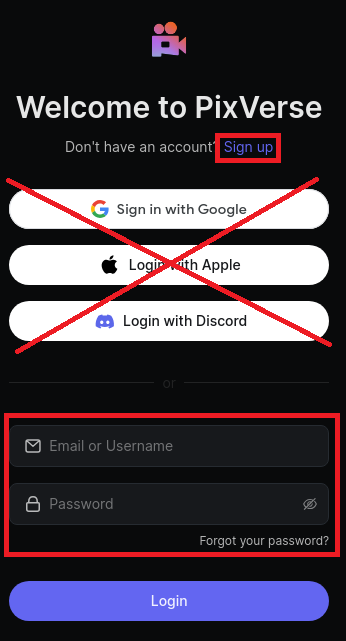
Navigate to [PixVerse.ai](https://PixVerse.ai) and sign up with an email account. Our API does not support Gmail, Apple, or Discord accounts. We strongly recommend creating a separate PixVerse.ai account designated for API work.
## Configure PixVerse.ai API account
Proceed to [POST /accounts/`email`](../api-pixverse-v2/post-pixverse-accounts-email) and configure the PixVerse API account to using `email` and `password`.
## OPTIONAL Configure PixVerse API to use the current PixVerse.ai session
The PixVerse.ai website enforces a single active session for a given account. When the API is running, it will terminate your web session. If you want to use the website and run the API simultaneously, you will need to perform the following steps in the **exact** order:
* [POST /accounts/`email`](../api-pixverse-v2/post-pixverse-accounts-email) using your `email` and `password`.
* Navigate to [PixVerse.ai](https://PixVerse.ai), **logout** from your account, and **login** again.
* Using the screenshot below, locate the session `token`.
Screenshot
* [POST /accounts/`email`](../api-pixverse-v2/post-pixverse-accounts-email) using your `email`, `password` and the obtained `token`.
* Keep the website open. Now, your API and your browser will share the session token, allowing you to use both.
Keep in mind that the API will eventually try to refresh the token, so the approach described above is only effective for a limited time. We strongly recommend not using the API account for any manual generation to avoid any interference with the API.
=== URL: https://useapi.net/docs/api-pixverse-v2 ===
Document URL: https://useapi.net/docs/api-pixverse-v2
---
layout: default
title: PixVerse API v2
nav_order: 6000
has_children: true
permalink: /docs/api-pixverse-v2
---
# PixVerse API v2
December 6, 2024 (January 27, 2026)
This is an [experimental](../../docs/legal) API for [PixVerse.ai](https://pixverse.ai). PixVerse.ai generates videos from text and image prompts, supports a large number of video effects, and can extend, upscale, and lipsync videos.
The PixVerse latest models `v5.6`, `v5.5`, `v5`, and `v5-fast` are supported along with Off-Peak mode (50% off credits), see [model capabilities](../../docs/api-pixverse-v2/model-capabilities).
Please see the table below for a cost comparison of the web subscription used by this API versus official API subscription.
💲 Cost calculator
The [web subscription](https://app.pixverse.ai/subscribe) gives you full access to every available video effect with no restrictions, while the official [API subscription](https://platform.pixverse.ai/billing) strictly limits you to just 1, 3 or 5 effect options per billing period. The official API does not support Off-Peak mode (50% off credits).
**v5.5**
| Video | [$60/m Premium web subscription](https://app.pixverse.ai/subscribe) 15,000 credits/month | [$100/ Essential API subscription](https://platform.pixverse.ai/billing) 15,000 credits/month |
| 5s 360p | 20 credits / $0.08 | 45 credits / $0.30 |
| 5s 360p + audio | 25 credits / $0.10 | 55 credits / $0.37 |
| 8s 360p | 40 credits / $0.16 | 90 credits / $0.60 |
| 8s 360p + audio | 50 credits / $0.20 | 100 credits / $0.67 |
| 10s 360p | 40 credits / $0.16 | 99 credits / $0.66 |
| 10s 360p + audio | 50 credits / $0.20 | 109 credits / $0.73 |
| 5s 540p | 30 credits / $0.12 | 45 credits / $0.30 |
| 5s 540p + audio | 40 credits / $0.16 | 55 credits / $0.37 |
| 8s 540p | 60 credits / $0.24 | 90 credits / $0.60 |
| 8s 540p + audio | 80 credits / $0.32 | 100 credits / $0.67 |
| 10s 540p | 60 credits / $0.24 | 99 credits / $0.66 |
| 10s 540p + audio | 80 credits / $0.32 | 109 credits / $0.73 |
| 5s 720p | 40 credits / $0.16 | 60 credits / $0.40 |
| 5s 720p + audio | 50 credits / $0.20 | 70 credits / $0.47 |
| 8s 720p | 80 credits / $0.32 | 120 credits / $0.80 |
| 8s 720p + audio | 100 credits / $0.40 | 130 credits / $0.87 |
| 10s 720p | 80 credits / $0.32 | 132 credits / $0.88 |
| 10s 720p + audio | 100 credits / $0.40 | 142 credits / $0.95 |
| 5s 1080p | 80 credits / $0.32 | 120 credits / $0.80 |
| 5s 1080p + audio | 100 credits / $0.40 | 130 credits / $0.87 |
| 8s 1080p | 160 credits / $0.64 | 240 credits / $1.60 |
| 8s 1080p + audio | 200 credits / $0.80 | 250 credits / $1.67 |
**v5**
| Video | [$60/m Premium web subscription](https://app.pixverse.ai/subscribe) 15,000 credits/month | [$100/ Essential API subscription](https://platform.pixverse.ai/billing) 15,000 credits/month |
| 5s 360p | 45 credits / $0.18 | 45 credits / $0.30 |
| 8s 360p | 90 credits / $0.36 | 90 credits / $0.60 |
| 5s 540p | 45 credits / $0.18 | 45 credits / $0.30 |
| 8s 540p | 90 credits / $0.36 | 90 credits / $0.60 |
| 5s 720p | 60 credits / $0.24 | 60 credits / $0.40 |
| 8s 720p | 120 credits / $0.48 | 120 credits / $0.80 |
| 5s 1080p | 120 credits / $0.48 | 120 credits / $0.80 |
| 8s 1080p | 240 credits / $0.96 | 240 credits / $1.60 |
**Other**
| Feature | Web | API |
| 5s 4K Upscale | 30 credits / $0.12 | n/a |
| 8s 4K Upscale | 60 credits / $0.24 | n/a |
| Concurrent generations | 8 concurrency limit | 5 concurrency limit |
| Effect available | **all** 150+ effects | 3 effect available |
[Setup PixVerse](../../docs/start-here/setup-pixverse)
[Postman collection](https://www.postman.com/useapinet/useapi-net/collection) (January 27, 2026)
Check out generated videos on YouTube.
Blogs:
* [PixVerse v5.6](../../blog/260127)
* [PixVerse Modify](../../blog/260126)
* [PixVerse v5.5](../../blog/251205)
* [PixVerse v5](../../blog/250829)
Developer Community:
* Discord Server
* Telegram Channel
* r/pixverse_api
=== URL: https://useapi.net/docs/api-pixverse-v2/del-pixverse-accounts-email ===
Document URL: https://useapi.net/docs/api-pixverse-v2/del-pixverse-accounts-email
---
layout: default
title: DEL accounts/email
parent: PixVerse API v2
nav_order: 400
---
## Delete PixVerse API account
{: .no_toc }
December 6, 2024
## Table of contents
{: .no_toc .text-delta }
1. TOC
{:toc}
---
{: .delete }
> **https://api.useapi.net/v2/accounts/`email`**
The `email` value should correspond to an account configured previously via a [POST /accounts/`email`](post-pixverse-accounts-email) request.
##### Request Headers
``` yaml
Authorization: Bearer {API token}
```
- `API token` is **required**, see [Setup useapi.net](../start-here/setup-useapi) for details.
##### Responses
{% tabs del_account_PixVerse_v2_response %}
{% tab del_account_PixVerse_v2_response 204 %}
204 No Content
{% endtab %}
{% tab del_account_PixVerse_v2_response 401 %}
401 Unauthorized
```json
{
"error": "Unauthorized",
"code": 401
}
```
{% endtab %}
{% tab del_account_PixVerse_v2_response 404 %}
404 Not Found
{% endtab %}
{% endtabs %}
##### Model
```typescript
{ // TypeScript, all fields are optional
error: string,
errorDetails: string,
code: number
}
```
##### Examples
{% tabs del_account_PixVerse_v2_example %}
{% tab del_account_PixVerse_v2_example Curl %}
``` bash
curl -H "Accept: application/json" \
-H "Content-Type: application/json" \
-H "Authorization: Bearer …" \
-X DELETE https://api.useapi.net/v2/pixverse/accounts/
```
{% endtab %}
{% tab del_account_PixVerse_v2_example JavaScript %}
``` javascript
const email = "Previously configured account email";
const apiUrl = `https://api.useapi.net/v2/pixverse/accounts/${email}`;
const token = "API token";
const data = {
method: 'DELETE',
headers: {
'Authorization': `Bearer ${token}`,
'Content-Type': 'application/json' }
};
const response = await fetch(apiUrl, data);
const result = await response.json();
console.log("response", {response, result});
```
{% endtab %}
{% tab del_account_PixVerse_v2_example Python %}
``` python
import requests
email = "Previously configured account email"
apiUrl = f"https://api.useapi.net/v2/pixverse/accounts/{email}"
token = "API token"
headers = {
"Content-Type": "application/json",
"Authorization" : f"Bearer {token}"
}
response = requests.delete(apiUrl, headers=headers)
print(response, response.json())
```
{% endtab %}
{% endtabs %}
=== URL: https://useapi.net/docs/api-pixverse-v2/del-pixverse-scheduler-video_id ===
Document URL: https://useapi.net/docs/api-pixverse-v2/del-pixverse-scheduler-video_id
---
layout: default
title: DEL scheduler/video_id
parent: PixVerse API v2
nav_order: 1800
---
## Cancel video currently being executed by the API
{: .no_toc }
December 6, 2024
## Table of contents
{: .no_toc .text-delta }
1. TOC
{:toc}
---
Remove `video_id` generation tracking by the API.
{: .delete }
> **https://api.useapi.net/v2/pixverse/scheduler/`video_id`**
##### Request Headers
``` yaml
Authorization: Bearer {API token}
```
- `API token` is **required**, see [Setup useapi.net](../start-here/setup-useapi) for details.
##### Path parameter
- `video_id` is **required**. Specify video_id you want to cancel.
##### Responses
{% tabs delete_scheduler_PixVerse_v2_scheduler_response %}
{% tab delete_scheduler_PixVerse_v2_scheduler_response 204 %}
204 No Content
{% endtab %}
{% tab delete_scheduler_PixVerse_v2_scheduler_response 400 %}
400 Bad Request
```json
{
"error": "",
"code": 400
}
```
{% endtab %}
{% tab delete_scheduler_PixVerse_v2_scheduler_response 401 %}
401 Unauthorized
```json
{
"error": "Unauthorized",
"code": 401
}
```
{% endtab %}
{% tab delete_scheduler_PixVerse_v2_scheduler_response 404 %}
404 Not Found
```json
{
"error": "Unable to locate running video_id "
}
```
{% endtab %}
{% endtabs %}
##### Model
```typescript
{ // TypeScript, all fields are optional
error: string
code: number
}
```
##### Examples
{% tabs delete_scheduler_PixVerse_v2_scheduler_example %}
{% tab delete_scheduler_PixVerse_v2_scheduler_example Curl %}
``` bash
curl -H "Accept: application/json" \
-H "Content-Type: application/json" \
-H "Authorization: Bearer …" \
-X DELETE "https://api.useapi.net/v2/pixverse/scheduler/video_id"
```
{% endtab %}
{% tab delete_scheduler_PixVerse_v2_scheduler_example JavaScript %}
``` javascript
const video_id = "video_id to cancel";
const apiUrl = `https://api.useapi.net/v2/pixverse/scheduler/${video_id}`;
const token = "API token";
const data = {
method: 'DELETE',
headers: {
'Authorization': `Bearer ${token}`,
'Content-Type': 'application/json' }
};
const response = await fetch(apiUrl, data);
const result = await response.json();
console.log("response", {response, result});
```
{% endtab %}
{% tab delete_scheduler_PixVerse_v2_scheduler_example Python %}
``` python
import requests
video_id = "video_id to cancel"
apiUrl = f"https://api.useapi.net/v2/pixverse/scheduler/{video_id}"
token = "API token"
headers = {
"Content-Type": "application/json",
"Authorization" : f"Bearer {token}"
}
response = requests.delete(apiUrl, headers=headers)
print(response, response.json())
```
{% endtab %}
{% endtabs %}
=== URL: https://useapi.net/docs/api-pixverse-v2/del-pixverse-videos-video_id ===
Document URL: https://useapi.net/docs/api-pixverse-v2/del-pixverse-videos-video_id
---
layout: default
title: DEL videos/video_id
parent: PixVerse API v2
nav_order: 800
---
## Delete a video
{: .no_toc }
December 6, 2024
## Table of contents
{: .no_toc .text-delta }
1. TOC
{:toc}
---
{: .delete }
> **https://api.useapi.net/v2/pixverse/videos/`video_id`**
##### Request Headers
``` yaml
Authorization: Bearer {API token}
Content-Type: application/json
```
- `API token` is **required**, see [Setup useapi.net](../start-here/setup-useapi) for details.
##### Path parameter
- `video_id` is **required**. Specify the video_id you want to delete.
##### Responses
{% tabs del_PixVerse_v2_videos_video_id_response %}
{% tab del_PixVerse_v2_videos_video_id_response 200 %}
200 OK
Video was successfully deleted.
{% endtab %}
{% tab del_PixVerse_v2_videos_video_id_response 400 %}
400 Bad Request
```json
{
"error": "",
"code": 400
}
```
{% endtab %}
{% tab del_PixVerse_v2_videos_video_id_response 401 %}
401 Unauthorized
```json
{
"error": "Unauthorized",
"code": 401
}
```
{% endtab %}
{% endtabs %}
##### Examples
{% tabs del_PixVerse_v2_videos_video_id_example %}
{% tab del_PixVerse_v2_videos_video_id_example Curl %}
``` bash
curl -H "Accept: application/json" \
-H "Content-Type: application/json" \
-H "Authorization: Bearer …" \
-X DELETE "https://api.useapi.net/v2/pixverse/videos/video_id"
```
{% endtab %}
{% tab del_PixVerse_v2_videos_video_id_example JavaScript %}
``` javascript
const token = "API token";
const video_id = "video_id to delete";
const apiUrl = `https://api.useapi.net/v2/pixverse/videos/${video_id}`;
const response = await fetch(apiUrl, {
method: 'DELETE',
headers: {
"Authorization": `Bearer ${token}`,
},
});
const result = await response.json();
console.log("response", {response, result});
```
{% endtab %}
{% tab del_PixVerse_v2_videos_video_id_example Python %}
``` python
import requests
token = "API token"
video_id = "video_id to delete"
apiUrl = f"https://api.useapi.net/v2/pixverse/videos/{video_id}"
headers = {
"Content-Type": "application/json",
"Authorization" : f"Bearer {token}"
}
response = requests.delete(apiUrl, headers=headers)
print(response, response.json())
```
{% endtab %}
{% endtabs %}
=== URL: https://useapi.net/docs/api-pixverse-v2/get-pixverse-accounts-email ===
Document URL: https://useapi.net/docs/api-pixverse-v2/get-pixverse-accounts-email
---
layout: default
title: GET accounts/email
parent: PixVerse API v2
nav_order: 200
---
## Retrieve PixVerse API account configuration for `email`
{: .no_toc }
December 6, 2024
## Table of contents
{: .no_toc .text-delta }
1. TOC
{:toc}
---
{: .get }
> **https://api.useapi.net/v2/pixverse/accounts/`email`**
The `email` value should correspond to an account configured previously via a [POST /accounts/`email`](post-pixverse-accounts-email) request.
##### Request Headers
``` yaml
Authorization: Bearer {API token}
Content-Type: application/json
```
- `API token` is **required**, see [Setup useapi.net](../start-here/setup-useapi) for details.
##### Responses
{% tabs get_account_PixVerse_v2_account_response %}
{% tab get_account_PixVerse_v2_account_response 200 %}
200 OK
```json
{
"email": "",
"password": "…secured…",
"maxJobs": 3,
"jwt": {
"AccountId": 66778899,
"ExpireTime": 123456789,
"ExpireTimeUTC": "2025-01-01T12:13:14.000Z",
"Username": "",
"token": "abc…secured…cde"
}
}
```
{% endtab %}
{% tab get_account_PixVerse_v2_account_response 401 %}
401 Unauthorized
```json
{
"error": "Unauthorized",
"code": 401
}
```
{% endtab %}
{% tab get_account_PixVerse_v2_account_response 404 %}
404 Not Found
Configuration not found. To create configuration use [POST /accounts/`email`](https://useapi.net/docs/api-pixverse-v2/post-pixverse-accounts-email).
{% endtab %}
{% endtabs %}
##### Model
```typescript
{ // TypeScript, all fields are optional
email: string
password: string
maxJobs: number
jwt: {
AccountId: number
ExpireTime: number
ExpireTimeUTC: string
Username: string
token: string
}
}
```
##### Examples
{% tabs get_account_PixVerse_v2_account_example %}
{% tab get_account_PixVerse_v2_account_example Curl %}
``` bash
curl https://api.useapi.net/v2/pixverse/accounts/ \
-H "Accept: application/json" \
-H "Authorization: Bearer …"
```
{% endtab %}
{% tab get_account_PixVerse_v2_account_example JavaScript %}
``` javascript
const token = "API token";
const email = "Previously configured account email";
const apiUrl = `https://api.useapi.net/v2/pixverse/accounts/${email}`;
const response = await fetch(apiUrl, {
headers: {
"Authorization": `Bearer ${token}`,
},
});
const result = await response.json();
console.log("response", {response, result});
```
{% endtab %}
{% tab get_account_PixVerse_v2_account_example Python %}
``` python
import requests
token = "API token"
email = "Previously configured account email"
apiUrl = f"https://api.useapi.net/v2/pixverse/accounts/{email}"
headers = {
"Content-Type": "application/json",
"Authorization" : f"Bearer {token}"
}
response = requests.get(apiUrl, headers=headers)
print(response, response.json())
```
{% endtab %}
{% endtabs %}
=== URL: https://useapi.net/docs/api-pixverse-v2/get-pixverse-accounts ===
Document URL: https://useapi.net/docs/api-pixverse-v2/get-pixverse-accounts
---
layout: default
title: GET accounts
parent: PixVerse API v2
nav_order: 100
---
## Retrieve PixVerse API accounts configuration
{: .no_toc }
December 6, 2024
## Table of contents
{: .no_toc .text-delta }
1. TOC
{:toc}
---
For your convenience, you can specify your PixVerse configuration values under your PixVerse account. If you specify multiple PixVerse accounts, the API will automatically perform load balancing by randomly selecting an account with available capacity before making calls to PixVerse.
This endpoint retrieves the complete list of configured API accounts for PixVerse.
{: .get }
> **https://api.useapi.net/v2/pixverse/accounts**
##### Request Headers
``` yaml
Authorization: Bearer {API token}
Content-Type: application/json
```
- `API token` is **required**, see [Setup useapi.net](../start-here/setup-useapi) for details.
##### Responses
{% tabs account_PixVerse_v2_response %}
{% tab account_PixVerse_v2_response 200 %}
200 OK
```json
{
"": {
"email": "",
"jwt": {
"AccountId": 1122334455,
"ExpireTime": 123456789,
"ExpireTimeUTC": "2025-01-01T12:13:14.000Z"
"Username": "",
"token": "abc…secured…cde",
},
"maxJobs": 8,
"password": "…secured…"
},
"": {
"email": "",
"jwt": {
"AccountId": 66778899,
"ExpireTime": 123456789,
"ExpireTime": 123456789,
"ExpireTimeUTC": "2025-01-01T12:13:14.000Z"
"Username": "",
"token": "abc…secured…cde",
},
"maxJobs": 3,
"password": "…secured…"
}
}
```
{% endtab %}
{% tab account_PixVerse_v2_response 401 %}
401 Unauthorized
```json
{
"error": "Unauthorized",
"code": 401
}
```
{% endtab %}
{% tab account_PixVerse_v2_response 404 %}
404 Not Found
Configuration not found. To create configuration use [POST /accounts/`email`](https://useapi.net/docs/api-pixverse-v2/post-pixverse-accounts-email).
{% endtab %}
{% endtabs %}
##### Model
```typescript
{ // TypeScript, all fields are optional
[email: string]: {
email: string
jwt: {
AccountId: number
ExpireTime: number
ExpireTimeUTC: string
Username: string
token: string
}
maxJobs: number
password: string
}
}
```
##### Examples
{% tabs account_PixVerse_v2_example %}
{% tab account_PixVerse_v2_example Curl %}
``` bash
curl https://api.useapi.net/v2/pixverse/accounts \
-H "Accept: application/json" \
-H "Authorization: Bearer …"
```
{% endtab %}
{% tab account_PixVerse_v2_example JavaScript %}
``` javascript
const token = "API token";
const apiUrl = "https://api.useapi.net/v2/pixverse/accounts";
const response = await fetch(apiUrl, {
headers: {
"Authorization": `Bearer ${token}`,
},
});
const result = await response.json();
console.log("response", {response, result});
```
{% endtab %}
{% tab account_PixVerse_v2_example Python %}
``` python
import requests
token = "API token"
apiUrl = "https://api.useapi.net/v2/pixverse/accounts"
headers = {
"Content-Type": "application/json",
"Authorization" : f"Bearer {token}"
}
response = requests.get(apiUrl, headers=headers)
print(response, response.json())
```
{% endtab %}
{% endtabs %}
=== URL: https://useapi.net/docs/api-pixverse-v2/get-pixverse-features ===
Document URL: https://useapi.net/docs/api-pixverse-v2/get-pixverse-features
---
layout: default
title: GET features
parent: PixVerse API v2
nav_order: 450
---
## Retrieve your PixVerse.ai account information (credits etc)
{: .no_toc }
December 6, 2024
## Table of contents
{: .no_toc .text-delta }
1. TOC
{:toc}
---
Retrieve your [PixVerse.ai](https://PixVerse.ai) account information, see [Setup PixVerse](../start-here/setup-pixverse) for details.
{: .get }
> **https://api.useapi.net/v2/pixverse/features/?…**
##### Request Headers
``` yaml
Authorization: Bearer {API token}
Content-Type: application/json
```
- `API token` is **required**, see [Setup useapi.net](../start-here/setup-useapi) for details.
##### Query Parameters
- `email` is optional when only one [account](../api-pixverse-v2/get-pixverse-accounts) configured. However, if you have multiple accounts configured, this parameter becomes **required**.
##### Responses
{% tabs get_features_PixVerse_v2_features_response %}
{% tab get_features_PixVerse_v2_features_response 200 %}
200 OK
```json
{
"user_id": 11223344,
"member_id": 5566778899,
"product_id": 9988776655,
"plan_name": "Pro Plan",
"next_plan_name": "Pro Plan",
"next_plan_type": 2,
"current_plan_type": 2,
"type": 0,
"credit_daily": 30,
"credit_daily_gift": 30,
"initial_credit_gift": 0,
"credit_monthly": 5600,
"credit_monthly_gift": 6000,
"credit_package": 20,
"expired_date": "2025-01-01T21:21:21Z",
"price": "30",
"billing_period": 1,
"next_billing_period": 1,
"billing_renewal_date": "2025-01-01T21:21:21Z",
"payment": 1,
"invoice_url": "https://stripe.pay.pixverse.ai/...",
"stripe_bill_url": "https://stripe.pay.pixverse.ai/...",
"gen_simultaneously": 5,
"allow_fast_mode": 1,
"allow_relaxed_mode": 1,
"allow_use_new_feat": 1,
"allow_private_generate": 1,
"remove_watermark": 1,
"allow_purchase_credit": 1,
"sub_order_in_progress": 0,
"allow_effect": 1
}
```
{% endtab %}
{% tab get_features_PixVerse_v2_features_response 400 %}
400 Bad Request
```json
{
"error": "",
"code": 400
}
```
{% endtab %}
{% tab get_features_PixVerse_v2_features_response 401 %}
401 Unauthorized
```json
{
"error": "Unauthorized",
"code": 401
}
```
{% endtab %}
{% endtabs %}
##### Model
```typescript
{ // TypeScript, all fields are optional
user_id: number
member_id: number
product_id: number
plan_name: string
next_plan_name: string
next_plan_type: number
current_plan_type: number
type: number
credit_daily: number
credit_daily_gift: number
initial_credit_gift: number
credit_monthly: number
credit_monthly_gift: number
credit_package: number
expired_date: string
price: string
billing_period: number
next_billing_period: number
billing_renewal_date: string
payment: number
invoice_url: string
stripe_bill_url: string
gen_simultaneously: number
allow_fast_mode: number
allow_relaxed_mode: number
allow_use_new_feat: number
allow_private_generate: number
remove_watermark: number
allow_purchase_credit: number
sub_order_in_progress: number
allow_effect: number
}
```
##### Examples
{% tabs get_features_PixVerse_v2_features_example %}
{% tab get_features_PixVerse_v2_features_example Curl %}
``` bash
curl "https://api.useapi.net/v2/pixverse/features/?email=email" \
-H "Accept: application/json" \
-H "Authorization: Bearer …"
```
{% endtab %}
{% tab get_features_PixVerse_v2_features_example JavaScript %}
``` javascript
const token = "API token";
const email= "Previously configured account email";
const apiUrl = `https://api.useapi.net/v2/pixverse/features/?email=${email}`;
const response = await fetch(apiUrl, {
headers: {
"Authorization": `Bearer ${token}`,
},
});
const result = await response.json();
console.log("response", {response, result});
```
{% endtab %}
{% tab get_features_PixVerse_v2_features_example Python %}
``` python
import requests
token = "API token"
email= "Previously configured account email"
apiUrl = f"https://api.useapi.net/v2/pixverse/features/?email={email}"
headers = {
"Content-Type": "application/json",
"Authorization" : f"Bearer {token}"
}
response = requests.get(apiUrl, headers=headers)
print(response, response.json())
```
{% endtab %}
{% endtabs %}
=== URL: https://useapi.net/docs/api-pixverse-v2/get-pixverse-scheduler-available ===
Document URL: https://useapi.net/docs/api-pixverse-v2/get-pixverse-scheduler-available
---
layout: default
title: GET scheduler/available
parent: PixVerse API v2
nav_order: 1600
---
## Retrieve the list of videos currently running via the API along with the available account capacity
{: .no_toc }
December 6, 2024
## Table of contents
{: .no_toc .text-delta }
1. TOC
{:toc}
---
This endpoint retrieves the list of videos currently running via the API along with the available account capacity.
If you want to get all videos currently being executed including you manually initiated from PixVerse.ai website use [GET /videos](../api-pixverse-v2/get-pixverse-videos).
{: .get }
> **https://api.useapi.net/v2/pixverse/scheduler/available**
##### Request Headers
``` yaml
Authorization: Bearer {API token}
Content-Type: application/json
```
- `API token` is **required**, see [Setup useapi.net](../start-here/setup-useapi) for details.
##### Responses
{% tabs get_scheduler_available_PixVerse_v2_scheduler_available_response %}
{% tab get_scheduler_available_PixVerse_v2_scheduler_available_response 200 %}
200 OK
```json
{
"executing": [
{
"video_id": "user:user_id-pixverse:email-video:id1",
"started": "2024-09-25T01:55:16.128Z",
"elapsed": "03:57",
"replyUrl": "",
"replyRef": ""
},
{
"video_id": "user:user_id-pixverse:email-video:inN",
"started": "2024-09-25T01:58:18.555Z",
"elapsed": "00:35",
"replyUrl": "",
"replyRef": ""
}
],
"available": [
{
"email": "",
"maxJobs": 5,
"executing": 0,
"available": 5
},
{
"email": "",
"maxJobs": 8,
"executing": 3,
"available": 2
},
{
"email": "",
"maxJobs": 3,
"executing": 2,
"available": 1
}
]
}
```
{% endtab %}
{% tab get_scheduler_available_PixVerse_v2_scheduler_available_response 401 %}
401 Unauthorized
```json
{
"error": "Unauthorized",
"code": 401
}
```
{% endtab %}
{% endtabs %}
##### Model
```typescript
{ // TypeScript, all fields are optional
executing: {
video_id: string
started: string
elapsed: string
replyUrl: string
replyRef: string
}[]
available: {
email: string
maxJobs: number
executing: number
available: number
}[]
error: string
code: number
}
```
##### Examples
{% tabs get_scheduler_available_PixVerse_v2_scheduler_available_example %}
{% tab get_scheduler_available_PixVerse_v2_scheduler_available_example Curl %}
``` bash
curl "https://api.useapi.net/v2/pixverse/scheduler/available" \
-H "Accept: application/json" \
-H "Authorization: Bearer …"
```
{% endtab %}
{% tab get_scheduler_available_PixVerse_v2_scheduler_available_example JavaScript %}
``` javascript
const token = "API token";
const apiUrl = `https://api.useapi.net/v2/pixverse/scheduler/available`;
const response = await fetch(apiUrl, {
headers: {
"Authorization": `Bearer ${token}`,
},
});
const result = await response.json();
console.log("response", {response, result});
```
{% endtab %}
{% tab get_scheduler_available_PixVerse_v2_scheduler_available_example Python %}
``` python
import requests
token = "API token"
apiUrl = f"https://api.useapi.net/v2/pixverse/scheduler/available"
headers = {
"Content-Type": "application/json",
"Authorization" : f"Bearer {token}"
}
response = requests.get(apiUrl, headers=headers)
print(response, response.json())
```
{% endtab %}
{% endtabs %}
=== URL: https://useapi.net/docs/api-pixverse-v2/get-pixverse-scheduler ===
Document URL: https://useapi.net/docs/api-pixverse-v2/get-pixverse-scheduler
---
layout: default
title: GET scheduler
parent: PixVerse API v2
nav_order: 1500
---
## Retrieve the list of videos currently being executed by the API
{: .no_toc }
December 6, 2024
## Table of contents
{: .no_toc .text-delta }
1. TOC
{:toc}
---
This endpoint retrieves the list of videos currently being executed by the API. If you want to get all videos currently being executed including you manually initiated from PixVerse.ai website use [GET /videos](../api-pixverse-v2/get-pixverse-videos).
{: .get }
> **https://api.useapi.net/v2/pixverse/scheduler/**
##### Request Headers
``` yaml
Authorization: Bearer {API token}
Content-Type: application/json
```
- `API token` is **required**, see [Setup useapi.net](../start-here/setup-useapi) for details.
##### Responses
{% tabs get_scheduler_PixVerse_v2_scheduler_response %}
{% tab get_scheduler_PixVerse_v2_scheduler_response 200 %}
200 OK
```json
[
{
"videoId": "user:user_id-pixverse:email-video:id1",
"started": "2024-09-25T01:55:16.128Z",
"elapsed": "03:57",
"replyUrl": "",
"replyRef": ""
},
{
"videoId": "user:user_id-pixverse:email-video:inN",
"started": "2024-09-25T01:58:18.555Z",
"elapsed": "00:35",
"replyUrl": "",
"replyRef": ""
}
]
```
{% endtab %}
{% tab get_scheduler_PixVerse_v2_scheduler_response 401 %}
401 Unauthorized
```json
{
"error": "Unauthorized",
"code": 401
}
```
{% endtab %}
{% endtabs %}
##### Model
```typescript
{ // TypeScript, all fields are optional
videoId: string
started: string
elapsed: string
replyUrl: string
replyRef: string
}[]
```
##### Examples
{% tabs get_scheduler_PixVerse_v2_scheduler_example %}
{% tab get_scheduler_PixVerse_v2_scheduler_example Curl %}
``` bash
curl "https://api.useapi.net/v2/pixverse/scheduler/" \
-H "Accept: application/json" \
-H "Authorization: Bearer …"
```
{% endtab %}
{% tab get_scheduler_PixVerse_v2_scheduler_example JavaScript %}
``` javascript
const token = "API token";
const apiUrl = `https://api.useapi.net/v2/pixverse/scheduler/`;
const response = await fetch(apiUrl, {
headers: {
"Authorization": `Bearer ${token}`,
},
});
const result = await response.json();
console.log("response", {response, result});
```
{% endtab %}
{% tab get_scheduler_PixVerse_v2_scheduler_example Python %}
``` python
import requests
token = "API token"
apiUrl = f"https://api.useapi.net/v2/pixverse/scheduler/"
headers = {
"Content-Type": "application/json",
"Authorization" : f"Bearer {token}"
}
response = requests.get(apiUrl, headers=headers)
print(response, response.json())
```
{% endtab %}
{% endtabs %}
=== URL: https://useapi.net/docs/api-pixverse-v2/get-pixverse-videos-effects ===
Document URL: https://useapi.net/docs/api-pixverse-v2/get-pixverse-videos-effects
---
layout: default
title: GET videos/effects
parent: PixVerse API v2
nav_order: 1400
---
## Retrieve the list of effects
{: .no_toc }
December 6, 2024 (January 8, 2026)
## Table of contents
{: .no_toc .text-delta }
1. TOC
{:toc}
---
The returned `effect_type` field indicates the number of images required for a given effect:
- `"1"` = single image (e.g., face swap, dance effects)
- `"2"` = two images (e.g., hug, kiss effects)
The total credit cost for a template is `video_base_cost + fixed_cost`.
{: .get }
> **https://api.useapi.net/v2/pixverse/videos/effects?…**
##### Request Headers
``` yaml
Authorization: Bearer {API token}
Content-Type: application/json
```
- `API token` is **required**, see [Setup useapi.net](../start-here/setup-useapi) for details.
##### Query Parameters
- `email` is optional when only one [account](../api-pixverse-v2/get-pixverse-accounts) configured. However, if you have multiple accounts configured, this parameter becomes **required**.
##### Responses
{% tabs get_PixVerse_v2_videos_effects_response %}
{% tab get_PixVerse_v2_videos_effects_response 200 %}
200 OK
```json
{
"items": [
{
"template_id": 380178461924416,
"display_name": "Miniature Nail Artist Live",
"workflow_tag": "meta_nanopro_it2v_v5_251204",
"display_prompt": "Watch your 3D figurine create gorgeous nail designs!",
"effect_type": "1",
"template_type": 1,
"duration": 5,
"qualities": ["360p", "540p", "720p", "1080p"],
"video_base_cost": 20,
"fixed_cost": 20,
"example_text": "Upload a person photo",
"thumbnail_path": "https://media.pixverse.ai/…png",
"thumbnail_video_path": "https://media.pixverse.ai/…mp4",
"thumbnail_gif_path": "https://media.pixverse.ai/…gif",
"audio_path": "https://media.pixverse.ai/…mp3",
"marker": "new"
},
{
"template_id": 326733946317888,
"display_name": "Hug Together",
"workflow_tag": "interact_hug_250529",
"display_prompt": "Create a heartwarming hug moment",
"effect_type": "2",
"template_type": 1,
"duration": 5,
"qualities": ["360p", "540p", "720p", "1080p"],
"video_base_cost": 20,
"fixed_cost": 0,
"example_text": "Upload a two-person photo",
"thumbnail_path": "https://media.pixverse.ai/…png",
"thumbnail_video_path": "https://media.pixverse.ai/…mp4",
"thumbnail_gif_path": "https://media.pixverse.ai/…gif",
"audio_path": "https://media.pixverse.ai/…mp3",
"marker": "hot"
}
],
"total": 150,
"next_offset": 0
}
```
{% endtab %}
{% tab get_PixVerse_v2_videos_effects_response 400 %}
400 Bad Request
```json
{
"error": "",
"code": 400
}
```
{% endtab %}
{% tab get_PixVerse_v2_videos_effects_response 401 %}
401 Unauthorized
```json
{
"error": "Unauthorized",
"code": 401
}
```
{% endtab %}
{% endtabs %}
##### Model
```typescript
{ // TypeScript, all fields are optional
items: {
template_id: number
display_name: string
workflow_tag: string
display_prompt: string
effect_type: string // "1" = single image, "2" = two images required
template_type: number // 1 = video template
duration: number // video duration in seconds (5 or 8)
qualities: string[] // available quality options
video_base_cost: number // base credit cost
fixed_cost: number // template-specific extra cost (0 for basic, 20 for premium)
example_text: string // usage hint (e.g., "Upload a person photo")
thumbnail_path: string
thumbnail_video_path: string
thumbnail_gif_path: string
audio_path: string
marker: string // "new", "hot", or ""
}[]
total: number
next_offset: number
}
```
##### Examples
{% tabs get_PixVerse_v2_videos_effects_example %}
{% tab get_PixVerse_v2_videos_effects_example Curl %}
``` bash
curl "https://api.useapi.net/v2/pixverse/videos/effects?email=email" \
-H "Accept: application/json" \
-H "Authorization: Bearer …"
```
{% endtab %}
{% tab get_PixVerse_v2_videos_effects_example JavaScript %}
``` javascript
const token = "API token";
const email= "Previously configured account email";
const apiUrl = `https://api.useapi.net/v2/pixverse/videos/effects?email=${email}`;
const response = await fetch(apiUrl, {
headers: {
"Authorization": `Bearer ${token}`,
},
});
const result = await response.json();
console.log("response", {response, result});
```
{% endtab %}
{% tab get_PixVerse_v2_videos_effects_example Python %}
``` python
import requests
token = "API token"
email= "Previously configured account email"
apiUrl = f"https://api.useapi.net/v2/pixverse/videos/effects?email={email}"
headers = {
"Content-Type": "application/json",
"Authorization" : f"Bearer {token}"
}
response = requests.get(apiUrl, headers=headers)
print(response, response.json())
```
{% endtab %}
{% endtabs %}
=== URL: https://useapi.net/docs/api-pixverse-v2/get-pixverse-videos-restyles ===
Document URL: https://useapi.net/docs/api-pixverse-v2/get-pixverse-videos-restyles
---
layout: default
title: GET videos/restyles
nav_exclude: true
---
## Retrieve the list of styles used for restyling
{: .no_toc }
March 31, 2025 (January 27, 2026)
PixVerse website no longer supports Restyle. This endpoint no loner available.
## Table of contents
{: .no_toc .text-delta }
1. TOC
{:toc}
---
{: .get }
> **https://api.useapi.net/v2/pixverse/videos/restyles?…**
##### Request Headers
``` yaml
Authorization: Bearer {API token}
Content-Type: application/json
```
- `API token` is **required**, see [Setup useapi.net](../start-here/setup-useapi) for details.
##### Query Parameters
- `email` is optional when only one [account](../api-pixverse-v2/get-pixverse-accounts) configured. However, if you have multiple accounts configured, this parameter becomes **required**.
- `limit` is optional, specify the number of videos to return. Default 100.
- `offset` is optional, specify the offset from where to start.
##### Responses
{% tabs get_PixVerse_v2_videos_restyles_response %}
{% tab get_PixVerse_v2_videos_restyles_response 200 %}
200 OK
```json
{
"items": [
{
"restyle_id": 322004186061696,
"display_name": "Van Gogh",
"restyle_prompt": "Impressionistic Van Gogh style, with thick, expressive brushstrokes and vibrant, swirling color palettes, reminiscent of classic paintings, featuring textured yet simplified characters and environments full of movement and emotional depth.",
"thumbnail_path": "asset/template/vangogh_1.png",
"thumbnail_url": "https://media.pixverse.ai/asset%2Ftemplate%2Fvangogh_1.png",
"marker": "new",
"created_at": "2025-02-12T09:02:40Z",
"updated_at": "2025-02-18T02:24:14Z"
},
{
"restyle_id": 322876019426368,
"display_name": "Ghibli Animation",
"restyle_prompt": "Ghibli style, with whimsical, fluid animation and soft, earthy color palettes, reminiscent of Studio Ghibli’s enchanting worlds, featuring simplified yet lush characters and environments made of hand-painted textures and dreamlike, nature-inspired elements.",
"thumbnail_path": "asset/template/ghibli_1.png",
"thumbnail_url": "https://media.pixverse.ai/asset%2Ftemplate%2Fghibli_1.png",
"marker": "new",
"created_at": "2025-02-17T07:17:40Z",
"updated_at": "2025-02-17T10:19:09Z"
}
]
}
```
{% endtab %}
{% tab get_PixVerse_v2_videos_restyles_response 400 %}
400 Bad Request
```json
{
"error": "",
"code": 400
}
```
{% endtab %}
{% tab get_PixVerse_v2_videos_restyles_response 401 %}
401 Unauthorized
```json
{
"error": "Unauthorized",
"code": 401
}
```
{% endtab %}
{% endtabs %}
##### Model
```typescript
{ // TypeScript, all fields are optional
items: {
restyle_id: number
restyle_tag: string
display_name: string
restyle_prompt: string
thumbnail_path: string
thumbnail_url: string
thumbnail_video_path: string
thumbnail_video_url: string
show_status: string
app_show_status: string
marker: string
display_prompt: string
i18n_json: object | null
score: number
example_list: string
qualities: any | null
thumbnail_gif_path: string
thumbnail_gif_url: string
app_thumbnail_path: string
app_thumbnail_url: string
app_thumbnail_video_path: string
app_thumbnail_video_url: string
app_thumbnail_gif_path: string
app_thumbnail_gif_url: string
audio_path: string
audio_url: string
is_del: number
is_pinned: string
created_at: string
updated_at: string
}[]
next_offset: number
total: number
}
```
##### Examples
{% tabs get_PixVerse_v2_videos_restyles_example %}
{% tab get_PixVerse_v2_videos_restyles_example Curl %}
``` bash
curl "https://api.useapi.net/v2/pixverse/videos/restyles?email=email" \
-H "Accept: application/json" \
-H "Authorization: Bearer …"
```
{% endtab %}
{% tab get_PixVerse_v2_videos_restyles_example JavaScript %}
``` javascript
const token = "API token";
const email= "Previously configured account email";
const apiUrl = `https://api.useapi.net/v2/pixverse/videos/restyles?email=${email}`;
const response = await fetch(apiUrl, {
headers: {
"Authorization": `Bearer ${token}`,
},
});
const result = await response.json();
console.log("response", {response, result});
```
{% endtab %}
{% tab get_PixVerse_v2_videos_restyles_example Python %}
``` python
import requests
token = "API token"
email= "Previously configured account email"
apiUrl = f"https://api.useapi.net/v2/pixverse/videos/restyles?email={email}"
headers = {
"Content-Type": "application/json",
"Authorization" : f"Bearer {token}"
}
response = requests.get(apiUrl, headers=headers)
print(response, response.json())
```
{% endtab %}
{% endtabs %}
=== URL: https://useapi.net/docs/api-pixverse-v2/get-pixverse-videos-video_id ===
Document URL: https://useapi.net/docs/api-pixverse-v2/get-pixverse-videos-video_id
---
layout: default
title: GET videos/video_id
parent: PixVerse API v2
nav_order: 700
---
## Retrieve a generated video or image information
{: .no_toc }
December 6, 2024 (September 22, 2025)
## Table of contents
{: .no_toc .text-delta }
1. TOC
{:toc}
---
Use this endpoint to retrieve a generated video or image information. Attempting to retrieve a video that is still processing will result in a `404` response. Use [GET /videos](../api-pixverse-v2/get-pixverse-videos) to retrieve all available videos.
As of September 2025, the only endpoint capable of image generation is [POST videos/create](../api-pixverse-v2/post-pixverse-videos-create-v4) when an image `template_id` is used (`template_type: 2`). We're planning to add separate images endpoints once PixVerse rolls out fully-fledged image generation.
{: .get }
> **https://api.useapi.net/v2/pixverse/videos/`video_id`**
##### Request Headers
``` yaml
Authorization: Bearer {API token}
Content-Type: application/json
```
- `API token` is **required**, see [Setup useapi.net](../start-here/setup-useapi) for details.
##### Path parameter
- `video_id` is **required**. Specify the video_id or image_id you want to retrieve.
##### Responses
{% tabs get_videos_video_id_PixVerse_v2_videos_video_id_response %}
{% tab get_videos_video_id_PixVerse_v2_videos_video_id_response 200 %}
200 OK
```json
{
"video_id": "user:-pixverse:-video:112233445566",
"video_status": 1,
"account_id": 33445566,
"created_at": "2024-11-11T12:34:56Z",
"first_frame": "https://media.pixverse.ai/....jpg",
"output_width": 2560,
"output_height": 1472,
"original_video_id": "user:-pixverse:-video:66778899",
"upscaled": 1,
"prompt": "",
"model": "v3",
"negative_prompt": "",
"quality": "360p",
"motion_mode": "normal",
"asset_id": 0,
"auto_character_prompt": 0,
"seed": 0,
"likes": 0,
"model_name": "",
"queue_data": {
"queue_time": 1,
"queue_count": 0
},
"video_duration": 5,
"last_frame": "",
"extended": 0,
"lip_sync": null,
"url": "https://media.pixverse.ai/...mp4",
"img_id": 115994841,
"img_url": "https://media.pixverse.ai/...webp",
"duration": 5,
"motion_brush": "",
"asset_name": "",
"asset_img_url": "",
"remove_watermark": 1,
"nick_name": "",
"avatar": "https://media.pixverse.ai/...jpeg",
"aspect_ratio": "",
"camera_movement": "default",
"relation_type": 0,
"style": "",
"template_id": 307489548427968,
"template_name": "Crazy Cat Woman",
"template_thumbnail_url": "https://media.pixverse.ai/asset%2Ftemplate%2Fcatwoman.png",
"template_thumbnail_video_url": "https://media.pixverse.ai/asset%2Ftemplate%2Fcatwoman.mp4",
"template_i18n_json": "{\"zh-CN\":{\"display_name\":\"疯狂猫女变身\",\"display_prompt\":\"变身妖娆猫女,撩翻全场!\"}}",
"workflow_tag": "",
"customer_paths": null,
"platform": "",
"off_peak": 0,
"video_status_name": "COMPLETED",
"video_status_final": true
}
```
{% endtab %}
{% tab get_videos_video_id_PixVerse_v2_videos_video_id_response 400 %}
400 Bad Request
```json
{
"error": "",
"code": 400
}
```
{% endtab %}
{% tab get_videos_video_id_PixVerse_v2_videos_video_id_response 401 %}
401 Unauthorized
```json
{
"error": "Unauthorized",
"code": 401
}
```
{% endtab %}
{% tab get_videos_video_id_PixVerse_v2_videos_video_id_response 404 %}
404 Not Found
The video was deleted, not found, or is still processing.
```json
{
"error": "The original video has been deleted"
}
```
{% endtab %}
{% endtabs %}
##### Model
```typescript
{ // TypeScript, all fields are optional
video_id: string
video_status: number
account_id: number
created_at: string
first_frame: string
output_width: number
output_height: number
original_video_id: number
upscaled: number
prompt: string
model: string
negative_prompt: string
quality: string
motion_mode: string
asset_id: number
auto_character_prompt: number
seed: number
likes: number
model_name: string
queue_data?: {
queue_time: number
queue_count: number
estimated_gen_time?: number
processing_start_time?: string
}
video_duration: number
last_frame: string
extended: number
lip_sync?: any
original_sound_switch: number
sound_effect_switch: number
lip_sync_switch: number
is_sound: number
url: string
video_path: string
img_id: number
img_url: string
img_path: string
customer_img_path?: string
customer_img_url?: string
duration: number
motion_brush: string
asset_name: string
asset_img_url: string
remove_watermark: number
nick_name: string
avatar: string
aspect_ratio: string
camera_movement: string
relation_type: number
style: string
template_id: number
template_name: string
template_thumbnail_url: string
template_thumbnail_video_url: string
template_thumbnail_gif_url: string
template_i18n_json: string
workflow_tag: string
customer_paths?: {
customer_img_url?: string
customer_img_path?: string
lip_sync_audio_url?: string
lip_sync_audio_path?: string
lip_sync_tts_content?: string
sound_effect_content?: string
lip_sync_tts_audio_path?: string
lip_sync_tts_speaker_id?: string
customer_video_url?: string
customer_video_path?: string
customer_video_duration?: number
customer_first_frame?: string
customer_last_frame?: string
customer_first_frame_url?: string
customer_last_frame_url?: string
customer_img_urls?: string[]
customer_img_paths?: string[]
customer_lip_sync_audio_path?: string
}
platform: string
create_mode: string
qualities?: string[] | null
lora_weight: number
restyle_id: number
restyle_prompt: string
off_peak: number
// added
video_status_name: string
video_status_final: boolean
error: string
}
```
##### Examples
{% tabs get_videos_video_id_PixVerse_v2_videos_video_id_example %}
{% tab get_videos_video_id_PixVerse_v2_videos_video_id_example Curl %}
``` bash
curl "https://api.useapi.net/v2/pixverse/videos/video_id" \
-H "Accept: application/json" \
-H "Authorization: Bearer …"
```
{% endtab %}
{% tab get_videos_video_id_PixVerse_v2_videos_video_id_example JavaScript %}
``` javascript
const token = "API token";
const video_id = "video_id to retrieve";
const apiUrl = `https://api.useapi.net/v2/pixverse/videos/${video_id}`;
const response = await fetch(apiUrl, {
headers: {
"Authorization": `Bearer ${token}`,
},
});
const result = await response.json();
console.log("response", {response, result});
```
{% endtab %}
{% tab get_videos_video_id_PixVerse_v2_videos_video_id_example Python %}
``` python
import requests
token = "API token"
video_id = "video_id to retrieve"
apiUrl = f"https://api.useapi.net/v2/pixverse/videos/{video_id}"
headers = {
"Content-Type": "application/json",
"Authorization" : f"Bearer {token}"
}
response = requests.get(apiUrl, headers=headers)
print(response, response.json())
```
{% endtab %}
{% endtabs %}
=== URL: https://useapi.net/docs/api-pixverse-v2/get-pixverse-videos-voices ===
Document URL: https://useapi.net/docs/api-pixverse-v2/get-pixverse-videos-voices
---
layout: default
title: GET videos/voices
parent: PixVerse API v2
nav_order: 1300
---
## Retrieve the list of voices for lipsync
{: .no_toc }
December 6, 2024
## Table of contents
{: .no_toc .text-delta }
1. TOC
{:toc}
---
{: .get }
> **https://api.useapi.net/v2/pixverse/videos/voices/?…**
##### Request Headers
``` yaml
Authorization: Bearer {API token}
Content-Type: application/json
```
- `API token` is **required**, see [Setup useapi.net](../start-here/setup-useapi) for details.
##### Query Parameters
- `email` is optional when only one [account](../api-pixverse-v2/get-pixverse-accounts) configured. However, if you have multiple accounts configured, this parameter becomes **required**.
##### Responses
{% tabs get_PixVerse_v2_videos_voices_response %}
{% tab get_PixVerse_v2_videos_voices_response 200 %}
200 OK
```json
{
"tts_list": [
{
"speaker_id": "1",
"url": "https://media.pixverse.ai/pixverse/mp3/lipsync/tts/1.mp3",
"display_name": "Emily"
},
{
"speaker_id": "2",
"url": "https://media.pixverse.ai/pixverse/mp3/lipsync/tts/2.mp3",
"display_name": "James"
},
{
"speaker_id": "3",
"url": "https://media.pixverse.ai/pixverse/mp3/lipsync/tts/3.mp3\n",
"display_name": "Isabella"
},
{
"speaker_id": "4",
"url": "https://media.pixverse.ai/pixverse/mp3/lipsync/tts/4.mp3",
"display_name": "Liam"
},
{
"speaker_id": "5",
"url": "https://media.pixverse.ai/pixverse/mp3/lipsync/tts/5.mp3",
"display_name": "Chloe"
},
{
"speaker_id": "6",
"url": "https://media.pixverse.ai/pixverse/mp3/lipsync/tts/6.mp3",
"display_name": "Adrian"
}
]
}
```
{% endtab %}
{% tab get_PixVerse_v2_videos_voices_response 400 %}
400 Bad Request
```json
{
"error": "",
"code": 400
}
```
{% endtab %}
{% tab get_PixVerse_v2_videos_voices_response 401 %}
401 Unauthorized
```json
{
"error": "Unauthorized",
"code": 401
}
```
{% endtab %}
{% endtabs %}
##### Model
```typescript
{ // TypeScript, all fields are optional
tts_list: {
speaker_id: string
url: string
display_name: string
}[]
}
```
##### Examples
{% tabs get_PixVerse_v2_videos_voices_example %}
{% tab get_PixVerse_v2_videos_voices_example Curl %}
``` bash
curl "https://api.useapi.net/v2/pixverse/videos/voices/?email=email" \
-H "Accept: application/json" \
-H "Authorization: Bearer …"
```
{% endtab %}
{% tab get_PixVerse_v2_videos_voices_example JavaScript %}
``` javascript
const token = "API token";
const email= "Previously configured account email";
const apiUrl = `https://api.useapi.net/v2/pixverse/videos/voices/?email=${email}`;
const response = await fetch(apiUrl, {
headers: {
"Authorization": `Bearer ${token}`,
},
});
const result = await response.json();
console.log("response", {response, result});
```
{% endtab %}
{% tab get_PixVerse_v2_videos_voices_example Python %}
``` python
import requests
token = "API token"
email= "Previously configured account email"
apiUrl = f"https://api.useapi.net/v2/pixverse/videos/voices/?email={email}"
headers = {
"Content-Type": "application/json",
"Authorization" : f"Bearer {token}"
}
response = requests.get(apiUrl, headers=headers)
print(response, response.json())
```
{% endtab %}
{% endtabs %}
=== URL: https://useapi.net/docs/api-pixverse-v2/get-pixverse-videos ===
Document URL: https://useapi.net/docs/api-pixverse-v2/get-pixverse-videos
---
layout: default
title: GET videos
parent: PixVerse API v2
nav_order: 600
---
## Retrieve the list of videos
{: .no_toc }
December 6, 2024 (July 8, 2025)
## Table of contents
{: .no_toc .text-delta }
1. TOC
{:toc}
---
Retrieve the list of videos, this will include those currently being generated or queued. Check the `video_status_name` field for the status and the field `video_status_final` to determine if the provided status is the final status.
The API internally uses the field `video_status` to calculate values for `video_status_name` and `video_status_final`. See below for the known statuses map:
| video_status | video_status_name | video_status_final |
|--------|-------------------|--------------------|
| 1 | COMPLETED | true |
| 5 | QUEUED | true |
| 7 | MODERATED | true |
| 9 | GENERATING | false |
| 10 | GENERATING | false |
If field `off_peak` set to `1` that means this video will be generated during off-peak hours.
{: .get }
> **https://api.useapi.net/v2/pixverse/videos/?…**
##### Request Headers
``` yaml
Authorization: Bearer {API token}
Content-Type: application/json
```
- `API token` is **required**, see [Setup useapi.net](../start-here/setup-useapi) for details.
##### Query Parameters
- `email` is optional when only one [account](../api-pixverse-v2/get-pixverse-accounts) configured. However, if you have multiple accounts configured, this parameter becomes **required**.
- `limit` is optional, specify the number of videos to return. Default 40.
- `offset` is optional, specify the offset from where to start.
##### Responses
{% tabs get_videos_PixVerse_v2_videos_response %}
{% tab get_videos_PixVerse_v2_videos_response 200 %}
200 OK
```json
{
"data": [
{
"video_id": "user:-pixverse:-video:11223344",
"video_status": 10,
"account_id": 33445566,
"created_at": "2024-11-11T12:34:56Z",
"first_frame": "",
"output_width": 0,
"output_height": 0,
"original_video_id": 0,
"upscaled": 0,
"prompt": "",
"model": "v3",
"negative_prompt": "",
"quality": "540p",
"motion_mode": "normal",
"asset_id": 0,
"auto_character_prompt": 0,
"seed": 123456,
"likes": 0,
"model_name": "",
"queue_data": {
"queue_time": 1,
"queue_count": 0
},
"video_duration": 5,
"last_frame": "",
"extended": 0,
"lip_sync": {},
"url": "https://media.pixverse.ai/...mp4",
"img_id": 55667788,
"img_url": "https://media.pixverse.ai/...webp",
"duration": 5,
"motion_brush": "",
"asset_name": "",
"asset_img_url": "",
"remove_watermark": 0,
"nick_name": "",
"avatar": "https://media.pixverse.ai/...jpeg",
"aspect_ratio": "3:4",
"camera_movement": "default",
"relation_type": 0,
"style": "",
"template_id": 0,
"template_name": "",
"template_thumbnail_url": "",
"template_thumbnail_video_url": "",
"template_i18n_json": "",
"workflow_tag": "",
"customer_paths": null,
"platform": "",
"video_status_name": "GENERATING",
"off_peak": 0,
"video_status_final": false
},
{
"video_id": "user:-pixverse:-video:112233445566",
"video_status": 1,
"account_id": 33445566,
"created_at": "2024-11-11T12:34:56Z",
"first_frame": "https://media.pixverse.ai/....jpg",
"output_width": 2560,
"output_height": 1472,
"original_video_id": "user:-pixverse:-video:66778899",
"upscaled": 1,
"prompt": "",
"model": "v3",
"negative_prompt": "",
"quality": "360p",
"motion_mode": "normal",
"asset_id": 0,
"auto_character_prompt": 0,
"seed": 0,
"likes": 0,
"model_name": "",
"queue_data": {
"queue_time": 1,
"queue_count": 0
},
"video_duration": 5,
"last_frame": "",
"extended": 0,
"lip_sync": null,
"url": "https://media.pixverse.ai/...mp4",
"img_id": 115994841,
"img_url": "https://media.pixverse.ai/...webp",
"duration": 5,
"motion_brush": "",
"asset_name": "",
"asset_img_url": "",
"remove_watermark": 1,
"nick_name": "",
"avatar": "https://media.pixverse.ai/...jpeg",
"aspect_ratio": "",
"camera_movement": "default",
"relation_type": 0,
"style": "",
"template_id": 307489548427968,
"template_name": "Crazy Cat Woman",
"template_thumbnail_url": "https://media.pixverse.ai/asset%2Ftemplate%2Fcatwoman.png",
"template_thumbnail_video_url": "https://media.pixverse.ai/asset%2Ftemplate%2Fcatwoman.mp4",
"template_i18n_json": "{\"zh-CN\":{\"display_name\":\"疯狂猫女变身\",\"display_prompt\":\"变身妖娆猫女,撩翻全场!\"}}",
"workflow_tag": "",
"customer_paths": null,
"platform": "",
"off_peak": 1,
"video_status_name": "COMPLETED",
"video_status_final": true
}
],
"next_offset": 40,
"total": 55
}
```
{% endtab %}
{% tab get_videos_PixVerse_v2_videos_response 400 %}
400 Bad Request
```json
{
"error": "",
"code": 400
}
```
{% endtab %}
{% tab get_videos_PixVerse_v2_videos_response 401 %}
401 Unauthorized
```json
{
"error": "Unauthorized",
"code": 401
}
```
{% endtab %}
{% endtabs %}
##### Model
```typescript
{ // TypeScript, all fields are optional
{
video_id: string
video_status: number
account_id: number
created_at: string
first_frame: string
output_width: number
output_height: number
original_video_id: number
upscaled: number
prompt: string
model: string
negative_prompt: string
quality: string
motion_mode: string
asset_id: number
auto_character_prompt: number
seed: number
likes: number
model_name: string
queue_data?: {
queue_time: number
queue_count: number
estimated_gen_time?: number
processing_start_time?: string
}
video_duration: number
last_frame: string
extended: number
lip_sync?: any
original_sound_switch: number
sound_effect_switch: number
lip_sync_switch: number
is_sound: number
url: string
video_path: string
img_id: number
img_url: string
img_path: string
customer_img_path?: string
customer_img_url?: string
duration: number
motion_brush: string
asset_name: string
asset_img_url: string
remove_watermark: number
nick_name: string
avatar: string
aspect_ratio: string
camera_movement: string
relation_type: number
style: string
template_id: number
template_name: string
template_thumbnail_url: string
template_thumbnail_video_url: string
template_thumbnail_gif_url: string
template_i18n_json: string
workflow_tag: string
customer_paths?: {
customer_img_url?: string
customer_img_path?: string
lip_sync_audio_url?: string
lip_sync_audio_path?: string
lip_sync_tts_content?: string
sound_effect_content?: string
lip_sync_tts_audio_path?: string
lip_sync_tts_speaker_id?: string
customer_video_url?: string
customer_video_path?: string
customer_video_duration?: number
customer_first_frame?: string
customer_last_frame?: string
customer_first_frame_url?: string
customer_last_frame_url?: string
customer_img_urls?: string[]
customer_img_paths?: string[]
customer_lip_sync_audio_path?: string
}
platform: string
create_mode: string
qualities?: string[] | null
lora_weight: number
restyle_id: number
restyle_prompt: string
off_peak: number
// added
video_status_name: string
video_status_final: boolean
}[]
next_offset: number
total: number
}
```
##### Examples
{% tabs get_videos_PixVerse_v2_videos_example %}
{% tab get_videos_PixVerse_v2_videos_example Curl %}
``` bash
curl "https://api.useapi.net/v2/pixverse/videos/?email=email" \
-H "Accept: application/json" \
-H "Authorization: Bearer …"
```
{% endtab %}
{% tab get_videos_PixVerse_v2_videos_example JavaScript %}
``` javascript
const token = "API token";
const email= "Previously configured account email";
const apiUrl = `https://api.useapi.net/v2/pixverse/videos/?email=${email}`;
const response = await fetch(apiUrl, {
headers: {
"Authorization": `Bearer ${token}`,
},
});
const result = await response.json();
console.log("response", {response, result});
```
{% endtab %}
{% tab get_videos_PixVerse_v2_videos_example Python %}
``` python
import requests
token = "API token"
email= "Previously configured account email"
apiUrl = f"https://api.useapi.net/v2/pixverse/videos/?email={email}"
headers = {
"Content-Type": "application/json",
"Authorization" : f"Bearer {token}"
}
response = requests.get(apiUrl, headers=headers)
print(response, response.json())
```
{% endtab %}
{% endtabs %}
=== URL: https://useapi.net/docs/api-pixverse-v2/model-capabilities ===
Document URL: https://useapi.net/docs/api-pixverse-v2/model-capabilities
---
layout: default
title: Model Capabilities
parent: PixVerse API v2
nav_order: 50
---
December 5, 2025 (January 27, 2026)
## Table of contents
{: .no_toc .text-delta }
1. TOC
{:toc}
---
### Available Models
| Model | Description |
|-------|-------------|
| **v5.6** | Latest model with audio generation |
| **v5.5** | Audio generation |
| **v5** | Lip sync TTS, sound effects |
| **v5-fast** | Fast generation, no audio features |
### Quality & Duration Matrix
All models support duration **1-10 seconds**, except:
- **1080p** is limited to **1-8 seconds** maximum
- **create-frames** endpoint is limited to **1-8 seconds**
| Quality | Duration Range | Notes |
|---------|----------------|-------|
| **360p** | 1-10s | All tiers |
| **540p** *(default)* | 1-10s | All tiers |
| **720p** | 1-10s | Standard+ |
| **1080p** | 1-8s | Pro/Premium |
### Audio Features by Model
| Model | Audio Feature | Usage |
|-------|---------------|-------|
| **v5.6** | Integrated audio | `audio: true` |
| **v5.5** | Integrated audio | `audio: true` |
| **v5** | Lip sync + Sound effects | `lip_sync_tts_prompt` + `sound_effect_prompt` |
| **v5-fast** | None | No audio support |
### v5.5/v5.6 Native Audio
Models `v5.5` and `v5.6` feature **integrated audio generation** - voice, lip sync, and background music are generated together with the video in a single step.
```json
{
"model": "v5.6",
"audio": true,
"prompt": "A woman says hello and waves at the camera"
}
```
| v5.5/v5.6 Audio | v5 Audio |
|-----------------|----------|
| Use `audio: true` | Use `lip_sync_tts_prompt` + `sound_effect_prompt` |
| Voice integrated with video | Separate lipsync step available |
| Background music auto-generated | Manual via `sound_effect_prompt` |
| Lipsync endpoint not supported | Lipsync endpoint supported |
### Feature Comparison
| Feature | v5.6 | v5.5 | v5 | v5-fast |
|---------|------|------|----|---------|
| Native Audio | ✅ | ✅ | - | - |
| Lip Sync TTS | - | - | ✅ | - |
| Sound Effects | - | - | ✅ | - |
| Duration 1-10s | ✅ | ✅ | ✅ | ✅ |
| Preview Mode | ✅ | ✅ | ✅ | ✅ |
### Endpoint Compatibility
| Endpoint | v5.6 | v5.5 | v5 | v5-fast |
|----------|------|------|----|---------|
| [POST videos/create](post-pixverse-videos-create-v4) | ✅ | ✅ | ✅ | ✅ |
| [POST videos/create-frames](post-pixverse-videos-create-frames-v4) | ✅ | ✅ | ✅ | ✅ |
| [POST videos/create-transition](post-pixverse-videos-create-transition) (2-frame) | ✅ | ✅ | ✅ | - |
| [POST videos/create-transition](post-pixverse-videos-create-transition) (3+ frame) | - | - | ✅ | - |
| [POST videos/extend](post-pixverse-videos-extend-v4) | - | ✅ | ✅ | - |
| [POST videos/modify](post-pixverse-videos-modify) | - | ✅ | - | - |
| [POST videos/upscale](post-pixverse-videos-upscale) | ✅ | ✅ | ✅ | ✅ |
| [POST videos/lipsync](post-pixverse-videos-lipsync) | - | - | ✅ | - |
| [POST videos/create-fusion](post-pixverse-videos-create-fusion) | - | - | ✅ | - |
### Endpoint-Specific Constraints
| Endpoint | Supported Models | Max Duration | Max Quality |
|----------|------------------|--------------|-------------|
| create | v5.6, v5.5, v5, v5-fast | 10s (8s@1080p) | 1080p |
| create-frames | v5.6, v5.5, v5, v5-fast | 8s | 1080p |
| create-transition (2-frame) | v5.6, v5.5, v5 | 8s | 1080p |
| create-transition (3+ frame) | v5 only | 8s | 1080p |
| extend | v5.5, v5 | 10s (8s@1080p) | 1080p |
| modify | v5.5 only | source video | 720p |
| lipsync | v5 only | source video | source |
| fusion | v5 only | 10s (8s@1080p) | 1080p |
### Quality Tier Requirements
- **360p**: All subscription tiers
- **540p**: All subscription tiers (default)
- **720p**: Standard or higher
- **1080p**: Pro/Premium
=== URL: https://useapi.net/docs/api-pixverse-v2/post-pixverse-accounts-email ===
Document URL: https://useapi.net/docs/api-pixverse-v2/post-pixverse-accounts-email
---
layout: default
title: POST accounts/email
parent: PixVerse API v2
nav_order: 300
---
## Create or update PixVerse API account configuration
{: .no_toc }
December 6, 2024 (March 11, 2025)
## Table of contents
{: .no_toc .text-delta }
1. TOC
{:toc}
---
See [Setup PixVerse](../start-here/setup-pixverse) for details.
For your convenience, you can specify your PixVerse configuration values under your account. If you specify multiple PixVerse accounts, the API will automatically perform load balancing by randomly selecting an account with available capacity before making calls to PixVerse.
{: .post }
> **https://api.useapi.net/v2/pixverse/accounts/`email`**
##### Request Headers
``` yaml
Authorization: Bearer {API token}
Content-Type: application/json
# Alternatively you can use multipart/form-data
# Content-Type: multipart/form-data
```
- `API token` is **required**, see [Setup useapi.net](../start-here/setup-useapi) for details.
##### Request Body
```json
{
"email": "Required PixVerse account email",
"password": "Required PixVerse account password",
"maxJobs": 1-8,
"token": "Optional PixVerse token",
}
```
- `email` and `password` are **required**. Please see [Setup PixVerse](../start-here/setup-pixverse) for details.
- `maxJobs` is **required**.
Valid range: 1…8
It should not exceed the number of concurrent generations supported by your account [subscription](https://app.pixverse.ai/subscribe) plan.
- `token` is optional and should only be used for development or debugging purposes. See [details](../start-here/setup-pixverse#optional-configure-pixverse-api-to-use-the-current-pixverseai-session).
**Important:** When creating an account, leave the token field empty. Only add it after the account has been created, and only if you truly need it.
##### Responses
{% tabs post_account_PixVerse_v2_response %}
{% tab post_account_PixVerse_v2_response 201 %}
201 Created
```json
{
"email": "",
"password": "…secured…",
"maxJobs": 3,
"jwt": {
"AccountId": 66778899,
"ExpireTime": 123456789,
"ExpireTimeUTC": "2025-01-01T12:13:14.000Z",
"Username": "",
"token": "abc…secured…cde"
}
}
```
{% endtab %}
{% tab post_account_PixVerse_v2_response 400 %}
400 Bad Request
```json
{
"error": "",
"code": 400
}
```
{% endtab %}
{% tab post_account_PixVerse_v2_response 401 %}
401 Unauthorized
```json
{
"error": "",
"code": 401
}
```
{% endtab %}
{% endtabs %}
##### Model
```typescript
{ // TypeScript, all fields are optional
email: string
password: string
maxJobs: number
jwt: {
AccountId: number
ExpireTime: number
ExpireTimeUTC: string
Username: string
token: string
}
}
```
##### Examples
{% tabs post_account_PixVerse_v2_example %}
{% tab post_account_PixVerse_v2_example Curl %}
``` bash
curl -H "Accept: application/json" \
-H "Content-Type: application/json" \
-H "Authorization: Bearer …" \
-X POST https://api.useapi.net/v2/pixverse/accounts/ \
-d '{"email": "…", "password": "…", "maxJobs": …}'
```
{% endtab %}
{% tab post_account_PixVerse_v2_example JavaScript %}
``` javascript
const email = "PixVerse account email";
const password = "PixVerse account password";
const apiUrl = `https://api.useapi.net/v2/pixverse/accounts/${email}`;
const api_token = "API token";
const maxJobs = 3;
const data = {
method: 'POST',
headers: {
'Authorization': `Bearer ${api_token}`,
'Content-Type': 'application/json' }
};
data.body = JSON.stringify({
email, password, maxJobs
});
const response = await fetch(apiUrl, data);
const result = await response.json();
console.log("response", {response, result});
```
{% endtab %}
{% tab post_account_PixVerse_v2_example Python %}
``` python
import requests
email = "PixVerse account email"
password = "PixVerse account password"
apiUrl = f"https://api.useapi.net/v2/pixverse/accounts/{email}"
api_token = "API token"
maxJobs = 3
headers = {
"Content-Type": "application/json",
"Authorization" : f"Bearer {api_token}"
}
body = {
"email": f"{email}",
"password": f"{password}",
"maxJobs": maxJobs
}
response = requests.post(apiUrl, headers=headers, json=body)
print(response, response.json())
```
{% endtab %}
{% endtabs %}
=== URL: https://useapi.net/docs/api-pixverse-v2/post-pixverse-files ===
Document URL: https://useapi.net/docs/api-pixverse-v2/post-pixverse-files
---
layout: default
title: POST files
parent: PixVerse API v2
nav_order: 500
---
## Upload image, video or audio file
{: .no_toc }
December 6, 2024
## Table of contents
{: .no_toc .text-delta }
1. TOC
{:toc}
---
Upload an image, video, or audio file up to 5GB in size. Files uploaded to one PixVerse.ai account can be accessed from any other PixVerse.ai account just by referencing the `id` (image) or `path` (video/audio) so keep that in mind.
[POST raw content using Make.com and similar nocode tools.](../questions-and-answers.html#how-post-raw-content-to-runwaymlassets-and-minimaxfiles-using-makecom-and-similar-nocode-tools)
{: .post }
> **https://api.useapi.net/v2/pixverse/files/?…**
##### Request Headers
``` yaml
Authorization: Bearer {API token}
Content-Type: select from the table below
```
- `API token` is **required**, see [Setup useapi.net](../start-here/setup-useapi) for details.
- `Content-Type` is **required**, select from the table below:
| Content-Type | File Extension |
| ------------------- | -------------- |
| image/png | png |
| image/jpeg | jpeg |
| image/gif | gif |
| image/webp | webp |
| video/mp4 | mp4 |
| video/quicktime | mov |
| video/3gpp | 3gp |
| video/x-matroska | mkv |
| video/x-flv | flv |
| video/mpeg | mpeg |
| video/MP2T | ts |
| video/x-msvideo | avi |
| video/x-motion-jpeg | mjpeg |
| video/webm | webm |
| video/ogg | ogv |
| audio/wav | wav |
| audio/wave | wav |
| audio/mpeg | mp3 |
**NOTE** We took a guess on supported video and audio types and only tested the most popular ones.
##### Query Parameters
- `email` is optional when only one [account](../api-pixverse-v2/get-pixverse-accounts) configured. However, if you have multiple accounts configured, this parameter becomes **required**.
##### Responses
{% tabs post_files_PixVerse_v2_files_response %}
{% tab post_files_PixVerse_v2_files_response 200 %}
200 OK
The image upload response contains a `id` that you can use to reference the uploaded image file:
```json
{
"result": [
{
"id": 123456,
"url": "",
"path": "",
"size": 112233,
"name": "",
"category": 0,
"err_msg": ""
}
]
}
```
The video/audio upload response contains a `path` that you can use to reference the uploaded video/audio file:
```json
{
"path": "",
"url": ""
}
```
{% endtab %}
{% tab post_files_PixVerse_v2_files_response 400 %}
400 Bad Request
```json
{
"error": "",
"code": 400
}
```
{% endtab %}
{% tab post_files_PixVerse_v2_files_response 401 %}
401 Unauthorized
```json
{
"error": "Unauthorized",
"code": 401
}
```
{% endtab %}
{% endtabs %}
##### Model
```typescript
{ // TypeScript, all fields are optional
url: string
path: string
result: {
id: number
url: string
path: string
size: number
name: string
category: number
err_msg: string
}[]
}
```
##### Examples
{% tabs post_files_PixVerse_v2_files_example %}
{% tab post_files_PixVerse_v2_files_example Curl %}
``` bash
curl "https://api.useapi.net/v2/pixverse/files/?email=email" \
-H "Authorization: Bearer …" \
-H "Content-Type: image/jpeg" \
--data-binary /path/to/your/image.jpeg
```
{% endtab %}
{% tab post_files_PixVerse_v2_files_example JavaScript %}
``` javascript
const token = "API token";
const email = "Previously configured account email";
const apiUrl = `https://api.useapi.net/v2/pixverse/files/?email=${email}`;
let blob;
/*
// Example 1: Fetch image from URL
const imageUrl = "https://upload.wikimedia.org/wikipedia/commons/7/7d/Mona_Lisa_color_restoration.jpg";
const responseImage = await fetch(imageUrl);
blob = await responseImage.blob();
*/
/*
// Example 2: Load image from local file (Blob)
const fsp = require('fs').promises;
const imageFileName = "./cat.png";
blob = new Blob([await fsp.readFile(imageFileName)]);
*/
/*
// Example 3: Load from input file html element
//
const imageFile = document.getElementById(`image-file`);
if (imageFile.files[0])
blob = imageFile.files[0]);
*/
const response = await fetch(apiUrl, {
method: "POST"
headers: {
"Authorization": `Bearer ${token}`,
},
body: blob
});
const result = await response.json();
console.log("response", {response, result});
```
{% endtab %}
{% tab post_files_PixVerse_v2_files_example Python %}
``` python
import requests
token = "API token"
email = "Previously configured account email"
apiUrl = f"https://api.useapi.net/v2/pixverse/files/?email={email}"
headers = {
'Authorization': f'Bearer {token}',
'Content-Type': 'image/jpeg'
}
# # Example 1: Fetch image from URL
# image_url = "https://upload.wikimedia.org/wikipedia/commons/7/7d/Mona_Lisa_color_restoration.jpg"
# response_image = requests.get(image_url)
# file_content = response_image.content
# # Example 2: Load image from local file
# image_file_path = "./image.jpg"
# with open(image_file_path, 'rb') as image_file:
# file_content = image_file.read()
response = requests.post(api_url, headers=headers, data=file_content)
print(response, response.json())
```
{% endtab %}
{% endtabs %}
=== URL: https://useapi.net/docs/api-pixverse-v2/post-pixverse-videos-create-frames-v4 ===
Document URL: https://useapi.net/docs/api-pixverse-v2/post-pixverse-videos-create-frames-v4
---
layout: default
title: POST videos/create-frames
parent: PixVerse API v2
nav_order: 860
---
## Create video using first and last frames
{: .no_toc }
March 31, 2025 (January 27, 2026)
## Table of contents
{: .no_toc .text-delta }
1. TOC
{:toc}
---
This endpoint uses PixVerse models `v5.6`, `v5.5`, `v5`, and `v5-fast`. Default: `v5.5`.
To upload prompt image use [POST /files](../api-pixverse-v2/post-pixverse-files).
{: .post }
> **https://api.useapi.net/v2/pixverse/videos/create-frames**
##### Request Headers
``` yaml
Authorization: Bearer {API token}
Content-Type: application/json
# Alternatively you can use multipart/form-data
# Content-Type: multipart/form-data
```
- `API token` is **required**, see [Setup useapi.net](../start-here/setup-useapi) for details.
##### Request Body
```json
{
"email": "Optional PixVerse API account email",
"prompt": "Optional text prompt",
"first_frame_path": "upload/7d16f-eed2-a8f4-cef8-aa44-72807n313.jpeg",
"last_frame_path": "upload/e7484a28-6efd-174d-7c02-316ef1a5d.jpeg",
"duration": 8,
"quality": "1080p",
"seed": 654321,
"replyUrl": "Place your call back URL here",
"replyRef": "Place your reference id here",
"maxJobs": 3
}
```
- `email` is optional, if not specified API will randomly select account from available [accounts](../api-pixverse-v2/get-pixverse-accounts).
- `model` is optional.
Supported values: `v5.6`, `v5.5`, `v5`, and `v5-fast`. Default: `v5.6`. See [Model Capabilities](model-capabilities) for feature differences.
- `prompt` is optional, describe your video.
Maximum length 2048 characters.
- `first_frame_path` is **required**, provide path of uploaded image via [POST /files](../api-pixverse-v2/post-pixverse-files).
- `last_frame_path` is **required**, provide path of uploaded image via [POST /files](../api-pixverse-v2/post-pixverse-files).
- `duration` is optional. Video duration in seconds.
Supported values: `1` through `8`. Default: `5`.
- `quality` is optional. Video quality.
Supported values: `1080p`, `720p`, `540p` (default), `360p`.
- `audio` is optional (v5.5/v5.6 only). Set to `true` to enable integrated native audio generation.
v5.5/v5.6 generates voice, lip sync, and background music together with the video. See [Model Capabilities](model-capabilities#v55v56-native-audio).
Supported values: not specified (default), `false`, `true`.
- `preview_mode` is optional. Set to `true` for fast preview generation (lower quality, faster results).
Preview videos can later be upscaled via [POST videos/upscale](post-pixverse-videos-upscale).
Supported values: `false` (default), `true`.
- `auto_sound` is optional (v5 only). Set to `true` to generate videos with sound.
Supported values: not specified (default), `false`, `true`.
- `sound_effect_prompt` is optional (v5 only), describe the sound eg "the sound of waves hitting the shore".
- `lip_sync_tts_prompt` is optional (v5 only), enter character lines.
Maximum length 140 characters.
- `lip_sync_tts_speaker_id` is optional (v5 only), specify desired lipsync voice see [GET videos/voices](../api-pixverse-v2/get-pixverse-videos-voices).
- `seed` is optional.
Valid range 1…2147483647.
- `off_peak_mode` is optional. Set to `true` to generate videos during low-demand periods with up to 50% credit savings. Results are usually delivered within 24 hours. Off-Peak Mode generations are not tracked by the scheduler and are not counted towards the number of currently executed jobs. The replyUrl webhook will also be ignored. You must use [GET videos](../api-pixverse-v2/get-pixverse-videos) to retrieve the generated results.
Supported values: `false` (default), `true`.
- `replyUrl` is optional. Callback URL for job completion notifications.
API will call the provided `replyUrl` once PixVerse video completed or failed.
Maximum length 1024 characters.
We recommend using sites like [webhook.site](https://webhook.site) to test callback URL functionality.
- `replyRef` is optional, place here your reference id which will be stored and returned along with this PixVerse video response / result.
Maximum length 1024 characters.
- `maxJobs` is optional, if not specified value from selected [accounts/email](../api-pixverse-v2/get-pixverse-accounts-email) will be used.
Valid range: 1…8
It should not exceed the number of concurrent generations supported by your account [subscription](https://app.pixverse.ai/subscribe) plan.
##### Responses
{% tabs post_PixVerse_v2_videos_create-frames-v4_response %}
{% tab post_PixVerse_v2_videos_create-frames-v4_response 200 %}
200 OK
Use the returned `video_id` to retrieve video status and results using [GET /videos](../api-pixverse-v2/get-pixverse-videos). Locate the video in the response array and check if the field `video_status_final` is `true` or `video_status_name` is `COMPLETED`. The field `url` will contain the generated video link.
If you specify the optional parameter [`replyUrl`](#request-body), the API will call the provided `replyUrl` with video progress updates until the video is complete or fails.
```json
{
"video_id": "user:-pixverse:-video:"
}
```
{% endtab %}
{% tab post_PixVerse_v2_videos_create-frames-v4_response 400 %}
400 Bad Request
```json
{
"error": ""
}
```
{% endtab %}
{% tab post_PixVerse_v2_videos_create-frames-v4_response 401 %}
401 Unauthorized
```json
{
"error": "Unauthorized"
}
```
{% endtab %}
{% tab post_PixVerse_v2_videos_create-frames-v4_response 412 %}
412 Insufficient credits
Insufficient credits. All Credits have been used up. Please upgrade your membership or purchase credits.
```json
{
"error": "All Credits have been used up. Please upgrade your membership or purchase credits."
}
```
{% endtab %}
{% tab post_PixVerse_v2_videos_create-frames-v4_response 422 %}
422 Unprocessable Content
Moderated message.
```json
{
"error": "Your prompt has triggered our AI moderator, please re-enter your prompt"
}
```
{% endtab %}
{% tab post_PixVerse_v2_videos_create-frames-v4_response 429 %}
429 Too Many Requests
Wait in a loop for **at least** 10..30 seconds and retry again.
There are two possible cases for API response 429:
1. API query is full and can not accept new [videos/create-frames](#request-headers) requests. Size of query defined by [`maxJobs` optional parameter](#request-body).
```json
{
"error":
"Account is busy executing tasks."
"All configured accounts are running at maximum capacity."
}
```
2. The API received an HTTP response status 429 from PixVerse. Please refer to your [subscription](https://app.pixverse.ai/subscribe) plan for the maximum allowed tasks in the queue.
```json
{
"error": "Reached the limit for concurrent generations."
}
```
{% endtab %}
{% tab post_PixVerse_v2_videos_create-frames-v4_response 596 %}
596 Pending mod message
Your PixVerse.ai account has a pending error. Most likely, you changed your account password or your PixVerse.ai account was placed on hold. Once the issue is resolved, update your account to clear the error by executing [POST accounts/email](../api-pixverse-v2/post-pixverse-accounts-email) before making any new API calls.
```json
{
"error":
"Your PixVerse account has pending error."
"Please address this issue at https://useapi.net/docs/api-pixverse-v2/post-pixverse-accounts-email before making any new API calls."
}
```
{% endtab %}
{% endtabs %}
##### Model
```typescript
{ // TypeScript, all fields are optional
video_id: string
error: string
}
```
##### Examples
{% tabs post_PixVerse_v2_videos_create-frames-v4_example %}
{% tab post_PixVerse_v2_videos_create-frames-v4_example Curl %}
``` bash
curl -H "Accept: application/json" \
-H "Content-Type: application/json" \
-H "Authorization: Bearer …" \
-X POST "https://api.useapi.net/v2/pixverse/videos/create-frames" \
-d '{"prompt": "…", "first_frame_path": "…", "last_frame_path": "…"}'
```
{% endtab %}
{% tab post_PixVerse_v2_videos_create-frames-v4_example JavaScript %}
``` javascript
const prompt = "text prompt";
const first_frame_path = "provide path of uploaded first image via POST /files";
const last_frame_path = "provide path of uploaded last image via POST /files";
const apiUrl = `https://api.useapi.net/v2/pixverse/videos/create-frames`;
const token = "API token";
const data = {
method: 'POST',
headers: {
'Authorization': `Bearer ${token}`,
'Content-Type': 'application/json' }
};
data.body = JSON.stringify({
prompt, first_frame_path, last_frame_path
});
const response = await fetch(apiUrl, data);
const result = await response.json();
console.log("response", {response, result});
```
{% endtab %}
{% tab post_PixVerse_v2_videos_create-frames-v4_example Python %}
``` python
import requests
prompt = "text prompt"
first_frame_path = "provide path of uploaded first image via POST /files"
last_frame_path = "provide path of uploaded last image via POST /files"
apiUrl = f"https://api.useapi.net/v2/pixverse/videos/create-frames"
token = "API token"
headers = {
"Content-Type": "application/json",
"Authorization" : f"Bearer {token}"
}
body = {
"prompt": f"{prompt}",
"first_frame_path": f"{first_frame_path}",
"last_frame_path": f"{last_frame_path}"
}
response = requests.post(apiUrl, headers=headers, json=body)
print(response, response.json())
```
{% endtab %}
{% endtabs %}
=== URL: https://useapi.net/docs/api-pixverse-v2/post-pixverse-videos-create-fusion ===
Document URL: https://useapi.net/docs/api-pixverse-v2/post-pixverse-videos-create-fusion
---
layout: default
title: POST videos/create-fusion
parent: PixVerse API v2
nav_order: 890
---
## Create video using image fusion
{: .no_toc }
May 16, 2025 (January 27, 2026)
## Table of contents
{: .no_toc .text-delta }
1. TOC
{:toc}
---
Upload up to three frames and describe the content you want to create.
This endpoint uses PixVerse model `v5` only. See [Model Capabilities](model-capabilities) for details.
To upload prompt images use [POST /files](../api-pixverse-v2/post-pixverse-files).
{: .post }
> **https://api.useapi.net/v2/pixverse/videos/create-fusion**
##### Request Headers
``` yaml
Authorization: Bearer {API token}
Content-Type: application/json
# Alternatively you can use multipart/form-data
# Content-Type: multipart/form-data
```
- `API token` is **required**, see [Setup useapi.net](../start-here/setup-useapi) for details.
##### Request Body
```json
{
"email": "Optional PixVerse API account email",
"prompt": "A dog @pic1 and a cat @pic2 traveling together in the car @pic3",
"frame_1_path": "upload/eb20c63d-2a1a-5be6-a562-d3578a2831e3.png",
"frame_2_path": "upload/7b45d27f-301c-4d18-a2a1-f8bc3672e6a9.png",
"frame_3_path": "upload/f8bc3672e6a9-301c-4d18-a2a1-7b45d27f.png",
"duration": 8,
"quality": "540p",
"aspect_ratio": "16:9",
"seed": 654321,
"replyUrl": "Place your call back URL here",
"replyRef": "Place your reference here",
"off_peak_mode": true
}
```
- `email` is optional, if not specified API will randomly select account from available [accounts](../api-pixverse-v2/get-pixverse-accounts).
- `model` is optional.
Supported value: `v5`.
- `prompt` is **required**, describe your video.
Maximum length 2048 characters.
Use special notation "@pic1" to reference the frame_1_path image, "@pic2" to reference the frame_2_path image and "@pic3" to reference the frame_3_path image.
- `frame_1_path` is **required**, provide the path of uploaded image via [POST /files](../api-pixverse-v2/post-pixverse-files).
This image will be referenced in the prompt as "@pic1".
- `frame_2_path` is optional, provide the path of the uploaded image via [POST /files](../api-pixverse-v2/post-pixverse-files).
If provided, this image will be referenced in the prompt as "@pic2".
- `frame_3_path` is optional, provide the path of the uploaded image via [POST /files](../api-pixverse-v2/post-pixverse-files).
If provided, this image will be referenced in the prompt as "@pic3".
- `duration` is optional. Video duration in seconds.
Supported values: `1` through `10`. Default: `5`. Note: 1080p quality is limited to 8 seconds maximum.
- `quality` is optional. Video quality.
Supported values: `1080p`, `720p`, `540p` (default), `360p` (Turbo).
- `aspect_ratio` is optional. Default is `16:9`.
Supported values: `16:9` (default), `9:16`, `1:1`, `4:3`, `3:4`
- `seed` is optional.
Valid range 1…999999.
- `off_peak_mode` is optional. Set to `true` to generate videos during low-demand periods with up to 50% credit savings. Results are usually delivered within 24 hours. Off-Peak Mode generations are not tracked by the scheduler and are not counted towards the number of currently executed jobs. The replyUrl webhook will also be ignored. You must use [GET videos](../api-pixverse-v2/get-pixverse-videos) to retrieve the generated results.
Supported values: `false` (default), `true`.
- `replyUrl` is optional. Callback URL for job completion notifications.
API will call the provided `replyUrl` once PixVerse video completed or failed.
Maximum length 1024 characters.
We recommend using sites like [webhook.site](https://webhook.site) to test callback URL functionality.
- `replyRef` is optional, place here your reference id which will be stored and returned along with this PixVerse video response / result.
Maximum length 1024 characters.
- `maxJobs` is optional, if not specified value from selected [accounts/email](../api-pixverse-v2/get-pixverse-accounts-email) will be used.
Valid range: 1…8
It should not exceed the number of concurrent generations supported by your account [subscription](https://app.pixverse.ai/subscribe) plan.
##### Responses
{% tabs post_PixVerse_v2_videos_create-fusion_response %}
{% tab post_PixVerse_v2_videos_create-fusion_response 200 %}
200 OK
Use the returned `video_id` to retrieve video status and results using [GET /videos](../api-pixverse-v2/get-pixverse-videos). Locate the video in the response array and check if the field `video_status_final` is `true` or `video_status_name` is `COMPLETED`. The field `url` will contain the generated video link.
If you specify the optional parameter [`replyUrl`](#request-body), the API will call the provided `replyUrl` with video progress updates until the video is complete or fails.
```json
{
"video_id": "user:-pixverse:-video:"
}
```
{% endtab %}
{% tab post_PixVerse_v2_videos_create-fusion_response 400 %}
400 Bad Request
```json
{
"error": ""
}
```
{% endtab %}
{% tab post_PixVerse_v2_videos_create-fusion_response 401 %}
401 Unauthorized
```json
{
"error": "Unauthorized"
}
```
{% endtab %}
{% tab post_PixVerse_v2_videos_create-fusion_response 412 %}
412 Insufficient credits
Insufficient credits. All Credits have been used up. Please upgrade your membership or purchase credits.
```json
{
"error": "All Credits have been used up. Please upgrade your membership or purchase credits."
}
```
{% endtab %}
{% tab post_PixVerse_v2_videos_create-fusion_response 422 %}
422 Unprocessable Content
Moderated message.
```json
{
"error": "Your prompt has triggered our AI moderator, please re-enter your prompt"
}
```
{% endtab %}
{% tab post_PixVerse_v2_videos_create-fusion_response 429 %}
429 Too Many Requests
Wait in a loop for **at least** 10..30 seconds and retry again.
There are two possible cases for API response 429:
1. API query is full and can not accept new [videos/create-fusion](#request-headers) requests. Size of query defined by [`maxJobs` optional parameter](#request-body).
```json
{
"error":
"Account is busy executing tasks."
"All configured accounts are running at maximum capacity."
}
```
2. The API received an HTTP response status 429 from PixVerse. Please refer to your [subscription](https://app.pixverse.ai/subscribe) plan for the maximum allowed tasks in the queue.
```json
{
"error": "Reached the limit for concurrent generations."
}
```
{% endtab %}
{% tab post_PixVerse_v2_videos_create-fusion_response 596 %}
596 Pending mod message
Your PixVerse.ai account has a pending error. Most likely, you changed your account password or your PixVerse.ai account was placed on hold. Once the issue is resolved, update your account to clear the error by executing [POST accounts/email](../api-pixverse-v2/post-pixverse-accounts-email) before making any new API calls.
```json
{
"error":
"Your PixVerse account has pending error."
"Please address this issue at https://useapi.net/docs/api-pixverse-v2/post-pixverse-accounts-email before making any new API calls."
}
```
{% endtab %}
{% endtabs %}
##### Model
```typescript
{ // TypeScript, all fields are optional
video_id: string
error: string
}
```
##### Examples
{% tabs post_PixVerse_v2_videos_create-fusion_example %}
{% tab post_PixVerse_v2_videos_create-fusion_example Curl %}
``` bash
curl -H "Accept: application/json" \
-H "Content-Type: application/json" \
-H "Authorization: Bearer …" \
-X POST "https://api.useapi.net/v2/pixverse/videos/create-fusion" \
-d '{"prompt": "A dog @pic1 and a cat @pic2 traveling together", "frame_1_path": "…", "frame_2_path": "…"}'
```
{% endtab %}
{% tab post_PixVerse_v2_videos_create-fusion_example JavaScript %}
``` javascript
const prompt = "A dog @pic1 and a cat @pic2 traveling together";
const frame_1_path = "provide path of uploaded first image via POST /files";
const frame_2_path = "provide path of uploaded last image via POST /files";
const apiUrl = `https://api.useapi.net/v2/pixverse/videos/create-fusion`;
const token = "API token";
const data = {
method: 'POST',
headers: {
'Authorization': `Bearer ${token}`,
'Content-Type': 'application/json' }
};
data.body = JSON.stringify({
prompt, frame_1_path, frame_2_path
});
const response = await fetch(apiUrl, data);
const result = await response.json();
console.log("response", {response, result});
```
{% endtab %}
{% tab post_PixVerse_v2_videos_create-fusion_example Python %}
``` python
import requests
prompt = "A dog @pic1 and a cat @pic2 traveling together"
frame_1_path = "provide path of uploaded first image via POST /files"
frame_2_path = "provide path of uploaded last image via POST /files"
apiUrl = f"https://api.useapi.net/v2/pixverse/videos/create-fusion"
token = "API token"
headers = {
"Content-Type": "application/json",
"Authorization" : f"Bearer {token}"
}
body = {
"prompt": f"{prompt}",
"frame_1_path": f"{frame_1_path}",
"frame_2_path": f"{frame_2_path}"
}
response = requests.post(apiUrl, headers=headers, json=body)
print(response, response.json())
```
{% endtab %}
{% endtabs %}
=== URL: https://useapi.net/docs/api-pixverse-v2/post-pixverse-videos-create-transition ===
Document URL: https://useapi.net/docs/api-pixverse-v2/post-pixverse-videos-create-transition
---
layout: default
title: POST videos/create-transition
parent: PixVerse API v2
nav_order: 890
---
## Create transition video
{: .no_toc }
August 29, 2025 (January 27, 2026)
## Table of contents
{: .no_toc .text-delta }
1. TOC
{:toc}
---
This endpoint creates multi-frame transition videos with up to 7 frames and customizable transition durations between frames.
To upload frame images use [POST files](../api-pixverse-v2/post-pixverse-files).
{: .post }
> **https://api.useapi.net/v2/pixverse/videos/create-transition**
##### Request Headers
``` yaml
Authorization: Bearer {API token}
Content-Type: application/json
# Alternatively you can use multipart/form-data
# Content-Type: multipart/form-data
```
- `API token` is **required**, see [Setup useapi.net](../start-here/setup-useapi) for details.
##### Request Body
```json
{
"email": "Optional PixVerse API account email",
"quality": "540p",
"seed": 123456789,
"frame_1_path": "upload/scene1.jpg",
"frame_2_path": "upload/scene2.jpg",
"frame_3_path": "upload/scene3.jpg",
"duration_1_to_2": "3",
"duration_2_to_3": "2",
"prompt_1_to_2": "Smooth fade between scenes",
"prompt_2_to_3": "Quick transition",
"lip_sync_tts_prompt": "Optional TTS narration",
"lip_sync_tts_speaker_id": "speaker_001",
"auto_sound": true,
"sound_effect_prompt": "Ambient background music",
"off_peak_mode": false,
"maxJobs": 1,
"replyUrl": "Place your call back URL here",
"replyRef": "Place your reference id here"
}
```
- `email` is optional, if not specified API will randomly select account from available [accounts](../api-pixverse-v2/get-pixverse-accounts).
- `model` is optional. Model availability depends on frame count:
- **2-frame mode** (frame_1 + frame_2 only): Supports `v5.6` (default), `v5.5`, and `v5`.
- v5.5/v5.6: Use `audio` parameter for sound.
- v5: Use `lip_sync_tts_prompt` and `sound_effect_prompt` for audio.
- **3+ frame mode** (3-7 frames): Only `v5` supported (default). Use `lip_sync_tts_prompt` and `sound_effect_prompt` for audio.
Using incompatible parameters for the model returns error 400.
See [Model Capabilities](model-capabilities) for feature differences.
- `quality` is optional. Video quality.
Supported values: `1080p`, `720p`, `540p` (default), `360p`.
- `seed` is optional.
Valid range 1…2147483647.
- `frame_1_path` is **required**, provide path of uploaded image via [POST files](../api-pixverse-v2/post-pixverse-files).
- `frame_2_path` is **required**, provide path of uploaded image via [POST files](../api-pixverse-v2/post-pixverse-files).
- `frame_3_path` is optional, provide path of uploaded image via [POST files](../api-pixverse-v2/post-pixverse-files).
- `frame_4_path` is optional, provide path of uploaded image via [POST files](../api-pixverse-v2/post-pixverse-files).
- `frame_5_path` is optional, provide path of uploaded image via [POST files](../api-pixverse-v2/post-pixverse-files).
- `frame_6_path` is optional, provide path of uploaded image via [POST files](../api-pixverse-v2/post-pixverse-files).
- `frame_7_path` is optional, provide path of uploaded image via [POST files](../api-pixverse-v2/post-pixverse-files).
- `duration_1_to_2` is optional. Transition duration from frame 1 to frame 2 in seconds.
Supported values: `1`, `2`, `3`, `4`, `5`, `6`, `7`, `8`.
- `duration_2_to_3` is optional. Transition duration from frame 2 to frame 3 in seconds.
Supported values: `1`, `2`, `3`, `4`, `5`, `6`, `7`, `8`.
- `duration_3_to_4` is optional. Transition duration from frame 3 to frame 4 in seconds.
Supported values: `1`, `2`, `3`, `4`, `5`, `6`, `7`, `8`.
- `duration_4_to_5` is optional. Transition duration from frame 4 to frame 5 in seconds.
Supported values: `1`, `2`, `3`, `4`, `5`, `6`, `7`, `8`.
- `duration_5_to_6` is optional. Transition duration from frame 5 to frame 6 in seconds.
Supported values: `1`, `2`, `3`, `4`, `5`, `6`, `7`, `8`.
- `duration_6_to_7` is optional. Transition duration from frame 6 to frame 7 in seconds.
Supported values: `1`, `2`, `3`, `4`, `5`, `6`, `7`, `8`.
- `prompt_1_to_2` is optional, describe transition from frame 1 to frame 2.
- `prompt_2_to_3` is optional, describe transition from frame 2 to frame 3.
- `prompt_3_to_4` is optional, describe transition from frame 3 to frame 4.
- `prompt_4_to_5` is optional, describe transition from frame 4 to frame 5.
- `prompt_5_to_6` is optional, describe transition from frame 5 to frame 6.
- `prompt_6_to_7` is optional, describe transition from frame 6 to frame 7.
- `audio` is optional (**2-frame mode only**, v5.5/v5.6 only). Set to `true` to enable integrated native audio generation.
v5.5/v5.6 generates voice, lip sync, and background music together with the video. Not supported with v5 model. See [Model Capabilities](model-capabilities#v55v56-native-audio).
Supported values: not specified (default), `false`, `true`.
- `preview_mode` is optional. Set to `true` for fast preview generation (lower quality, faster results).
Preview videos can later be upscaled via [POST videos/upscale](post-pixverse-videos-upscale).
Supported values: `false` (default), `true`.
- `auto_sound` is optional (**v5 model only**). Set to `true` to generate videos with sound.
Supported values: not specified (default), `false`, `true`.
- `sound_effect_prompt` is optional (**v5 model only**), describe the sound eg "epic adventure music".
Maximum length 140 characters.
- `lip_sync_tts_prompt` is optional (**v5 model only**), enter character lines.
Maximum length 140 characters.
- `lip_sync_tts_speaker_id` is optional (**v5 model only**), specify desired lipsync voice see [GET videos/voices](../api-pixverse-v2/get-pixverse-videos-voices).
- `off_peak_mode` is optional. Set to `true` to generate videos during low-demand periods with up to 50% credit savings. Results are usually delivered within 24 hours. Off-Peak Mode generations are not tracked by the scheduler and are not counted towards the number of currently executed jobs. The replyUrl webhook will also be ignored. You must use [GET videos](../api-pixverse-v2/get-pixverse-videos) to retrieve the generated results.
Supported values: `false` (default), `true`.
- `replyUrl` is optional, place here your callback URL. API will call the provided `replyUrl` once PixVerse video completed or failed. We recommend using sites like [webhook.site](https://webhook.site) to test callback URL functionality.
Maximum length 1024 characters.
- `replyRef` is optional, place here your reference id which will be stored and returned along with this PixVerse video response / result.
Maximum length 1024 characters.
- `maxJobs` is optional, if not specified value from selected [accounts/email](../api-pixverse-v2/get-pixverse-accounts-email) will be used. It should not exceed the number of concurrent generations supported by your account [subscription](https://app.pixverse.ai/subscribe) plan.
Valid range: 1…8
##### Responses
{% tabs post_PixVerse_v2_videos_create-transition_response %}
{% tab post_PixVerse_v2_videos_create-transition_response 200 %}
200 OK
Use the returned `video_id` to retrieve video status and results using [GET videos](../api-pixverse-v2/get-pixverse-videos). Locate the video in the response array and check if the field `video_status_final` is `true` or `video_status_name` is `COMPLETED`. The field `url` will contain the generated video link.
If you specify the optional parameter [`replyUrl`](#request-body), the API will call the provided `replyUrl` with video progress updates until the video is complete or fails.
```json
{
"video_id": "user:-pixverse:-video:"
}
```
{% endtab %}
{% tab post_PixVerse_v2_videos_create-transition_response 400 %}
400 Bad Request
```json
{
"error": ""
}
```
{% endtab %}
{% tab post_PixVerse_v2_videos_create-transition_response 401 %}
401 Unauthorized
```json
{
"error": "Unauthorized"
}
```
{% endtab %}
{% tab post_PixVerse_v2_videos_create-transition_response 412 %}
412 Insufficient credits
Insufficient credits. All Credits have been used up. Please upgrade your membership or purchase credits.
```json
{
"error": "All Credits have been used up. Please upgrade your membership or purchase credits."
}
```
{% endtab %}
{% tab post_PixVerse_v2_videos_create-transition_response 422 %}
422 Unprocessable Content
Moderated message.
```json
{
"error": "Your prompt has triggered our AI moderator, please re-enter your prompt"
}
```
{% endtab %}
{% tab post_PixVerse_v2_videos_create-transition_response 429 %}
429 Too Many Requests
Wait in a loop for **at least** 10..30 seconds and retry again.
There are two possible cases for API response 429:
1. API query is full and can not accept new [videos/create-transition](#request-headers) requests. Size of query defined by [`maxJobs` optional parameter](#request-body).
```json
{
"error":
"Account is busy executing tasks."
"All configured accounts are running at maximum capacity."
}
```
2. The API received an HTTP response status 429 from PixVerse. Please refer to your [subscription](https://app.pixverse.ai/subscribe) plan for the maximum allowed tasks in the queue.
```json
{
"error": "Reached the limit for concurrent generations."
}
```
{% endtab %}
{% tab post_PixVerse_v2_videos_create-transition_response 596 %}
596 Pending mod message
Your PixVerse.ai account has a pending error. Most likely, you changed your account password or your PixVerse.ai account was placed on hold. Once the issue is resolved, update your account to clear the error by executing [POST accounts/email](../api-pixverse-v2/post-pixverse-accounts-email) before making any new API calls.
```json
{
"error":
"Your PixVerse account has pending error."
"Please address this issue at https://useapi.net/docs/api-pixverse-v2/post-pixverse-accounts-email before making any new API calls."
}
```
{% endtab %}
{% endtabs %}
##### Model
```typescript
{ // TypeScript, all fields are optional
video_id: string
error: string
}
```
##### Examples
{% tabs post_PixVerse_v2_videos_create-transition_example %}
{% tab post_PixVerse_v2_videos_create-transition_example Curl %}
``` bash
curl -H "Accept: application/json" \
-H "Content-Type: application/json" \
-H "Authorization: Bearer …" \
-X POST "https://api.useapi.net/v2/pixverse/videos/create-transition" \
-d '{"frame_1_path": "…", "frame_2_path": "…"}'
```
{% endtab %}
{% tab post_PixVerse_v2_videos_create-transition_example JavaScript %}
``` javascript
const frame_1_path = "provide path of uploaded first image via POST /files";
const frame_2_path = "provide path of uploaded second image via POST /files";
const apiUrl = `https://api.useapi.net/v2/pixverse/videos/create-transition`;
const token = "API token";
const data = {
method: 'POST',
headers: {
'Authorization': `Bearer ${token}`,
'Content-Type': 'application/json' }
};
data.body = JSON.stringify({
frame_1_path, frame_2_path
});
const response = await fetch(apiUrl, data);
const result = await response.json();
console.log("response", {response, result});
```
{% endtab %}
{% tab post_PixVerse_v2_videos_create-transition_example Python %}
``` python
import requests
frame_1_path = "provide path of uploaded first image via POST /files"
frame_2_path = "provide path of uploaded second image via POST /files"
apiUrl = f"https://api.useapi.net/v2/pixverse/videos/create-transition"
token = "API token"
headers = {
"Content-Type": "application/json",
"Authorization" : f"Bearer {token}"
}
body = {
"frame_1_path": f"{frame_1_path}",
"frame_2_path": f"{frame_2_path}"
}
response = requests.post(apiUrl, headers=headers, json=body)
print(response, response.json())
```
{% endtab %}
{% endtabs %}
=== URL: https://useapi.net/docs/api-pixverse-v2/post-pixverse-videos-create-v4 ===
Document URL: https://useapi.net/docs/api-pixverse-v2/post-pixverse-videos-create-v4
---
layout: default
title: POST videos/create
parent: PixVerse API v2
nav_order: 850
---
## Create video or image
{: .no_toc }
March 24, 2025 (January 27, 2026)
## Table of contents
{: .no_toc .text-delta }
1. TOC
{:toc}
---
This endpoint uses PixVerse models `v5.6`, `v5.5`, `v5`, and `v5-fast`. Default: `v5.6`. See [Model Capabilities](model-capabilities) for feature differences.
As of September 2025, the only case when an image will be generated is when an image `template_id` is used (`template_type: 2`). We're planning to add separate images endpoints once PixVerse rolls out fully-fledged image generation.
To upload prompt image use [POST files](../api-pixverse-v2/post-pixverse-files).
{: .post }
> **https://api.useapi.net/v2/pixverse/videos/create**
##### Request Headers
``` yaml
Authorization: Bearer {API token}
Content-Type: application/json
# Alternatively you can use multipart/form-data
# Content-Type: multipart/form-data
```
- `API token` is **required**, see [Setup useapi.net](../start-here/setup-useapi) for details.
##### Request Body
```json
{
"email": "Optional PixVerse API account email",
"model": "v5.6",
"prompt": "Required text prompt",
"first_frame_path": "upload/eb20c63d-2a1a-5be6-a562-d3578a2831e3.png",
"duration": 5,
"quality": "540p",
"aspect_ratio": "16:9",
"audio": true,
"seed": 654321,
"replyUrl": "Place your call back URL here",
"replyRef": "Place your reference id here",
"maxJobs": 3
}
```
**Note:** When using `template_id` for effects, the model is determined by the template itself. Do not specify `model` parameter with templates.
- `email` is optional, if not specified API will randomly select account from available [accounts](../api-pixverse-v2/get-pixverse-accounts).
- `model` is optional.
Supported values: `v5.6` (default), `v5.5`, `v5`, `v5-fast`. See [Model Capabilities](model-capabilities) for feature differences.
- `prompt` is optional, describe your video.
Maximum length 2048 characters.
- `first_frame_path` is optional, provide the path of uploaded image via [POST files](../api-pixverse-v2/post-pixverse-files).
- `last_frame_path` is optional, provide the path of the uploaded image via [POST files](../api-pixverse-v2/post-pixverse-files). Some effects require two images (e.g., "Forever Us"). Check the template field `effect_type` for the number of required images, and if it is set to `2` you will need to provide a `last_frame_path` image.
- `template_id` is optional, provide template_id of desired effect, see [GET videos/effects](../api-pixverse-v2/get-pixverse-videos-effects).
- `duration` is optional. Video duration in seconds.
Supported values: `1` through `10`. Default: `5`. Note: 1080p quality is limited to 8 seconds maximum.
- `quality` is optional. Video quality.
Supported values: `1080p`, `720p`, `540p` (default), `360p` (Turbo).
- `aspect_ratio` is optional.
Supported values: `16:9` (default), `9:16`, `1:1`, `4:3`, `3:4`
- `auto_sound` is optional. Set to `true` to generate videos with sound or `false` to explicitly remove the default effect sound.
Supported values: not specified (default), `false`, `true`.
- `sound_effect_prompt` is optional, describe the sound eg "the sound of waves hitting the shore".
- `lip_sync_tts_prompt` is optional, enter character lines.
Maximum length 140 characters.
- `lip_sync_tts_speaker_id` is optional, specify desired lipsync voice see [GET videos/voices](../api-pixverse-v2/get-pixverse-videos-voices).
- `audio` is optional. **v5.5 and v5.6 only.** Set to `true` to enable integrated audio generation (voice, lip sync, and background music generated together with the video). This replaces the separate `lip_sync_tts_prompt` and `sound_effect_prompt` parameters used in v5 model.
Supported values: `false` (default), `true`.
- `preview_mode` is optional. Set to `true` to generate a fast preview at lower quality. Use [POST videos/upscale](post-pixverse-videos-upscale) to upscale the preview to full quality.
Supported values: `false` (default), `true`.
- `seed` is optional.
Valid range 1…2147483647.
- `off_peak_mode` is optional. Set to `true` to generate videos during low-demand periods with up to 50% credit savings. Results are usually delivered within 24 hours. Off-Peak Mode generations are not tracked by the scheduler and are not counted towards the number of currently executed jobs. The replyUrl webhook will also be ignored. You must use [GET videos](../api-pixverse-v2/get-pixverse-videos) to retrieve the generated results.
Supported values: `false` (default), `true`.
- `replyUrl` is optional, place here your callback URL. API will call the provided `replyUrl` once PixVerse video completed or failed. We recommend using sites like [webhook.site](https://webhook.site) to test callback URL functionality.
Maximum length 1024 characters.
- `replyRef` is optional, place here your reference id which will be stored and returned along with this PixVerse video response / result.
Maximum length 1024 characters.
- `maxJobs` is optional, if not specified value from selected [accounts/email](../api-pixverse-v2/get-pixverse-accounts-email) will be used. It should not exceed the number of concurrent generations supported by your account [subscription](https://app.pixverse.ai/subscribe) plan.
Valid range: 1…8
##### Responses
{% tabs post_PixVerse_v2_videos_create-v4_response %}
{% tab post_PixVerse_v2_videos_create-v4_response 200 %}
200 OK
Use the returned `video_id` or `image_id` to retrieve video status and results using [GET videos](../api-pixverse-v2/get-pixverse-videos). Locate the video in the response array and check if the field `video_status_final` is `true` or `video_status_name` is `COMPLETED`. The field `url` will contain the generated video link.
If you specify the optional parameter [`replyUrl`](#request-body), the API will call the provided `replyUrl` with video progress updates until the video is complete or fails.
```json
{
"video_id": "user:-pixverse:-video:"
}
```
{% endtab %}
{% tab post_PixVerse_v2_videos_create-v4_response 400 %}
400 Bad Request
```json
{
"error": ""
}
```
{% endtab %}
{% tab post_PixVerse_v2_videos_create-v4_response 401 %}
401 Unauthorized
```json
{
"error": "Unauthorized"
}
```
{% endtab %}
{% tab post_PixVerse_v2_videos_create-v4_response 412 %}
412 Insufficient credits
Insufficient credits. All Credits have been used up. Please upgrade your membership or purchase credits.
```json
{
"error": "All Credits have been used up. Please upgrade your membership or purchase credits."
}
```
{% endtab %}
{% tab post_PixVerse_v2_videos_create-v4_response 422 %}
422 Unprocessable Content
Moderated message.
```json
{
"error": "Your prompt has triggered our AI moderator, please re-enter your prompt"
}
```
{% endtab %}
{% tab post_PixVerse_v2_videos_create-v4_response 429 %}
429 Too Many Requests
Wait in a loop for **at least** 10..30 seconds and retry again.
There are two possible cases for API response 429:
1. API query is full and can not accept new [videos/create](#request-headers) requests. Size of query defined by [`maxJobs` optional parameter](#request-body).
```json
{
"error":
"Account is busy executing tasks."
"All configured accounts are running at maximum capacity."
}
```
2. The API received an HTTP response status 429 from PixVerse. Please refer to your [subscription](https://app.pixverse.ai/subscribe) plan for the maximum allowed tasks in the queue.
```json
{
"error": "Reached the limit for concurrent generations."
}
```
{% endtab %}
{% tab post_PixVerse_v2_videos_create-v4_response 596 %}
596 Pending mod message
Your PixVerse.ai account has a pending error. Most likely, you changed your account password or your PixVerse.ai account was placed on hold. Once the issue is resolved, update your account to clear the error by executing [POST accounts/email](../api-pixverse-v2/post-pixverse-accounts-email) before making any new API calls.
```json
{
"error":
"Your PixVerse account has pending error."
"Please address this issue at https://useapi.net/docs/api-pixverse-v2/post-pixverse-accounts-email before making any new API calls."
}
```
{% endtab %}
{% endtabs %}
##### Model
```typescript
{ // TypeScript, all fields are optional
video_id: string
image_id: string // When image template_id is used (template_type: 2)
error: string
}
```
##### Examples
{% tabs post_PixVerse_v2_videos_create-v4_example %}
{% tab post_PixVerse_v2_videos_create-v4_example Curl %}
``` bash
curl -H "Accept: application/json" \
-H "Content-Type: application/json" \
-H "Authorization: Bearer …" \
-X POST "https://api.useapi.net/v2/pixverse/videos/create" \
-d '{"prompt": "…"}'
```
{% endtab %}
{% tab post_PixVerse_v2_videos_create-v4_example JavaScript %}
``` javascript
const prompt = "text prompt";
const apiUrl = `https://api.useapi.net/v2/pixverse/videos/create`;
const token = "API token";
const data = {
method: 'POST',
headers: {
'Authorization': `Bearer ${token}`,
'Content-Type': 'application/json' }
};
data.body = JSON.stringify({
prompt
});
const response = await fetch(apiUrl, data);
const result = await response.json();
console.log("response", {response, result});
```
{% endtab %}
{% tab post_PixVerse_v2_videos_create-v4_example Python %}
``` python
import requests
prompt = "text prompt"
apiUrl = f"https://api.useapi.net/v2/pixverse/videos/create"
token = "API token"
headers = {
"Content-Type": "application/json",
"Authorization" : f"Bearer {token}"
}
body = {
"prompt": f"{prompt}"
}
response = requests.post(apiUrl, headers=headers, json=body)
print(response, response.json())
```
{% endtab %}
{% endtabs %}
=== URL: https://useapi.net/docs/api-pixverse-v2/post-pixverse-videos-extend-v4 ===
Document URL: https://useapi.net/docs/api-pixverse-v2/post-pixverse-videos-extend-v4
---
layout: default
title: POST videos/extend
parent: PixVerse API v2
nav_order: 870
---
## Extend video
{: .no_toc }
March 31, 2025 (January 27, 2026)
## Table of contents
{: .no_toc .text-delta }
1. TOC
{:toc}
---
This endpoint uses PixVerse models `v5.5` and `v5`. Default: `v5.5`.
* Extend a video generated by PixVerse, retrieve the `video_id` of the desired video using [GET /videos](../api-pixverse-v2/get-pixverse-videos).
* Upload the video using [POST /files](../api-pixverse-v2/post-pixverse-files) and use `path` to specify the video you want to extend.
{: .post }
> **https://api.useapi.net/v2/pixverse/videos/extend**
##### Request Headers
``` yaml
Authorization: Bearer {API token}
Content-Type: application/json
# Alternatively you can use multipart/form-data
# Content-Type: multipart/form-data
```
- `API token` is **required**, see [Setup useapi.net](../start-here/setup-useapi) for details.
##### Request Body
```json
{
"email": "Optional PixVerse API account email",
"prompt": "Optional text prompt",
"video_id": "Optional video_id",
"duration": 5,
"quality": "540p",
"seed": 654321,
"replyUrl": "Place your call back URL here",
"replyRef": "Place your reference id here",
"maxJobs": 3
}
```
- `email` is optional, if not specified API will randomly select account from available [accounts](../api-pixverse-v2/get-pixverse-accounts).
- `model` is optional.
Supported values: `v5.5` and `v5`. Default: `v5.5`.
- `prompt` is optional, describe your video.
Maximum length 2048 characters.
- `video_id` is optional, retrieve the `video_id` of the desired video using [GET /videos](../api-pixverse-v2/get-pixverse-videos).
- `video_path` is optional, upload the video using [POST /files](../api-pixverse-v2/post-pixverse-files) and use `path` to specify the video you want to extend.
- `duration` is optional. Extend duration in seconds.
Supported values: `1` through `10`. Default: `5`. Note: 1080p quality is limited to 8 seconds maximum.
- `quality` is optional. Video quality.
Supported values: `1080p`, `720p`, `540p` (default), `360p`.
- `seed` is optional.
Valid range 1…2147483647.
- `off_peak_mode` is optional. Set to `true` to generate videos during low-demand periods with up to 50% credit savings. Results are usually delivered within 24 hours. Off-Peak Mode generations are not tracked by the scheduler and are not counted towards the number of currently executed jobs. The replyUrl webhook will also be ignored. You must use [GET videos](../api-pixverse-v2/get-pixverse-videos) to retrieve the generated results.
Supported values: `false` (default), `true`.
- `replyUrl` is optional. Callback URL for job completion notifications.
API will call the provided `replyUrl` once PixVerse video completed or failed.
Maximum length 1024 characters.
We recommend using sites like [webhook.site](https://webhook.site) to test callback URL functionality.
- `replyRef` is optional, place here your reference id which will be stored and returned along with this PixVerse video response / result.
Maximum length 1024 characters.
- `maxJobs` is optional, if not specified value from selected [accounts/email](../api-pixverse-v2/get-pixverse-accounts-email) will be used.
Valid range: 1…8
It should not exceed the number of concurrent generations supported by your account [subscription](https://app.pixverse.ai/subscribe) plan.
##### Responses
{% tabs post_PixVerse_v2_videos_extend-v4_response %}
{% tab post_PixVerse_v2_videos_extend-v4_response 200 %}
200 OK
Use the returned `video_id` to retrieve video status and results using [GET /videos](../api-pixverse-v2/get-pixverse-videos). Locate the video in the response array and check if the field `video_status_final` is `true` or `video_status_name` is `COMPLETED`. The field `url` will contain the generated video link.
If you specify the optional parameter [`replyUrl`](#request-body), the API will call the provided `replyUrl` with video progress updates until the video is complete or fails.
```json
{
"video_id": "user:-pixverse:-video:"
}
```
{% endtab %}
{% tab post_PixVerse_v2_videos_extend-v4_response 400 %}
400 Bad Request
```json
{
"error": ""
}
```
{% endtab %}
{% tab post_PixVerse_v2_videos_extend-v4_response 401 %}
401 Unauthorized
```json
{
"error": "Unauthorized"
}
```
{% endtab %}
{% tab post_PixVerse_v2_videos_extend-v4_response 412 %}
412 Insufficient credits
Insufficient credits. All Credits have been used up. Please upgrade your membership or purchase credits.
```json
{
"error": "All Credits have been used up. Please upgrade your membership or purchase credits."
}
```
{% endtab %}
{% tab post_PixVerse_v2_videos_extend-v4_response 422 %}
422 Unprocessable Content
Moderated message.
```json
{
"error": "Your prompt has triggered our AI moderator, please re-enter your prompt"
}
```
{% endtab %}
{% tab post_PixVerse_v2_videos_extend-v4_response 429 %}
429 Too Many Requests
Wait in a loop for **at least** 10..30 seconds and retry again.
There are two possible cases for API response 429:
1. API query is full and can not accept new [videos/extend](#request-headers) requests. Size of query defined by [`maxJobs` optional parameter](#request-body).
```json
{
"error":
"Account is busy executing tasks."
"All configured accounts are running at maximum capacity."
}
```
2. The API received an HTTP response status 429 from PixVerse. Please refer to your [subscription](https://app.pixverse.ai/subscribe) plan for the maximum allowed tasks in the queue.
```json
{
"error": "Reached the limit for concurrent generations."
}
```
{% endtab %}
{% tab post_PixVerse_v2_videos_extend-v4_response 596 %}
596 Pending mod message
Your PixVerse.ai account has a pending error. Most likely, you changed your account password or your PixVerse.ai account was placed on hold. Once the issue is resolved, update your account to clear the error by executing [POST accounts/email](../api-pixverse-v2/post-pixverse-accounts-email) before making any new API calls.
```json
{
"error":
"Your PixVerse account has pending error."
"Please address this issue at https://useapi.net/docs/api-pixverse-v2/post-pixverse-accounts-email before making any new API calls."
}
```
{% endtab %}
{% endtabs %}
##### Model
```typescript
{ // TypeScript, all fields are optional
video_id: string
error: string
}
```
##### Examples
{% tabs post_PixVerse_v2_videos_extend-v4_example %}
{% tab post_PixVerse_v2_videos_extend-v4_example Curl %}
``` bash
curl -H "Accept: application/json" \
-H "Content-Type: application/json" \
-H "Authorization: Bearer …" \
-X POST "https://api.useapi.net/v2/pixverse/videos/extend" \
-d '{"prompt": "…", "video_id": "…"}'
```
{% endtab %}
{% tab post_PixVerse_v2_videos_extend-v4_example JavaScript %}
``` javascript
const prompt = "text prompt";
const video_id = "video_id";
const apiUrl = `https://api.useapi.net/v2/pixverse/videos/extend`;
const token = "API token";
const data = {
method: 'POST',
headers: {
'Authorization': `Bearer ${token}`,
'Content-Type': 'application/json' }
};
data.body = JSON.stringify({
prompt, video_id
});
const response = await fetch(apiUrl, data);
const result = await response.json();
console.log("response", {response, result});
```
{% endtab %}
{% tab post_PixVerse_v2_videos_extend-v4_example Python %}
``` python
import requests
prompt = "text prompt"
video_id = "video_id"
apiUrl = f"https://api.useapi.net/v2/pixverse/videos/extend"
token = "API token"
headers = {
"Content-Type": "application/json",
"Authorization" : f"Bearer {token}"
}
body = {
"prompt": f"{prompt}",
"video_id": f"{video_id}"
}
response = requests.post(apiUrl, headers=headers, json=body)
print(response, response.json())
```
{% endtab %}
{% endtabs %}
=== URL: https://useapi.net/docs/api-pixverse-v2/post-pixverse-videos-lipsync ===
Document URL: https://useapi.net/docs/api-pixverse-v2/post-pixverse-videos-lipsync
---
layout: default
title: POST videos/lipsync
parent: PixVerse API v2
nav_order: 1100
---
## Lip sync video
{: .no_toc }
December 6, 2024 (January 27, 2026)
## Table of contents
{: .no_toc .text-delta }
1. TOC
{:toc}
---
* This endpoint uses PixVerse model `v5` only. See [Model Capabilities](model-capabilities) for details.
* Lip sync a video generated by PixVerse, retrieve the `video_id` of the desired video using [GET /videos](../api-pixverse-v2/get-pixverse-videos).
* Upload the video using [POST /files](../api-pixverse-v2/post-pixverse-files) and use `path` to specify the video you want to lip sync.
* Upload the audio track using [POST /files](../api-pixverse-v2/post-pixverse-files) and use `path` to specify the audio you want to use for lip sync.
{: .post }
> **https://api.useapi.net/v2/pixverse/videos/lipsync**
##### Request Headers
``` yaml
Authorization: Bearer {API token}
Content-Type: application/json
# Alternatively you can use multipart/form-data
# Content-Type: multipart/form-data
```
- `API token` is **required**, see [Setup useapi.net](../start-here/setup-useapi) for details.
##### Request Body
```json
{
"video_id": "Optional video_id",
"audio_path": "Optional audio track path",
"prompt": "Optional text prompt",
"speaker_id": 12345,
"replyUrl": "Place your call back URL here",
"replyRef": "Place your reference id here",
"maxJobs": 3
}
```
- `email` is optional, if not specified API will use account specified by `video_id` (if provided), otherwise randomly select account from available [accounts](../api-pixverse-v2/get-pixverse-accounts).
- `video_id` is optional, retrieve the `video_id` of the desired video using [GET /videos](../api-pixverse-v2/get-pixverse-videos).
- `video_path` is optional, upload the video using [POST /files](../api-pixverse-v2/post-pixverse-files) and use `path` to specify the video you want to lip sync.
- `audio_path` is optional, upload the audio track using [POST /files](../api-pixverse-v2/post-pixverse-files) and use `path` to specify the audio you want to use for lip sync. Maximum length of the audio track should not exceed 60 seconds. Generation will fail if you attempt to provide a sound clip longer than that.
- `prompt` is optional, provide text you want to use for lip sync.
Maximum length 200 characters.
- `speaker_id` is optional, to retrieve `speaker_id` see [GET /videos/voices](../api-pixverse-v2/get-pixverse-videos-voices).
- `original_sound_switch` is optional, set to `true` if you want to keep the original soundtrack of the video and extend it with the provided sound clip or generated audio.
- `off_peak_mode` is optional. Set to `true` to generate videos during low-demand periods with up to 50% credit savings. Results are usually delivered within 24 hours. Off-Peak Mode generations are not tracked by the scheduler and are not counted towards the number of currently executed jobs. The replyUrl webhook will also be ignored. You must use [GET videos](../api-pixverse-v2/get-pixverse-videos) to retrieve the generated results.
Supported values: `false` (default), `true`.
- `replyUrl` is optional. Callback URL for job completion notifications.
API will call the provided `replyUrl` once PixVerse video completed or failed.
Maximum length 1024 characters.
We recommend using sites like [webhook.site](https://webhook.site) to test callback URL functionality.
- `replyRef` is optional, place here your reference id which will be stored and returned along with this PixVerse video response / result.
Maximum length 1024 characters.
- `maxJobs` is optional, if not specified value from selected [accounts/email](../api-pixverse-v2/get-pixverse-accounts-email) will be used.
Valid range: 1…8
It should not exceed the number of concurrent generations supported by your account [subscription](https://app.pixverse.ai/subscribe) plan.
##### Responses
{% tabs post_PixVerse_v2_videos_lipsync_response %}
{% tab post_PixVerse_v2_videos_lipsync_response 200 %}
200 OK
Use the returned `video_id` to retrieve video status and results using [GET /videos](../api-pixverse-v2/get-pixverse-videos). Locate the video in the response array and check if the field `video_status_final` is `true` or `video_status_name` is `COMPLETED`. The field `url` will contain the generated video link.
If you specify the optional parameter [`replyUrl`](#request-body), the API will call the provided `replyUrl` with video progress updates until the video is complete or fails.
```json
{
"video_id": "user:-pixverse:-video:"
}
```
{% endtab %}
{% tab post_PixVerse_v2_videos_lipsync_response 400 %}
400 Bad Request
```json
{
"error": ""
}
```
{% endtab %}
{% tab post_PixVerse_v2_videos_lipsync_response 401 %}
401 Unauthorized
```json
{
"error": "Unauthorized"
}
```
{% endtab %}
{% tab post_PixVerse_v2_videos_lipsync_response 412 %}
412 Insufficient credits
Insufficient credits. All Credits have been used up. Please upgrade your membership or purchase credits.
```json
{
"error": "All Credits have been used up. Please upgrade your membership or purchase credits."
}
```
{% endtab %}
{% tab post_PixVerse_v2_videos_lipsync_response 422 %}
422 Unprocessable Content
Moderated message.
```json
{
"error": "Your prompt has triggered our AI moderator, please re-enter your prompt"
}
```
{% endtab %}
{% tab post_PixVerse_v2_videos_lipsync_response 429 %}
429 Too Many Requests
Wait in a loop for **at least** 10..30 seconds and retry again.
There are two possible cases for API response 429:
1. API query is full and can not accept new [videos/lipsync](#request-headers) requests. Size of query defined by [`maxJobs` optional parameter](#request-body).
```json
{
"error":
"Account is busy executing tasks."
"All configured accounts are running at maximum capacity."
}
```
2. The API received an HTTP response status 429 from PixVerse. Please refer to your [subscription](https://app.pixverse.ai/subscribe) plan for the maximum allowed tasks in the queue.
```json
{
"error": "Reached the limit for concurrent generations."
}
```
{% endtab %}
{% tab post_PixVerse_v2_videos_lipsync_response 596 %}
596 Pending mod message
Your PixVerse.ai account has a pending error. Most likely, you changed your account password or your PixVerse.ai account was placed on hold. Once the issue is resolved, update your account to clear the error by executing [POST accounts/email](../api-pixverse-v2/post-pixverse-accounts-email) before making any new API calls.
```json
{
"error":
"Your PixVerse account has pending error."
"Please address this issue at https://useapi.net/docs/api-pixverse-v2/post-pixverse-accounts-email before making any new API calls."
}
```
{% endtab %}
{% endtabs %}
##### Model
```typescript
{ // TypeScript, all fields are optional
video_id: string
error: string
}
```
##### Examples
{% tabs post_PixVerse_v2_videos_lipsync_example %}
{% tab post_PixVerse_v2_videos_lipsync_example Curl %}
``` bash
curl -H "Accept: application/json" \
-H "Content-Type: application/json" \
-H "Authorization: Bearer …" \
-X POST "https://api.useapi.net/v2/pixverse/videos/lipsync" \
-d '{"audio_path": "…", "video_id": "…"}'
```
{% endtab %}
{% tab post_PixVerse_v2_videos_lipsync_example JavaScript %}
``` javascript
const audio_path = "audio_path";
const video_id = "video_id";
const apiUrl = `https://api.useapi.net/v2/pixverse/videos/lipsync`;
const token = "API token";
const data = {
method: 'POST',
headers: {
'Authorization': `Bearer ${token}`,
'Content-Type': 'application/json' }
};
data.body = JSON.stringify({
audio_path, video_id
});
const response = await fetch(apiUrl, data);
const result = await response.json();
console.log("response", {response, result});
```
{% endtab %}
{% tab post_PixVerse_v2_videos_lipsync_example Python %}
``` python
import requests
audio_path = "audio_path"
video_id = "video_id"
apiUrl = f"https://api.useapi.net/v2/pixverse/videos/lipsync"
token = "API token"
headers = {
"Content-Type": "application/json",
"Authorization" : f"Bearer {token}"
}
body = {
"audio_path": f"{audio_path}",
"video_id": f"{video_id}"
}
response = requests.post(apiUrl, headers=headers, json=body)
print(response, response.json())
```
{% endtab %}
{% endtabs %}
=== URL: https://useapi.net/docs/api-pixverse-v2/post-pixverse-videos-modify ===
Document URL: https://useapi.net/docs/api-pixverse-v2/post-pixverse-videos-modify
---
layout: default
title: POST videos/modify
parent: PixVerse API v2
nav_order: 875
---
## Modify video
{: .no_toc }
January 26, 2026
## Table of contents
{: .no_toc .text-delta }
1. TOC
{:toc}
---
This endpoint uses PixVerse model `v5.5`.
Modify video content based on your prompt.
* Modify a video generated by PixVerse, retrieve the `video_id` of the desired video using [GET /videos](../api-pixverse-v2/get-pixverse-videos).
* Upload the video using [POST /files](../api-pixverse-v2/post-pixverse-files) and use `path` to specify the video you want to modify.
{: .post }
> **https://api.useapi.net/v2/pixverse/videos/modify**
##### Request Headers
``` yaml
Authorization: Bearer {API token}
Content-Type: application/json
# Alternatively you can use multipart/form-data
# Content-Type: multipart/form-data
```
- `API token` is **required**, see [Setup useapi.net](../start-here/setup-useapi) for details.
##### Request Body
```json
{
"email": "Optional PixVerse API account email",
"prompt": "Required modification prompt",
"video_id": "Optional video_id",
"quality": "540p",
"seed": 654321,
"replyUrl": "Place your call back URL here",
"replyRef": "Place your reference id here",
"maxJobs": 3
}
```
- `email` is optional, if not specified API will randomly select account from available [accounts](../api-pixverse-v2/get-pixverse-accounts).
- `model` is optional.
Supported values: `v5.5` (default).
- `prompt` is **required**, describe the modification you want to apply.
Maximum length 2048 characters.
- `video_id` is optional, retrieve the `video_id` of the desired video using [GET /videos](../api-pixverse-v2/get-pixverse-videos).
- `video_path` is optional, upload the video using [POST /files](../api-pixverse-v2/post-pixverse-files) and use `path` to specify the video you want to modify.
- `quality` is optional. Video quality.
Supported values: `720p`, `540p` (default), `360p`.
- `seed` is optional.
Valid range 1…2147483647.
- `off_peak_mode` is optional. Set to `true` to generate videos during low-demand periods with up to 50% credit savings. Results are usually delivered within 24 hours. Off-Peak Mode generations are not tracked by the scheduler and are not counted towards the number of currently executed jobs. The replyUrl webhook will also be ignored. You must use [GET videos](../api-pixverse-v2/get-pixverse-videos) to retrieve the generated results.
Supported values: `false` (default), `true`.
- `replyUrl` is optional. Callback URL for job completion notifications.
API will call the provided `replyUrl` once PixVerse video completed or failed.
Maximum length 1024 characters.
We recommend using sites like [webhook.site](https://webhook.site) to test callback URL functionality.
- `replyRef` is optional, place here your reference id which will be stored and returned along with this PixVerse video response / result.
Maximum length 1024 characters.
- `maxJobs` is optional, if not specified value from selected [accounts/email](../api-pixverse-v2/get-pixverse-accounts-email) will be used.
Valid range: 1…8
It should not exceed the number of concurrent generations supported by your account [subscription](https://app.pixverse.ai/subscribe) plan.
##### Responses
{% tabs post_PixVerse_v2_videos_modify_response %}
{% tab post_PixVerse_v2_videos_modify_response 200 %}
200 OK
Use the returned `video_id` to retrieve video status and results using [GET /videos](../api-pixverse-v2/get-pixverse-videos). Locate the video in the response array and check if the field `video_status_final` is `true` or `video_status_name` is `COMPLETED`. The field `url` will contain the generated video link.
If you specify the optional parameter [`replyUrl`](#request-body), the API will call the provided `replyUrl` with video progress updates until the video is complete or fails.
```json
{
"video_id": "user:-pixverse:-video:"
}
```
{% endtab %}
{% tab post_PixVerse_v2_videos_modify_response 400 %}
400 Bad Request
```json
{
"error": ""
}
```
{% endtab %}
{% tab post_PixVerse_v2_videos_modify_response 401 %}
401 Unauthorized
```json
{
"error": "Unauthorized"
}
```
{% endtab %}
{% tab post_PixVerse_v2_videos_modify_response 412 %}
412 Insufficient credits
Insufficient credits. All Credits have been used up. Please upgrade your membership or purchase credits.
```json
{
"error": "All Credits have been used up. Please upgrade your membership or purchase credits."
}
```
{% endtab %}
{% tab post_PixVerse_v2_videos_modify_response 422 %}
422 Unprocessable Content
Moderated message or no masks detected.
```json
{
"error": "Your prompt has triggered our AI moderator, please re-enter your prompt"
}
```
```json
{
"error": "No masks detected in video frame"
}
```
{% endtab %}
{% tab post_PixVerse_v2_videos_modify_response 429 %}
429 Too Many Requests
Wait in a loop for **at least** 10..30 seconds and retry again.
There are two possible cases for API response 429:
1. API query is full and can not accept new [videos/modify](#request-headers) requests. Size of query defined by [`maxJobs` optional parameter](#request-body).
```json
{
"error":
"Account is busy executing tasks."
"All configured accounts are running at maximum capacity."
}
```
2. The API received an HTTP response status 429 from PixVerse. Please refer to your [subscription](https://app.pixverse.ai/subscribe) plan for the maximum allowed tasks in the queue.
```json
{
"error": "Reached the limit for concurrent generations."
}
```
{% endtab %}
{% tab post_PixVerse_v2_videos_modify_response 596 %}
596 Pending mod message
Your PixVerse.ai account has a pending error. Most likely, you changed your account password or your PixVerse.ai account was placed on hold. Once the issue is resolved, update your account to clear the error by executing [POST accounts/email](../api-pixverse-v2/post-pixverse-accounts-email) before making any new API calls.
```json
{
"error":
"Your PixVerse account has pending error."
"Please address this issue at https://useapi.net/docs/api-pixverse-v2/post-pixverse-accounts-email before making any new API calls."
}
```
{% endtab %}
{% endtabs %}
##### Model
```typescript
{ // TypeScript, all fields are optional
video_id: string
error: string
}
```
##### Examples
{% tabs post_PixVerse_v2_videos_modify_example %}
{% tab post_PixVerse_v2_videos_modify_example Curl %}
``` bash
curl -H "Accept: application/json" \
-H "Content-Type: application/json" \
-H "Authorization: Bearer …" \
-X POST "https://api.useapi.net/v2/pixverse/videos/modify" \
-d '{"prompt": "change the outfit to red dress", "video_id": "…"}'
```
{% endtab %}
{% tab post_PixVerse_v2_videos_modify_example JavaScript %}
``` javascript
const prompt = "change the outfit to red dress";
const video_id = "video_id";
const apiUrl = `https://api.useapi.net/v2/pixverse/videos/modify`;
const token = "API token";
const data = {
method: 'POST',
headers: {
'Authorization': `Bearer ${token}`,
'Content-Type': 'application/json' }
};
data.body = JSON.stringify({
prompt, video_id
});
const response = await fetch(apiUrl, data);
const result = await response.json();
console.log("response", {response, result});
```
{% endtab %}
{% tab post_PixVerse_v2_videos_modify_example Python %}
``` python
import requests
prompt = "change the outfit to red dress"
video_id = "video_id"
apiUrl = f"https://api.useapi.net/v2/pixverse/videos/modify"
token = "API token"
headers = {
"Content-Type": "application/json",
"Authorization" : f"Bearer {token}"
}
body = {
"prompt": f"{prompt}",
"video_id": f"{video_id}"
}
response = requests.post(apiUrl, headers=headers, json=body)
print(response, response.json())
```
{% endtab %}
{% endtabs %}
=== URL: https://useapi.net/docs/api-pixverse-v2/post-pixverse-videos-restyle-v4 ===
Document URL: https://useapi.net/docs/api-pixverse-v2/post-pixverse-videos-restyle-v4
---
layout: default
title: POST videos/restyle
nav_exclude: true
---
## Restyle video
{: .no_toc }
March 31, 2025 (January 27, 2026)
PixVerse website no longer supports Restyle. This endpoint no loner available.
## Table of contents
{: .no_toc .text-delta }
1. TOC
{:toc}
---
> [v5 release endpoint changes](../changelog#august-29-2025)
This endpoint uses PixVerse model `v5`.
* Restyle a video generated by PixVerse, retrieve the `video_id` of the desired video using [GET /videos](../api-pixverse-v2/get-pixverse-videos).
* Upload the video using [POST /files](../api-pixverse-v2/post-pixverse-files) and use `path` to specify the video you want to restyle.
{: .post }
> **https://api.useapi.net/v2/pixverse/videos/restyle**
##### Request Headers
``` yaml
Authorization: Bearer {API token}
Content-Type: application/json
# Alternatively you can use multipart/form-data
# Content-Type: multipart/form-data
```
- `API token` is **required**, see [Setup useapi.net](../start-here/setup-useapi) for details.
##### Request Body
```json
{
"email": "Optional PixVerse API account email",
"prompt": "Required text prompt",
"video_id": "Optional video_id",
"seed": 654321,
"replyUrl": "Place your call back URL here",
"replyRef": "Place your reference id here",
"maxJobs": 3
}
```
- `email` is optional, if not specified API will randomly select account from available [accounts](../api-pixverse-v2/get-pixverse-accounts).
- `model` is optional.
Supported values: `v5` (default).
- `prompt` is optional, describe the desired style for your video.
Maximum length 2048 characters.
- `video_id` is optional, retrieve the `video_id` of the desired video using [GET /videos](../api-pixverse-v2/get-pixverse-videos).
- `video_path` is optional, upload the video using [POST /files](../api-pixverse-v2/post-pixverse-files) and use `path` to specify the video you want to restyle.
- `restyle_id` is optional, retrieve supported styles using [GET videos/restyles](../api-pixverse-v2/get-pixverse-videos-restyles).
- `seed` is optional.
Valid range 1…2147483647.
- `off_peak_mode` is optional. Set to `true` to generate videos during low-demand periods with up to 50% credit savings. Results are usually delivered within 24 hours. Off-Peak Mode generations are not tracked by the scheduler and are not counted towards the number of currently executed jobs. The replyUrl webhook will also be ignored. You must use [GET videos](../api-pixverse-v2/get-pixverse-videos) to retrieve the generated results.
Supported values: `false` (default), `true`.
- `replyUrl` is optional. Callback URL for job completion notifications.
API will call the provided `replyUrl` once PixVerse video completed or failed.
Maximum length 1024 characters.
We recommend using sites like [webhook.site](https://webhook.site) to test callback URL functionality.
- `replyRef` is optional, place here your reference id which will be stored and returned along with this PixVerse video response / result.
Maximum length 1024 characters.
- `maxJobs` is optional, if not specified value from selected [accounts/email](../api-pixverse-v2/get-pixverse-accounts-email) will be used.
Valid range: 1…8
It should not exceed the number of concurrent generations supported by your account [subscription](https://app.pixverse.ai/subscribe) plan.
##### Responses
{% tabs post_PixVerse_v2_videos_restyle-v4_response %}
{% tab post_PixVerse_v2_videos_restyle-v4_response 200 %}
200 OK
Use the returned `video_id` to retrieve video status and results using [GET /videos](../api-pixverse-v2/get-pixverse-videos). Locate the video in the response array and check if the field `video_status_final` is `true` or `video_status_name` is `COMPLETED`. The field `url` will contain the generated video link.
If you specify the optional parameter [`replyUrl`](#request-body), the API will call the provided `replyUrl` with video progress updates until the video is complete or fails.
```json
{
"video_id": "user:-pixverse:-video:"
}
```
{% endtab %}
{% tab post_PixVerse_v2_videos_restyle-v4_response 400 %}
400 Bad Request
```json
{
"error": ""
}
```
{% endtab %}
{% tab post_PixVerse_v2_videos_restyle-v4_response 401 %}
401 Unauthorized
```json
{
"error": "Unauthorized"
}
```
{% endtab %}
{% tab post_PixVerse_v2_videos_restyle-v4_response 412 %}
412 Insufficient credits
Insufficient credits. All Credits have been used up. Please upgrade your membership or purchase credits.
```json
{
"error": "All Credits have been used up. Please upgrade your membership or purchase credits."
}
```
{% endtab %}
{% tab post_PixVerse_v2_videos_restyle-v4_response 422 %}
422 Unprocessable Content
Moderated message.
```json
{
"error": "Your prompt has triggered our AI moderator, please re-enter your prompt"
}
```
{% endtab %}
{% tab post_PixVerse_v2_videos_restyle-v4_response 429 %}
429 Too Many Requests
Wait in a loop for **at least** 10..30 seconds and retry again.
There are two possible cases for API response 429:
1. API query is full and can not accept new [videos/restyle](#request-headers) requests. Size of query defined by [`maxJobs` optional parameter](#request-body).
```json
{
"error":
"Account is busy executing tasks."
"All configured accounts are running at maximum capacity."
}
```
2. The API received an HTTP response status 429 from PixVerse. Please refer to your [subscription](https://app.pixverse.ai/subscribe) plan for the maximum allowed tasks in the queue.
```json
{
"error": "Reached the limit for concurrent generations."
}
```
{% endtab %}
{% tab post_PixVerse_v2_videos_restyle-v4_response 596 %}
596 Pending mod message
Your PixVerse.ai account has a pending error. Most likely, you changed your account password or your PixVerse.ai account was placed on hold. Once the issue is resolved, update your account to clear the error by executing [POST accounts/email](../api-pixverse-v2/post-pixverse-accounts-email) before making any new API calls.
```json
{
"error":
"Your PixVerse account has pending error."
"Please address this issue at https://useapi.net/docs/api-pixverse-v2/post-pixverse-accounts-email before making any new API calls."
}
```
{% endtab %}
{% endtabs %}
##### Model
```typescript
{ // TypeScript, all fields are optional
video_id: string
error: string
}
```
##### Examples
{% tabs post_PixVerse_v2_videos_restyle-v4_example %}
{% tab post_PixVerse_v2_videos_restyle-v4_example Curl %}
``` bash
curl -H "Accept: application/json" \
-H "Content-Type: application/json" \
-H "Authorization: Bearer …" \
-X POST "https://api.useapi.net/v2/pixverse/videos/restyle" \
-d '{"prompt": "…", "video_id": "…"}'
```
{% endtab %}
{% tab post_PixVerse_v2_videos_restyle-v4_example JavaScript %}
``` javascript
const prompt = "text prompt";
const video_id = "video_id";
const apiUrl = `https://api.useapi.net/v2/pixverse/videos/restyle`;
const token = "API token";
const data = {
method: 'POST',
headers: {
'Authorization': `Bearer ${token}`,
'Content-Type': 'application/json' }
};
data.body = JSON.stringify({
prompt, video_id
});
const response = await fetch(apiUrl, data);
const result = await response.json();
console.log("response", {response, result});
```
{% endtab %}
{% tab post_PixVerse_v2_videos_restyle-v4_example Python %}
``` python
import requests
prompt = "text prompt"
video_id = "video_id"
apiUrl = f"https://api.useapi.net/v2/pixverse/videos/restyle"
token = "API token"
headers = {
"Content-Type": "application/json",
"Authorization" : f"Bearer {token}"
}
body = {
"prompt": f"{prompt}",
"video_id": f"{video_id}"
}
response = requests.post(apiUrl, headers=headers, json=body)
print(response, response.json())
```
{% endtab %}
{% endtabs %}
=== URL: https://useapi.net/docs/api-pixverse-v2/post-pixverse-videos-upscale ===
Document URL: https://useapi.net/docs/api-pixverse-v2/post-pixverse-videos-upscale
---
layout: default
title: POST videos/upscale
parent: PixVerse API v2
nav_order: 1200
---
## Upscale to 4K
{: .no_toc }
December 6, 2024
## Table of contents
{: .no_toc .text-delta }
1. TOC
{:toc}
---
{: .post }
> **https://api.useapi.net/v2/pixverse/videos/upscale**
##### Request Headers
``` yaml
Authorization: Bearer {API token}
Content-Type: application/json
# Alternatively you can use multipart/form-data
# Content-Type: multipart/form-data
```
- `API token` is **required**, see [Setup useapi.net](../start-here/setup-useapi) for details.
##### Request Body
```json
{
"video_id": "Required video_id",
"replyUrl": "Place your call back URL here",
"replyRef": "Place your reference id here",
"maxJobs": 3
}
```
- `video_id` is **required**, retrieve the `video_id` of the desired video using [GET /videos](../api-pixverse-v2/get-pixverse-videos).
- `replyUrl` is optional. Callback URL for job completion notifications.
API will call the provided `replyUrl` once PixVerse video completed or failed.
Maximum length 1024 characters.
We recommend using sites like [webhook.site](https://webhook.site) to test callback URL functionality.
- `replyRef` is optional, place here your reference id which will be stored and returned along with this PixVerse video response / result.
Maximum length 1024 characters.
- `maxJobs` is optional, if not specified value from selected [accounts/email](../api-pixverse-v2/get-pixverse-accounts-email) will be used.
Valid range: 1…8
It should not exceed the number of concurrent generations supported by your account [subscription](https://app.pixverse.ai/subscribe) plan.
##### Responses
{% tabs post_PixVerse_v2_videos_upscale_response %}
{% tab post_PixVerse_v2_videos_upscale_response 200 %}
200 OK
Use the returned `video_id` to retrieve video status and results using [GET /videos](../api-pixverse-v2/get-pixverse-videos). Locate the video in the response array and check if the field `video_status_final` is `true` or `video_status_name` is `COMPLETED`. The field `url` will contain the generated video link.
If you specify the optional parameter [`replyUrl`](#request-body), the API will call the provided `replyUrl` with video progress updates until the video is complete or fails.
```json
{
"video_id": "user:-pixverse:-video:"
}
```
{% endtab %}
{% tab post_PixVerse_v2_videos_upscale_response 400 %}
400 Bad Request
```json
{
"error": ""
}
```
{% endtab %}
{% tab post_PixVerse_v2_videos_upscale_response 401 %}
401 Unauthorized
```json
{
"error": "Unauthorized"
}
```
{% endtab %}
{% tab post_PixVerse_v2_videos_upscale_response 412 %}
412 Insufficient credits
Insufficient credits. All Credits have been used up. Please upgrade your membership or purchase credits.
```json
{
"error": "All Credits have been used up. Please upgrade your membership or purchase credits."
}
```
{% endtab %}
{% tab post_PixVerse_v2_videos_upscale_response 429 %}
429 Too Many Requests
Wait in a loop for **at least** 10..30 seconds and retry again.
There are two possible cases for API response 429:
1. API query is full and can not accept new [videos/upscale](#request-headers) requests. Size of query defined by [`maxJobs` optional parameter](#request-body).
```json
{
"error":
"Account is busy executing tasks."
"All configured accounts are running at maximum capacity."
}
```
2. The API received an HTTP response status 429 from PixVerse. Please refer to your [subscription](https://app.pixverse.ai/subscribe) plan for the maximum allowed tasks in the queue.
```json
{
"error": "Reached the limit for concurrent generations."
}
```
{% endtab %}
{% tab post_PixVerse_v2_videos_upscale_response 596 %}
596 Pending mod message
Your PixVerse.ai account has a pending error. Most likely, you changed your account password or your PixVerse.ai account was placed on hold. Once the issue is resolved, update your account to clear the error by executing [POST accounts/email](../api-pixverse-v2/post-pixverse-accounts-email) before making any new API calls.
```json
{
"error":
"Your PixVerse account has pending error."
"Please address this issue at https://useapi.net/docs/api-pixverse-v2/post-pixverse-accounts-email before making any new API calls."
}
```
{% endtab %}
{% endtabs %}
##### Model
```typescript
{ // TypeScript, all fields are optional
video_id: string
error: string
}
```
##### Examples
{% tabs post_PixVerse_v2_videos_upscale_example %}
{% tab post_PixVerse_v2_videos_upscale_example Curl %}
``` bash
curl -H "Accept: application/json" \
-H "Content-Type: application/json" \
-H "Authorization: Bearer …" \
-X POST "https://api.useapi.net/v2/pixverse/videos/upscale" \
-d '{"video_id": "…"}'
```
{% endtab %}
{% tab post_PixVerse_v2_videos_upscale_example JavaScript %}
``` javascript
const video_id = "video_id";
const apiUrl = `https://api.useapi.net/v2/pixverse/videos/upscale`;
const token = "API token";
const data = {
method: 'POST',
headers: {
'Authorization': `Bearer ${token}`,
'Content-Type': 'application/json' }
};
data.body = JSON.stringify({
video_id
});
const response = await fetch(apiUrl, data);
const result = await response.json();
console.log("response", {response, result});
```
{% endtab %}
{% tab post_PixVerse_v2_videos_upscale_example Python %}
``` python
import requests
video_id = "video_id"
apiUrl = f"https://api.useapi.net/v2/pixverse/videos/upscale"
token = "API token"
headers = {
"Content-Type": "application/json",
"Authorization" : f"Bearer {token}"
}
body = {
"video_id": f"{video_id}"
}
response = requests.post(apiUrl, headers=headers, json=body)
print(response, response.json())
```
{% endtab %}
{% endtabs %}
=== URL: https://useapi.net/docs/questions-and-answers ===
Document URL: https://useapi.net/docs/questions-and-answers
---
title: Q&A
nav_order: 110000
layout: home
---
# Questions and Answers
{: .no_toc }
4 min read • September 2023 (January 14, 2026)
## Table of contents
{: .no_toc .text-delta }
1. TOC
{:toc}
---
### How to avoid Midjourney bans?
Using automation is against Discord and Midjourney's Terms of Service, so you need to plan accordingly and have backup account(s) ready.
* The best practice is to create several new Discord accounts and join the Midjourney Discord server. These accounts should be used exclusively for API work and nothing else. We strongly recommend using a VPN to prevent your personal data/IP addresses from being leaked. You can use the [Opera](https://www.opera.com/download) browser with built-in VPN or the [Brave](https://brave.com/download) browser with [Tor support](https://support.brave.com/hc/en-us/articles/360018121491-What-is-a-Private-Window-with-Tor-Connectivity).
* Brand new/fresh Discord accounts have a significantly higher chance of being banned when running high Midjourney generation loads. Consider purchasing aged Discord accounts (2-3 years old) from marketplaces like [z2u.com](https://www.z2u.com/) for around $1-3 each. Aged accounts appear more legitimate and are less likely to trigger automated bans.
* When creating accounts in bulk, make sure to restart Opera/Brave so that your IP is different every time, since Discord tracks and records the IP addresses used to create new accounts. Make sure to log in to the Discord accounts designated for API use through a VPN. When creating new email and Discord accounts, use names closely resembling real names - something that does not look suspicious.
* Once a Discord account is created, join the Midjourney Discord [server](https://discord.com/invite/midjourney) and follow the [instructions](https://useapi.net/docs/start-here/setup-midjourney) to create your own server and invite the Midjourney bot. If you're planning to use this account, you can proceed with a Midjourney subscription. It's a good idea to create several Discord accounts with the Midjourney setup, as described above early on, this will *"age"* them and make them less suspicious later on when you need to subscribe to Midjourney.
* When paying for a Midjourney subscription use a virtual credit card number (provided by most major credit card companies) or services like [Privacy.com](https://privacy.com). Make sure to use a credit card name and address that resemble an actual address and name. Use a *different name and address* for every new Midjourney subscription. Midjourney has access to all payment details and will cross-check banned accounts' payment information to ban newly created accounts if a match is found.
* If your account gets banned, file a charge dispute with your credit card company. Since Midjourney cannot produce any evidence of you violating the ToS, the bank will fully refund your payment. Our customers have reported a 100% success rate of getting their money back, though it may take some time.
* When using the API, try to simulate real users. Avoid running generations 24/7 by establishing quiet hours (for example, you can use two or three accounts and rotate them every 12/8 hours). Midjourney seems to specifically target accounts with a large number of `--relax` usage, so try to limit those generations to a reasonable number (<300 generations/day). If you heavily rely on `--relax`, execute at least one fast generation for every NN relax generations.
* Do not post public links to Discord/Midjourney CDN attachments, they contain your Discord account number and can be used to trace back to your account.
* Sharing cross-account `--p` codes is not safe. You risk all accounts using the same `--p` codes being banned by Midjourney.
* Do not run multiple requests with the same or similar prompts (e.g., "My test prompt 1", "My test prompt 2", and so on). Midjourney analyzes prompts and will force your Discord account token to expire when this kind of situation is detected. You will have to reset your Discord password manually before you can continue operating.
* Adjust [maxJobs](../docs/api-v2/post-account-midjourney) parameter to be one less than the maximum possible. For example, for the [Pro Plan](https://docs.midjourney.com/docs/plans) with a maximum of 12 concurrent jobs, set `maxJobs` to 11 or even 10.
* If you ever receive a [504](../docs/api-v2/post-jobs-imagine#responses) response code, it means your `maxJobs` is set to a value higher than your account plan supports. Adjust it accordingly.
* Finally, monitor for [596](../docs/api-v2/post-jobs-imagine#responses) response codes and ensure you check your API email. The API will proactively warn you if you have pending moderation messages or if Midjourney issues a CAPTCHA request.
### How to avoid Runway account suspension?
Using automation is against Runway's Terms of Service, so you need to plan accordingly and have backup account(s) ready.
* The best practice is to create several stand-by Runway accounts. These accounts should be used exclusively for API work and nothing else. We strongly recommend using a VPN to prevent your personal data/IP addresses from being leaked. You can use the [Opera](https://www.opera.com/download) browser with a built-in VPN or the [Brave](https://brave.com/download) browser with [Tor support](https://support.brave.com/hc/en-us/articles/360018121491-What-is-a-Private-Window-with-Tor-Connectivity).
* When creating accounts in bulk, make sure to restart Opera/Brave so that your IP is different every time. When creating new emails and Runway accounts, use names that closely resemble real names—something that does not look suspicious.
* Once a new Runway account is created, you will have a few free credits with which you can test the API. After testing, log out and leave the account alone until you are ready to activate the [Unlimited plan](https://runwayml.com/pricing) (the only subscription plan that makes sense to pay for).
* When paying for a Runway subscription, use a virtual credit card number (provided by most major credit card companies) or services like [Privacy.com](https://privacy.com). Make sure to use a credit card name and address that resemble an actual name and address. Use a *different name and address* for every new Runway subscription. Runway has access to all payment details and can cross-check banned accounts' payment information to ban newly created accounts if a match is found.
* If your account gets suspended, file a charge dispute with your credit card company. Since Runway cannot produce any evidence of you violating the ToS, the bank will fully refund your payment. Our customers have reported a 100% success rate of getting their money back, though it may take some time.
* When using the API, try to simulate real users. Avoid running generations 24/7 by establishing quiet hours (for example, you can use two or three accounts and rotate them every 12 to 8 hours). Avoid calling API endpoints too frequently, and consider using the `replyUrl` webhook to retrieve results, as this will ensure the least intrusive operation.
* Finally, monitor your API email—the one you used to subscribe to useapi.net services. The API will proactively warn you if your Runway account has any issues.
### Do you validate a user's text/image prompts to ensure they are passing AI services' safety requirements?
It is common practice for AI services to ban users for violating prompt guidelines (for example, see Midjourney PG13 [requirements](https://docs.midjourney.com/docs/community-guidelines)). Our API does not perform any prompt pre-validations, it will return a [422](../docs/api-v2/post-jobs-imagine#responses) status code if the job is moderated by Midjourney, and similar checks apply for the other AI APIs we offer.
Generally speaking, if you're planning to use the API for a public Telegram bot (which is one of the popular use cases) or in similar scenarios where you do not control the quality of the prompt, it might be a good idea to use a combination of a ban/stop word list along with [OpenAI ChatGPT](https://openai.com/api/pricing) or [Google Gemini](https://ai.google.dev/pricing) to check if the prompts meet safety requirements. [Gemini](https://ai.google.dev/pricing) offers a free tier with some RPM (requests per minute) limitations.
We also offer LLM models, specifically `MiniMax-Text-01`, a fast instructional multimodal model that is free to use and can validate both text and images for safety. Please see [POST minimax/llm](../docs/api-minimax-v1/post-minimax-llm).
### How is your experimental Runway API different from the official Runway API?
Official [Runway API](https://docs.dev.runwayml.com) currently only supports Gen-3 Alpha Turbo. The cost for Gen-3 Alpha Turbo 10-second generation is [$0.50](https://docs.dev.runwayml.com/usage/billing).
Our [experimental Runway API](https://useapi.net/docs/api-runwayml-v1) is a reverse-engineered version of [runwayml.com](https://runwayml.com). It fully supports **all** features of Gen-3 Alpha, Gen-3 Alpha Turbo, Act-One, Video to Video, Super-Slow Motion, Gen-2, the LipSync feature, and [more](https://useapi.net/docs/api-runwayml-v1). When used along with the Runway [Unlimited plan](https://runwayml.com/pricing), it allows you to run several hundred generations each day.
On average, you can expect the following numbers for Gen-3 Alpha Turbo 10-second generation:
- 1 generation is completed within 25 seconds
- 10 generations take about 4 minutes to complete
- 30 generations take about 12 minutes to complete
- 150 generations take about one hour to complete
If you generate 200+ videos, the official API will cost you $0.50 per generation, so 200 generations cost about $100. This means the $95 [Unlimited plan](https://runwayml.com/pricing), combined with our $15/month subscription, will pay for itself by the **first day**, most often within the first few hours.
We provide an API for all the features available at [runwayml.com](https://runwayml.com), including Gen-3 Alpha, Act-One, video-to-video (with extend and expand), Frames, and many more. The official Runway API only supports [Gen-3 Alpha Turbo](https://docs.dev.runwayml.com/).
### How is your experimental MiniMax API different from the official MiniMax API?
Official [MiniMax API](https://intl.minimaxi.com/document/video_generation) costs $0.43…$0.65 [link](https://www.minimaxi.com/en/price) per single 6-second-long generation.
Our [experimental MiniMax API](https://useapi.net/docs/api-minimax-v1) is a reverse-engineered version of the MiniMax/HailuoAI websites. It does not cost you anything to generate as many videos as you wish, thanks to a flat monthly [subscription](https://useapi.net/docs/subscription) fee. You can link as many [paid](https://hailuoai.video/subscribe) or free MiniMax/HailuoAI accounts to our API as you wish.
With [Unlimited](https://hailuoai.video/subscribe) Hailuo AI plan or [Standard](https://hailuoai.video/subscribe) plan for first day, you can expect the following numbers:
- 1 generation completed within 2 minutes
- 10 generations take about 20 minutes to complete
- 30 generations take about an hour to complete
If you generate 250+ videos, the official API will cost you $0.43 per generation, so 250 generations total about $107.50. This means the $95 [Unlimited](https://hailuoai.video/subscribe) plan, combined with our $15/month subscription, will pay for itself by the **first day**.
When using free [hailuoai.video](https://hailuoai.video) account, it costs one credit to generate a single image, and you can generate up to four images at once. With a daily free top-up of 100 credits, a free hailuoai.video account can generate 100 images per day – up to 3K images per month.
### Do you support [n8n](https://n8n.io) workflow automation?
Please consider the [n8n-nodes-useapi](https://github.com/lvalics/n8n-nodes-useapi) package by [lvalics](https://github.com/lvalics).
### How POST raw content to [runwayml/assets](https://useapi.net/docs/api-runwayml-v1/post-runwayml-assets) and [minimax/files](https://useapi.net/docs/api-minimax-v1/post-minimax-files) using Make.com and similar nocode tools?
We recommend using module called [0codekit](https://www.make.com/en/integrations/onesaas) to run JavaScript and return a result.
0codekit JavaScript example
```js
async function fetchFromURLandPOST(imageURL, name) {
const apiToken = ""; // https://useapi.net/docs/start-here/setup-useapi
// Runway https://useapi.net/docs/api-runwayml-v1/post-runwayml-assets
const apiUrl = `https://api.useapi.net/v1/runwayml/assets/?name=${name}`;
// MiniMax https://useapi.net/docs/api-minimax-v1/post-minimax-files
// const apiUrl = `https://api.useapi.net/v1/minimax/files/`;
try {
// Fetch the image from the URL
const responseImage = await fetch(imageURL);
if (!responseImage.ok)
throw new Error(`Failed to fetch ${imageURL}: ${responseImage.statusText}`);
// Convert the response to a Blob
const blob = await responseImage.blob();
// Prepare headers for the POST request
const headers = {
"Authorization": `Bearer ${apiToken}`,
"Content-Type": blob.type,
};
// Make the POST request with the blob as the body
const response = await fetch(apiUrl, {
method: "POST",
headers: headers,
body: blob,
});
const result = await response.json();
return { data: result };
} catch (error) {
return { error: error.message };
}
}
// Calling the function
result = await fetchFromURLandPOST("https:\\website.com\image.jpeg", "my_image");
```
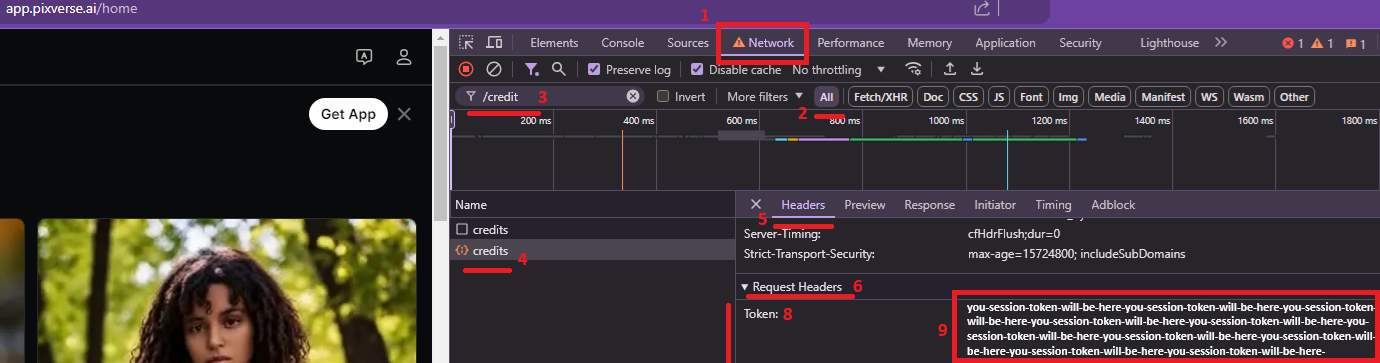
 Setup PixVerse
{: .no_toc }
December 6, 2024
## Table of contents
{: .no_toc .text-delta }
1. TOC
{:toc}
Approximately 2 minutes to complete setup steps.
---
## Create PixVerse.ai account
Navigate to [PixVerse.ai](https://PixVerse.ai) and sign up with an email account. Our API does not support Gmail, Apple, or Discord accounts. We strongly recommend creating a separate PixVerse.ai account designated for API work.

## Configure PixVerse.ai API account
Proceed to [POST /accounts/`email`](../api-pixverse-v2/post-pixverse-accounts-email) and configure the PixVerse API account to using `email` and `password`.
##
Setup PixVerse
{: .no_toc }
December 6, 2024
## Table of contents
{: .no_toc .text-delta }
1. TOC
{:toc}
Approximately 2 minutes to complete setup steps.
---
## Create PixVerse.ai account
Navigate to [PixVerse.ai](https://PixVerse.ai) and sign up with an email account. Our API does not support Gmail, Apple, or Discord accounts. We strongly recommend creating a separate PixVerse.ai account designated for API work.

## Configure PixVerse.ai API account
Proceed to [POST /accounts/`email`](../api-pixverse-v2/post-pixverse-accounts-email) and configure the PixVerse API account to using `email` and `password`.
##  YouTube.
Blogs:
* [PixVerse v5.6](../../blog/260127)
* [PixVerse Modify](../../blog/260126)
* [PixVerse v5.5](../../blog/251205)
* [PixVerse v5](../../blog/250829)
Developer Community:
*
YouTube.
Blogs:
* [PixVerse v5.6](../../blog/260127)
* [PixVerse Modify](../../blog/260126)
* [PixVerse v5.5](../../blog/251205)
* [PixVerse v5](../../blog/250829)
Developer Community:
*  Discord Server
*
Discord Server
*  Telegram Channel
*
Telegram Channel
*  r/pixverse_api
=== URL: https://useapi.net/docs/api-pixverse-v2/del-pixverse-accounts-email ===
Document URL: https://useapi.net/docs/api-pixverse-v2/del-pixverse-accounts-email
---
layout: default
title:
r/pixverse_api
=== URL: https://useapi.net/docs/api-pixverse-v2/del-pixverse-accounts-email ===
Document URL: https://useapi.net/docs/api-pixverse-v2/del-pixverse-accounts-email
---
layout: default
title: