=== URL: https://useapi.net/docs/start-here/setup-minimax ===
Document URL: https://useapi.net/docs/start-here/setup-minimax
---
layout: default
title: Setup MiniMax
parent: Start Here
nav_order: 350
---
# Setup MiniMax | Hailuo AI

{: .no_toc }
September 25, 2024 (November 24, 2025)
## Table of contents
{: .no_toc .text-delta }
1. TOC
{:toc}
Approximately 5 minutes to complete setup steps.
---
## Setup hailuoai.video account
You need a [hailuoai.video](https://hailuoai.video) account to to use MiniMax API. Sign-in with your Google account at [hailuoai.video](https://hailuoai.video). You can create as many accounts as you need. Our API uses automated load balancing and will select an account with available capacity.
### Step 1 • Navigate to hailuoai.video
Open Chromium-compatible browser (e.g. [Google Chrome](https://www.google.com/chrome/), [Microsoft Edge](https://www.microsoft.com/en-us/edge) or [Opera](https://www.opera.com/)) and navigate to [https://hailuoai.video](https://hailuoai.video).
Once the page is fully loaded, ensure that you're logged in with your Google account `1` .
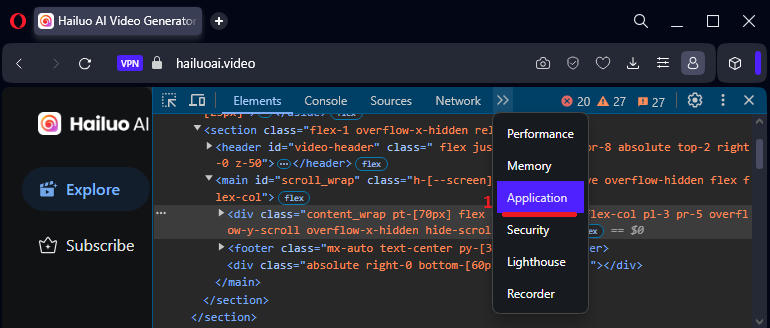
Open [Developer Tools](https://developer.chrome.com/docs/devtools) by right-clicking on the page and selecting "Inspect Element" `2` .
Finally refresh page `3` .

### Step 2 • Locate `url`
Select Developer Tools » Network `1` :
* On the left side many click on `Assets` submenu `2` .
* Type `/cursor` in the filter box `3` and hit Enter.
* Make sure that `All` or `Fetch/XHR` is selected `4` .
* You should see a http call(s) entry as shown below `5` , click on that entry.
* Select "Headers" tab `6` .
* Locate General » Request URL `7` as shown below and copy its value. This is your `url`.
[EXPAND](../../assets/images/minimax_video_setup_2.png){:target="_blank"}
As an example below the `url` is
```
https://hailuoai.video/v3/api/multimodal/video/my/cursor?type=next¤tID=0&limit=30&scene=mine&filterType=2&device_platform=web&app_id=3001&version_code=22202&biz_id=0&lang=en&uuid=8a2d8b5d-ac0d-4bb5-8028-3177fa64f861&device_id=301350748241866752&os_name=Windows&browser_name=opera&device_memory=8&cpu_core_num=12&browser_language=en-US&browser_platform=Win32&screen_width=1920&screen_height=1080&unix=1728704107000
```
### Step 3 • Locate `token` value
Locate Request Headers » Token `7` as shown below and copy it's value. This is your `token`.
[EXPAND](../../assets/images/minimax_video_setup_3.png){:target="_blank"}

As an example below the `token` is
```
eyJhbGciOiJIUzI1NiIsInR5cCI6IkpXVCJ9.eyJleHAiOjE3MzIxNTk4MjksInVzZXIiOnsiaWQiOiIzMDEzNDg0MDk1ODE4MzgzMzYiLCJuYW1lIjoidXNlIGFwaSIsImF2YXRhciI6Imh0dHBzOi8vbGgzLmdvb2dsZXVzZXJjb250ZW50LmNvbS9hL0FDZzhvY0lLNEJaMmpfSlIxcTh3TkFKU2RlZzlwVHZlTDJTSVhFRjg4TkU4MV85VlowbFBRQT1zOTYtYyIsImRldmljZUlEIjoiIn19.1-zGnbUfENnVdjDGDBuaZ4Sf7rTelfqUKk5XNj7liE4
```
If you are curious, you can use [jwt.io](https://jwt.io) to decode the token and see its content.
## Configure MiniMax API account
Please use the [Verify](#verify-url-and-token-values) feature below to ensure all the retrieved values above are correct.
Proceed to [POST /accounts](../api-minimax-v1/post-minimax-accounts-account) and configure the MiniMax API account to using `url` and `token` values retrieved above.
## Verify `url` and `token` values
This only verifies that `url` and `token` values are correct. To complete setup, you **MUST** proceed to [POST /accounts](../api-minimax-v1/post-minimax-accounts-account) and complete the configuration of the MiniMax API account using the `url` and `token` values retrieved above.
=== URL: https://useapi.net/docs/api-minimax-v1 ===
Document URL: https://useapi.net/docs/api-minimax-v1
---
layout: default
title: MiniMax API v1
nav_order: 3000
has_children: true
permalink: /docs/api-minimax-v1
---
# MiniMax API v1
September 25, 2024 (January 2, 2026)
This is [experimental](../../docs/legal) API for for the [MiniMax AI](https://minimaxi.com), a Chinese AI startup backed by Alibaba and Tencent.
We provide full API support for following MiniMax/Hailuo AI models:
* MiniMax [videos](api-minimax-v1/post-minimax-videos-create) supports multiple models: [Hailuo 01/02/2.3](https://hailuoai.video), [Veo 3.1](https://deepmind.google/models/veo/), and [Sora 2](https://openai.com/sora/). These models are notable for generating ultra-realistic video clips with precise prompt following.
* MiniMax [images](api-minimax-v1/post-minimax-images-create) supports multiple models: [Nano Banana Pro](https://blog.google/technology/ai/nano-banana-pro/), [GPT Image 1.5](https://openai.com/index/introducing-4o-image-generation/), [Seedream 4.5](https://seed.bytedance.com/en/seedream4_5), and image-01.
* MiniMax [agent](api-minimax-v1/post-minimax-agent) supports multiple AI models including video generation ([Hailuo 2.3](https://hailuoai.video/ai-video-landing/ai-video-generator-hailuo-2-3), [02](https://www.minimax.io/news/minimax-hailuo-02), [Veo 3.1](https://deepmind.google/models/veo/), [Sora 2](https://openai.com/sora/)), image generation ([Nano Banana 2/Pro](https://blog.google/technology/ai/nano-banana-pro/), [Seedream 4.5](https://seed.bytedance.com/en/seedream4_5), [F.1 Kontext](https://bfl.ai/models/flux-kontext), [Qwen](https://github.com/QwenLM/Qwen-Image), Kolors), and audio synthesis ([Speech 2.5](https://minimax-ai.chat/models/minimax-speech-25/), [Music 2.0](https://www.minimax.io/news/minimax-music-20)).
It costs 1 to 4 credits to generate an image and 1 credit to generate a song. With the [$79.99/m](https://hailuoai.video/subscribe/modal) Master account (12,000 credits), you can generate ~12,000 songs or up to 12,000 images. Nano Banana 2/Pro costs 4 credits, so you can generate 3,000 images per month.
Nano Banana 2/Pro deployment provided by MiniMax has less content moderation compared to Google Flow and is capable of editing photos of minors or famous people.
[Setup MiniMax](../../docs/start-here/setup-minimax)
[Postman collection](https://www.postman.com/useapinet/useapi-net/collection) (January 20, 2026)
[Q&A: How is your experimental MiniMax API different from the official MiniMax API?](../../docs/questions-and-answers#how-is-your-experimental-minimax-api-different-from-the-official-minimax-api)
Blogs:
* [MiniMax Sora 2, Veo 3.1](../../blog/260102)
* [MiniMax Agent: Nano Banana 2/Pro, Speech 2.5, Music 2.0 and more...](../../blog/251124)
* [MiniMax 2.3](../../blog/251030)
* [MiniMax 02 End Frame](../../blog/250830)
* [Groundbreaking Video Agents](../../blog/250630)
* [MiniMax Images](../../blog/250508)
Articles:
* [Fun with MiniMax API](../../docs/articles/minimax-bash)
Developer Community:
* Discord Server

* Telegram Channel
* r/minimax_api
=== URL: https://useapi.net/docs/api-minimax-v1/del-minimax-accounts-account ===
Document URL: https://useapi.net/docs/api-minimax-v1/del-minimax-accounts-account
---
layout: default
title: DEL accounts/account
parent: MiniMax API v1
nav_order: 400
---
## Delete MiniMax API account
{: .no_toc }
September 25, 2024 (March 17, 2025)
## Table of contents
{: .no_toc .text-delta }
1. TOC
{:toc}
---
{: .delete }
> **https://api.useapi.net/v1/minimax/accounts/`account`**
The `account` value should correspond to an account configured previously via a [POST /accounts](post-minimax-accounts-account) request.
##### Request Headers
``` yaml
Authorization: Bearer {API token}
```
- `API token` is **required**, see [Setup useapi.net](../start-here/setup-useapi) for details.
##### Responses
{% tabs del_account_MiniMax_response %}
{% tab del_account_MiniMax_response 204 %}
204 No Content
{% endtab %}
{% tab del_account_MiniMax_response 401 %}
401 Unauthorized
```json
{
"error": "Unauthorized",
"code": 401
}
```
{% endtab %}
{% tab del_account_MiniMax_response 404 %}
404 Not Found
{% endtab %}
{% endtabs %}
##### Model
```typescript
{ // TypeScript, all fields are optional
error: string,
errorDetails: string,
code: number
}
```
##### Examples
{% tabs del_account_MiniMax_example %}
{% tab del_account_MiniMax_example Curl %}
``` bash
curl -H "Accept: application/json" \
-H "Content-Type: application/json" \
-H "Authorization: Bearer …" \
-X DELETE https://api.useapi.net/v1/minimax/accounts/
```
{% endtab %}
{% tab del_account_MiniMax_example JavaScript %}
``` javascript
const account = "Previously configured account";
const apiUrl = `https://api.useapi.net/v1/minimax/accounts/${channnel}`;
const token = "API token";
const data = {
method: 'DELETE',
headers: {
'Authorization': `Bearer ${token}`,
'Content-Type': 'application/json' }
};
const response = await fetch(apiUrl, data);
const result = await response.json();
console.log("response", {response, result});
```
{% endtab %}
{% tab del_account_MiniMax_example Python %}
``` python
import requests
account = "Previously configured account"
apiUrl = f"https://api.useapi.net/v1/minimax/accounts/{account}"
token = "API token"
headers = {
"Content-Type": "application/json",
"Authorization" : f"Bearer {token}"
}
response = requests.delete(apiUrl, headers=headers)
print(response, response.json())
```
{% endtab %}
{% endtabs %}
=== URL: https://useapi.net/docs/api-minimax-v1/del-minimax-audio-audio_id ===
Document URL: https://useapi.net/docs/api-minimax-v1/del-minimax-audio-audio_id
---
layout: default
title: DEL audio/audio_id
nav_order: 2800
nav_exclude: true
---
## Delete text-to-speech audio clip
{: .no_toc }
December 27, 2024 (August 21, 2025)
This version of MiniMax audio has been decommissioned. Consider switching to Mureka API
## Table of contents
{: .no_toc .text-delta }
1. TOC
{:toc}
---
Please configure at least one [www.minimax.io/audio](https://www.minimax.io/audio) account for this endpoint, see [Setup MiniMax](../start-here/setup-minimax) for details.
This endpoint will delete audio clip generated by
* [POST audio/create-mp3](https://useapi.net/docs/api-minimax-v1/post-minimax-audio-create-mp3)
* [POST audio/create-stream](https://useapi.net/docs/api-minimax-v1/post-minimax-audio-create-stream)
This endpoint will return a response `200` if you're trying to delete a audio clip that does not exist or has already been deleted. It is safe to say it always succeeds.
{: .delete }
> **https://api.useapi.net/v1/minimax/audio/`audio_id`**
##### Request Headers
``` yaml
Authorization: Bearer {API token}
Content-Type: application/json
```
- `API token` is **required**, see [Setup useapi.net](../start-here/setup-useapi) for details.
##### Path parameter
- `audio_id` is **required**. Specify the audio_id you want to delete.
##### Responses
{% tabs del_MiniMax_audio_audio_id_response %}
{% tab del_MiniMax_audio_audio_id_response 200 %}
200 OK
{% endtab %}
{% tab del_MiniMax_audio_audio_id_response 400 %}
400 Bad Request
```json
{
"error": "",
"code": 400
}
```
{% endtab %}
{% tab del_MiniMax_audio_audio_id_response 401 %}
401 Unauthorized
```json
{
"error": "Unauthorized",
"code": 401
}
```
{% endtab %}
{% endtabs %}
##### Examples
{% tabs del_MiniMax_audio_audio_id_example %}
{% tab del_MiniMax_audio_audio_id_example Curl %}
``` bash
curl -X DELETE "https://api.useapi.net/v1/minimax/audio/" \
-H "Accept: application/json" \
-H "Authorization: Bearer …"
```
{% endtab %}
{% tab del_MiniMax_audio_audio_id_example JavaScript %}
``` javascript
const token = "API token";
const audio_id = "audio_id to delete";
const apiUrl = `https://api.useapi.net/v1/minimax/audio/${audio_id}`;
const response = await fetch(apiUrl, {
method: 'DELETE',
headers: {
"Authorization": `Bearer ${token}`,
},
});
const result = await response.json();
console.log("response", {response, result});
```
{% endtab %}
{% tab del_MiniMax_audio_audio_id_example Python %}
``` python
import requests
token = "API token"
audio_id = "audio_id to delete"
apiUrl = f"https://api.useapi.net/v1/minimax/audio/{audio_id}"
headers = {
"Content-Type": "application/json",
"Authorization" : f"Bearer {token}"
}
response = requests.delete(apiUrl, headers=headers)
print(response, response.json())
```
{% endtab %}
{% endtabs %}
=== URL: https://useapi.net/docs/api-minimax-v1/del-minimax-files-fileID ===
Document URL: https://useapi.net/docs/api-minimax-v1/del-minimax-files-fileID
---
layout: default
title: DEL files/fileID
parent: MiniMax API v1
nav_order: 3500
---
## Delete file
{: .no_toc }
December 23, 2024
## Table of contents
{: .no_toc .text-delta }
1. TOC
{:toc}
---
Use this endpoint to delete file uploaded by
* [POST files](https://useapi.net/docs/api-minimax-v1/post-minimax-files)
This endpoint will return a response `200` if you're trying to delete a file that does not exist or has already been deleted. It is safe to say it always succeeds.
{: .delete }
> **https://api.useapi.net/v1/minimax/files/`fileID`**
##### Request Headers
``` yaml
Authorization: Bearer {API token}
Content-Type: application/json
```
- `API token` is **required**, see [Setup useapi.net](../start-here/setup-useapi) for details.
##### Path parameter
- `fileID` is **required**. Specify the fileID you want to delete.
##### Responses
{% tabs del_MiniMax_files_fileID_response %}
{% tab del_MiniMax_files_fileID_response 200 %}
200 OK
{% endtab %}
{% tab del_MiniMax_files_fileID_response 400 %}
400 Bad Request
```json
{
"error": "",
"code": 400
}
```
{% endtab %}
{% tab del_MiniMax_files_fileID_response 401 %}
401 Unauthorized
```json
{
"error": "Unauthorized",
"code": 401
}
```
{% endtab %}
{% endtabs %}
##### Examples
{% tabs del_MiniMax_files_fileID_example %}
{% tab del_MiniMax_files_fileID_example Curl %}
``` bash
curl -X DELETE "https://api.useapi.net/v1/minimax/files/fileID" \
-H "Accept: application/json" \
-H "Authorization: Bearer …"
```
{% endtab %}
{% tab del_MiniMax_files_fileID_example JavaScript %}
``` javascript
const token = "API token";
const fileID = "fileID to delete";
const apiUrl = `https://api.useapi.net/v1/minimax/files/${fileID}`;
const response = await fetch(apiUrl, {
method: 'DELETE',
headers: {
"Authorization": `Bearer ${token}`,
},
});
const result = await response.json();
console.log("response", {response, result});
```
{% endtab %}
{% tab del_MiniMax_files_fileID_example Python %}
``` python
import requests
token = "API token"
fileID = "fileID to delete"
apiUrl = f"https://api.useapi.net/v1/minimax/files/{fileID}"
headers = {
"Content-Type": "application/json",
"Authorization" : f"Bearer {token}"
}
response = requests.delete(apiUrl, headers=headers)
print(response, response.json())
```
{% endtab %}
{% endtabs %}
=== URL: https://useapi.net/docs/api-minimax-v1/del-minimax-images-imageId ===
Document URL: https://useapi.net/docs/api-minimax-v1/del-minimax-images-imageId
---
layout: default
title: DEL images/imageId
parent: MiniMax API v1
nav_order: 1400
---
## Delete image
{: .no_toc }
March 17, 2025
## Table of contents
{: .no_toc .text-delta }
1. TOC
{:toc}
---
Use this endpoint to delete image generated by
* [POST images/create](https://useapi.net/docs/api-minimax-v1/post-minimax-images-create)
This endpoint will return a response `200` if you're trying to delete a image that does not exist or has already been deleted. It is safe to say it always succeeds.
Images are soft-deleted. While the image will no longer appear in [GET images](https://useapi.net/docs/api-minimax-v1/get-minimax-images), you can still retrieve it via [GET images/`imageId`](https://useapi.net/docs/api-minimax-v1/get-minimax-images-imageId).
{: .delete }
> **https://api.useapi.net/v1/minimax/images/`imageId`**
##### Request Headers
``` yaml
Authorization: Bearer {API token}
Content-Type: application/json
```
- `API token` is **required**, see [Setup useapi.net](../start-here/setup-useapi) for details.
##### Path parameter
- `imageId` is **required**. Specify the imageId you want to delete.
##### Responses
{% tabs del_MiniMax_images_imageId_response %}
{% tab del_MiniMax_images_imageId_response 200 %}
200 OK
{% endtab %}
{% tab del_MiniMax_images_imageId_response 400 %}
400 Bad Request
```json
{
"error": "",
"code": 400
}
```
{% endtab %}
{% tab del_MiniMax_images_imageId_response 401 %}
401 Unauthorized
```json
{
"error": "Unauthorized",
"code": 401
}
```
{% endtab %}
{% endtabs %}
##### Examples
{% tabs del_MiniMax_images_imageId_example %}
{% tab del_MiniMax_images_imageId_example Curl %}
``` bash
curl -X DELETE "https://api.useapi.net/v1/minimax/images/" \
-H "Accept: application/json" \
-H "Authorization: Bearer …"
```
{% endtab %}
{% tab del_MiniMax_images_imageId_example JavaScript %}
``` javascript
const token = "API token";
const imageId = "imageId to delete";
const apiUrl = `https://api.useapi.net/v1/minimax/images/${imageId}`;
const response = await fetch(apiUrl, {
method: 'DELETE',
headers: {
"Authorization": `Bearer ${token}`,
},
});
const result = await response.json();
console.log("response", {response, result});
```
{% endtab %}
{% tab del_MiniMax_images_imageId_example Python %}
``` python
import requests
token = "API token"
imageId = "imageId to delete"
apiUrl = f"https://api.useapi.net/v1/minimax/images/{imageId}"
headers = {
"Content-Type": "application/json",
"Authorization" : f"Bearer {token}"
}
response = requests.delete(apiUrl, headers=headers)
print(response, response.json())
```
{% endtab %}
{% endtabs %}
=== URL: https://useapi.net/docs/api-minimax-v1/del-minimax-llm ===
Document URL: https://useapi.net/docs/api-minimax-v1/del-minimax-llm
---
layout: default
title: DEL llm
nav_order: 1800
nav_exclude: true
---
## Delete LLM chats and/or messages
{: .no_toc }
March 7, 2025 (November 24, 2025)
This version of MiniMax LLM has been decommissioned and will be replaced with upcoming Google AI and Gemini support.
## Table of contents
{: .no_toc .text-delta }
1. TOC
{:toc}
---
Equivalent of [chat.minimax.io](https://chat.minimax.io).
Use your [chat.minimax.io](https://chat.minimax.io) account for this endpoint, see [Setup MiniMax](../start-here/setup-minimax) for details.
{: .delete }
> **https://api.useapi.net/v1/minimax/llm/?…**
##### Request Headers
``` yaml
Authorization: Bearer {API token}
```
- `API token` is **required**, see [Setup useapi.net](../start-here/setup-useapi) for details.
##### Query Parameters
- `account` is optional when only one LLM [chat.minimax.io](https://chat.minimax.io) [account](../api-minimax-v1/get-minimax-accounts) configured. However, if you have multiple accounts configured, this parameter becomes **required**.
- `chatIDs` is optional, specify comma-separated list of chatID values that you want to delete. Set it to `all` to delete all chats for your account.
- `msgIDs` is optional, specify a comma-separated list of msgID values that you want to delete.
##### Responses
{% tabs get_llm_MiniMax_llm_response %}
{% tab get_llm_MiniMax_llm_response 200 %}
200 OK
{% endtab %}
{% tab get_llm_MiniMax_llm_response 400 %}
400 Bad Request
```json
{
"error": "",
"code": 400
}
```
{% endtab %}
{% tab get_llm_MiniMax_llm_response 401 %}
401 Unauthorized
```json
{
"error": "Unauthorized",
"code": 401
}
```
{% endtab %}
{% endtabs %}
##### Examples
{% tabs get_llm_MiniMax_llm_example %}
{% tab get_llm_MiniMax_llm_example Curl %}
``` bash
curl "https://api.useapi.net/v1/minimax/llm/?account=&msgID=" \
-H "Accept: application/json" \
-H "Authorization: Bearer …"
```
{% endtab %}
{% tab get_llm_MiniMax_llm_example JavaScript %}
``` javascript
const token = "API token";
const account = "Previously configured account";
const msgID = "Message msgID you want to delete";
const apiUrl = `https://api.useapi.net/v1/minimax/llm/?account=${account}&msgID=${msgID}`;
const response = await fetch(apiUrl, {
method: 'DELETE',
headers: {
"Authorization": `Bearer ${token}`,
},
});
const result = await response.json();
console.log("response", {response, result});
```
{% endtab %}
{% tab get_llm_MiniMax_llm_example Python %}
``` python
import requests
token = "API token"
account = "Previously configured account"
msgID = "Message msgID you want to delete"
apiUrl = f"https://api.useapi.net/v1/minimax/llm/?account={account}&msgID={msgID}"
headers = {
"Content-Type": "application/json",
"Authorization" : f"Bearer {token}"
}
response = requests.delete(apiUrl, headers=headers)
print(response, response.json())
```
{% endtab %}
{% endtabs %}
=== URL: https://useapi.net/docs/api-minimax-v1/del-minimax-scheduler-videoId ===
Document URL: https://useapi.net/docs/api-minimax-v1/del-minimax-scheduler-videoId
---
layout: default
title: DEL scheduler/id
parent: MiniMax API v1
nav_order: 3800
---
## Remove video or image generation from being tracked by the scheduler
{: .no_toc }
September 25, 2024 (March 17, 2025)
## Table of contents
{: .no_toc .text-delta }
1. TOC
{:toc}
---
API tracks the running generations of images and videos. This is done to maintain a list of currently executed video generations and to send webhook messages via optionally provided `replyUrl` parameters. If you want to remove image or video generation from being tracked by the scheduler, use this endpoint.
{: .delete }
> **https://api.useapi.net/v1/minimax/scheduler/`id`**
##### Request Headers
``` yaml
Authorization: Bearer {API token}
```
- `API token` is **required**, see [Setup useapi.net](../start-here/setup-useapi) for details.
##### Path parameter
- `id` is **required**. Specify videoId or imageId you want to stop tracking.
##### Responses
{% tabs delete_scheduler_MiniMax_scheduler_response %}
{% tab delete_scheduler_MiniMax_scheduler_response 204 %}
204 No Content
{% endtab %}
{% tab delete_scheduler_MiniMax_scheduler_response 400 %}
400 Bad Request
```json
{
"error": "",
"code": 400
}
```
{% endtab %}
{% tab delete_scheduler_MiniMax_scheduler_response 401 %}
401 Unauthorized
```json
{
"error": "Unauthorized",
"code": 401
}
```
{% endtab %}
{% tab delete_scheduler_MiniMax_scheduler_response 404 %}
404 Not Found
```json
{
"error": "Unable to locate running "
}
```
{% endtab %}
{% endtabs %}
##### Model
```typescript
{ // TypeScript, all fields are optional
error: string
code: number
}
```
##### Examples
{% tabs delete_scheduler_MiniMax_scheduler_example %}
{% tab delete_scheduler_MiniMax_scheduler_example Curl %}
``` bash
curl -H "Accept: application/json" \
-H "Content-Type: application/json" \
-H "Authorization: Bearer …" \
-X DELETE "https://api.useapi.net/v1/minimax/scheduler/"
```
{% endtab %}
{% tab delete_scheduler_MiniMax_scheduler_example JavaScript %}
``` javascript
const videoId = "videoId to cancel";
const apiUrl = `https://api.useapi.net/v1/minimax/scheduler/${videoId}`;
const token = "API token";
const data = {
method: 'DELETE',
headers: {
'Authorization': `Bearer ${token}`,
'Content-Type': 'application/json' }
};
const response = await fetch(apiUrl, data);
const result = await response.json();
console.log("response", {response, result});
```
{% endtab %}
{% tab delete_scheduler_MiniMax_scheduler_example Python %}
``` python
import requests
videoId = "videoId to cancel"
apiUrl = f"https://api.useapi.net/v1/minimax/scheduler/{videoId}"
token = "API token"
headers = {
"Content-Type": "application/json",
"Authorization" : f"Bearer {token}"
}
response = requests.delete(apiUrl, headers=headers)
print(response, response.json())
```
{% endtab %}
{% endtabs %}
=== URL: https://useapi.net/docs/api-minimax-v1/del-minimax-videos-videoId ===
Document URL: https://useapi.net/docs/api-minimax-v1/del-minimax-videos-videoId
---
layout: default
title: DEL videos/videoId
parent: MiniMax API v1
nav_order: 1000
---
## Delete video
{: .no_toc }
December 23, 2024
## Table of contents
{: .no_toc .text-delta }
1. TOC
{:toc}
---
Use this endpoint to delete video generated by
* [videos/create](https://useapi.net/docs/api-minimax-v1/post-minimax-videos-create)
This endpoint will return a response `200` if you're trying to delete a video that does not exist or has already been deleted. It is safe to say it always succeeds.
{: .delete }
> **https://api.useapi.net/v1/minimax/videos/`videoId`**
##### Request Headers
``` yaml
Authorization: Bearer {API token}
Content-Type: application/json
```
- `API token` is **required**, see [Setup useapi.net](../start-here/setup-useapi) for details.
##### Path parameter
- `videoId` is **required**. Specify the videoId you want to delete.
##### Responses
{% tabs del_MiniMax_videos_videoId_response %}
{% tab del_MiniMax_videos_videoId_response 200 %}
200 OK
{% endtab %}
{% tab del_MiniMax_videos_videoId_response 400 %}
400 Bad Request
```json
{
"error": "",
"code": 400
}
```
{% endtab %}
{% tab del_MiniMax_videos_videoId_response 401 %}
401 Unauthorized
```json
{
"error": "Unauthorized",
"code": 401
}
```
{% endtab %}
{% endtabs %}
##### Examples
{% tabs del_MiniMax_videos_videoId_example %}
{% tab del_MiniMax_videos_videoId_example Curl %}
``` bash
curl -X DELETE "https://api.useapi.net/v1/minimax/videos/videoId" \
-H "Accept: application/json" \
-H "Authorization: Bearer …"
```
{% endtab %}
{% tab del_MiniMax_videos_videoId_example JavaScript %}
``` javascript
const token = "API token";
const videoId = "videoId to delete";
const apiUrl = `https://api.useapi.net/v1/minimax/videos/${videoId}`;
const response = await fetch(apiUrl, {
method: 'DELETE',
headers: {
"Authorization": `Bearer ${token}`,
},
});
const result = await response.json();
console.log("response", {response, result});
```
{% endtab %}
{% tab del_MiniMax_videos_videoId_example Python %}
``` python
import requests
token = "API token"
videoId = "videoId to delete"
apiUrl = f"https://api.useapi.net/v1/minimax/videos/{videoId}"
headers = {
"Content-Type": "application/json",
"Authorization" : f"Bearer {token}"
}
response = requests.delete(apiUrl, headers=headers)
print(response, response.json())
```
{% endtab %}
{% endtabs %}
=== URL: https://useapi.net/docs/api-minimax-v1/get-minimax-accounts-account ===
Document URL: https://useapi.net/docs/api-minimax-v1/get-minimax-accounts-account
---
layout: default
title: GET accounts/account
parent: MiniMax API v1
nav_order: 200
---
## Retrieve MiniMax API account configuration for `account`
{: .no_toc }
September 25, 2024 (March 17, 2025)
## Table of contents
{: .no_toc .text-delta }
1. TOC
{:toc}
---
{: .get }
> **https://api.useapi.net/v1/minimax/accounts/`account`**
The `account` value should correspond to an account configured previously via a [POST /accounts](post-minimax-accounts-account) request.
##### Request Headers
``` yaml
Authorization: Bearer {API token}
Content-Type: application/json
```
- `API token` is **required**, see [Setup useapi.net](../start-here/setup-useapi) for details.
##### Responses
{% tabs get_account_MiniMax_account_response %}
{% tab get_account_MiniMax_account_response 200 %}
200 OK
```json
{
"account": "123456",
"jwt": {
"token": "abc…secured…xyz",
"user": {
"deviceID": "123456789",
"id": "123456",
"isAnonymous": true,
"name": "",
"avatar": ""
},
"exp": 1734858598.864,
"iat": 1732266598.864,
"host": "hailuoai.video",
"searchParams": "device_platform=web&app_id=3001&version_code=22201&uuid=b5df53d1-4c0d-4c77-8422-87e3f3b1a1d6&device_id=123456789&os_name=Windows&browser_name=chrome&device_memory=8&cpu_core_num=4&browser_language=en-US&browser_platform=Win32&screen_width=1920&screen_height=1080&unix=1732266598000",
"iat_Issued": "2024-01-01T00:00:00.000Z",
"exp_Expire": "2024-12-01T00:00:00.000Z"
},
"maxJobs": 1,
"supportVideo": true,
"supportChat": true,
"supportAudio": true
}
```
{% endtab %}
{% tab get_account_MiniMax_account_response 401 %}
401 Unauthorized
```json
{
"error": "Unauthorized",
"code": 401
}
```
{% endtab %}
{% tab get_account_MiniMax_account_response 404 %}
404 Not Found
Configuration not found. To create configuration use [POST /accounts](https://useapi.net/docs/api-minimax-v1/post-minimax-accounts-account).
{% endtab %}
{% endtabs %}
##### Model
```typescript
{ // TypeScript, all fields are optional
account: string
jwt: {
token: string
user: {
deviceID: string
id: string
isAnonymous: boolean
name: string
avatar: string
},
exp: number
iat: number
host: string
searchParams: string
iat_Issued: string
exp_Expire: string
}
maxJobs: number
supportVideo: boolean
supportChat: boolean
supportAudio: boolean
supportMusic: boolean
}
```
##### Examples
{% tabs get_account_MiniMax_account_example %}
{% tab get_account_MiniMax_account_example Curl %}
``` bash
curl https://api.useapi.net/v1/minimax/accounts/ \
-H "Accept: application/json" \
-H "Authorization: Bearer …"
```
{% endtab %}
{% tab get_account_MiniMax_account_example JavaScript %}
``` javascript
const token = "API token";
const account = "Previously configured account";
const apiUrl = `https://api.useapi.net/v1/minimax/accounts/${account}`;
const response = await fetch(apiUrl, {
headers: {
"Authorization": `Bearer ${token}`,
},
});
const result = await response.json();
console.log("response", {response, result});
```
{% endtab %}
{% tab get_account_MiniMax_account_example Python %}
``` python
import requests
token = "API token"
account = "Previously configured account"
apiUrl = f"https://api.useapi.net/v1/minimax/accounts/{account}"
headers = {
"Content-Type": "application/json",
"Authorization" : f"Bearer {token}"
}
response = requests.get(apiUrl, headers=headers)
print(response, response.json())
```
{% endtab %}
{% endtabs %}
=== URL: https://useapi.net/docs/api-minimax-v1/get-minimax-accounts ===
Document URL: https://useapi.net/docs/api-minimax-v1/get-minimax-accounts
---
layout: default
title: GET accounts
parent: MiniMax API v1
nav_order: 100
---
## Retrieve MiniMax API accounts configuration
{: .no_toc }
September 25, 2024 (March 17, 2025)
## Table of contents
{: .no_toc .text-delta }
1. TOC
{:toc}
---
For your convenience, you can specify your MiniMax configuration values under your MiniMax account. If you specify multiple MiniMax accounts, the API will automatically perform load balancing by randomly selecting an account with available capacity before making calls to MiniMax.
This endpoint retrieves the complete list of configured API accounts for MiniMax.
{: .get }
> **https://api.useapi.net/v1/minimax/accounts**
##### Request Headers
``` yaml
Authorization: Bearer {API token}
Content-Type: application/json
```
- `API token` is **required**, see [Setup useapi.net](../start-here/setup-useapi) for details.
##### Responses
{% tabs account_MiniMax_response %}
{% tab account_MiniMax_response 200 %}
200 OK
```json
{
"123456": {
"account": "123456",
"jwt": {
"token": "abc…secured…xyz",
"user": {
"deviceID": "123456789",
"id": "123456",
"isAnonymous": true,
"name": "",
"avatar": ""
},
"exp": 1734858598.864,
"iat": 1732266598.864,
"host": "hailuoai.video",
"searchParams": "device_platform=web&app_id=3001&version_code=22201&uuid=b5df53d1-4c0d-4c77-8422-87e3f3b1a1d6&device_id=123456789&os_name=Windows&browser_name=chrome&device_memory=8&cpu_core_num=4&browser_language=en-US&browser_platform=Win32&screen_width=1920&screen_height=1080&unix=1732266598000",
"iat_Issued": "2024-01-01T00:00:00.000Z",
"exp_Expire": "2024-12-01T00:00:00.000Z"
},
"maxJobs": 1,
"supportVideo": true,
"supportChat": true,
"supportAudio": true
},
"78910": {
"account": "78910",
"jwt": {
"token": "edf…secured…lmn",
"user": {
"deviceID": "987654321",
"id": "78910",
"isAnonymous": true,
"name": "",
"avatar": ""
},
"host": "hailuoai.com",
"exp": 1744858598.864,
"iat": 1742266598.864,
"searchParams": "device_platform=web&app_id=3001&version_code=22201&uuid=92f1a65c-3e9e-4a37-8bd7-8615a6cf60ee&device_id=987654321&os_name=Windows&browser_name=firefox&device_memory=16&cpu_core_num=8&browser_language=en-US&browser_platform=Win64&screen_width=2560&screen_height=1440&unix=1742266598000",
"iat_Issued": "2025-01-01T00:00:00.000Z",
"exp_Expire": "2025-12-01T00:00:00.000Z"
},
"maxJobs": 1,
"supportVideo": true,
"supportChat": true,
"supportAudio": true
}
}
```
{% endtab %}
{% tab account_MiniMax_response 401 %}
401 Unauthorized
```json
{
"error": "Unauthorized",
"code": 401
}
```
{% endtab %}
{% tab account_MiniMax_response 404 %}
404 Not Found
Configuration not found. To create configuration use [POST /accounts](https://useapi.net/docs/api-minimax-v1/post-minimax-accounts-account).
{% endtab %}
{% endtabs %}
##### Model
```typescript
{ // TypeScript, all fields are optional
[account: string]: {
account: string
jwt: {
token: string
user: {
deviceID: string
id: string
isAnonymous: boolean
name: string
avatar: string
},
exp: number
iat: number
host: string
searchParams: string
iat_Issued: string
exp_Expire: string
}
maxJobs: number
supportVideo: boolean
supportChat: boolean
supportAudio: boolean
supportMusic: boolean
}
}
```
##### Examples
{% tabs account_MiniMax_example %}
{% tab account_MiniMax_example Curl %}
``` bash
curl https://api.useapi.net/v1/minimax/accounts \
-H "Accept: application/json" \
-H "Authorization: Bearer …"
```
{% endtab %}
{% tab account_MiniMax_example JavaScript %}
``` javascript
const token = "API token";
const apiUrl = "https://api.useapi.net/v1/minimax/accounts";
const response = await fetch(apiUrl, {
headers: {
"Authorization": `Bearer ${token}`,
},
});
const result = await response.json();
console.log("response", {response, result});
```
{% endtab %}
{% tab account_MiniMax_example Python %}
``` python
import requests
token = "API token"
apiUrl = "https://api.useapi.net/v1/minimax/accounts"
headers = {
"Content-Type": "application/json",
"Authorization" : f"Bearer {token}"
}
response = requests.get(apiUrl, headers=headers)
print(response, response.json())
```
{% endtab %}
{% endtabs %}
=== URL: https://useapi.net/docs/api-minimax-v1/get-minimax-agent-jobId ===
Document URL: https://useapi.net/docs/api-minimax-v1/get-minimax-agent-jobId
---
layout: default
title: GET agent/jobId
parent: MiniMax API v1
nav_order: 2100
---
## Retrieve Agent Job Status and Results
{: .no_toc }
November 24, 2025 (November 26, 2025)
## Table of contents
{: .no_toc .text-delta }
1. TOC
{:toc}
---
Retrieve the status and results of an agent job. Jobs are stored for 31 days after creation.
Use this endpoint to check the progress of asynchronous agent jobs created with [POST agent](https://useapi.net/docs/api-minimax-v1/post-minimax-agent) using `async: true`.
{: .get }
> **https://api.useapi.net/v1/minimax/agent/`jobId`**
##### Request Headers
``` yaml
Authorization: Bearer {API token}
```
- `API token` is **required**, see [Setup useapi.net](../start-here/setup-useapi) for details.
##### Path Parameters
- `jobId` is **required**. The job ID to query.
##### Responses
{% tabs get_agent_jobid_response %}
{% tab get_agent_jobid_response 200 %}
200 OK
Job found and returned successfully.
**Started Job:**
```json
{
"jobId": "p123456789-u12345-a67890-bot:minimax",
"status": "started",
"created": "2025-11-23T12:34:56.789Z",
"request": {
"prompt": "Generate a video of a cat playing piano",
"models": ["hailuo-2.3"],
"async": true
}
}
```
**Completed Job:**
```json
{
"jobId": "p123456789-u12345-a67890-bot:minimax",
"status": "completed",
"created": "2025-11-23T12:34:56.789Z",
"request": {
"prompt": "Generate a video of a cat playing piano",
"models": ["hailuo-2.3", "nano-banana-2"]
},
"response": {
"projectID": "123456789",
"sectionID": "987654321",
"chatID": "456789123",
"msg_content": "I've generated a video of a cat playing piano and an image variation.",
"timestamp": 1732366496789,
"elapsedTime": "02:15",
"attachments": [
{
"attachmentID": "att_123456789",
"type": 1,
"status": 3,
"file": {
"fileName": "cat_piano_video.mp4",
"fileUrl": "https://cdn.hailuoai.video/...mp4",
"type": "video/mp4",
"extra": {
"width": "1280",
"height": "720",
"duration": "5.0",
"fps": "24",
"no_watermark_url": "https://cdn.hailuoai.video/.../no_watermark.mp4",
"watermark_url": "https://cdn.hailuoai.video/.../watermark.mp4",
"thumbnail_url": "https://cdn.hailuoai.video/.../thumb.jpg"
}
}
},
{
"attachmentID": "att_987654321",
"type": 2,
"status": 3,
"file": {
"fileName": "cat_piano_image.png",
"fileUrl": "https://cdn.hailuoai.video/...png",
"type": "image/png",
"extra": {
"model_name": "banana_2",
"model_aspect_ratio": "16:9",
"model_resolution": "1K"
}
}
}
]
}
}
```
**Failed Job:**
```json
{
"jobId": "p123456789-u12345-a67890-bot:minimax",
"status": "failed",
"created": "2025-11-23T12:34:56.789Z",
"request": {
"prompt": "Generate a video",
"models": ["hailuo-2.3"]
},
"error": {
"message": "Timeout waiting for assistant response",
"status": 504
}
}
```
{% endtab %}
{% tab get_agent_jobid_response 400 %}
400 Bad Request
Invalid job ID format or access denied.
```json
{
"error": "Error …",
"code": 400
}
```
{% endtab %}
{% tab get_agent_jobid_response 401 %}
401 Unauthorized
Invalid API token.
```json
{
"error": "Unauthorized",
"code": 401
}
```
{% endtab %}
{% tab get_agent_jobid_response 404 %}
404 Not Found
Job not found or expired after 31 days.
```json
{
"error": "Job not found or expired after 31 days",
"code": 404
}
```
{% endtab %}
{% endtabs %}
##### Model
**Downloading Generated Files:**
- `file.fileUrl` - Primary download URL (may have watermark)
- `file.extra.no_watermark_url` - URL without watermark (when available)
- `file.extra.watermark_url` - URL with watermark
- `node.agentFile.noWatermarkUrl` - Alternative watermark-free URL
- `node.agentFile.url` - Alternative file URL
```typescript
{
// Job metadata
jobId: string // Unique job identifier
status: 'started' | 'completed' | 'failed' // Job status
created: string // ISO 8601 timestamp
code?: number // HTTP status code (optional)
// Original request
request: {
prompt: string // User's prompt
file?: Array<{ // File metadata (actual files not included)
name: string
size: number
type: string
}>
models: string[] // Model IDs used
async?: boolean // Async mode flag
replyUrl?: string // Callback URL
replyRef?: string // User's reference ID
}
// Agent response (only present when status is 'completed')
response?: {
projectID: string // MiniMax project ID
sectionID: string // MiniMax section ID
chatID: string // MiniMax chat ID
msg_content: string // Agent's response message
timestamp: number // Response timestamp (milliseconds since epoch)
elapsedTime: string // Elapsed time (mm:ss format)
attachments?: Array<{ // Generated files
attachmentID: string // Attachment identifier
type: number // Attachment type (numeric)
status: number // Attachment status (3 = completed)
file: {
fileName: string // File name
fileUrl: string // CDN URL to download file
extra?: { // Additional file metadata
// Video-specific fields
height?: string // Video height in pixels
width?: string // Video width in pixels
duration?: string // Duration in seconds
fps?: string // Frames per second
frames?: string // Total frame count
no_watermark_url?: string // CDN URL without watermark
watermark_url?: string // CDN URL with watermark
thumbnail_url?: string // Thumbnail image URL
url?: string // Alternative URL
path?: string // File path
task_id?: string // Generation task ID
vendor?: string // Video generation vendor
subtitle_path?: string // Subtitle file path
// Image-specific fields (nano-banana-2 model)
model_aspect_ratio?: string // e.g. "9:16", "16:9"
model_name?: string // e.g. "banana_2"
model_resolution?: string // e.g. "1K", "2K"
// Audio/TTS-specific fields
format?: string // e.g. "mp3"
type?: string // e.g. "audio"
model_speech_count?: string // Character count for TTS
}
posterUrl?: string // Poster/thumbnail URL
type?: string // File MIME type
referenceType?: number // Reference type
}
text?: string // Associated text content
extra?: Record // Additional metadata
node?: { // Node/timeline information
nodeID: string // Unique node identifier
xStart: number // X position start
yStart: number // Y position start
width: number // Node width
height: number // Node height
layer: number // Layer index
nodeType: number // Node type identifier
agentFile?: { // Generated file details
id: string // File ID
name: string // File name
url: string // File URL
coverInfo?: { // Cover image info
coverURL: string // Cover image URL
}
noWatermarkUrl?: string // URL without watermark
duration?: number // Duration in seconds
relativePath?: string // Relative file path
thumbnailUrl?: string // Thumbnail URL
}
status: number // Node status
playWidth: number // Playback width
playHeight: number // Playback height
logoType: number // Logo type identifier
}
}>
}
// Error information (only present when status is 'failed')
error?: string | { // Error can be a string or object
message: string // Error description
status: number // HTTP status code
details?: any // Additional error details
}
}
```
##### Examples
{% tabs get_agent_jobid_example %}
{% tab get_agent_jobid_example Curl %}
``` bash
curl -H "Authorization: Bearer YOUR_API_TOKEN" \
"https://api.useapi.net/v1/minimax/agent/p123456789-u12345-a67890-bot:minimax"
```
{% endtab %}
{% tab get_agent_jobid_example JavaScript %}
``` javascript
const token = "YOUR_API_TOKEN";
const jobId = "p123456789-u12345-a67890-bot:minimax";
const apiUrl = `https://api.useapi.net/v1/minimax/agent/${jobId}`;
const response = await fetch(apiUrl, {
headers: {
'Authorization': `Bearer ${token}`
}
});
const job = await response.json();
console.log('Job status:', job.status);
if (job.status === 'completed' && job.response?.attachments) {
job.response.attachments.forEach(att => {
console.log(`${att.file.fileName}: ${att.file.fileUrl}`);
});
} else if (job.status === 'failed') {
console.error('Job failed:', job.error);
}
```
{% endtab %}
{% tab get_agent_jobid_example Python %}
``` python
import requests
token = "YOUR_API_TOKEN"
job_id = "p123456789-u12345-a67890-bot:minimax"
api_url = f"https://api.useapi.net/v1/minimax/agent/{job_id}"
response = requests.get(
api_url,
headers={'Authorization': f'Bearer {token}'}
)
job = response.json()
print(f"Job status: {job['status']}")
if job['status'] == 'completed' and job.get('response', {}).get('attachments'):
for att in job['response']['attachments']:
print(f"{att['file']['fileName']}: {att['file']['fileUrl']}")
elif job['status'] == 'failed':
print(f"Job failed: {job['error']}")
```
{% endtab %}
{% endtabs %}
=== URL: https://useapi.net/docs/api-minimax-v1/get-minimax-agent-jobs ===
Document URL: https://useapi.net/docs/api-minimax-v1/get-minimax-agent-jobs
---
layout: default
title: GET agent/jobs
parent: MiniMax API v1
nav_order: 2200
---
## List Running Agent Jobs
{: .no_toc }
November 24, 2025
## Table of contents
{: .no_toc .text-delta }
1. TOC
{:toc}
---
List all currently running agent jobs for your account. This endpoint returns jobs that are still being processed (status: `started`).
Completed and failed jobs are not included in this list but can be retrieved using [GET agent/`jobId`](https://useapi.net/docs/api-minimax-v1/get-minimax-agent-jobId) if you have the job ID.
{: .get }
> **https://api.useapi.net/v1/minimax/agent/jobs**
##### Request Headers
``` yaml
Authorization: Bearer {API token}
```
- `API token` is **required**, see [Setup useapi.net](../start-here/setup-useapi) for details.
##### Responses
{% tabs get_agent_jobs_response %}
{% tab get_agent_jobs_response 200 %}
200 OK
List of running jobs returned successfully.
Returns jobs grouped by account with execution statistics.
```json
{
"accounts": ["67890", "54321"],
"summary": {
"67890": {
"executing": 2
},
"54321": {
"executing": 1
}
},
"executing": {
"67890": [
{
"jobId": "p123456789-u12345-a67890-bot:minimax",
"elapsed": "02:15"
},
{
"jobId": "p987654321-u12345-a67890-bot:minimax",
"elapsed": "01:30"
}
],
"54321": [
{
"jobId": "p456789123-u12345-a54321-bot:minimax",
"elapsed": "00:45"
}
]
}
}
```
{% endtab %}
{% tab get_agent_jobs_response 401 %}
401 Unauthorized
Invalid API token.
```json
{
"error": "Unauthorized"
}
```
{% endtab %}
{% endtabs %}
##### Model
```typescript
{
accounts: string[] // List of account IDs with configured access
summary: Record
executing: Record>
}
```
##### Examples
{% tabs get_agent_jobs_example %}
{% tab get_agent_jobs_example Curl %}
``` bash
curl -H "Authorization: Bearer YOUR_API_TOKEN" \
"https://api.useapi.net/v1/minimax/agent/jobs"
```
{% endtab %}
{% tab get_agent_jobs_example JavaScript %}
``` javascript
const token = "YOUR_API_TOKEN";
const apiUrl = "https://api.useapi.net/v1/minimax/agent/jobs";
const response = await fetch(apiUrl, {
headers: {
'Authorization': `Bearer ${token}`
}
});
const result = await response.json();
console.log(`${result.accounts.length} account(s) configured`);
for (const account of result.accounts) {
const summary = result.summary[account];
if (summary) {
console.log(`Account ${account}: ${summary.executing} job(s) executing`);
}
const jobs = result.executing[account] || [];
jobs.forEach(job => {
console.log(` ${job.jobId} (${job.elapsed})`);
});
}
```
{% endtab %}
{% tab get_agent_jobs_example Python %}
``` python
import requests
token = "YOUR_API_TOKEN"
api_url = "https://api.useapi.net/v1/minimax/agent/jobs"
response = requests.get(
api_url,
headers={'Authorization': f'Bearer {token}'}
)
result = response.json()
print(f"{len(result['accounts'])} account(s) configured")
for account in result['accounts']:
summary = result['summary'].get(account)
if summary:
print(f"Account {account}: {summary['executing']} job(s) executing")
jobs = result['executing'].get(account, [])
for job in jobs:
print(f" {job['jobId']} ({job['elapsed']})")
```
{% endtab %}
{% endtabs %}
=== URL: https://useapi.net/docs/api-minimax-v1/get-minimax-audio-config ===
Document URL: https://useapi.net/docs/api-minimax-v1/get-minimax-audio-config
---
layout: default
title: GET audio/config
nav_order: 2700
nav_exclude: true
---
## Retrieve audio configuration parameters
{: .no_toc }
December 23, 2024 (August 21, 2025)
This version of MiniMax audio has been decommissioned. Consider switching to Mureka API
## Table of contents
{: .no_toc .text-delta }
1. TOC
{:toc}
---
Please configure at least one [www.minimax.io/audio](https://www.minimax.io/audio) account for this endpoint, see [Setup MiniMax](../start-here/setup-minimax) for details.
{: .get }
> **https://api.useapi.net/v1/minimax/audio/config/?…**
##### Request Headers
``` yaml
Authorization: Bearer {API token}
Content-Type: application/json
```
- `API token` is **required**, see [Setup useapi.net](../start-here/setup-useapi) for details.
##### Query Parameters
- `account` is optional when only one [account](../api-minimax-v1/get-minimax-accounts) configured. However, if you have multiple accounts configured, this parameter becomes **required**.
##### Responses
{% tabs get_MiniMax_audio_config_response %}
{% tab get_MiniMax_audio_config_response 200 %}
200 OK
```json
{
"t2a_emotion": [
{
"label": "Happy",
"value": "happy"
},
{
"label": "...",
"value": "..."
}
],
"voice_tag_accent": [
{
"language": "English",
"tag_name": "US (General)"
},
{
"language": "...",
"tag_name": "..."
}
],
"voice_tag_age": [
{
"tag_name": "Young Adult"
},
{
"tag_name": "..."
}
],
"voice_tag_gender": [
{
"tag_name": "Male"
},
{
"tag_name": "..."
}
],
"voice_tag_language": [
{
"tag_name": "English"
},
{
"tag_name": "..."
}
]
}
```
{% endtab %}
{% tab get_MiniMax_audio_config_response 400 %}
400 Bad Request
```json
{
"error": "",
"code": 400
}
```
{% endtab %}
{% tab get_MiniMax_audio_config_response 401 %}
401 Unauthorized
```json
{
"error": "Unauthorized",
"code": 401
}
```
{% endtab %}
{% endtabs %}
##### Model
```typescript
{ // TypeScript, all fields are optional
t2a_emotion: {
label: string
value: string
}[]
voice_tag_accent: {
language: string
tag_name: string
}[]
voice_tag_age: {
tag_name: string
}[]
voice_tag_gender: {
tag_name: string
}[]
voice_tag_language: {
tag_name: string
}[]
}
```
##### Examples
{% tabs get_MiniMax_audio_config_example %}
{% tab get_MiniMax_audio_config_example Curl %}
``` bash
curl "https://api.useapi.net/v1/minimax/audio/config/?account=account" \
-H "Accept: application/json" \
-H "Authorization: Bearer …"
```
{% endtab %}
{% tab get_MiniMax_audio_config_example JavaScript %}
``` javascript
const token = "API token";
const account = "Previously configured account";
const apiUrl = `https://api.useapi.net/v1/minimax/audio/config/?account=${account}`;
const response = await fetch(apiUrl, {
headers: {
"Authorization": `Bearer ${token}`,
},
});
const result = await response.json();
console.log("response", {response, result});
```
{% endtab %}
{% tab get_MiniMax_audio_config_example Python %}
``` python
import requests
token = "API token"
account = "Previously configured account"
apiUrl = f"https://api.useapi.net/v1/minimax/audio/config/?account={account}"
headers = {
"Content-Type": "application/json",
"Authorization" : f"Bearer {token}"
}
response = requests.get(apiUrl, headers=headers)
print(response, response.json())
```
{% endtab %}
{% endtabs %}
=== URL: https://useapi.net/docs/api-minimax-v1/get-minimax-audio-voices ===
Document URL: https://useapi.net/docs/api-minimax-v1/get-minimax-audio-voices
---
layout: default
title: GET audio/voices
nav_order: 2600
nav_exclude: true
---
## Retrieve the list of system and cloned audio voices
{: .no_toc }
December 23, 2024 (August 21, 2025)
This version of MiniMax audio has been decommissioned. Consider switching to Mureka API
## Table of contents
{: .no_toc .text-delta }
1. TOC
{:toc}
---
Please configure at least one [www.minimax.io/audio](https://www.minimax.io/audio) account for this endpoint, see [Setup MiniMax](../start-here/setup-minimax) for details.
Over **300** pre-built voices provided supporting the following:
* Languages: English, Chinese (Mandarin), Spanish, French, Russian, Portuguese, Indonesian, German, Japanese, Korean, Italian, Cantonese
* Emotions: happy, sad, angry, fearful, disgusted, surprised, neutral
* Accents: US (General), English, Indian
* Ages: Young Adult, Adult, Middle-Aged, Senior
* Genders: Male, Female
{: .get }
> **https://api.useapi.net/v1/minimax/audio/voices/?…**
##### Request Headers
``` yaml
Authorization: Bearer {API token}
Content-Type: application/json
```
- `API token` is **required**, see [Setup useapi.net](../start-here/setup-useapi) for details.
##### Query Parameters
- `account` is optional when only one [account](../api-minimax-v1/get-minimax-accounts) configured. However, if you have multiple accounts configured, this parameter becomes **required**.
- `tag_list` is optional. Specify a comma-separated list of tags using those returned by [GET audio/config](../api-minimax-v1/get-minimax-audio-config) to narrow down the returned results.
Example: `Italian,Female,Adult,Calm`
- `page` and `page_size` are optional. Use them to retrieve the next page of data when the returned `has_more` field is `true`.
Default `page_size` is 500.
- `is_system` is optional. Set to `false` if you want to retrieve a list of custom voices cloned via [POST audio/clone-voice](../api-minimax-v1/post-minimax-audio-clone-voice). The entire list of custom voices will be returned at once, the `page` and `page_size` parameters will not be used.
Default is `true` (return system voices).
##### Responses
{% tabs get_MiniMax_audio_voices_response %}
{% tab get_MiniMax_audio_voices_response 200 %}
200 OK
`GET` [https://api.useapi.net/v1/minimax/audio/voices/?tag_list=Italian,Female,Adult,Calm](https://api.useapi.net/v1/minimax/audio/voices/?tag_list=Italian,Female,Adult,Calm)
```json
{
"voice_list": [
{
"voice_id": "209544421245048",
"parent_voice_id": "0",
"voice_name": "Diligent Leader",
"tag_list": [
"Italian",
"Female",
"Adult",
"Calm",
"Standard"
],
"file_id": "",
"cover_url": "https://cdn.hailuoai.video/moss/staging/2024-11-21-14/moss-audio/voice_cover//1732171514479796864-207331589841022.png?x-oss-process=image/resize,p_50/format,webp",
"create_time": 1732711650948,
"update_time": 1732711650948,
"collected": false,
"voice_status": 2,
"sample_audio": "https://cdn.hailuoai.video/moss/staging/2024-11-25-20/moss-audio/voice_sample_audio/1732537441602153587-official_sample_audio/4_it05.mp3",
"uniq_id": "Italian_DiligentLeader",
"group_id": "0"
}
],
"total": 1,
"has_more": false
}
```
{% endtab %}
{% tab get_MiniMax_audio_voices_response 400 %}
400 Bad Request
```json
{
"error": "",
"code": 400
}
```
{% endtab %}
{% tab get_MiniMax_audio_voices_response 401 %}
401 Unauthorized
```json
{
"error": "Unauthorized",
"code": 401
}
```
{% endtab %}
{% endtabs %}
##### Model
```typescript
{ // TypeScript, all fields are optional
voice_list: {
voice_id: string
parent_voice_id: string
voice_name: string
tag_list: string[]
file_id: string
cover_url: string
create_time: number
update_time: number
collected: boolean
voice_status: number
sample_audio: string
uniq_id: string
group_id: string
managed_by_api: boolean
is_expired: boolean
refresh_count: number
cloned_id: string
clone: {
voice_name: string
language_tag: string
need_noise_reduction: boolean
files: {
file_id: string
file_name: string
}[]
}
}[]
total: number
has_more: boolean
}
```
##### Examples
{% tabs get_MiniMax_audio_voices_example %}
{% tab get_MiniMax_audio_voices_example Curl %}
``` bash
curl "https://api.useapi.net/v1/minimax/audio/voices/?account=account" \
-H "Accept: application/json" \
-H "Authorization: Bearer …"
```
{% endtab %}
{% tab get_MiniMax_audio_voices_example JavaScript %}
``` javascript
const token = "API token";
const account = "Previously configured account";
const apiUrl = `https://api.useapi.net/v1/minimax/audio/voices/?account=${account}`;
const response = await fetch(apiUrl, {
headers: {
"Authorization": `Bearer ${token}`,
},
});
const result = await response.json();
console.log("response", {response, result});
```
{% endtab %}
{% tab get_MiniMax_audio_voices_example Python %}
``` python
import requests
token = "API token"
account = "Previously configured account"
apiUrl = f"https://api.useapi.net/v1/minimax/audio/voices/?account={account}"
headers = {
"Content-Type": "application/json",
"Authorization" : f"Bearer {token}"
}
response = requests.get(apiUrl, headers=headers)
print(response, response.json())
```
{% endtab %}
{% endtabs %}
=== URL: https://useapi.net/docs/api-minimax-v1/get-minimax-audio ===
Document URL: https://useapi.net/docs/api-minimax-v1/get-minimax-audio
---
layout: default
title: GET audio
nav_order: 2400
nav_exclude: true
---
## Retrieve the list of text-to-speech audio clips you have generated
{: .no_toc }
December 23, 2024 (August 21, 2025)
This version of MiniMax audio has been decommissioned. Consider switching to Mureka API
## Table of contents
{: .no_toc .text-delta }
1. TOC
{:toc}
---
Please configure at least one [www.minimax.io/audio](https://www.minimax.io/audio) account for this endpoint, see [Setup MiniMax](../start-here/setup-minimax) for details.
This endpoint will return audio clips generated by
* [POST audio/create-mp3](https://useapi.net/docs/api-minimax-v1/get-minimax-audio-create-mp3)
* [POST audio/create-stream](https://useapi.net/docs/api-minimax-v1/get-minimax-audio-create-stream)
{: .get }
> **https://api.useapi.net/v1/minimax/audio/?…**
##### Request Headers
``` yaml
Authorization: Bearer {API token}
Content-Type: application/json
```
- `API token` is **required**, see [Setup useapi.net](../start-here/setup-useapi) for details.
##### Query Parameters
- `account` is optional when only one [account](../api-minimax-v1/get-minimax-accounts) configured. However, if you have multiple accounts configured, this parameter becomes **required**.
- `page` and `page_size` are optional. Use them to retrieve the next page of data when the returned `has_more` field is `true`.
Default `page_size` is 100.
##### Responses
{% tabs get_MiniMax_audio_response %}
{% tab get_MiniMax_audio_response 200 %}
200 OK
```json
{
"audio_list": [
{
"audio_id": "user:user_id-minimax:account_id-audio:audio_id",
"audio_review": 0,
"user_id": 987654321,
"audio_title": "",
"audio_url": "https://cdn.hailuoai.video/...mp3",
"update_time": 1122334455778
},
{
"audio_id": "user:user_id-minimax:account_id-audio:audio_id",
"audio_review": 0,
"user_id": 987654321,
"audio_title": "Audio title",
"audio_url": "https://cdn.hailuoai.video/...mp3",
"update_time": 1122334455779
}
],
"total": 2025,
"has_more": true
}
```
{% endtab %}
{% tab get_MiniMax_audio_response 400 %}
400 Bad Request
```json
{
"error": "",
"code": 400
}
```
{% endtab %}
{% tab get_MiniMax_audio_response 401 %}
401 Unauthorized
```json
{
"error": "Unauthorized",
"code": 401
}
```
{% endtab %}
{% endtabs %}
##### Model
```typescript
{ // TypeScript, all fields are optional
audio_list: {
audio_id: string
audio_review: number
user_id: number
audio_title: string
audio_url: string
update_time: number
}[]
total: number
has_more: boolean
}
```
##### Examples
{% tabs get_MiniMax_audio_example %}
{% tab get_MiniMax_audio_example Curl %}
``` bash
curl "https://api.useapi.net/v1/minimax/audio/?account=account" \
-H "Accept: application/json" \
-H "Authorization: Bearer …"
```
{% endtab %}
{% tab get_MiniMax_audio_example JavaScript %}
``` javascript
const token = "API token";
const account = "Previously configured account";
const apiUrl = `https://api.useapi.net/v1/minimax/audio/?account=${account}`;
const response = await fetch(apiUrl, {
headers: {
"Authorization": `Bearer ${token}`,
},
});
const result = await response.json();
console.log("response", {response, result});
```
{% endtab %}
{% tab get_MiniMax_audio_example Python %}
``` python
import requests
token = "API token"
account = "Previously configured account"
apiUrl = f"https://api.useapi.net/v1/minimax/audio/?account={account}"
headers = {
"Content-Type": "application/json",
"Authorization" : f"Bearer {token}"
}
response = requests.get(apiUrl, headers=headers)
print(response, response.json())
```
{% endtab %}
{% endtabs %}
=== URL: https://useapi.net/docs/api-minimax-v1/get-minimax-audio_audio_id ===
Document URL: https://useapi.net/docs/api-minimax-v1/get-minimax-audio_audio_id
---
layout: default
title: GET audio/audio_id
nav_order: 2500
nav_exclude: true
---
## Retrieve text-to-speech audio clip
{: .no_toc }
December 23, 2024 (August 21, 2025)
This version of MiniMax audio has been decommissioned. Consider switching to Mureka API
## Table of contents
{: .no_toc .text-delta }
1. TOC
{:toc}
---
Please configure at least one [www.minimax.io/audio](https://www.minimax.io/audio) account for this endpoint, see [Setup MiniMax](../start-here/setup-minimax) for details.
This endpoint will return audio clip generated by
* [POST audio/create-mp3](https://useapi.net/docs/api-minimax-v1/get-minimax-audio-create-mp3)
{: .get }
> **https://api.useapi.net/v1/minimax/audio/`audio_id`**
##### Request Headers
``` yaml
Authorization: Bearer {API token}
Content-Type: application/json
```
- `API token` is **required**, see [Setup useapi.net](../start-here/setup-useapi) for details.
##### Path parameter
- `audio_id` is **required**. Specify audio clip you want to retrieve.
##### Responses
{% tabs get_MiniMax_audio_audio_id_response %}
{% tab get_MiniMax_audio_audio_id_response 200 %}
200 OK
```json
{
"audio_id": "user:user_id-minimax:account_id-audio:audio_id",
"audio_review": 0,
"voice_info": {
"voice_id": "209533299589184",
"parent_voice_id": "0",
"voice_name": "Calm Woman",
"tag_list": [
"English",
"Female",
"Adult",
"Audiobook",
"US (General)"
],
"file_id": "",
"cover_url": "https://cdn.hailuoai.video/...png",
"create_time": 1122334455667,
"update_time": 1122334455668,
"collected": false,
"voice_status": 2,
"sample_audio": "https://cdn.hailuoai.video/...mp3",
"uniq_id": "English_CalmWoman",
"group_id": "0"
},
"text": "",
"audio_url": "https://cdn.hailuoai.video/...mp3",
"audio_title": "",
"create_time": 1122334455667,
"emotion": "Auto",
"language_boost": "Auto",
"speed": 1,
"pitch": 0,
"update_time": 0,
"effects": {
"deepen_lighten": 0,
"stronger_softer": 0,
"nasal_crisp": 0,
"spacious_echo": true,
"lofi_telephone": false,
"robotic": false,
"auditorium_echo": false
}
}
```
{% endtab %}
{% tab get_MiniMax_audio_audio_id_response 400 %}
400 Bad Request
```json
{
"error": "",
"code": 400
}
```
{% endtab %}
{% tab get_MiniMax_audio_audio_id_response 401 %}
401 Unauthorized
```json
{
"error": "Unauthorized",
"code": 401
}
```
{% endtab %}
{% endtabs %}
##### Model
```typescript
{ // TypeScript, all fields are optional
audio_id: string
audio_review: number
voice_info: {
voice_id: string
parent_voice_id: string
voice_name: string
tag_list: string[]
file_id: string
cover_url: string
create_time: number
update_time: number
collected: boolean
voice_status: number
sample_audio: string
uniq_id: string
group_id: string
}
text: string
audio_url: string
audio_title: string
create_time: number
emotion: string
language_boost: string
speed: number
pitch: number
update_time: number
effects: {
deepen_lighten: number
stronger_softer: number
nasal_crisp: number
spacious_echo: boolean
lofi_telephone: boolean
robotic: boolean
auditorium_echo: boolean
}
}
```
##### Examples
{% tabs get_MiniMax_audio_audio_id_example %}
{% tab get_MiniMax_audio_audio_id_example Curl %}
``` bash
curl "https://api.useapi.net/v1/minimax/audio/audio_id" \
-H "Accept: application/json" \
-H "Authorization: Bearer …"
```
{% endtab %}
{% tab get_MiniMax_audio_audio_id_example JavaScript %}
``` javascript
const token = "API token";
const audio_id = "audio_id to retrieve";
const apiUrl = `https://api.useapi.net/v1/minimax/audio/${audio_id}`;
const response = await fetch(apiUrl, {
headers: {
"Authorization": `Bearer ${token}`,
},
});
const result = await response.json();
console.log("response", {response, result});
```
{% endtab %}
{% tab get_MiniMax_audio_audio_id_example Python %}
``` python
import requests
token = "API token"
audio_id = "audio_id to retrieve"
apiUrl = f"https://api.useapi.net/v1/minimax/audio/{audio_id}"
headers = {
"Content-Type": "application/json",
"Authorization" : f"Bearer {token}"
}
response = requests.get(apiUrl, headers=headers)
print(response, response.json())
```
{% endtab %}
{% endtabs %}
=== URL: https://useapi.net/docs/api-minimax-v1/get-minimax-features ===
Document URL: https://useapi.net/docs/api-minimax-v1/get-minimax-features
---
layout: default
title: GET features
parent: MiniMax API v1
nav_order: 450
---
## Retrieve your hailuoai.video and minimax.io/audio accounts information
{: .no_toc }
October 14, 2024 (May 31, 2025)
## Table of contents
{: .no_toc .text-delta }
1. TOC
{:toc}
---
Retrieve your [hailuoai.video](https://hailuoai.video) and [www.minimax.io/audio](https://www.minimax.io/audio) accounts information, see [Setup MiniMax](../start-here/setup-minimax) for details.
This endpoint provides detailed information about available credits and features supported by your account, such as the list of models, credits required for different models, maximum size of jobs query, and so on.
{: .get }
> **https://api.useapi.net/v1/minimax/features/?…**
##### Request Headers
``` yaml
Authorization: Bearer {API token}
Content-Type: application/json
```
- `API token` is **required**, see [Setup useapi.net](../start-here/setup-useapi) for details.
##### Query Parameters
- `account` is optional when only one [account](../api-minimax-v1/get-minimax-accounts) configured. However, if you have multiple accounts configured, this parameter becomes **required**.
##### Responses
{% tabs get_features_MiniMax_features_response %}
{% tab get_features_MiniMax_features_response 200 %}
200 OK
```json
{
"privilegeType": 0,
"totalCredits": 100,
"expireText": "100 points will expire within 24 hours",
"videoCost": 30,
"queueLength": 3,
"memberText": "Subscribe",
"memberHoverText": "",
"expireTime": 0,
"isNewUser": false,
"questionText": "",
"trialExpireTime": 0,
"trialText": 0,
"memberName": "Free",
"newUserVersion": 0,
"creditExpireText": [
{
"credit": 100,
"endTime": 1748735999999
}
],
"modelControl": [
{
"modelId": "image-01",
"videoCost": 1,
"isMember": false,
"freeCount": 0,
"durations": [],
"resolutions": [],
"modes": [],
"videoCosts": []
},
{
"modelId": "23000",
"videoCost": 30,
"isMember": false,
"freeCount": 0,
"durations": [],
"resolutions": [],
"modes": [],
"videoCosts": []
},
{
"modelId": "23010",
"videoCost": 30,
"isMember": false,
"freeCount": 0,
"durations": [],
"resolutions": [],
"modes": [],
"videoCosts": []
},
{
"modelId": "23001",
"videoCost": 30,
"isMember": false,
"freeCount": 0,
"durations": [],
"resolutions": [],
"modes": [],
"videoCosts": []
},
{
"modelId": "23011",
"videoCost": 30,
"isMember": false,
"freeCount": 0,
"durations": [],
"resolutions": [],
"modes": [],
"videoCosts": []
},
{
"modelId": "23102",
"videoCost": 30,
"isMember": false,
"freeCount": 0,
"durations": [],
"resolutions": [],
"modes": [],
"videoCosts": []
},
{
"modelId": "23021",
"videoCost": 45,
"isMember": false,
"freeCount": 0,
"durations": [],
"resolutions": [],
"modes": [],
"videoCosts": []
}
],
"supportModes": [],
"imageQueueLength": 5,
"totalCreditsStr": "100",
"isPaidSubscription": false,
"canManagePlan": true,
"audio": {
"total_credit": 100,
"sub_credits": [
{
"credit_type": 3,
"end_time": 1748735999999,
"credit": 100,
"text": "",
"record": [
{
"credit": 100,
"endTime": 1748735999999
}
],
"coin_type": 0
}
],
"base_resp": {}
}
}
```
{% endtab %}
{% tab get_features_MiniMax_features_response 400 %}
400 Bad Request
```json
{
"error": "",
"code": 400
}
```
{% endtab %}
{% tab get_features_MiniMax_features_response 401 %}
401 Unauthorized
```json
{
"error": "Unauthorized",
"code": 401
}
```
{% endtab %}
{% endtabs %}
##### Model
```typescript
{ // TypeScript, all fields are optional
privilegeType: number
totalCredits: number
expireText: string
videoCost: number
queueLength: number
memberText: string
memberHoverText: string
expireTime: number
isNewUser: boolean
questionText: string
trialExpireTime: number
trialText: number
memberName: string
newUserVersion: number
creditExpireText: {
credit: number
endTime: number
}[]
modelControl: {
modelId: string
videoCost: number
isMember: boolean
freeCount: number
durations: any[]
resolutions: any[]
modes: any[]
videoCosts: any[]
}[]
supportModes: any[]
imageQueueLength: number
totalCreditsStr: string
isPaidSubscription: boolean
canManagePlan: boolean
audio: {
total_credit: number
sub_credits: {
credit_type: number
end_time: number
credit: number
text: string
record: {
credit: number
endTime: number
}[]
coin_type: number
}[]
}
}
```
##### Examples
{% tabs get_features_MiniMax_features_example %}
{% tab get_features_MiniMax_features_example Curl %}
``` bash
curl "https://api.useapi.net/v1/minimax/features/?account=account" \
-H "Accept: application/json" \
-H "Authorization: Bearer …"
```
{% endtab %}
{% tab get_features_MiniMax_features_example JavaScript %}
``` javascript
const token = "API token";
const account = "Previously configured account";
const apiUrl = `https://api.useapi.net/v1/minimax/features/?account=${account}`;
const response = await fetch(apiUrl, {
headers: {
"Authorization": `Bearer ${token}`,
},
});
const result = await response.json();
console.log("response", {response, result});
```
{% endtab %}
{% tab get_features_MiniMax_features_example Python %}
``` python
import requests
token = "API token"
account = "Previously configured account"
apiUrl = f"https://api.useapi.net/v1/minimax/features/?account={account}"
headers = {
"Content-Type": "application/json",
"Authorization" : f"Bearer {token}"
}
response = requests.get(apiUrl, headers=headers)
print(response, response.json())
```
{% endtab %}
{% endtabs %}
=== URL: https://useapi.net/docs/api-minimax-v1/get-minimax-files ===
Document URL: https://useapi.net/docs/api-minimax-v1/get-minimax-files
---
layout: default
title: GET files
parent: MiniMax API v1
nav_order: 3400
---
## Retrieve the list of images you have uploaded
{: .no_toc }
October 14, 2024 (March 17, 2025)
## Table of contents
{: .no_toc .text-delta }
1. TOC
{:toc}
---
Use [hailuoai.video](https://hailuoai.video) account to retrieve list of uploaded images, see [Setup MiniMax](../start-here/setup-minimax) for details.
This endpoint will return a list of all the images you've used previously to generate videos. Only images that were actually used for generation will be shown.
**NOTE**: As of March 2025, this endpoint appears to be retired both on [hailuoai.video](https://hailuoai.video) website and internally, as it is not used by any website API calls nor does it return any data. We decided to keep it just in case it is revived.
{: .get }
> **https://api.useapi.net/v1/minimax/files/?…**
##### Request Headers
``` yaml
Authorization: Bearer {API token}
Content-Type: application/json
```
- `API token` is **required**, see [Setup useapi.net](../start-here/setup-useapi) for details.
##### Query Parameters
- `account` is optional when only one [account](../api-minimax-v1/get-minimax-accounts) configured. However, if you have multiple accounts configured, this parameter becomes **required**.
- `limit` is optional, specify the number of files to return. Default 10.
##### Responses
{% tabs get_files_MiniMax_files_response %}
{% tab get_files_MiniMax_files_response 200 %}
200 OK
```json
[
{
"file_id": "user:user_id-minimax:account-file:file_id_#1",
"file_name": "",
"file_type": "jpeg",
"cdn_url": "",
"oss_path": "",
"file_scene": 10,
"file_status": 1
},
{
"file_id": "user:user_id-minimax:account-file:file_id_#n",
"file_name": "",
"file_type": "png",
"cdn_url": "",
"oss_path": "",
"file_scene": 10,
"file_status": 1
}
]
```
{% endtab %}
{% tab get_files_MiniMax_files_response 400 %}
400 Bad Request
```json
{
"error": "",
"code": 400
}
```
{% endtab %}
{% tab get_files_MiniMax_files_response 401 %}
401 Unauthorized
```json
{
"error": "Unauthorized",
"code": 401
}
```
{% endtab %}
{% endtabs %}
##### Model
```typescript
{ // TypeScript, all fields are optional
file_id: string
file_name: string
file_type: string
cdn_url: string
oss_path: string
file_scene: number
file_status: number
}[]
```
##### Examples
{% tabs get_files_MiniMax_files_example %}
{% tab get_files_MiniMax_files_example Curl %}
``` bash
curl "https://api.useapi.net/v1/minimax/files/?account=account" \
-H "Accept: application/json" \
-H "Authorization: Bearer …"
```
{% endtab %}
{% tab get_files_MiniMax_files_example JavaScript %}
``` javascript
const token = "API token";
const account = "Previously configured account";
const apiUrl = `https://api.useapi.net/v1/minimax/files/?account=${account}`;
const response = await fetch(apiUrl, {
headers: {
"Authorization": `Bearer ${token}`,
},
});
const result = await response.json();
console.log("response", {response, result});
```
{% endtab %}
{% tab get_files_MiniMax_files_example Python %}
``` python
import requests
token = "API token"
account = "Previously configured account"
apiUrl = f"https://api.useapi.net/v1/minimax/files/?account={account}"
headers = {
"Content-Type": "application/json",
"Authorization" : f"Bearer {token}"
}
response = requests.get(apiUrl, headers=headers)
print(response, response.json())
```
{% endtab %}
{% endtabs %}
=== URL: https://useapi.net/docs/api-minimax-v1/get-minimax-images-imageId ===
Document URL: https://useapi.net/docs/api-minimax-v1/get-minimax-images-imageId
---
layout: default
title: GET images/imageId
parent: MiniMax API v1
nav_order: 1300
---
## Retrieve image
{: .no_toc }
March 17, 2025
## Table of contents
{: .no_toc .text-delta }
1. TOC
{:toc}
---
Use this endpoint to retrieve status and results of
* [POST images/create](https://useapi.net/docs/api-minimax-v1/post-minimax-images-create)
{: .get }
> **https://api.useapi.net/v1/minimax/images/`imageId`**
##### Request Headers
``` yaml
Authorization: Bearer {API token}
Content-Type: application/json
```
- `API token` is **required**, see [Setup useapi.net](../start-here/setup-useapi) for details.
##### Path parameter
- `imageId` is **required**. Specify the imageId you want to retrieve.
##### Responses
{% tabs get_images_imageId_MiniMax_images_imageId_response %}
{% tab get_images_imageId_MiniMax_images_imageId_response 200 %}
200 OK
```json
{
"id": "",
"desc": "...prompt...",
"coverURL": "https://cdn.hailuoai.video/...png?x-oss-process=image/resize,w_1080/format,webp",
"videoURL": "https://cdn.hailuoai.video/....png",
"status": 2,
"canRetry": false,
"width": 0,
"height": 0,
"originFiles": [],
"canAppeal": false,
"downloadURL": "https://cdn.hailuoai.video/....png",
"hasVoice": false,
"modelID": "image-01",
"useOriginPrompt": false,
"isBookmarked": false,
"disableGenerateSimilar": false,
"createTime": 1742173334234,
"postStatus": 0,
"userID": 923847293472394000,
"createType": 4,
"promptImgURL": "",
"extra": {
"cameraMotions": [],
"promptStruct": ""
},
"isVisitor": false,
"videoURLs": {
"feedURL": "",
"downloadURLWithWatermark": "https://cdn.hailuoai.video/....png"
},
"priority": 0,
"generatorType": 1,
"isInFolder": false,
"batchID": "357846312387492374",
"aspectRatio": "9:16",
"fileID": "user:-minimax:-file:",
"tags": [
{
"type": "normal",
"tagIcon": "",
"tagText": "image-01"
},
{
"type": "normal",
"tagIcon": "",
"tagText": "Enable Optimization"
},
{
"type": "normal",
"tagIcon": "",
"tagText": "Image to video"
}
],
"duration": 0,
"resolution": 0,
"humanCheckStatus": 0,
"userIDStr": "",
"statusLabel": "completed",
"statusFinal": true,
"imageId": "user:-minimax:-image:"
}
```
{% endtab %}
{% tab get_images_imageId_MiniMax_images_imageId_response 400 %}
400 Bad Request
```json
{
"error": "",
"code": 400
}
```
{% endtab %}
{% tab get_images_imageId_MiniMax_images_imageId_response 401 %}
401 Unauthorized
```json
{
"error": "Unauthorized",
"code": 401
}
```
{% endtab %}
{% tab get_images_imageId_MiniMax_images_imageId_response 404 %}
404 Not Found
```json
{
"error": "Not found.",
"code": 404
}
```
{% endtab %}
{% endtabs %}
##### Model
Known `status` values:
* **0** pending
* **1** processing
* **2** completed
* **3** failed
* **5** moderated
* **7** moderated
* **11** queued
* **12** processing
* **14** moderated
Optional fields `message` and `percent` will contain generation progress information.
```typescript
{ // TypeScript, all fields are optional
id: string
desc: string
coverURL: string
videoURL: string
status: number
message: string // Contains the message shown to the user while the image is being processed
percent: number // Contains 0-100 percent while the image is being processed
canRetry: boolean
width: number
height: number
originFiles: any[]
canAppeal: boolean
downloadURL: string
hasVoice: boolean
modelID: string
useOriginPrompt: boolean
isBookmarked: boolean
disableGenerateSimilar: boolean
createTime: number
postStatus: number
userID: number
createType: number
promptImgURL: string
extra: {
cameraMotions: any[]
promptStruct: string
}
isVisitor: boolean
videoURLs: {
feedURL: string
downloadURLWithWatermark: string
}
priority: number
generatorType: number
isInFolder: boolean
batchID: string
aspectRatio: string
fileID: string
tags: {
type: string
tagIcon: string
tagText: string
}[]
duration: number
resolution: number
humanCheckStatus: number
userIDStr: string
statusLabel: string
statusFinal: boolean
imageId: string
}
```
##### Examples
{% tabs get_images_imageId_MiniMax_images_imageId_example %}
{% tab get_images_imageId_MiniMax_images_imageId_example Curl %}
``` bash
curl "https://api.useapi.net/v1/minimax/images/" \
-H "Accept: application/json" \
-H "Authorization: Bearer …"
```
{% endtab %}
{% tab get_images_imageId_MiniMax_images_imageId_example JavaScript %}
``` javascript
const token = "API token";
const imageId = "imageId to retrieve";
const apiUrl = `https://api.useapi.net/v1/minimax/images/${imageId}`;
const response = await fetch(apiUrl, {
headers: {
"Authorization": `Bearer ${token}`,
},
});
const result = await response.json();
console.log("response", {response, result});
```
{% endtab %}
{% tab get_images_imageId_MiniMax_images_imageId_example Python %}
``` python
import requests
token = "API token"
imageId = "imageId to retrieve"
apiUrl = f"https://api.useapi.net/v1/minimax/images/{imageId}"
headers = {
"Content-Type": "application/json",
"Authorization" : f"Bearer {token}"
}
response = requests.get(apiUrl, headers=headers)
print(response, response.json())
```
{% endtab %}
{% endtabs %}
=== URL: https://useapi.net/docs/api-minimax-v1/get-minimax-images ===
Document URL: https://useapi.net/docs/api-minimax-v1/get-minimax-images
---
layout: default
title: GET images
parent: MiniMax API v1
nav_order: 1200
---
## Retrieve the list of images you have generated
{: .no_toc }
March 17, 2025
## Table of contents
{: .no_toc .text-delta }
1. TOC
{:toc}
---
Use [hailuoai.video](https://hailuoai.video) account to retrieve list of generated images, see [Setup MiniMax](../start-here/setup-minimax) for details.
Returned image `fileID` value can be used as a parameter for [POST videos/create](../api-minimax-v1/post-minimax-videos-create).
{: .get }
> **https://api.useapi.net/v1/minimax/images/?…**
##### Request Headers
``` yaml
Authorization: Bearer {API token}
Content-Type: application/json
```
- `API token` is **required**, see [Setup useapi.net](../start-here/setup-useapi) for details.
##### Query Parameters
- `account` is optional when only one [account](../api-minimax-v1/get-minimax-accounts) configured. However, if you have multiple accounts configured, this parameter becomes **required**.
- `limit` is optional, specify the number of images to return. Default 30.
- `lastImageId` is optional, specify the image id from where to start.
##### Responses
{% tabs get_images_MiniMax_images_response %}
{% tab get_images_MiniMax_images_response 200 %}
200 OK
```json
{
"images": [
{
"id": "",
"desc": "...prompt...",
"coverURL": "https://cdn.hailuoai.video/...png?x-oss-process=image/resize,w_1080/format,webp",
"videoURL": "https://cdn.hailuoai.video/....png",
"status": 2,
"canRetry": false,
"width": 0,
"height": 0,
"originFiles": [],
"canAppeal": false,
"downloadURL": "https://cdn.hailuoai.video/....png",
"hasVoice": false,
"modelID": "image-01",
"useOriginPrompt": false,
"isBookmarked": false,
"disableGenerateSimilar": false,
"createTime": 1742173334234,
"postStatus": 0,
"userID": 923847293472394000,
"createType": 4,
"promptImgURL": "",
"extra": {
"cameraMotions": [],
"promptStruct": ""
},
"isVisitor": false,
"videoURLs": {
"feedURL": "",
"downloadURLWithWatermark": "https://cdn.hailuoai.video/....png"
},
"priority": 0,
"generatorType": 1,
"isInFolder": false,
"batchID": "357846312387492374",
"aspectRatio": "9:16",
"fileID": "user:-minimax:-file:",
"tags": [
{
"type": "normal",
"tagIcon": "",
"tagText": "image-01"
},
{
"type": "normal",
"tagIcon": "",
"tagText": "Enable Optimization"
},
{
"type": "normal",
"tagIcon": "",
"tagText": "Image to video"
}
],
"duration": 0,
"resolution": 0,
"humanCheckStatus": 0,
"userIDStr": "",
"statusLabel": "completed",
"statusFinal": true,
"imageId": "user:-minimax:-image:"
}
],
"hasPre": false,
"hasNext": true,
"processing": false,
"total": 4135
}
```
{% endtab %}
{% tab get_images_MiniMax_images_response 400 %}
400 Bad Request
```json
{
"error": "",
"code": 400
}
```
{% endtab %}
{% tab get_images_MiniMax_images_response 401 %}
401 Unauthorized
```json
{
"error": "Unauthorized",
"code": 401
}
```
{% endtab %}
{% endtabs %}
##### Model
Known `status` values:
* **0** pending
* **1** processing
* **2** completed
* **3** failed
* **5** moderated
* **7** moderated
* **11** queued
* **12** processing
* **14** moderated
```typescript
{
images: {
id: string
desc: string
coverURL: string
videoURL: string
status: number
canRetry: boolean
width: number
height: number
originFiles: any[]
canAppeal: boolean
downloadURL: string
hasVoice: boolean
modelID: string
useOriginPrompt: boolean
isBookmarked: boolean
disableGenerateSimilar: boolean
createTime: number
postStatus: number
userID: number
createType: number
promptImgURL: string
extra: {
cameraMotions: any[]
promptStruct: string
}
isVisitor: boolean
videoURLs: {
feedURL: string
downloadURLWithWatermark: string
}
priority: number
generatorType: number
isInFolder: boolean
batchID: string
aspectRatio: string
fileID: string
tags: {
type: string
tagIcon: string
tagText: string
}[]
duration: number
resolution: number
humanCheckStatus: number
userIDStr: string
statusLabel: string
statusFinal: boolean
imageId: string
}[]
hasPre: boolean
hasNext: boolean
processing: boolean
total: number
}
```
##### Examples
{% tabs get_images_MiniMax_images_example %}
{% tab get_images_MiniMax_images_example Curl %}
``` bash
curl "https://api.useapi.net/v1/minimax/images/?account=" \
-H "Accept: application/json" \
-H "Authorization: Bearer …"
```
{% endtab %}
{% tab get_images_MiniMax_images_example JavaScript %}
``` javascript
const token = "API token";
const account = "Previously configured account";
const apiUrl = `https://api.useapi.net/v1/minimax/images/?account=${account}`;
const response = await fetch(apiUrl, {
headers: {
"Authorization": `Bearer ${token}`,
},
});
const result = await response.json();
console.log("response", {response, result});
```
{% endtab %}
{% tab get_images_MiniMax_images_example Python %}
``` python
import requests
token = "API token"
account = "Previously configured account"
apiUrl = f"https://api.useapi.net/v1/minimax/images/?account={account}"
headers = {
"Content-Type": "application/json",
"Authorization" : f"Bearer {token}"
}
response = requests.get(apiUrl, headers=headers)
print(response, response.json())
```
{% endtab %}
{% endtabs %}
=== URL: https://useapi.net/docs/api-minimax-v1/get-minimax-llm-chatID ===
Document URL: https://useapi.net/docs/api-minimax-v1/get-minimax-llm-chatID
---
layout: default
title: GET llm/chatID
nav_order: 1700
nav_exclude: true
---
## Retrieve the messages from the LLM chat
{: .no_toc }
March 7, 2025 (November 24, 2025)
This version of MiniMax LLM has been decommissioned and will be replaced with upcoming Google AI and Gemini support.
## Table of contents
{: .no_toc .text-delta }
1. TOC
{:toc}
---
Equivalent of [chat.minimax.io](https://chat.minimax.io).
Use your [chat.minimax.io](https://chat.minimax.io) account for this endpoint, see [Setup MiniMax](../start-here/setup-minimax) for details.
{: .get }
> **https://api.useapi.net/v1/minimax/llm/`chatID`/?…**
##### Request Headers
``` yaml
Authorization: Bearer {API token}
```
- `API token` is **required**, see [Setup useapi.net](../start-here/setup-useapi) for details.
##### Path parameter
- `chatID` is **required**. Specify the chatID you want to retrieve.
##### Query Parameters
- `account` is optional when only one LLM [chat.minimax.io](https://chat.minimax.io) [account](../api-minimax-v1/get-minimax-accounts) configured. However, if you have multiple accounts configured, this parameter becomes **required**.
##### Responses
{% tabs get_llm_MiniMax_llm_response %}
{% tab get_llm_MiniMax_llm_response 200 %}
200 OK
```json
{
"messages": [
{
"msgID": "1234567890",
"createTime": 1741385047333,
"content": "hola",
"msgType": "user",
"feadbackType": 0,
"requestStatus": 0,
"isEnd": 0,
"chatID": "",
"msgSubtype": 0,
"chatStyle": "pro",
"parentMsgID": "0",
"otherAgentAnswer": {
"botInfo": null
},
"failedText": "",
"canEdit": true,
"extra": {
"parsedQuestion": [],
"msgTitle": "",
"links": [],
"audioUrl": "",
"chatBotList": [],
"form": [],
"copilotTable": [],
"copilotHandled": false,
"copilotTextLimit": 0,
"netSearchStatus": {
"finalStatus": {
"status": "",
"statusCode": 0
},
"linkDetail": []
},
"feedbackStatus": {},
"responseType": "",
"followUpQuestions": [],
"urlStatus": {},
"generateImage": [],
"replyMsgType": "",
"generateProcess": "",
"ciCallResults": [],
"isUserStopped": false
}
},
{
"msgID": "1234567891",
"createTime": 1741385047360,
"content": "¡Hola! ¿Cómo estás hoy? Estoy aquí para ayudarte con cualquier cosa que necesites.",
"msgType": "system",
"feadbackType": 0,
"requestStatus": 1,
"isEnd": 0,
"chatID": "",
"msgSubtype": 0,
"chatStyle": "pro",
"parentMsgID": "9876543210",
"otherAgentAnswer": {
"botInfo": null
},
"failedText": "",
"canEdit": false,
"extra": {
"parsedQuestion": [],
"msgTitle": "",
"links": [],
"audioUrl": "",
"chatBotList": [],
"form": [],
"copilotTable": [],
"copilotHandled": false,
"copilotTextLimit": 0,
"netSearchStatus": {
"finalStatus": {
"status": "",
"statusCode": 0
},
"linkDetail": []
},
"feedbackStatus": {},
"responseType": "",
"followUpQuestions": [],
"urlStatus": {},
"generateImage": [],
"replyMsgType": "",
"generateProcess": "",
"ciCallResults": [],
"isUserStopped": false
}
}
],
"title": "hola",
"characterID": "1",
"canSearch": true,
"model": "mm-01"
}
```
{% endtab %}
{% tab get_llm_MiniMax_llm_response 400 %}
400 Bad Request
```json
{
"error": "",
"code": 400
}
```
{% endtab %}
{% tab get_llm_MiniMax_llm_response 401 %}
401 Unauthorized
```json
{
"error": "Unauthorized",
"code": 401
}
```
{% endtab %}
{% endtabs %}
##### Model
```typescript
{ // TypeScript, all fields are optional
messages: {
msgID: string
createTime: number
content: string
msgType: string
feadbackType: number
requestStatus: number
isEnd: number
chatID: string
msgSubtype: number
chatStyle: string
parentMsgID: string
otherAgentAnswer: {
botInfo: null
}
failedText: string
canEdit: boolean
extra: {
parsedQuestion: any[]
msgTitle: string
links: any[]
audioUrl: string
chatBotList: any[]
form: {
formType: number
content: string
path: string
fileID: string
height: number
width: number
status: number
fileByte: number
}[]
copilotTable: any[]
copilotHandled: boolean
copilotTextLimit: number
netSearchStatus: {
finalStatus: {
status: string
statusCode: number
}
linkDetail: any[]
}
feedbackStatus: { [key: string]: unknown }
responseType: string
followUpQuestions: any[]
urlStatus: { [key: string]: unknown }
generateImage: any[]
replyMsgType: string
generateProcess: string
ciCallResults: any[]
isUserStopped: boolean
}
}[]
title: string
characterID: string
canSearch: boolean
model: string
statusInfo: {
code: number
httpCode: number
message?: string
messageEnglish?: string
serviceTime: number
requestID: string
debugInfo: string
serverAlert: number
}
}
```
##### Examples
{% tabs get_llm_MiniMax_llm_example %}
{% tab get_llm_MiniMax_llm_example Curl %}
``` bash
curl "https://api.useapi.net/v1/minimax/llm/" \
-H "Accept: application/json" \
-H "Authorization: Bearer …"
```
{% endtab %}
{% tab get_llm_MiniMax_llm_example JavaScript %}
``` javascript
const token = "API token";
const apiUrl = `https://api.useapi.net/v1/minimax/llm/`;
const response = await fetch(apiUrl, {
headers: {
"Authorization": `Bearer ${token}`,
},
});
const result = await response.json();
console.log("response", {response, result});
```
{% endtab %}
{% tab get_llm_MiniMax_llm_example Python %}
``` python
import requests
token = "API token"
apiUrl = f"https://api.useapi.net/v1/minimax/llm/"
headers = {
"Content-Type": "application/json",
"Authorization" : f"Bearer {token}"
}
response = requests.get(apiUrl, headers=headers)
print(response, response.json())
```
{% endtab %}
{% endtabs %}
=== URL: https://useapi.net/docs/api-minimax-v1/get-minimax-llm ===
Document URL: https://useapi.net/docs/api-minimax-v1/get-minimax-llm
---
layout: default
title: GET llm
nav_order: 1600
nav_exclude: true
---
## Retrieve the list of LLM chats
{: .no_toc }
March 7, 2025 (November 24, 2025)
This version of MiniMax LLM has been decommissioned and will be replaced with upcoming Google AI and Gemini support.
## Table of contents
{: .no_toc .text-delta }
1. TOC
{:toc}
---
Equivalent of [chat.minimax.io](https://chat.minimax.io).
Use your [chat.minimax.io](https://chat.minimax.io) account for this endpoint, see [Setup MiniMax](../start-here/setup-minimax) for details.
{: .get }
> **https://api.useapi.net/v1/minimax/llm/?…**
##### Request Headers
``` yaml
Authorization: Bearer {API token}
```
- `API token` is **required**, see [Setup useapi.net](../start-here/setup-useapi) for details.
##### Query Parameters
- `account` is optional when only one LLM [chat.minimax.io](https://chat.minimax.io) [account](../api-minimax-v1/get-minimax-accounts) configured. However, if you have multiple accounts configured, this parameter becomes **required**.
- `limit` is optional, specify the number of records to return. Default 20.
- `lastChatID` is optional, specify the chatID from where to start.
##### Responses
{% tabs get_llm_MiniMax_llm_response %}
{% tab get_llm_MiniMax_llm_response 200 %}
200 OK
```json
{
"hasMore": true,
"limit": 2,
"items": [
{
"chatID": "123467890",
"createTime": 1741385047356,
"updateTime": 1741385047356,
"chatTitle": "hola",
"chatDescription": "hola",
"requestStatus": 0,
"isTop": false,
"chatStyle": "pro",
"robotID": 1,
"robotName": "HiloAI",
"robotAvatar": {
"small": "https://cdn.yingshi-ai.com/….png",
"medium": "https://cdn.yingshi-ai.com/….png",
"large": "https://cdn.yingshi-ai.com/….png",
"oversize": "https://cdn.yingshi-ai.com/….png"
},
"isPhoneMode": false,
"type": 0,
"attachments": [],
"abstractContent": "¡Hola! ¿Cómo estás hoy? Estoy aquí para ayudarte con cualquier cosa que necesites.",
"canSearch": true,
"favoriteStatus": 0,
"model": "mm-01"
},
{
"chatID": "9876543210",
"createTime": 1741385031166,
"updateTime": 1741385031166,
"chatTitle": "hola",
"chatDescription": "hola",
"requestStatus": 0,
"isTop": false,
"chatStyle": "pro",
"robotID": 1,
"robotName": "HiloAI",
"robotAvatar": {
"small": "https://cdn.yingshi-ai.com/….png",
"medium": "https://cdn.yingshi-ai.com/….png",
"large": "https://cdn.yingshi-ai.com/….png",
"oversize": "https://cdn.yingshi-ai.com/….png"
},
"isPhoneMode": false,
"type": 0,
"attachments": [],
"abstractContent": "\nOkay, the user said \"hola\". That's Spanish for \"hello\". I should respond in Spanish to match their language.\n\nI need to make sure my response is friendly and welcoming. Maybe say \"¡Hola! ¿En qué puedo ayudarte hoy?\" which means \"Hello! How can I assist you today?\"\n\nWait, does the user need help with something specific? They might be testing if I understand Spanish. I'll keep it open-ended and ask how I can help them. That way they can proceed with their actual request.\n\nAlternatively, maybe they just want a greeting back. But it's better to prompt them to ask for assistance. So the response should be welcoming and encourage them to ask their question.\n \n\n¡Hola! ¿En qué puedo ayudarte hoy?",
"canSearch": true,
"favoriteStatus": 0,
"model": "mm-m1"
}
]
}
```
{% endtab %}
{% tab get_llm_MiniMax_llm_response 400 %}
400 Bad Request
```json
{
"error": "",
"code": 400
}
```
{% endtab %}
{% tab get_llm_MiniMax_llm_response 401 %}
401 Unauthorized
```json
{
"error": "Unauthorized",
"code": 401
}
```
{% endtab %}
{% endtabs %}
##### Model
```typescript
{ // TypeScript, all fields are optional
hasMore: boolean
limit: number
items: {
chatID: string
createTime: number
updateTime: number
chatTitle: string
chatDescription: string
requestStatus: number
isTop: boolean
chatStyle: string
robotID: number
robotName: string
robotAvatar: {
small: string
medium: string
large: string
oversize: string
}
isPhoneMode: boolean
type: number
attachments: {
id: string
type: string
fileID: string
fileType: string
fileName: string
img: string
link: string
sceneId: string
text: string
title: string
content: string
}[]
abstractContent: string
canSearch: boolean
favoriteStatus: number
model: string
}[]
}
```
##### Examples
{% tabs get_llm_MiniMax_llm_example %}
{% tab get_llm_MiniMax_llm_example Curl %}
``` bash
curl "https://api.useapi.net/v1/minimax/llm/?account=account" \
-H "Accept: application/json" \
-H "Authorization: Bearer …"
```
{% endtab %}
{% tab get_llm_MiniMax_llm_example JavaScript %}
``` javascript
const token = "API token";
const account = "Previously configured account";
const apiUrl = `https://api.useapi.net/v1/minimax/llm/?account=${account}`;
const response = await fetch(apiUrl, {
headers: {
"Authorization": `Bearer ${token}`,
},
});
const result = await response.json();
console.log("response", {response, result});
```
{% endtab %}
{% tab get_llm_MiniMax_llm_example Python %}
``` python
import requests
token = "API token"
account = "Previously configured account"
apiUrl = f"https://api.useapi.net/v1/minimax/llm/?account={account}"
headers = {
"Content-Type": "application/json",
"Authorization" : f"Bearer {token}"
}
response = requests.get(apiUrl, headers=headers)
print(response, response.json())
```
{% endtab %}
{% endtabs %}
=== URL: https://useapi.net/docs/api-minimax-v1/get-minimax-music-create ===
Document URL: https://useapi.net/docs/api-minimax-v1/get-minimax-music-create
---
layout: default
title: GET music/create
nav_order: 2900
nav_exclude: true
---
## Compose music up to 60 seconds long using a text prompt
{: .no_toc }
September 25, 2024 (August 21, 2025)
This version of MiniMax audio has been decommissioned. Consider switching to Mureka API
## Table of contents
{: .no_toc .text-delta }
1. TOC
{:toc}
---
Equivalent of [hailuoai.com/music](https://hailuoai.com/music).
Generate music in under 60 seconds. Add a new line to separate sentences. Add two empty lines for a pause.
Use [hailuoai.com/music](https://hailuoai.com/music) account to generate music, see [Setup MiniMax](../start-here/setup-minimax) for details.
{: .get }
> **https://api.useapi.net/v1/minimax/music/create?…**
##### Request Headers
``` yaml
Authorization: Bearer {API token}
Content-Type: application/json
```
- `API token` is **required**, see [Setup useapi.net](../start-here/setup-useapi) for details.
##### Query Parameters
- `account` is optional when only one [account](../api-minimax-v1/get-minimax-accounts) configured. However, if you have multiple accounts configured, this parameter becomes **required**.
- `prompt` is **required**. Provide your lyrics.
Maximum length 600 characters.
- `styleId` is **required**. Specify desired music [style](../api-minimax-v1/get-minimax-music-styles).
- `title` is optional.
##### Responses
{% tabs post_music-create_MiniMax_response %}
{% tab post_music-create_MiniMax_response 200 %}
Use the returned `musicId` to retrieve full music results, such as `coverURL`, `style`, `lyrics` and moderation `status` by using [GET /music/`musicId`](../api-minimax-v1/get-minimax-music-musicId).
Sometimes, MiniMax will apply post-moderation to an already generated song. In such cases, attempting to retrieve and play `audioURL` will fail, and the `status` of the generation will be set to `4`. Those songs will not appear under [GET /music](../api-minimax-v1/get-minimax-music) and can only be retrieved by the [GET /music/`musicId`](../api-minimax-v1/get-minimax-music-musicId) endpoint.
```json
{
"musicId": "user:1234-minimax:987654321-music:998877665544332211",
"audioURL": "https://cdn.hailuoai.com/prod/2024-10-05-08/music/123456789-music_998877665544332211.mp3",
"duration": 55,
}
```
{% endtab %}
{% tab post_music-create_MiniMax_response 400 %}
400 Bad Request
```json
{
"error": "",
"code": 400
}
```
{% endtab %}
{% tab post_music-create_MiniMax_response 401 %}
401 Unauthorized
```json
{
"error": "Unauthorized",
"code": 401
}
```
{% endtab %}
{% tab post_music-create_MiniMax_response 422 %}
422 Unprocessable Content
Moderated prompt.
```json
{
"error": "Moderated prompt"
}
```
{% endtab %}
{% tab post_music-create_MiniMax_response 429 %}
429 Too Many Requests
Only one concurrent music generation is supported per account.
```json
{
"error": "The previous request has not been completed yet. Please try again later."
}
```
{% endtab %}
{% endtabs %}
##### Model
```typescript
{ // TypeScript, all fields are optional
musicId: string
audioURL: string
duration: number
error: string
code: number
}
```
##### Examples
{% tabs post_music-create_MiniMax_example %}
{% tab post_music-create_MiniMax_example Curl %}
``` bash
curl "https://api.useapi.net/v1/minimax/music/create?styleId=…&prompt=…" \
-H "Accept: application/json" \
-H "Authorization: Bearer …"
```
{% endtab %}
{% tab post_music-create_MiniMax_example JavaScript %}
``` javascript
const styleId = "abcdef";
const prompt = "lyrics";
const apiUrl = `https://api.useapi.net/v1/minimax/music/create?styleId=${styleId}&prompt=${prompt}`;
const token = "API token";
const response = await fetch(apiUrl, {
headers: {
"Authorization": `Bearer ${token}`,
},
});
const result = await response.json();
console.log("response", {response, result});
```
{% endtab %}
{% tab post_music-create_MiniMax_example Python %}
``` python
import requests
styleId = "abcdef";
prompt = "lyrics";
apiUrl = f"https://api.useapi.net/v1/minimax/music/create?styleId={styleId}&prompt={prompt}";
token = "API token"
headers = {
"Content-Type": "application/json",
"Authorization" : f"Bearer {token}"
}
response = requests.get(apiUrl, headers=headers)
print(response, response.json())
```
{% endtab %}
{% endtabs %}
=== URL: https://useapi.net/docs/api-minimax-v1/get-minimax-music-musicId ===
Document URL: https://useapi.net/docs/api-minimax-v1/get-minimax-music-musicId
---
layout: default
title: GET music/musicId
nav_order: 3000
nav_exclude: true
---
## Retrieve music
{: .no_toc }
September 25, 2024 (August 21, 2025)
This version of MiniMax audio has been decommissioned. Consider switching to Mureka API
## Table of contents
{: .no_toc .text-delta }
1. TOC
{:toc}
---
Use this endpoint to retrieve status and results of
* [music/create](https://useapi.net/docs/api-minimax-v1/get-minimax-music-create)
{: .get }
> **https://api.useapi.net/v1/minimax/music/`musicId`**
##### Request Headers
``` yaml
Authorization: Bearer {API token}
Content-Type: application/json
```
- `API token` is **required**, see [Setup useapi.net](../start-here/setup-useapi) for details.
##### Path parameter
- `musicId` is **required**. Specify the musicId you want to retrieve.
##### Responses
{% tabs get_music_musicId_MiniMax_music_musicId_response %}
{% tab get_music_musicId_MiniMax_music_musicId_response 200 %}
200 OK
```json
{
"title": "",
"lyrics": "",
"style": "Popular",
"coverURL": "https://minimax-public-cdn.com/music/final_v3/987654321.png",
"audioURL": "https://cdn.hailuoai.com/prod/2024-10-05-08/music/987654321.mp3",
"status": 2,
"statusLabel": "completed",
"statusFinal": true,
"createTime": 123456789,
"duration": 38,
"musicId": "user:user_id-minimax:account_id-music:music_id"
}
```
{% endtab %}
{% tab get_music_musicId_MiniMax_music_musicId_response 400 %}
400 Bad Request
```json
{
"error": "",
"code": 400
}
```
{% endtab %}
{% tab get_music_musicId_MiniMax_music_musicId_response 401 %}
401 Unauthorized
```json
{
"error": "Unauthorized",
"code": 401
}
```
{% endtab %}
{% tab get_music_musicId_MiniMax_music_musicId_response 404 %}
404 Not Found
```json
{
"error": "Not found.",
"code": 404
}
```
{% endtab %}
{% endtabs %}
##### Model
Known `status` values:
* **0** pending
* **1** processing
* **2** completed
* **4** moderated
```typescript
{ // TypeScript, all fields are optional
title: string
lyrics: string
style: string
coverURL: string
audioURL: string
status: number
statusLabel: string
statusFinal: boolean
createTime: number
duration: number
musicId: string
}
```
##### Examples
{% tabs get_music_musicId_MiniMax_music_musicId_example %}
{% tab get_music_musicId_MiniMax_music_musicId_example Curl %}
``` bash
curl "https://api.useapi.net/v1/minimax/music/musicId" \
-H "Accept: application/json" \
-H "Authorization: Bearer …"
```
{% endtab %}
{% tab get_music_musicId_MiniMax_music_musicId_example JavaScript %}
``` javascript
const token = "API token";
const musicId = "musicId to retrieve";
const apiUrl = `https://api.useapi.net/v1/minimax/music/${musicId}`;
const response = await fetch(apiUrl, {
headers: {
"Authorization": `Bearer ${token}`,
},
});
const result = await response.json();
console.log("response", {response, result});
```
{% endtab %}
{% tab get_music_musicId_MiniMax_music_musicId_example Python %}
``` python
import requests
token = "API token"
musicId = "musicId to retrieve"
apiUrl = f"https://api.useapi.net/v1/minimax/music/{musicId}"
headers = {
"Content-Type": "application/json",
"Authorization" : f"Bearer {token}"
}
response = requests.get(apiUrl, headers=headers)
print(response, response.json())
```
{% endtab %}
{% endtabs %}
=== URL: https://useapi.net/docs/api-minimax-v1/get-minimax-music-styles ===
Document URL: https://useapi.net/docs/api-minimax-v1/get-minimax-music-styles
---
layout: default
title: GET music/styles
nav_order: 3100
nav_exclude: true
---
## Retrieve the list of music styles
{: .no_toc }
September 25, 2024 (August 21, 2025)
This version of MiniMax audio has been decommissioned. Consider switching to Mureka API
## Table of contents
{: .no_toc .text-delta }
1. TOC
{:toc}
---
You can preview all styles at [music/create](../api-minimax-v1/get-minimax-music-create#try-it)
Use [hailuoai.com/music](https://hailuoai.com/music) account to generate music, see [Setup MiniMax](../start-here/setup-minimax) for details.
{: .get }
> **https://api.useapi.net/v1/minimax/music/styles/?…**
##### Request Headers
``` yaml
Authorization: Bearer {API token}
Content-Type: application/json
```
- `API token` is **required**, see [Setup useapi.net](../start-here/setup-useapi) for details.
##### Query Parameters
- `account` is optional when only one [account](../api-minimax-v1/get-minimax-accounts) configured. However, if you have multiple accounts configured, this parameter becomes **required**.
##### Responses
{% tabs get_music_styles_MiniMax_music_styles_response %}
{% tab get_music_styles_MiniMax_music_styles_response 200 %}
200 OK
```json
[
{
"name": "Classical",
"styles": [
{
"url": "https://cdn.hailuoai.com/samle_1.mp3",
"styleId": "",
"name": ""
}
]
},
{
"name": "World",
"styles": [
{
"url": "https://cdn.hailuoai.com/samle_2.mp3",
"styleId": "",
"name": ""
},
{
"url": "https://cdn.hailuoai.com/samle_3.mp3",
"styleId": "",
"name": ""
}
]
}
]
```
{% endtab %}
{% tab get_music_styles_MiniMax_music_styles_response 400 %}
400 Bad Request
```json
{
"error": "",
"code": 400
}
```
{% endtab %}
{% tab get_music_styles_MiniMax_music_styles_response 401 %}
401 Unauthorized
```json
{
"error": "Unauthorized",
"code": 401
}
```
{% endtab %}
{% endtabs %}
##### Model
```typescript
{ // TypeScript, all fields are optional
name: string
styles: {
url: string
styleId: string
name: string
}[]
}[]
```
##### Examples
{% tabs get_music_styles_MiniMax_music_styles_example %}
{% tab get_music_styles_MiniMax_music_styles_example Curl %}
``` bash
curl "https://api.useapi.net/v1/minimax/music/styles/?account=account" \
-H "Accept: application/json" \
-H "Authorization: Bearer …"
```
{% endtab %}
{% tab get_music_styles_MiniMax_music_styles_example JavaScript %}
``` javascript
const token = "API token";
const account = "Previously configured account";
const apiUrl = `https://api.useapi.net/v1/minimax/music/styles/?account=${account}`;
const response = await fetch(apiUrl, {
headers: {
"Authorization": `Bearer ${token}`,
},
});
const result = await response.json();
console.log("response", {response, result});
```
{% endtab %}
{% tab get_music_styles_MiniMax_music_styles_example Python %}
``` python
import requests
token = "API token"
account = "Previously configured account"
apiUrl = f"https://api.useapi.net/v1/minimax/music/styles/?account={account}"
headers = {
"Content-Type": "application/json",
"Authorization" : f"Bearer {token}"
}
response = requests.get(apiUrl, headers=headers)
print(response, response.json())
```
{% endtab %}
{% endtabs %}
=== URL: https://useapi.net/docs/api-minimax-v1/get-minimax-music ===
Document URL: https://useapi.net/docs/api-minimax-v1/get-minimax-music
---
layout: default
title: GET music
nav_order: 3200
nav_exclude: true
---
## Retrieve the list of songs you have generated
{: .no_toc }
September 25, 2024 (August 21, 2025)
This version of MiniMax audio has been decommissioned. Consider switching to Mureka API
## Table of contents
{: .no_toc .text-delta }
1. TOC
{:toc}
---
Use [hailuoai.com/music](https://hailuoai.com/music) account to retrieve generated music, see [Setup MiniMax](../start-here/setup-minimax) for details.
{: .get }
> **https://api.useapi.net/v1/minimax/music/?…**
##### Request Headers
``` yaml
Authorization: Bearer {API token}
Content-Type: application/json
```
- `API token` is **required**, see [Setup useapi.net](../start-here/setup-useapi) for details.
##### Query Parameters
- `account` is optional when only one [account](../api-minimax-v1/get-minimax-accounts) configured. However, if you have multiple accounts configured, this parameter becomes **required**.
- `limit` is optional, specify the number of songs to return. Default 20.
- `lastMusicId` is optional, specify the music id from where to start.
##### Responses
{% tabs get_music_MiniMax_music_response %}
{% tab get_music_MiniMax_music_response 200 %}
200 OK
```json
[
{
"title": "",
"lyrics": "",
"style": "Urban",
"coverURL": "https://minimax-public-cdn.com/music/final_v3/123456789.png",
"audioURL": "https://cdn.hailuoai.com/prod/2024-10-05-08/music/123456789.mp3",
"status": 2,
"statusLabel": "completed",
"statusFinal": true,
"createTime": 123456789,
"duration": 45,
"musicId": "user:user_id-minimax:account_id-music:music_id"
},
{
"title": "",
"lyrics": "",
"style": "Popular",
"coverURL": "https://minimax-public-cdn.com/music/final_v3/987654321.png",
"audioURL": "https://cdn.hailuoai.com/prod/2024-10-05-08/music/987654321.mp3",
"status": 2,
"statusLabel": "completed",
"statusFinal": true,
"createTime": 123456789,
"duration": 38,
"musicId": "user:user_id-minimax:account_id-music:music_id"
},
]
```
{% endtab %}
{% tab get_music_MiniMax_music_response 400 %}
400 Bad Request
```json
{
"error": "",
"code": 400
}
```
{% endtab %}
{% tab get_music_MiniMax_music_response 401 %}
401 Unauthorized
```json
{
"error": "Unauthorized",
"code": 401
}
```
{% endtab %}
{% endtabs %}
##### Model
Known `status` values:
* **0** pending
* **1** processing
* **2** completed
* **4** moderated
```typescript
{ // TypeScript, all fields are optional
title: string
lyrics: string
style: string
coverURL: string
audioURL: string
status: number
statusLabel: string
statusFinal: boolean
createTime: number
duration: number
musicId: string
}[]
```
##### Examples
{% tabs get_music_MiniMax_music_example %}
{% tab get_music_MiniMax_music_example Curl %}
``` bash
curl "https://api.useapi.net/v1/minimax/music/?account=account" \
-H "Accept: application/json" \
-H "Authorization: Bearer …"
```
{% endtab %}
{% tab get_music_MiniMax_music_example JavaScript %}
``` javascript
const token = "API token";
const account = "Previously configured account";
const apiUrl = `https://api.useapi.net/v1/minimax/music/?account=${account}`;
const response = await fetch(apiUrl, {
headers: {
"Authorization": `Bearer ${token}`,
},
});
const result = await response.json();
console.log("response", {response, result});
```
{% endtab %}
{% tab get_music_MiniMax_music_example Python %}
``` python
import requests
token = "API token"
account = "Previously configured account"
apiUrl = f"https://api.useapi.net/v1/minimax/music/?account={account}"
headers = {
"Content-Type": "application/json",
"Authorization" : f"Bearer {token}"
}
response = requests.get(apiUrl, headers=headers)
print(response, response.json())
```
{% endtab %}
{% endtabs %}
=== URL: https://useapi.net/docs/api-minimax-v1/get-minimax-scheduler-available ===
Document URL: https://useapi.net/docs/api-minimax-v1/get-minimax-scheduler-available
---
layout: default
title: GET scheduler/available
parent: MiniMax API v1
nav_order: 3700
---
## Retrieve the list of videos currently running via the API along with the available account capacity
{: .no_toc }
October 15, 2024 (March 17, 2025)
## Table of contents
{: .no_toc .text-delta }
1. TOC
{:toc}
---
This endpoint retrieves the list of images and videos currently running via the API along with the available account capacity.
If you want to get all videos currently being executed including you manually initiated from hailuoai.com website use [GET /videos](../api-minimax-v1/get-minimax-videos).
If you want to get all images currently being executed including you manually initiated from hailuoai.com website use [GET /images](../api-minimax-v1/get-minimax-images).
Please refer to code provided in article [Fun with MiniMax API](../articles/minimax-bash) to see how this endpoint can be used in conjunction with [POST /files](https://useapi.net/docs/api-minimax-v1/post-minimax-files) and [POST videos/create](https://useapi.net/docs/api-minimax-v1/post-minimax-videos-create).
**NOTE**: The available capacity (array `available`) includes only videos, the API does not include currently executing image generations in that capacity.
{: .get }
> **https://api.useapi.net/v1/minimax/scheduler/available**
##### Request Headers
``` yaml
Authorization: Bearer {API token}
Content-Type: application/json
```
- `API token` is **required**, see [Setup useapi.net](../start-here/setup-useapi) for details.
##### Responses
{% tabs get_scheduler_available_MiniMax_scheduler_available_response %}
{% tab get_scheduler_available_MiniMax_scheduler_available_response 200 %}
200 OK
```json
{
"executing": [
{
"videoId": "user:user_id-minimax:account-video:id1",
"started": "2024-09-25T01:55:16.128Z",
"elapsed": "03:57",
"replyUrl": "",
"replyRef": ""
},
{
"videoId": "user:user_id-minimax:account-image:inN",
"started": "2024-09-25T01:58:18.555Z",
"elapsed": "00:35",
"replyUrl": "",
"replyRef": ""
}
],
"available": [
{
"account": "",
"maxJobs": 5,
"executing": 0,
"available": 5
},
{
"account": "",
"maxJobs": 5,
"executing": 3,
"available": 2
},
{
"account": "",
"maxJobs": 3,
"executing": 2,
"available": 1
}
]
}
```
{% endtab %}
{% tab get_scheduler_available_MiniMax_scheduler_available_response 401 %}
401 Unauthorized
```json
{
"error": "Unauthorized",
"code": 401
}
```
{% endtab %}
{% endtabs %}
##### Model
```typescript
{ // TypeScript, all fields are optional
executing: {
videoId: string
imageId: string
started: string
elapsed: string
replyUrl: string
replyRef: string
}[]
available: {
account: string
maxJobs: number
executing: number
available: number
}[]
error: string
code: number
}
```
##### Examples
{% tabs get_scheduler_available_MiniMax_scheduler_available_example %}
{% tab get_scheduler_available_MiniMax_scheduler_available_example Curl %}
``` bash
curl "https://api.useapi.net/v1/minimax/scheduler/available" \
-H "Accept: application/json" \
-H "Authorization: Bearer …"
```
{% endtab %}
{% tab get_scheduler_available_MiniMax_scheduler_available_example JavaScript %}
``` javascript
const token = "API token";
const apiUrl = `https://api.useapi.net/v1/minimax/scheduler/available`;
const response = await fetch(apiUrl, {
headers: {
"Authorization": `Bearer ${token}`,
},
});
const result = await response.json();
console.log("response", {response, result});
```
{% endtab %}
{% tab get_scheduler_available_MiniMax_scheduler_available_example Python %}
``` python
import requests
token = "API token"
apiUrl = f"https://api.useapi.net/v1/minimax/scheduler/available"
headers = {
"Content-Type": "application/json",
"Authorization" : f"Bearer {token}"
}
response = requests.get(apiUrl, headers=headers)
print(response, response.json())
```
{% endtab %}
{% endtabs %}
=== URL: https://useapi.net/docs/api-minimax-v1/get-minimax-scheduler ===
Document URL: https://useapi.net/docs/api-minimax-v1/get-minimax-scheduler
---
layout: default
title: GET scheduler
parent: MiniMax API v1
nav_order: 3600
---
## Retrieve the list of images and videos currently being executed by the API
{: .no_toc }
September 25, 2024 (March 17, 2025)
## Table of contents
{: .no_toc .text-delta }
1. TOC
{:toc}
---
This endpoint retrieves the list of images and videos currently being executed by the API.
If you want to get all videos currently being executed including you manually initiated from hailuoai.com website use [GET /videos](../api-minimax-v1/get-minimax-videos).
If you want to get all images currently being executed including you manually initiated from hailuoai.com website use [GET /images](../api-minimax-v1/get-minimax-images).
{: .get }
> **https://api.useapi.net/v1/minimax/scheduler/**
##### Request Headers
``` yaml
Authorization: Bearer {API token}
Content-Type: application/json
```
- `API token` is **required**, see [Setup useapi.net](../start-here/setup-useapi) for details.
##### Responses
{% tabs get_scheduler_MiniMax_scheduler_response %}
{% tab get_scheduler_MiniMax_scheduler_response 200 %}
200 OK
```json
[
{
"videoId": "user:user_id-minimax:account-video:id1",
"started": "2024-09-25T01:55:16.128Z",
"elapsed": "03:57",
"replyUrl": "",
"replyRef": ""
},
{
"videoId": "user:user_id-minimax:account-image:inN",
"started": "2024-09-25T01:58:18.555Z",
"elapsed": "00:35",
"replyUrl": "",
"replyRef": ""
}
]
```
{% endtab %}
{% tab get_scheduler_MiniMax_scheduler_response 401 %}
401 Unauthorized
```json
{
"error": "Unauthorized",
"code": 401
}
```
{% endtab %}
{% endtabs %}
##### Model
```typescript
{ // TypeScript, all fields are optional
videoId: string
imageId: string
started: number
elapsed: string
replyUrl: string
replyRef: string
}[]
```
##### Examples
{% tabs get_scheduler_MiniMax_scheduler_example %}
{% tab get_scheduler_MiniMax_scheduler_example Curl %}
``` bash
curl "https://api.useapi.net/v1/minimax/scheduler/" \
-H "Accept: application/json" \
-H "Authorization: Bearer …"
```
{% endtab %}
{% tab get_scheduler_MiniMax_scheduler_example JavaScript %}
``` javascript
const token = "API token";
const apiUrl = `https://api.useapi.net/v1/minimax/scheduler/`;
const response = await fetch(apiUrl, {
headers: {
"Authorization": `Bearer ${token}`,
},
});
const result = await response.json();
console.log("response", {response, result});
```
{% endtab %}
{% tab get_scheduler_MiniMax_scheduler_example Python %}
``` python
import requests
token = "API token"
apiUrl = f"https://api.useapi.net/v1/minimax/scheduler/"
headers = {
"Content-Type": "application/json",
"Authorization" : f"Bearer {token}"
}
response = requests.get(apiUrl, headers=headers)
print(response, response.json())
```
{% endtab %}
{% endtabs %}
=== URL: https://useapi.net/docs/api-minimax-v1/get-minimax-videos-agent-templates ===
Document URL: https://useapi.net/docs/api-minimax-v1/get-minimax-videos-agent-templates
---
layout: default
title: GET videos/agent-templates
parent: MiniMax API v1
nav_order: 701
---
## Retrieve available agent video templates
{: .no_toc }
June 30, 2025
## Table of contents
{: .no_toc .text-delta }
1. TOC
{:toc}
---
Use [hailuoai.video](https://hailuoai.video) account to retrieve available agent video templates, see [Setup MiniMax](../start-here/setup-minimax) for details.
Templates can be used with [POST videos/agent-create](../api-minimax-v1/post-minimax-videos-agent-create) to generate videos.
{: .get }
> **https://api.useapi.net/v1/minimax/videos/agent-templates/?…**
##### Request Headers
``` yaml
Authorization: Bearer {API token}
Content-Type: application/json
```
- `API token` is **required**, see [Setup useapi.net](../start-here/setup-useapi) for details.
##### Query Parameters
- `account` is optional when only one [account](../api-minimax-v1/get-minimax-accounts) configured. However, if you have multiple accounts configured, this parameter becomes **required**.
- `templateId` is optional, specify a template ID to get detailed information for a specific template including input requirements.
- `limit` is optional, specify the number of templates to return. Default 30.
- `lastId` is optional, specify the template id from where to start pagination.
##### Responses
{% tabs get_videos_agent_templates_MiniMax_response %}
{% tab get_videos_agent_templates_MiniMax_response 200 %}
200 OK
**Template List Response** (when `templateId` is not provided):
```json
{
"videoList": [
{
"id": "1122334455667788",
"createTime": 1702953600000,
"videoAsset": {
"id": "video_asset_id",
"desc": "Template description",
"coverURL": "https://example.com/cover.jpg",
"videoURL": "https://example.com/video.mp4",
"status": 2,
"width": 1280,
"height": 720,
"duration": 10,
"resolution": 1,
"title": "Template Title",
"agentTemplateID": "1122334455667788",
"agentTemplateName": "Template Name",
"downloadURL": "https://example.com/download.mp4",
"hasVoice": true,
"modelID": "model_123",
"useOriginPrompt": false,
"isBookmarked": false,
"disableGenerateSimilar": false,
"postStatus": 1,
"userID": 123456,
"createType": 1,
"promptImgURL": "https://example.com/prompt.jpg",
"aspectRatio": "16:9",
"tags": [
{
"type": "style",
"tagIcon": "https://example.com/icon.png",
"tagText": "Cinematic"
}
],
"humanCheckStatus": 1,
"userIDStr": "123456"
},
"like": {
"likes": 42,
"likeStatus": 0
},
"author": {
"userID": "user123",
"name": "Author Name",
"avatar": "https://example.com/avatar.jpg"
},
"cardType": 1,
"tabID": "template"
}
],
"hasPre": false,
"hasNext": true
}
```
**Template Details Response** (when `templateId` is provided):
```json
{
"id": "1122334455667788",
"createTime": 1702953600000,
"videoAsset": {
"id": "video_asset_id",
"desc": "Template description",
"coverURL": "https://example.com/cover.jpg",
"videoURL": "https://example.com/video.mp4",
"status": 2,
"width": 1280,
"height": 720,
"duration": 10,
"resolution": 1,
"title": "Template Title",
"agentTemplateID": "1122334455667788",
"agentTemplateName": "Template Name"
},
"like": {
"likes": 42,
"likeStatus": 0
},
"author": {
"userID": "user123",
"name": "Author Name",
"avatar": "https://example.com/avatar.jpg"
},
"cardType": 1,
"tabID": "template",
"credits": 100,
"requirePrompt": true,
"requireImage": true,
"prompt": "Template prompt",
"inputs": [
{
"name": "text_input",
"type": "text",
},
{
"name": "image_input",
"type": "image",
}
]
}
```
{% endtab %}
{% tab get_videos_agent_templates_MiniMax_response 400 %}
400 Bad Request
```json
{
"error": "",
"code": 400
}
```
{% endtab %}
{% tab get_videos_agent_templates_MiniMax_response 401 %}
401 Unauthorized
```json
{
"error": "Unauthorized",
"code": 401
}
```
{% endtab %}
{% tab get_videos_agent_templates_MiniMax_response 404 %}
404 Not Found
```json
{
"error": "The video or template you are trying to use does not exist or has been deleted."
}
```
{% endtab %}
{% endtabs %}
##### Model
```typescript
{ // TypeScript, template list response
videoList: {
id: string
createTime: number
videoAsset: {
id: string
desc: string
coverURL: string
videoURL: string
status: number
width: number
height: number
duration: number
resolution: number
title: string
agentTemplateID: string
agentTemplateName: string
downloadURL?: string
hasVoice?: boolean
modelID?: string
useOriginPrompt?: boolean
isBookmarked?: boolean
disableGenerateSimilar?: boolean
postStatus?: number
userID?: number
createType?: number
promptImgURL?: string
aspectRatio?: string
tags?: {
type: string
tagIcon: string
tagText: string
}[]
humanCheckStatus?: number
userIDStr?: string
}
like: {
likes: number
likeStatus: number
}
author: {
userID: string
name: string
avatar: string
}
cardType: number
tabID: string
}[]
hasPre: boolean
hasNext: boolean
}
{ // TypeScript, template details response (when templateId provided)
id: string
createTime: number
videoAsset: {} // Same structure as above
like: {} // Same structure as above
author: {} // Same structure as above
cardType: number
tabID: string
credits: number
requirePrompt: boolean
requireImage: boolean
prompt: string
inputs: {
name: string
type: "text" | "image"
}[]
}
```
##### Examples
{% tabs get_videos_agent_templates_MiniMax_example %}
{% tab get_videos_agent_templates_MiniMax_example Curl %}
``` bash
# Get list of templates
curl "https://api.useapi.net/v1/minimax/videos/agent-templates/?account=account&limit=10" \
-H "Accept: application/json" \
-H "Authorization: Bearer …"
# Get specific template details
curl "https://api.useapi.net/v1/minimax/videos/agent-templates/?templateId=1122334455667788" \
-H "Accept: application/json" \
-H "Authorization: Bearer …"
```
{% endtab %}
{% tab get_videos_agent_templates_MiniMax_example JavaScript %}
``` javascript
// Get list of templates
const token = "API token";
const account = "Previously configured account";
const apiUrl = `https://api.useapi.net/v1/minimax/videos/agent-templates/?account=${account}&limit=10`;
const response = await fetch(apiUrl, {
headers: {
"Authorization": `Bearer ${token}`,
},
});
const result = await response.json();
console.log("Templates:", {response, result});
// Get specific template details
const templateId = "1122334455667788";
const detailUrl = `https://api.useapi.net/v1/minimax/videos/agent-templates/?templateId=${templateId}`;
const detailResponse = await fetch(detailUrl, {
headers: {
"Authorization": `Bearer ${token}`,
},
});
const templateDetails = await detailResponse.json();
console.log("Template details:", {detailResponse, templateDetails});
```
{% endtab %}
{% tab get_videos_agent_templates_MiniMax_example Python %}
``` python
import requests
# Get list of templates
token = "API token"
account = "Previously configured account"
apiUrl = f"https://api.useapi.net/v1/minimax/videos/agent-templates/?account={account}&limit=10"
headers = {
"Content-Type": "application/json",
"Authorization" : f"Bearer {token}"
}
response = requests.get(apiUrl, headers=headers)
print("Templates:", response, response.json())
# Get specific template details
template_id = "1122334455667788"
detail_url = f"https://api.useapi.net/v1/minimax/videos/agent-templates/?templateId={template_id}"
detail_response = requests.get(detail_url, headers=headers)
print("Template details:", detail_response, detail_response.json())
```
{% endtab %}
{% endtabs %}
=== URL: https://useapi.net/docs/api-minimax-v1/get-minimax-videos-characters ===
Document URL: https://useapi.net/docs/api-minimax-v1/get-minimax-videos-characters
---
layout: default
title: GET videos/characters
parent: MiniMax API v1
nav_order: 800
---
## Retrieve the list of characters
{: .no_toc }
January 9, 2025 (March 17, 2025)
## Table of contents
{: .no_toc .text-delta }
1. TOC
{:toc}
---
Use [hailuoai.video](https://hailuoai.video) account to retrieve list of generated videos, see [Setup MiniMax](../start-here/setup-minimax) for details.
This endpoint returns a list of previously created characters, the same list you see when navigating to Subject Reference » Add Reference Character » My Characters.
{: .get }
> **https://api.useapi.net/v1/minimax/videos/characters/?…**
##### Request Headers
``` yaml
Authorization: Bearer {API token}
Content-Type: application/json
```
- `API token` is **required**, see [Setup useapi.net](../start-here/setup-useapi) for details.
##### Query Parameters
- `account` is optional when only one [account](../api-minimax-v1/get-minimax-accounts) configured. However, if you have multiple accounts configured, this parameter becomes **required**.
- `page` is optional, specify the page number. Default 1.
- `pageSize` is optional, specify number of items to return. Default 50.
##### Responses
{% tabs get_MiniMax_videos_characters_response %}
{% tab get_MiniMax_videos_characters_response 200 %}
200 OK
Field `cdnUrl` contains a link to the originally uploaded file.
Field `promptImgUrl` contains a link to the detected character face from the file mentioned above.
```json
[
{
"characterID": "1234567890",
"characterType": 1,
"file": {
"fileID": "user:user_id-minimax:account-file:file_id",
"cdnUrl": "https://cdn.hailuoai.video/...jpeg",
"promptImgUrl": "https://cdn.hailuoai.video/..."
}
}
]
```
{% endtab %}
{% tab get_MiniMax_videos_characters_response 400 %}
400 Bad Request
```json
{
"error": "",
"code": 400
}
```
{% endtab %}
{% tab get_MiniMax_videos_characters_response 401 %}
401 Unauthorized
```json
{
"error": "Unauthorized",
"code": 401
}
```
{% endtab %}
{% endtabs %}
##### Model
```typescript
{ // TypeScript, all fields are optional
characterID: string
characterType: number
file: {
fileID: string
cdnUrl: string
promptImgUrl: string
}
}[]
```
##### Examples
{% tabs get_MiniMax_videos_characters_example %}
{% tab get_MiniMax_videos_characters_example Curl %}
``` bash
curl "https://api.useapi.net/v1/minimax/videos/characters/?account=account" \
-H "Accept: application/json" \
-H "Authorization: Bearer …"
```
{% endtab %}
{% tab get_MiniMax_videos_characters_example JavaScript %}
``` javascript
const token = "API token";
const account = "Previously configured account";
const apiUrl = `https://api.useapi.net/v1/minimax/videos/characters/?account=${account}`;
const response = await fetch(apiUrl, {
headers: {
"Authorization": `Bearer ${token}`,
},
});
const result = await response.json();
console.log("response", {response, result});
```
{% endtab %}
{% tab get_MiniMax_videos_characters_example Python %}
``` python
import requests
token = "API token"
account = "Previously configured account"
apiUrl = f"https://api.useapi.net/v1/minimax/videos/characters/?account={account}"
headers = {
"Content-Type": "application/json",
"Authorization" : f"Bearer {token}"
}
response = requests.get(apiUrl, headers=headers)
print(response, response.json())
```
{% endtab %}
{% endtabs %}
=== URL: https://useapi.net/docs/api-minimax-v1/get-minimax-videos-videoId ===
Document URL: https://useapi.net/docs/api-minimax-v1/get-minimax-videos-videoId
---
layout: default
title: GET videos/videoId
parent: MiniMax API v1
nav_order: 600
---
## Retrieve video
{: .no_toc }
September 25, 2024
## Table of contents
{: .no_toc .text-delta }
1. TOC
{:toc}
---
Use this endpoint to retrieve status and results of
* [videos/create](https://useapi.net/docs/api-minimax-v1/post-minimax-videos-create)
{: .get }
> **https://api.useapi.net/v1/minimax/videos/`videoId`**
##### Request Headers
``` yaml
Authorization: Bearer {API token}
Content-Type: application/json
```
- `API token` is **required**, see [Setup useapi.net](../start-here/setup-useapi) for details.
##### Path parameter
- `videoId` is **required**. Specify the videoId you want to retrieve.
##### Responses
{% tabs get_videos_videoId_MiniMax_videos_videoId_response %}
{% tab get_videos_videoId_MiniMax_videos_videoId_response 200 %}
200 OK
```json
{
"id": "id",
"desc": "",
"coverURL": "",
"videoURL": "",
"downloadURL": "",
"status": 2,
"statusLabel": "completed",
"statusFinal": true,
"percent": 100,
"width": 1300,
"height": 760,
"originFiles": [
{
"id": "user:user_id-minimax:account-file:file_id",
"url": "",
"type": "png"
}
],
"canAppeal": false,
"canRetry": false,
"videoId": "user:user_id-minimax:account-video:id"
}
```
{% endtab %}
{% tab get_videos_videoId_MiniMax_videos_videoId_response 400 %}
400 Bad Request
```json
{
"error": "",
"code": 400
}
```
{% endtab %}
{% tab get_videos_videoId_MiniMax_videos_videoId_response 401 %}
401 Unauthorized
```json
{
"error": "Unauthorized",
"code": 401
}
```
{% endtab %}
{% tab get_videos_videoId_MiniMax_videos_videoId_response 404 %}
404 Not Found
This most often means that the video was moderated and removed after it was generated.
```json
{
"error": "Not found.",
"code": 404
}
```
{% endtab %}
{% endtabs %}
##### Model
Known `status` values:
* **0** pending
* **1** processing
* **2** completed
* **3** failed
* **5** moderated
* **7** moderated
* **11** queued
* **12** processing
* **14** moderated
Optional fields `message` and `percent` will contain generation progress information.
```typescript
{ // TypeScript, all fields are optional
id: string
desc: string
coverURL: string
videoURL: string
downloadURL: string
status: number
statusLabel: string
statusFinal: boolean
message: string // Contains the message shown to the user while the video is being processed
percent: number // Contains 0-100 percent while the video is being processed
width: number
height: number
originFiles: {
id: string
url: string
type: string
}[]
canAppeal: boolean
canRetry: boolean
videoId: string
}
```
##### Examples
{% tabs get_videos_videoId_MiniMax_videos_videoId_example %}
{% tab get_videos_videoId_MiniMax_videos_videoId_example Curl %}
``` bash
curl "https://api.useapi.net/v1/minimax/videos/videoId" \
-H "Accept: application/json" \
-H "Authorization: Bearer …"
```
{% endtab %}
{% tab get_videos_videoId_MiniMax_videos_videoId_example JavaScript %}
``` javascript
const token = "API token";
const videoId = "videoId to retrieve";
const apiUrl = `https://api.useapi.net/v1/minimax/videos/${videoId}`;
const response = await fetch(apiUrl, {
headers: {
"Authorization": `Bearer ${token}`,
},
});
const result = await response.json();
console.log("response", {response, result});
```
{% endtab %}
{% tab get_videos_videoId_MiniMax_videos_videoId_example Python %}
``` python
import requests
token = "API token"
videoId = "videoId to retrieve"
apiUrl = f"https://api.useapi.net/v1/minimax/videos/{videoId}"
headers = {
"Content-Type": "application/json",
"Authorization" : f"Bearer {token}"
}
response = requests.get(apiUrl, headers=headers)
print(response, response.json())
```
{% endtab %}
{% endtabs %}
=== URL: https://useapi.net/docs/api-minimax-v1/get-minimax-videos ===
Document URL: https://useapi.net/docs/api-minimax-v1/get-minimax-videos
---
layout: default
title: GET videos
parent: MiniMax API v1
nav_order: 700
---
## Retrieve the list of videos you have generated
{: .no_toc }
September 25, 2024 (March 17, 2025)
## Table of contents
{: .no_toc .text-delta }
1. TOC
{:toc}
---
Use [hailuoai.video](https://hailuoai.video) account to retrieve list of generated videos, see [Setup MiniMax](../start-here/setup-minimax) for details.
{: .get }
> **https://api.useapi.net/v1/minimax/videos/?…**
##### Request Headers
``` yaml
Authorization: Bearer {API token}
Content-Type: application/json
```
- `API token` is **required**, see [Setup useapi.net](../start-here/setup-useapi) for details.
##### Query Parameters
- `account` is optional when only one [account](../api-minimax-v1/get-minimax-accounts) configured. However, if you have multiple accounts configured, this parameter becomes **required**.
- `limit` is optional, specify the number of videos to return. Default 30.
- `lastVideoId` is optional, specify the video id from where to start.
##### Responses
{% tabs get_videos_MiniMax_videos_response %}
{% tab get_videos_MiniMax_videos_response 200 %}
200 OK
```json
[
{
"id": "video_id_#1",
"desc": "",
"coverURL": "",
"videoURL": "",
"status": 1,
"statusLabel": "processing",
"statusFinal": false,
"message": "",
"width": 0,
"height": 0,
"originFiles": [],
"canAppeal": false,
"canRetry": false,
"videoId": "user:user_id-minimax:account-video:video_id_#1"
},
{
"id": "video_id_#2",
"desc": "",
"coverURL": "",
"videoURL": "",
"downloadURL": "",
"status": 2,
"statusLabel": "completed",
"statusFinal": true,
"width": 1300,
"height": 760,
"originFiles": [
{
"id": "user:user_id-minimax:account-file:file_id",
"url": "",
"type": "png"
}
],
"canAppeal": false,
"canRetry": false,
"videoId": "user:user_id-minimax:account-video:video_id_#2"
}
]
```
{% endtab %}
{% tab get_videos_MiniMax_videos_response 400 %}
400 Bad Request
```json
{
"error": "",
"code": 400
}
```
{% endtab %}
{% tab get_videos_MiniMax_videos_response 401 %}
401 Unauthorized
```json
{
"error": "Unauthorized",
"code": 401
}
```
{% endtab %}
{% endtabs %}
##### Model
Known `status` values:
* **0** pending
* **1** processing
* **2** completed
* **3** failed
* **5** moderated
* **7** moderated
* **11** queued
* **12** processing
* **14** moderated
```typescript
{ // TypeScript, all fields are optional
id: string
desc: string
coverURL: string
videoURL: string
downloadURL: string
status: number
statusLabel: string
statusFinal: boolean
message: string,
width: number
height: number
originFiles: {
id: string
url: string
type: string
}[]
canAppeal: boolean
canRetry: boolean
videoId: string
}[]
```
##### Examples
{% tabs get_videos_MiniMax_videos_example %}
{% tab get_videos_MiniMax_videos_example Curl %}
``` bash
curl "https://api.useapi.net/v1/minimax/videos/?account=account" \
-H "Accept: application/json" \
-H "Authorization: Bearer …"
```
{% endtab %}
{% tab get_videos_MiniMax_videos_example JavaScript %}
``` javascript
const token = "API token";
const account = "Previously configured account";
const apiUrl = `https://api.useapi.net/v1/minimax/videos/?account=${account}`;
const response = await fetch(apiUrl, {
headers: {
"Authorization": `Bearer ${token}`,
},
});
const result = await response.json();
console.log("response", {response, result});
```
{% endtab %}
{% tab get_videos_MiniMax_videos_example Python %}
``` python
import requests
token = "API token"
account = "Previously configured account"
apiUrl = f"https://api.useapi.net/v1/minimax/videos/?account={account}"
headers = {
"Content-Type": "application/json",
"Authorization" : f"Bearer {token}"
}
response = requests.get(apiUrl, headers=headers)
print(response, response.json())
```
{% endtab %}
{% endtabs %}
=== URL: https://useapi.net/docs/api-minimax-v1/post-minimax-accounts-account ===
Document URL: https://useapi.net/docs/api-minimax-v1/post-minimax-accounts-account
---
layout: default
title: POST accounts
parent: MiniMax API v1
nav_order: 300
---
## Create or update MiniMax API account configuration
{: .no_toc }
September 25, 2024 (March 17, 2025)
## Table of contents
{: .no_toc .text-delta }
1. TOC
{:toc}
---
See [Setup MiniMax](../start-here/setup-minimax) for details.
For your convenience, you can specify your MiniMax configuration values under your account. If you specify multiple MiniMax accounts, the API will automatically perform load balancing by randomly selecting an account with available capacity before making calls to MiniMax.
{: .post }
> **https://api.useapi.net/v1/minimax/accounts**
##### Request Headers
``` yaml
Authorization: Bearer {API token}
Content-Type: application/json
```
- `API token` is **required**, see [Setup useapi.net](../start-here/setup-useapi) for details.
##### Request Body
```json
{
"url": "MiniMax url",
"token": "MiniMax token",
"maxJobs": 1-10,
}
```
- `url` and `token` are **required**. Please see [Setup MiniMax](../start-here/setup-minimax) for details.
- `maxJobs` is **required**. Currently, it should be between 1 and 10.
For **video** accounts, please set this number according to your [subscription](https://hailuoai.video/subscribe) plan. We recommend setting it to **2** (3 maximum) for Free, and **3** (4 maximum) for Standard and Unlimited plans. Although you can set it to higher values (3 for Free and 5 for Standard and Unlimited respectively), it won't make any difference since only one video can be processed at a time for Free accounts, and no more than two for Standard and Unlimited accounts. It's helpful to have a spare empty slot for cases where the MiniMax website is too busy and responds with `502` or `504` while still accepting jobs into the internal queue.
##### Responses
{% tabs post_account_MiniMax_response %}
{% tab post_account_MiniMax_response 201 %}
201 Created
```json
{
"account": "123456",
"jwt": {
"token": "abc…secured…xyz",
"user": {
"deviceID": "123456789",
"id": "123456",
"isAnonymous": true,
"name": "",
"avatar": ""
},
"exp": 1734858598.864,
"iat": 1732266598.864,
"host": "hailuoai.video",
"searchParams": "device_platform=web&app_id=3001&version_code=22201&uuid=b5df53d1-4c0d-4c77-8422-87e3f3b1a1d6&device_id=123456789&os_name=Windows&browser_name=chrome&device_memory=8&cpu_core_num=4&browser_language=en-US&browser_platform=Win32&screen_width=1920&screen_height=1080&unix=1732266598000",
"iat_Issued": "2024-01-01T00:00:00.000Z",
"exp_Expire": "2024-12-01T00:00:00.000Z"
},
"maxJobs": 1,
"supportVideo": true,
"supportChat": true,
"supportAudio": true
}
```
{% endtab %}
{% tab post_account_MiniMax_response 400 %}
400 Bad Request
```json
{
"error": "",
"code": 400
}
```
{% endtab %}
{% tab post_account_MiniMax_response 401 %}
401 Unauthorized
```json
{
"error":
"Unauthorized",
"Wrong username/password combination.",
"This account has been suspended."
"code": 401
}
```
{% endtab %}
{% endtabs %}
##### Model
```typescript
{ // TypeScript, all fields are optional
account: string
jwt: {
token: string
user: {
deviceID: string
id: string
isAnonymous: boolean
name: string
avatar: string
},
exp: number
iat: number
host: string
searchParams: string
iat_Issued: string
exp_Expire: string
}
maxJobs: number
supportMusic: boolean
supportVideo: boolean
supportAudio: boolean
supportChat: boolean
}
```
##### Examples
{% tabs post_account_MiniMax_example %}
{% tab post_account_MiniMax_example Curl %}
``` bash
curl -H "Accept: application/json" \
-H "Content-Type: application/json" \
-H "Authorization: Bearer …" \
-X POST https://api.useapi.net/v1/minimax/accounts \
-d '{"url": "…", "token": "…", "maxJobs": …}'
```
{% endtab %}
{% tab post_account_MiniMax_example JavaScript %}
``` javascript
const url = "MiniMax url";
const token = "MiniMax token";
const apiUrl = `https://api.useapi.net/v1/minimax/accounts`;
const api_token = "API token";
const maxJobs = 1;
const data = {
method: 'POST',
headers: {
'Authorization': `Bearer ${api_token}`,
'Content-Type': 'application/json' }
};
data.body = JSON.stringify({
url, token, maxJobs
});
const response = await fetch(apiUrl, data);
const result = await response.json();
console.log("response", {response, result});
```
{% endtab %}
{% tab post_account_MiniMax_example Python %}
``` python
import requests
url = "MiniMax url"
token = "MiniMax token"
apiUrl = f"https://api.useapi.net/v1/minimax/accounts"
api_token = "API token"
maxJobs = 1
headers = {
"Content-Type": "application/json",
"Authorization" : f"Bearer {api_token}"
}
body = {
"url": f"{url}",
"token": f"{token}",
"maxJobs": maxJobs
}
response = requests.post(apiUrl, headers=headers, json=body)
print(response, response.json())
```
{% endtab %}
{% endtabs %}
=== URL: https://useapi.net/docs/api-minimax-v1/post-minimax-agent ===
Document URL: https://useapi.net/docs/api-minimax-v1/post-minimax-agent
---
layout: default
title: POST agent
parent: MiniMax API v1
nav_order: 2000
---
## Execute AI Agent with Multi-Model Support
{: .no_toc }
November 24, 2025 (January 2, 2026)
## Table of contents
{: .no_toc .text-delta }
1. TOC
{:toc}
---
Execute MiniMax AI Agent with support for multiple AI models including video generation ([Hailuo 2.3](https://hailuoai.video/ai-video-landing/ai-video-generator-hailuo-2-3), [02](https://www.minimax.io/news/minimax-hailuo-02), [Veo 3.1](https://deepmind.google/models/veo/), [Sora 2](https://openai.com/sora/)), image generation ([Nano Banana 2/Pro](https://blog.google/technology/ai/nano-banana-pro/), [Seedream 4.5](https://seed.bytedance.com/en/seedream4_5), [F.1 Kontext](https://bfl.ai/models/flux-kontext), [Qwen](https://github.com/QwenLM/Qwen-Image), Kolors), and audio synthesis ([Speech 2.5](https://minimax-ai.chat/models/minimax-speech-25/), [Music 2.0](https://www.minimax.io/news/minimax-music-20)).
The agent API can operate in synchronous or asynchronous mode.
Be very specific in your prompt about the type of content you want to generate. Explicitly state "generate a video", "generate an image", or "generate a song based on my lyrics" to ensure the agent uses the correct model from your provided list. You can also specify aspect ratio and resolution directly in your prompt, e.g., "create 1:1 4K image of a sunset" or "generate 16:9 video of waves". Without clear instructions, the agent may choose a different model or generate unexpected content type (e.g., generating a video when you wanted an image). To verify which model was actually used along with the resolution and aspect ratio, check the `file.extra` fields in the response (see [Model](#model) section for `model_name`, `model_aspect_ratio`, `model_resolution` fields).
This endpoint features dynamic capacity limits. If you receive a `429` response, wait for at least one job to complete (or wait ~30 seconds) and try again. Use [GET agent/jobs](https://useapi.net/docs/api-minimax-v1/get-minimax-agent-jobs) to monitor running jobs.
Execution Times:
- Simple one-step tasks: 20-60 seconds
- Medium complexity tasks: 60 seconds to 2 minutes
- Multi-step complex tasks with multiple models: 5+ minutes
- Jobs expire after 15 minutes
Use [hailuoai.video](https://hailuoai.video) account to execute agent tasks, see [Setup MiniMax](../start-here/setup-minimax) for details.
**Note:**
Model `nano-banana-2` Nano Banana 2/Pro has less content moderation compared to Google Flow and is capable of editing photos of minors or famous people. Use responsibly and in compliance with applicable laws and regulations.
{: .post }
> **https://api.useapi.net/v1/minimax/agent**
##### Request Headers
``` yaml
Authorization: Bearer {API token}
Content-Type: multipart/form-data
```
- `API token` is **required**, see [Setup useapi.net](../start-here/setup-useapi) for details.
##### Request Body
Below is a [FormData](https://developer.mozilla.org/en-US/docs/Web/API/FormData) `multipart/form-data` example using Postman notation:
| Key | Type | Value (example) |
| --------- | ---- | --------------------------------- |
| account | Text | Optional MiniMax API account |
| prompt | Text | Generate a video of a cat playing |
| models | Text | hailuo-2.3,nano-banana-2 |
| file | File | «Reference.jpg» |
| file | File | «Style.png» |
| async | Text | false |
| replyUrl | Text | https://webhook.site/your-id |
| replyRef | Text | my-task-123 |
- `account` is optional when only one [account](../api-minimax-v1/get-minimax-accounts) configured. However, if you have multiple accounts configured, this parameter becomes **required**.
- `prompt` is **required**, describe your request to the AI agent.
- `models` is **required**, comma-separated list of AI models to use.
Supported models:
**Video Models - Hailuo:**
- `hailuo-2.3` - Hailuo 2.3 (highest quality)
- `hailuo-2.3-fast` - Hailuo 2.3-Fast (faster generation)
- `hailuo-02` - Hailuo 02
**Video Models - Veo & Sora:**
- `veo-3.1` - Veo 3.1 (Google DeepMind)
- `veo-3.1-fast` - Veo 3.1 Fast
- `sora-2` - Sora 2 (OpenAI)
**Image Models - MiniMax:**
- `nano-banana-2` - Nano Banana 2/Pro
- `nano-banana` - Nano Banana
- `seedream` - Seedream 4.5
**Image Models - Third Party:**
- `kontext` - F.1 Kontext (Flux)
- `qwen` - Qwen Image (Alibaba)
- `kolors` - Kolors (Kuaishou)
**Audio Models - TTS:**
- `speech-2.5-hd-preview` - Speech 2.5 HD Preview
- `speech-2.5-turbo-preview` - Speech 2.5 Turbo Preview
**Audio Models - Music:**
- `minimax-music-2.0` - MiniMax Music 2.0
Example: `"hailuo-2.3,nano-banana-2"` will use both Hailuo 2.3 video and Nano Banana 2/Pro image models.
- `file` is optional, attach reference files for the agent to process. You can upload multiple files.
- `async` is optional. When set to `true`, the API returns immediately with a job ID and processes the request in the background. Default: `false` (synchronous).
- `replyUrl` is optional. Callback URL for job completion notifications.
API will call the provided `replyUrl` once the agent task is completed or failed.
The callback payload format matches the response [Model](https://useapi.net/docs/api-minimax-v1/get-minimax-agent-jobId#model) shown below.
Maximum length 1024 characters.
We recommend using sites like [webhook.site](https://webhook.site) to test callback URL functionality.
- `replyRef` is optional, place here your reference id which will be stored and returned along with this agent response/result.
Maximum length 1024 characters.
##### Responses
{% tabs post_agent_minimax_response %}
{% tab post_agent_minimax_response 200 %}
200 OK
Agent task completed successfully (synchronous mode).
```json
{
"jobId": "p123456789-u12345-a67890-bot:minimax",
"status": "completed",
"created": "2025-11-24T12:34:56.789Z",
"request": {
"account": "67890",
"prompt": "Generate a video of a cat playing piano",
"models": [
"hailuo-2.3",
"nano-banana-2"
],
"replyUrl": "https://webhook.site/your-webhook-id",
"replyRef": "my-task-123"
},
"response": {
"projectID": "123456789",
"sectionID": "987654321",
"chatID": "456789123",
"msg_content": "I've generated a video of a cat playing piano and an image variation.",
"timestamp": 1732366496789,
"elapsedTime": "02:15",
"attachments": [
{
"attachmentID": "att_123456789",
"type": 1,
"status": 3,
"file": {
"fileName": "cat_piano_video.mp4",
"fileUrl": "https://cdn.hailuoai.video/...mp4",
"type": "video/mp4",
"extra": {
"width": "1280",
"height": "720",
"duration": "5.0",
"fps": "24",
"no_watermark_url": "https://cdn.hailuoai.video/.../no_watermark.mp4",
"watermark_url": "https://cdn.hailuoai.video/.../watermark.mp4",
"thumbnail_url": "https://cdn.hailuoai.video/.../thumb.jpg"
}
}
},
{
"attachmentID": "att_987654321",
"type": 2,
"status": 3,
"file": {
"fileName": "cat_piano_image.png",
"fileUrl": "https://cdn.hailuoai.video/...png",
"type": "image/png",
"extra": {
"model_name": "banana_2",
"model_aspect_ratio": "16:9",
"model_resolution": "1K"
}
}
}
]
}
}
```
{% endtab %}
{% tab post_agent_minimax_response 201 %}
201 Created
Agent task created and processing in background (asynchronous mode with `async: true`).
Use the returned `jobId` to check status via [GET agent/`jobId`](https://useapi.net/docs/api-minimax-v1/get-minimax-agent-jobId).
```json
{
"jobId": "p987654321-u12345-a67890-bot:minimax",
"status": "started",
"created": "2025-11-24T12:30:00.000Z",
"request": {
"account": "67890",
"prompt": "Generate a video of a cat playing piano",
"models": [
"hailuo-2.3"
],
"async": true,
"replyUrl": "https://webhook.site/your-webhook-id",
"replyRef": "my-task-456"
},
"response": {
"projectID": "987654321",
"sectionID": "123456789",
"chatID": "456789012"
}
}
```
{% endtab %}
{% tab post_agent_minimax_response 400 %}
400 Bad Request
Invalid request parameters.
```json
{
"error": "Error …",
"code": 400
}
```
{% endtab %}
{% tab post_agent_minimax_response 401 %}
401 Unauthorized
```json
{
"error": "Unauthorized",
"code": 401
}
```
{% endtab %}
{% tab post_agent_minimax_response 422 %}
422 Unprocessable Content
Moderated content or invalid file.
```json
{
"error": "Your prompt contains content that violates our policies"
}
```
{% endtab %}
{% tab post_agent_minimax_response 429 %}
429 Too Many Requests
Dynamic capacity limit reached. Wait for at least one job to complete (or wait ~30 seconds) and try again.
```json
{
"error": "Agent generation failed"
}
```
{% endtab %}
{% tab post_agent_minimax_response 500 %}
500 Internal Server Error
Agent execution failed.
```json
{
"jobId": "p123456789-u12345-a67890-bot:minimax",
"status": "failed",
"created": "2025-11-23T12:34:56.789Z",
"request": {
"prompt": "Generate a video",
"models": ["hailuo-2.3"]
},
"error": {
"message": "Agent connection error",
"status": 500
}
}
```
{% endtab %}
{% tab post_agent_minimax_response 504 %}
504 Gateway Timeout
Agent task timed out after 15 minutes.
```json
{
"jobId": "p123456789-u12345-a67890-bot:minimax",
"status": "failed",
"created": "2025-11-23T12:34:56.789Z",
"request": {
"prompt": "Generate a video",
"models": ["hailuo-2.3"]
},
"error": {
"message": "Timeout waiting for assistant response",
"status": 504
}
}
```
{% endtab %}
{% tab post_agent_minimax_response 596 %}
596 Pending mod message
Your hailuoai.video account has been placed on hold, which may last a few hours. It may be a good idea to pause operations until then. You can reach out to the Discord [support channel](https://discord.com/channels/1280370508373950534/1297778596236103762) or send an email requesting your account to be unlocked. Based on the information we have gathered, this seems to be a temporary ban that will automatically unlock in just a few hours.
```json
{
"error": "Unusual account activities detected. Please contact customer support at contact@hailuoai.com"
}
```
{% endtab %}
{% endtabs %}
##### Model
- `response.attachments[].file.fileUrl` - primary download URL (may have watermark)
- `response.attachments[].file.extra.no_watermark_url` - URL without watermark (when available)
- `response.attachments[].file.extra.watermark_url` - URL with watermark
- `response.attachments[].node.agentFile.noWatermarkUrl` - alternative watermark-free URL
- `response.attachments[].node.agentFile.url` - alternative file URL
```typescript
{
// Job metadata
jobId: string // Unique job identifier
status: 'started' | 'completed' | 'failed' // Job status
created: string // ISO 8601 timestamp
code?: number // HTTP status code (optional)
// Original request
request: {
prompt: string // User's prompt
file?: Array<{ // File metadata (actual files not included)
name: string
size: number
type: string
}>
models: string[] // Model IDs used
async?: boolean // Async mode flag
replyUrl?: string // Callback URL
replyRef?: string // User's reference ID
}
// Agent response (only present on completion)
response?: {
projectID: string // MiniMax project ID
sectionID: string // MiniMax section ID
chatID: string // MiniMax chat ID
msg_content: string // Agent's response message
timestamp: number // Response timestamp (milliseconds since epoch)
elapsedTime: string // Elapsed time (mm:ss format)
attachments?: Array<{ // Generated files
attachmentID: string // Attachment identifier
type: number // Attachment type (numeric)
status: number // Attachment status (3 = completed)
file: {
fileName: string // File name
fileUrl: string // CDN URL to download file
extra?: { // Additional file metadata
// Video-specific fields
height?: string // Video height in pixels
width?: string // Video width in pixels
duration?: string // Duration in seconds
fps?: string // Frames per second
frames?: string // Total frame count
no_watermark_url?: string // CDN URL without watermark
watermark_url?: string // CDN URL with watermark
thumbnail_url?: string // Thumbnail image URL
url?: string // Alternative URL
path?: string // File path
task_id?: string // Generation task ID
vendor?: string // Video generation vendor
subtitle_path?: string // Subtitle file path
// Image-specific fields (nano-banana-2 model)
model_aspect_ratio?: string // e.g. "9:16", "16:9"
model_name?: string // e.g. "banana_2"
model_resolution?: string // e.g. "1K", "2K"
// Audio/TTS-specific fields
format?: string // e.g. "mp3"
type?: string // e.g. "audio"
model_speech_count?: string // Character count for TTS
}
posterUrl?: string // Poster/thumbnail URL
type?: string // File MIME type
referenceType?: number // Reference type
}
text?: string // Associated text content
extra?: Record // Additional metadata
node?: { // Node/timeline information
nodeID: string // Unique node identifier
xStart: number // X position start
yStart: number // Y position start
width: number // Node width
height: number // Node height
layer: number // Layer index
nodeType: number // Node type identifier
agentFile?: { // Generated file details
id: string // File ID
name: string // File name
url: string // File URL
coverInfo?: { // Cover image info
coverURL: string // Cover image URL
}
noWatermarkUrl?: string // URL without watermark
duration?: number // Duration in seconds
relativePath?: string // Relative file path
thumbnailUrl?: string // Thumbnail URL
}
status: number // Node status
playWidth: number // Playback width
playHeight: number // Playback height
logoType: number // Logo type identifier
}
}>
}
// Error information (only present on failure)
error?: string | { // Error can be a string or object
message: string // Error description
status: number // HTTP status code
details?: any // Additional error details
}
}
```
##### Examples
{% tabs post_agent_minimax_example %}
{% tab post_agent_minimax_example Curl %}
``` bash
# Synchronous request
curl -H "Authorization: Bearer YOUR_API_TOKEN" \
-F "prompt=Generate a video of a cat playing piano" \
-F "models=hailuo-2.3,nano-banana-2" \
"https://api.useapi.net/v1/minimax/agent"
# Asynchronous request
curl -H "Authorization: Bearer YOUR_API_TOKEN" \
-F "prompt=Generate a video of a cat playing piano" \
-F "models=hailuo-2.3" \
-F "async=true" \
-F "replyUrl=https://webhook.site/your-webhook-id" \
"https://api.useapi.net/v1/minimax/agent"
# With file upload
curl -H "Authorization: Bearer YOUR_API_TOKEN" \
-F "prompt=Generate a video using this reference" \
-F "models=hailuo-2.3" \
-F "file=@/path/to/reference.jpg" \
"https://api.useapi.net/v1/minimax/agent"
```
{% endtab %}
{% tab post_agent_minimax_example JavaScript %}
``` javascript
const token = "YOUR_API_TOKEN";
const apiUrl = "https://api.useapi.net/v1/minimax/agent";
// Synchronous request
const formData = new FormData();
formData.append('prompt', 'Generate a video of a cat playing piano');
formData.append('models', 'hailuo-2.3,nano-banana-2');
const response = await fetch(apiUrl, {
method: 'POST',
headers: {
'Authorization': `Bearer ${token}`
},
body: formData
});
const result = await response.json();
console.log("Job completed:", result);
if (result.response?.attachments) {
result.response.attachments.forEach(att => {
console.log(`${att.file.fileName}: ${att.file.fileUrl}`);
});
}
// Asynchronous request
const asyncFormData = new FormData();
asyncFormData.append('prompt', 'Generate a video of a cat playing piano');
asyncFormData.append('models', 'hailuo-2.3');
asyncFormData.append('async', 'true');
asyncFormData.append('replyUrl', 'https://webhook.site/your-webhook-id');
const asyncResponse = await fetch(apiUrl, {
method: 'POST',
headers: {
'Authorization': `Bearer ${token}`
},
body: asyncFormData
});
const asyncResult = await asyncResponse.json();
console.log("Job ID:", asyncResult.jobId);
```
{% endtab %}
{% tab post_agent_minimax_example Python %}
``` python
import requests
token = "YOUR_API_TOKEN"
api_url = "https://api.useapi.net/v1/minimax/agent"
headers = {
"Authorization": f"Bearer {token}"
}
# Synchronous request
data = {
"prompt": "Generate a video of a cat playing piano",
"models": "hailuo-2.3,nano-banana-2"
}
response = requests.post(api_url, headers=headers, data=data)
result = response.json()
print("Job completed:", result)
if result.get('response', {}).get('attachments'):
for att in result['response']['attachments']:
print(f"{att['file']['fileName']}: {att['file']['fileUrl']}")
# Asynchronous request
async_data = {
"prompt": "Generate a video of a cat playing piano",
"models": "hailuo-2.3",
"async": "true",
"replyUrl": "https://webhook.site/your-webhook-id"
}
async_response = requests.post(api_url, headers=headers, data=async_data)
async_result = async_response.json()
print("Job ID:", async_result['jobId'])
```
{% endtab %}
{% endtabs %}
=== URL: https://useapi.net/docs/api-minimax-v1/post-minimax-audio-clone-voice ===
Document URL: https://useapi.net/docs/api-minimax-v1/post-minimax-audio-clone-voice
---
layout: default
title: POST audio/clone-voice
nav_order: 2200
nav_exclude: true
---
## Clone a voice using uploaded audio samples
{: .no_toc }
## Table of contents
{: .no_toc .text-delta }
December 27, 2024 (August 21, 2025)
This version of MiniMax audio has been decommissioned. Consider switching to Mureka API
1. TOC
{:toc}
---
Please configure at least one [www.minimax.io/audio](https://www.minimax.io/audio) account for this endpoint, see [Setup MiniMax](../start-here/setup-minimax) for details.
Make sure that you have slots are available for cloned voices. To check, please navigate to [https://www.minimax.io/audio/voices](https://www.minimax.io/audio/voices) and select "My Voices" as shown below. Single [www.minimax.io/audio](https://www.minimax.io/audio) account can have up to 4 cloned voices, if you need more simple create another [www.minimax.io/audio](https://www.minimax.io/audio) account.
Please be patient, voice cloning can take up to 60 seconds. This endpoint can only support one or two parallel tasks maximum, so organize internal queuing if you need to clone many voices in bulk.
{: .post }
> **https://api.useapi.net/v1/minimax/audio/clone-voice**
##### Request Headers
``` yaml
Authorization: Bearer {API token}
Content-Type: application/json
# Alternatively you can use multipart/form-data
# Content-Type: multipart/form-data
```
- `API token` is **required**, see [Setup useapi.net](../start-here/setup-useapi) for details.
##### Request Body
```json
{
"files": "user:user_id-minimax:account-file:file_id1,user:user_id-minimax:account-file:file_id2",
"voice_name": "Doctor Who",
"language_tag": "English",
}
```
- `voice_name` is **required**.
Maximum length: 30 characters.
- `language_tag` is **required**. Use tag_name from array `voice_tag_language` of [GET audio/config](../api-minimax-v1/get-minimax-audio-config).
- `files` is **required**. Provide up to 10 comma-separated `fileID` values of audio samples uploaded via [POST audio/upload-sample](../api-minimax-v1/post-minimax-audio-upload-sample). Each audio sample should be between 10 to 60 seconds long.
- `need_noise_reduction` is optional.
Supported values: `true` (default), `false`.
##### Responses
{% tabs post-MiniMax_audio-clone-voice_response %}
{% tab post-MiniMax_audio-clone-voice_response 200 %}
200 OK
```json
{
"voice_id": "user:user_id-minimax:account_id-audio:voice_id",
"parent_voice_id": "0",
"voice_name": "Doctor Who",
"tag_list": [
"English"
],
"file_id": "1234567890",
"cover_url": "https://cdn.hailuoai.video/...png",
"create_time": 1122334455667,
"update_time": 1122334455667,
"collected": false,
"voice_status": 2,
"sample_audio": "https://cdn.hailuoai.video/...mp3",
"uniq_id": "",
"group_id": ""
}
```
{% endtab %}
{% tab post-MiniMax_audio-clone-voice_response 400 %}
400 Bad Request
```json
{
"error": ""
}
```
{% endtab %}
{% tab post-MiniMax_audio-clone-voice_response 401 %}
401 Unauthorized
```json
{
"error": "Unauthorized"
}
```
{% endtab %}
{% endtabs %}
##### Model
```typescript
{ // TypeScript, all fields are optional
voice_id: string
parent_voice_id: string
voice_name: string
tag_list: string[]
file_id: string
cover_url: string
create_time: number
update_time: number
collected: boolean
voice_status: number
sample_audio: string
uniq_id: string
group_id: string
}
```
##### Examples
{% tabs post_MiniMax_audio_clone_voice_example %}
{% tab post_MiniMax_audio_clone_voice_example Curl %}
``` bash
curl -H "Accept: application/json" \
-H "Content-Type: application/json" \
-H "Authorization: Bearer …" \
-X POST https://api.useapi.net/v1/minimax/audio/clone-voice \
-d '{"voice_name": "…", "language_tag": "…", "files": …}'
```
{% endtab %}
{% tab post_MiniMax_audio_clone_voice_example JavaScript %}
``` javascript
const voice_name = "Voice Name";
const language_tag = "Voice Language";
const files = "fileID1,fileID2";
const apiUrl = `https://api.useapi.net/v1/minimax/audio/clone-voice`;
const api_token = "API token";
const data = {
method: 'POST',
headers: {
'Authorization': `Bearer ${api_token}`,
'Content-Type': 'application/json' }
};
data.body = JSON.stringify({
voice_name, language_tag, files
});
const response = await fetch(apiUrl, data);
const result = await response.json();
console.log("response", {response, result});
```
{% endtab %}
{% tab post_MiniMax_audio_clone_voice_example Python %}
``` python
import requests
voice_name = "Voice Name"
language_tag = "Voice Language"
files = "fileID1,fileID2"
apiUrl = f"https://api.useapi.net/v1/minimax/audio/clone-voice"
api_token = "API token"
maxJobs = 1
headers = {
"Content-Type": "application/json",
"Authorization" : f"Bearer {api_token}"
}
body = {
"voice_name": f"{voice_name}",
"language_tag": f"{language_tag}",
"files": files
}
response = requests.post(apiUrl, headers=headers, json=body)
print(response, response.json())
```
{% endtab %}
{% endtabs %}
=== URL: https://useapi.net/docs/api-minimax-v1/post-minimax-audio-create-mp3 ===
Document URL: https://useapi.net/docs/api-minimax-v1/post-minimax-audio-create-mp3
---
layout: default
title: POST audio/create-mp3
nav_order: 1900
nav_exclude: true
---
## Create text-to-speech audio
{: .no_toc }
## Table of contents
{: .no_toc .text-delta }
December 23, 2024 (August 21, 2025)
This version of MiniMax audio has been decommissioned. Consider switching to Mureka API
1. TOC
{:toc}
---
Please configure at least one [www.minimax.io/audio](https://www.minimax.io/audio) account for this endpoint, see [Setup MiniMax](../start-here/setup-minimax) for details.
This endpoint creates an mp3 audio from the provided text in under 10 seconds.
* Up to **20** parallel jobs per account are supported.
Over **300** pre-built voices provided [GET audio/voices](../api-minimax-v1/get-minimax-audio-voices) supporting the following:
* Languages: English (US, UK, Australia, India), Chinese (Mandarin and Cantonese), Japanese, Korean, French, German, Spanish, Portuguese (including Brazilian), Italian, Arabic, Russian, Turkish, Dutch, Ukrainian, Vietnamese, and Indonesian.
The list is constantly updated to include more languages!
* Emotions: happy, sad, angry, fearful, disgusted, surprised, neutral
* Accents: US (General), English, Indian
* Ages: Young Adult, Adult, Middle-Aged, Senior
* Genders: Male, Female
{: .post }
> **https://api.useapi.net/v1/minimax/audio/create-mp3**
##### Request Headers
``` yaml
Authorization: Bearer {API token}
Content-Type: application/json
# Alternatively you can use multipart/form-data
# Content-Type: multipart/form-data
```
- `API token` is **required**, see [Setup useapi.net](../start-here/setup-useapi) for details.
##### Request Body
```json
{
"account": "Optional MiniMax www.minimax.io/audio API account",
"text": "Required text",
"voice_id": "Required voice id"
}
```
- `account` is optional when only one [account](../api-minimax-v1/get-minimax-accounts) configured. However, if you have multiple accounts configured, this parameter becomes **required**.
- `text` is **required**. Insert `<#0.5#>` to add a 0.5s pause between sentences. Adjust the duration as needed.
Maximum length: 500 characters / 30 seconds.
**NOTE** You can generate mp3 for text tens times longer using combination of [POST audio/create-stream](../api-minimax-v1/post-minimax-audio-create-stram) and [WSS audio/wss](../api-minimax-v1/wss-minimax-audio-wss).
- `voice_id` is **required**. Use [GET audio/voices](../api-minimax-v1/get-minimax-audio-voices) to get list of all available voices.
- `model` is optional.
Supported values: `speech-02-hd` (default), `speech-01-hd`, `speech-02-turbo`, `speech-01-turbo`.
- `language_boost` is optional. Use tag_name from array `voice_tag_language` of [GET audio/config](../api-minimax-v1/get-minimax-audio-config).
Default value `Auto`.
- `emotion` is optional. Use value from array `t2a_emotion` of [GET audio/config](../api-minimax-v1/get-minimax-audio-config).
Default value `Auto`.
- `vol` is optional.
Default 1.
- `speed` is optional.
Valid range: 0.5…2, default 1.
- `pitch` is optional.
Valid range: -12…12, default 0.
- `deepen_lighten` is optional.
Valid range: -100…100, default 0.
- `stronger_softer` is optional.
Valid range: -100…100, default 0.
- `nasal_crisp` is optional.
Valid range: -100…100, default 0.
- `spacious_echo` is optional.
Supported values: `true`, `false` (default).
- `lofi_telephone` is optional.
Supported values: `true`, `false` (default).
- `robotic` is optional.
Supported values: `true`, `false` (default).
- `auditorium_echo` is optional.
Supported values: `true`, `false` (default).
##### Responses
{% tabs post-MiniMax_audio-create-mp3_response %}
{% tab post-MiniMax_audio-create-mp3_response 200 %}
200 OK
Use returned `audio_url` to download generated mp3 audio file.
Use returned `audio_id` to retrieve full details using [GET audio/`audio_id`](../api-minimax-v1/get-minimax-audio_audio_id).
```json
{
"audio_id": "user:user_id-minimax:account_id-audio:audio_id",
"audio_length": 0,
"audio_sample_rate": 32000,
"audio_size": 1234567,
"bitrate": 128000,
"word_count": 0,
"invisible_character_ratio": 0,
"usage_characters": 500,
"audio_format": "mp3",
"audio_channel": 1,
"input_sensitive": false,
"trace_id": "",
"chunks": 5123,
"audio_review": 0,
"user_id": 11223344556677,
"audio_title": "",
"audio_url": "https://cdn.hailuoai.video/...mp3",
"update_time": 123456789
}
```
{% endtab %}
{% tab post-MiniMax_audio-create-mp3_response 400 %}
400 Bad Request
```json
{
"error": ""
}
```
{% endtab %}
{% tab post-MiniMax_audio-create-mp3_response 401 %}
401 Unauthorized
```json
{
"error": "Unauthorized"
}
```
{% endtab %}
{% endtabs %}
##### Model
```typescript
{ // TypeScript, all fields are optional
audio_id: string
audio_length: number
audio_sample_rate: number
audio_size: number
bitrate: number
word_count: number
invisible_character_ratio: number
usage_characters: number
audio_format: string
audio_channel: number
input_sensitive: boolean
trace_id: string
chunks: number
audio_review: number
user_id: number
audio_title: string
audio_url: string
update_time: number
error: string
}
```
##### Examples
{% tabs post-MiniMax_audio-create-mp3_example %}
{% tab post-MiniMax_audio-create-mp3_example Curl %}
``` bash
curl -H "Accept: application/json" \
-H "Content-Type: application/json" \
-H "Authorization: Bearer …" \
-X POST "https://api.useapi.net/v1/minimax/audio/create-mp3" \
-d '{"text": "…", "voice_id": "…"}'
```
{% endtab %}
{% tab post-MiniMax_audio-create-mp3_example JavaScript %}
``` javascript
const text = "text";
const voice_id = "voice_id";
const apiUrl = `https://api.useapi.net/v1/minimax/audio/create-mp3`;
const token = "API token";
const data = {
method: 'POST',
headers: {
'Authorization': `Bearer ${token}`,
'Content-Type': 'application/json' }
};
data.body = JSON.stringify({
text, voice_id
});
const response = await fetch(apiUrl, data);
const result = await response.json();
console.log("response", {response, result});
```
{% endtab %}
{% tab post-MiniMax_audio-create-mp3_example Python %}
``` python
import requests
text = "text"
voice_id = "voice_id"
apiUrl = f"https://api.useapi.net/v1/minimax/audio/create-mp3"
token = "API token"
headers = {
"Content-Type": "application/json",
"Authorization" : f"Bearer {token}"
}
body = {
"text": f"{text}",
"voice_id": f"{voice_id}"
}
response = requests.post(apiUrl, headers=headers, json=body)
print(response, response.json())
```
{% endtab %}
{% endtabs %}
=== URL: https://useapi.net/docs/api-minimax-v1/post-minimax-audio-create-stream ===
Document URL: https://useapi.net/docs/api-minimax-v1/post-minimax-audio-create-stream
---
layout: default
title: POST audio/create-stream
nav_order: 2000
nav_exclude: true
---
## Create text-to-speech audio stream token and payload
{: .no_toc }
## Table of contents
{: .no_toc .text-delta }
December 23, 2024 (August 21, 2025)
This version of MiniMax audio has been decommissioned. Consider switching to Mureka API
1. TOC
{:toc}
---
Please configure at least one [www.minimax.io/audio](https://www.minimax.io/audio) account for this endpoint, see [Setup MiniMax](../start-here/setup-minimax) for details.
This endpoint creates a near real-time audio stream from the provided text.
* Average time to response is **3** seconds.
* Up to **20** parallel jobs per account are supported.
Over **300** pre-built voices provided [GET audio/voices](../api-minimax-v1/get-minimax-audio-voices) supporting the following:
* Languages: English (US, UK, Australia, India), Chinese (Mandarin and Cantonese), Japanese, Korean, French, German, Spanish, Portuguese (including Brazilian), Italian, Arabic, Russian, Turkish, Dutch, Ukrainian, Vietnamese, and Indonesian.
The list is constantly updated to include more languages!
* Emotions: happy, sad, angry, fearful, disgusted, surprised, neutral
* Accents: US (General), English, Indian
* Ages: Young Adult, Adult, Middle-Aged, Senior
* Genders: Male, Female
Returned by this endpoint `token` and `payload` will be used by WebSocket [WSS audio/wss](../api-minimax-v1/wss-minimax-audio-wss).
{: .post }
> **https://api.useapi.net/v1/minimax/audio/create-stream**
##### Request Headers
``` yaml
Authorization: Bearer {API token}
Content-Type: application/json
# Alternatively you can use multipart/form-data
# Content-Type: multipart/form-data
```
- `API token` is **required**, see [Setup useapi.net](../start-here/setup-useapi) for details.
##### Request Body
```json
{
"account": "Optional MiniMax www.minimax.io/audio API account",
"text": "Required text",
"voice_id": "Required voice id"
}
```
- `account` is optional when only one [account](../api-minimax-v1/get-minimax-accounts) configured. However, if you have multiple accounts configured, this parameter becomes **required**.
- `text` is **required**. Insert `<#0.5#>` to add a 0.5s pause between sentences. Adjust the duration as needed.
Maximum length: 5000 characters.
- `voice_id` is **required**. Use [GET audio/voices](../api-minimax-v1/get-minimax-audio-voices) to get list of all available voices.
- `model` is optional.
Supported values: `speech-02-hd` (default), `speech-01-hd`, `speech-02-turbo`, `speech-01-turbo`.
- `language_boost` is optional. Use tag_name from array `voice_tag_language` of [GET audio/config](../api-minimax-v1/get-minimax-audio-config).
Default value `Auto`.
- `emotion` is optional. Use value from array `t2a_emotion` of [GET audio/config](../api-minimax-v1/get-minimax-audio-config).
Default value `Auto`.
- `vol` is optional.
Default 1.
- `speed` is optional.
Valid range: 0.5…2, default 1.
- `pitch` is optional.
Valid range: -12…12, default 0.
- `deepen_lighten` is optional.
Valid range: -100…100, default 0.
- `stronger_softer` is optional.
Valid range: -100…100, default 0.
- `nasal_crisp` is optional.
Valid range: -100…100, default 0.
- `spacious_echo` is optional.
Supported values: `true`, `false` (default).
- `lofi_telephone` is optional.
Supported values: `true`, `false` (default).
- `robotic` is optional.
Supported values: `true`, `false` (default).
- `auditorium_echo` is optional.
Supported values: `true`, `false` (default).
##### Responses
{% tabs post-MiniMax_audio-create-stream_response %}
{% tab post-MiniMax_audio-create-stream_response 200 %}
200 OK
Field `token` and `payload` values are used by WebSocket [WSS audio/wss](../api-minimax-v1/wss-minimax-audio-wss).
- The `token` contains WebSocket authorization information and will expire in 24 hours.
- The `payload` contains a properly formed and validated payload built from user-provided input. You should send this payload over the WebSocket to generate a real-time sound stream and optionally retrieve the generated MP3 file.
```typescript
{
"token": "token for WSS WebSocket endpoint",
"payload": {
"msg_id": "1e53d-a593-e40b9-54e20-f29c84-40ae3",
"payload": {
"model": "",
"text": "Text for TTS generation",
"voice_setting": {
"speed": 1,
"vol": 1,
"pitch": 0,
"voice_id": "123456789",
"emotion": "happy"
},
"audio_setting": {},
"effects": {
"deepen_lighten": 0,
"stronger_softer": 0,
"nasal_crisp": 0,
"spacious_echo": false,
"lofi_telephone": false,
"robotic": false,
"auditorium_echo": false
},
"er_weights": [],
"language_boost": "German",
"stream": true
}
}
}
```
{% endtab %}
{% tab post-MiniMax_audio-create-stream_response 400 %}
400 Bad Request
```json
{
"error": ""
}
```
{% endtab %}
{% tab post-MiniMax_audio-create-stream_response 401 %}
401 Unauthorized
```json
{
"error": "Unauthorized"
}
```
{% endtab %}
{% endtabs %}
##### Examples
The code provided at [WSS audio/wss](../api-minimax-v1/wss-minimax-audio-wss#examples) is used on this page when you use the [Try It](#try-it) feature.
##### Model
Field `token` and `payload` values are used by WebSocket [WSS audio/wss](../api-minimax-v1/wss-minimax-audio-wss).
- The `token` contains WebSocket authorization information and will expire in 24 hours.
- The `payload` contains a properly formed and validated payload built from user-provided input. You should send this payload over the WebSocket to generate a real-time sound stream and optionally retrieve the generated MP3 file.
```typescript
{ // TypeScript, all fields are optional
token: string
payload: {}
}
```
=== URL: https://useapi.net/docs/api-minimax-v1/post-minimax-audio-delete-voice ===
Document URL: https://useapi.net/docs/api-minimax-v1/post-minimax-audio-delete-voice
---
layout: default
title: POST audio/delete-voice
nav_order: 2300
nav_exclude: true
---
## Delete cloned voice
{: .no_toc }
December 27, 2024 (August 21, 2025)
This version of MiniMax audio has been decommissioned. Consider switching to Mureka API
## Table of contents
{: .no_toc .text-delta }
1. TOC
{:toc}
---
Please configure at least one [www.minimax.io/audio](https://www.minimax.io/audio) account for this endpoint, see [Setup MiniMax](../start-here/setup-minimax) for details.
This endpoint deletes a voice cloned via [POST audio/clone-voice](../api-minimax-v1/post-minimax-audio-clone-voice).
This endpoint will return a response `200` if you're trying to delete a cloned voice that does not exist or has already been deleted. It is safe to say it always succeeds.
{: .post }
> **https://api.useapi.net/v1/minimax/accounts/`account`**
##### Request Headers
``` yaml
Authorization: Bearer {API token}
Content-Type: application/json
# Alternatively you can use multipart/form-data
# Content-Type: multipart/form-data
```
- `API token` is **required**, see [Setup useapi.net](../start-here/setup-useapi) for details.
##### Request Body
```json
{
"account": "Optional MiniMax account",
"voice_id": "1234567890",
}
```
- `account` is optional when only one [account](../api-minimax-v1/get-minimax-accounts) configured. However, if you have multiple accounts configured, this parameter becomes **required**.
- `voice_id` is **required**, use value of field voice_id returned by [POST audio/clone-voice](../api-minimax-v1/post-minimax-audio-clone-voice) or [GET audio/voices/?is_system=false](../api-minimax-v1/get-minimax-audio-voices)
##### Responses
{% tabs post_MiniMax_audio_delete_voice_response %}
{% tab post_MiniMax_audio_delete_voice_response 200 %}
200 OK
{% endtab %}
{% tab post_MiniMax_audio_delete_voice_response 400 %}
400 Bad Request
```json
{
"error": "",
"code": 400
}
```
{% endtab %}
{% tab post_MiniMax_audio_delete_voice_response 401 %}
401 Unauthorized
```json
{
"error":
"Unauthorized",
"Wrong username/password combination.",
"This account has been suspended."
"code": 401
}
```
{% endtab %}
{% endtabs %}
##### Examples
{% tabs post_MiniMax_audio_delete_voice_example %}
{% tab post_MiniMax_audio_delete_voice_example Curl %}
``` bash
curl -H "Accept: application/json" \
-H "Content-Type: application/json" \
-H "Authorization: Bearer …" \
-X POST https://api.useapi.net/v1/minimax/audio/delete-voice \
-d '{"account": "…", "voice_id": "…"}'
```
{% endtab %}
{% tab post_MiniMax_audio_delete_voice_example JavaScript %}
``` javascript
const account = "MiniMax account";
const voice_id = "voice id";
const apiUrl = `https://api.useapi.net/v1/minimax/audio/delete-voice`;
const api_token = "API token";
const data = {
method: 'POST',
headers: {
'Authorization': `Bearer ${api_token}`,
'Content-Type': 'application/json' }
};
data.body = JSON.stringify({
});
const response = await fetch(apiUrl, data);
const result = await response.json();
console.log("response", {response, result});
```
{% endtab %}
{% tab post_MiniMax_audio_delete_voice_example Python %}
``` python
import requests
account = "MiniMax account"
voice_id = "voice id"
apiUrl = f"https://api.useapi.net/v1/minimax/audio/delete-voice"
api_token = "API token"
maxJobs = 1
headers = {
"Content-Type": "application/json",
"Authorization" : f"Bearer {api_token}"
}
body = {
"account": f"{account}",
"voice_id": f"{voice_id}"
}
response = requests.post(apiUrl, headers=headers, json=body)
print(response, response.json())
```
{% endtab %}
{% endtabs %}
=== URL: https://useapi.net/docs/api-minimax-v1/post-minimax-audio-upload-sample ===
Document URL: https://useapi.net/docs/api-minimax-v1/post-minimax-audio-upload-sample
---
layout: default
title: POST audio/upload-sample
nav_order: 2100
nav_exclude: true
---
## Upload audio samples for voice cloning
{: .no_toc }
December 27, 2024 (August 21, 2025)
This version of MiniMax audio has been decommissioned. Consider switching to Mureka API
## Table of contents
{: .no_toc .text-delta }
1. TOC
{:toc}
---
Please configure at least one [www.minimax.io/audio](https://www.minimax.io/audio) account for this endpoint, see [Setup MiniMax](../start-here/setup-minimax) for details.
Upload `.mp3` and `.wav` audio samples that you want to use for your voice cloning via [POST audio/clone-voice](../api-minimax-v1/post-minimax-audio-clone-voice). Each audio sample should be between 10 to 60 seconds long.
[POST raw content using Make.com and similar nocode tools.](../questions-and-answers.html#how-post-raw-content-to-runwaymlassets-and-minimaxfiles-using-makecom-and-similar-nocode-tools)
{: .post }
> **https://api.useapi.net/v1/minimax/audio/upload-sample/?…**
##### Request Headers
``` yaml
Authorization: Bearer {API token}
Content-Type: select from the table below
```
- `API token` is **required**, see [Setup useapi.net](../start-here/setup-useapi) for details.
- `Content-Type` is **required**, select from the table below:
| Content-Type | File Extension |
| ------------ | -------------- |
| audio/mpeg | mp3 |
| audio/wav | wav |
| audio/wave | wav |
##### Query Parameters
- `account` is optional when only one [account](../api-minimax-v1/get-minimax-accounts) configured. However, if you have multiple accounts configured, this parameter becomes **required**.
##### Responses
{% tabs post_MiniMax_audio_upload_sample_response %}
{% tab post_MiniMax_audio_upload_sample_response 200 %}
200 OK
```json
{
"ossPath": "",
"fileID": "user:user_id-minimax:account-file:file_id"
}
```
{% endtab %}
{% tab post_MiniMax_audio_upload_sample_response 400 %}
400 Bad Request
```json
{
"error": "",
"code": 400
}
```
{% endtab %}
{% tab post_MiniMax_audio_upload_sample_response 401 %}
401 Unauthorized
```json
{
"error": "Unauthorized",
"code": 401
}
```
{% endtab %}
{% endtabs %}
##### Model
```typescript
{ // TypeScript, all fields are optional
ossPath: string
fileID: string
error: string
code: number
}
```
##### Examples
{% tabs post_MiniMax_audio_upload_sample_example %}
{% tab post_MiniMax_audio_upload_sample_example Curl %}
``` bash
curl "https://api.useapi.net/v1/minimax/audio/upload-sample/?account=account" \
-H "Authorization: Bearer …" \
-H "Content-Type: audio/mpeg" \
--data-binary /path/to/your/voice-sample.mp3
```
{% endtab %}
{% tab post_MiniMax_audio_upload_sample_example JavaScript %}
``` javascript
const token = "API token";
const account = "Previously configured audio account";
const apiUrl = `https://api.useapi.net/v1/minimax/audio/upload-sample/?account=${account}`;
let blob;
/*
// Example 1: Fetch audio from URL
const audioUrl = "https://upload.wikimedia.org/wikipedia/commons/voice-sample.mp3";
const responseAudio = await fetch(audioUrl);
blob = await responseAudio.blob();
*/
/*
// Example 2: Load audio from local file (Blob)
const fsp = require('fs').promises;
const audioFileName = "./voice-sample.mp3";
blob = new Blob([await fsp.readFile(audioFileName)]);
*/
/*
// Example 3: Load from input file html element
//
const audioFile = document.getElementById(`audio-file`);
if (audioFile.files[0])
blob = audioFile.files[0]);
*/
const response = await fetch(apiUrl, {
method: "POST"
headers: {
"Authorization": `Bearer ${token}`,
},
body: blob
});
const result = await response.json();
console.log("response", {response, result});
```
{% endtab %}
{% tab post_MiniMax_audio_upload_sample_example Python %}
``` python
import requests
token = "API token"
account = "Previously configured audio account"
apiUrl = f"https://api.useapi.net/v1/minimax/audio/upload-sample/?account={account}"
headers = {
'Authorization': f'Bearer {token}',
'Content-Type': 'audio/mpeg'
}
# # Example 1: Fetch audio from URL
# audio_url = "https://upload.wikimedia.org/wikipedia/commons/voice-sample.mp3"
# response_audio = requests.get(audio_url)
# file_content = response_audio.content
# # Example 2: Load audio from local file
# audio_file_path = "./voice-sample.mp3"
# with open(audio_file_path, 'rb') as audio_file:
# file_content = audio_file.read()
response = requests.post(api_url, headers=headers, data=file_content)
print(response, response.json())
```
{% endtab %}
{% endtabs %}
=== URL: https://useapi.net/docs/api-minimax-v1/post-minimax-files ===
Document URL: https://useapi.net/docs/api-minimax-v1/post-minimax-files
---
layout: default
title: POST files
parent: MiniMax API v1
nav_order: 3300
---
## Upload image
{: .no_toc }
October 15, 2024 (March 17, 2025)
## Table of contents
{: .no_toc .text-delta }
1. TOC
{:toc}
---
Use [hailuoai.video](https://hailuoai.video) account to upload image, see [Setup MiniMax](../start-here/setup-minimax) for details.
Upload `.png` and `.jpeg` images up to 5GB in size that you want to use for your image generations via [POST videos/create](../api-minimax-v1/post-minimax-videos-create). You can also upload `.webp` files using `Content-Type: image/jpeg`.
Please **be patient**, on average, it takes about 1 minute per GB to upload.
[POST raw content using Make.com and similar nocode tools.](../questions-and-answers.html#how-post-raw-content-to-runwaymlassets-and-minimaxfiles-using-makecom-and-similar-nocode-tools)
{: .post }
> **https://api.useapi.net/v1/minimax/files/?…**
##### Request Headers
``` yaml
Authorization: Bearer {API token}
Content-Type: select from the table below
```
- `API token` is **required**, see [Setup useapi.net](../start-here/setup-useapi) for details.
- `Content-Type` is **required**, select from the table below:
| Content-Type | File Extension |
| ------------ | -------------- |
| image/png | png |
| image/jpeg | jpeg |
##### Query Parameters
- `account` is optional when only one [account](../api-minimax-v1/get-minimax-accounts) configured. However, if you have multiple accounts configured, this parameter becomes **required**.
##### Responses
{% tabs post_files_MiniMax_files_response %}
{% tab post_files_MiniMax_files_response 200 %}
200 OK
```json
{
"ossPath": "",
"fileID": "user:user_id-minimax:account-file:file_id"
}
```
{% endtab %}
{% tab post_files_MiniMax_files_response 400 %}
400 Bad Request
```json
{
"error": "",
"code": 400
}
```
{% endtab %}
{% tab post_files_MiniMax_files_response 401 %}
401 Unauthorized
```json
{
"error": "Unauthorized",
"code": 401
}
```
{% endtab %}
{% endtabs %}
##### Model
```typescript
{ // TypeScript, all fields are optional
ossPath: string
fileID: string
error: string
code: number
}
```
##### Examples
{% tabs post_files_MiniMax_files_example %}
{% tab post_files_MiniMax_files_example Curl %}
``` bash
curl "https://api.useapi.net/v1/minimax/files/?account=account" \
-H "Authorization: Bearer …" \
-H "Content-Type: image/jpeg" \
--data-binary /path/to/your/image.jpeg
```
{% endtab %}
{% tab post_files_MiniMax_files_example JavaScript %}
``` javascript
const token = "API token";
const account = "Previously configured video account";
const apiUrl = `https://api.useapi.net/v1/minimax/files/?account=${account}`;
let blob;
/*
// Example 1: Fetch image from URL
const imageUrl = "https://upload.wikimedia.org/wikipedia/commons/7/7d/Mona_Lisa_color_restoration.jpg";
const responseImage = await fetch(imageUrl);
blob = await responseImage.blob();
*/
/*
// Example 2: Load image from local file (Blob)
const fsp = require('fs').promises;
const imageFileName = "./cat.png";
blob = new Blob([await fsp.readFile(imageFileName)]);
*/
/*
// Example 3: Load from input file html element
//
const imageFile = document.getElementById(`image-file`);
if (imageFile.files[0])
blob = imageFile.files[0]);
*/
const response = await fetch(apiUrl, {
method: "POST"
headers: {
"Authorization": `Bearer ${token}`,
},
body: blob
});
const result = await response.json();
console.log("response", {response, result});
```
{% endtab %}
{% tab post_files_MiniMax_files_example Python %}
``` python
import requests
token = "API token"
account = "Previously configured video account"
apiUrl = f"https://api.useapi.net/v1/minimax/files/?account={account}"
headers = {
'Authorization': f'Bearer {token}',
'Content-Type': 'image/jpeg'
}
# # Example 1: Fetch image from URL
# image_url = "https://upload.wikimedia.org/wikipedia/commons/7/7d/Mona_Lisa_color_restoration.jpg"
# response_image = requests.get(image_url)
# file_content = response_image.content
# # Example 2: Load image from local file
# image_file_path = "./image.jpg"
# with open(image_file_path, 'rb') as image_file:
# file_content = image_file.read()
response = requests.post(api_url, headers=headers, data=file_content)
print(response, response.json())
```
{% endtab %}
{% endtabs %}
=== URL: https://useapi.net/docs/api-minimax-v1/post-minimax-images-create ===
Document URL: https://useapi.net/docs/api-minimax-v1/post-minimax-images-create
---
layout: default
title: POST images/create
parent: MiniMax API v1
nav_order: 1100
---
## Create an image using a text prompt
{: .no_toc }
## Table of contents
{: .no_toc .text-delta }
March 17, 2025 (January 2, 2026)
1. TOC
{:toc}
---
Use [hailuoai.video](https://hailuoai.video) account to retrieve list of generated images, see [Setup MiniMax](../start-here/setup-minimax) for details.
##### Model Comparison Matrix
| Model | Resolutions | Aspect Ratios | Reference Images |
|:------|:------------|:--------------|:-----------------|
| image-01 | HD | 16:9 (default), 4:3, 1:1, 3:4, 9:16, 21:9 | 1 max via `characterFileId` |
| nano-banana-pro | 1K, 2K, 4K | auto (default), 16:9, 5:4, 4:3, 3:2, 1:1, 2:3, 3:4, 4:5, 9:16, 21:9 | 1-14 via `referenceFileId1`…`14` |
| gpt-image-1.5 | 1K, 2K, 4K | auto (default), 1:1, 3:2, 2:3 | 1-3 via `referenceFileId1`…`3` |
| seedream-4.5 | 2K, 4K | auto (default), 16:9, 5:4, 4:3, 3:2, 1:1, 2:3, 3:4, 4:5, 9:16, 21:9 | 1-14 via `referenceFileId1`…`14` |
To retrieve generated image(s), use:
* [GET images/`imageId`](https://useapi.net/docs/api-minimax-v1/get-minimax-images-imageId)
* [GET images](https://useapi.net/docs/api-minimax-v1/get-minimax-images)
{: .post }
> **https://api.useapi.net/v1/minimax/images/create**
##### Request Headers
``` yaml
Authorization: Bearer {API token}
Content-Type: application/json
# Alternatively you can use multipart/form-data
# Content-Type: multipart/form-data
```
- `API token` is **required**, see [Setup useapi.net](../start-here/setup-useapi) for details.
##### Request Body
```json
{
"account": "Optional MiniMax API account",
"prompt": "Required text prompt",
"promptOptimization": true,
"model": "nano-banana-pro",
"aspectRatio": "16:9",
"resolution": "2K",
"referenceFileId1": "user:…-minimax:…-file:…",
"referenceFileId2": "user:…-minimax:…-file:…",
"quantity": 2,
"replyUrl": "Place your call back URL here",
"replyRef": "Place your reference id here"
}
```
##### Parameters
- `account` is optional when only one [account](../api-minimax-v1/get-minimax-accounts) configured. However, if you have multiple accounts configured, this parameter becomes **required**.
- `prompt` is **required**, describe your image.
Maximum length depends on model: 1,250 characters for `image-01`, `gpt-image-1.5`, `seedream-4.5`; 5,000 characters for `nano-banana-pro`.
- `promptOptimization` is optional.
Supported values: `true` (default), `false`.
- `model` is optional.
Supported values:
* `image-01` (default) - Character-focused image generation with HD resolution.
* `nano-banana-pro` - High-resolution image generation (1K/2K/4K) with up to 14 reference images.
* `gpt-image-1.5` - High-resolution image generation (1K/2K/4K) with up to 3 reference images and limited aspect ratios.
* `seedream-4.5` - High-resolution image generation (2K/4K only) with up to 14 reference images. 4 credits regardless of resolution.
- `resolution` is optional, model-specific.
* `image-01`: Only `HD` supported (default).
* `nano-banana-pro`: `1K` (default), `2K`, `4K`.
* `gpt-image-1.5`: `1K` (default), `2K`, `4K`. Credits: 1K=4, 2K=8, 4K=15.
* `seedream-4.5`: `2K` (default), `4K`. Credits: 4 regardless of resolution.
- `aspectRatio` is optional, model-specific.
* `image-01`: `16:9` (default), `4:3`, `1:1`, `3:4`, `9:16`, `21:9`.
* `nano-banana-pro`: `auto` (default), `16:9`, `5:4`, `4:3`, `3:2`, `1:1`, `2:3`, `3:4`, `4:5`, `9:16`, `21:9`.
* `gpt-image-1.5`: `auto` (default), `1:1`, `3:2`, `2:3`.
* `seedream-4.5`: `auto` (default), `16:9`, `5:4`, `4:3`, `3:2`, `1:1`, `2:3`, `3:4`, `4:5`, `9:16`, `21:9`.
- `characterFileId` is optional, **only for `image-01`**:
* fileID of the character image uploaded via [POST /files](../api-minimax-v1/post-minimax-files). Upload a clear front-facing photo for best result. Avoid side angles and obstructions.
* Cannot be used with `nano-banana-pro` model.
- `referenceFileId1` … `referenceFileId14` are optional, **for `nano-banana-pro`, `gpt-image-1.5`, `seedream-4.5`**:
* fileID(s) of reference images uploaded via [POST /files](../api-minimax-v1/post-minimax-files).
* `nano-banana-pro` and `seedream-4.5`: Supports 1-14 reference images for style and content guidance.
* `gpt-image-1.5`: Supports 1-3 reference images (`referenceFileId1`…`3` only).
* All reference files must belong to the same account.
* Cannot be used with `image-01` model (use `characterFileId` instead).
- `quantity` is optional. Supported range: 1…4, default 1.
- `replyUrl` is optional. Callback URL for job completion notifications.
API will call the provided `replyUrl` once MiniMax image completed or failed.
Maximum length 1024 characters.
We recommend using sites like [webhook.site](https://webhook.site) to test callback URL functionality.
- `replyRef` is optional, place here your reference id which will be stored and returned along with this MiniMax image response/result.
Maximum length 1024 characters.
##### Responses
{% tabs post_images-create_MiniMax_response %}
{% tab post_images-create_MiniMax_response 200 %}
200 OK
Use returned in array `imageIds` values to retrieve image status and results using [GET images/`imageId`](../api-minimax-v1/get-minimax-images-imageId). Check `videoURL` and/or `downloadURL` (paid account, no watermarks) for generated image with the `status` **2** (Completed).
If you specify the optional parameter [`replyUrl`](post-minimax-images-create#request-body) the API will call the provided `replyUrl` with image progress updates until the image is complete or fails.
```json
{
"id": "",
"task": {
"batchID": "",
"videoIDs": [
"",
"",
"",
""
]
},
"isFirstGenerate": false,
"imageIds": [
"user:-minimax:-image:",
"user:-minimax:-image:"
],
"replyUrl": "https://webhook.site/…",
"replyRef": "2025-03-11T17:23:05.795Z",
"code": 200
}
```
{% endtab %}
{% tab post_images-create_MiniMax_response 400 %}
400 Bad Request
```json
{
"error": ""
}
```
{% endtab %}
{% tab post_images-create_MiniMax_response 401 %}
401 Unauthorized
```json
{
"error": "Unauthorized"
}
```
{% endtab %}
{% tab post_images-create_MiniMax_response 412 %}
412 Insufficient credits
Insufficient credits. Please recharge to get more credits or try again next day.
```json
{
"error": "Insufficient credits. Please recharge to get more credits or try again next day."
}
```
{% endtab %}
{% tab post_images-create_MiniMax_response 422 %}
422 Unprocessable Content
Moderated message.
```json
{
"error": "Your prompt is too short, please provide more details"
}
```
{% endtab %}
{% tab post_images-create_MiniMax_response 429 %}
429 Too Many Requests
Wait in a loop for **at least** 10..30 seconds and retry again.
```json
{
"error": "There are currently multiple tasks in the queue, and only can be generated at once"
}
```
{% endtab %}
{% tab post_images-create_MiniMax_response 596 %}
596 Pending mod message
Your hailuoai.video account has been placed on hold, which may last a few hours. It may be a good idea to pause operations until then. You can reach out to the Discord [support channel](https://discord.com/channels/1280370508373950534/1297778596236103762) or send an email requesting your account to be unlocked. Based on the information we have gathered, this seems to be a temporary ban that will automatically unlock in just a few hours.
```json
{
"error": "Unusual account activities detected. Please contact customer support at contact@hailuoai.com"
}
```
{% endtab %}
{% endtabs %}
##### Model
```typescript
{ // TypeScript, all fields are optional
id: string
task: {
batchID: string
videoIDs: string[]
}
isFirstGenerate: boolean
imageIds: string[]
replyUrl: string
replyRef: string
code: number
}
```
##### Examples
{% tabs post_images-create_MiniMax_example %}
{% tab post_images-create_MiniMax_example Curl %}
``` bash
curl -H "Accept: application/json" \
-H "Content-Type: application/json" \
-H "Authorization: Bearer …" \
-X POST "https://api.useapi.net/v1/minimax/images/create" \
-d '{"prompt": "…"}'
```
{% endtab %}
{% tab post_images-create_MiniMax_example JavaScript %}
``` javascript
const prompt = "text prompt";
const apiUrl = `https://api.useapi.net/v1/minimax/images/create`;
const token = "API token";
const data = {
method: 'POST',
headers: {
'Authorization': `Bearer ${token}`,
'Content-Type': 'application/json' }
};
data.body = JSON.stringify({
prompt
});
const response = await fetch(apiUrl, data);
const result = await response.json();
console.log("response", {response, result});
```
{% endtab %}
{% tab post_images-create_MiniMax_example Python %}
``` python
import requests
prompt = "text prompt"
apiUrl = f"https://api.useapi.net/v1/minimax/images/create"
token = "API token"
headers = {
"Content-Type": "application/json",
"Authorization" : f"Bearer {token}"
}
body = {
"prompt": f"{prompt}"
}
response = requests.post(apiUrl, headers=headers, json=body)
print(response, response.json())
```
{% endtab %}
{% endtabs %}
=== URL: https://useapi.net/docs/api-minimax-v1/post-minimax-llm ===
Document URL: https://useapi.net/docs/api-minimax-v1/post-minimax-llm
---
layout: default
title: POST llm
nav_order: 1500
nav_exclude: true
---
## Chat with LLM
{: .no_toc }
## Table of contents
{: .no_toc .text-delta }
March 7, 2025 (November 24, 2025)
This version of MiniMax LLM has been decommissioned and will be replaced with upcoming Google AI and Gemini support.
1. TOC
{:toc}
---
Equivalent of [chat.minimax.io](https://chat.minimax.io).
Use your [chat.minimax.io](https://chat.minimax.io) account for this endpoint, see [Setup MiniMax](../start-here/setup-minimax) for details.
Up to **five** parallel requests are supported per individual [chat.minimax.io](https://chat.minimax.io) account. If you need more parallel executions, please add additional [chat.minimax.io](https://chat.minimax.io) accounts.
Please visit 🚀 [Chat with AI](/assets/llm_chat/) to try a fully-fledged chat demo that features the entire LLM functionality available via our API, complete with full source code.
Feel free to chat with our 🤖 [Ask AI](/assets/aibot/) support bot, which is powered by this very API.
Currently following models supported:
| Model | Context Length | Notes |
| ------------------------------------------------------------| -------------------------------- | -------------------------------- |
| [MiniMax-M1](https://github.com/MiniMax-AI/MiniMax-M1) | 1M-token input, 80k-token output | Reasoning model |
| [MiniMax-Text-01](https://github.com/MiniMax-AI/MiniMax-01) | 1M-token input | Fast model with concise response |
Both models support file uploads for processing and are capable of executing real-time web searches.
{: .post }
> **https://api.useapi.net/v1/minimax/llm**
##### Request Headers
``` yaml
Authorization: Bearer {API token}
Content-Type: multipart/form-data
```
- `API token` is **required**, see [Setup useapi.net](../start-here/setup-useapi) for details.
##### Request Body
Below is a [FormData](https://developer.mozilla.org/en-US/docs/Web/API/FormData) `multipart/form-data` example using Postman notation:
| Key | Type | Value (example) |
| --------- | ---- | ---------------------------- |
| account | Text | Optional MiniMax API account |
| prompt | Text | Required text prompt |
| model | Text | mm-m1 |
| searchWeb | Text | true |
| stream | Text | true |
| chatID | Text | 123456789 |
| file | File | «Notes.txt» |
| file | File | «Design.doc» |
| file | File | «ProjectPlan.jpeg» |
| file | File | «Invoice.pdf» |
- `account` is optional when only one LLM [chat.minimax.io](https://chat.minimax.io) [account](../api-minimax-v1/get-minimax-accounts) configured. However, if you have multiple accounts configured, this parameter becomes **required**.
- `prompt` is **required**.
Note: We strongly advise that you sanitize your prompts and remove all URLs. Currently, it appears that the AI will attempt to fetch every URL it finds in the request body, and this will ultimately lead to a failure. You can observe similar behavior when posting the same request at [chat.minimax.io](https://chat.minimax.io).
- `model` is optional.
Supported values:
* `mm-m1` [MiniMax-M1](https://github.com/MiniMax-AI/MiniMax-M1) (default)
* `mm-01` [MiniMax-Text-01](https://github.com/MiniMax-AI/MiniMax-01)
- `searchWeb` is optional, set it to `true` if you want the LLM to perform real-time web searches for your request. The default value is `false`.
This can *significantly* slow down LLM response time.
- `chatID` is optional, if you want to continue a conversation thread, include the `chatID` from a previous response to retain the full conversation context within the same chat thread.
- `stream` is optional, set it to `true` if you want a real-time `Content-Type: text/event-stream` response. The default value is `false`, which returns a `Content-Type: application/json` response.
We **strongly** recommend using the streaming approach when working with MiniMax-M1 or when sending complex queries in general to avoid timeouts.
- `file` is optional, provide up to 10 files with the following extensions: txt, docx, doc, pdf, ppt, pptx, xls, xlsx, png, jpeg, jpg, webp, svg, heif, tiff. The maximum file size is 100MB.
Consider adding one file at a time to ensure each file is accepted. You may include a simple prompt (e.g., "here's my file x of y") along with the file if you're not ready to process it immediately and need to add all the files. All your files will be retained within the chat `chatID` context.
Note that you can *repeat* the `file` parameter with different values multiple times, this is supported by [FormData](https://developer.mozilla.org/en-US/docs/Web/API/FormData).
##### Responses
{% tabs post_llm_MiniMax_response %}
{% tab post_llm_MiniMax_response 200 %}
200 OK
For the responses below, we used a simple request with the prompt `tell me a joke` and the model `mm-01`.
A. `stream` parameter set to `true`, response `Content-Type: text/event-stream`:
```bash
event:send_result
data:{"type":1,"data":{"sendResult":{"userMsgID":"829104756293847156","chatID":"460283175649302817","systemMsgID":"167982430562198437","msgContent":"tell me a joke","wordSpreadRate":11,"chatTitle":"tell me a joke","canSearch":false,"canEdit":true,"extra":{"longCutCopyWriting":""},"isPreSendResult":false}},"statusInfo":{"code":0,"message":"Success"}}
event:message_result
data:{"type":2,"data":{"messageResult":{"msgID":"167982430562198437","chatID":"460283175649302817","msgType":"system","content":"Sure, here's a light-hearted joke","requestStatus":6,"isEnd":1,"msgSubType":0,"parentMsgID":"829104756293847156","extra":{"netSearchStatus":{"finalStatus":{"statusCode":0}},"warningText":""},"canRetry":false}},"statusInfo":{"code":0,"message":"success"}}
event:message_result
data:{"type":2,"data":{"messageResult":{"msgID":"167982430562198437","chatID":"460283175649302817","msgType":"system","content":"Sure, here's a light-hearted joke for you:\n\nWhy don't scientists trust atoms?\n\nBecause they make up everything!\n\nI hope that","requestStatus":6,"isEnd":1,"msgSubType":0,"parentMsgID":"829104756293847156","extra":{"netSearchStatus":{"finalStatus":{"statusCode":0}},"warningText":""},"canRetry":false}},"statusInfo":{"code":0,"message":"success"}}
event:message_result
data:{"type":2,"data":{"messageResult":{"msgID":"167982430562198437","chatID":"460283175649302817","msgType":"system","content":"Sure, here's a light-hearted joke for you:\n\nWhy don't scientists trust atoms?\n\nBecause they make up everything!\n\nI hope that brought a smile to your face! If you have any other requests or topics you'd like to","requestStatus":6,"isEnd":1,"msgSubType":0,"parentMsgID":"829104756293847156","extra":{"netSearchStatus":{"finalStatus":{"statusCode":0}},"warningText":""},"canRetry":false}},"statusInfo":{"code":0,"message":"success"}}
event:message_result
data:{"type":2,"data":{"messageResult":{"msgID":"167982430562198437","chatID":"460283175649302817","msgType":"system","content":"Sure, here's a light-hearted joke for you:\n\nWhy don't scientists trust atoms?\n\nBecause they make up everything!\n\nI hope that brought a smile to your face! If you have any other requests or topics you'd like to discuss, feel free to let me know.","requestStatus":1,"isEnd":0,"msgSubType":0,"parentMsgID":"829104756293847156","extra":{"netSearchStatus":{"finalStatus":{"statusCode":0}},"feedbackStatus":{},"replyMsgType":"text","warningText":""},"canRetry":true}},"statusInfo":{"code":0,"message":"success"}}
event:close_chunk
data:{"type":8}
```
B. `stream` parameter set to `false` (default), response `Content-Type: application/json`:
```json
{
"request": {
"sendResult": {
"userMsgID": "930471528374615029",
"chatID": "471639820571230486",
"systemMsgID": "628940173205471392",
"msgContent": "tell me a joke",
"wordSpreadRate": 11,
"chatTitle": "tell me a joke",
"canSearch": false,
"canEdit": true,
"extra": {
"longCutCopyWriting": ""
},
"isPreSendResult": false
}
},
"response": {
"messageResult": {
"msgID": "628940173205471392",
"chatID": "471639820571230486",
"msgType": "system",
"content": "Sure, here's a light-hearted joke for you:\n\nWhy don't scientists trust atoms?\n\nBecause they make up everything!\n\nI hope that brought a smile to your face! If you have any other requests or topics you'd like to discuss, feel free to let me know.",
"requestStatus": 1,
"isEnd": 0,
"msgSubType": 0,
"parentMsgID": "930471528374615029",
"extra": {
"netSearchStatus": {
"finalStatus": {
"statusCode": 0
}
},
"feedbackStatus": {},
"replyMsgType": "text",
"warningText": ""
},
"canRetry": true
}
}
}
```
{% endtab %}
{% tab post_llm_MiniMax_response 400 %}
400 Bad Request
```json
{
"error": ""
}
```
{% endtab %}
{% tab post_llm_MiniMax_response 401 %}
401 Unauthorized
```json
{
"error": "Unauthorized"
}
```
{% endtab %}
{% tab post_llm_MiniMax_response 422 %}
422 Unprocessable Content
LLM is refusing to process your file(s) likely due to content moderation. This applies when the `stream` parameter is set to `false`, response `Content-Type` of `application/json`.
```json
{
"error": "Invalid file. Please try another one"
}
```
{% endtab %}
{% tab post_llm_MiniMax_response 429 %}
429 Too Many Requests
You have reached the maximum number of allowed parallel executions. Please wait until the running ones are completed and try again.
```json
{
"error": "The previous request has not been completed yet. Please try again later."
}
```
{% endtab %}
{% endtabs %}
##### Model `Content-Type: text/event-stream`
See [server-sent events](https://developer.mozilla.org/en-US/docs/Web/API/Server-sent_events/Using_server-sent_events) to learn more about events format.
```bash
event:
data:
event:
data:
…
```
###### SSE model
```typescript
{ // TypeScript, all fields are optional
type: number
data: {
messageResult: {
msgID: string
chatID: string
msgType: string
content: string
requestStatus: number
isEnd: number
msgSubType: number
parentMsgID: string
extra: {
netSearchStatus: {
finalStatus: {
statusCode: number
}
}
warningText: string
}
canRetry: boolean
}
}
statusInfo: {
code: number
message: string
}
}
```
###### SSE parser
When parsing the SSE response, we look for the very last occurrence of `event:message_result` where `data.type` is `2`. If any of the values in `data.statusInfo.code` are non-zero, it indicates that an error has occurred.
Expand SSE parser code (JavaScript):
```javascript
/**
* Generic SSE stream parser function.
* It reads the response stream chunk by chunk, decodes text,
* and reconstructs complete SSE events. When an event is complete,
* it calls the provided onEvent callback with the event name and event data.
*
* @param {Response} response - Fetch API Response object with a body stream.
* @param {Function} onEvent - Callback receiving (eventName, eventData) when an SSE event is complete.
*/
async function parseSSEStream(response, onEvent) {
const reader = response.body.getReader();
const decoder = new TextDecoder("utf-8");
let buffer = "";
let currentEvent = { event: null, data: "" };
while (true) {
const { done, value } = await reader.read();
if (done) break;
const chunk = decoder.decode(value, { stream: true });
buffer += chunk;
const lines = buffer.split(/\r?\n/);
// Preserve the last (possibly incomplete) line in the buffer.
buffer = lines.pop();
for (const line of lines) {
if (line.trim() === "") {
// Blank line indicates the end of an event.
if (currentEvent.event && currentEvent.data) {
onEvent(currentEvent.event, currentEvent.data);
}
currentEvent = { event: null, data: "" };
} else {
if (line.startsWith("event:")) {
currentEvent.event = line.slice("event:".length).trim();
} else if (line.startsWith("data:")) {
// Append data for events that span multiple lines.
currentEvent.data += line.slice("data:".length).trim();
}
}
}
}
// Process any remaining event data in the buffer.
if (currentEvent.event && currentEvent.data) {
onEvent(currentEvent.event, currentEvent.data);
}
await reader.closed;
}
/**
* Process an SSE stream from a POST request.
* This function sends a request to the provided URL with the given payload,
* then uses the generic SSE parser to process events.
*
* The provided eventHandler callback is invoked for each processed event.
*
* @param {string} url - The API endpoint URL.
* @param {object} payload - The JSON payload to be sent in the POST body.
* @param {Function} eventHandler - Callback receiving (eventName, parsedEventData).
* @returns {Promise} - Resolves with the response headers (in case extra metadata is needed).
*/
async function processSSE(url, payload, eventHandler) {
try {
const response = await fetch(url, {
method: "POST",
headers: { "Content-Type": "application/json" },
body: JSON.stringify(payload)
});
if (!response.ok) {
const errorText = await response.text();
throw new Error(`HTTP error! status: ${response.status}\n${errorText}`);
}
// Define how to process each SSE event.
await parseSSEStream(response, (eventName, eventDataStr) => {
try {
// Parse the event data as JSON.
const eventData = JSON.parse(eventDataStr);
// If the event data contains a statusInfo with a non-zero code, treat it as an error.
if (eventData.statusInfo && eventData.statusInfo.code !== 0) {
eventHandler("error", { code: eventData.statusInfo.code, message: eventData.statusInfo.message });
return;
}
// Process specific event types.
if (
eventName === "message_result" &&
eventData.type === 2 &&
eventData.data &&
eventData.data.messageResult
) {
// Pass the message result to the event handler.
eventHandler(eventName, eventData.data.messageResult);
} else {
// For any other events, pass the event name and full parsed data.
eventHandler(eventName, eventData);
}
} catch (err) {
console.error("Failed to parse event data:", err);
}
});
// Return headers if external logic needs to extract additional information.
return response.headers;
} catch (error) {
console.error(`Process SSE error: ${error.message}`);
throw error;
}
}
// Example usage:
// Replace this with your own event handling logic.
processSSE("https://api.useapi.net/v1/minimax/llm", { prompt: "tell me a joke" }, (eventName, eventData) => {
// For example, simply log the event.
console.log(`Event: ${eventName}`, eventData);
});
```
##### Model `Content-Type: application/json`
```typescript
{ // TypeScript, all fields are optional
request: {
sendResult: {
userMsgID: string
chatID: string
systemMsgID: string
msgContent: string
wordSpreadRate: number
chatTitle: string
canSearch: boolean
canEdit: boolean
extra: {
form: {
formType: number
content: string
path?: string
fileID?: string
status?: number
fileByte?: number
}[]
longCutCopyWriting: string
}
isPreSendResult: boolean
}
}
response: {
messageResult: {
msgID: string
chatID: string
msgType: string
content: string
requestStatus: number
isEnd: number
msgSubType: number
parentMsgID: string
extra: {
netSearchStatus: {
finalStatus: {
statusCode: number
}
}
feedbackStatus: { [key: string]: unknown }
replyMsgType: string
warningText: string
}
canRetry: boolean
}
},
error: {
code: number
httpCode: number
message: string
serviceTime: number
requestID: string
debugInfo: string
serverAlert: number
}
}
```
##### Examples
{% tabs post_llm_MiniMax_example %}
{% tab post_llm_MiniMax_example Curl %}
``` bash
curl -H "Accept: application/json" \
-H "Content-Type: application/json" \
-H "Authorization: Bearer …" \
-X POST "https://api.useapi.net/v1/minimax/llm" \
-d '{"prompt": "…"}'
```
{% endtab %}
{% tab post_llm_MiniMax_example JavaScript %}
``` javascript
const prompt = "text prompt";
const apiUrl = `https://api.useapi.net/v1/minimax/llm`;
const token = "API token";
const data = {
method: 'POST',
headers: {
'Authorization': `Bearer ${token}`,
'Content-Type': 'application/json' }
};
data.body = JSON.stringify({
prompt
});
const response = await fetch(apiUrl, data);
const result = await response.json();
console.log("response", {response, result});
```
{% endtab %}
{% tab post_llm_MiniMax_example Python %}
``` python
import requests
prompt = "text prompt"
apiUrl = f"https://api.useapi.net/v1/minimax/llm"
token = "API token"
headers = {
"Content-Type": "application/json",
"Authorization" : f"Bearer {token}"
}
body = {
"prompt": f"{prompt}"
}
response = requests.post(apiUrl, headers=headers, json=body)
print(response, response.json())
```
{% endtab %}
{% endtabs %}
=== URL: https://useapi.net/docs/api-minimax-v1/post-minimax-videos-agent-create ===
Document URL: https://useapi.net/docs/api-minimax-v1/post-minimax-videos-agent-create
---
layout: default
title: POST videos/agent-create
parent: MiniMax API v1
nav_order: 501
---
## Create a video using an agent template
{: .no_toc }
## Table of contents
{: .no_toc .text-delta }
June 30, 2025 (August 21, 2025)
1. TOC
{:toc}
---
Create videos using MiniMax agent templates with predefined prompts and input requirements. On average, it takes 2 to 7 minutes for the agent to complete generation. The longer the duration of the result video, the longer it will take to generate. Videos longer than 15 seconds on average can take up to 15 minutes to generate.
**Note:** This endpoint returns a **real-time streaming response** (`Content-Type: multipart/form-data`) that provides live progress updates during video generation.
Use [hailuoai.video](https://hailuoai.video) account to generate videos, see [Setup MiniMax](../start-here/setup-minimax) for details.
To browse available templates use [GET videos/agent-templates](../api-minimax-v1/get-minimax-videos-agent-templates).
{: .post }
> **https://api.useapi.net/v1/minimax/videos/agent-create**
##### Request Headers
``` yaml
Authorization: Bearer {API token}
Content-Type: application/json
# Alternatively you can use multipart/form-data
# Content-Type: multipart/form-data
```
##### Response Headers
``` yaml
Content-Type: text/event-stream
Cache-Control: no-cache
Connection: keep-alive
```
- `API token` is **required**, see [Setup useapi.net](../start-here/setup-useapi) for details.
##### Request Body
```json
{
"account": "Optional MiniMax API account",
"templateId": "Required template ID",
"prompt": "Optional text prompt",
"fileID": "user:user_id-minimax:account-file:file_id",
"ossPath": "Required OSS path when using fileID",
"replyUrl": "Place your call back URL here",
"replyRef": "Place your reference id here",
"maxJobs": 1
}
```
- `account` is optional, if not specified API will randomly select account from available [accounts](../api-minimax-v1/get-minimax-accounts).
- `templateId` is **required**, the ID of the agent template to use. Get available templates from [GET videos/agent-templates](../api-minimax-v1/get-minimax-videos-agent-templates).
- `prompt` is optional, text input for templates that require text prompts. Check template requirements using [GET videos/agent-templates/?templateId=`templateId`](../api-minimax-v1/get-minimax-videos-agent-templates) with the specific `templateId`.
- `fileID` is optional, required for templates that need image inputs:
* fileID of image uploaded via [POST /files](../api-minimax-v1/post-minimax-files)
* fileID of previously uploaded image retrieved via [GET /files](../api-minimax-v1/get-minimax-files)
* fileID of previously uploaded character retrieved via [GET videos/characters](../api-minimax-v1/get-minimax-videos-characters)
* fileID of image generated via [POST images/create](../api-minimax-v1/post-minimax-images-create).
- `ossPath` is **required** when using `fileID`, the OSS path / url for the uploaded file. Cannot be provided without `fileID`.
- `replyUrl` is optional. Callback URL for job completion notifications.
API will call the provided `replyUrl` once MiniMax video completed or failed.
Maximum length 1024 characters.
- `replyRef` is optional, place here your reference id which will be stored and returned along with this MiniMax video response / result.
Maximum length 1024 characters.
- `maxJobs` is optional, if not specified value from [accounts/account](../api-minimax-v1/get-minimax-accounts-account) will be used.
Valid range: 1…10.
##### Responses
{% tabs post_videos-agent-create_MiniMax_response %}
{% tab post_videos-agent-create_MiniMax_response 200 %}
200 OK
Returns a **streaming response** (`Content-Type: text/event-stream`) with real-time progress updates. The stream contains multiple data events showing the video generation process from start to finish.
See [server-sent events](https://developer.mozilla.org/en-US/docs/Web/API/Server-sent_events/Using_server-sent_events) to learn more about events format.
```bash
data: {"status":"created","videoId":"user:1234-minimax:1234567-video:7654321","projectID":"…","chatID":"…","message":{"msgContent":"Futuristic sports car","msgType":1},"code":200,"timestamp":1755800001000}
data: {"status":"connected","videoId":"user:1234-minimax:1234567-video:7654321","projectID":"…","chatID":"…","code":200,"timestamp":1755800002000}
data: {"status":"heartbeat","timestamp":1755800012000}
data: {"status":"progress","type":1,"message":{"msgContent":"Generating image...","msgType":2},"timestamp":1755800015000}
data: {"status":"progress","type":2,"message":{"attachmentInfo":{"attachments":[{"file":{"fileName":"processing"},"status":2}]}},"timestamp":1755800017000}
data: {"status":"progress","type":2,"message":{"attachmentInfo":{"attachments":[{"file":{"fileName":"car.png","fileUrl":"https://cdn.hailuoai.video/moss/prod/.../car.png"},"status":3}]}},"timestamp":1755800025000}
data: {"status":"progress","type":1,"message":{"msgContent":"Generating video...","msgType":2},"timestamp":1755800026000}
data: {"status":"progress","type":2,"message":{"attachmentInfo":{"type":3,"attachments":[{"file":{"fileName":"processing"},"status":2}]}},"timestamp":1755800028000}
data: {"status":"progress","type":2,"message":{"attachmentInfo":{"type":3,"attachments":[{"file":{"fileName":"final_video.mp4","fileUrl":"https://cdn.hailuoai.video/moss/prod/.../final.mp4"},"status":3}]}},"timestamp":1755800055000}
data: {"status":"progress","type":3,"isFinished":true,"recTemplateList":[{"id":"template_vlog_1","name":"Vlog Interview"},{"id":"template_tf_2","name":"Transformers"}],"timestamp":1755800056000}
data: {"status":"finished","videoId":"user:1234-minimax:1234567-video:7654321","projectID":"…","chatID":"…","message":{"msgContent":"Futuristic sports car","msgType":1},"code":200,"timestamp":1755800057000}
```
Use the `videoId` from the stream event with `"status":"finished"` or `"status":"created"` to retrieve video status and results using [GET /videos/`videoId`](../api-minimax-v1/get-minimax-videos-videoId).
{% endtab %}
{% tab post_videos-agent-create_MiniMax_response 400 %}
400 Bad Request
```json
{
"error": ""
}
```
{% endtab %}
{% tab post_videos-agent-create_MiniMax_response 401 %}
401 Unauthorized
```json
{
"error": "Unauthorized"
}
```
{% endtab %}
{% tab post_videos-agent-create_MiniMax_response 404 %}
404 Not Found
```json
{
"error": "The video or template you are trying to use does not exist or has been deleted."
}
```
{% endtab %}
{% endtabs %}
##### Model `Content-Type: text/event-stream`
See [server-sent events](https://developer.mozilla.org/en-US/docs/Web/API/Server-sent_events/Using_server-sent_events) to learn more about events format.
```bash
data:
data:
…
```
###### JSON Data Model
```typescript
{ // TypeScript, all fields are optional
status?: 'created' | 'connected' | 'heartbeat' | 'progress' | 'finished' // Event status
videoId?: string // Use GET /videos/ to retrieve results
timestamp?: number // Event timestamp in milliseconds
projectID?: string // Project identifier
sectionID?: string // Section identifier within the project
chatID?: string // Chat session identifier
code?: number // Response code, e.g., 200
type?: 1 | 2 | 3 // Progress type. 1: Text/Tool, 2: Attachment, 3: Recommendations
needUserInput?: boolean // Flag indicating if user input is required
isFinished?: boolean // Flag indicating if the entire process is complete
errCode?: number // Error code, 0 for success
errMsg?: string // Error message string
/** The main message payload, can be null during certain events */
message?: {
msgId: string // Unique message ID
parentMsgId?: string // ID of the parent message
msgType?: 1 | 2 // Message type. 1: User, 2: System
isQuota?: boolean // Quota usage flag
timestamp?: number // Message creation timestamp
msgContent?: string // Text content of the message
files?: { // User-uploaded files
fileName: string
fileUrl: string
posterUrl: string
type: string
extra: Record
}[]
toolCall?: { // System tool call details
toolName: string
toolCallStatus: 1 | 2 // Tool status. 1: Started, 2: Finished
toolCallArgs: string // Tool arguments as a JSON string
}
attachmentInfo?: { // Generated media attachments
attachmentInfoID: string
type?: 1 | 2 | 3 // Attachment type. 1: Image, 2: Video, 3: Final Composite
attachments: {
attachmentID: string
type?: number
file: {
fileName: string
fileUrl: string
posterUrl: string
type: string
extra?: {
height?: string
width?: string
url?: string
path?: string
no_watermark_url?: string
watermark_url?: string
duration?: string
fps?: string
frames?: string // A JSON string of frame URLs
task_id?: string
vendor?: string
} | Record
}
text?: string
status?: 2 | 3 // Generation status. 2: Processing, 3: Complete
extra?: Record
subAttachments?: []
}[]
createTime?: number
attachmentInfoUrl?: string
extra?: Record
status?: number
}
} | null
}
```
##### Examples
{% tabs post_videos-agent-create_MiniMax_example %}
{% tab post_videos-agent-create_MiniMax_example JavaScript %}
Expand JavaScript Streaming Example
``` javascript
const templateId = "1122334455667788";
const prompt = "text prompt";
const token = "API token";
const response = await fetch('https://api.useapi.net/v1/minimax/videos/agent-create', {
method: 'POST',
headers: {
'Authorization': `Bearer ${token}`
},
body: new FormData([['templateId', templateId], ['prompt', prompt]])
});
if (!response.ok) {
const errorText = await response.text();
throw new Error(`HTTP ${response.status}: ${errorText}`);
}
let videoId = null;
const reader = response.body.getReader();
const decoder = new TextDecoder("utf-8");
let buffer = "";
while (true) {
const { done, value } = await reader.read();
if (done) break;
buffer += decoder.decode(value, { stream: true });
const lines = buffer.split("\n");
buffer = lines.pop();
for (const line of lines) {
if (line.startsWith("data:")) {
try {
const json = JSON.parse(line.slice(5).trim());
console.log("Stream event:", json);
if (json.videoId && !videoId) {
videoId = json.videoId;
console.log("Video ID:", videoId);
}
if (json.status === 'finished') {
console.log("Generation completed!");
break;
}
} catch (e) {
console.error("Failed to parse JSON:", e);
}
}
}
}
console.log("Final video ID:", videoId);
```
{% endtab %}
{% tab post_videos-agent-create_MiniMax_example Python %}
Expand Python Streaming Example
``` python
import requests
import json
template_id = "1122334455667788"
prompt = "text prompt"
token = "API token"
data = {
'templateId': template_id,
'prompt': prompt
}
response = requests.post(
'https://api.useapi.net/v1/minimax/videos/agent-create',
headers={'Authorization': f'Bearer {token}'},
data=data,
stream=True
)
if not response.ok:
print(f"HTTP Error {response.status_code}: {response.text}")
exit(1)
video_id = None
for line in response.iter_lines(decode_unicode=True):
if line and line.startswith("data:"):
try:
json_data = json.loads(line[5:].strip())
print("Stream event:", json_data)
if json_data.get("videoId") and not video_id:
video_id = json_data["videoId"]
print(f"Video ID: {video_id}")
if json_data.get("status") == "finished":
print("Generation completed!")
break
except json.JSONDecodeError as e:
print(f"Failed to parse JSON: {e}")
print(f"Final video ID: {video_id}")
```
{% endtab %}
{% tab post_videos-agent-create_MiniMax_example Curl %}
``` bash
curl -H "Accept: text/event-stream" \
-H "Authorization: Bearer …" \
-X POST "https://api.useapi.net/v1/minimax/videos/agent-create" \
-d "templateId=1122334455667788" \
-d "prompt=text prompt" \
--no-buffer
```
{% endtab %}
{% endtabs %}
=== URL: https://useapi.net/docs/api-minimax-v1/post-minimax-videos-cancel ===
Document URL: https://useapi.net/docs/api-minimax-v1/post-minimax-videos-cancel
---
layout: default
title: POST videos/cancel
parent: MiniMax API v1
nav_order: 900
---
## Cancel the currently generated video
{: .no_toc }
## Table of contents
{: .no_toc .text-delta }
January 9, 2025
1. TOC
{:toc}
---
Attempt to cancel a currently generated video created via [POST videos/create](../api-minimax-v1/post-minimax-videos-create).
{: .post }
> **https://api.useapi.net/v1/minimax/videos/cancel**
##### Request Headers
``` yaml
Authorization: Bearer {API token}
Content-Type: application/json
# Alternatively you can use multipart/form-data
# Content-Type: multipart/form-data
```
- `API token` is **required**, see [Setup useapi.net](../start-here/setup-useapi) for details.
##### Request Body
```json
{
"videoId": "user:user_id-minimax:account-file:video_id",
}
```
- `videoId` is **required**. Specify the videoId you want to cancel.
##### Responses
{% tabs post_MiniMax_videos-cancel_response %}
{% tab post_MiniMax_videos-cancel_response 200 %}
200 OK
{% endtab %}
{% tab post_MiniMax_videos-cancel_response 400 %}
400 Bad Request
```json
{
"error": ""
}
```
{% endtab %}
{% tab post_MiniMax_videos-cancel_response 401 %}
401 Unauthorized
```json
{
"error": "Unauthorized"
}
```
{% endtab %}
{% endtabs %}
##### Examples
{% tabs post_MiniMax_videos-cancel_example %}
{% tab post_MiniMax_videos-cancel_example Curl %}
``` bash
curl -H "Accept: application/json" \
-H "Content-Type: application/json" \
-H "Authorization: Bearer …" \
-X POST "https://api.useapi.net/v1/minimax/videos/cancel" \
-d '{"videoId": "…"}'
```
{% endtab %}
{% tab post_MiniMax_videos-cancel_example JavaScript %}
``` javascript
const videoId = "videoId you want to cancel";
const apiUrl = `https://api.useapi.net/v1/minimax/videos/cancel`;
const token = "API token";
const data = {
method: 'POST',
headers: {
'Authorization': `Bearer ${token}`,
'Content-Type': 'application/json' }
};
data.body = JSON.stringify({
videoId
});
const response = await fetch(apiUrl, data);
const result = await response.json();
console.log("response", {response, result});
```
{% endtab %}
{% tab post_MiniMax_videos-cancel_example Python %}
``` python
import requests
videoId = "videoId you want to cancel"
apiUrl = f"https://api.useapi.net/v1/minimax/videos/cancel"
token = "API token"
headers = {
"Content-Type": "application/json",
"Authorization" : f"Bearer {token}"
}
body = {
"videoId": f"{videoId}"
}
response = requests.post(apiUrl, headers=headers, json=body)
print(response, response.json())
```
{% endtab %}
{% endtabs %}
=== URL: https://useapi.net/docs/api-minimax-v1/post-minimax-videos-create ===
Document URL: https://useapi.net/docs/api-minimax-v1/post-minimax-videos-create
---
layout: default
title: POST videos/create
parent: MiniMax API v1
nav_order: 500
---
## Create a video using a text and image prompt
{: .no_toc }
## Table of contents
{: .no_toc .text-delta }
September 25, 2024 (January 2, 2026)
1. TOC
{:toc}
---
Equivalent of [hailuoai.video](https://hailuoai.video).
How to prompt [tutorial](https://ageofllms.com/ai-howto-prompts/ai-fun/hailuo-minimax-tutorial).
Use [hailuoai.video](https://hailuoai.video) account to generate videos, see [Setup MiniMax](../start-here/setup-minimax) for details.
To upload prompt image use [POST /files](../api-minimax-v1/post-minimax-files).
Please take a look at the code provided in the article [Fun with MiniMax API](../articles/minimax-bash) as it covers all aspects of video generation, multiple account load balancing and downloading of generated videos along with proper handling of corner cases.
MiniMax 2.3 models [examples](../blog/251030).
##### Model Comparison Matrix
| Model | Type | Options | End Frame | Notes |
|:------|:-----|:--------|:----------|:------|
| T2V-01 | Text-to-Video | - | No | Default for text prompts |
| T2V-01-Director | Text-to-Video | - | No | Camera movement control |
| I2V-01 | Image-to-Video | - | No | Default for image prompts |
| I2V-01-live | Image-to-Video | - | No | Live photo effect |
| I2V-01-Director | Image-to-Video | - | No | Camera movement control |
| S2V-01 | Subject Reference | - | No | Character/subject consistency |
| 02 | Text/Image-to-Video | 512p-6/10sec, 768p-6/10sec, 1080p-6sec | Yes (768p/1080p) | Native 1080p, best instruction following |
| T2V-2.3 | Text-to-Video | 768p-6/10sec, 1080p-6sec | No | Hailuo 2.3 |
| I2V-2.3 | Image-to-Video | 768p-6/10sec, 1080p-6sec | No | Hailuo 2.3 |
| I2V-2.3-Fast | Image-to-Video | 768p-6/10sec, 1080p-6sec | No | Hailuo 2.3 Fast |
| Sora 2 | Text/Image-to-Video | 720p-4/8/12sec | No | OpenAI, requires exact 1280x720 or 720x1280 images |
| Veo-3.1 | Text/Image-to-Video | veo-720p-8sec, veo-1080p-8sec | Yes | Google DeepMind, native audio |
| Veo-3.1-Fast | Text/Image-to-Video | veo-720p-8sec, veo-1080p-8sec | Yes | Faster generation |
| Veo-3.1-S2V | Subject Reference | veo-720p-8sec, veo-1080p-8sec | No | Subject/character consistency |
{: .post }
> **https://api.useapi.net/v1/minimax/videos/create**
##### Request Headers
``` yaml
Authorization: Bearer {API token}
Content-Type: application/json
# Alternatively you can use multipart/form-data
# Content-Type: multipart/form-data
```
- `API token` is **required**, see [Setup useapi.net](../start-here/setup-useapi) for details.
##### Request Body
```json
{
"account": "Optional MiniMax API account",
"prompt": "Optional text prompt",
"promptOptimization": true,
"fileID": "user:user_id-minimax:account-file:file_id",
"model": "Optional model name",
"replyUrl": "Place your call back URL here",
"replyRef": "Place your reference id here",
"maxJobs": 1
}
```
- `account` is optional, if not specified API will randomly select account from available [accounts](../api-minimax-v1/get-minimax-accounts).
- `prompt` is optional, describe your shot. How to prompt [tutorial](https://ageofllms.com/ai-howto-prompts/ai-fun/hailuo-minimax-tutorial).
- `promptOptimization` is optional.
Supported values: `true`, `false`. Default: `false` (no optimization).
- `fileID` is optional:
* fileID of image uploaded via [POST /files](../api-minimax-v1/post-minimax-files)
* fileID of previously uploaded image retrieved via [GET /files](../api-minimax-v1/get-minimax-files)
* fileID of previously uploaded character retrieved via [GET videos/characters](../api-minimax-v1/get-minimax-videos-characters)
* fileID of image generated via [POST images/create](../api-minimax-v1/post-minimax-images-create).
- `end_frame_fileID` is optional and supported by model `02` with options `768p-6sec`, `768p-10sec`, and `1080p-6sec`. The `end_frame_fileID` and `fileID` cannot be the same, reupload the end frame via [POST /files](../api-minimax-v1/post-minimax-files) if needed.
* fileID of image uploaded via [POST /files](../api-minimax-v1/post-minimax-files)
* fileID of previously uploaded image retrieved via [GET /files](../api-minimax-v1/get-minimax-files)
* fileID of previously uploaded character retrieved via [GET videos/characters](../api-minimax-v1/get-minimax-videos-characters)
* fileID of image generated via [POST images/create](../api-minimax-v1/post-minimax-images-create).
- `model` is optional.
Supported values:
* `T2V-01` (default) model for text-to-video
* `I2V-01` (default) model for image-to-video with optional prompt
* `I2V-01-live` model for image-to-video with optional prompt, added December 3, 2024
* `S2V-01` model for image-to-video (Subject Reference) with optional prompt, added January 9, 2025
* `T2V-01-Director` Text-to-Video Director • control camera movements like a professional director, added January 28, 2025
Camera movement [instructions](https://www.minimax.io/platform/document/video_generation?key=66d1439376e52fcee2853049#whYrra7nHOP2eZy9yMMbnnU6) should be inserted in the prompt using the format `[]`.
* `I2V-01-Director` Image-to-Video Director • control camera movements like a professional director, added February 24, 2025
Camera movement [instructions](https://www.minimax.io/platform/document/video_generation?key=66d1439376e52fcee2853049#whYrra7nHOP2eZy9yMMbnnU6) should be inserted in the prompt using the format `[]`.
* `02` Hailuo 02 • best-in-class instruction following, handles crazy physics, native 1080p resolution, added June 19, 2025
* `T2V-2.3` Text-to-Video • generation model, added October 30, 2025
* `I2V-2.3` Image-to-Video • generation model, added October 30, 2025
* `I2V-2.3-Fast` Image-to-Video Fast • faster generation with image prompt, added October 30, 2025
* `Sora-2` OpenAI Sora 2 • text/image-to-video, 720p only (4/8/12 sec), added January 2, 2026
Image requirements: exact 1280x720 (16:9) or 720x1280 (9:16) dimensions required.
* `Veo-3.1` Google DeepMind Veo 3.1 • text/image-to-video with native audio, 720p/1080p (8 sec), added January 2, 2026
* `Veo-3.1-Fast` Veo 3.1 Fast • faster generation, 720p/1080p (8 sec), added January 2, 2026
* `Veo-3.1-S2V` Veo 3.1 Subject Reference • character/subject consistency, 720p/1080p (8 sec), added January 2, 2026
- `options` is optional, supported by models: `02`, `T2V-2.3`, `I2V-2.3`, `I2V-2.3-Fast`, `Sora-2`, `Veo-3.1`, `Veo-3.1-Fast`, `Veo-3.1-S2V`.
Supported values:
* `512p-6sec` (only for model `02`, image-to-video only, fileID is required)
* `512p-10sec` (only for model `02`, image-to-video only, fileID is required)
* `768p-6sec` (default for Hailuo models, fileID and end_frame_fileID parameters are supported as optional)
* `768p-10sec` (fileID and end_frame_fileID parameters are supported as optional)
* `1080p-6sec` (fileID and end_frame_fileID parameters are supported as optional)
* `720p-4sec` (Sora 2 only, default for Sora 2)
* `720p-8sec` (Sora 2 only)
* `720p-12sec` (Sora 2 only)
* `veo-720p-8sec` (Veo-3.1 models only, default for Veo models)
* `veo-1080p-8sec` (Veo-3.1 models only)
>| `model` | `options` | `end_frame` |
>|-------|-------------------|-----------|
>| `02` | 512p-6/10sec, 768p-6/10sec, 1080p-6sec | Yes (768p/1080p only) |
>| `T2V-2.3` | 768p-6sec, 768p-10sec, 1080p-6sec | No |
>| `I2V-2.3` | 768p-6sec, 768p-10sec, 1080p-6sec | No |
>| `I2V-2.3-Fast` | 768p-6sec, 768p-10sec, 1080p-6sec | No |
>| `Sora-2` | 720p-4sec, 720p-8sec, 720p-12sec | No |
>| `Veo-3.1` | veo-720p-8sec, veo-1080p-8sec | Yes |
>| `Veo-3.1-Fast` | veo-720p-8sec, veo-1080p-8sec | Yes |
>| `Veo-3.1-S2V` | veo-720p-8sec, veo-1080p-8sec | No |
- `replyUrl` is optional. Callback URL for job completion notifications.
API will call the provided `replyUrl` once MiniMax video completed or failed.
Maximum length 1024 characters.
We recommend using sites like [webhook.site](https://webhook.site) to test callback URL functionality.
- `replyRef` is optional, place here your reference id which will be stored and returned along with this MiniMax video response / result.
Maximum length 1024 characters.
- `maxJobs` is optional, if not specified value from [accounts/account](../api-minimax-v1/get-minimax-accounts-account) will be used.
Valid range: 1…10.
Please set this number according to your [subscription](https://hailuoai.video/subscribe) plan. We recommend setting it to **2** (3 maximum) for Free, and **3** (4 maximum) for Standard and Unlimited plans. Although you can set it to higher values (3 for Free and 5 for Standard and Unlimited respectively), it won't make any difference since only one video can be processed at a time for Free accounts, and no more than two for Standard and Unlimited accounts. It's helpful to have a spare empty slot for cases where the MiniMax website is too busy and responds with `502` or `504` while still accepting jobs into the internal queue.
##### Responses
{% tabs post_videos-create_MiniMax_response %}
{% tab post_videos-create_MiniMax_response 200 %}
200 OK
Use returned `videoId` to retrieve video status and results using [GET /videos/`videoId`](../api-minimax-v1/get-minimax-videos-videoId). Check `videoURL` and/or `downloadURL` (paid account, no watermarks) for generated video with the `status` **2** (Completed).
If you specify the optional parameter [`replyUrl`](post-minimax-videos-create#request-body) the API will call the provided `replyUrl` with video progress updates until the video is complete or fails.
```json
{
"id": "1122334455667798899",
"task": {
"batchID": "998877665544332211",
"videoIDs": [
"1122334455667798899"
]
},
"videoId": "user:1234-minimax:987654321-video:998877665544332211",
"replyUrl": "https://webhook.site/abc",
"replyRef": ""
}
```
{% endtab %}
{% tab post_videos-create_MiniMax_response 400 %}
400 Bad Request
```json
{
"error": ""
}
```
{% endtab %}
{% tab post_videos-create_MiniMax_response 401 %}
401 Unauthorized
```json
{
"error": "Unauthorized"
}
```
{% endtab %}
{% tab post_videos-create_MiniMax_response 412 %}
412 Insufficient credits
Insufficient credits. Please recharge to get more credits or try again next day.
```json
{
"error": "Insufficient credits. Please recharge to get more credits or try again next day."
}
```
{% endtab %}
{% tab post_videos-create_MiniMax_response 422 %}
422 Unprocessable Content
Moderated message.
```json
{
"error": "Your prompt is too short, please provide more details"
}
```
{% endtab %}
{% tab post_videos-create_MiniMax_response 429 %}
429 Too Many Requests
Wait in a loop for **at least** 10..30 seconds and retry again.
There are two possible cases for API response 429:
1. API query is full and can not accept new [videos/create](#create-a-6-second-long-video-using-text-prompt) requests. Size of query defined by [`maxJobs` optional parameter](#request-body).
```json
{
"error": "Account is busy executing videos",
"runningVideos": {
"": [
{
"account": "",
"id": "id1",
"scheduledVideo": "",
"videoId": "user:user_id-minimax:account-video:id1",
"started": "2024-09-25T01:55:16.128Z",
"replyUrl": "",
"replyRef": ""
},
{
"account": "",
"id": "idN",
"scheduledVideo": "",
"videoId": "user:user_id-minimax:account-video:idN",
"started": "2024-09-25T01:55:16.128Z",
"replyUrl": "",
"replyRef": ""
}
]
}
}
```
2. The API received an HTTP response status 429 from MiniMax. Please refer to your [subscription](https://hailuoai.video/subscribe) plan for the maximum allowed tasks in the queue.
```json
{
"error": "YOU CAN QUEUE 3 JOBS AT ONCE"
}
```
{% endtab %}
{% tab post_videos-create_MiniMax_response 596 %}
596 Pending mod message
Your hailuoai.video account has been placed on hold, which may last a few hours. It may be a good idea to pause operations until then. You can reach out to the Discord [support channel](https://discord.com/channels/1280370508373950534/1297778596236103762) or send an email requesting your account to be unlocked. Based on the information we have gathered, this seems to be a temporary ban that will automatically unlock in just a few hours.
```json
{
"error": "Unusual account activities detected. Please contact customer support at contact@hailuoai.com"
}
```
{% endtab %}
{% endtabs %}
##### Model
```typescript
{ // TypeScript, all fields are optional
videoId: string
id: string
task: {
batchID: string
videoIDs: string[]
}
runningVideos: {
[account: string]: {
account: string
id: string
scheduledVideo: string
videoId: string
started: string
replyUrl: string
replyRef: string
}[]
}
replyUrl: string
replyRef: string
error: string
}
```
##### Examples
{% tabs post_videos-create_MiniMax_example %}
{% tab post_videos-create_MiniMax_example Curl %}
``` bash
curl -H "Accept: application/json" \
-H "Content-Type: application/json" \
-H "Authorization: Bearer …" \
-X POST "https://api.useapi.net/v1/minimax/videos/create" \
-d '{"prompt": "…"}'
```
{% endtab %}
{% tab post_videos-create_MiniMax_example JavaScript %}
``` javascript
const prompt = "text prompt";
const apiUrl = `https://api.useapi.net/v1/minimax/videos/create`;
const token = "API token";
const data = {
method: 'POST',
headers: {
'Authorization': `Bearer ${token}`,
'Content-Type': 'application/json' }
};
data.body = JSON.stringify({
prompt
});
const response = await fetch(apiUrl, data);
const result = await response.json();
console.log("response", {response, result});
```
{% endtab %}
{% tab post_videos-create_MiniMax_example Python %}
``` python
import requests
prompt = "text prompt"
apiUrl = f"https://api.useapi.net/v1/minimax/videos/create"
token = "API token"
headers = {
"Content-Type": "application/json",
"Authorization" : f"Bearer {token}"
}
body = {
"prompt": f"{prompt}"
}
response = requests.post(apiUrl, headers=headers, json=body)
print(response, response.json())
```
{% endtab %}
{% endtabs %}
=== URL: https://useapi.net/docs/api-minimax-v1/wss-minimax-audio-wss ===
Document URL: https://useapi.net/docs/api-minimax-v1/wss-minimax-audio-wss
---
layout: default
title: WSS audio/wss
nav_order: 2010
nav_exclude: true
---
## Create text-to-speech audio stream over the WebSocket
{: .no_toc }
## Table of contents
{: .no_toc .text-delta }
January 7, 2025 (August 21, 2025)
This version of MiniMax audio has been decommissioned. Consider switching to Mureka API
1. TOC
{:toc}
---
Use [POST audio/create-stream](../api-minimax-v1/post-minimax-audio-create-stream) to obtain `token` and `payload`.
To see the provided below code in action use [Try It](../api-minimax-v1/post-minimax-audio-create-stream#try-it).
{: .wss }
> **wss://api.useapi.net/v1/minimax/audio/wss?token=`token`**
##### Query Parameters
- `token` is **required**. Use [POST audio/create-stream](../api-minimax-v1/post-minimax-audio-create-stream) to obtain `token`.
##### Responses
{% tabs wss-MiniMax_audio-wss_response %}
{% tab wss-MiniMax_audio-wss_response 101 %}
101 Switching Protocols
{% endtab %}
{% tab wss-MiniMax_audio-wss_response 400 %}
400 Bad Request
```json
{
"error": ""
}
```
{% endtab %}
{% endtabs %}
##### Examples
```javascript
var player = null;
var ws = null;
const urlCreateStream = 'https://api.useapi.net/v1/minimax/audio/create-stream';
const wssCreateStream = 'wss://api.useapi.net/v1/minimax/audio/wss';
const urlAudio = 'https://api.useapi.net/v1/minimax/audio';
class DynamicAudioPlayer {
constructor() {
this.audioContext = new (window.AudioContext || window.webkitAudioContext)();
this.audioQueue = [];
this.isPlaying = false;
this.currentSource = null;
this.onAudioFinishedCallback = null;
}
async loadAudioData(base64Chunk, finishCallback) {
try {
const byteArray = this.hexStringToByteArray('fffbe8c4' + base64Chunk);
this.audioQueue.push(byteArray);
this.onAudioFinishedCallback = finishCallback;
if (!this.isPlaying) {
this.isPlaying = true;
await this.playNextChunk();
}
} catch (e) {
console.error("Error decoding audio data:", e);
}
}
async playNextChunk() {
if (this.audioQueue.length > 0) {
const byteArray = this.audioQueue.shift();
const audioBuffer = await this.audioContext.decodeAudioData(byteArray.buffer);
this.scheduleAudioBuffer(audioBuffer);
} else {
this.isPlaying = false;
if (this.onAudioFinishedCallback) {
this.onAudioFinishedCallback();
this.onAudioFinishedCallback = null;
}
}
}
scheduleAudioBuffer(audioBuffer) {
const source = this.audioContext.createBufferSource();
source.buffer = audioBuffer;
source.connect(this.audioContext.destination);
source.start();
this.currentSource = source;
source.onended = () => {
this.playNextChunk();
};
}
stop() {
this.audioQueue = [];
if (this.currentSource) {
this.currentSource.stop();
this.currentSource = null;
}
this.isPlaying = false;
}
hexStringToByteArray(hexString) {
const bytes = new Uint8Array(hexString.length / 2);
for (let i = 0; i < hexString.length; i += 2) {
bytes[i / 2] = parseInt(hexString.substring(i, i + 2), 16);
}
return bytes;
}
}
async function streamAudio(data, callback, finishCallback) {
const parseData = async (wssData) => {
try {
const json = JSON.parse(wssData);
// Added March 17, 2025
// Error occurred.
if(json.data?.status === undefined && json.statusInfo?.code !== 0) {
callback({ status: json.statusInfo.code, json, text: '🛑 ' + json.statusInfo?.message });
ws.close();
ws = null;
finishCallback();
return;
}
let audio;
if (json.data?.audio) {
audio = json.data.audio;
json.data.audio = `…omitted ${audio.length} bytes of raw audio…`;
}
if (json.data?.status == 1 && audio)
player.loadAudioData(audio, finishCallback);
if (callback)
callback({ status: 200, json });
if (json.data?.status == 2) {
const { headers, body } = data;
const { account } = JSON.parse(body);
callback({ text: `⌛ GET ${urlAudio} ⁝ looking for generated mp3…` });
const response = await fetch(`${urlAudio}${account ? '/?account=' + account : ''}`, { headers });
const text = await response.text();
if (!response.ok) {
callback({ status: response.status, text });
return;
}
const { audio_list } = JSON.parse(text);
const item = audio_list?.at(0);
const { audio_url } = item ?? {};
callback({ status: response.status, json: item, text: '👉🏻 ' + audio_url });
}
} catch (error) {
console.error(`Failed to parse JSON: ${error}`, wssData);
}
};
if (player)
player.stop();
else
player = new DynamicAudioPlayer();
if (ws) {
ws.close();
ws = null;
}
callback({ text: `⏳ Requesting WebSocket token and payload from ${urlCreateStream}…` });
const response = await fetch(urlCreateStream, data);
const text = await response.text();
callback({ status: response.status, text });
if (!response.ok)
return;
const { token, payload } = JSON.parse(text);
callback({ text: `⌛ Establishing WebSocket connection to ${wssCreateStream}…` });
ws = new WebSocket(`${wssCreateStream}/?token=${token}`);
ws.addEventListener('open', () => {
callback({ text: `🚀 Sending payload over WebSocket connection` });
// Updated March 17, 2025
ws.send(JSON.stringify(payload));
});
ws.addEventListener('message', async event => {
await parseData(event.data);
});
ws.addEventListener('error', event => {
const text = `🛑 WebSocket error: ${JSON.stringify(event)}`;
console.error(text);
callback({ text });
});
ws.addEventListener('close', event => {
console.log('WebSocket close', event);
});
}
// Here's how you call above functions
const data = {
method: 'POST',
headers: {
'Authorization': `Bearer ${api_token_value}`,
'Content-Type': 'application/json'
},
body: JSON.stringify({
text: 'your text goes here',
voice_id: 'desired voice'
})
};
await streamAudio(
data,
// optional progress callback
(status, json, text) => {
console.log(`callback`, { status, json, text });
},
// optional playback completed callback
() => {
console.log(`playback completed`);
}
);
```
##### Model
The below model represent WebSocket message payload object.
The value of `data.status` can be either `1` (progress) or `2` (completed).
Once generation is completed, you can locate the generated `mp3` file in `audio_list[]` returned by the [GET audio](../api-minimax-v1/get-minimax-audio) endpoint. It will be the last returned item or alternatively, you can match on text.
```typescript
{ // TypeScript, all fields are optional
data: {
audio: string
status: number
ced: string
}
extra_info?: {
audio_length: number
audio_sample_rate: number
audio_size: number
bitrate: number
word_count: number
invisible_character_ratio: number
usage_characters: number
audio_format: string
audio_channel: number
}
input_sensitive: boolean
trace_id: string
base_resp: {
status_code: number
status_msg: string
}
}
```
=== URL: https://useapi.net/docs/questions-and-answers ===
Document URL: https://useapi.net/docs/questions-and-answers
---
title: Q&A
nav_order: 110000
layout: home
---
# Questions and Answers
{: .no_toc }
4 min read • September 2023 (January 14, 2026)
## Table of contents
{: .no_toc .text-delta }
1. TOC
{:toc}
---
### How to avoid Midjourney bans?
Using automation is against Discord and Midjourney's Terms of Service, so you need to plan accordingly and have backup account(s) ready.
* The best practice is to create several new Discord accounts and join the Midjourney Discord server. These accounts should be used exclusively for API work and nothing else. We strongly recommend using a VPN to prevent your personal data/IP addresses from being leaked. You can use the [Opera](https://www.opera.com/download) browser with built-in VPN or the [Brave](https://brave.com/download) browser with [Tor support](https://support.brave.com/hc/en-us/articles/360018121491-What-is-a-Private-Window-with-Tor-Connectivity).
* Brand new/fresh Discord accounts have a significantly higher chance of being banned when running high Midjourney generation loads. Consider purchasing aged Discord accounts (2-3 years old) from marketplaces like [z2u.com](https://www.z2u.com/) for around $1-3 each. Aged accounts appear more legitimate and are less likely to trigger automated bans.
* When creating accounts in bulk, make sure to restart Opera/Brave so that your IP is different every time, since Discord tracks and records the IP addresses used to create new accounts. Make sure to log in to the Discord accounts designated for API use through a VPN. When creating new email and Discord accounts, use names closely resembling real names - something that does not look suspicious.
* Once a Discord account is created, join the Midjourney Discord [server](https://discord.com/invite/midjourney) and follow the [instructions](https://useapi.net/docs/start-here/setup-midjourney) to create your own server and invite the Midjourney bot. If you're planning to use this account, you can proceed with a Midjourney subscription. It's a good idea to create several Discord accounts with the Midjourney setup, as described above early on, this will *"age"* them and make them less suspicious later on when you need to subscribe to Midjourney.
* When paying for a Midjourney subscription use a virtual credit card number (provided by most major credit card companies) or services like [Privacy.com](https://privacy.com). Make sure to use a credit card name and address that resemble an actual address and name. Use a *different name and address* for every new Midjourney subscription. Midjourney has access to all payment details and will cross-check banned accounts' payment information to ban newly created accounts if a match is found.
* If your account gets banned, file a charge dispute with your credit card company. Since Midjourney cannot produce any evidence of you violating the ToS, the bank will fully refund your payment. Our customers have reported a 100% success rate of getting their money back, though it may take some time.
* When using the API, try to simulate real users. Avoid running generations 24/7 by establishing quiet hours (for example, you can use two or three accounts and rotate them every 12/8 hours). Midjourney seems to specifically target accounts with a large number of `--relax` usage, so try to limit those generations to a reasonable number (<300 generations/day). If you heavily rely on `--relax`, execute at least one fast generation for every NN relax generations.
* Do not post public links to Discord/Midjourney CDN attachments, they contain your Discord account number and can be used to trace back to your account.
* Sharing cross-account `--p` codes is not safe. You risk all accounts using the same `--p` codes being banned by Midjourney.
* Do not run multiple requests with the same or similar prompts (e.g., "My test prompt 1", "My test prompt 2", and so on). Midjourney analyzes prompts and will force your Discord account token to expire when this kind of situation is detected. You will have to reset your Discord password manually before you can continue operating.
* Adjust [maxJobs](../docs/api-v2/post-account-midjourney) parameter to be one less than the maximum possible. For example, for the [Pro Plan](https://docs.midjourney.com/docs/plans) with a maximum of 12 concurrent jobs, set `maxJobs` to 11 or even 10.
* If you ever receive a [504](../docs/api-v2/post-jobs-imagine#responses) response code, it means your `maxJobs` is set to a value higher than your account plan supports. Adjust it accordingly.
* Finally, monitor for [596](../docs/api-v2/post-jobs-imagine#responses) response codes and ensure you check your API email. The API will proactively warn you if you have pending moderation messages or if Midjourney issues a CAPTCHA request.
### How to avoid Runway account suspension?
Using automation is against Runway's Terms of Service, so you need to plan accordingly and have backup account(s) ready.
* The best practice is to create several stand-by Runway accounts. These accounts should be used exclusively for API work and nothing else. We strongly recommend using a VPN to prevent your personal data/IP addresses from being leaked. You can use the [Opera](https://www.opera.com/download) browser with a built-in VPN or the [Brave](https://brave.com/download) browser with [Tor support](https://support.brave.com/hc/en-us/articles/360018121491-What-is-a-Private-Window-with-Tor-Connectivity).
* When creating accounts in bulk, make sure to restart Opera/Brave so that your IP is different every time. When creating new emails and Runway accounts, use names that closely resemble real names—something that does not look suspicious.
* Once a new Runway account is created, you will have a few free credits with which you can test the API. After testing, log out and leave the account alone until you are ready to activate the [Unlimited plan](https://runwayml.com/pricing) (the only subscription plan that makes sense to pay for).
* When paying for a Runway subscription, use a virtual credit card number (provided by most major credit card companies) or services like [Privacy.com](https://privacy.com). Make sure to use a credit card name and address that resemble an actual name and address. Use a *different name and address* for every new Runway subscription. Runway has access to all payment details and can cross-check banned accounts' payment information to ban newly created accounts if a match is found.
* If your account gets suspended, file a charge dispute with your credit card company. Since Runway cannot produce any evidence of you violating the ToS, the bank will fully refund your payment. Our customers have reported a 100% success rate of getting their money back, though it may take some time.
* When using the API, try to simulate real users. Avoid running generations 24/7 by establishing quiet hours (for example, you can use two or three accounts and rotate them every 12 to 8 hours). Avoid calling API endpoints too frequently, and consider using the `replyUrl` webhook to retrieve results, as this will ensure the least intrusive operation.
* Finally, monitor your API email—the one you used to subscribe to useapi.net services. The API will proactively warn you if your Runway account has any issues.
### Do you validate a user's text/image prompts to ensure they are passing AI services' safety requirements?
It is common practice for AI services to ban users for violating prompt guidelines (for example, see Midjourney PG13 [requirements](https://docs.midjourney.com/docs/community-guidelines)). Our API does not perform any prompt pre-validations, it will return a [422](../docs/api-v2/post-jobs-imagine#responses) status code if the job is moderated by Midjourney, and similar checks apply for the other AI APIs we offer.
Generally speaking, if you're planning to use the API for a public Telegram bot (which is one of the popular use cases) or in similar scenarios where you do not control the quality of the prompt, it might be a good idea to use a combination of a ban/stop word list along with [OpenAI ChatGPT](https://openai.com/api/pricing) or [Google Gemini](https://ai.google.dev/pricing) to check if the prompts meet safety requirements. [Gemini](https://ai.google.dev/pricing) offers a free tier with some RPM (requests per minute) limitations.
We also offer LLM models, specifically `MiniMax-Text-01`, a fast instructional multimodal model that is free to use and can validate both text and images for safety. Please see [POST minimax/llm](../docs/api-minimax-v1/post-minimax-llm).
### How is your experimental Runway API different from the official Runway API?
Official [Runway API](https://docs.dev.runwayml.com) currently only supports Gen-3 Alpha Turbo. The cost for Gen-3 Alpha Turbo 10-second generation is [$0.50](https://docs.dev.runwayml.com/usage/billing).
Our [experimental Runway API](https://useapi.net/docs/api-runwayml-v1) is a reverse-engineered version of [runwayml.com](https://runwayml.com). It fully supports **all** features of Gen-3 Alpha, Gen-3 Alpha Turbo, Act-One, Video to Video, Super-Slow Motion, Gen-2, the LipSync feature, and [more](https://useapi.net/docs/api-runwayml-v1). When used along with the Runway [Unlimited plan](https://runwayml.com/pricing), it allows you to run several hundred generations each day.
On average, you can expect the following numbers for Gen-3 Alpha Turbo 10-second generation:
- 1 generation is completed within 25 seconds
- 10 generations take about 4 minutes to complete
- 30 generations take about 12 minutes to complete
- 150 generations take about one hour to complete
If you generate 200+ videos, the official API will cost you $0.50 per generation, so 200 generations cost about $100. This means the $95 [Unlimited plan](https://runwayml.com/pricing), combined with our $15/month subscription, will pay for itself by the **first day**, most often within the first few hours.
We provide an API for all the features available at [runwayml.com](https://runwayml.com), including Gen-3 Alpha, Act-One, video-to-video (with extend and expand), Frames, and many more. The official Runway API only supports [Gen-3 Alpha Turbo](https://docs.dev.runwayml.com/).
### How is your experimental MiniMax API different from the official MiniMax API?
Official [MiniMax API](https://intl.minimaxi.com/document/video_generation) costs $0.43…$0.65 [link](https://www.minimaxi.com/en/price) per single 6-second-long generation.
Our [experimental MiniMax API](https://useapi.net/docs/api-minimax-v1) is a reverse-engineered version of the MiniMax/HailuoAI websites. It does not cost you anything to generate as many videos as you wish, thanks to a flat monthly [subscription](https://useapi.net/docs/subscription) fee. You can link as many [paid](https://hailuoai.video/subscribe) or free MiniMax/HailuoAI accounts to our API as you wish.
With [Unlimited](https://hailuoai.video/subscribe) Hailuo AI plan or [Standard](https://hailuoai.video/subscribe) plan for first day, you can expect the following numbers:
- 1 generation completed within 2 minutes
- 10 generations take about 20 minutes to complete
- 30 generations take about an hour to complete
If you generate 250+ videos, the official API will cost you $0.43 per generation, so 250 generations total about $107.50. This means the $95 [Unlimited](https://hailuoai.video/subscribe) plan, combined with our $15/month subscription, will pay for itself by the **first day**.
When using free [hailuoai.video](https://hailuoai.video) account, it costs one credit to generate a single image, and you can generate up to four images at once. With a daily free top-up of 100 credits, a free hailuoai.video account can generate 100 images per day – up to 3K images per month.
### Do you support [n8n](https://n8n.io) workflow automation?
Please consider the [n8n-nodes-useapi](https://github.com/lvalics/n8n-nodes-useapi) package by [lvalics](https://github.com/lvalics).
### How POST raw content to [runwayml/assets](https://useapi.net/docs/api-runwayml-v1/post-runwayml-assets) and [minimax/files](https://useapi.net/docs/api-minimax-v1/post-minimax-files) using Make.com and similar nocode tools?
We recommend using module called [0codekit](https://www.make.com/en/integrations/onesaas) to run JavaScript and return a result.
0codekit JavaScript example
```js
async function fetchFromURLandPOST(imageURL, name) {
const apiToken = ""; // https://useapi.net/docs/start-here/setup-useapi
// Runway https://useapi.net/docs/api-runwayml-v1/post-runwayml-assets
const apiUrl = `https://api.useapi.net/v1/runwayml/assets/?name=${name}`;
// MiniMax https://useapi.net/docs/api-minimax-v1/post-minimax-files
// const apiUrl = `https://api.useapi.net/v1/minimax/files/`;
try {
// Fetch the image from the URL
const responseImage = await fetch(imageURL);
if (!responseImage.ok)
throw new Error(`Failed to fetch ${imageURL}: ${responseImage.statusText}`);
// Convert the response to a Blob
const blob = await responseImage.blob();
// Prepare headers for the POST request
const headers = {
"Authorization": `Bearer ${apiToken}`,
"Content-Type": blob.type,
};
// Make the POST request with the blob as the body
const response = await fetch(apiUrl, {
method: "POST",
headers: headers,
body: blob,
});
const result = await response.json();
return { data: result };
} catch (error) {
return { error: error.message };
}
}
// Calling the function
result = await fetchFromURLandPOST("https:\\website.com\image.jpeg", "my_image");
```