How to Make an AI Music Video from a Song with the PixVerse API
7 min read • November 10, 2026
Table of contents
- Introduction
- Pricing
- Example: a 2½-minute AI music video made from one song on a free account
- Step 1. Write the song with Flow Music
- Step 2. Make the dancer with Nano Banana 2.1
- Step 3. Upload the song and the photo
- Step 4. Check the price, then make the video
- Step 5. Wait for it and download it
- More examples
- Modes and styles
- Questions
- Conclusion
Introduction
The useapi.net PixVerse API turns a song and one character photo into a finished, lip-synced AI music video with a single REST call, POST music-video/create, using PixVerse’s One-Click MV engine on the PixVerse subscription you already pay for. The first music video on every PixVerse account is free, at any length and in 1080p, even on a free Basic plan, which otherwise makes video only up to 540p. After that a minute of song costs $2.40 on Premium at 720p, against $4.00 on PixVerse’s own developer API (as of November 2026).
To show what it does, we made a whole music video from scratch, all through useapi.net: an original song with the Flow Music API, a dancer with Nano Banana 2.1 on the Google Flow API, then the full 2½-minute video at 1080p. This page has every prompt, every request, the timings, the prices and the results. useapi.net is a third-party API, not affiliated with PixVerse or Google.
Pricing
One minute of song costs (PixVerse bills every second, rounded to the nearest second):
| Mode and quality | Official API | Premium $60/mo 15,000 cr/mo | Pro $30/mo 6,000 cr/mo | Ultra $199/mo 25,000 cr/mo |
|---|---|---|---|---|
performance or expressive, 720p | $4.00 15 cr/s | $2.40 10 cr/s | $3.00 10 cr/s | $4.78 10 cr/s |
performance or expressive, 1080p | $6.00 22.5 cr/s | $3.60 15 cr/s | $4.50 15 cr/s | $7.16 15 cr/s |
storytelling, 720p | not sold | $4.80 20 cr/s | $6.00 20 cr/s | $9.55 20 cr/s |
storytelling, 1080p | not sold | $9.60 40 cr/s | $12.00 40 cr/s | $19.10 40 cr/s |
The first music video on every PixVerse account is free, at any length and in 1080p, even on a free Basic plan. Prices as of November 2026.
- Our 2½-minute 1080p video below was the free one of a Basic account. On Premium it would have cost $9.12.
- PixVerse’s developer API has one music video workflow and no
expressiveorstorytellingmode, which the PixVerse website and this API both offer.
Start using the API
A single $15/month subscription covers every API on useapi.net — one token, all services. You connect up to 3 accounts per service, each with its own website subscription, and useapi.net handles the REST API, load balancing, and polling. Need more accounts? Each extra subscription is $10/month and adds 3 more accounts per service.
Subscribe — $15/month Pay with crypto
Pricing and volume options — full refund within the first 14 days if you have fewer than 50 successful generations. Already subscribed? Change the quantity in the Stripe Customer Portal instead of buying again.
Example: a 2½-minute AI music video made from one song on a free account
A 2½-minute song at 1080p in performance mode with lyric captions, made on a free PixVerse account at no cost (normally 2,280 credits). It took 15 minutes 44 seconds:
PixVerse planned 17 shots from the song, kept the dancer from our photo in almost every one of them (afro, black sunglasses, tied-up white shirt, blue cycling shorts), lip-synced her to the vocals, built bright retro sets with floating cubes, music notes and a gramophone, and timed the captions to the sung words. Nobody edited anything.
Step 1. Write the song with Flow Music
The Flow Music API generates a complete song from a style prompt and your lyrics on Google’s Lyria models. We wanted a hard, minimal party rap with chants and stop-and-drop breaks, so the prompt spells out the beat, the voice and the structure:
curl — POST /music (Flow Music)
curl --location 'https://api.useapi.net/v1/flowmusic/music' \
--header 'Authorization: Bearer user:12345-…' \
--form 'model="lyria-3.5"' \
--form 'prompt="1990 pop-rap dance hit, 133 BPM, hard minimal drum machine beat with booming 808 kick and big gated hand claps, one repeating staccato funk bass-and-synth riff in the style of an early-80s funk sample looped through the whole song, sparse arrangement, confident sassy female MC with a strong low voice chanting short rhythmic lines on the beat, punchy shouted hooks, mixed gang vocal chants answering oh-oh oh-oh-oh, hard stops where the whole beat cuts out for a shouted line then slams back in, party dance floor energy, classic 1990 MTV rap anthem sound"' \
--form 'lyrics="[Verse 1]
Ooh, that bassline hits me so hard
Makes me jump up off the boulevard
…
[Verse 2]
Step to the left, now step to the right
Spin on the floor till the morning light
…"'
One request returns two takes in about a minute. We kept the first one, about 2½ minutes long. Lyria rewrote part of our lyrics while it sang and named the song “Can’t Stop This”, which is why the captions use the lyrics it returned, not the ones we sent:
Getting here took four tries. A synth-pop song with clear vocals came out too sweet, a generic pop-rap prompt came out bland, and a male MC voice didn’t fit a female dancer. Spelling out the minimal 808 beat, the looped funk riff, the chanted delivery and the hard stops is what got the sound.
Step 2. Make the dancer with Nano Banana 2.1
The character photo decides who performs. PixVerse keeps the face, hair and outfit from it in almost every shot, so the photo needs a full body, a clearly visible face and a look that tells the story. We made it with Nano Banana 2.1 (nano-banana-2 on the Google Flow API), two images per request at 9:16:
curl — POST /images (Google Flow)
curl --location 'https://api.useapi.net/v1/google-flow/images' \
--header 'Authorization: Bearer user:12345-…' \
--form 'model="nano-banana-2"' \
--form 'aspectRatio="9:16"' \
--form 'count="2"' \
--form 'prompt="Still frame from a 1990 rap music video shot on 35mm film: a sexy, athletic, fit young woman rapper dancing in the sunny parking lot outside the Oakland Coliseum, clear blue sky, a boombox at her feet, dancers clapping behind her. Her look: black sunglasses, a white cropped jacket tied up at the front over a toned stomach, tight royal blue cycling shorts, gold chains, gold hoop earrings, white high-tops, voluminous curls. Rapping mid-line with lips clearly visible, full body in frame, face toward the camera, warm film colors, sharp focus"'
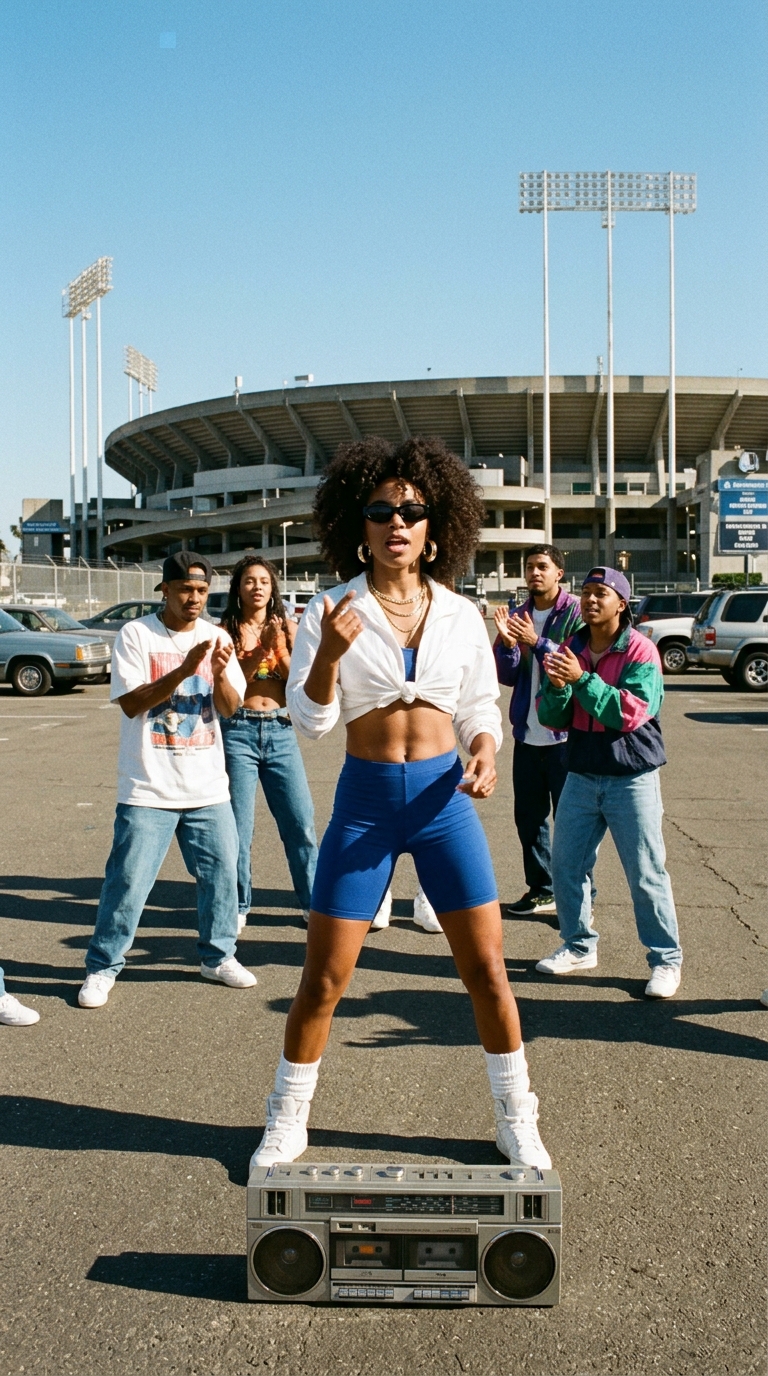
Our first dancers looked like stock photos. What made the difference was describing the picture as a still from an old music video shot on film, naming a real place and period clothes, and asking for the lips to be visible for lip-sync.
Step 3. Upload the song and the photo
Upload both files to your PixVerse account with POST files and keep the path of each. Upload the song as MP3: PixVerse refused an M4A file in our tests. With several PixVerse accounts connected, add ?email= to the upload and email to the requests below to pick one, for example the account whose free music video you want to use.
curl — POST /files (PixVerse)
curl --location 'https://api.useapi.net/v2/pixverse/files/' \
--header 'Authorization: Bearer user:12345-…' \
--header 'Content-Type: audio/mpeg' \
--data-binary '@cant-stop-this.mp3'
# {"path": "upload/8aa34c5f-7f33-4fdc-af40-7357909102cb.mp3", "duration": 151.968, …}

curl --location 'https://api.useapi.net/v2/pixverse/files/' \
--header 'Authorization: Bearer user:12345-…' \
--header 'Content-Type: image/jpeg' \
--data-binary '@dancer.jpg'
# {"result": [{"path": "upload/66952750-badc-473b-b2a2-721197e96e7d.jpeg", …}]}
Step 4. Check the price, then make the video
Every request can be quoted first, for free. quote: true returns the exact price and creates nothing:
curl — POST /music-video/create with quote
curl --location 'https://api.useapi.net/v2/pixverse/music-video/create' \
--header 'Authorization: Bearer user:12345-…' \
--form 'audio_path="upload/8aa34c5f-7f33-4fdc-af40-7357909102cb.mp3"' \
--form 'image_path="upload/66952750-badc-473b-b2a2-721197e96e7d.jpeg"' \
--form 'mode="performance"' \
--form 'music_genre="hip_hop"' \
--form 'subtitles="true"' \
--form 'aspect_ratio="16:9"' \
--form 'quality="1080p"' \
--form 'quote="true"'
Expand Response
{
    "quote": true,
    "mode": "performance",
    "quality": "1080p",
    "bill_seconds": 152,
    "credits_per_second": 15,
    "list_cost_credits": 2280,
    "cost_credits": 0,
    "free": true,
    "has_enough_credits": true
}
cost_credits: 0 and free: true mean the account’s free music video applies. Drop quote and add the lyrics, one line per caption, to make it. curl reads a multi-line field from a file with <:
curl — POST /music-video/create
curl --location 'https://api.useapi.net/v2/pixverse/music-video/create' \
--header 'Authorization: Bearer user:12345-…' \
--form 'audio_path="upload/8aa34c5f-7f33-4fdc-af40-7357909102cb.mp3"' \
--form 'image_path="upload/66952750-badc-473b-b2a2-721197e96e7d.jpeg"' \
--form 'mode="performance"' \
--form 'music_genre="hip_hop"' \
--form 'subtitles="true"' \
--form 'lyrics=<lyrics.txt' \
--form 'aspect_ratio="16:9"' \
--form 'quality="1080p"'
The answer carries the video_id:
Expand Response
{
    "video_id": "user:12345-pixverse:[email protected]:642767619916505",
    "project_id": 192080023076656,
    "mode": "performance",
    "quality": "1080p",
    "aspect_ratio": "16:9",
    "bill_seconds": 152,
    "credits_per_second": 15,
    "list_cost_credits": 2280,
    "cost_credits": 0,
    "free": true
}
Step 5. Wait for it and download it
Poll GET music-video/video_id until status is succeeded or failed, or pass a replyUrl with the create request and get the result by callback. A 30-second song took about 5 minutes to render, the 2½-minute song about 16 minutes. Save this as poll.mjs and run it with node poll.mjs:
Expand poll.mjs
const token = process.env.USEAPI_TOKEN;
const video_id = "user:12345-pixverse:[email protected]:642767619916505";
for (;;) {
  const res = await fetch(`https://api.useapi.net/v2/pixverse/music-video/${video_id}`, {
    headers: { Authorization: `Bearer ${token}` }
  });
  const mv = await res.json();
  console.log(mv.status);
  if (mv.status === "succeeded") { console.log(mv.video.url, mv.files); break; }
  if (mv.status === "failed") { console.log(mv.error); break; }
  await new Promise(r => setTimeout(r, 20000));
}
video.url is the finished mp4. files holds the extras: the same video without captions, the timed lyrics as an .ass subtitle file (for a song with vocals), and the key images and clips PixVerse cut together. For our song that was 17 images and 17 clips, handy if you want to re-edit it yourself. PixVerse’s media server refuses downloads that don’t send a browser-like User-Agent, so set one if a script gets 403.
More examples
Three shorter videos from the same tests, each with a different mode or style.
Performance, auto style, 9:16 at 720p
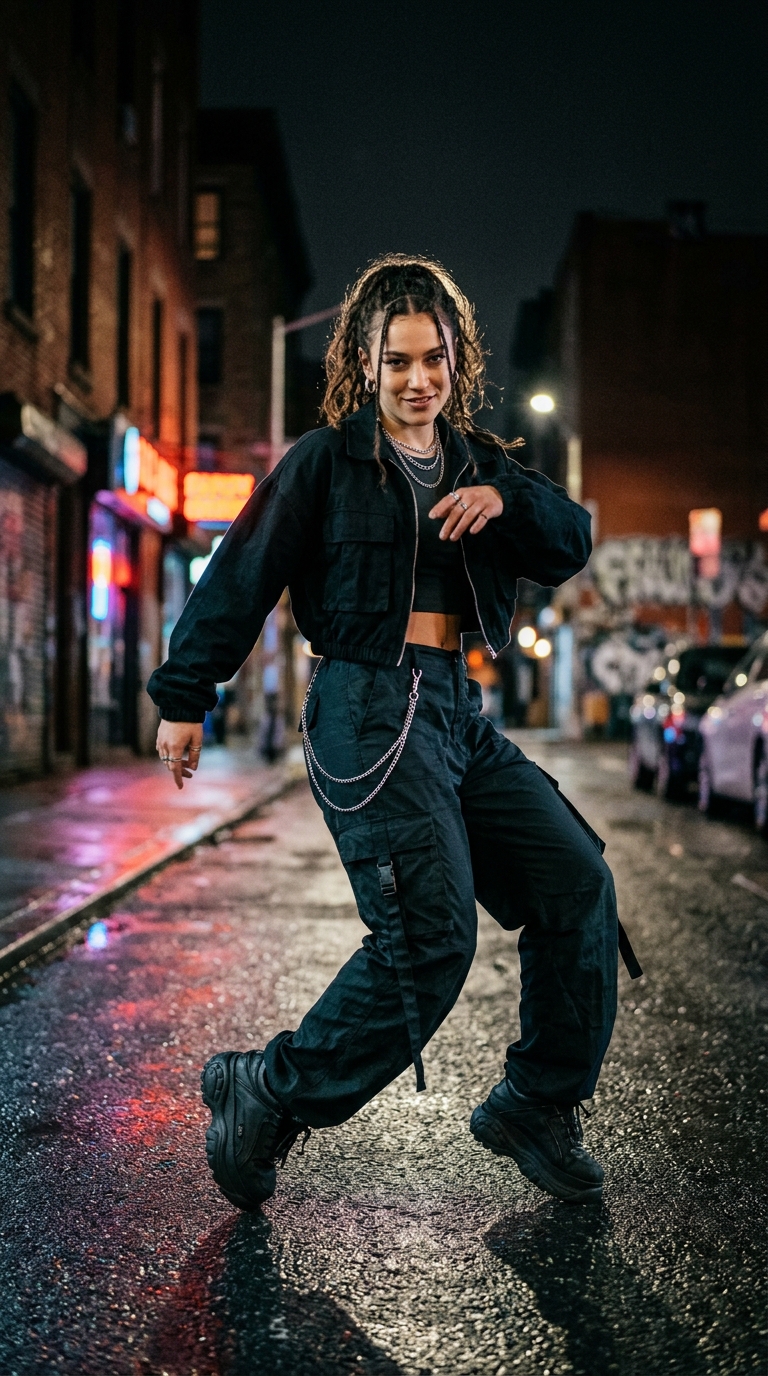
A 30-second song clip and a Nano Banana 2.1 dancer on a neon street at night. With style: auto PixVerse chose its own set, a plush retro lounge with chandeliers, disco balls and backup dancers. 300 credits, 5 minutes 21 seconds.
The song and the character that went in:
curl — POST /music-video/create
curl --location 'https://api.useapi.net/v2/pixverse/music-video/create' \
--header 'Authorization: Bearer user:12345-…' \
--form 'audio_path="upload/881729de-53f0-47bd-8e46-d2c93a8a751f.mp3"' \
--form 'image_path="upload/51b3b775-5f85-4016-a946-4de6ba35c042.jpeg"' \
--form 'mode="performance"' \
--form 'style="auto"' \
--form 'aspect_ratio="9:16"' \
--form 'quality="720p"'
The music video that came out:
Expressive, custom style, 16:9 at 1080p
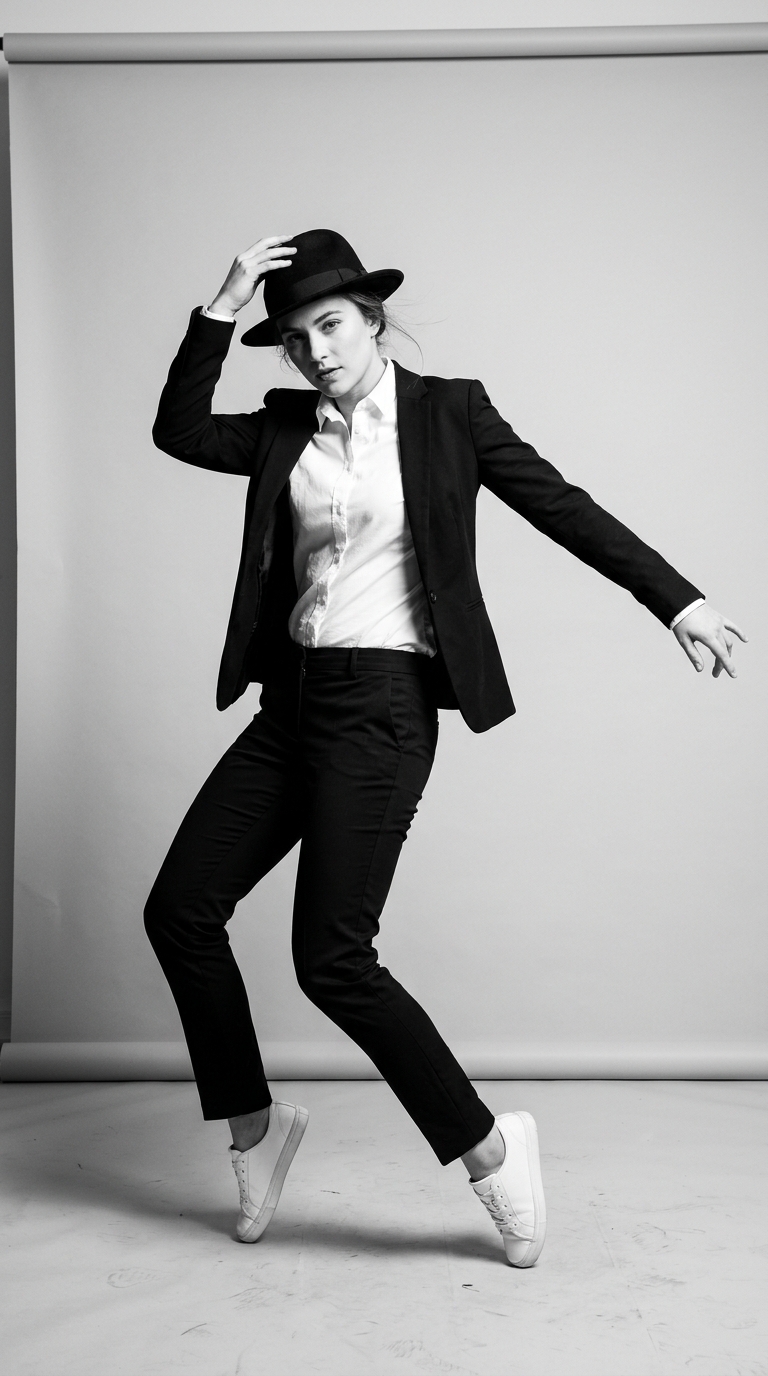
A 21-second song clip and a black-and-white Nano Banana 2.1 studio portrait of a dancer in a fedora and blazer. style: custom with no separate style image uses the character photo as the style, so the whole video stays black and white. 315 credits, 5 minutes 22 seconds.
The song and the character that went in:
curl — POST /music-video/create
curl --location 'https://api.useapi.net/v2/pixverse/music-video/create' \
--header 'Authorization: Bearer user:12345-…' \
--form 'audio_path="upload/90f95193-2c91-4a42-a506-930d4c964c45.mp3"' \
--form 'image_path="upload/ff4265e2-bdd5-490a-83bb-f77a34d2761b.jpeg"' \
--form 'mode="expressive"' \
--form 'style="custom"' \
--form 'aspect_ratio="16:9"' \
--form 'quality="1080p"'
The music video that came out:
Performance on an instrumental, 9:16 at 720p
A 10-second instrumental beat from Flow Music and the same dancer as the main video. With no vocals there is nothing to lip-sync, so PixVerse makes a dance video on a sunny Mediterranean street. 100 credits, 3 minutes 13 seconds.
The beat that went in:
curl — POST /music-video/create
curl --location 'https://api.useapi.net/v2/pixverse/music-video/create' \
--header 'Authorization: Bearer user:12345-…' \
--form 'audio_path="upload/23f6fdc4-8882-4b65-a70e-7a1a8b9c9761.mp3"' \
--form 'image_path="upload/66952750-badc-473b-b2a2-721197e96e7d.jpeg"' \
--form 'mode="performance"' \
--form 'style="auto"' \
--form 'aspect_ratio="9:16"' \
--form 'quality="720p"'
The music video that came out:
Modes and styles
| Mode | What it makes | Styles |
|---|---|---|
performance | the character sings the song with lip-sync | auto, custom and 16 looks such as cinematic, underground, lo_fi, claymation, retro_game |
expressive | emotional, atmospheric shots of the character | the same 18 |
storytelling | a storyline from your prompt, one or two characters | 18 of its own, such as photorealistic, anime, cyberpunk, ghibli, lego_blocks |
The full lists, lyric captions, aspect ratios and the built-in library of 13 songs, 15 characters and 28 style images are on the endpoint page.
Questions
Is there a PixVerse music video API?
Yes. useapi.net’s PixVerse API makes music videos from your song on your PixVerse subscription, in all three modes of PixVerse’s One-Click MV. On Premium a minute of song at 720p costs $2.40, against $4.00 on PixVerse’s own developer API, which has no expressive or storytelling mode (as of November 2026).
Can I make an AI music video for free?
Yes. Through useapi.net the first music video on any PixVerse account, even a free Basic one, costs nothing at any length (ours ran 2½ minutes), in any mode and at 1080p, and a quote shows free: true while it is unused. On PixVerse’s own developer API the same 2½-minute 1080p video would cost $15.20 (22.5 credits a second at 225 credits per dollar, as of November 2026).
Can an API lip-sync a singer to my song?
Yes. In performance mode the useapi.net PixVerse API lip-syncs the character from your photo to the song’s vocals, with no separate lip-sync step, as in our video above. Use a full-body photo with the face and lips clearly visible. At 1080p it costs $3.60 a minute on Premium, against $6.00 on PixVerse’s own developer API (as of November 2026).
Do I need lyrics to get captions?
No. Through useapi.net, subtitles: true alone makes PixVerse transcribe the vocals and time the captions, and lyrics, one line per caption, fixes the spelling. Every video also comes with a copy without captions, and a song with vocals also gets the .ass subtitle file. Captions work in expressive mode too, which PixVerse’s developer API doesn’t offer (as of November 2026).
Conclusion
A song, a photo and one API call make a finished music video, and with Flow Music and the Google Flow API the song and the photo can come from the same useapi.net subscription. Start with the free music video on your PixVerse account, then see POST music-video/create for every option.
Visit our  Discord Server or
 Telegram Channel for any support questions and concerns.