 Setup Flow Music
June 3, 2026
Table of contents
Approximately 5 minutes to complete setup steps.
This is the setup guide for Flow Music API. A Flow Music account (Google sign-in) and a useapi.net subscription are required for the API to work.
Automated setup (recommended)
Use our guided browser setup to configure your account automatically — no DevTools or token copying needed. Enter your API token, sign in with Google in the remote browser, and your account is ready.
Prefer manual setup? Continue with the steps below.
Flow Music is Google Labs’ AI music generator, powered by the Lyria 3 Pro model (formerly Producer AI, originally Riffusion). It creates complete, fully-produced songs — vocals, melody, and arrangement — from a text prompt, and can also cover/restyle songs, adjust lyrics in place, extend or replace sections, and apply audio effects.
Flow Music signs you in with your Google account and keeps the session — including a refresh token — in your browser. To use the API you copy that refresh token and register it with POST /accounts; useapi.net then calls Flow Music on your behalf and refreshes the token automatically.
You can configure up to 50 Flow Music accounts per single useapi.net subscription.
Sign in to Flow Music
- Navigate to https://www.flowmusic.app
- Sign in with your Google account. We strongly recommend using a dedicated Google account for the API — not your personal Gmail.
- Generate at least one song, and upload at least one image and one audio file. Doing each once in the browser dismisses Flow Music’s first-use consent dialogs.
Copy your refresh token
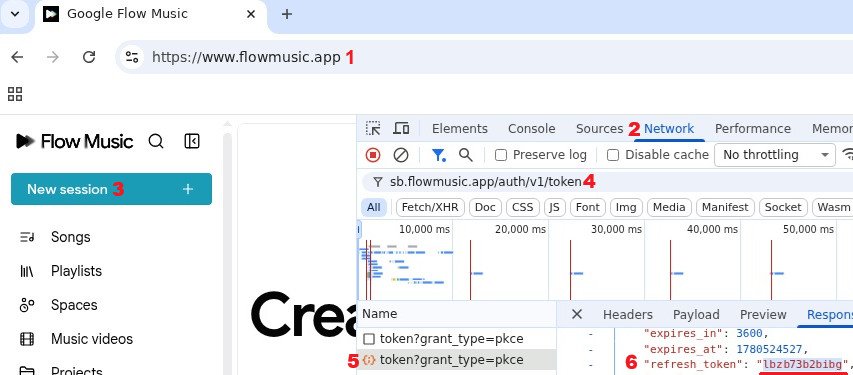
- Open https://www.flowmusic.app
1and make sure you’re signed out (sign out if you’re already signed in). - Open browser DevTools (F12) and select the Network tab
2. - Click Login
3and sign in with Google — this triggers a fresh token exchange. (The screenshot shows that button as New session because it changes to that once sign-in completes.) - In the Network filter box, type
sb.flowmusic.app/auth/v1/token4. - Click the
token?grant_type=pkcerequest that appears5. - Open the Response tab and copy the value of
refresh_token6.
Important — manual setup only: once the account is added to the API, clear Flow Music’s cookies in your browser (or just close it and stop using Flow Music there). Do not sign out — signing out revokes the refresh token and disables the API account. Also don’t keep browsing Flow Music there, or it will refresh the token itself and rotate it away from the API. Let the API fully manage the session from here on.
 Important — manual setup only: once the account is added to the API, clear Flow Music’s cookies in your browser (or just close it and stop using Flow Music there). Do not sign out — signing out revokes the refresh token and disables the API account. Also don’t keep browsing Flow Music there, or it will refresh the token itself and rotate it away from the API. Let the API fully manage the session from here on.
The automated setup handles all of this for you — it captures the token in a throwaway remote browser with no lingering session, so it’s strongly preferred.
If an account later stops working, repeat these steps and re-run POST /accounts.
Verify and add account
Paste your API token and the refresh_token below to register the account — you should receive a 201 (new) or 200 (updated) response. You can also call POST /accounts directly.