 Setup TemPolor
May 15, 2025
Table of contents
Approximately 5 minutes to complete setup steps.
This is the setup guide for TemPolor API. An active TemPolor subscription and a useapi.net subscription are required for the API to work.
TemPolor, an AI-powered, royalty-free music generation service that creates high-quality soundtracks from text prompts, custom lyrics, MIDI, and supports voice cloning. TemPolor offers extensive customization for instrumental tracks, including chords and BPM. Supports export in mp3, wav, and stems, and it can generate stems from users’ audio files. Up to 10 tracks can be generated concurrently, with unlimited generations available on the Ultra plan.
Create TemPolor account
Create a TemPolor account if you don’t have one already.
Locate your TemPolor requestParams
Open a Chromium-compatible browser (e.g. Google Chrome, Microsoft Edge, or Opera) and navigate to your TemPolor account profile page https://www.tempolor.com/account/profile 1.
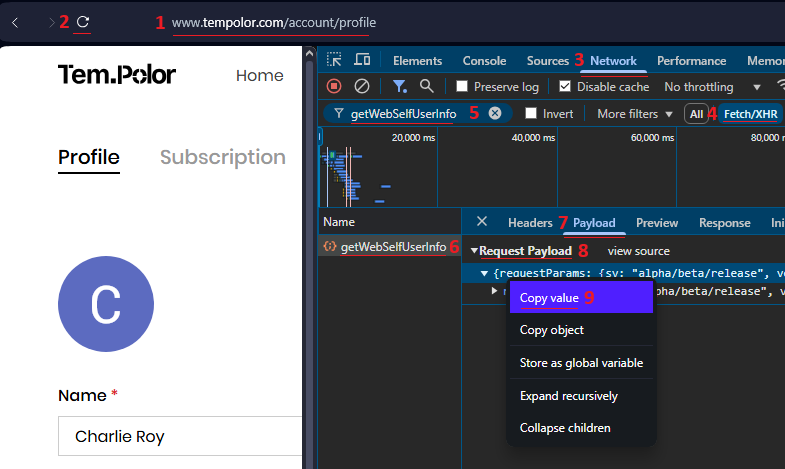
Refresh the page 2.
Once the page is fully loaded, ensure that you’re logged in and current page is https://www.tempolor.com/account/profile.
Open Developer Tools by right-clicking on the page and selecting “Inspect Element” or via keyboard shortcuts: Mac Command+Option+I or Windows F12 or Control+Shift+I.
Select Developer Tools » Network 3:
- Make sure that
AllorFetch/XHRis selected4. - Type
/getWebSelfUserInfoin the filter box5and hit Enter. - You should see a single HTTP call entry as shown below
6and click on that entry. - Select the “Payload” tab
7. - Locate and select the “Request Payload” header
8. - Right-click on the
requestParamsand copy its content9.
This is yourrequestParams.
As an example above, the requestParams (JSON)
{
  "requestParams": {
    "sv": "alpha/beta/release",
    "ver_code": 20000,
    "lang": "french",
    "la": "fr-FR",
    "di": "e23c9f7db8ced478b8574923817c2b6a",
    "pf": "100",
    "mi": "Windows",
    "biz": 378,
    "utdid": "e23c9f7db8ced478b8574923817c2b6a",
    "ts": 1849982225671,
    "service_ticket": "hUUCp7MeIAXpXKo9AOP5zPlJLqVZh81C2MWlZdTuqoGbNqzlgQNjBwtxdYnJPRA52Wn=",
    "ucid": "100349856",
    "user_id": "100349856",
    "member_level": 0,
    "is_visitor": 0,
    "vip_type": 20,
    "app_id": "material",
    "app": "web",
    "ve": "2.0.0",
    "entry": "web_main",
    "fr": "web",
    "ip": "88.222.199.44",
    "business_type": "material",
    "la_multi": "fr",
    "b_ts": "1849512371543",
    "userAgent": "Mozilla/5.0 (X11; Linux x86_64) AppleWebKit/537.39 (KHTML, like Gecko) Chrome/122.1.0.0 Safari/537.39 OPR/123.0.0.0",
    "web_terminal": "web_pc"
  }
}
Verify and add account
Use the form below to verify your credentials and add your TemPolor account.
Select Add Account to complete setup, or Verify to test your credentials first. You should receive response 200 if successful. You can also use POST /accounts directly.