How to Generate Animated GIFs with the GPT Image 2.6 API
7 min read • November 23, 2026
Table of contents
- Introduction
- Before you start
- Make a GIF in two calls
- GIF size, frames and speed
- Flare or Sunburst
- Transparent PNG stickers
- Other new PixVerse image models
- Pricing
- Examples
- Questions
- Conclusion
Introduction
The useapi.net PixVerse API makes looping animated GIFs with OpenAI’s GPT Image 2.6 from a text prompt. Send "output_format": "gif" to POST images/create and a GIF of up to 16 frames comes back in about 20 to 30 seconds. Flare and Sunburst both work. They run on your own PixVerse subscription, not on an OpenAI API key.

gpt-image-2.6-sunburst, 576x1024 (9:16), 12 frames at 130 ms, detail_level: high, 39 credits on a Pro plan, about 50 seconds. One request, no editing.
curl — POST images/create: the dancing Christmas GIF, with the full prompt
curl --location 'https://api.useapi.net/v2/pixverse/images/create' \
--header 'Authorization: Bearer user:12345-…' \
--form 'model="gpt-image-2.6-sunburst"' \
--form 'output_format="gif"' \
--form 'gif_frame_size="576x1024"' \
--form 'frame_count="12"' \
--form 'frame_duration_ms="130"' \
--form 'detail_level="high"' \
--form 'prompt="Looping animation. A pretty, stylish young woman with an eye-catching, one-of-a-kind look: a tall, glossy retro pompadour of pastel mint hair fading to silver tips, tiny gold hoop earrings, a dusting of freckles, rosy cheeks and a confident, playful smile. She wears normal-size retro cat-eye novelty glasses with glossy red frames; instead of see-through lenses, each lens shows a big printed cartoon eye with long lashes, and the cartoon pupils glance left and right and blink in a smooth loop. Her outfit is a fitted red velvet Christmas coat with fluffy white fur trim and a wide black belt with a big gold buckle encrusted with sapphires that sparkle and glow as she moves. She dances smoothly and gently: a soft shoulder shimmy, a slight side-to-side sway, and her hands rolling in small circles close to her body, all small, flowing movements. Behind her, on a vibrant blue background, Christmas ornaments, candy canes, wrapped gifts and snowflakes float and drift across the screen in bouncy rows, like the floating graphics of a 1990s dance-pop music video. Playful retro studio-portrait style, bright saturated colors, smooth seamless loop."'
PixVerse’s Ultra plan makes GPT Image 2.6 free to use, GIFs included. We verified it on November 23, 2026, when an Ultra account made a GIF for 0 credits. So you pay one flat monthly price instead of a price per image. Below are the requests, the GIFs they made and what each cost. After the GIFs come transparent PNG stickers and three more new image models on PixVerse.
useapi.net is a third-party API, not affiliated with OpenAI or PixVerse.
Watch the GIFs in a 40-second YouTube Short: the dancer, the pixel-art campfire and the paper boat made on Ultra for 0 credits, each with its prompt on screen.

Before you start
You need a useapi.net API token and a PixVerse account connected through Setup PixVerse. GPT Image 2.6 needs a paid PixVerse plan, Standard or higher. On Ultra the GIFs are free. On Standard, Pro and Premium they cost credits, see Pricing.
In the examples, user:12345-… stands for your useapi.net API token. With more than one PixVerse account connected, add --form 'email="[email protected]"' to a request to pick the account. Leave it out and the API picks one for you.
Make a GIF in two calls
1. Submit the job
curl — POST images/create: a 768x432 GIF with GPT Image 2.6 Sunburst
curl --location 'https://api.useapi.net/v2/pixverse/images/create' \
--header 'Authorization: Bearer user:12345-…' \
--form 'model="gpt-image-2.6-sunburst"' \
--form 'output_format="gif"' \
--form 'gif_frame_size="768x432"' \
--form 'frame_count="16"' \
--form 'frame_duration_ms="80"' \
--form 'detail_level="medium"' \
--form 'prompt="Looping pixel-art animation of a cozy campfire at night under a starry sky, flames flickering, sparks rising, a fox sleeping beside it"'
The answer has the new image’s id and the credits PixVerse charged:
200 answer: the image id and the credits charged
{
    "image_id": "user:12345-pixverse:[email protected]:123456789012345",
    "success_ids": [
        "user:12345-pixverse:[email protected]:123456789012345"
    ],
    "success_count": 1,
    "fail_count": 0,
    "total_count": 1,
    "cost_credits": 32,
    "code": 200
}
2. Wait for the GIF
Read the image with GET images/image_id every 5 to 10 seconds until image_status_final is true. Reading costs nothing:
curl — GET images/image_id
curl --location 'https://api.useapi.net/v2/pixverse/images/user:12345-pixverse:[email protected]:123456789012345' \
--header 'Authorization: Bearer user:12345-…'
When image_status_name is COMPLETED, image_url is your GIF. The answer has more fields than this. These are the ones that matter:
200 answer: the finished GIF
{
    "image_id": "user:12345-pixverse:[email protected]:123456789012345",
    "model": "gpt-image-2.6-sunburst",
    "output_format": "gif",
    "gif_frame_size": "768x432",
    "frame_count": 16,
    "frame_duration_ms": 80,
    "detail_level": "medium",
    "complexity": "high",
    "image_url": "https://media.pixverse.ai/pixverse%2Ft2i%2Fori%2F...gif",
    "output_width": 768,
    "output_height": 432,
    "cost_credits": 32,
    "image_status_name": "COMPLETED",
    "image_status_final": true
}
If image_status_name is FAILED or MODERATED, the job ended without a GIF. Send it again, or change the prompt. Instead of polling, you can add replyUrl to the first request, and we call that URL when the image is done. A wrong token gets 401, and every other error is listed on the endpoint page.
Our GIF took 28 seconds. Sixteen frames at 80 ms each make a loop of about 1.3 seconds:
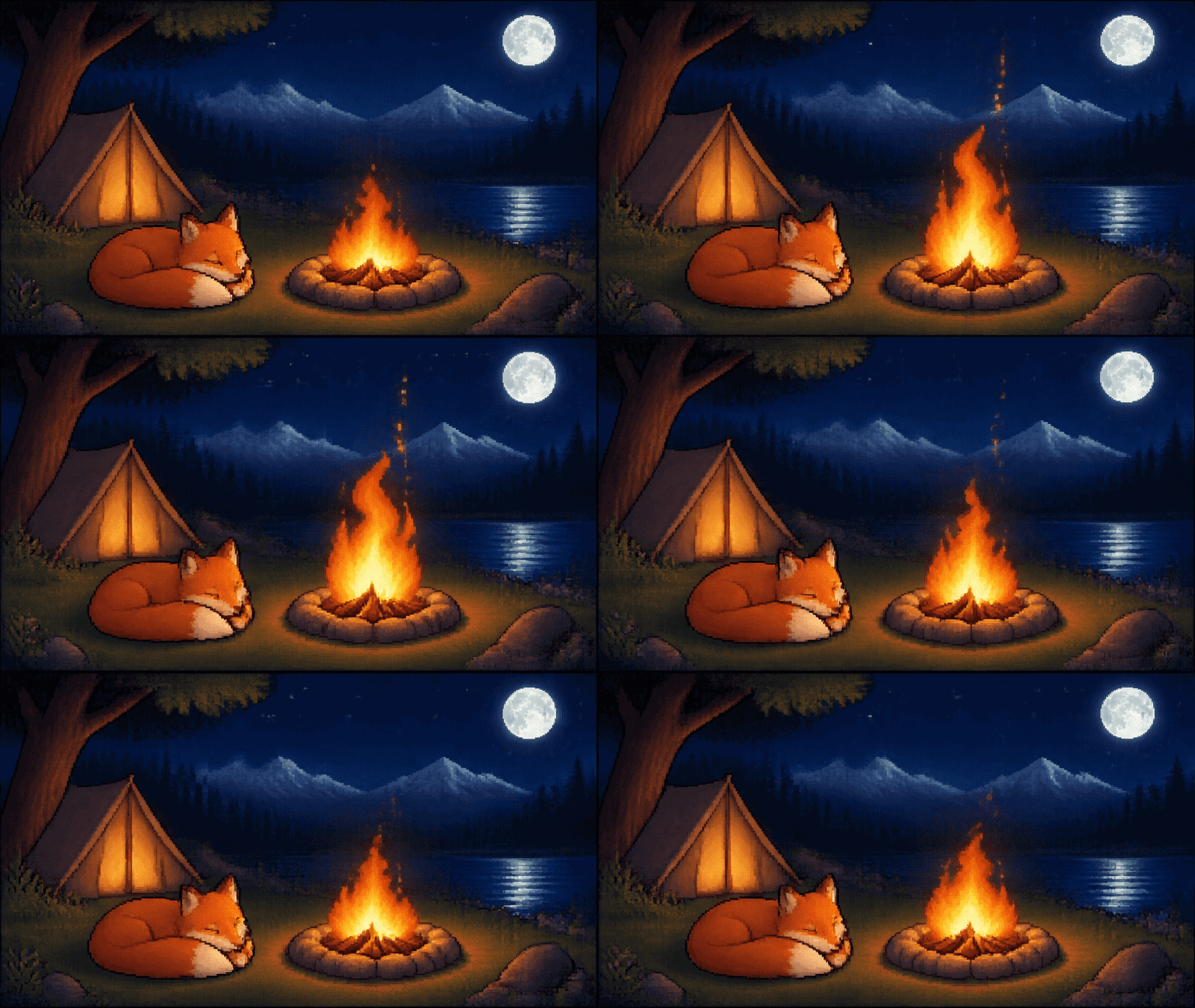
gpt-image-2.6-sunburst, 768x432, 16 frames at 80 ms, detail_level: medium, 32 credits on a Pro plan.
Save the GIF with any HTTP client. With curl:
curl — save the GIF
curl --location --output campfire-fox.gif --user-agent 'Mozilla/5.0' 'https://media.pixverse.ai/pixverse%2Ft2i%2Fori%2F...gif'
A runnable version, a script that makes a GIF for every prompt in a list and saves the files, is the gpt-image-2-6-gif/ example on GitHub.
GIF size, frames and speed
A GIF has three settings of its own. gif_frame_size is required. The other two have defaults.
gif_frame_sizesets the width and height of every frame. It also sets the shape, so leave outqualityandaspect_ratio.frame_countis how many frames the GIF has, from 2 up to the limit of the size. It is 9 if you leave it out.frame_duration_msis how long each frame stays on screen, from 20 to 2000 ms in steps of 10. It is 200 if you leave it out.
The loop lasts frame_count times frame_duration_ms. 9 frames at 200 ms is a 1.8-second loop.
| Shape | gif_frame_size | Most frames |
|---|---|---|
| Square | 384x384, 512x512, 720x720 | 16 |
| Square | 960x960 | 9 |
| Wide 16:9 | 512x288, 768x432 | 16 |
| Wide 16:9 | 1024x576 | 12 |
| Tall 9:16 | 288x512, 432x768 | 16 |
| Tall 9:16 | 576x1024 | 12 |
GIFs have no transparent background, so background is refused with a GIF. Reference images work as in any request. Upload them with POST files and send their paths as image_path_1, image_path_2 and so on. On a plan that pays credits, each reference adds 5 credits.
Flare or Sunburst
Both models take the same request and cost the same. OpenAI describes Flare as made “for fast iteration” and Sunburst as made “for detailed visual work”. In our runs, both took about 20 to 30 seconds for a GIF. Try a prompt on both and keep the one you like.
Two more settings change how the GIF looks:
detail_levelislow,medium,high,xhighormax, andlowif you leave it out. A higher level costs more credits on plans that pay credits.complexityislow,mediumorhigh, andhighif you leave it out. It is how busy the picture is. It doesn’t change the price.
Here is Flare at low detail, 12 frames at 100 ms each:

gpt-image-2.6-flare, 512x512, 12 frames at 100 ms, detail_level: low, 18 credits on Pro, 19 seconds. Prompt: Looping animation: a white paper boat bobbing gently on small blue waves, sun glinting on the water, flat illustrated style.
Transparent PNG stickers
GPT Image 2.6 also makes still images, at 1080p, 1440p or 2160p. Add "background": "transparent" to get a PNG with no background, ready to use as a sticker or an icon. Send output_format as png or webp. JPEG has no transparency, so jpeg with transparent returns 400 and charges nothing:
400 answer: JPEG with a transparent background
{
  "error": "JPEG does not support a transparent background: use output_format png or webp, or background auto or opaque",
  "code": 400
}
curl — POST images/create: a transparent PNG sticker with GPT Image 2.6 Sunburst
curl --location 'https://api.useapi.net/v2/pixverse/images/create' \
--header 'Authorization: Bearer user:12345-…' \
--form 'model="gpt-image-2.6-sunburst"' \
--form 'output_format="png"' \
--form 'background="transparent"' \
--form 'detail_level="medium"' \
--form 'quality="1080p"' \
--form 'aspect_ratio="1:1"' \
--form 'prompt="A glossy die-cut sticker of a smiling paper boat mascot, bold outline, isolated, no background"'
We sent the same prompt to GPT Image 2.6 Sunburst and, for comparison, to the older GPT Image 2.5 Flare. Both came back as 1024 x 1024 PNGs with a clear background. They sit on a dark page here so you can see the edges:


Left: gpt-image-2.6-sunburst, medium, 12 credits on Pro, 23 seconds. Right: gpt-image-2.5-flare, low, 5 credits on Pro, 12 seconds. Ultra makes both models free.
Other new PixVerse image models
The same endpoint, POST images/create, got three more new models this month. None of them is free on Ultra or any other plan. They always cost credits. The full list of settings is on the endpoint page.
Kling Image 4.0: long images for product pages and web design
Kling Image 4.0 also runs on the Kling API, with 8K images, Series Mode and style presets, shown in How to Generate Kling Image 4.0 Images via the Kling API. On PixVerse, kling-4.0 makes single images at 1440p or 2160p. With "image_type": "long" it makes one tall image that holds a whole page. long_image_layout picks the page:
webpagemakes a landing page design. Reference images are optional, up to 2.ecommerce_short,ecommerce_mediumandecommerce_longmake a product page from 1 to 3 photos of your product.
A long image is 1080p or 1440p and takes no aspect_ratio. Each of our two long images took about 2 minutes, so poll these less often than a GIF.
curl — POST images/create: a Kling Image 4.0 product page from one photo
curl --location 'https://api.useapi.net/v2/pixverse/images/create' \
--header 'Authorization: Bearer user:12345-…' \
--form 'model="kling-4.0"' \
--form 'image_type="long"' \
--form 'long_image_layout="ecommerce_short"' \
--form 'quality="1080p"' \
--form 'image_path_1="upload/0b1c2d3e-4f50-6172-8394-a5b6c7d8e9f0.png"' \
--form 'prompt="Product page for these wireless headphones: hero shot, 40-hour battery, active noise cancelling, foldable design, warm minimal style"'

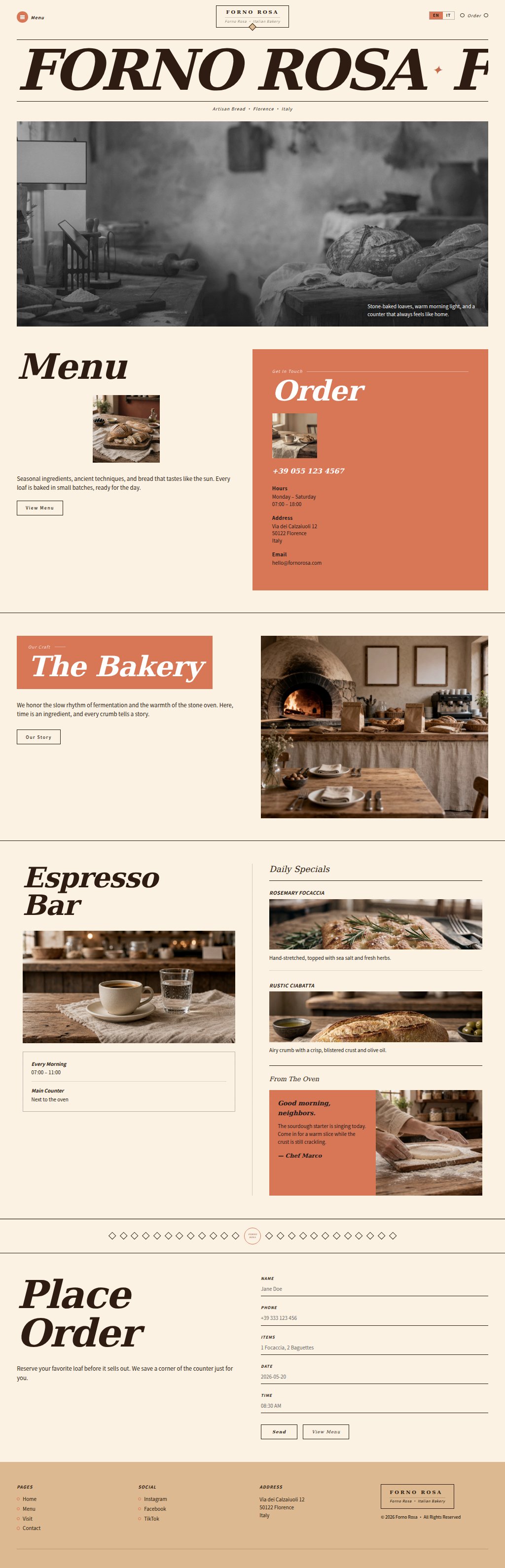
Scroll each frame to see the whole page. Left: ecommerce_short from the Seedream 5.5 headphones below, 1024 x 7157, 73 credits (72 plus 1 for the reference), 123 seconds. Right: webpage with no reference, prompt Landing page for a small Italian bakery called Forno Rosa: hero with fresh bread, menu section, opening hours, map, warm cream and terracotta palette, 1024 x 3179, 167 credits, 107 seconds.
Seedream 5.5
Seedream 5.5 is also on the Dreamina API. On PixVerse, seedream-5.5 makes images at 1080p, 1.5k or 1440p, and it takes background: transparent too. It is the one new model that also works on the free Basic plan. Our 1.5K product shot was 1536 x 1536 and cost 5 credits during a 40% off sale (7 at list price), in 17 seconds.
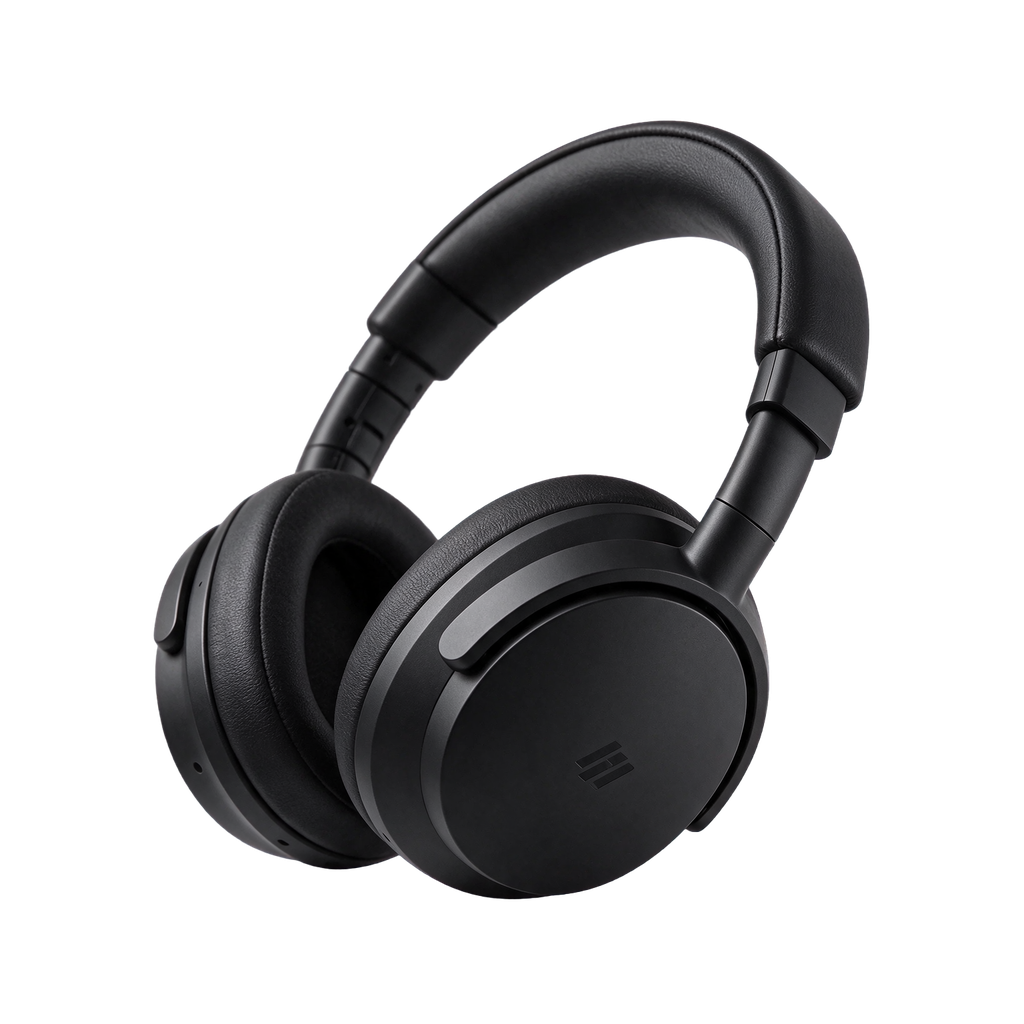
seedream-5.5, 1.5k, 1:1, background: transparent. Prompt: Studio product shot of matte black wireless over-ear headphones, three-quarter view, soft shadows. Shown at 1024 x 1024.
MiniMax H3 Image
MiniMax H3 Image also runs on the MiniMax API, shown in How to Generate Images with the MiniMax H3 Image API. On PixVerse, minimax-h3-image makes images at 1080p, 1440p or 2160p and takes up to 16 reference images. At 1080p and 16:9 ours was 1360 x 768. It cost 6 credits during a 25% off sale (8 at list price) and took 17 seconds.
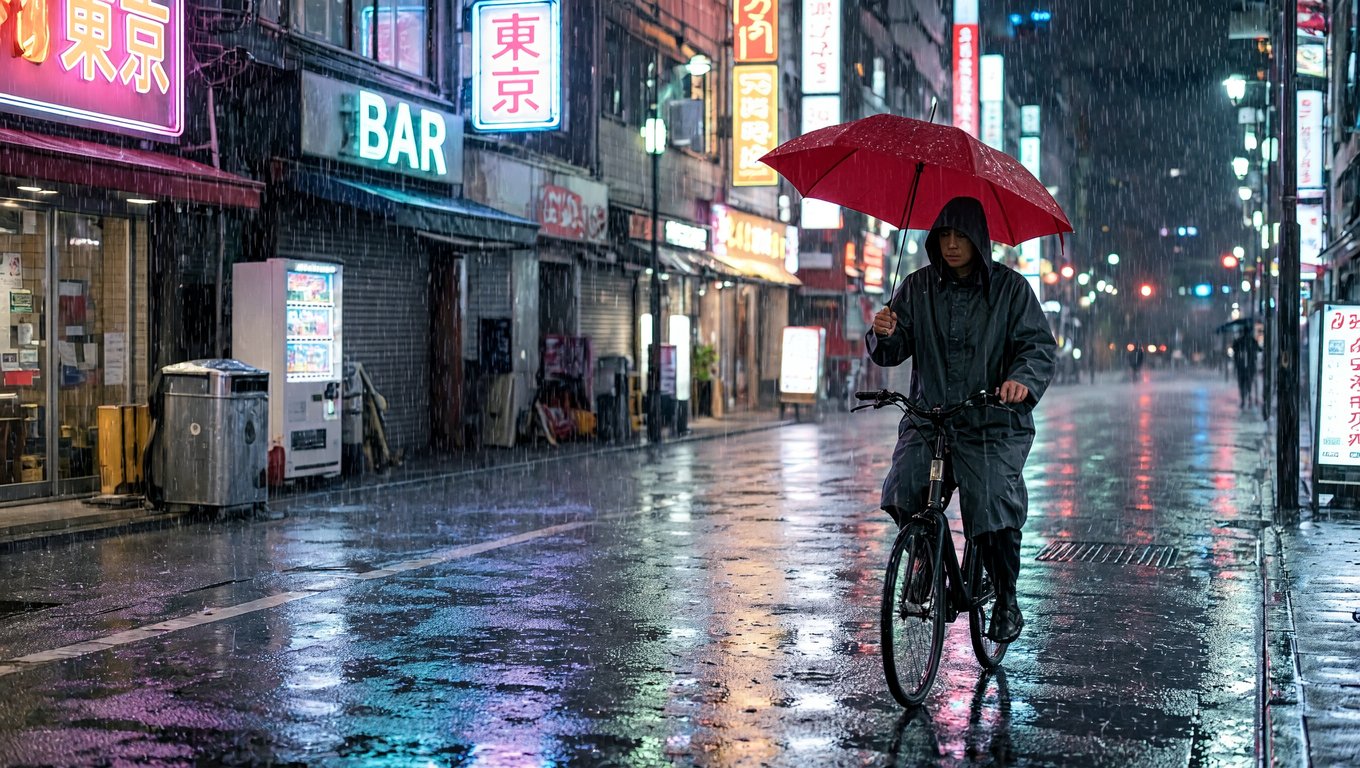
minimax-h3-image, 1080p, 16:9. Prompt: A rainy neon-lit street in Tokyo at night, reflections on wet asphalt, a lone cyclist with a red umbrella, photoreal.
Pricing
On PixVerse Ultra, GPT Image 2.6 GIFs and stills cost 0 credits. You pay two flat monthly prices:
| What you pay | A month |
|---|---|
| PixVerse Ultra | $199 (Black Friday price, regular $249) |
| useapi.net subscription | $15 |
| Total | $214 |
Ultra’s free generation runs in Relax Mode. Past a daily amount for each model, PixVerse moves your account to a slow queue. The GIFs still cost nothing, but they take longer. Flare and Sunburst each have their own daily amount, and it resets at about 00:00 UTC. Details are in Unlimited Image Generation.
Ultra paid yearly is $1,788, which is $149 a month, or $164 a month with useapi.net. The plan also comes with 30,000 credits a month. GPT Image 2.6 doesn’t use them, so they are left for video and for the models that are not free.
OpenAI’s own API bills GPT Image 2.6 by tokens: $30 for a million image output tokens, the same for Flare and Sunburst (OpenAI pricing, November 23, 2026). OpenAI lists no price for a GIF. A third-party test measured about 1,150 output tokens for a small 9-frame GIF, about $0.035 a GIF (OmniaKey, November 5, 2026). Larger or more detailed GIFs can use more tokens. At $0.035 the flat plan wins once you make about 6,100 GIFs a month, around 200 a day. On the yearly plan it wins from about 4,700 a month. At Ultra’s regular $249 price it needs about 7,500.
| GIFs a month | OpenAI API, about $0.035 each | PixVerse Ultra + useapi.net |
|---|---|---|
| 10,000 | about $350 | $214 |
| 20,000 | about $700 | $214 |
Below the break-even, paying OpenAI per GIF costs less. At high volume PixVerse’s daily slow queue can make some GIFs take longer, so split the work between Flare and Sunburst, or across more accounts.
On Standard, Pro and Premium, GPT Image 2.6 costs credits:
detail_level | low | medium | high | xhigh | max |
|---|---|---|---|---|---|
| GIF, any frame size | 18 | 32 | 39 | 69 | 154 |
Still image, 1080p | 7 | 12 | 14 | 24 | 53 |
Each reference image adds 5 credits.
Start using the API
A single $15/month subscription covers every API on useapi.net — one token, all services. You connect up to 3 accounts per service, each with its own website subscription, and useapi.net handles the REST API, load balancing, and polling. Need more accounts? Each extra subscription is $10/month and adds 3 more accounts per service.
Subscribe — $15/month Pay with crypto
Pricing and volume options — full refund within the first 14 days if you have fewer than 50 successful generations. Already subscribed? Change the quantity in the Stripe Customer Portal instead of buying again.
Examples
Two more GIFs from our runs. The cat was made on a Pro plan. The paper boat in the puddle was made on an Ultra plan and cost 0 credits.
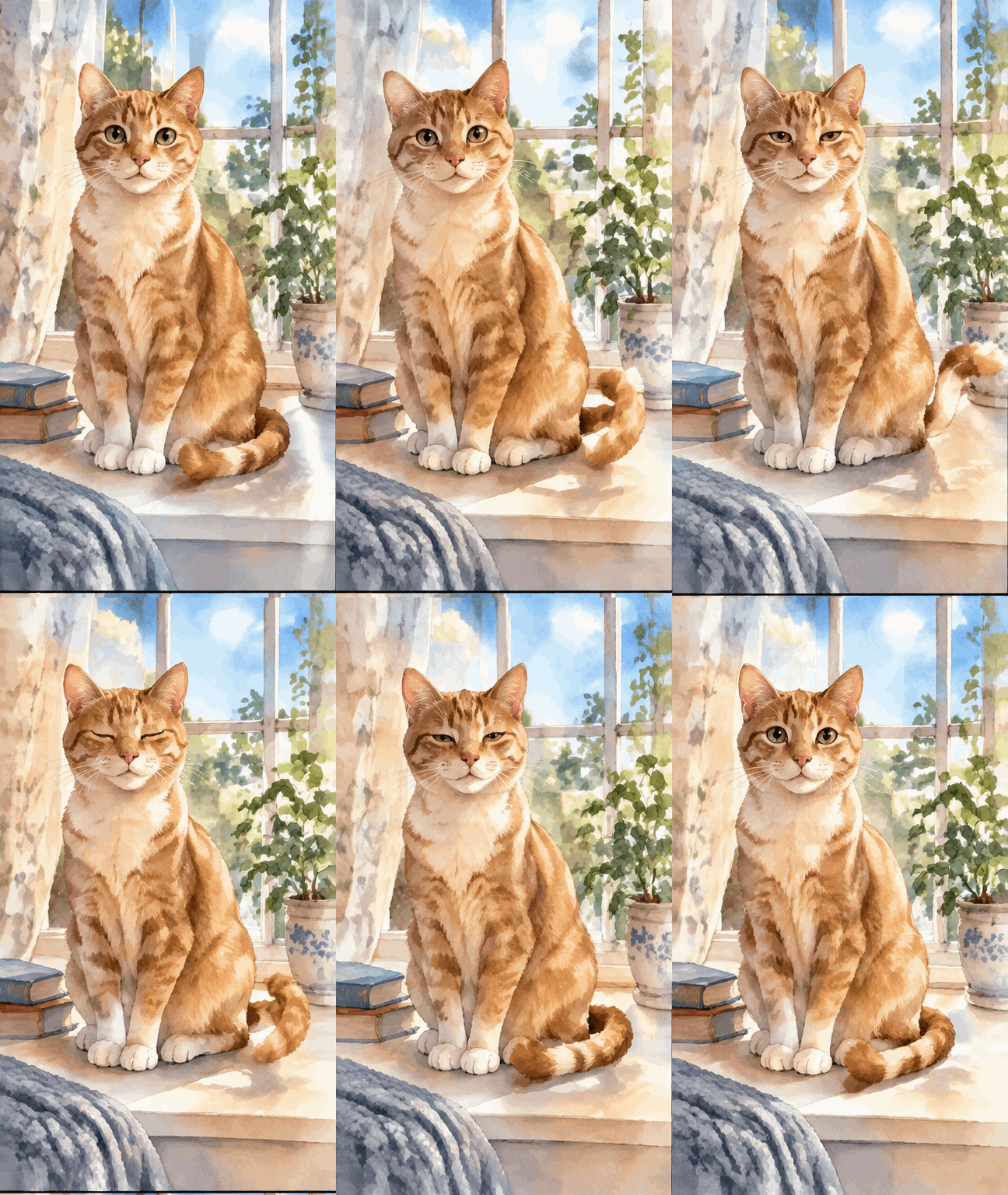

Left: gpt-image-2.6-flare, 432x768, 9 frames at 150 ms, low, 18 credits on Pro, 24 seconds. Prompt: Looping animation of a ginger cat on a sunny windowsill, slowly blinking and flicking its tail, watercolor style. Right: gpt-image-2.6-flare, 384x384, default 9 frames at 200 ms, low, 0 credits on Ultra. Prompt: Looping animation of a tiny paper boat sailing through a rain puddle on a city sidewalk, ripples spreading, flat illustrated style.
For comparison, the paper boat prompt as a still image. gpt-image-2.6-flare, png, 1080p, 16:9 and low made a 1280 x 720 image in 7 seconds for 7 credits:
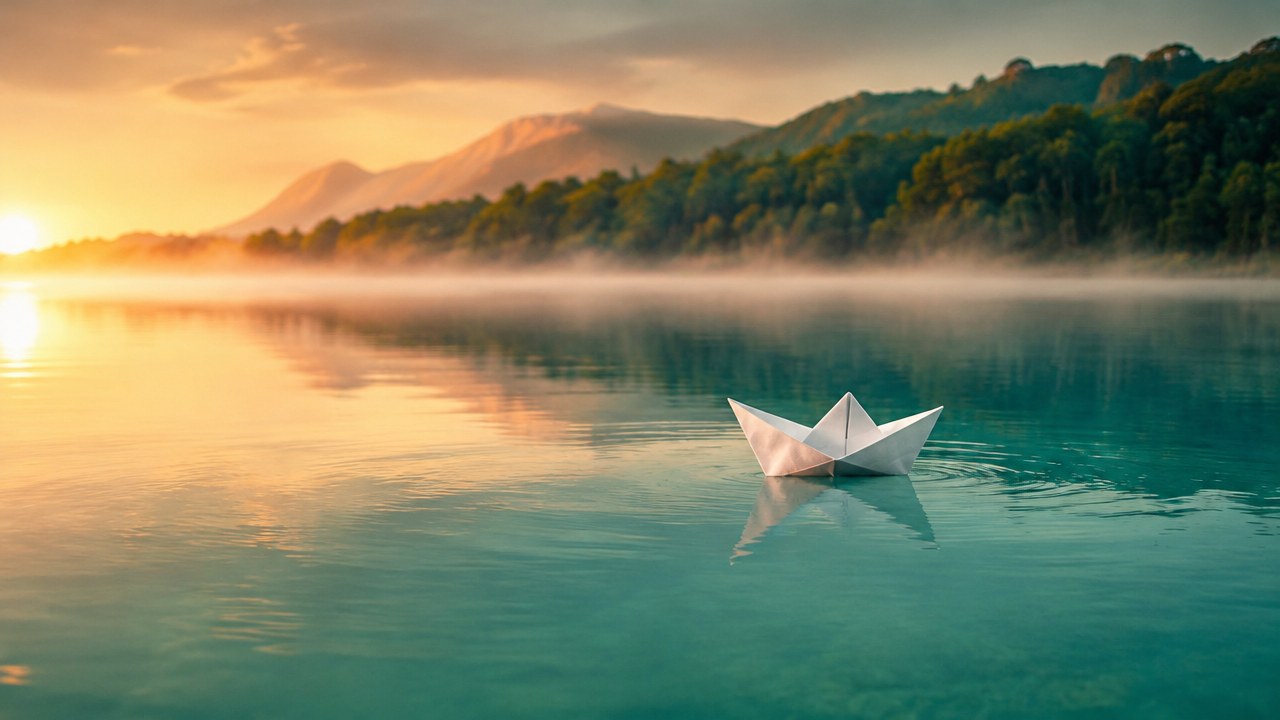 Prompt:
A small white paper boat drifting on a calm turquoise lake at golden hour, soft reflections, gentle mist, cinematic wide shot.
Questions
How do I make GPT Image 2.6 GIFs without an OpenAI API key?
useapi.net runs GPT Image 2.6 Flare and Sunburst on your own PixVerse account, so you need one useapi.net token and a PixVerse plan from Standard up, with no OpenAI account. Send output_format: gif and a gif_frame_size to POST images/create, then read the result with GET images. On PixVerse Ultra the GIF costs 0 credits.
How much does a GPT Image 2.6 GIF cost?
Through useapi.net on PixVerse Ultra, no credits per GIF: we verified a GIF at 0 credits on November 23, 2026. You pay $199 for Ultra (its Black Friday price) plus $15 for useapi.net, $214 a month. OpenAI’s API charges by tokens, about $0.035 for a small 9-frame GIF in a third-party test. From about 6,100 GIFs a month, the flat plan is cheaper (as of November 2026).
How do I make a transparent PNG sticker with GPT Image 2.6?
useapi.net sends your sticker request to GPT Image 2.6 with one extra field, background: transparent, and output_format set to png or webp. Our Sunburst sticker came back as a 1024 x 1024 PNG with a clear background in 23 seconds. JPEG can’t be transparent, so that mix returns 400 before anything is charged. On PixVerse Ultra stickers cost 0 credits, like the GIFs.
How long can a GPT Image 2.6 GIF be?
useapi.net lets you set the length of every GIF yourself. A GIF has 2 to 16 frames, and each frame stays on screen for 20 to 2000 ms, so a loop lasts up to 32 seconds. Sizes run from 384 x 384 to 960 x 960, in square, 16:9 and 9:16 shapes. The largest sizes allow only 9 or 12 frames. On PixVerse Ultra every size and length costs 0 credits.
Conclusion
One request with output_format: gif turns a prompt into a looping GPT Image 2.6 GIF. On PixVerse Ultra those GIFs cost no credits, so a busy app pays $214 a month instead of a price per GIF. Start with POST images/create, or see the PixVerse API overview for everything else it does.
Visit our  Discord Server or
 Telegram Channel for any support questions and concerns.