 Dreamina
February 23, 2026 (September 7, 2026)
Table of contents
- VPN setup
- Create a Dreamina account
- Verify available models
- Verify and add account
- Cost calculator
- Important notes
Approximately 10 minutes to complete setup steps.
This is the setup guide for Dreamina API. An active Dreamina subscription and a useapi.net subscription are required for the API to work.
Dreamina creates AI-generated videos and images using models from ByteDance’s Seed family.
The API supports two regions: US and CA (Canada). Both expose seedance-2.5, seedance-2.0, seedance-2.0-fast, and seedance-2.0-mini at 720p. The image models differ — seedream-5.0-pro, seedream-4.7, nano-banana, and gpt-image-2 are CA-only. 1080p is CA-only for now on both seedance-2.0 and seedance-2.5 — will change once Dreamina adds US support.
See the Cost calculator below for per-region pricing. CA is the only region offering 1080p.
VPN setup
A VPN with a US or Canadian IP address is required to create a Dreamina account. The VPN is only needed for browser-based account creation — the API handles all requests through its own proxy infrastructure.
For US region accounts:
Opera browser has a built-in free VPN.
- Download and install Opera if you don’t have it already
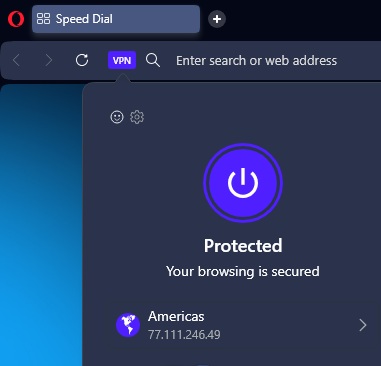
- Enable the built-in VPN by clicking the VPN badge in the address bar
- Set the VPN region to Americas
- Verify the VPN is active — you should see “Protected” and an Americas IP address
For CA region accounts:
Opera’s free VPN does not support the Canadian region. You will need a commercial VPN service that offers Canadian server locations (e.g., NordVPN, ExpressVPN, Surfshark, or similar). Set your VPN to a Canada server before creating the account.
Create a Dreamina account
⚠️ Use a dedicated email account for this API — do NOT use your personal email.
- Navigate to https://dreamina.capcut.com/ with your VPN active and set to the desired region (Americas for US, Canada for CA)
- Verify your region by checking the URL — US accounts will see
dreamina.capcut.com, CA accounts may see a Canadian IP in the VPN indicator - Click Sign in in the bottom-left corner
- Select Continue with email from the login options
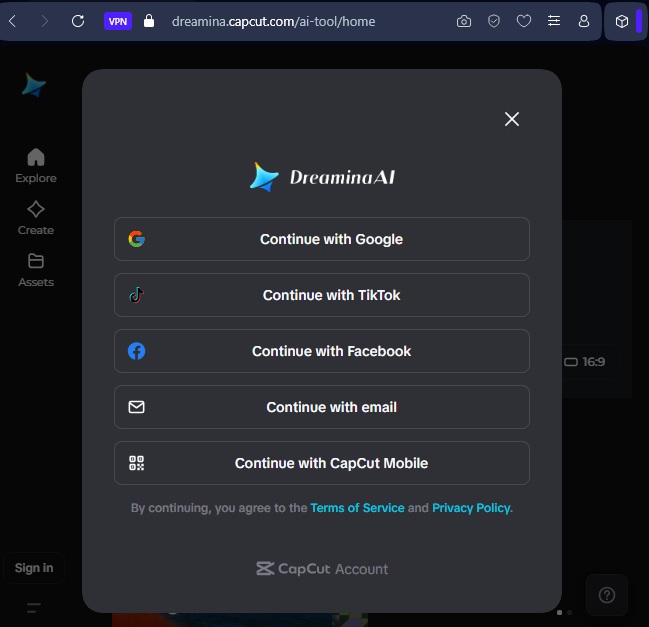
- Click Sign up to create a new account
- Enter your email address and choose a password
- Click Continue to complete registration
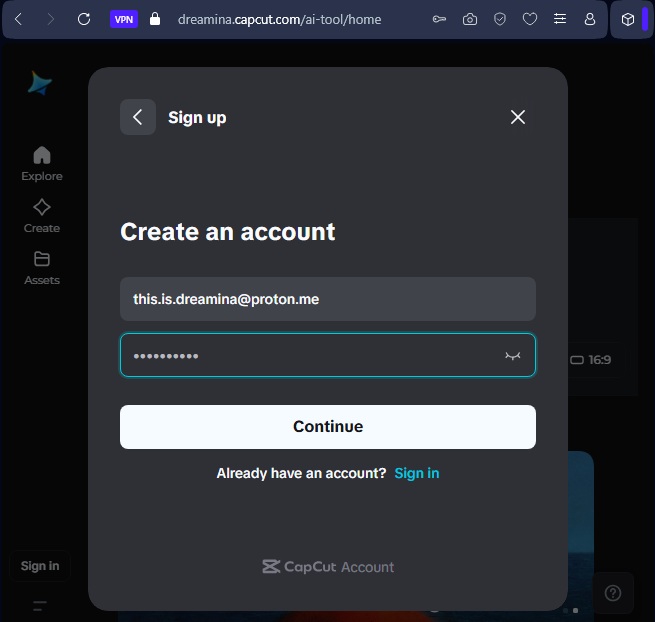
You may need to verify your email address by entering a code sent to your inbox.
Verify available models
Before adding your account to the API, confirm that the desired Seedance models are available:
- Navigate to https://dreamina.capcut.com/ai-tool/generate
- Select AI Video from the mode selector at the bottom
- Click the model name to open the model dropdown and verify that your desired models (e.g., Seedance 2.0 Fast, Seedance 2.0) are listed
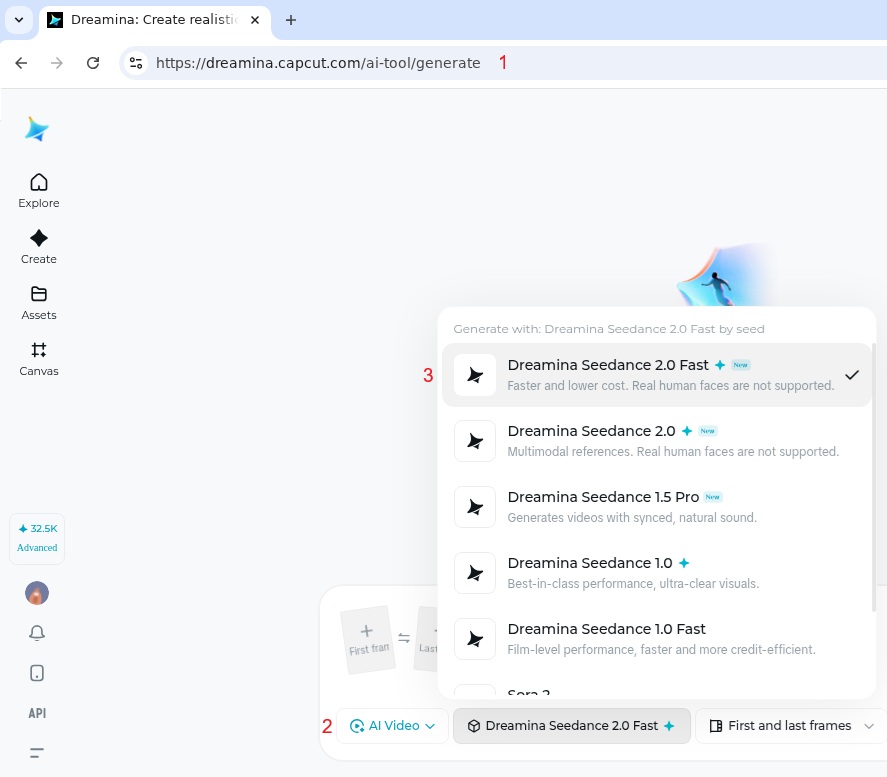
If you don’t see Seedance 2.0 models, your account may have been created in the wrong region. Create a new account with the correct VPN region.
We recommend starting with the Basic plan to verify that subscription and generation work end-to-end before upgrading to the Advanced plan. The model dropdown is only an advertisement — Dreamina sometimes lists models that fail at execution for a given region or account. Running one successful generation on the Basic plan confirms the model actually works for your account before you commit to a larger plan.
Verify and add account
Use the form below to verify your credentials and add your Dreamina account.
Select Add Account to complete setup, or Verify to test your credentials first. You should receive response 200 if successful. You can also use POST /accounts directly.
Cost calculator
Billed seconds are the output duration plus every input video attached, rounded down to a whole second. On an edit that includes the source video itself, which is counted once as the input and once as the output. Two live CA generations on 2026-09-07 landed on the predicted figure exactly: a 21.3-second edit billed 42 seconds (756 credits) and a 35-second long video built from a 21.3-second reference billed 56 (1,680).
Credit rates come from each region’s own price metadata — CA read 2026-09-07, US 2026-08-14. Dollars apply each region’s Advanced plan rate, CA converted at CAD/USD 0.7167 (2026-08-07). Rates move: CA’s 720p reference discount disappeared between August 14 and September 7, and the US 720p reference rate was 29 a week before that. Treat the table as a snapshot.
| Model | US cr/sec | US $/sec | CA cr/sec | CA $/sec |
|---|---|---|---|---|
| Seedance 2.5 @480p, with a video reference | 14 | $0.113 | 18 | $0.105 |
| Seedance 2.5 @480p | 17 | $0.138 | 22 | $0.128 |
| Seedance 2.5 @720p, with a video reference | 27 | $0.219 | 48 | $0.280 |
| Seedance 2.5 @720p | 37 | $0.300 | 48 | $0.280 |
| Seedance 2.5 @1080p | — | — | 117 | $0.682 |
| Seedance 2.5 long video @480p | 23 | $0.186 | 30 | $0.175 |
| Seedance 2.5 long video @720p | 45 | $0.364 | 58 | $0.338 |
| Seedance 2.5 long video @1080p | — | — | 130 | $0.758 |
| Seedance 2.0 Mini / Fast (720p) | 8 | $0.065 | 10 | $0.058 |
| Seedance 2.0 (720p) | 17 | $0.138 | 23 | $0.134 |
| Seedance 2.0 (1080p) | — | — | 57 | $0.332 |
| Seedance 2.0 (4K) | — | — | 126 | $0.734 |
CA is cheaper on almost every model, by up to 10%. It charges more credits per second than US (23 against 17 at 720p) but its plan buys far more credits per dollar — 171.6 against 123.5 — and that usually more than covers the difference. The one exception is Seedance 2.5 at 720p with a reference video, where CA no longer discounts and US still does. CA also has 1080p and 4K, which US does not.
Seedance 2.5 is the only model whose price depends on the input. Attach an omni video reference and the rate drops, but the reference’s own duration is billed on top of the output — a 4-second clip built from a 5-second reference bills 9 seconds. The discount stops at 1080p in both regions, and on CA it now stops at 720p too.
Long video, any duration from 31 to 180 seconds, is priced on its own higher scale — on CA 30 credits a second at 480p against 22 for an ordinary generation without a reference, and 58 against 48 at 720p — and gets no reference discount at all.
Show the math
Dollars per credit, from the Advanced plan billed yearly:
| Region | Plan | Credits/month | Per credit | Credits per USD |
|---|---|---|---|---|
| US | $70.00/mo | 8,645 | $0.008097 | 123.5 |
| CA | C$94.90/mo = $68.02 | 11,670 | $0.005829 | 171.6 |
The nominal per-credit price looks identical in each local currency — $0.0081 and C$0.0081 — which is what makes CA look more expensive until the conversion is applied. It is not.
Failed generations are not charged.
Plan screenshots
Both are the yearly plan billed monthly, captured 2026-08-07, so the two are directly comparable.
US — Advanced $70/month for 8,645 credits, or $0.0081 per credit 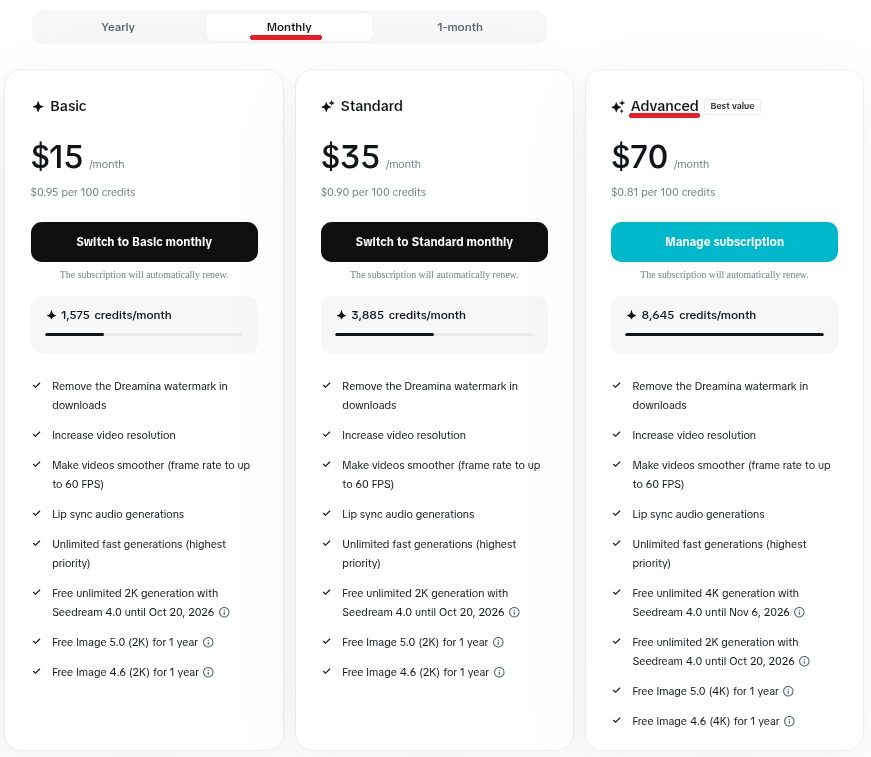
CA — Advanced C$94.90/month for 11,670 credits, or C$0.0081 per credit. Month-to-month is higher: C$24.49 / C$56.90 / C$112.99 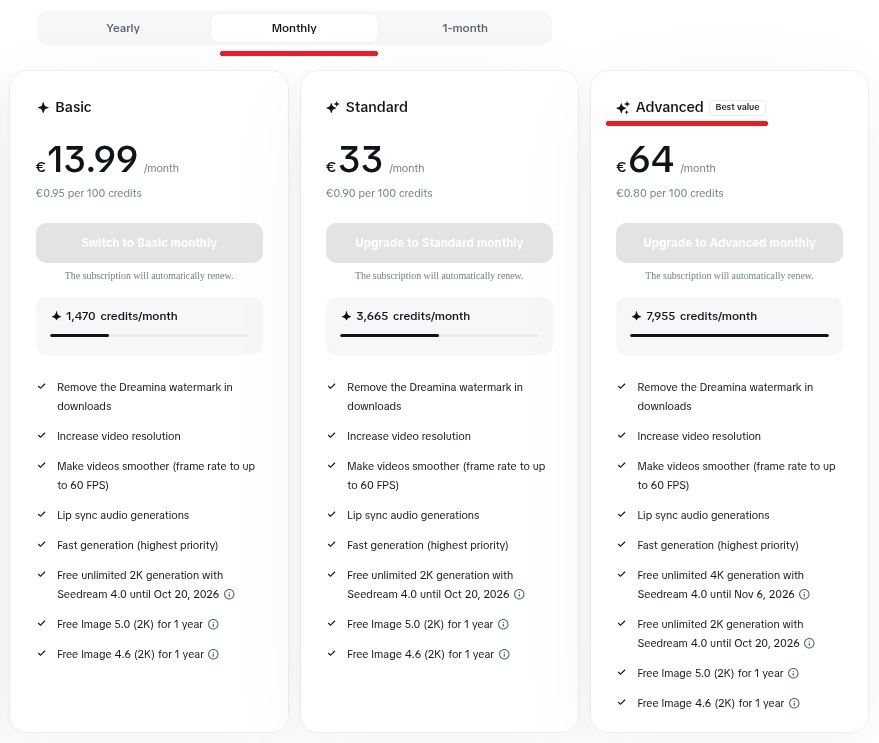
Important notes
- First generation via browser — after setting up your account, generate at least one video using the Dreamina website (e.g., a short Seedance 2.0 Fast clip in Omni Reference mode) to ensure the service is working and to accept the Terms of Service. This is a one-time step before using the API.
- VPN not required for API usage — the VPN is only needed for creating the Dreamina account in the browser. The API handles all requests through its own proxy infrastructure.
- Region is permanent — use the same region for the account as the VPN used during creation. US accounts must use
region: "US", Canadian accounts must useregion: "CA". - Session management — the API automatically manages your Dreamina session, including refreshing expired sessions. If you see
596errors, re-add your account via POST /accounts. - Avoid using the same account simultaneously through both the API and the Dreamina website — it should work, but to play safe it’s better to avoid potential session conflicts.
- Avoid logging in from other regions — do not log in to your Dreamina account from any region other than the one used during creation, as it may change the account’s default region.
- Free credits — new Dreamina accounts receive free credits. Check your balance via GET /accounts/
account.