Nano Banana 2 Lite・2.1・Pro を比較:Google Flow の3つの画像モデル
7分で読めます • 2026年7月2日(2026年11月6日更新)
useapi.net はサードパーティの API です。Google とは提携しておらず、Google の承認も受けていません。
目次
- はじめに
- 3つの Nano Banana モデルとは?
- 料金
- 比較に使うプロンプト
- 3つのモデルで生成する
- 例
- どの Nano Banana モデルを使うべき?
- 自分で実行する
- よくある質問
- おわりに
はじめに
Google Flow には nano-banana-2-lite、nano-banana-2、nano-banana-pro の3つの Nano Banana 画像モデルがあり、useapi.net の Google Flow API なら、お使いの Google Flow アカウントで3つすべてを1つのプロンプトから実行できます。画像の生成は無料アカウントを含むすべての Google AI のプランに含まれていますが、公式の Gemini API では画像1枚に $0.034〜$0.134 かかります(2026年11月時点)。Google Cloud プロジェクトも API キーも不要です。
このガイドでは、まったく同じプロンプトを Lite、2.1、Pro で実行して違いを確かめ、そのうえで全セットを1つのコマンドで生成できる Node.js スクリプトを紹介します。まずは基本から知りたい場合は、姉妹編の画像生成チュートリアルをご覧ください。
3つの Nano Banana モデルとは?
モデルはリクエストごとに model フィールドで選びます。省略すると、Google Flow は2026年7月からのデフォルトである nano-banana-2-lite を使います。3つのモデルはどれも、無料アカウントを含むすべての Google AI のプランで使えます。
| モデル ID | 製品名 | 向いている用途 | 参照画像(I2I) | 速度 |
|---|---|---|---|---|
nano-banana-2-lite (デフォルト) | Nano Banana 2 Lite / Gemini 3.1 Flash-Lite Image | どのプランでも速く大量に生成 | 最大10枚 | 最速 |
nano-banana-2 | Nano Banana 2.1 | 品質と速度のバランス | 最大10枚 | 速い |
nano-banana-pro | Nano Banana Pro / Gemini 3 Pro Image | 最高の忠実度と指示への追従 | 最大10枚 | 遅め |
3つのモデルはどれも同じアスペクト比(16:9、4:3、1:1、3:4、9:16、画像から画像のモードでは auto も)、count(1〜4)、結果を再現するための seed、最大10枚の参照画像、プロンプト内の @ メンション、2K/4K へのアップスケールに対応しています。非推奨のエイリアス imagen-4(Google は2026年7月に Google Flow から Imagen を削除しました)と nano-banana も引き続き使え、それぞれ nano-banana-2-lite と nano-banana-2 に対応します。モデルごとの詳細は POST /images のリファレンスにあります。
2K/4K へのアップスケール
生成したどの画像も、POST /images/upscale でアップスケールできます。画像の mediaGenerationId と、resolution に 2k(デフォルト)または 4k を渡します。応答は encodedImage に入った base64 です。2k はどのプランでも使え、4k には Google AI Ultra が必要です。
料金
画像は無料アカウントを含むどの Google AI のプランでも Flow クレジットを消費せず、useapi.net も画像ごとの料金を取りません。全モデル・全プランの料金と公式 API との比較は Google Flow の料金表にあります。アカウントの接続方法はセットアップガイドをご覧ください。
比較に使うプロンプト
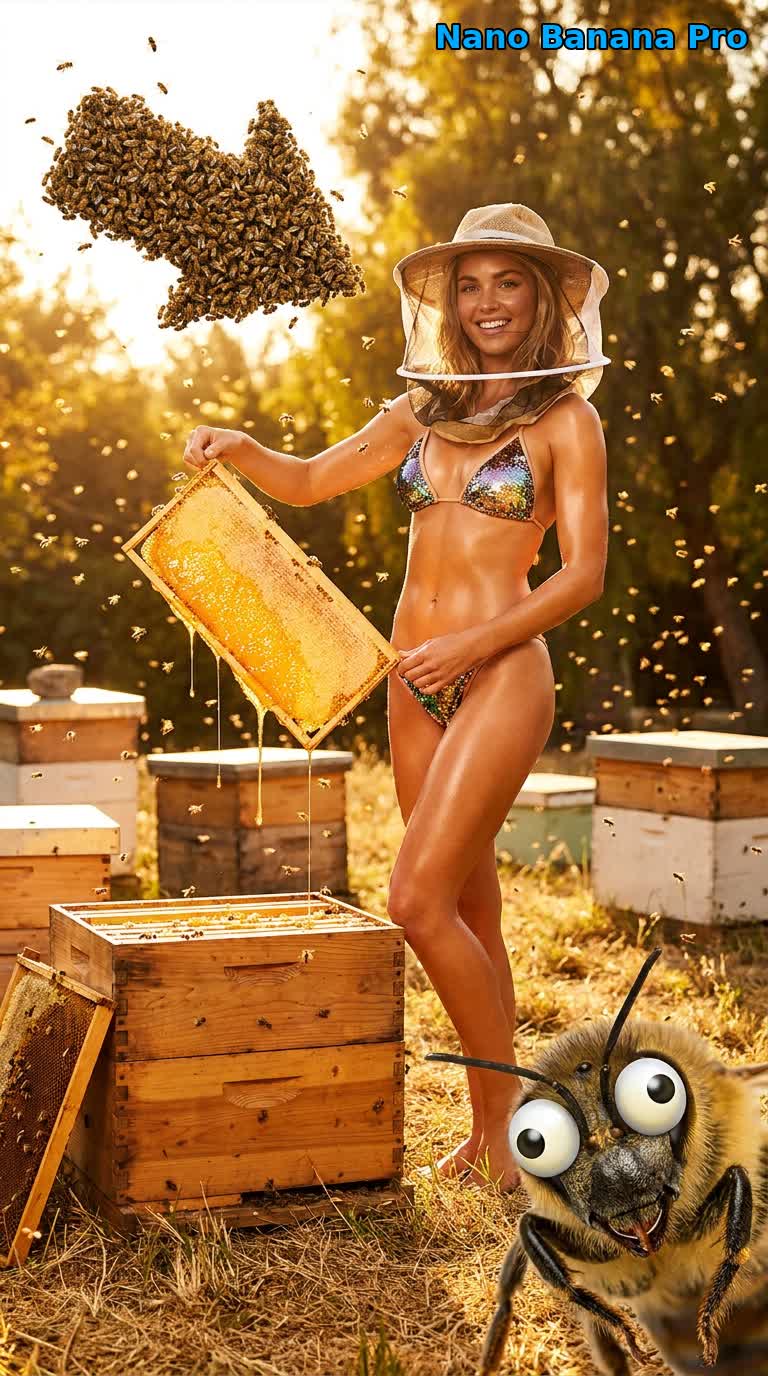
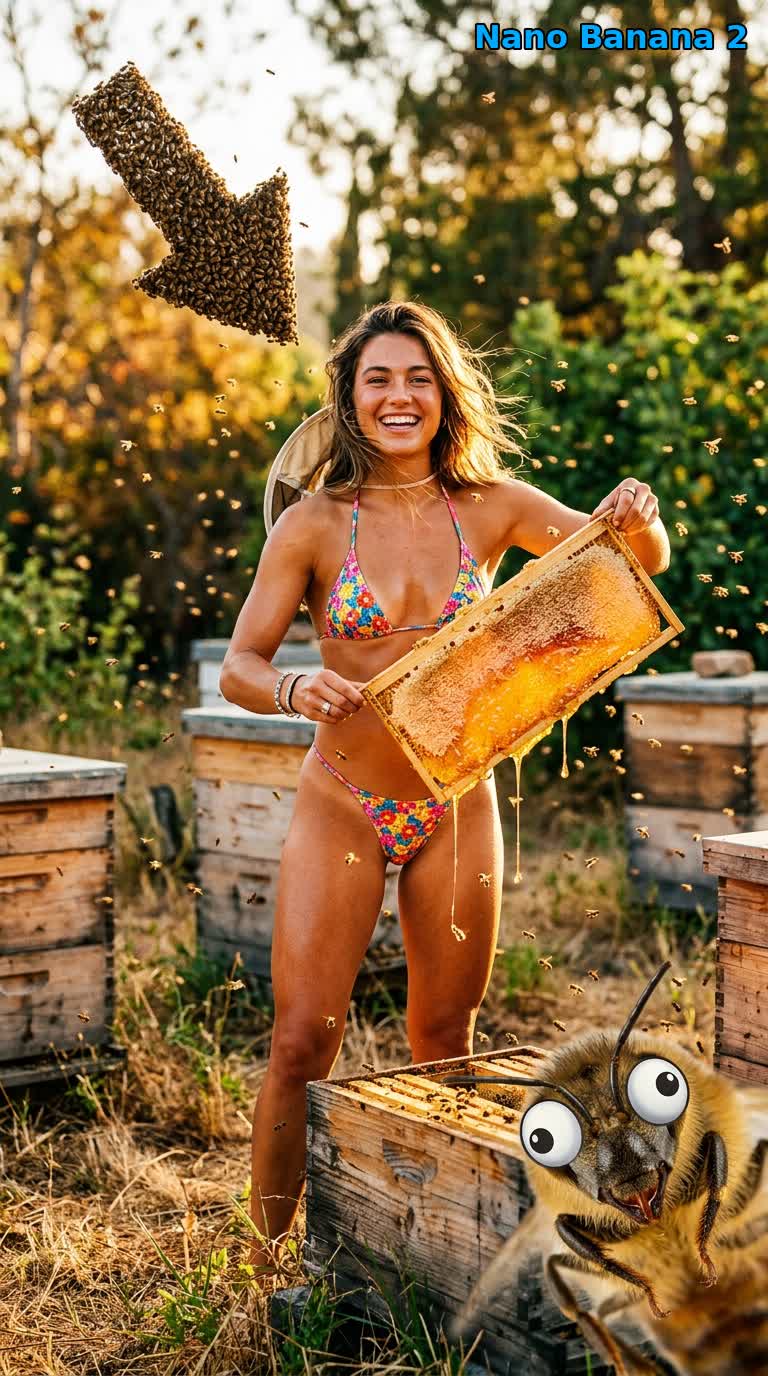
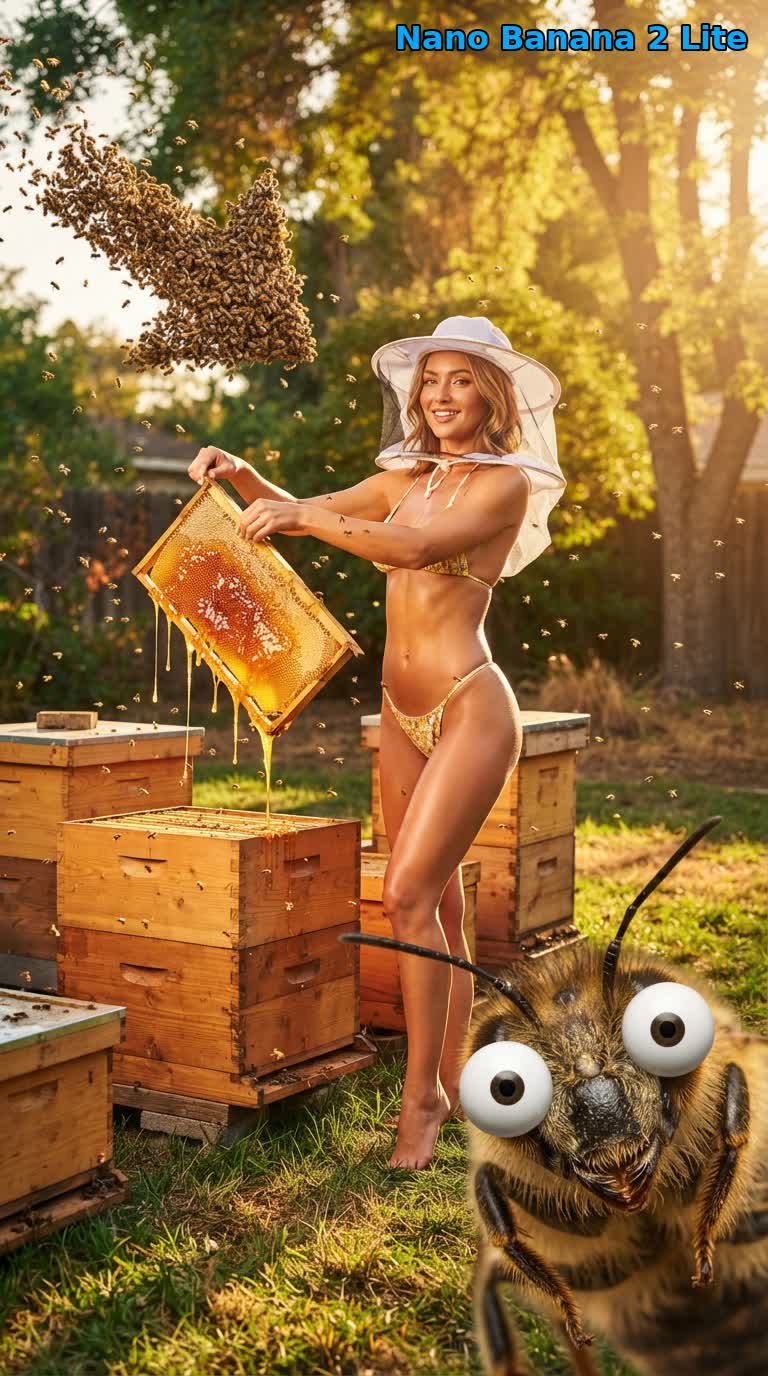
モデルの比較は、プロンプトが難しくなければ意味がありません。このプロンプトはわざと突飛な1コマの場面にしてあり、いくつもの点を同時に試します。名前を挙げた写真のスタイル(David LaChapelle)、複数の被写体の配置(左上で矢印の形になる蜂の群れと、右下の遠近法を誇張した1匹の蜂)、小道具の再現度(蜜がしたたる巣板)、特定のコミカルな表情(o_O の漫画風の目)、そしてちぐはぐなトーンを、すべて1枚のまとまった画像に収める必要があります。
A visually breathtaking, beautifully absurd, single-frame photograph in the hyper-saturated,
glossy, surreal-comedy editorial style of David LaChapelle, shot at a sun-dappled backyard
apiary at golden hour on an 85mm f/1.4 lens with creamy shallow depth of field. In the center
midground, a gorgeous, radiant young woman beekeeper with an elegant figure, flawless glowing
sun-kissed skin and a warm playful smile, incongruously wearing a tiny mini bikini and a
beekeeper's veil hat pushed back off her face, stands among the wooden hive boxes on the grass and lifts a single
open beehive frame heavy with golden honeycomb, thick honey oozing and stringing down in glossy
ribbons and catching the light. She looks directly into the camera, delighted and completely
unbothered by the bees swirling around her. In the top-left of the frame, a dense swarm of bees
bunches together and organizes into a bold, unmistakable arrow / pointer shape aimed straight at
her, as if frantically calling everyone's attention. In the extreme bottom-right foreground of
the exact same scene, photobombing the lens, is a huge forced-perspective close-up of a single
frazzled worker bee, staring directly into the camera with bulging, mind-blown "o_O" cartoon
googly eyes, completely frozen in comical disbelief. Single cohesive image, seamless depth of
field, no cut-ins, warm dynamic backlighting, glistening honey highlights, crazy situational
comedy, hyper-detailed, masterpiece.
3つのモデルで生成する
useapi.net の API トークンと、接続済みの Google Flow アカウントが必要です。POST /images は同期です。1回の呼び出しが画像の完成まで待ち(通常20〜60秒、混雑時は Pro モデルで最大2分ほど)、画像1枚につき1件の media[] 配列を返すので、ポーリングする jobid はありません。
1回の呼び出しです。model を差し替えて比べます。
curl -X POST "https://api.useapi.net/v1/google-flow/images" \
  -H "Authorization: Bearer $USEAPI_TOKEN" \
  -H "Content-Type: application/json" \
  -d '{
    "model": "nano-banana-pro",
    "aspectRatio": "9:16",
    "count": 4,
    "prompt": "A beekeeper at golden hour lifting a dripping honeycomb frame, a swarm forming an arrow in the sky, a forced-perspective bee with o_O googly eyes in the foreground"
  }' > result.json

# 各画像は .media[N].image.generatedImage.fifeUrl にあります
curl -o pro_1.jpg "$(jq -r '.media[0].image.generatedImage.fifeUrl' result.json)"
比較全体を1つのコマンドで実行するには、下の Node.js スクリプトを使います。prompts.json(モデルごとに1件、プロンプトはすべて同じ)を読み込んで1件ずつ送信し、返ってきた画像をすべてモデル名入りのファイル名で保存します。画像は fifeUrl からダウンロードし、URL がない場合はインラインの encodedImage をデコードします。失敗した画像はログに記録して、次に進みます。Node.js v21 以降が必要です。2つのファイルを同じフォルダーに置き、node ./google-flow-nano-banana-compare.mjs API_TOKEN EMAIL を実行します。API_TOKEN は useapi.net の API トークン、EMAIL は接続済みの Google Flow アカウントです。スクリプトはメールアドレスからアカウントを探して送信前に health を確認し、captchaToken は送りません。reCAPTCHA は useapi.net のワーカーが自動で解決します。
クローンして実行したい場合は、スクリプトの完全版、Python 版、prompts.json が GitHub の useapi/google-flow-api にあります。
prompts.json を表示
[
    {
        "model": "nano-banana-2-lite",
        "aspectRatio": "9:16",
        "count": 4,
        "prompt": "A beekeeper at golden hour lifting a dripping honeycomb frame in the surreal editorial style of David LaChapelle, a dense bee swarm forming a bold arrow in the top-left, a forced-perspective bee with o_O cartoon googly eyes photobombing the bottom-right. Single cohesive image, masterpiece."
    },
    {
        "model": "nano-banana-2",
        "aspectRatio": "9:16",
        "count": 4,
        "prompt": "A beekeeper at golden hour lifting a dripping honeycomb frame in the surreal editorial style of David LaChapelle, a dense bee swarm forming a bold arrow in the top-left, a forced-perspective bee with o_O cartoon googly eyes photobombing the bottom-right. Single cohesive image, masterpiece."
    },
    {
        "model": "nano-banana-pro",
        "aspectRatio": "9:16",
        "count": 4,
        "prompt": "A beekeeper at golden hour lifting a dripping honeycomb frame in the surreal editorial style of David LaChapelle, a dense bee swarm forming a bold arrow in the top-left, a forced-perspective bee with o_O cartoon googly eyes photobombing the bottom-right. Single cohesive image, masterpiece."
    }
]
google-flow-nano-banana-compare.mjs スクリプトを表示
/*

Script version 1.1, September 11, 2026

Batch-compare Google Flow's Nano Banana image models (2 Lite, 2.1, Pro) with the useapi.net API 🚀
Reads prompts.json (one entry per model), submits each to the synchronous POST /images endpoint,
and downloads every returned image with a model-labeled filename.
For more details visit https://useapi.net/docs/api-google-flow-v1/post-google-flow-images

Companion tutorial:
  https://useapi.net/docs/articles/google-flow-nano-banana-compare

Installation Instructions:
==========================

You need Node.js v21 or newer installed to run this script. Download and install Node.js from:

- Windows, macOS, Linux: https://nodejs.org/

After installation, verify by running the following command in a terminal:

   node -v

Running the Script:
===================

Usage: node google-flow-nano-banana-compare.mjs <API_TOKEN> <EMAIL> [PROMPTS_FILE]

Replace API_TOKEN with your actual useapi.net API token, see https://useapi.net/docs/start-here/setup-useapi
Replace EMAIL with configured Google Flow email account, see https://useapi.net/docs/start-here/setup-google-flow
If optional PROMPTS_FILE not provided prompts.json will be used.

Example:
--------

node google-flow-nano-banana-compare.mjs user:1234-abcdefhijklmnopqrstuv [email protected]

Changelog:
==========

- July 2, 2026: Initial release.
- September 11, 2026: Saves encodedImage when fifeUrl is absent, and writes a downloaded image only once it has been fully received, so a failed download leaves no partial file for the next run to skip as "already exists".

*/

import fs from 'fs/promises';
import { writeFile } from 'node:fs/promises';

// Constants
const DEFAULT_PROMPTS_FILE = 'prompts.json';
const DEFAULT_MODEL = 'nano-banana-2-lite';
const SLEEP_RETRY = 30 * 1000; // in milliseconds

const urlAccounts = 'https://api.useapi.net/v1/google-flow/accounts';
const urlImages = 'https://api.useapi.net/v1/google-flow/images';

// Utility to sleep for given milliseconds
const sleep = (ms) => new Promise((resolve) => setTimeout(resolve, ms));
const elapsedTimeSec = (start) => (Date.now() - start) / 1000;

// Function to fetch configured Google Flow API accounts
async function fetchAccounts(apiToken) {
    const response = await fetch(urlAccounts, {
        headers: {
            'Accept': 'application/json',
            'Authorization': `Bearer ${apiToken}`
        }
    });

    if (!response.ok) {
        console.error(`⛔ Error fetching accounts (HTTP ${response.status}): ${response.statusText}`);
        process.exit(1);
    }

    return response.json();
}

// Save a single image from its signed fifeUrl. fifeUrl is normally present; when it is absent
// the image arrived inline as base64 in encodedImage. A failure is reported and skipped.
async function downloadImage(img, filename) {
    try {
        await fs.access(filename);
        console.log(`⚠️ ${filename} already exists. Skipping download.`);
        return;
    } catch {
        // File does not exist, proceed with downloading
    }

    const url = img?.fifeUrl;

    if (!url && img?.encodedImage) {
        console.log(`✅ Saving ${filename} from encodedImage`);
        try {
            await writeFile(filename, Buffer.from(img.encodedImage, 'base64'));
        } catch (err) {
            console.error(`⛔ Unable to save ${filename}: ${err}`);
        }
        return;
    }

    if (!url) {
        console.error(`🛑 No fifeUrl or encodedImage for ${filename}`);
        return;
    }

    console.log(`✅ Downloading ${filename}`);
    try {
        const imageResponse = await fetch(url);
        if (!imageResponse.ok) {
            console.error(`⛔ Unable to download ${filename} (HTTP ${imageResponse.status})`);
            return;
        }
        // Read the whole body before creating the file, so a failed download leaves no
        // partial file behind for the next run to skip as "already exists".
        const data = Buffer.from(await imageResponse.arrayBuffer());
        await writeFile(filename, data);
    } catch (err) {
        console.error(`⛔ Error during download: ${err}`);
    }
}

// Submit a single prompt to the synchronous POST /images endpoint and download the results.
async function submitImage(apiToken, email, prompt, index) {
    const model = prompt.model ?? DEFAULT_MODEL;

    // Build the request body.
    const body = { model, email, prompt: prompt.prompt };
    for (const key of ['aspectRatio', 'count', 'seed'])
        if (prompt[key] !== undefined) body[key] = prompt[key];

    console.log(`🚀 ${model} » Prompt #${index} • account ${email} …`);
    const startTime = Date.now();

    while (true) {
        const response = await fetch(urlImages, {
            method: 'POST',
            headers: {
                'Accept': 'application/json',
                'Content-Type': 'application/json',
                'Authorization': `Bearer ${apiToken}`
            },
            body: JSON.stringify(body)
        });

        const responseText = await response.text();

        if (response.status == 200) {
            const media = JSON.parse(responseText)?.media ?? [];

            if (media.length == 0)
                console.error(`🛑 200 OK but no media (moderated?) for ${model}`);

            // count > 1 returns multiple images in the media array.
            for (let i = 0; i < media.length; i++) {
                const img = media[i]?.image?.generatedImage;
                await downloadImage(img, `${model}_${i + 1}.jpg`);
            }
            console.log(`🆗 ${model} done (${elapsedTimeSec(startTime)} sec)`);
            return 200;
        }

        switch (response.status) {
            case 429:
            case 503:
                console.log(`🔄️ Retry on HTTP ${response.status}`, responseText);
                await sleep(SLEEP_RETRY);
                break;
            default:
                console.error(`🛑 ${model} failed with HTTP ${response.status}`, responseText);
                return response.status;
        }
    }
}

// Main function
async function main() {
    const apiToken = process.argv[2];
    const email = process.argv[3];
    const promptFile = process.argv[4] || DEFAULT_PROMPTS_FILE;

    if (!apiToken || !email) {
        console.error('Usage: node google-flow-nano-banana-compare.mjs <API_TOKEN> <EMAIL> [PROMPTS_FILE]');
        process.exit(1);
    }

    console.info('Script v1.1 • Node version ' + process.version);

    const accounts = await fetchAccounts(apiToken);

    if (!accounts[email]) {
        console.error(`⛔ Account ${email} not found. Please refer to https://useapi.net/docs/start-here/setup-google-flow`);
        process.exit(1);
    }

    if (accounts[email].health && accounts[email].health !== 'OK') {
        console.error(`⛔ Account ${email} health is '${accounts[email].health}'. Please resolve and update the account, see https://useapi.net/docs/start-here/setup-google-flow`);
        process.exit(1);
    }

    const prompts = JSON.parse(await fs.readFile(promptFile, 'utf8'));
    console.log(`Comparing ${prompts.length} model runs …`);

    const start = new Date();
    for (let i = 0; i < prompts.length; i++)
        await submitImage(apiToken, email, prompts[i], i + 1);

    console.info('COMPLETED', new Date(), '• elapsed', elapsedTimeSec(start), 'sec');
}

main();
例
同じ養蜂家のプロンプトを、各モデルがこの Google Flow API を通じて 9:16 で生成した結果です。違いには一貫性があります。Pro は最も洗練されていて指示に最も忠実、2.1 は最も躍動感があり、Lite は最も速いうえに仕上がりも近いです。
nano-banana-pro:最も洗練された雑誌の誌面のような仕上がりで、ベールの網、巣板の上を這う蜂、文字どおりの o_O の漫画風の目を安定して描けたのはこのモデルだけでした。
nano-banana-2:最も躍動感とエネルギーのある解釈で、矢印の形の群れが最もはっきりしていて、場面の細部(作業用のブーツ、巣枠の上の蜂)も豊富です。
nano-banana-2-lite:3つの中で最も速く(私たちの実行では Pro のおよそ半分の時間)、構図、したたる蜂蜜、手前の目をむいた蜂もきちんと保っています。
どの Nano Banana モデルを使うべき?
- 忠実度を最優先するなら
nano-banana-pro。メインビジュアル、複数の被写体がいる複雑な場面、正確な文字や指示への追従に向いています。3つの中では最も遅いモデルです。 - 品質と速度のバランスを取りたいとき、またはプロンプトをより躍動的で個性的に解釈してほしいときは
nano-banana-2。 - 試行錯誤や大量の一括生成で速度が大事なときは
nano-banana-2-lite(デフォルト)。品質もかなり近いままです。
リクエストの形が同じなので、切り替えは model の1語を変えるだけです。上のスクリプトのように3つすべてでまとめて生成し、いちばん良いものを選べます。
自分で実行する
Node.js スクリプトの完全版、Python 版、prompts.json は useapi/google-flow-api/nano-banana-compare にあります。クローンして prompts.json を編集し、コマンドを1つ実行すれば、お使いの Google Flow アカウントで比較の全セットを生成できます。
よくある質問
- Nano Banana 2.1 や Nano Banana Pro の API はありますか? useapi.net を使えば、あります。Google Flow API は、Google Flow のバージョンを POST /images で
nano-banana-2(Nano Banana 2.1)、nano-banana-2-lite、nano-banana-proとして実行します。公式の Gemini API では Nano Banana 2.1 が 1K の画像1枚で約 $0.034、Nano Banana Pro が1枚 $0.134 ですが、こちらでは画像ごとの料金はかかりません(2026年11月時点)。 - Nano Banana 2 Lite、2.1、Pro の違いは何ですか? useapi.net では3つとも同じエンドポイントで動き、それぞれに強みがあります。
nano-banana-pro(Gemini 3 Pro Image)は最も洗練されていて指示に最も忠実、nano-banana-2(Nano Banana 2.1)は最も躍動的な解釈をし、デフォルトのnano-banana-2-lite(Gemini 3.1 Flash-Lite Image)は私たちの実行で Pro のおよそ半分の時間で終わりました。どのモデルを使うべき?をご覧ください。 - Nano Banana API の料金はいくらですか? useapi.net なら、無料アカウントを含むどの Google AI のプランでも画像は Flow クレジットを消費せず、Gemini API キーや Cloud の請求先アカウントの設定もいりません。公式の Gemini API では、Nano Banana 2 Lite は 1K の画像1枚で約 $0.034 です(2026年11月時点)。料金をご覧ください。
- 画像はモデレーションされますか? useapi.net 経由でも、プロンプトは Google 自身のコンテンツモデレーションを通り、拒否されたリクエストは空の結果を返します。モデレーションの判断はリクエストやモデルによって変わるため、再試行、プロンプトの修正、モデルの切り替えでうまくいくことがよくあります。Nano Banana の各モデルでモデレーションが少しずつ違うためです。
- CAPTCHA や Google Cloud プロジェクトは必要ですか? useapi.net なら、Google Cloud プロジェクトもご自身での CAPTCHA の対応も不要です。Google Flow は画像ごとに reCAPTCHA を求めますが、useapi.net のワーカーが自動で解決します。最初の Google Flow アカウントには、当社の AntiCaptcha、CapSolver、EzCaptcha のキーで300回の無料解決が付き、その後はご自身のプロバイダーのキーを追加します。このガイドのスクリプトは
captchaTokenを送りません。
おわりに
ご質問は  Discord サーバー または
 Telegram チャンネルへどうぞ。
コード例は GitHub リポジトリにあります。
ほかの掲載先
この記事(英語版)は dev.to にも掲載し、Reddit でも話題にしています。
API を使い始める
月額15ドルのサブスクリプション1つで、useapi.net のすべての API を使えます。トークン1つで、すべてのサービスに対応します。各サービスにご自身のアカウントを最大3つまで接続でき、REST API、負荷分散、ポーリングは useapi.net が担当します。アカウントを増やしたい場合は、サブスクリプションを1つ追加するごとに月額10ドルで、各サービスのアカウントが3つずつ増えます。
海外で使えるクレジットカードがない場合は、暗号資産で登録することもできます(暗号資産での支払いは返金できません)。料金とボリュームプランはサブスクリプションのページをご覧ください。Stripe でお支払いの場合、初回購入から14日以内で、成功した生成が50回未満であれば全額返金されます。すでに登録済みの場合は、新たに購入せず Stripe カスタマーポータルで数量を変更してください。