Google Flow API で Nano Banana 2.1 と Nano Banana Pro の画像を生成する方法
6分で読めます • 2026年6月15日(2026年11月6日更新)
useapi.net はサードパーティの API です。Google とは提携しておらず、Google の承認も受けていません。
目次
はじめに
useapi.net の Google Flow API に同期の POST を1回送ると、Nano Banana 2.1、Nano Banana Pro、Nano Banana 2 Lite の画像が最大4枚返ってきます。画像はお使いの Google Flow アカウントで作られます。画像の生成は無料アカウントを含むすべての Google AI のプランに含まれていますが、公式の Gemini API では画像1枚に $0.034〜$0.134 かかります(2026年11月時点)。Google Cloud プロジェクトも Gemini API キーも不要です。
このガイドでは、使えるモデル、料金の違い、コピーしてそのまま使える curl による1回の呼び出しでの画像生成、プロンプトのリストから一括生成する Node.js スクリプトを紹介します。3つのモデルが同じプロンプトでどう違うかは Nano Banana モデル比較をご覧ください。動画を作りたい場合は、姉妹編の Veo 3.1 チュートリアルをご覧ください。
対応モデル
モデルはリクエストごとに model フィールドで選びます(デフォルトは nano-banana-2-lite)。3つのモデルはどれも、無料アカウントを含むすべての Google AI のプランで使えます。
| モデル ID | 製品名 | 参照画像(I2I) | アスペクト比 | 備考 |
|---|---|---|---|---|
nano-banana-2-lite (デフォルト) | Nano Banana 2 Lite / Gemini 3.1 Flash-Lite Image | 最大10枚 | 16:9、4:3、1:1、3:4、9:16、auto† | 2026年7月から Google Flow のデフォルトの画像モデル。画像から画像のモードでも、比率を指定しなければ 16:9 のまま |
nano-banana-2 | Nano Banana 2.1 | 最大10枚 | 16:9、4:3、1:1、3:4、9:16、auto† | 画像から画像のモードではデフォルトが auto |
nano-banana-pro | Nano Banana Pro / Gemini 3 Pro Image | 最大10枚 | 16:9、4:3、1:1、3:4、9:16、auto† | 最も高品質な画像モデル。画像から画像のモードではデフォルトが auto |
† auto は画像から画像のモード(reference_* または character_* を1つ以上指定した場合)でのみ有効で、バックエンドが最初の参照画像から比率を決めます。参照画像が複数あると縦横の向きは保証されないため、すべての画像を同じ形で受け取りたい場合は比率を明示してください。
3つのモデルはどれも count(1〜4)と、結果を再現するための seed を受け付けます。model を省略すると、参照画像の有無にかかわらず nano-banana-2-lite が使われます。非推奨のエイリアスも2つ引き続き使えます。nano-banana は nano-banana-2 に、imagen-4 は nano-banana-2-lite に対応します(Google は2026年7月に Google Flow から Imagen を削除しました)。詳細とモデルごとの機能は POST /images のリファレンスにあります。
2K/4K へのアップスケール
3つのどのモデルで生成した画像も、POST /images/upscale でアップスケールできます。画像の mediaGenerationId と、resolution に 2k(デフォルト)または 4k を渡します。応答は encodedImage に入った base64 です。2k は無料アカウントを含むどのプランでも使えます。4k には Google AI Ultra が必要で、ほかのプランでは CAPTCHA を解く前に 400 と 4k upscaling is not available for this account が返るため、費用はかからず、再試行しても結果は変わりません。どちらも Flow クレジットを消費しません。
料金
画像は無料アカウントを含むどの Google AI のプランでも Flow クレジットを消費せず、useapi.net も画像ごとの料金を取りません。有料プランが必要なのは、Omni 1.1 Flash の動画、10秒を超える Omni 1.2 Flash の動画、Omni 1.2 での延長、動画のアップスケールだけで、画像の 4k アップスケールには Ultra が必要です。全モデル・全プランの料金と公式 API との比較は Google Flow の料金表にあります。
curl で Nano Banana の画像を生成する方法
useapi.net の API トークンと、接続済みの Google Flow アカウントが必要です。画像の生成は同期です。POST 1回が画像の完成まで待ち(通常10〜20秒)、応答に画像を入れて返すので、ポーリングする jobid はありません。2つ目の手順は結果を保存するだけで、署名付き URL から、それがない場合はインラインの base64 画像から保存します。
- プロンプトを送信する —
POST https://api.useapi.net/v1/google-flow/images:
curl -X POST "https://api.useapi.net/v1/google-flow/images" \
  -H "Authorization: Bearer $USEAPI_TOKEN" \
  -H "Content-Type: application/json" \
  -d '{
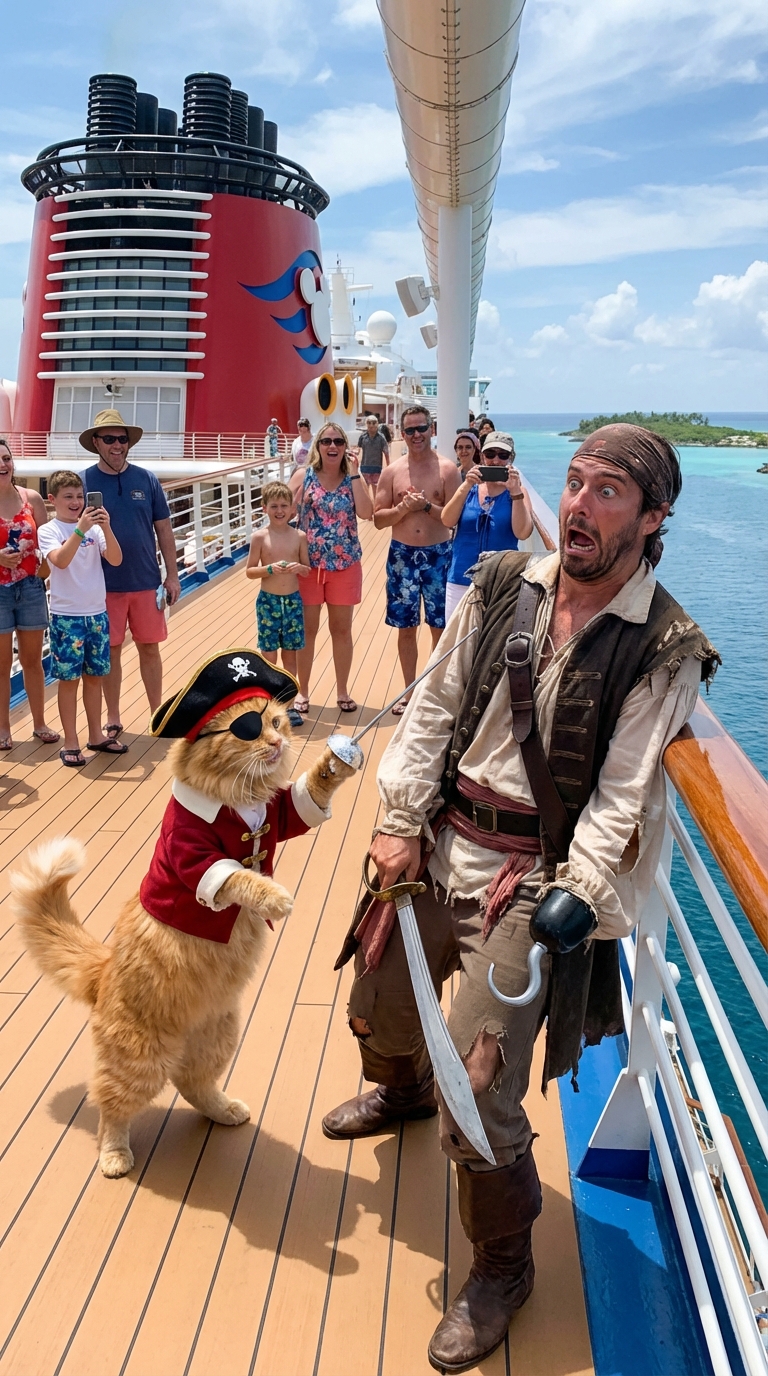
    "prompt": "Cat dressed like a pirate fencing with a real pirate, pirate looks absolutely terrified, this is happening on a deck of the Disney cruise ship",
    "model": "nano-banana-pro",
    "aspectRatio": "16:9",
    "count": 4,
    "seed": 123456
  }' > response.json
呼び出しは 200 OK を返し、jobId と media 配列が入っています。media は画像1枚につき1件です(count は1〜4、デフォルトは4)。各画像の署名付きダウンロード URL は media[].image.generatedImage.fifeUrl にあります。
{
  "jobId": "j1731859345678i-u12345-email:jo***@gmail.com-bot:google-flow",
  "media": [
    {
      "image": {
        "generatedImage": {
          "seed": 123456,
          "mediaGenerationId": "user:12345-email:6a6f...-image:...",
          "prompt": "Cat dressed like a pirate fencing with a real pirate, pirate looks absolutely terrified, this is happening on a deck of the Disney cruise ship",
          "fifeUrl": "https://flow-content.google/image/...",
          "aspectRatio": "IMAGE_ASPECT_RATIO_LANDSCAPE"
        }
      }
    }
  ]
}
fifeUrlから画像をダウンロードします(署名付き URL の有効期間は限られているので、早めにダウンロードしてください)。まれにfifeUrlがなく、画像がencodedImageにインラインの base64 で返ることがあるので、その場合はそちらをデコードします。
URL=$(jq -r '.media[0].image.generatedImage.fifeUrl // empty' response.json)
if [ -n "$URL" ]; then
  curl -o image_1.jpg "$URL"
else
  jq -r '.media[0].image.generatedImage.encodedImage' response.json | base64 -d > image_1.jpg
fi
生成した各画像の mediaGenerationId は、あとのリクエストで参照画像として再利用できます。下の参照画像とキャラクターを参照してください。
Webhook も使いたい場合は、リクエストのボディに replyUrl を渡すと、API がジョブのステータスの更新もその URL に送ります。呼び出し自体は、これまでどおり画像ができるまで待ちます。ペイロードは GET /jobs/jobId の応答と同じ形で、完成した画像は response.media[].image.generatedImage.fifeUrl にあります。
参照画像とキャラクター
既存の画像で生成の方向を決めるには、まず POST /assets/email でアップロードします(生のバイト列、画像の Content-Type、20 MB までの PNG/JPEG/WebP)。アップロードの応答では、参照 ID が mediaGenerationId.mediaGenerationId に入れ子になっています。この入れ子の文字列を reference_1 として渡します(3つのモデルはどれも参照画像を最大10枚受け付けます)。
# 1. 参照画像をアップロードする
curl -X POST "https://api.useapi.net/v1/google-flow/assets/john%40gmail.com" \
  -H "Authorization: Bearer $USEAPI_TOKEN" \
  -H "Content-Type: image/jpeg" \
  --data-binary @reference.jpeg

# 応答(参照 ID は1階層下に入れ子になっています):
# {
#   "mediaGenerationId": {
#     "mediaGenerationId": "user:12345-email:6a6f...-image:ff9aa5cc-..."
#   },
#   "width": 1024, "height": 1024, "email": "jo***@gmail.com"
# }

# 2. その参照画像を使って生成する
curl -X POST "https://api.useapi.net/v1/google-flow/images" \
  -H "Authorization: Bearer $USEAPI_TOKEN" \
  -H "Content-Type: application/json" \
  -d '{
    "model": "nano-banana-pro",
    "prompt": "Make this photograph look modern",
    "reference_1": "user:12345-email:6a6f...-image:ff9aa5cc-..."
  }'
多くの画像で同じ人物を保ちたい場合は、POST /characters で1〜2枚の参照画像を再利用できるキャラクターにまとめ、その character ID を character_1〜character_7 として渡します。キャラクターは reference_* と自由に組み合わせられ、モデルごとの参照画像の上限を共有します。prompt の中に @reference_1 / @character_1 のマーカーを入れて、プロンプトのどこでどの画像を使うかを示すこともできます。インラインのマーカーにはそれぞれ、対応するボディのパラメーターが必要です。
スクリプトで一括生成する
狙いどおりの画像を得るには何度も試す必要があり、手作業で1回ずつ実行するのは面倒です。下の Node.js スクリプトは、prompts.json からプロンプトのリストを読み込み、参照画像があればアップロードし、各リクエストを送信して、返ってきた画像をすべてダウンロードします。まとめてキューに入れておき、あとで良いものを選べます。POST /images は同期なので、スクリプトは呼び出しが返るたびにその結果を保存します。
Node.js v21 以降が必要です。prompts.json と google-flow-images.mjs を同じフォルダーに置き、node ./google-flow-images.mjs API_TOKEN EMAIL を実行します。API_TOKEN は useapi.net の API トークン、EMAIL は接続済みの Google Flow アカウントのメールアドレスです。スクリプトはメールアドレスからアカウントを自動で探し、送信前に health フィールドを確認します。
クローンしてローカルで実行したい場合は、google-flow-images.mjs と prompts.json の完全版が GitHub の useapi/google-flow-api にあります。
prompts.json を表示
[
    {
        "prompt": "By default the nano-banana-2-lite model generates 4 image variations at 16:9."
    },
    {
        "model": "nano-banana-pro",
        "aspectRatio": "1:1",
        "count": 2,
        "seed": 123456,
        "prompt": "Nano Banana Pro (Gemini 3 Pro Image), two square variations. For all parameters see https://useapi.net/docs/api-google-flow-v1/post-google-flow-images"
    },
    {
        "model": "nano-banana-2",
        "aspectRatio": "auto",
        "reference_1": "./reference_image.jpeg",
        "prompt": "Image-to-image: pass a local reference file as reference_1 (uploaded automatically). auto aspect ratio derives from the first reference. All three models accept up to 10 references."
    },
    {
        "model": "nano-banana-2-lite",
        "aspectRatio": "9:16",
        "count": 4,
        "prompt": "Nano Banana 2 Lite portrait. Other models (nano-banana-2, nano-banana-pro) are selectable via the model field — see the POST /images docs."
    }
]
google-flow-images.mjs スクリプトを表示
/*

Script version 1.2, September 11, 2026

Script to batch-generate images using prompts with the Google Flow API v1 by useapi.net 🚀
Uses the synchronous POST /images endpoint (default model: nano-banana-2-lite) and saves each image from fifeUrl, or from encodedImage when fifeUrl is absent.
For more details visit https://useapi.net/docs/api-google-flow-v1/post-google-flow-images

Installation Instructions:
==========================

You need Node.js v21 or newer installed to run this script. Download and install Node.js from:

- Windows, macOS, Linux: https://nodejs.org/

After installation, verify by running the following command in a terminal:

   node -v

Running the Script:
===================

Usage: node google-flow-images.mjs <API_TOKEN> <EMAIL> [PROMPTS_FILE]

Replace API_TOKEN with your actual useapi.net API token, see https://useapi.net/docs/start-here/setup-useapi
Replace EMAIL with configured Google Flow email account, see https://useapi.net/docs/start-here/setup-google-flow
If optional PROMPTS_FILE not provided prompts.json will be used.

Example:
--------

node google-flow-images.mjs user:1234-abcdefhijklmnopqrstuv [email protected]

This command executes the script using API token user:1234-abcdefhijklmnopqrstuv with [email protected] Google Flow account email.

Changelog:
==========

- June 15, 2026: Initial release.
- September 10, 2026: Default model is now nano-banana-2-lite (Google removed Imagen from Flow, and imagen-4 now maps to nano-banana-2-lite). Saves encodedImage when fifeUrl is absent, and accepts .jpg reference images.
- September 11, 2026: A prompt whose reference_* file fails to upload is skipped and logged to google-flow-images_errors.txt instead of being submitted without that reference. Writes a downloaded image only once it has been fully received, so a failed download leaves no partial file for the next run to skip as "already exists".

*/

import fs from 'fs/promises';
import { writeFile } from 'node:fs/promises';


// Constants
const ERRORS_FILE = 'google-flow-images_errors.txt';
const DEFAULT_PROMPTS_FILE = 'prompts.json';
const DEFAULT_MODEL = 'nano-banana-2-lite';
const SLEEP_429 = 30 * 1000; // in milliseconds

const urlAccounts = 'https://api.useapi.net/v1/google-flow/accounts';
const urlImages = 'https://api.useapi.net/v1/google-flow/images';
const urlUploadAsset = 'https://api.useapi.net/v1/google-flow/assets/';

// Google Flow accepts png, jpeg and webp for reference images.
const supportedFileExtensions = ['png', 'jpg', 'jpeg', 'webp'];

// reference_1 .. reference_10 are accepted by POST /images.
const referenceParams = Array.from({ length: 10 }, (_, i) => `reference_${i + 1}`);

// { filename: mediaGenerationId }
const uploadedFiles = {};

// Utility to sleep for given milliseconds
const sleep = (ms) => new Promise((resolve) => setTimeout(resolve, ms));

// Function to fetch configured Google Flow API accounts
async function fetchAccounts(apiToken) {
    const response = await fetch(urlAccounts, {
        headers: {
            'Accept': 'application/json',
            'Authorization': `Bearer ${apiToken}`
        }
    });

    if (!response.ok) {
        console.error(`⛔ Error fetching accounts (HTTP ${response.status}): ${response.statusText}`);
        process.exit(1);
    }

    return response.json();
}

const elapsedTimeSec = (start) => (Date.now() - start) / 1000;

// Map a file extension to the Content-Type required by POST /assets
const contentTypeForExt = (ext) => ext === 'png' ? 'image/png' : ext === 'webp' ? 'image/webp' : 'image/jpeg';

async function uploadAsset(apiToken, email, filename) {

    // Check if already uploaded
    if (uploadedFiles.hasOwnProperty(filename))
        return uploadedFiles[filename];

    const startTime = Date.now();

    console.log(`⬆️  Account ${email} uploading file…`, filename);

    const body = new Blob([await fs.readFile(filename)]);

    const fileExt = filename.split('.').pop().toLowerCase();

    const response = await fetch(`${urlUploadAsset}${encodeURIComponent(email)}`, {
        method: 'POST',
        headers: {
            'Accept': 'application/json',
            'Authorization': `Bearer ${apiToken}`,
            'Content-Type': contentTypeForExt(fileExt)
        },
        body
    });

    if (response.ok) {
        const json = await response.json();
        // POST /assets returns the reference id nested as mediaGenerationId.mediaGenerationId
        const mediaGenerationId = json?.mediaGenerationId?.mediaGenerationId;
        console.log(`🆗 mediaGenerationId (${elapsedTimeSec(startTime)} sec)`, mediaGenerationId);
        uploadedFiles[filename] = mediaGenerationId;
    }
    else {
        console.error(`❗ Unable to upload file HTTP ${response.status} (${elapsedTimeSec(startTime)} sec)`, await response.text());
        // Do not attempt to upload failed file again
        uploadedFiles[filename] = undefined;
    }

    return uploadedFiles[filename];
}

// Download a single image from its signed fifeUrl.
async function downloadImage(url, filename) {
    try {
        await fs.access(filename);
        console.log(`⚠️ ${filename} already exists. Skipping download.`);
        return;
    } catch {
        // File does not exist, proceed with downloading
    }

    if (!url) {
        console.error(`🛑 No fifeUrl for ${filename}`);
        return;
    }

    console.log(`✅ Downloading ${url} to ${filename}`);
    try {
        const imageResponse = await fetch(url);
        if (!imageResponse.ok) {
            console.error(`⛔ Unable to download ${filename} (HTTP ${imageResponse.status})`, url);
            return;
        }
        // Read the whole body before creating the file, so a failed download leaves no
        // partial file behind for the next run to skip as "already exists".
        const data = Buffer.from(await imageResponse.arrayBuffer());
        await writeFile(filename, data);
    } catch (err) {
        console.error(`⛔ Error during download: ${err}`);
    }
}

// Submit a single prompt to the synchronous POST /images endpoint and download the results.
async function submitImage(apiToken, email, prompt, index) {
    const { model, prompt: text } = prompt;

    const useModel = model ?? DEFAULT_MODEL;

    console.log(`🚀 ${useModel} » Prompt #${index} • account ${email} …`);

    // Build the request body, uploading any local reference_* file to a mediaGenerationId first.
    const body = { model: useModel, email, prompt: text };

    for (const key of ['aspectRatio', 'count', 'seed'])
        if (prompt[key] !== undefined) body[key] = prompt[key];

    for (const refKey of referenceParams) {
        const value = prompt[refKey];
        if (value)
            body[refKey] = await uploadAsset(apiToken, email, value);
    }

    // A reference that failed to upload would be left out of the body, and the prompt would still be
    // generated (and charged) without it. Skip the prompt instead. uploadAsset remembers the failed file,
    // so a later prompt using it is skipped too, without another upload attempt.
    const failedUploads = referenceParams.filter(refKey => prompt[refKey] && !body[refKey]);
    for (const refKey of failedUploads) {
        console.error(`🛑 Prompt #${index} skipped: ${refKey} ${prompt[refKey]} failed to upload`);
        await fs.appendFile(ERRORS_FILE, `Upload failed for ${refKey} ${prompt[refKey]},#${index}:${text}\n`);
    }
    if (failedUploads.length)
        return;

    while (true) {
        const response = await fetch(urlImages, {
            method: 'POST',
            headers: {
                'Accept': 'application/json',
                'Content-Type': 'application/json',
                'Authorization': `Bearer ${apiToken}`
            },
            body: JSON.stringify(body)
        });

        const responseText = await response.text();

        if (response.status == 200) {
            const json = JSON.parse(responseText);
            const media = json?.media ?? [];

            if (media.length == 0)
                console.error(`🛑 200 OK but no media for prompt #${index}:\n${text}\n`);

            // count > 1 returns multiple images in the media array.
            for (let i = 0; i < media.length; i++) {
                const img = media[i]?.image?.generatedImage;
                const filename = `google-flow_${index}_${i + 1}.jpg`;
                // fifeUrl is normally present. When it is absent the image arrived inline as base64 in encodedImage.
                if (!img?.fifeUrl && img?.encodedImage)
                    await fs.writeFile(filename, Buffer.from(img.encodedImage, 'base64'));
                else
                    await downloadImage(img?.fifeUrl, filename);
            }
            return 200;
        }

        switch (response.status) {
            case 429:
                console.log(`🔄️ Retry on HTTP ${response.status}`, responseText);
                await sleep(SLEEP_429);
                break;
            case 503:
                console.log(`🔄️ Service unavailable, retry on HTTP ${response.status}`, responseText);
                await sleep(SLEEP_429);
                break;
            case 402:
                console.log(`🛑 No subscription / insufficient credits`, responseText);
                await fs.appendFile(ERRORS_FILE, `${response.status},#${index}:${text}\n`);
                process.exit(1);
            case 400:
            case 500:
                console.log(`🛑 Rejected (validation or content moderation)`, responseText);
                await fs.appendFile(ERRORS_FILE, `${response.status},#${index}:${text}\n`);
                return response.status;
            default:
                console.log(`❗ FAILED with HTTP ${response.status}`, responseText);
                await fs.appendFile(ERRORS_FILE, `${response.status},#${index}:${text}\n`);
                return response.status;
        }
    }
}

// Main function
async function main() {
    const apiToken = process.argv[2];
    const email = process.argv[3];
    const promptFile = process.argv[4] || DEFAULT_PROMPTS_FILE;

    if (!apiToken || !email) {
        console.error('Usage: node google-flow-images.mjs <API_TOKEN> <EMAIL> [PROMPTS_FILE]');
        process.exit(1);
    }

    console.info('Script v1.2');
    console.info('Node version is: ' + process.version);

    const start = new Date();
    try {
        console.info('START EXECUTION', start);
        await execute(apiToken, email, promptFile);
    } catch (error) {
        console.error('⛔ Error during execution:', error.stack || error);
    } finally {
        console.info('COMPLETED', new Date());
        console.info('EXECUTION ELAPSED', diffInMinutesAndSeconds(start, new Date()));
    }
}

async function execute(apiToken, email, promptFile) {
    const accounts = await fetchAccounts(apiToken);

    console.info(`Configured Google Flow API accounts (${Object.keys(accounts).length}):`, Object.keys(accounts).join(', '));

    if (Object.keys(accounts).length <= 0) {
        console.error(`⛔ No configured Google Flow accounts found. Please refer to https://useapi.net/docs/start-here/setup-google-flow`);
        process.exit(1);
    }

    if (!accounts[email]) {
        console.error(`⛔ Account ${email} not found. Please refer to https://useapi.net/docs/start-here/setup-google-flow`);
        process.exit(1);
    }

    if (accounts[email].health && accounts[email].health !== 'OK') {
        console.error(`⛔ Account ${email} health is '${accounts[email].health}'. Please resolve and update the account, see https://useapi.net/docs/start-here/setup-google-flow`);
        process.exit(1);
    }

    const promptData = await fs.readFile(promptFile, 'utf8');
    const prompts = JSON.parse(promptData);
    console.log(`Total number of prompts to process`, prompts.length);

    let warnings = [];

    // Parameters accepted by this script for the POST /images endpoint.
    // See https://useapi.net/docs/api-google-flow-v1/post-google-flow-images for every model's full parameter set.
    const supportedParams = ['model', 'prompt', 'aspectRatio', 'count', 'seed', ...referenceParams];

    const invalidKeys = (prompt) => Object.keys(prompt).filter(key => !key.startsWith('__') && !supportedParams.includes(key))

    for (let i = 1; i <= prompts.length; i++) {
        const prompt = prompts[i - 1];
        const { prompt: text } = prompt;

        const validateImage = async (file) => {
            if (file) {
                try {
                    await fs.access(file);
                } catch {
                    warnings.push(`⚠️  Image '${file}' does not exist. Prompt ${i}`);
                }

                const ext = file.split('.').pop().toLowerCase();

                if (!supportedFileExtensions.includes(ext))
                    warnings.push(`⚠️  Image ${file} extension ${ext} not supported. Prompt ${i}`);
            }
        };

        const notSupported = invalidKeys(prompt);
        if (notSupported.length)
            warnings.push(`⚠️  Following params not supported: ${notSupported.join(',')}. Prompt ${i}`);

        if (!text)
            warnings.push(`⚠️  prompt is required. Prompt ${i}`);

        await Promise.all(referenceParams.map(refKey => validateImage(prompt[refKey])));
    }

    if (warnings.length > 0) {
        warnings.forEach(warning => console.warn(warning));
        console.error(`⛔ Execution stopped due to warnings.`);
        process.exit(1);
    }

    for (let i = 0; i < prompts.length; i++)
        await submitImage(apiToken, email, prompts[i], i + 1);
}

function diffInMinutesAndSeconds(date1, date2) {
    const diffInSeconds = Math.floor((date2 - date1) / 1000);
    return `${Math.floor(diffInSeconds / 60)} minutes ${diffInSeconds % 60} seconds`;
};

main();
例
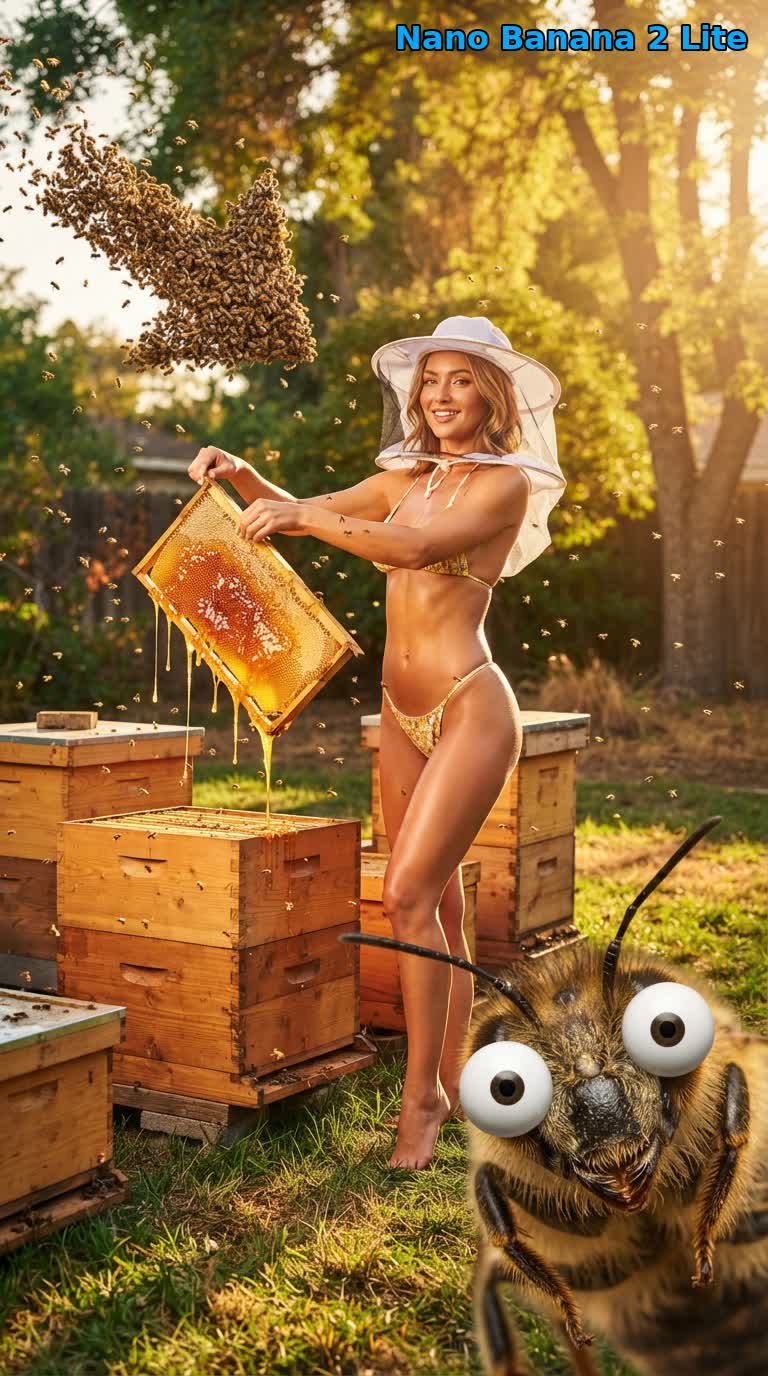
同じ Google Flow API で Nano Banana Pro と Nano Banana 2 Lite を使って生成した実際の画像です。当社のブログとモデル比較からそのまま持ってきました。
Nano Banana Pro — テキストから画像(出典):“Cat dressed like a pirate fencing with a real pirate… on a Disney cruise ship.”
Nano Banana Pro — 参照画像5枚(出典):5人それぞれのポートレートを、1枚の「K-Pop group victory celebration」の集合写真に合成したもの。

Nano Banana 2 Lite、デフォルトのモデル(出典):3モデル比較で使った養蜂家のプロンプトを、3つの中で最も速いこのモデルが 9:16 で生成したもの。
よくある質問
- Nano Banana 2 の API はありますか? useapi.net を使えば、あります。Google Flow API の
nano-banana-2は、Google Flow が使っているバージョンである Nano Banana 2.1 で画像を作ります。どの Google AI のプランでも無料アカウントでも使え、画像ごとの料金はかかりません。Google の公式の Gemini API では、Nano Banana 2(Gemini 3.1 Flash Image)は 1K の画像1枚が $0.067 です(2026年11月時点)。標準的な REST エンドポイントで、Cloud プロジェクトは不要です。 - Nano Banana Pro の API はありますか? useapi.net を使えば、あります。Nano Banana Pro(Gemini 3 Pro Image)は POST /images エンドポイントで
nano-banana-proとして動き、同期リクエスト1回で最大4枚の画像が返ります。画像ごとの料金はかかりません。Google の公式の Gemini API では、Pro の画像は1枚ごとに $0.134 かかります(2026年11月時点)。 - API のデフォルトのモデルは何ですか? useapi.net では、参照画像の有無にかかわらず
nano-banana-2-lite(Gemini 3.1 Flash-Lite Image)がデフォルトです。リクエストごとにmodelをnano-banana-2(Nano Banana 2.1)またはnano-banana-pro(Gemini 3 Pro Image、最高品質)に切り替えられます。3つのモデルはどれも参照画像を最大10枚受け付け、2K/4K にアップスケールできます。Nano Banana 2 Lite vs 2.1 vs Proでは、同じプロンプトで3つのモデルを比べています。 - Google Flow で Imagen 4 はまだ使えますか? useapi.net では
imagen-4のモデル ID が今も使えるので、既存のコードはそのまま動きます。ただし Google は2026年7月に Google Flow から Imagen を削除したため、こうしたリクエストは現在、それ以降 Google Flow のデフォルトの画像モデルになっているnano-banana-2-liteで画像を作ります。別のモデルを使うには、modelをnano-banana-2またはnano-banana-proにします。 - CAPTCHA や Google Cloud プロジェクトは必要ですか? useapi.net なら、Google Cloud プロジェクトもご自身での CAPTCHA の対応も不要です。Google Flow は画像ごとに reCAPTCHA を求めますが、useapi.net のワーカーが自動で解決します。最初の Google Flow アカウントには、当社の AntiCaptcha、CapSolver、EzCaptcha のキーで300回の無料解決が付き、その後は POST /accounts/captcha-providers でご自身のプロバイダーのキーを追加します。このガイドのスクリプトは
captchaTokenを送りません。
おわりに
ご質問は  Discord サーバー または
 Telegram チャンネルへどうぞ。
コード例は GitHub リポジトリにあります。
ほかの掲載先
この記事(英語版)は dev.to にも掲載し、Bluesky でも紹介しています。
API を使い始める
月額15ドルのサブスクリプション1つで、useapi.net のすべての API を使えます。トークン1つで、すべてのサービスに対応します。各サービスにご自身のアカウントを最大3つまで接続でき、REST API、負荷分散、ポーリングは useapi.net が担当します。アカウントを増やしたい場合は、サブスクリプションを1つ追加するごとに月額10ドルで、各サービスのアカウントが3つずつ増えます。
海外で使えるクレジットカードがない場合は、暗号資産で登録することもできます(暗号資産での支払いは返金できません)。料金とボリュームプランはサブスクリプションのページをご覧ください。Stripe でお支払いの場合、初回購入から14日以内で、成功した生成が50回未満であれば全額返金されます。すでに登録済みの場合は、新たに購入せず Stripe カスタマーポータルで数量を変更してください。