Nano Banana 2 Lite vs 2.1 vs Pro: เปรียบเทียบโมเดลสร้างภาพของ Google Flow
อ่าน 7 นาที • 2 กรกฎาคม 2026 (6 พฤศจิกายน 2026)
useapi.net เป็น API ของบุคคลที่สาม (third-party) ไม่มีส่วนเกี่ยวข้องกับ Google และไม่ได้รับการรับรองจาก Google
สารบัญ
- บทนำ
- โมเดล Nano Banana ทั้งสามตัวคืออะไร?
- ราคา
- พรอมต์ที่ใช้เปรียบเทียบ
- สร้างภาพด้วยทั้งสามโมเดล
- ตัวอย่าง
- ควรใช้โมเดล Nano Banana ตัวไหน?
- ลองรันเอง
- คำถามที่พบบ่อย
- สรุป
บทนำ
Google Flow มีโมเดลสร้างภาพ Nano Banana สามตัว คือ nano-banana-2-lite, nano-banana-2 และ nano-banana-pro และ Google Flow API ของ useapi.net รันได้ทั้งสามตัวจากพรอมต์เดียวด้วยบัญชี Google Flow ของคุณเอง การสร้างภาพรวมอยู่ในทุกแพ็กเกจ Google AI รวมถึงบัญชีฟรี ขณะที่ Gemini API ทางการคิดภาพละ $0.034 ถึง $0.134 (ข้อมูล ณ พฤศจิกายน 2026) ไม่ต้องมีโปรเจกต์ Google Cloud และไม่ต้องมี API key
คู่มือนี้รันพรอมต์เดียวกันทุกตัวอักษรกับ Lite, 2.1 และ Pro ให้คุณเห็นว่าต่างกันอย่างไร จากนั้นให้สคริปต์ Node.js ที่รันได้จริงสำหรับสร้างภาพทั้งชุดด้วยคำสั่งเดียว อยากเริ่มจากพื้นฐานก่อน ดูคู่มือการสร้างภาพ ซึ่งเป็นบทความคู่กัน
โมเดล Nano Banana ทั้งสามตัวคืออะไร?
เลือกโมเดลในแต่ละคำขอด้วยฟิลด์ model ถ้าไม่ระบุ Google Flow จะใช้ nano-banana-2-lite ซึ่งเป็นค่าเริ่มต้นตั้งแต่กรกฎาคม 2026 ทั้งสามโมเดลใช้ได้กับทุกแพ็กเกจ Google AI รวมถึงบัญชีฟรี
| ID โมเดล | ชื่อทางการตลาด | เหมาะกับ | ภาพอ้างอิง (I2I) | ความเร็ว |
|---|---|---|---|---|
nano-banana-2-lite (ค่าเริ่มต้น) | Nano Banana 2 Lite / Gemini 3.1 Flash-Lite Image | สร้างภาพเร็ว ปริมาณมาก ได้ทุกแพ็กเกจ | สูงสุด 10 | เร็วที่สุด |
nano-banana-2 | Nano Banana 2.1 | สมดุลระหว่างคุณภาพกับความเร็ว | สูงสุด 10 | เร็ว |
nano-banana-pro | Nano Banana Pro / Gemini 3 Pro Image | ความสมจริงและการทำตามคำสั่งสูงสุด | สูงสุด 10 | ช้ากว่า |
ทั้งสามโมเดลรับอัตราส่วนภาพเหมือนกัน (16:9, 4:3, 1:1, 3:4, 9:16 และ auto ในโหมดภาพเป็นภาพ) รับ count (1–4), seed สำหรับสร้างผลลัพธ์ซ้ำ, ภาพอ้างอิงสูงสุด 10 ภาพ, การ @-mention ในพรอมต์ และการอัปสเกลเป็น 2K/4K ชื่อแทนที่เลิกใช้แล้วอย่าง imagen-4 (Google นำ Imagen ออกจาก Google Flow ในเดือนกรกฎาคม 2026) และ nano-banana ยังใช้ได้ โดยจับคู่กับ nano-banana-2-lite และ nano-banana-2 ตามลำดับ รายละเอียดเต็มของแต่ละโมเดลอยู่ในเอกสารอ้างอิง POST /images
อัปสเกลเป็น 2K/4K
ภาพใดก็ตามที่สร้างแล้วอัปสเกลได้ด้วย POST /images/upscale โดยส่ง mediaGenerationId ของภาพ และ resolution เป็น 2k (ค่าเริ่มต้น) หรือ 4k การตอบกลับเป็น base64 ใน encodedImage ใช้ 2k ได้ทุกแพ็กเกจ ส่วน 4k ต้องใช้ Google AI Ultra
ราคา
การสร้างภาพไม่ใช้เครดิต Flow ในทุกแพ็กเกจ Google AI รวมถึงบัญชีฟรี และ useapi.net ไม่คิดค่าบริการต่อภาพ ราคาของทุกโมเดลในทุกแพ็กเกจเทียบกับ API ทางการ ดูได้ในตารางราคา Google Flow ดูคู่มือการตั้งค่าเพื่อเชื่อมต่อบัญชีของคุณ
พรอมต์ที่ใช้เปรียบเทียบ
การเปรียบเทียบโมเดลจะมีประโยชน์ก็ต่อเมื่อพรอมต์ยาก พรอมต์นี้ตั้งใจให้เป็นฉากเดียวที่ไร้สาระสุด ๆ เพื่อทดสอบหลายอย่างพร้อมกัน ได้แก่ สไตล์ภาพถ่ายที่ระบุชื่อ (David LaChapelle) การจัดวางหลายตัวแบบในพื้นที่ (ฝูงผึ้งรวมตัวเป็นลูกศรที่มุมซ้ายบน และผึ้งหนึ่งตัวแบบ forced perspective ที่มุมขวาล่าง) ความสมจริงของพร็อพ (รวงผึ้งที่น้ำผึ้งหยดย้อย) สีหน้าตลกแบบเจาะจง (ตาการ์ตูน o_O) และอารมณ์ภาพที่ขัดกัน ทั้งหมดต้องอยู่ในภาพเดียวที่กลมกลืนกัน
A visually breathtaking, beautifully absurd, single-frame photograph in the hyper-saturated,
glossy, surreal-comedy editorial style of David LaChapelle, shot at a sun-dappled backyard
apiary at golden hour on an 85mm f/1.4 lens with creamy shallow depth of field. In the center
midground, a gorgeous, radiant young woman beekeeper with an elegant figure, flawless glowing
sun-kissed skin and a warm playful smile, incongruously wearing a tiny mini bikini and a
beekeeper's veil hat pushed back off her face, stands among the wooden hive boxes on the grass and lifts a single
open beehive frame heavy with golden honeycomb, thick honey oozing and stringing down in glossy
ribbons and catching the light. She looks directly into the camera, delighted and completely
unbothered by the bees swirling around her. In the top-left of the frame, a dense swarm of bees
bunches together and organizes into a bold, unmistakable arrow / pointer shape aimed straight at
her, as if frantically calling everyone's attention. In the extreme bottom-right foreground of
the exact same scene, photobombing the lens, is a huge forced-perspective close-up of a single
frazzled worker bee, staring directly into the camera with bulging, mind-blown "o_O" cartoon
googly eyes, completely frozen in comical disbelief. Single cohesive image, seamless depth of
field, no cut-ins, warm dynamic backlighting, glistening honey highlights, crazy situational
comedy, hyper-detailed, masterpiece.
สร้างภาพด้วยทั้งสามโมเดล
คุณต้องมี API token ของ useapi.net และบัญชี Google Flow ที่เชื่อมต่อแล้ว POST /images เป็นแบบซิงโครนัส การเรียกครั้งเดียวจะรอจนภาพเสร็จ (ปกติ 20–60 วินาที และโมเดล Pro อาจใช้ถึงราว 2 นาทีเมื่อโหลดสูง) แล้วส่งอาร์เรย์ media[] กลับมา ภาพละหนึ่งรายการ จึงไม่มี jobid ที่ต้องโพล
เรียกครั้งเดียว เปลี่ยน model เพื่อเปรียบเทียบ:
curl -X POST "https://api.useapi.net/v1/google-flow/images" \
  -H "Authorization: Bearer $USEAPI_TOKEN" \
  -H "Content-Type: application/json" \
  -d '{
    "model": "nano-banana-pro",
    "aspectRatio": "9:16",
    "count": 4,
    "prompt": "A beekeeper at golden hour lifting a dripping honeycomb frame, a swarm forming an arrow in the sky, a forced-perspective bee with o_O googly eyes in the foreground"
  }' > result.json

# แต่ละภาพอยู่ที่ .media[N].image.generatedImage.fifeUrl
curl -o pro_1.jpg "$(jq -r '.media[0].image.generatedImage.fifeUrl' result.json)"
ถ้าต้องการรันการเปรียบเทียบทั้งหมดด้วยคำสั่งเดียว สคริปต์ Node.js ด้านล่างจะอ่าน prompts.json (โมเดลละหนึ่งรายการ ทุกรายการใช้พรอมต์เดียวกัน) ส่งทีละรายการ และบันทึกทุกภาพที่ได้กลับมาด้วยชื่อไฟล์ที่ระบุชื่อโมเดล โดยดาวน์โหลดจาก fifeUrl หรือถอดรหัส encodedImage ที่แนบมาในการตอบกลับเมื่อไม่มี URL ภาพที่ล้มเหลวจะถูกบันทึกลง log แล้วสคริปต์ทำงานต่อ คุณต้องมี Node.js v21 ขึ้นไป วางทั้งสองไฟล์ไว้ในโฟลเดอร์เดียวกัน แล้วรัน node ./google-flow-nano-banana-compare.mjs API_TOKEN EMAIL โดย API_TOKEN คือ API token ของ useapi.net และ EMAIL คือบัญชี Google Flow ที่เชื่อมต่อแล้ว สคริปต์จะค้นหาบัญชีจากอีเมล ตรวจ health ก่อนส่ง และไม่ส่ง captchaToken เพราะ worker ของ useapi.net แก้ reCAPTCHA ให้อัตโนมัติ
อยาก clone ไปรันเองหรือเปล่า สคริปต์ฉบับเต็ม เวอร์ชัน Python และ prompts.json อยู่บน GitHub ที่ useapi/google-flow-api
ขยาย prompts.json
[
    {
        "model": "nano-banana-2-lite",
        "aspectRatio": "9:16",
        "count": 4,
        "prompt": "A beekeeper at golden hour lifting a dripping honeycomb frame in the surreal editorial style of David LaChapelle, a dense bee swarm forming a bold arrow in the top-left, a forced-perspective bee with o_O cartoon googly eyes photobombing the bottom-right. Single cohesive image, masterpiece."
    },
    {
        "model": "nano-banana-2",
        "aspectRatio": "9:16",
        "count": 4,
        "prompt": "A beekeeper at golden hour lifting a dripping honeycomb frame in the surreal editorial style of David LaChapelle, a dense bee swarm forming a bold arrow in the top-left, a forced-perspective bee with o_O cartoon googly eyes photobombing the bottom-right. Single cohesive image, masterpiece."
    },
    {
        "model": "nano-banana-pro",
        "aspectRatio": "9:16",
        "count": 4,
        "prompt": "A beekeeper at golden hour lifting a dripping honeycomb frame in the surreal editorial style of David LaChapelle, a dense bee swarm forming a bold arrow in the top-left, a forced-perspective bee with o_O cartoon googly eyes photobombing the bottom-right. Single cohesive image, masterpiece."
    }
]
ขยายสคริปต์ google-flow-nano-banana-compare.mjs
/*

Script version 1.1, September 11, 2026

Batch-compare Google Flow's Nano Banana image models (2 Lite, 2.1, Pro) with the useapi.net API 🚀
Reads prompts.json (one entry per model), submits each to the synchronous POST /images endpoint,
and downloads every returned image with a model-labeled filename.
For more details visit https://useapi.net/docs/api-google-flow-v1/post-google-flow-images

Companion tutorial:
  https://useapi.net/docs/articles/google-flow-nano-banana-compare

Installation Instructions:
==========================

You need Node.js v21 or newer installed to run this script. Download and install Node.js from:

- Windows, macOS, Linux: https://nodejs.org/

After installation, verify by running the following command in a terminal:

   node -v

Running the Script:
===================

Usage: node google-flow-nano-banana-compare.mjs <API_TOKEN> <EMAIL> [PROMPTS_FILE]

Replace API_TOKEN with your actual useapi.net API token, see https://useapi.net/docs/start-here/setup-useapi
Replace EMAIL with configured Google Flow email account, see https://useapi.net/docs/start-here/setup-google-flow
If optional PROMPTS_FILE not provided prompts.json will be used.

Example:
--------

node google-flow-nano-banana-compare.mjs user:1234-abcdefhijklmnopqrstuv [email protected]

Changelog:
==========

- July 2, 2026: Initial release.
- September 11, 2026: Saves encodedImage when fifeUrl is absent, and writes a downloaded image only once it has been fully received, so a failed download leaves no partial file for the next run to skip as "already exists".

*/

import fs from 'fs/promises';
import { writeFile } from 'node:fs/promises';

// Constants
const DEFAULT_PROMPTS_FILE = 'prompts.json';
const DEFAULT_MODEL = 'nano-banana-2-lite';
const SLEEP_RETRY = 30 * 1000; // in milliseconds

const urlAccounts = 'https://api.useapi.net/v1/google-flow/accounts';
const urlImages = 'https://api.useapi.net/v1/google-flow/images';

// Utility to sleep for given milliseconds
const sleep = (ms) => new Promise((resolve) => setTimeout(resolve, ms));
const elapsedTimeSec = (start) => (Date.now() - start) / 1000;

// Function to fetch configured Google Flow API accounts
async function fetchAccounts(apiToken) {
    const response = await fetch(urlAccounts, {
        headers: {
            'Accept': 'application/json',
            'Authorization': `Bearer ${apiToken}`
        }
    });

    if (!response.ok) {
        console.error(`⛔ Error fetching accounts (HTTP ${response.status}): ${response.statusText}`);
        process.exit(1);
    }

    return response.json();
}

// Save a single image from its signed fifeUrl. fifeUrl is normally present; when it is absent
// the image arrived inline as base64 in encodedImage. A failure is reported and skipped.
async function downloadImage(img, filename) {
    try {
        await fs.access(filename);
        console.log(`⚠️ ${filename} already exists. Skipping download.`);
        return;
    } catch {
        // File does not exist, proceed with downloading
    }

    const url = img?.fifeUrl;

    if (!url && img?.encodedImage) {
        console.log(`✅ Saving ${filename} from encodedImage`);
        try {
            await writeFile(filename, Buffer.from(img.encodedImage, 'base64'));
        } catch (err) {
            console.error(`⛔ Unable to save ${filename}: ${err}`);
        }
        return;
    }

    if (!url) {
        console.error(`🛑 No fifeUrl or encodedImage for ${filename}`);
        return;
    }

    console.log(`✅ Downloading ${filename}`);
    try {
        const imageResponse = await fetch(url);
        if (!imageResponse.ok) {
            console.error(`⛔ Unable to download ${filename} (HTTP ${imageResponse.status})`);
            return;
        }
        // Read the whole body before creating the file, so a failed download leaves no
        // partial file behind for the next run to skip as "already exists".
        const data = Buffer.from(await imageResponse.arrayBuffer());
        await writeFile(filename, data);
    } catch (err) {
        console.error(`⛔ Error during download: ${err}`);
    }
}

// Submit a single prompt to the synchronous POST /images endpoint and download the results.
async function submitImage(apiToken, email, prompt, index) {
    const model = prompt.model ?? DEFAULT_MODEL;

    // Build the request body.
    const body = { model, email, prompt: prompt.prompt };
    for (const key of ['aspectRatio', 'count', 'seed'])
        if (prompt[key] !== undefined) body[key] = prompt[key];

    console.log(`🚀 ${model} » Prompt #${index} • account ${email} …`);
    const startTime = Date.now();

    while (true) {
        const response = await fetch(urlImages, {
            method: 'POST',
            headers: {
                'Accept': 'application/json',
                'Content-Type': 'application/json',
                'Authorization': `Bearer ${apiToken}`
            },
            body: JSON.stringify(body)
        });

        const responseText = await response.text();

        if (response.status == 200) {
            const media = JSON.parse(responseText)?.media ?? [];

            if (media.length == 0)
                console.error(`🛑 200 OK but no media (moderated?) for ${model}`);

            // count > 1 returns multiple images in the media array.
            for (let i = 0; i < media.length; i++) {
                const img = media[i]?.image?.generatedImage;
                await downloadImage(img, `${model}_${i + 1}.jpg`);
            }
            console.log(`🆗 ${model} done (${elapsedTimeSec(startTime)} sec)`);
            return 200;
        }

        switch (response.status) {
            case 429:
            case 503:
                console.log(`🔄️ Retry on HTTP ${response.status}`, responseText);
                await sleep(SLEEP_RETRY);
                break;
            default:
                console.error(`🛑 ${model} failed with HTTP ${response.status}`, responseText);
                return response.status;
        }
    }
}

// Main function
async function main() {
    const apiToken = process.argv[2];
    const email = process.argv[3];
    const promptFile = process.argv[4] || DEFAULT_PROMPTS_FILE;

    if (!apiToken || !email) {
        console.error('Usage: node google-flow-nano-banana-compare.mjs <API_TOKEN> <EMAIL> [PROMPTS_FILE]');
        process.exit(1);
    }

    console.info('Script v1.1 • Node version ' + process.version);

    const accounts = await fetchAccounts(apiToken);

    if (!accounts[email]) {
        console.error(`⛔ Account ${email} not found. Please refer to https://useapi.net/docs/start-here/setup-google-flow`);
        process.exit(1);
    }

    if (accounts[email].health && accounts[email].health !== 'OK') {
        console.error(`⛔ Account ${email} health is '${accounts[email].health}'. Please resolve and update the account, see https://useapi.net/docs/start-here/setup-google-flow`);
        process.exit(1);
    }

    const prompts = JSON.parse(await fs.readFile(promptFile, 'utf8'));
    console.log(`Comparing ${prompts.length} model runs …`);

    const start = new Date();
    for (let i = 0; i < prompts.length; i++)
        await submitImage(apiToken, email, prompts[i], i + 1);

    console.info('COMPLETED', new Date(), '• elapsed', elapsedTimeSec(start), 'sec');
}

main();
ตัวอย่าง
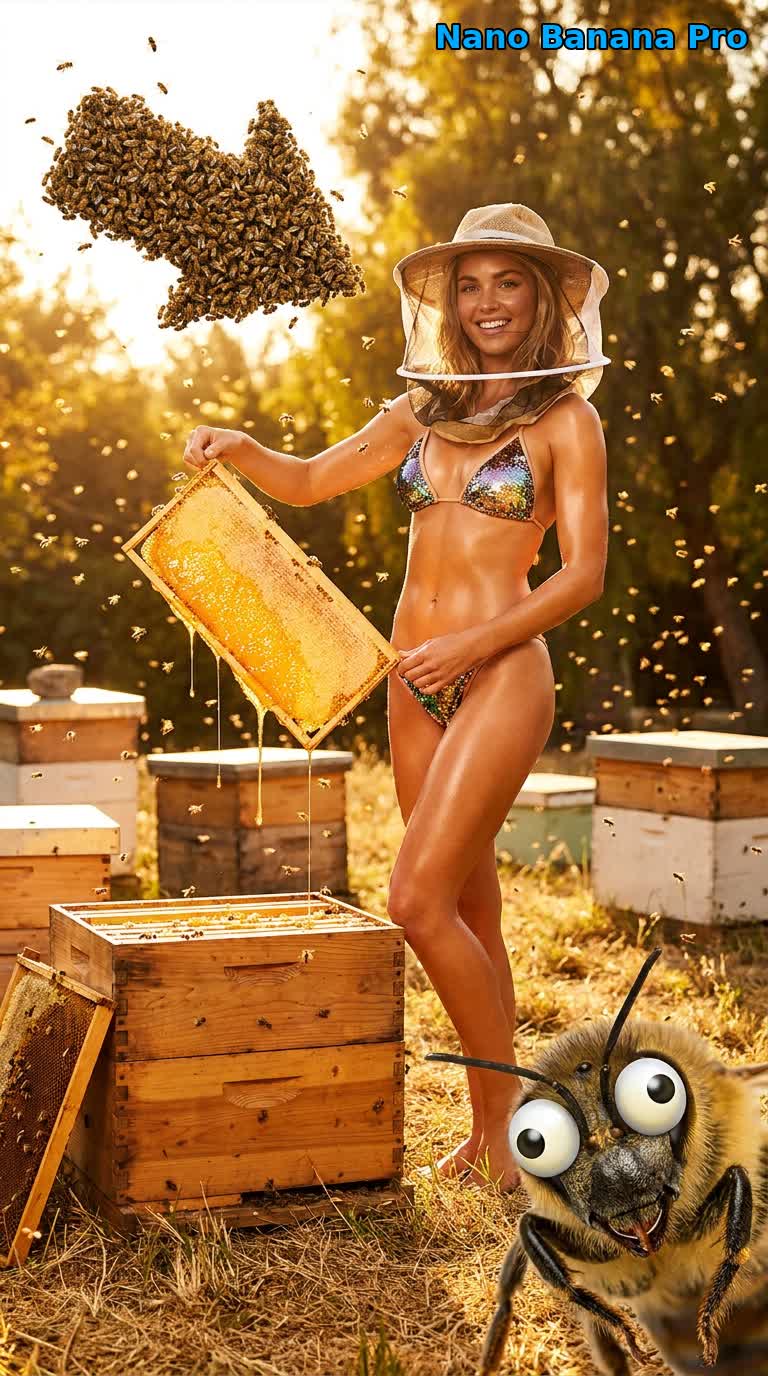
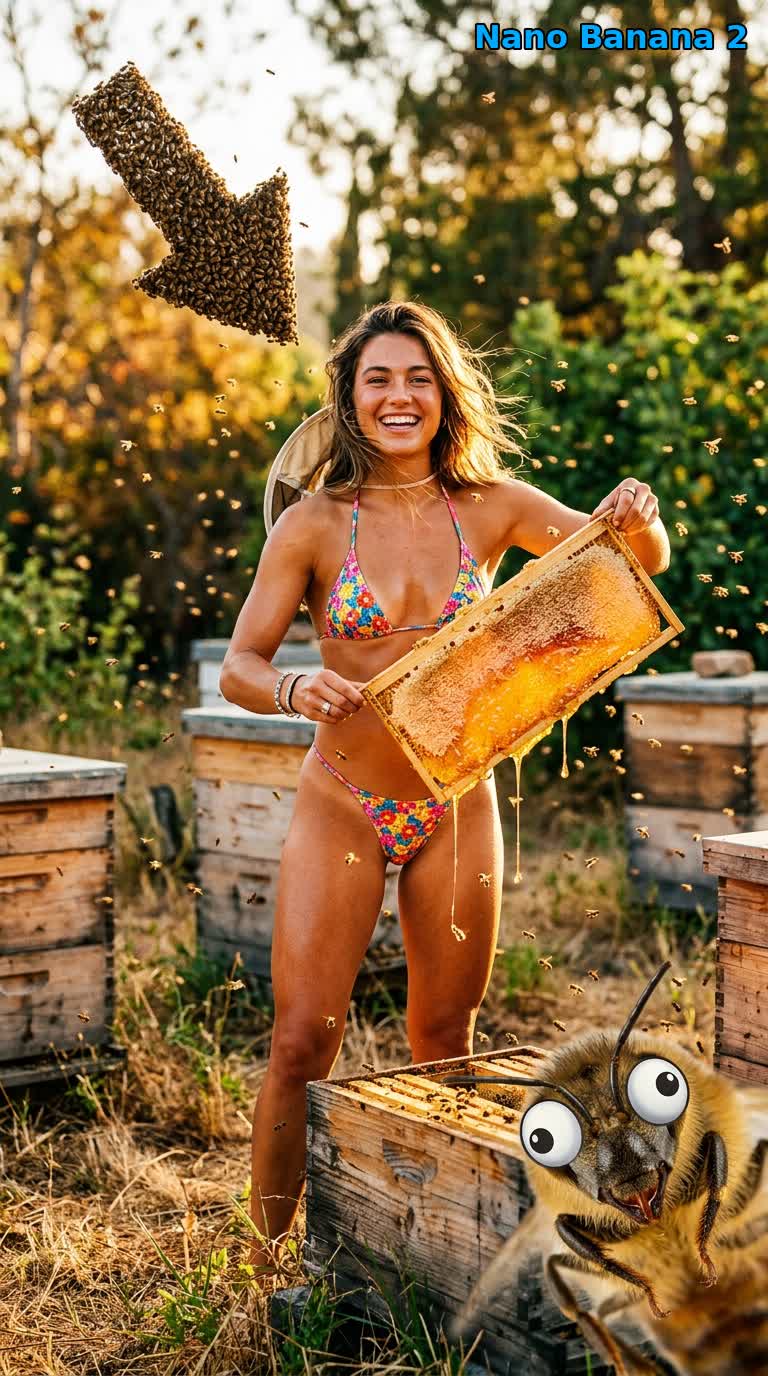
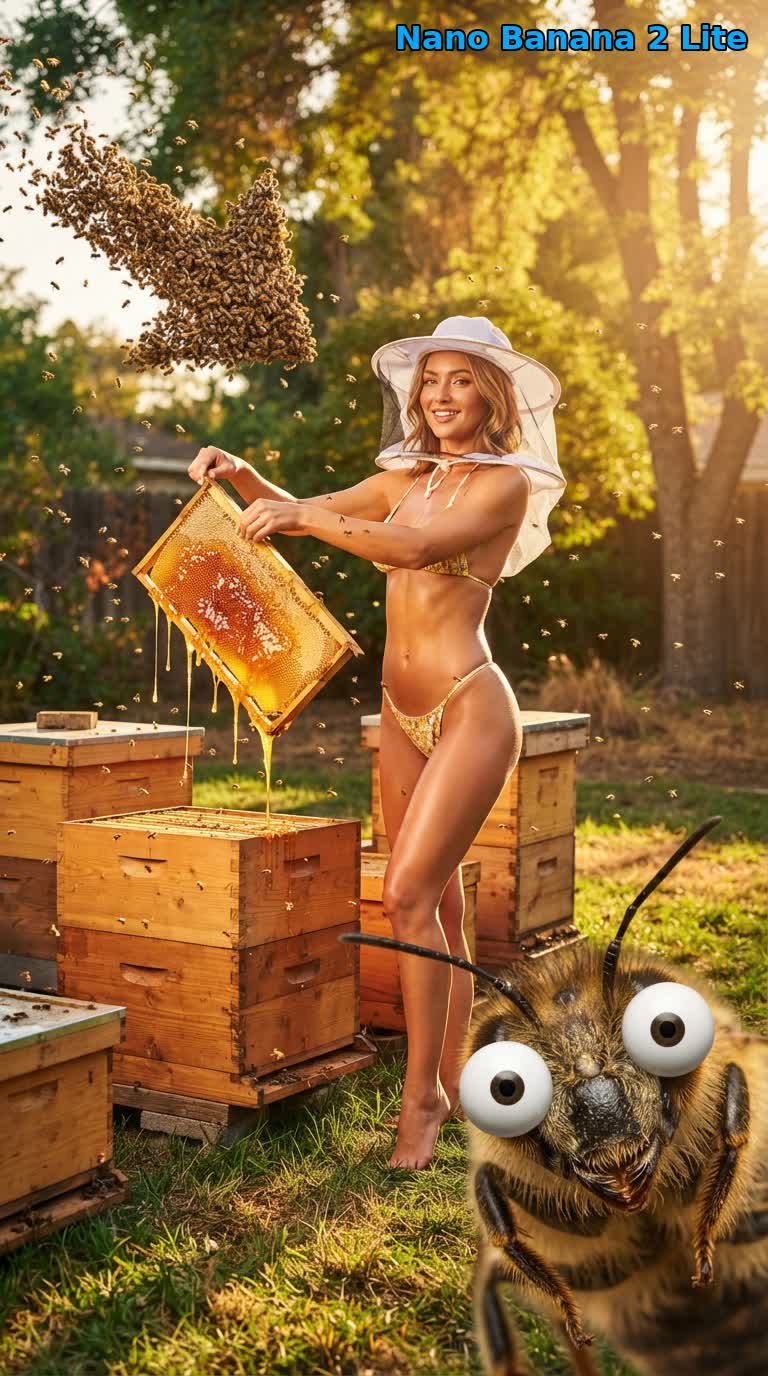
นี่คือพรอมต์คนเลี้ยงผึ้งเดียวกันที่แต่ละโมเดลสร้างในอัตราส่วน 9:16 ผ่าน Google Flow API นี้ ความต่างออกมาสม่ำเสมอ Pro เนี้ยบที่สุดและทำตามคำสั่งตรงที่สุด 2.1 มีชีวิตชีวาที่สุด ส่วน Lite เร็วที่สุดและผลลัพธ์ก็ใกล้เคียงกัน
nano-banana-pro เนี้ยบที่สุดและให้อารมณ์ภาพนิตยสารมากที่สุด และเป็นโมเดลเดียวที่วาดตาข่ายของหมวกคลุมหน้า ผึ้งที่ไต่อยู่บนรวง และตาการ์ตูน o_O ตามตัวอักษรได้อย่างสม่ำเสมอ
nano-banana-2 ตีความได้มีชีวิตชีวาและมีพลังที่สุด ฝูงผึ้งรูปลูกศรชัดที่สุด และมีรายละเอียดของสถานการณ์มากมาย (รองเท้าบูตทำงาน ผึ้งบนคอนรวง)
nano-banana-2-lite เร็วที่สุดในสามตัว (ใช้เวลาราวครึ่งหนึ่งของ Pro ในการทดสอบของเรา) โดยยังคงองค์ประกอบภาพ น้ำผึ้งที่หยดย้อย และผึ้งตาโปนที่อยู่ด้านหน้า
ควรใช้โมเดล Nano Banana ตัวไหน?
- ใช้
nano-banana-proเมื่อความสมจริงสำคัญที่สุด เช่น ภาพหลัก ฉากซับซ้อนที่มีหลายตัวแบบ ข้อความที่ต้องแม่นยำ หรือการทำตามคำสั่ง ตัวนี้ช้าที่สุดในสามตัว - ใช้
nano-banana-2เมื่ออยากได้ความสมดุลที่ดีระหว่างคุณภาพกับความเร็ว หรืออยากได้การตีความพรอมต์ที่มีชีวิตชีวาและมีสไตล์มากขึ้น - ใช้
nano-banana-2-lite(ค่าเริ่มต้น) สำหรับการลองซ้ำหลายรอบและการสร้างเป็นชุดใหญ่ เมื่อความเร็วสำคัญและคุณภาพยังใกล้เคียงมาก
เพราะทั้งสามใช้คำขอรูปแบบเดียวกัน การสลับโมเดลจึงแค่เปลี่ยนคำเดียวใน model สร้างภาพชุดหนึ่งด้วยทั้งสามโมเดลแล้วเลือกภาพที่ดีที่สุด เหมือนที่สคริปต์ด้านบนทำ
ลองรันเอง
สคริปต์ Node.js ฉบับเต็ม เวอร์ชัน Python และ prompts.json อยู่ที่ useapi/google-flow-api/nano-banana-compare clone ไป แก้ prompts.json แล้วรันคำสั่งเดียวเพื่อสร้างภาพเปรียบเทียบทั้งชุดด้วยบัญชี Google Flow ของคุณ
คำถามที่พบบ่อย
- มี API ของ Nano Banana 2.1 หรือ Nano Banana Pro ไหม? ผ่าน useapi.net มี Google Flow API รันเวอร์ชันของ Google Flow ในชื่อ
nano-banana-2(Nano Banana 2.1),nano-banana-2-liteและnano-banana-proบน POST /images บน Gemini API ทางการ Nano Banana 2.1 ราคาราว $0.034 ต่อภาพ 1K และ Nano Banana Pro $0.134 ต่อภาพ ขณะที่ที่นี่ไม่มีค่าบริการต่อภาพ (ข้อมูล ณ พฤศจิกายน 2026) - Nano Banana 2 Lite, 2.1 และ Pro ต่างกันอย่างไร? ผ่าน useapi.net ทั้งสามโมเดลใช้ endpoint เดียวกัน และแต่ละตัวมีจุดเด่นของตัวเอง
nano-banana-pro(Gemini 3 Pro Image) เนี้ยบที่สุดและทำตามคำสั่งตรงที่สุดnano-banana-2(Nano Banana 2.1) ตีความได้มีชีวิตชีวาที่สุด และnano-banana-2-lite(Gemini 3.1 Flash-Lite Image) ซึ่งเป็นค่าเริ่มต้น ใช้เวลาราวครึ่งหนึ่งของ Pro ในการทดสอบของเรา ดูควรใช้โมเดลตัวไหน? - API ของ Nano Banana ราคาเท่าไร? ผ่าน useapi.net การสร้างภาพไม่ใช้เครดิต Flow ในทุกแพ็กเกจ Google AI รวมถึงบัญชีฟรี และไม่ต้องตั้งค่า Gemini API key หรือบัญชีเรียกเก็บเงินของ Cloud บน Gemini API ทางการ Nano Banana 2 Lite ราคาราว $0.034 ต่อภาพ 1K (ข้อมูล ณ พฤศจิกายน 2026) ดูราคา
- ภาพถูกตรวจสอบเนื้อหาไหม? ผ่าน useapi.net พรอมต์ของคุณยังผ่านระบบตรวจสอบเนื้อหาของ Google เอง และคำขอที่ถูกปฏิเสธจะได้ผลลัพธ์ว่างกลับมา ผลการตรวจสอบต่างกันไปในแต่ละคำขอและแต่ละโมเดล การลองใหม่ แก้พรอมต์ หรือเปลี่ยนโมเดลจึงมักได้ผล เพราะโมเดล Nano Banana แต่ละตัวตรวจสอบเนื้อหาต่างกันเล็กน้อย
- ต้องใช้ captcha หรือโปรเจกต์ Google Cloud ไหม? ผ่าน useapi.net คุณไม่ต้องมีโปรเจกต์ Google Cloud และไม่ต้องแก้ captcha เอง Google Flow ขอ reCAPTCHA ทุกครั้งที่สร้างภาพ และ worker ของ useapi.net จะแก้ให้อัตโนมัติ บัญชี Google Flow แรกของคุณได้สิทธิ์แก้ฟรี 300 ครั้งด้วยคีย์ AntiCaptcha, CapSolver และ EzCaptcha ของเราเอง หลังจากนั้นคุณเพิ่มคีย์ของผู้ให้บริการของคุณเองได้ สคริปต์ในคู่มือนี้ไม่ได้ส่ง
captchaToken
สรุป
ติดต่อเราได้ที่  Discord Server หรือ
 Telegram Channel สำหรับทุกคำถามและข้อสงสัยด้านการใช้งาน
ดูตัวอย่างโค้ดได้ใน GitHub repo ของเรา
เผยแพร่ที่อื่นด้วย
เผยแพร่บน dev.to (ภาษาอังกฤษ) และมีการพูดคุยบน Reddit (ภาษาอังกฤษ) ด้วย
เริ่มใช้งาน API
การสมัครสมาชิกเดือนละ $15 ใช้ได้กับทุก API บน useapi.net ใช้ Token เดียวกับทุกบริการ เชื่อมบัญชีของคุณเองได้สูงสุด 3 บัญชีต่อบริการ แต่ละบัญชีใช้แพ็กเกจของเว็บไซต์นั้นเอง ส่วน useapi.net ดูแล REST API การกระจายโหลด และการ polling ให้ ต้องการบัญชีมากกว่านี้? สมัครเพิ่มแต่ละครั้งเดือนละ $10 และได้เพิ่มอีก 3 บัญชีต่อบริการ
สมัครสมาชิก — $15/เดือน ชำระด้วยคริปโต
ไม่มีบัตรเครดิตที่ใช้จ่ายต่างประเทศได้? สมัครด้วยคริปโตก็ได้ (การชำระด้วยคริปโตขอคืนเงินไม่ได้) ดูราคาและแพ็กเกจสำหรับปริมาณมากได้ที่หน้าการสมัครสมาชิก ถ้าชำระผ่าน Stripe ขอคืนเงินเต็มจำนวนได้ภายใน 14 วันหลังซื้อครั้งแรก หากสร้างงานสำเร็จไม่ถึง 50 ครั้ง สมัครไว้แล้ว? เปลี่ยนจำนวนได้ที่ Stripe Customer Portal โดยไม่ต้องซื้อใหม่