Nano Banana 2 Lite、2.1 与 Pro 对比:Google Flow 三款图片模型横评
7 分钟阅读 • 2026 年 7 月 2 日(2026 年 11 月 6 日更新)
useapi.net 是第三方 API,与 Google 无关联,也未获得 Google 的认可。
目录
简介
Google Flow 提供三款 Nano Banana 图片模型:nano-banana-2-lite、nano-banana-2 和 nano-banana-pro。useapi.net 的 Google Flow API 用你自己的 Google Flow 账号,以同一个提示词运行这三款模型。所有 Google AI 订阅都包含图片生成,免费账号也一样,而官方 Gemini API 每张图片收费 $0.034 到 $0.134(截至 2026 年 11 月)。不需要 Google Cloud 项目,也不需要 API Key。
本指南把完全相同的提示词分别交给 Lite、2.1 和 Pro,让你看清它们的差别,然后给出一个可运行的 Node.js 脚本,一条命令生成整套对比图。想先从头学起?请看姊妹篇图片生成教程。
三款 Nano Banana 模型分别是什么?
每个请求通过 model 字段选择模型。省略时,Google Flow 使用 nano-banana-2-lite,这是它自 2026 年 7 月起的默认模型。三款模型都能在任何 Google AI 订阅上运行,免费账号也可以。
| 模型 ID | 产品名称 | 适合场景 | 参考图(I2I) | 速度 |
|---|---|---|---|---|
nano-banana-2-lite (默认) | Nano Banana 2 Lite / Gemini 3.1 Flash-Lite Image | 任何订阅上快速、大批量出图 | 最多 10 张 | 最快 |
nano-banana-2 | Nano Banana 2.1 | 画质与速度兼顾 | 最多 10 张 | 快 |
nano-banana-pro | Nano Banana Pro / Gemini 3 Pro Image | 保真度最高,最能遵循指令 | 最多 10 张 | 较慢 |
三款模型接受相同的宽高比(16:9、4:3、1:1、3:4、9:16,图生图模式下还有 auto)、count(1–4)、用于复现结果的 seed、最多 10 张参考图、提示词内的 @ 引用,以及 2K/4K 放大。已弃用的别名 imagen-4(Google 已于 2026 年 7 月从 Google Flow 中移除 Imagen)和 nano-banana 仍然可用,分别映射到 nano-banana-2-lite 和 nano-banana-2。每个模型的完整说明见 POST /images 参考文档。
放大到 2K/4K
任何生成的图片都可以用 POST /images/upscale 放大:传入它的 mediaGenerationId,并把 resolution 设为 2k(默认)或 4k。响应以 base64 放在 encodedImage 中返回。2k 适用于任何套餐,4k 需要 Google AI Ultra。
价格
在任何 Google AI 订阅上(包括免费账号),图片都不消耗 Flow 积分,useapi.net 也不按图片收费。每个模型在每个套餐上的价格以及与官方 API 的对比,见 Google Flow 价格表。连接账号请看设置指南。
对比用的提示词
只有提示词够难,模型对比才有意义。这个提示词刻意设计成一个荒诞的单帧场景,同时考验好几件事:指定的摄影风格(David LaChapelle)、多主体的空间布局(左上角蜂群组成箭头,右下角一只强迫透视的蜜蜂)、道具的还原度(滴着蜜的蜂巢)、特定的喜剧表情(o_O 卡通眼)以及相互冲突的基调,而且全部要融在一张连贯的图片里。
A visually breathtaking, beautifully absurd, single-frame photograph in the hyper-saturated,
glossy, surreal-comedy editorial style of David LaChapelle, shot at a sun-dappled backyard
apiary at golden hour on an 85mm f/1.4 lens with creamy shallow depth of field. In the center
midground, a gorgeous, radiant young woman beekeeper with an elegant figure, flawless glowing
sun-kissed skin and a warm playful smile, incongruously wearing a tiny mini bikini and a
beekeeper's veil hat pushed back off her face, stands among the wooden hive boxes on the grass and lifts a single
open beehive frame heavy with golden honeycomb, thick honey oozing and stringing down in glossy
ribbons and catching the light. She looks directly into the camera, delighted and completely
unbothered by the bees swirling around her. In the top-left of the frame, a dense swarm of bees
bunches together and organizes into a bold, unmistakable arrow / pointer shape aimed straight at
her, as if frantically calling everyone's attention. In the extreme bottom-right foreground of
the exact same scene, photobombing the lens, is a huge forced-perspective close-up of a single
frazzled worker bee, staring directly into the camera with bulging, mind-blown "o_O" cartoon
googly eyes, completely frozen in comical disbelief. Single cohesive image, seamless depth of
field, no cut-ins, warm dynamic backlighting, glistening honey highlights, crazy situational
comedy, hyper-detailed, masterpiece.
用三款模型分别生成
你需要一个 useapi.net API Token 和一个已连接的 Google Flow 账号。POST /images 是同步的:一次调用会一直等到图片生成完毕(通常 20–60 秒,负载高时 Pro 模型可能需要约 2 分钟),然后返回 media[] 数组,每张图片一项,所以没有需要轮询的 jobid。
单次调用,换掉 model 即可对比:
curl -X POST "https://api.useapi.net/v1/google-flow/images" \
  -H "Authorization: Bearer $USEAPI_TOKEN" \
  -H "Content-Type: application/json" \
  -d '{
    "model": "nano-banana-pro",
    "aspectRatio": "9:16",
    "count": 4,
    "prompt": "A beekeeper at golden hour lifting a dripping honeycomb frame, a swarm forming an arrow in the sky, a forced-perspective bee with o_O googly eyes in the foreground"
  }' > result.json

# 每张图片位于 .media[N].image.generatedImage.fifeUrl
curl -o pro_1.jpg "$(jq -r '.media[0].image.generatedImage.fifeUrl' result.json)"
要一条命令跑完整个对比,可以用下面的 Node.js 脚本。它读取 prompts.json(每个模型一项,提示词都相同),逐个提交,并用带模型名的文件名保存返回的每张图片:从 fifeUrl 下载,URL 缺失时则解码内联的 encodedImage。某张图片失败时会记录下来,然后继续运行。需要 Node.js v21 及以上版本。把两个文件放进同一个文件夹,运行 node ./google-flow-nano-banana-compare.mjs API_TOKEN EMAIL,其中 API_TOKEN 是你的 useapi.net API Token,EMAIL 是已连接的 Google Flow 账号。脚本会按邮箱查找账号,提交前检查它的 health,并且不发送 captchaToken:useapi.net 的 worker 会自动解决 reCAPTCHA。
想直接克隆运行?完整脚本、Python 移植版和 prompts.json 都在 GitHub 的 useapi/google-flow-api 中。
展开 prompts.json
[
    {
        "model": "nano-banana-2-lite",
        "aspectRatio": "9:16",
        "count": 4,
        "prompt": "A beekeeper at golden hour lifting a dripping honeycomb frame in the surreal editorial style of David LaChapelle, a dense bee swarm forming a bold arrow in the top-left, a forced-perspective bee with o_O cartoon googly eyes photobombing the bottom-right. Single cohesive image, masterpiece."
    },
    {
        "model": "nano-banana-2",
        "aspectRatio": "9:16",
        "count": 4,
        "prompt": "A beekeeper at golden hour lifting a dripping honeycomb frame in the surreal editorial style of David LaChapelle, a dense bee swarm forming a bold arrow in the top-left, a forced-perspective bee with o_O cartoon googly eyes photobombing the bottom-right. Single cohesive image, masterpiece."
    },
    {
        "model": "nano-banana-pro",
        "aspectRatio": "9:16",
        "count": 4,
        "prompt": "A beekeeper at golden hour lifting a dripping honeycomb frame in the surreal editorial style of David LaChapelle, a dense bee swarm forming a bold arrow in the top-left, a forced-perspective bee with o_O cartoon googly eyes photobombing the bottom-right. Single cohesive image, masterpiece."
    }
]
展开 google-flow-nano-banana-compare.mjs 脚本
/*

Script version 1.1, September 11, 2026

Batch-compare Google Flow's Nano Banana image models (2 Lite, 2.1, Pro) with the useapi.net API 🚀
Reads prompts.json (one entry per model), submits each to the synchronous POST /images endpoint,
and downloads every returned image with a model-labeled filename.
For more details visit https://useapi.net/docs/api-google-flow-v1/post-google-flow-images

Companion tutorial:
  https://useapi.net/docs/articles/google-flow-nano-banana-compare

Installation Instructions:
==========================

You need Node.js v21 or newer installed to run this script. Download and install Node.js from:

- Windows, macOS, Linux: https://nodejs.org/

After installation, verify by running the following command in a terminal:

   node -v

Running the Script:
===================

Usage: node google-flow-nano-banana-compare.mjs <API_TOKEN> <EMAIL> [PROMPTS_FILE]

Replace API_TOKEN with your actual useapi.net API token, see https://useapi.net/docs/start-here/setup-useapi
Replace EMAIL with configured Google Flow email account, see https://useapi.net/docs/start-here/setup-google-flow
If optional PROMPTS_FILE not provided prompts.json will be used.

Example:
--------

node google-flow-nano-banana-compare.mjs user:1234-abcdefhijklmnopqrstuv [email protected]

Changelog:
==========

- July 2, 2026: Initial release.
- September 11, 2026: Saves encodedImage when fifeUrl is absent, and writes a downloaded image only once it has been fully received, so a failed download leaves no partial file for the next run to skip as "already exists".

*/

import fs from 'fs/promises';
import { writeFile } from 'node:fs/promises';

// Constants
const DEFAULT_PROMPTS_FILE = 'prompts.json';
const DEFAULT_MODEL = 'nano-banana-2-lite';
const SLEEP_RETRY = 30 * 1000; // in milliseconds

const urlAccounts = 'https://api.useapi.net/v1/google-flow/accounts';
const urlImages = 'https://api.useapi.net/v1/google-flow/images';

// Utility to sleep for given milliseconds
const sleep = (ms) => new Promise((resolve) => setTimeout(resolve, ms));
const elapsedTimeSec = (start) => (Date.now() - start) / 1000;

// Function to fetch configured Google Flow API accounts
async function fetchAccounts(apiToken) {
    const response = await fetch(urlAccounts, {
        headers: {
            'Accept': 'application/json',
            'Authorization': `Bearer ${apiToken}`
        }
    });

    if (!response.ok) {
        console.error(`⛔ Error fetching accounts (HTTP ${response.status}): ${response.statusText}`);
        process.exit(1);
    }

    return response.json();
}

// Save a single image from its signed fifeUrl. fifeUrl is normally present; when it is absent
// the image arrived inline as base64 in encodedImage. A failure is reported and skipped.
async function downloadImage(img, filename) {
    try {
        await fs.access(filename);
        console.log(`⚠️ ${filename} already exists. Skipping download.`);
        return;
    } catch {
        // File does not exist, proceed with downloading
    }

    const url = img?.fifeUrl;

    if (!url && img?.encodedImage) {
        console.log(`✅ Saving ${filename} from encodedImage`);
        try {
            await writeFile(filename, Buffer.from(img.encodedImage, 'base64'));
        } catch (err) {
            console.error(`⛔ Unable to save ${filename}: ${err}`);
        }
        return;
    }

    if (!url) {
        console.error(`🛑 No fifeUrl or encodedImage for ${filename}`);
        return;
    }

    console.log(`✅ Downloading ${filename}`);
    try {
        const imageResponse = await fetch(url);
        if (!imageResponse.ok) {
            console.error(`⛔ Unable to download ${filename} (HTTP ${imageResponse.status})`);
            return;
        }
        // Read the whole body before creating the file, so a failed download leaves no
        // partial file behind for the next run to skip as "already exists".
        const data = Buffer.from(await imageResponse.arrayBuffer());
        await writeFile(filename, data);
    } catch (err) {
        console.error(`⛔ Error during download: ${err}`);
    }
}

// Submit a single prompt to the synchronous POST /images endpoint and download the results.
async function submitImage(apiToken, email, prompt, index) {
    const model = prompt.model ?? DEFAULT_MODEL;

    // Build the request body.
    const body = { model, email, prompt: prompt.prompt };
    for (const key of ['aspectRatio', 'count', 'seed'])
        if (prompt[key] !== undefined) body[key] = prompt[key];

    console.log(`🚀 ${model} » Prompt #${index} • account ${email} …`);
    const startTime = Date.now();

    while (true) {
        const response = await fetch(urlImages, {
            method: 'POST',
            headers: {
                'Accept': 'application/json',
                'Content-Type': 'application/json',
                'Authorization': `Bearer ${apiToken}`
            },
            body: JSON.stringify(body)
        });

        const responseText = await response.text();

        if (response.status == 200) {
            const media = JSON.parse(responseText)?.media ?? [];

            if (media.length == 0)
                console.error(`🛑 200 OK but no media (moderated?) for ${model}`);

            // count > 1 returns multiple images in the media array.
            for (let i = 0; i < media.length; i++) {
                const img = media[i]?.image?.generatedImage;
                await downloadImage(img, `${model}_${i + 1}.jpg`);
            }
            console.log(`🆗 ${model} done (${elapsedTimeSec(startTime)} sec)`);
            return 200;
        }

        switch (response.status) {
            case 429:
            case 503:
                console.log(`🔄️ Retry on HTTP ${response.status}`, responseText);
                await sleep(SLEEP_RETRY);
                break;
            default:
                console.error(`🛑 ${model} failed with HTTP ${response.status}`, responseText);
                return response.status;
        }
    }
}

// Main function
async function main() {
    const apiToken = process.argv[2];
    const email = process.argv[3];
    const promptFile = process.argv[4] || DEFAULT_PROMPTS_FILE;

    if (!apiToken || !email) {
        console.error('Usage: node google-flow-nano-banana-compare.mjs <API_TOKEN> <EMAIL> [PROMPTS_FILE]');
        process.exit(1);
    }

    console.info('Script v1.1 • Node version ' + process.version);

    const accounts = await fetchAccounts(apiToken);

    if (!accounts[email]) {
        console.error(`⛔ Account ${email} not found. Please refer to https://useapi.net/docs/start-here/setup-google-flow`);
        process.exit(1);
    }

    if (accounts[email].health && accounts[email].health !== 'OK') {
        console.error(`⛔ Account ${email} health is '${accounts[email].health}'. Please resolve and update the account, see https://useapi.net/docs/start-here/setup-google-flow`);
        process.exit(1);
    }

    const prompts = JSON.parse(await fs.readFile(promptFile, 'utf8'));
    console.log(`Comparing ${prompts.length} model runs …`);

    const start = new Date();
    for (let i = 0; i < prompts.length; i++)
        await submitImage(apiToken, email, prompts[i], i + 1);

    console.info('COMPLETED', new Date(), '• elapsed', elapsedTimeSec(start), 'sec');
}

main();
示例
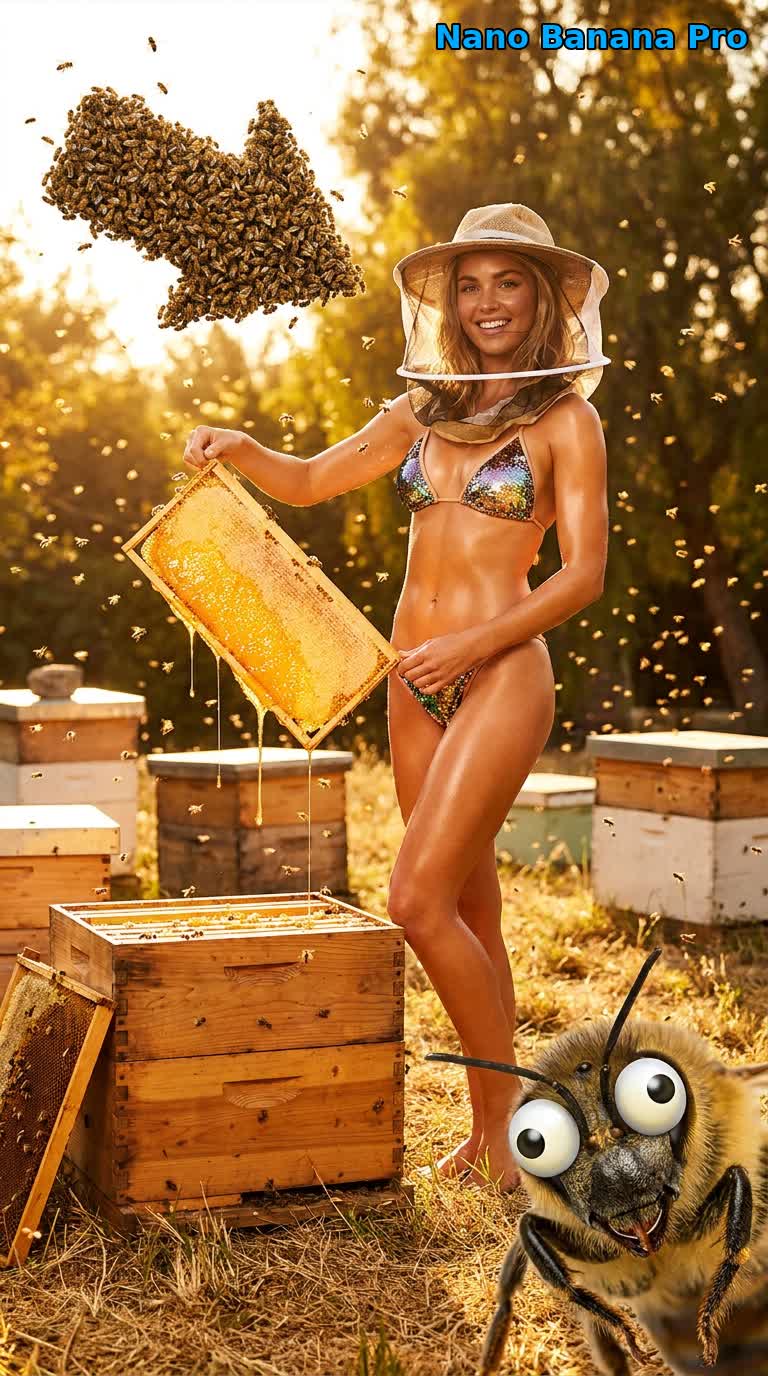
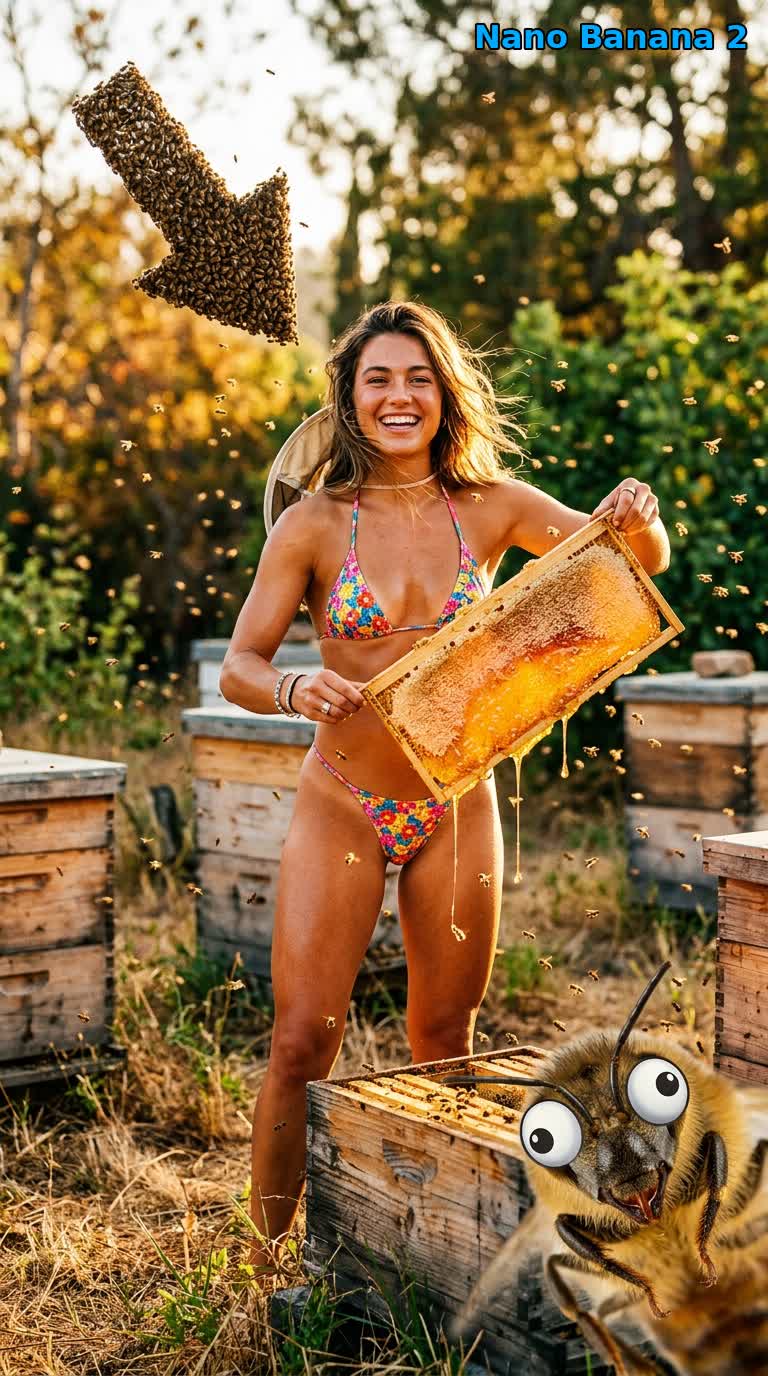
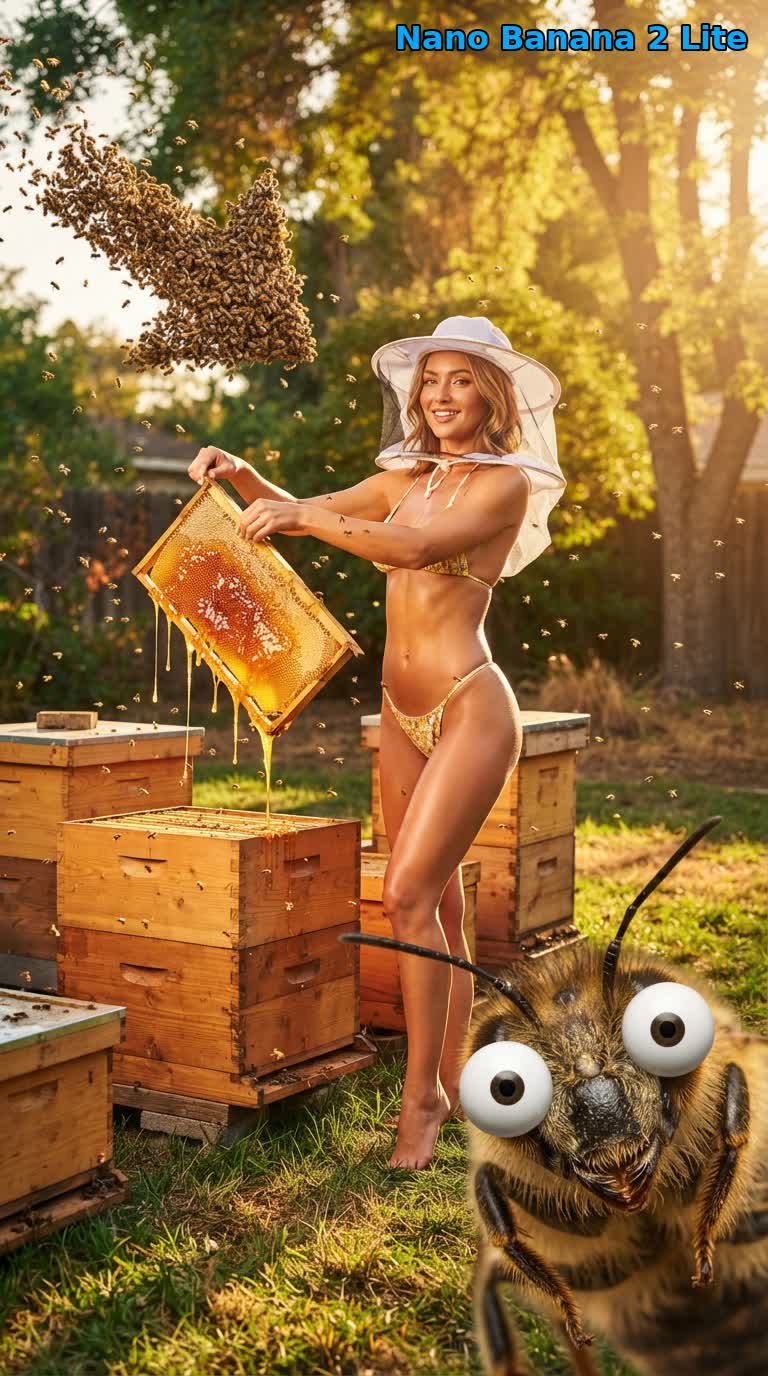
下面是同一个养蜂人提示词由每个模型以 9:16 生成的结果,都通过这个 Google Flow API 生成。差别很稳定:Pro 最精致,也最忠实于指令,2.1 最有动感,Lite 最快,效果也很接近。
nano-banana-pro:最精致、最有杂志大片感,也是唯一能稳定画出面纱网、在蜂巢上爬的蜜蜂以及字面意义上的 o_O 卡通眼的模型。
nano-banana-2:最有动感、最有活力的诠释,箭头形的蜂群最清楚,情境细节也很多(工作靴、框上的蜜蜂)。
nano-banana-2-lite:三者中最快(在我们的测试中用时大约是 Pro 的一半),同时保留了构图、滴落的蜂蜜和前景中那只瞪着卡通眼的蜜蜂。
该用哪款 Nano Banana 模型?
- 画质最重要时选
nano-banana-pro:主视觉、复杂的多主体场景、精确的文字或指令遵循。它是三者中最慢的。 - 想兼顾画质与速度,或想要更有动感、更有风格的诠释时,选
nano-banana-2。 - 迭代和大批量生成时选
nano-banana-2-lite(默认),速度要紧,画质也依然非常接近。
三者的请求格式相同,所以切换只需改动 model 里的一个词:像上面的脚本那样,把三款模型各跑一批,再挑出最好的。
自己运行
完整的 Node.js 脚本、Python 移植版和 prompts.json 在 useapi/google-flow-api/nano-banana-compare。克隆下来,编辑 prompts.json,运行一条命令,就能用你的 Google Flow 账号生成整套对比图。
常见问题
- 有 Nano Banana 2.1 或 Nano Banana Pro 的 API 吗? 通过 useapi.net 就有:Google Flow API 在 POST /images 上以
nano-banana-2(Nano Banana 2.1)、nano-banana-2-lite和nano-banana-pro运行 Google Flow 的这几个版本。在官方 Gemini API 上,Nano Banana 2.1 每张 1K 图片约 $0.034,Nano Banana Pro 每张 $0.134,而这里不按图片收费(截至 2026 年 11 月)。 - Nano Banana 2 Lite、2.1 和 Pro 有什么区别? 在 useapi.net 上,三款模型用同一个接口,各有所长。
nano-banana-pro(Gemini 3 Pro Image)最精致,也最贴合指令,nano-banana-2(Nano Banana 2.1)的诠释最有动感,默认的nano-banana-2-lite(Gemini 3.1 Flash-Lite Image)在我们的测试中用时约为 Pro 的一半。见该用哪款模型? - Nano Banana API 多少钱? 通过 useapi.net,在任何 Google AI 订阅上(包括免费账号)图片都不消耗 Flow 积分,也不需要设置 Gemini API Key 或 Cloud 结算账号。在官方 Gemini API 上,Nano Banana 2 Lite 每张 1K 图片约 $0.034(截至 2026 年 11 月)。见价格。
- 图片会被审核吗? 通过 useapi.net,你的提示词会经过 Google 自己的内容审核,被拒绝的请求会返回空结果。审核结果因请求和模型而异,所以重试、修改提示词或换个模型往往就能成功,因为每款 Nano Banana 模型的审核尺度都略有不同。
- 需要验证码或 Google Cloud 项目吗? 通过 useapi.net,既不需要 Google Cloud 项目,也不需要自己处理验证码。Google Flow 每生成一张图片都要求 reCAPTCHA,useapi.net 的 worker 会自动解决:你的第一个 Google Flow 账号自带 300 次免费解码,使用我们自己的 AntiCaptcha、CapSolver 和 EzCaptcha 密钥,之后再添加你自己的服务商密钥。本文的脚本不发送
captchaToken。
结语
有问题欢迎加入我们的  Discord 服务器 或
 Telegram 频道。
代码示例见我们的 GitHub 仓库。
其他发布平台
本文英文版也发布在 dev.to,并在 Reddit 上讨论。
开始使用
每月 15 美元的订阅即可使用 useapi.net 上的所有 API:一个 Token,所有服务。每个服务最多绑定 3 个你自己的账号,useapi.net 负责 REST 接口、负载均衡和轮询。需要更多账号?每增加一个订阅每月 10 美元,每个服务再多 3 个账号。
没有国际信用卡?可以用加密货币订阅(加密货币付款不退款)。价格与批量方案见订阅页面。用 Stripe 付款,首次购买 14 天内、且成功生成少于 50 次可全额退款。已经订阅?请在 Stripe 客户门户 修改数量,无需重新购买。