Google Flow API で UGC 風の商品紹介動画を作る方法
8分で読めます • 2026年9月4日(2026年11月6日更新)
useapi.net はサードパーティの API です。Google とは提携しておらず、Google の承認も受けていません。
目次
- はじめに
- 料金
- リクエスト内の ID について
- ステップ1:商品ごとのシート
- ステップ2:出演者
- ステップ3:静止画、1フレームにシーン全体を
- ステップ4:商品ごとに1クリップ、すべて静止画から
- ステップ5:1080p にアップスケール
- ステップ6:つなげる
- 注意点
- かかった費用
- 自分で動かす
- よくある質問
- おわりに
はじめに
UGC 風の商品紹介動画は、useapi.net の Google Flow API だけで最初から最後まで作れます。かかるのは Flow クレジット45だけで、ローカルでの処理は一切ありません。架空の出演者が、架空の商品3つをカメラに向かって紹介します。
UGC(ユーザー生成コンテンツ)は、SNS のフィードや広告ライブラリにあふれているスタイルです。1人がスマートフォンのカメラに向かって話し、商品を売り込んだり、笑わせたり、ただ楽しんだりします。
これは、そうした動画をプロ品質で作るための A から Z までの完全ガイドです。商品、出演者、セリフ、最終的な編集まですべて自分で決められ、API 呼び出しは6ステップで、そのままコピーして使えます。ノーコードのフォームがよければ、n8n の UGC 広告ワークフロー(英語)でもこの種の広告を作れます。各ステップで選び直しや再生成ができるページ付きです。
完成した動画がこちらです。10秒の Omni 1.1 Flash クリップ3本を1080p にアップスケールしたもので、映像も音もすべて Google Flow API で生成しています。プロ品質が必要なら、同じアップスケールの呼び出しで4K にもできます。ステップ5をご覧ください。
合計45クレジット
読むより見るほうがよければ、ガイド全体を75秒にまとめた動画(英語)もあります。
YouTube で見る · ナレーションと音楽は MiniMax API で作成
料金
Omni 1.1 Flash の動画には有料の Google AI のプラン(Plus、Pro、Ultra)が必要で、useapi.net は動画ごとの料金を取りません。この動画にかかった費用はステップごとにかかった費用にまとめています。各プランでの動画1本あたりの価格と公式 API との比較は、Google Flow の料金表をご覧ください。
リクエスト内の ID について
以下のリクエストはすべて、前のステップの結果をその mediaGenerationId で参照します。ID は長いので、ここでは user:1234-email:…-image:b0bdf3e8-… のように短縮し、各リクエストの下に、どの ID が前のどの結果なのかを1行で書いています。画像の ID は POST /images のレスポンスの media[0].image.generatedImage.mediaGenerationId、キャラクターの ID は POST /characters の character フィールド、動画の ID は完了した ジョブ の media[0].mediaGenerationId にあります。アップスケールしたクリップの ID は、元の ID の末尾に _upsampled を付けたものです。
ステップ1:商品ごとのシート
商品シートとは、1つの商品を4つの方向から見せる1枚の画像です。たまたまうまくいった1つの角度ではなく、商品全体をモデルに伝えられます。POST /images を正方形で、商品ごとに1リクエスト送ります。プロンプトではパネルごとにカメラの位置を書いています。「正面、側面、背面」とだけ書くと、マグでは同じパネルが2つでき、キーボードには本当の側面図ができなかったからです。キーボードのような平たい物には真上からのパネルが必要で、立方体の物には要りません。手、キャプション、ロゴは入れません。そうすれば、商品以外のものがクリップに紛れ込むことはありません。
実在の商品でも同じことができます。POST /assets で商品の写真をアップロードし、その ID をこのリクエストの reference_1〜reference_4 に渡すと、モデルがきれいな4面のシートにまとめます。パッケージ、ロゴ、セット商品のシートも同じ方法で作れます。
curl — POST /images(マグ)
curl --location 'https://api.useapi.net/v1/google-flow/images' \
--header 'Authorization: Bearer user:1234-…' \
--form 'email="[email protected]"' \
--form 'aspectRatio="1:1"' \
--form 'count="2"' \
--form 'prompt="Orthographic product-catalog sheet on a plain white background: a matte white ceramic mug with a straight cylindrical body and a clearly visible glowing amber light band around its base, about a finger wide, like a smart heated mug. The sheet is divided into four equal panels by thin grey lines in a 2 by 2 grid. Every panel shows the same single item at exactly the same size, position and lighting, camera at the item'\''s eye level unless stated: top-left: side profile, the handle pointing left and seen edge-on; top-right: view from the handle side, the handle pointing straight at the camera; bottom-left: view from the opposite side, the handle hidden behind the body; bottom-right: three-quarter view from slightly above, the handle to the right. Soft even studio light, photoreal. Object only: no hands, no people, no props, no text anywhere, no captions, no labels, no logo, no packaging."'
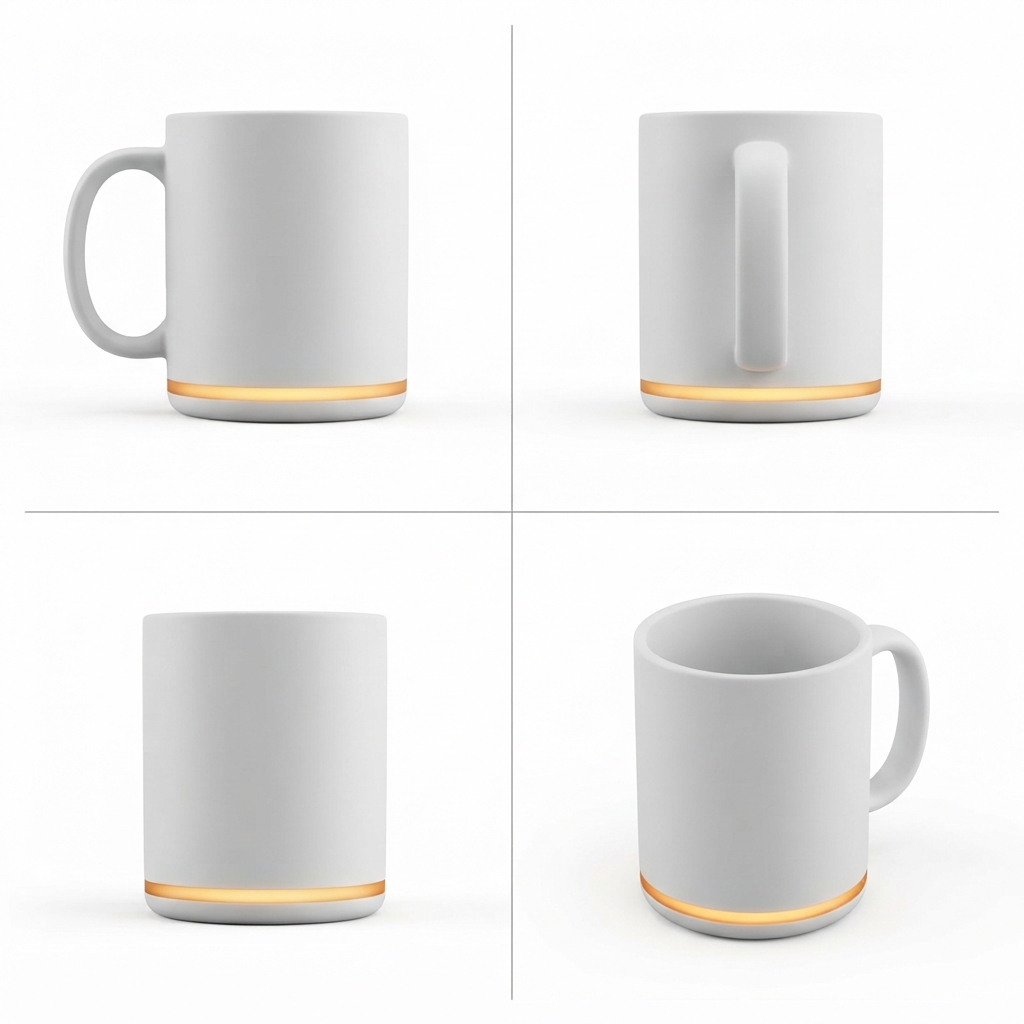
b0bdf3e80クレジット
curl — POST /images(デスクロボット)
curl --location 'https://api.useapi.net/v1/google-flow/images' \
--header 'Authorization: Bearer user:1234-…' \
--form 'email="[email protected]"' \
--form 'aspectRatio="1:1"' \
--form 'count="2"' \
--form 'prompt="Orthographic product-catalog sheet on a plain white background: a small rounded pastel mint desk robot, a palm-sized cube with a glossy black screen face showing a happy smiling expression, two round white eyes and a curved white smile, a little rounded antenna nub on top, a small round white dial on its right side, and a speaker grille on its back. The sheet is divided into four equal panels by thin grey lines in a 2 by 2 grid. Every panel shows the same single item at exactly the same size, position and lighting, camera at the item'\''s eye level unless stated: top-left: front view showing the smiling face; top-right: right side view showing the round dial and the antenna nub; bottom-left: back view showing the speaker grille; bottom-right: three-quarter view showing the smiling face and the dial. Soft even studio light, photoreal. Object only: no hands, no people, no props, no text anywhere, no captions, no labels, no logo, no packaging."'
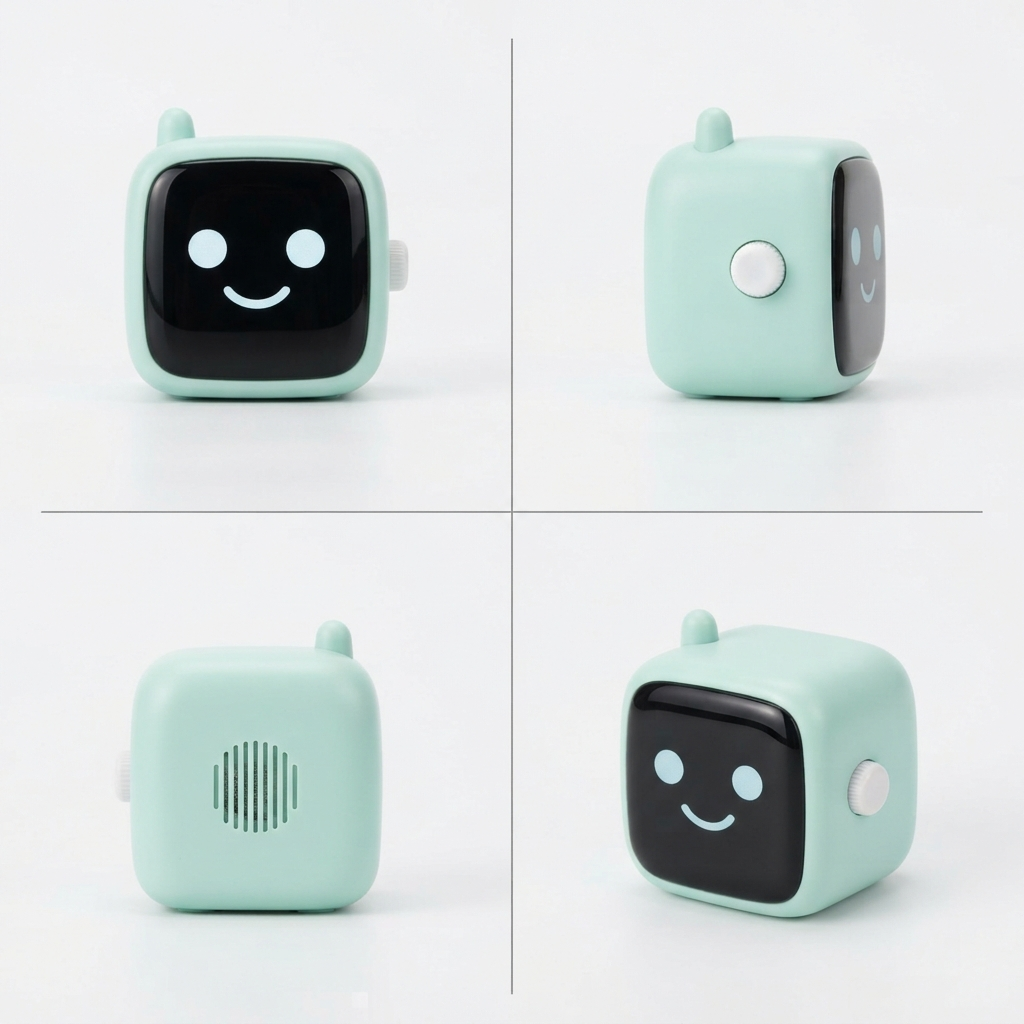
7aaed0560クレジット
curl — POST /images(キーボード)
curl --location 'https://api.useapi.net/v1/google-flow/images' \
--header 'Authorization: Bearer user:1234-…' \
--form 'email="[email protected]"' \
--form 'aspectRatio="1:1"' \
--form 'count="4"' \
--form 'prompt="Orthographic product-catalog sheet on a plain white background: a real mechanical three-key macro pad, the kind sold for shortcuts: a slim, low-profile white aluminum case, three mechanical key switches in one row with sculpted dished keycaps and a small gap between them, coral on the left, lemon yellow in the middle, sky blue on the right, a USB-C port on the back edge. Exactly three keys in one row, never more. The sheet is divided into four equal panels by thin grey lines in a 2 by 2 grid. Every panel shows the same single item at exactly the same size, position and lighting, camera at the item'\''s eye level unless stated: top-left: top-down view straight from above, the three keys in a row left to right; top-right: front view at eye level; bottom-left: left side view at eye level, the slim case and the keycap profile seen edge-on; bottom-right: three-quarter view from above. Soft even studio light, photoreal. Object only: no hands, no people, no props, no text anywhere, no captions, no labels, no logo, no packaging."'
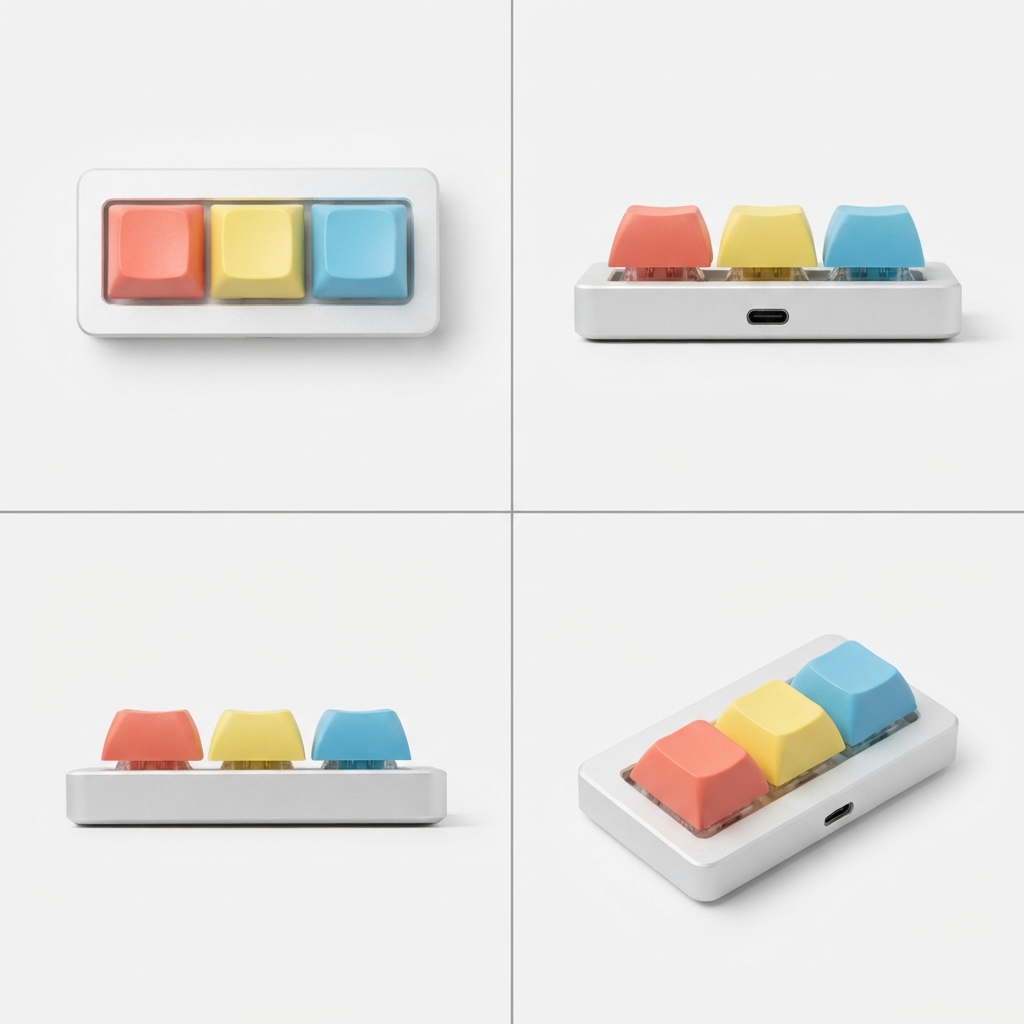
4f861c230クレジット
画像は無料なので、count を2〜4にして一番よいシートを選びましょう。キーボードは、プロンプトが実在のマクロパッドと真上からのパネルを描写できるまで何度か試しました。立方体のロボットは一発でうまくいきました。
ステップ2:出演者
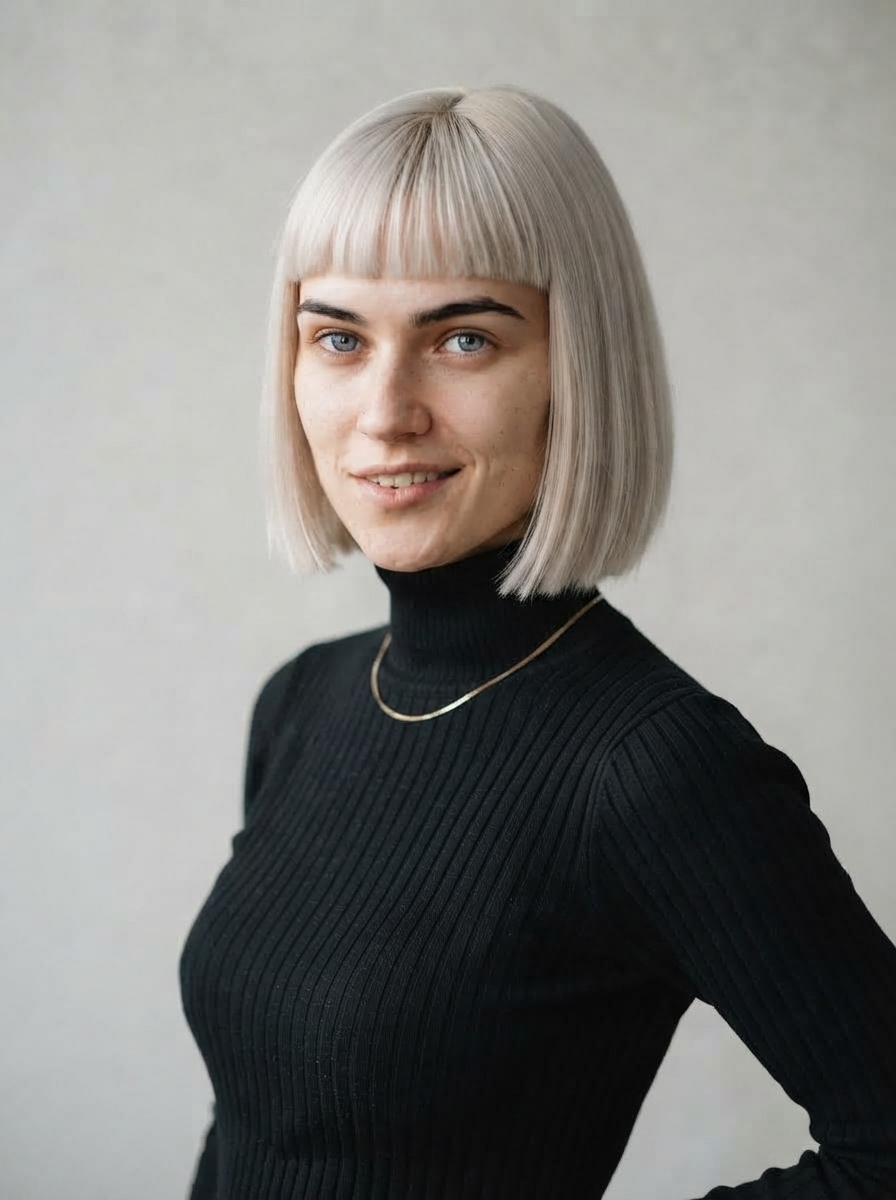
呼び出しは3回です。まず説明文から正面のポートレートを作ります。次に、1枚目を reference_1 にして斜め45度のポートレートを作り、2枚の顔をそろえます。最後に2枚のポートレートで POST /characters を呼ぶと、キャラクターの参照が返ります。以後、どのプロンプトでも彼女は @character_1 になり、Google は説明文ではなく自社のエンティティの仕組みで彼女を固定します。
curl — POST /images(正面のポートレート)
curl --location 'https://api.useapi.net/v1/google-flow/images' \
--header 'Authorization: Bearer user:1234-…' \
--form 'email="[email protected]"' \
--form 'aspectRatio="3:4"' \
--form 'count="2"' \
--form 'prompt="Character reference portrait, photoreal, natural skin, no heavy retouching: a strikingly attractive young woman in her early twenties with a sleek platinum-blonde blunt bob and straight bangs, dark defined eyebrows, icy grey eyes, a tiny silver nose stud, a playful smirk with a hint of teeth, wearing a fitted black turtleneck and a thin gold chain necklace. Head and shoulders, facing the camera straight on, plain light-grey studio background, soft even light. No text, no logo, no captions."'
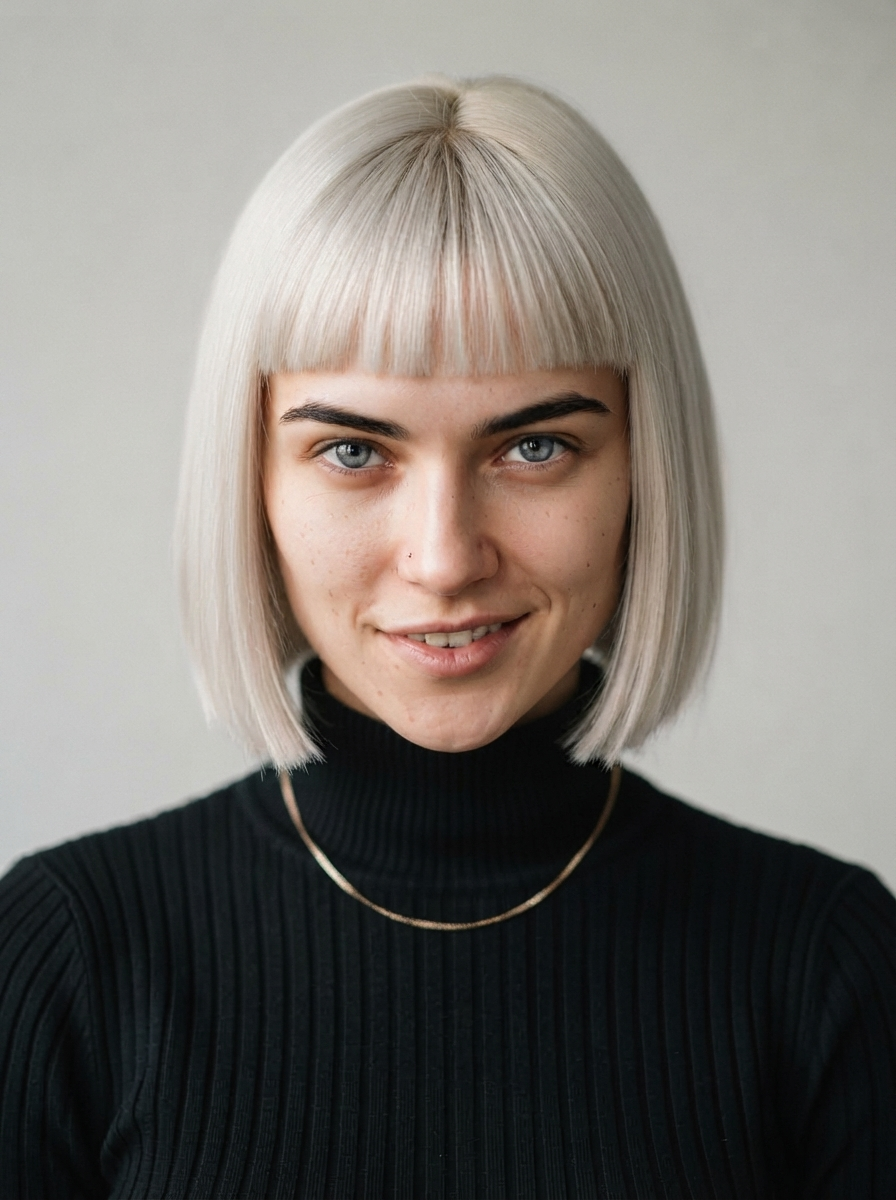
a236ef660クレジット
いくつかのルックを生成して、これを選びました。あとで細部を変えたくなったら(たとえばネックレス)、本人のポートレートを reference_1 にし、変更点だけを書いたプロンプトで作り直せば、顔はそのまま保たれます。
curl — POST /images(斜め45度のポートレート)
curl --location 'https://api.useapi.net/v1/google-flow/images' \
--header 'Authorization: Bearer user:1234-…' \
--form 'email="[email protected]"' \
--form 'aspectRatio="3:4"' \
--form 'count="1"' \
--form 'reference_1="user:1234-email:…-image:a236ef66-…"' \
--form 'prompt="@reference_1 is the same woman: identical face, hair, freckles, sweater and earrings. Three-quarter view from the waist up, relaxed natural smile, plain light-grey studio background, soft even light. Photoreal, no text."'
reference_1 は正面のポートレート a236ef66 です。このプロンプトには、以前の出演者の名残でそばかす、セーター、イヤリングが書かれたままですが、問題はありませんでした。リクエストに参照画像があれば、文章より参照画像が優先されます。
d891301c0クレジット
curl — POST /characters
curl --location 'https://api.useapi.net/v1/google-flow/characters' \
--header 'Authorization: Bearer user:1234-…' \
--form 'displayName="Mia"' \
--form 'personalityNotes="Quick, bright, deadpan delivery with a smile in her voice. Talks to the camera like a friend showing off things she bought at 2am."' \
--form 'imageReference_1="user:1234-email:…-image:a236ef66-…"' \
--form 'imageReference_2="user:1234-email:…-image:d891301c-…"' \
--form 'voice="Leda"'
imageReference_1 は正面のポートレート a236ef66、imageReference_2 は斜め45度の d891301c です。レスポンスの character フィールドが彼女の ID で、以下では 53ca1036 です。voice は Google のシステムプリセットの声の1つで、キャラクターと一緒に保存されますが、ステップ4で使うクリップのモードには届きません。注意点をご覧ください。
ステップ3:静止画、1フレームにシーン全体を
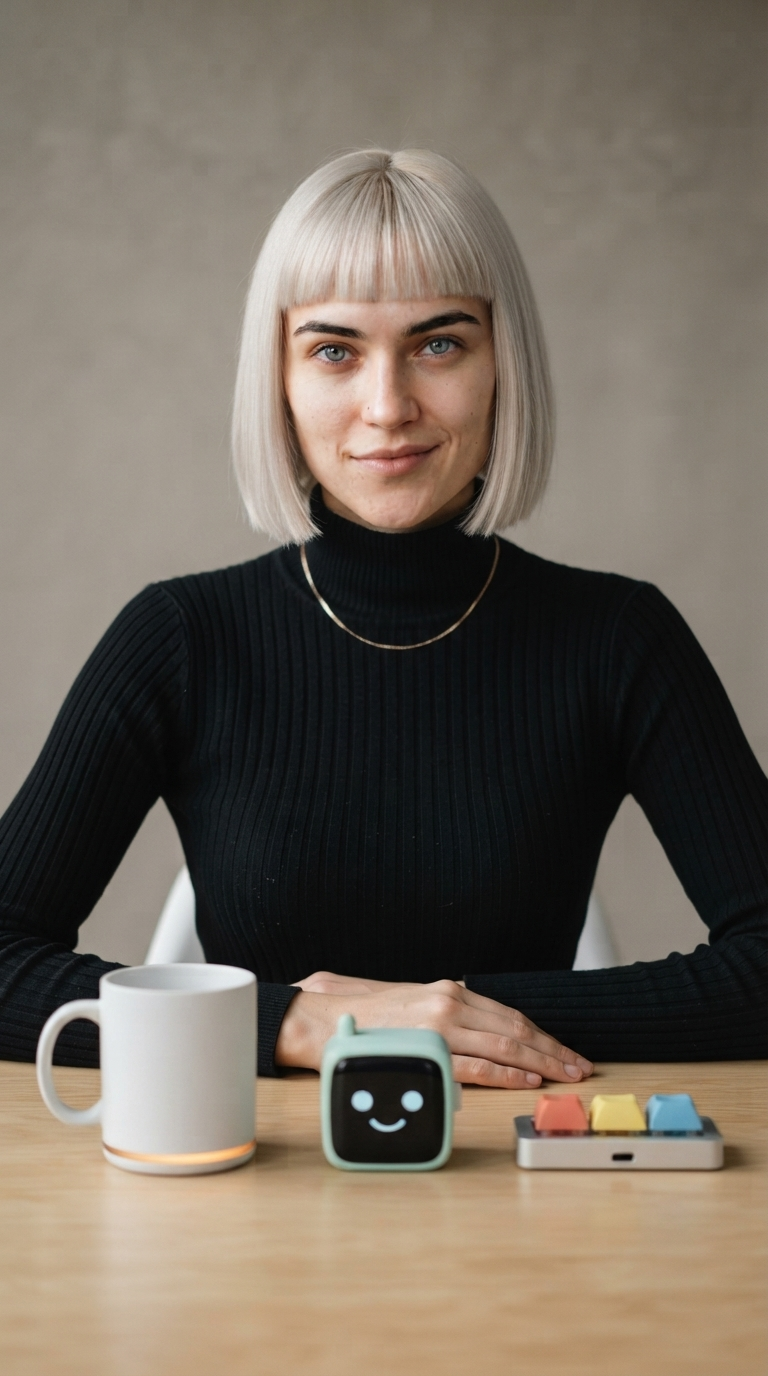
1つのリクエストですべてをまとめます。キャラクターを character_1、3枚のシートを reference_1〜reference_3 として渡し、プロンプトでタグを使って、彼女の前のテーブルに左から右へ並べます。このフレームがすべてのクリップの最初と最後になるので、タグが働くのはここだけです。
curl — POST /images
curl --location 'https://api.useapi.net/v1/google-flow/images' \
--header 'Authorization: Bearer user:1234-…' \
--form 'email="[email protected]"' \
--form 'aspectRatio="9:16"' \
--form 'count="2"' \
--form 'character_1="user:1234-email:…-character:53ca1036-…"' \
--form 'reference_1="user:1234-email:…-image:b0bdf3e8-…"' \
--form 'reference_2="user:1234-email:…-image:7aaed056-…"' \
--form 'reference_3="user:1234-email:…-image:4f861c23-…"' \
--form 'prompt="Full-frame vertical phone video look, no phone, no bezel. @character_1 sits at a light wooden table in a bright minimal creator studio, facing the camera, waist-up and centered, a plain warm-grey backdrop behind her, soft key light from the left with a gentle catchlight in her eyes. Laid out on the table in front of her, left to right, each fully visible and resting flat on the table: the mug from @reference_1, the desk robot from @reference_2, the keyboard from @reference_3. Her hands rest on the table, relaxed closed-mouth smile, eyes on the lens. Photoreal, no text, no captions."'
character_1 はステップ2のキャラクター 53ca1036 です。reference_1〜reference_3 はステップ1の3枚のシートで、マグ b0bdf3e8、デスクロボット 7aaed056、キーボード 4f861c23 です。
034cddc80クレジット
マグには光る帯、ロボットには顔とアンテナ、キーボードには3つの色とポートがあり、彼女はポートレートと同じ女性です。
ステップ4:商品ごとに1クリップ、すべて静止画から
Omni の開始フレーム+終了フレームのモードで、両方に静止画を入れ、商品ごとに1リクエスト、毎回同じ POST /videos を送ります。このモードが受け取るのは2枚の画像だけで、シートもキャラクターも声の参照も入れられません。それで問題ありません。静止画にすべてが入っているからです。彼女が手に取った商品は、静止画だけでどれもシートどおりに再現されました。
プロンプトには3つの役割があります。両端をこのフレームに固定し、前後に静かな間を置くこと。セリフと声を与えること。そして動きのタイミングを決めることです。商品を持ち上げながら話し始め、8秒の時点で商品は元の位置に戻り、最後の2秒は動かず無音で止まります。この最後の部分がないと、彼女の動きが遅れ、腕が終了フレームへ急に飛びました。
curl — POST /videos(マグ)
curl --location 'https://api.useapi.net/v1/google-flow/videos' \
--header 'Authorization: Bearer user:1234-…' \
--form 'email="[email protected]"' \
--form 'model="omni-flash"' \
--form 'aspectRatio="portrait"' \
--form 'duration="10"' \
--form 'resolution="720p"' \
--form 'startImage="user:1234-email:…-image:034cddc8-…"' \
--form 'endImage="user:1234-email:…-image:034cddc8-…"' \
--form 'prompt="She begins and ends exactly on this frame: hands resting on the table, the three items laid out in front of her, a small closed-mouth smile, looking into the lens, with a short quiet beat before she moves and another after she settles back. Timing matters: after a short quiet beat she picks up the mug on the left with both hands and starts talking as she lifts it, holding it up to the camera and talking straight to the lens, quick and bright with a deadpan edge and a smile in her voice, keeping both hands on the mug while she speaks. She says: \"Three gadgets smarter than me. Low bar. One: this mug texts me when my coffee'\''s cold. Better follow-up than my ex.\" Right after the last word she gives one short laugh to herself, still holding the mug. By the eight-second mark the mug is back down gently in exactly the same spot and both hands are resting on the table again, brought back in one calm unhurried movement. For the final two seconds she holds completely still, hands resting on the table, looking into the lens with a small closed-mouth smile. Natural room tone, no music, no captions, no text on screen."'
startImage と endImage はどちらもステップ3の静止画 034cddc8 です。3本のクリップすべてに同じ2つの ID を使います。
55808825、ステップ5で1080p にアップスケールしたもの15クレジット
curl — POST /videos(デスクロボット)
curl --location 'https://api.useapi.net/v1/google-flow/videos' \
--header 'Authorization: Bearer user:1234-…' \
--form 'email="[email protected]"' \
--form 'model="omni-flash"' \
--form 'aspectRatio="portrait"' \
--form 'duration="10"' \
--form 'resolution="720p"' \
--form 'startImage="user:1234-email:…-image:034cddc8-…"' \
--form 'endImage="user:1234-email:…-image:034cddc8-…"' \
--form 'prompt="She begins and ends exactly on this frame: hands resting on the table, the three items laid out in front of her, a small closed-mouth smile, looking into the lens, with a short quiet beat before she moves and another after she settles back. Timing matters: after a short quiet beat she picks up the desk robot in the middle with both hands and starts talking as she lifts it, holding it up to the camera with its smiling face toward the lens and turning it once and talking straight to the lens, quick and bright with a deadpan edge and a smile in her voice, keeping both hands on it while she speaks. The other two items stay on the table exactly where they are. She says: \"Two: a desk robot that reacts to my day. It has a face. It has never once looked impressed.\" Right after the last word she raises one eyebrow at the camera, a quick expressive beat, still holding the desk robot. By the eight-second mark the desk robot is back down gently in exactly the same spot and both hands are resting on the table again, brought back in one calm unhurried movement. For the final two seconds she is silent and holds completely still, hands resting on the table, looking into the lens with a small closed-mouth smile. Natural room tone, no music, no captions, no text on screen."'
c4d0e6b1、ステップ5で1080p にアップスケールしたもの15クレジット
curl — POST /videos(キーボード)
curl --location 'https://api.useapi.net/v1/google-flow/videos' \
--header 'Authorization: Bearer user:1234-…' \
--form 'email="[email protected]"' \
--form 'model="omni-flash"' \
--form 'aspectRatio="portrait"' \
--form 'duration="10"' \
--form 'resolution="720p"' \
--form 'startImage="user:1234-email:…-image:034cddc8-…"' \
--form 'endImage="user:1234-email:…-image:034cddc8-…"' \
--form 'prompt="She begins and ends exactly on this frame: hands resting on the table, the three items laid out in front of her, a small closed-mouth smile, looking into the lens, with a short quiet beat before she moves and another after she settles back. Timing matters: after a short quiet beat she picks up the keyboard on the right with both hands and starts talking as she lifts it, holding it up to the camera with the three keys facing the lens and talking straight to the lens, quick and bright with a deadpan edge and a smile in her voice, keeping both hands on it while she speaks. The other two items stay on the table exactly where they are. She says: \"Three: a keyboard with three keys. Copy, paste, undo. That'\''s my whole career. Oh, the mug'\''s texting. Bye!\" Right after the last word she raises one eyebrow at the camera, a quick expressive beat, still holding the keyboard. By the eight-second mark the keyboard is back down gently in exactly the same spot and both hands are resting on the table again, brought back in one calm unhurried movement. For the final two seconds she is silent and holds completely still, hands resting on the table, looking into the lens with a small closed-mouth smile. Natural room tone, no music, no captions, no text on screen."'
3cc8ea2f、ステップ5で1080p にアップスケールしたもの15クレジット
同じ女性、同じテーブル、同じ照明で、どのクリップも静止画で始まり静止画で終わるので、どの順番でもつなげられます。セリフは英語で約20語です。このテンポだと10秒にちょうど収まり、最後の間も取れます。
ステップ5:1080p にアップスケール
Omni 1.1 Flash は720p で出力されます。POST /videos/upscale を使うと、どの有料プランでもクリップを無料で1080p にでき、約40秒で終わります。アップスケールしたクリップの ID と URL は同じ呼び出しで返ります。クリップごとに1リクエストで、email は不要です。アカウントは ID から決まります。
curl — POST /videos/upscale(マグ、残り2本も同様)
curl --location 'https://api.useapi.net/v1/google-flow/videos/upscale' \
--header 'Authorization: Bearer user:1234-…' \
--form 'mediaGenerationId="user:1234-email:…-video:55808825-…"' \
--form 'resolution="1080p"'
mediaGenerationId はステップ4のマグのクリップ 55808825 です。同じ呼び出しを c4d0e6b1 と 3cc8ea2f で行えば、ロボットとキーボードもアップスケールされます。各レスポンスの media[0].mediaGenerationId に新しいクリップが入っており、元の ID の末尾に _upsampled が付いたものなので、アップスケール後の3つの ID は 55808825-…_upsampled、c4d0e6b1-…_upsampled、3cc8ea2f-…_upsampled です。ステップ4で表示しているクリップは、これらのアップスケール版です。4K にもでき、1本50クレジットで、Google AI Ultra のプランでのみ使えます。
ステップ6:つなげる
POST /videos/concatenate は、アップスケールした3つの ID を順番に受け取り、つなげたファイルを base64 で返します。解像度はクリップと同じです。つなぎ目が1テイクに見えるかどうかはトリミング次第です。各クリップは静止画での短い間で始まり、静止画に戻って終わるので、トリミングしないとカットのたびに静止が重なります。ただ、彼女はセリフを言い終える時点で手をすでにテーブルに置いているので、映像だけを見てトリミングすると最後の言葉が切れてしまいます。最後の音の後にひと呼吸置いてからカットし、それより早く切らないこと。今回のクリップでは、クリップ1は笑い声が最後のフレームまで続くのでそのまま残し、クリップ2の終わりを0.5秒強、クリップ2と3の始まりを数フレームずつ削りました。
curl — POST /videos/concatenate
curl --location 'https://api.useapi.net/v1/google-flow/videos/concatenate' \
--header 'Authorization: Bearer user:1234-…' \
--header 'Content-Type: application/json' \
--data '{
  "media": [
    { "mediaGenerationId": "user:1234-email:…-video:55808825-…_upsampled" },
    { "mediaGenerationId": "user:1234-email:…-video:c4d0e6b1-…_upsampled", "trimStart": 0.458, "trimEnd": 0.6 },
    { "mediaGenerationId": "user:1234-email:…-video:3cc8ea2f-…_upsampled", "trimStart": 0.125 }
  ]
}'
3つの ID は、ステップ5でアップスケールしたクリップを順に並べたもので、マグ、デスクロボット、キーボードです。
0クレジット
彼女がテーブルに手を置いてセリフを言い終えるとカットが入り、次の商品に手を伸ばします。結合したファイルはホスティング用に小さいサイズで再エンコードしていますが、3本のクリップは API が返したままです。
注意点
- 編集ではなく生成する。UGC トーキングヘッド(英語)の記事では動画から動画への編集でクリップを延長しており、セリフが短ければ今でもその方法が使えます。今回はうまくいきませんでした。編集は元の音声を元のタイムラインのまま残すため、10秒のセリフで元のクリップが埋まっていると、新しいセリフは古いセリフを置き換えずに混ざり合い、テーブルに残った商品もテイクごとに形が変わりました。各クリップを静止画から生成すると、セリフは最後まで入り、商品は崩れず、つなぎ目もきれいになり、クレジットも少なく済みました。
- タグは静止画に持たせる。開始フレーム+終了フレームのモードは2枚の画像しか受け取りません。キャラクターとシートを使ったタグ付けは静止画で済ませれば、クリップはそれを引き継ぎます。
- 動きの時間を指定する。セリフでいっぱいの10秒のクリップでは、商品を置くタイミングを「by the eight-second mark」(8秒の時点までに)のように時間で指示し、最後に動かず無音の間を置く必要があります。任せきりにすると、モデルはセリフを長引かせ、終了フレームへ飛びました。
- 声はすべてのプロンプトで同じように描写する。別々のクリップ間で声を引き継ぐ仕組みはなく、キャラクターは声のプリセットを持てても、このモードには届きません。まったく同じ描写にしたことで、3本のクリップは1テイクとして通用するほど近い声になりました。
- シートにはパネルごとのカメラ位置を。4つのパネルそれぞれに何を写すかを書きます。平たい物には真上からのパネルを入れます。手、キャプション、ロゴは入れないこと。シートに写っているものは何でもクリップに出てくる可能性があります。
- 映像ではなく音に合わせてトリミングする。彼女は話し終える前に動きを止めます。最初の静止フレームでカットすると、セリフの終わりまで切れてしまいました。
- 出演者は架空の人物。Google のモデレーションは、実在の特定できる人物に対してより厳しくなっています。生成したキャラクターから始めましょう。
かかった費用
| ステップ | モード | クレジット |
|---|---|---|
| 商品シート3枚、1:1 | Nano Banana 2 Lite | 0 |
| 出演者のポートレート2枚、3:4 | Nano Banana 2 Lite | 0 |
| キャラクター | — | 0 |
| 静止画、9:16 | Nano Banana 2 Lite、キャラクター+参照画像3枚 | 0 |
| クリップ1、マグ、10秒 | I2V、開始+終了フレーム | 15 |
| クリップ2、デスクロボット、10秒 | I2V、開始+終了フレーム | 15 |
| クリップ3、キーボード、10秒 | I2V、開始+終了フレーム | 15 |
| アップスケール、3本を1080p に | — | 0 |
| 結合 | — | 0 |
| 合計 | 45 |
画像、キャラクター、1080p へのアップスケール、結合はすべて無料です。動画にクレジットを使う前に、シート、出演者、静止画を気が済むまで作り直せます。費用がかかるアップグレードは4K だけで、Ultra でクリップ1本あたり50クレジットです。
自分で動かす
上の各ステップは API 呼び出し1回で、6つをつなげれば1本のスクリプトになります。Node.js の完全なパイプライン、Python 版、このページのすべてのプロンプトを収めた prompts.json は useapi/google-flow-api/ugc-product-video にあります。クローンして prompts.json に自分の商品とセリフを入れれば、コマンド1つで動画全体ができあがります。
ステップごとにチェックポイントを保存するので、中断した実行はクリップの費用を払い直すことなく再開できます。また、よりよい静止画や別の出演者など、1つのステップだけをやり直すこともでき、それ以前の結果を作り直す必要はありません。
よくある質問
- 生成したシートの代わりに自分の商品写真を使えますか? useapi.net なら使えます。POST /assets で写真をアップロードし、返ってきた ID を静止画のリクエストの
reference_1〜reference_3に渡します。ここで生成したシートを渡すのとまったく同じです。4面のシートは物のあらゆる面をモデルに見せるための方法で、実在の商品にも同じ効果があります。 - トーキングヘッドの記事(英語)のように、1本のクリップを編集して次のクリップにしないのはなぜですか? useapi.net でもそれはできますが、動画から動画への編集は元の音声を元のタイムラインのまま残します。セリフが短ければうまくいきます。10秒のセリフでクリップが埋まっていると、新しいセリフが古いセリフと混ざり、テーブルの商品も形が変わりました。すべてのクリップを同じ静止画から生成すればどちらも避けられ、費用も20クレジットではなく15クレジットで済みます。注意点をご覧ください。
- 3本のクリップがすべて同じフレームで始まり、同じフレームで終わるのはなぜですか? useapi.net では、開始フレーム+終了フレームのモードで各クリップの両端を同じ静止画に固定しているので、どの順番でもカットが目立たずにつながり、結合の呼び出しで各つなぎ目の短い間をトリミングします。仕組みは UGC トーキングヘッド(英語)の記事で説明しています。
- クリップ間で声は同じになりますか? useapi.net で作った3本のクリップは、1テイクとして通用するほど近い声になりました。すべてのプロンプトで声をまったく同じように描写したからです。開始フレーム+終了フレームのモードは音声の参照を受け取らず、キャラクターの声のプリセットも届きません。声を確実にそろえたい場合は、参照から動画を作るモードが
referenceAudio_1を受け付けますが、フレームの固定はできなくなります。 - 費用はいくらですか? useapi.net なら、この29秒の動画全体で Google AI Ultra($199.99)では $0.36 です。Omni 1.1 Flash のクリップ3本に Flow クレジット45を使い、画像、ポートレート、キャラクター、結合はすべて無料です。720p の Omni 1.1 Flash で同じ30秒を作ると、公式の Gemini API では約 $3.04 かかります(2026年11月時点)。かかった費用をご覧ください。
おわりに
ご質問は  Discord サーバー または
 Telegram チャンネルへどうぞ。
コード例は GitHub リポジトリにあります。
ほかの掲載先
この記事(英語版)は dev.to にも掲載しています。
API を使い始める
月額15ドルのサブスクリプション1つで、useapi.net のすべての API を使えます。トークン1つで、すべてのサービスに対応します。各サービスにご自身のアカウントを最大3つまで接続でき、REST API、負荷分散、ポーリングは useapi.net が担当します。アカウントを増やしたい場合は、サブスクリプションを1つ追加するごとに月額10ドルで、各サービスのアカウントが3つずつ増えます。
海外で使えるクレジットカードがない場合は、暗号資産で登録することもできます(暗号資産での支払いは返金できません)。料金とボリュームプランはサブスクリプションのページをご覧ください。Stripe でお支払いの場合、初回購入から14日以内で、成功した生成が50回未満であれば全額返金されます。すでに登録済みの場合は、新たに購入せず Stripe カスタマーポータルで数量を変更してください。