วิธีทำวิดีโอรีวิวสินค้าแบบ UGC ด้วย Google Flow API
อ่าน 8 นาที • 4 กันยายน 2026 (6 พฤศจิกายน 2026)
useapi.net เป็น API ของบุคคลที่สาม (third-party) ไม่มีส่วนเกี่ยวข้องกับ Google และไม่ได้รับการรับรองจาก Google
สารบัญ
- บทนำ
- ราคา
- เกี่ยวกับ id ในคำขอ
- ขั้นตอนที่ 1: ชีตสำหรับสินค้าแต่ละชิ้น
- ขั้นตอนที่ 2: พรีเซนเตอร์
- ขั้นตอนที่ 3: ภาพนิ่ง ทั้งฉากในเฟรมเดียว
- ขั้นตอนที่ 4: หนึ่งคลิปต่อสินค้าหนึ่งชิ้น ทั้งหมดจากภาพนิ่ง
- ขั้นตอนที่ 5: อัปสเกลเป็น 1080p
- ขั้นตอนที่ 6: ต่อคลิปเข้าด้วยกัน
- สิ่งที่ควรรู้
- ค่าใช้จ่ายจริง
- ลองรันเอง
- คำถามที่พบบ่อย
- สรุป
บทนำ
วิดีโอรีวิวสินค้าแบบ UGC ทำได้ตั้งแต่ต้นจนจบผ่าน Google Flow API ของ useapi.net ด้วยเครดิต Flow เพียง 45 เครดิต โดยไม่ต้องประมวลผลอะไรบนเครื่องของคุณ พรีเซนเตอร์ที่สร้างขึ้นมาหนึ่งคนนำเสนอสินค้าที่สร้างขึ้นมาสามชิ้นต่อหน้ากล้อง
UGC คือสไตล์คอนเทนต์ที่ผู้ใช้สร้างเอง ซึ่งเต็มไปหมดในฟีดโซเชียลและคลังโฆษณา: คนหนึ่งคนพูดกับกล้องมือถือ เพื่อขายสินค้า เพื่อความบันเทิง หรือแค่ทำเล่นสนุก ๆ
นี่คือคู่มือฉบับสมบูรณ์ตั้งแต่ A ถึง Z สำหรับทำวิดีโอแบบนั้นในระดับมืออาชีพ: สินค้า พรีเซนเตอร์ บทพูดของเธอ และการตัดต่อขั้นสุดท้าย คุณควบคุมได้ทั้งหมด ในหกขั้นตอนของการเรียก API ที่คัดลอกไปใช้ได้ทันที ชอบฟอร์มแบบไม่ต้องเขียนโค้ดมากกว่า? เวิร์กโฟลว์โฆษณา UGC บน n8n (ภาษาอังกฤษ) สร้างโฆษณาแบบนี้ได้ โดยมีหน้าให้เลือกหรือสร้างใหม่ในทุกขั้นตอน
นี่คือผลลัพธ์: คลิป Omni 1.1 Flash ยาว 10 วินาทีสามคลิปที่อัปสเกลเป็น 1080p ทุกเฟรมและทุกเสียงสร้างผ่าน Google Flow API การเรียกอัปสเกลแบบเดียวกันนี้ทำได้ถึง 4K เมื่อต้องการคุณภาพระดับมืออาชีพ ดูขั้นตอนที่ 5:
รวม 45 เครดิต
ถ้าอยากดูมากกว่าอ่าน นี่คือคู่มือทั้งหมดใน 75 วินาที (ภาษาอังกฤษ):
ดูบน YouTube · เสียงบรรยายและเพลงจาก MiniMax API
ราคา
วิดีโอ Omni 1.1 Flash ต้องใช้แพ็กเกจ Google AI แบบเสียเงิน (Plus, Pro หรือ Ultra) และ useapi.net ไม่คิดค่าบริการต่อวิดีโอ ค่าใช้จ่ายของวิดีโอนี้ทีละขั้นตอนอยู่ในค่าใช้จ่ายจริง ส่วนราคาต่อวิดีโอในแต่ละแพ็กเกจเทียบกับ API ทางการอยู่ในตารางราคา Google Flow
เกี่ยวกับ id ในคำขอ
ทุกคำขอด้านล่างอ้างถึงผลลัพธ์ก่อนหน้าด้วย mediaGenerationId ของผลลัพธ์นั้น id เหล่านี้ยาว จึงย่อไว้ที่นี่เป็น user:1234-email:…-image:b0bdf3e8-… และมีหนึ่งบรรทัดใต้แต่ละคำขอบอกว่าแต่ละ id คือผลลัพธ์ใดก่อนหน้า id ของภาพได้จาก POST /images ที่ media[0].image.generatedImage.mediaGenerationId id ของตัวละครอยู่ในฟิลด์ character ของ POST /characters id ของวิดีโออยู่ที่ media[0].mediaGenerationId ของ job ที่เสร็จแล้ว และ id ของคลิปที่อัปสเกลแล้วคือ id ต้นทางที่ต่อท้ายด้วย _upsampled
ขั้นตอนที่ 1: ชีตสำหรับสินค้าแต่ละชิ้น
ชีตสินค้าคือภาพเดียวที่แสดงสินค้าจากสี่ด้าน เพื่อให้โมเดลเห็นวัตถุทั้งชิ้น ไม่ใช่มุมเดียวที่บังเอิญออกมาดี ใช้ POST /images แบบสี่เหลี่ยมจัตุรัส หนึ่งคำขอต่อสินค้าหนึ่งชิ้น พรอมต์ระบุมุมกล้องของทุกช่อง เพราะการเขียนแค่ “ด้านหน้า ด้านข้าง ด้านหลัง” ทำให้แก้วมีสองช่องที่เหมือนกันเป๊ะ และคีย์บอร์ดไม่มีภาพด้านข้างจริง ๆ วัตถุแบน ๆ อย่างคีย์บอร์ดต้องมีช่องมุมมองจากด้านบน ส่วนวัตถุทรงลูกบาศก์ไม่ต้อง ไม่มีมือ ไม่มีข้อความ ไม่มีโลโก้ เพื่อไม่ให้มีอะไรนอกจากสินค้าหลุดเข้าไปในคลิป
วิธีเดียวกันใช้กับสินค้าจริงได้ อัปโหลดรูปสินค้าด้วย POST /assets แล้วส่ง id ที่ได้เป็น reference_1 ถึง reference_4 ในคำขอนี้ โมเดลจะเปลี่ยนรูปเหล่านั้นเป็นชีตสี่ช่องที่สะอาดตา เทคนิคเดียวกันนี้ใช้ทำชีตของบรรจุภัณฑ์ โลโก้ หรือสินค้าทั้งเซ็ตได้
curl — POST /images (แก้ว)
curl --location 'https://api.useapi.net/v1/google-flow/images' \
--header 'Authorization: Bearer user:1234-…' \
--form 'email="[email protected]"' \
--form 'aspectRatio="1:1"' \
--form 'count="2"' \
--form 'prompt="Orthographic product-catalog sheet on a plain white background: a matte white ceramic mug with a straight cylindrical body and a clearly visible glowing amber light band around its base, about a finger wide, like a smart heated mug. The sheet is divided into four equal panels by thin grey lines in a 2 by 2 grid. Every panel shows the same single item at exactly the same size, position and lighting, camera at the item'\''s eye level unless stated: top-left: side profile, the handle pointing left and seen edge-on; top-right: view from the handle side, the handle pointing straight at the camera; bottom-left: view from the opposite side, the handle hidden behind the body; bottom-right: three-quarter view from slightly above, the handle to the right. Soft even studio light, photoreal. Object only: no hands, no people, no props, no text anywhere, no captions, no labels, no logo, no packaging."'
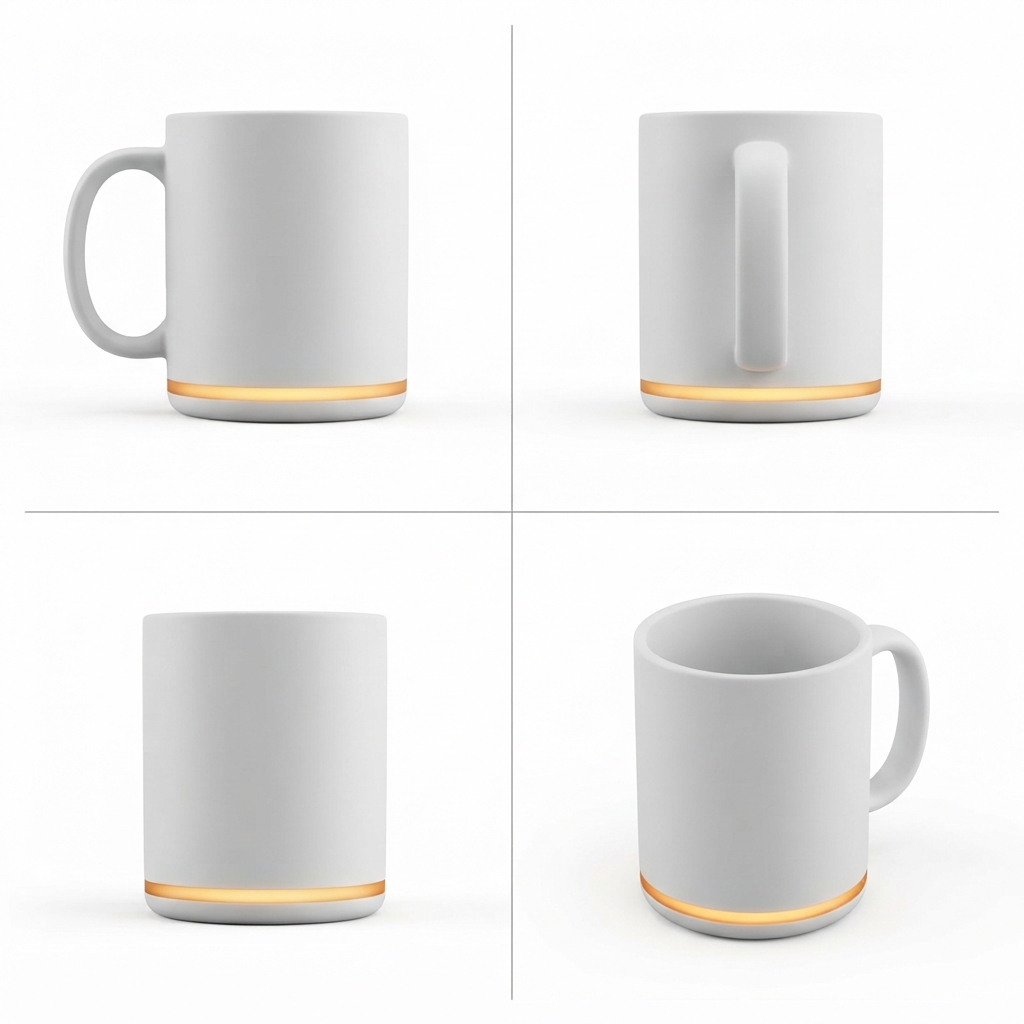
b0bdf3e80 เครดิต
curl — POST /images (หุ่นยนต์ตั้งโต๊ะ)
curl --location 'https://api.useapi.net/v1/google-flow/images' \
--header 'Authorization: Bearer user:1234-…' \
--form 'email="[email protected]"' \
--form 'aspectRatio="1:1"' \
--form 'count="2"' \
--form 'prompt="Orthographic product-catalog sheet on a plain white background: a small rounded pastel mint desk robot, a palm-sized cube with a glossy black screen face showing a happy smiling expression, two round white eyes and a curved white smile, a little rounded antenna nub on top, a small round white dial on its right side, and a speaker grille on its back. The sheet is divided into four equal panels by thin grey lines in a 2 by 2 grid. Every panel shows the same single item at exactly the same size, position and lighting, camera at the item'\''s eye level unless stated: top-left: front view showing the smiling face; top-right: right side view showing the round dial and the antenna nub; bottom-left: back view showing the speaker grille; bottom-right: three-quarter view showing the smiling face and the dial. Soft even studio light, photoreal. Object only: no hands, no people, no props, no text anywhere, no captions, no labels, no logo, no packaging."'
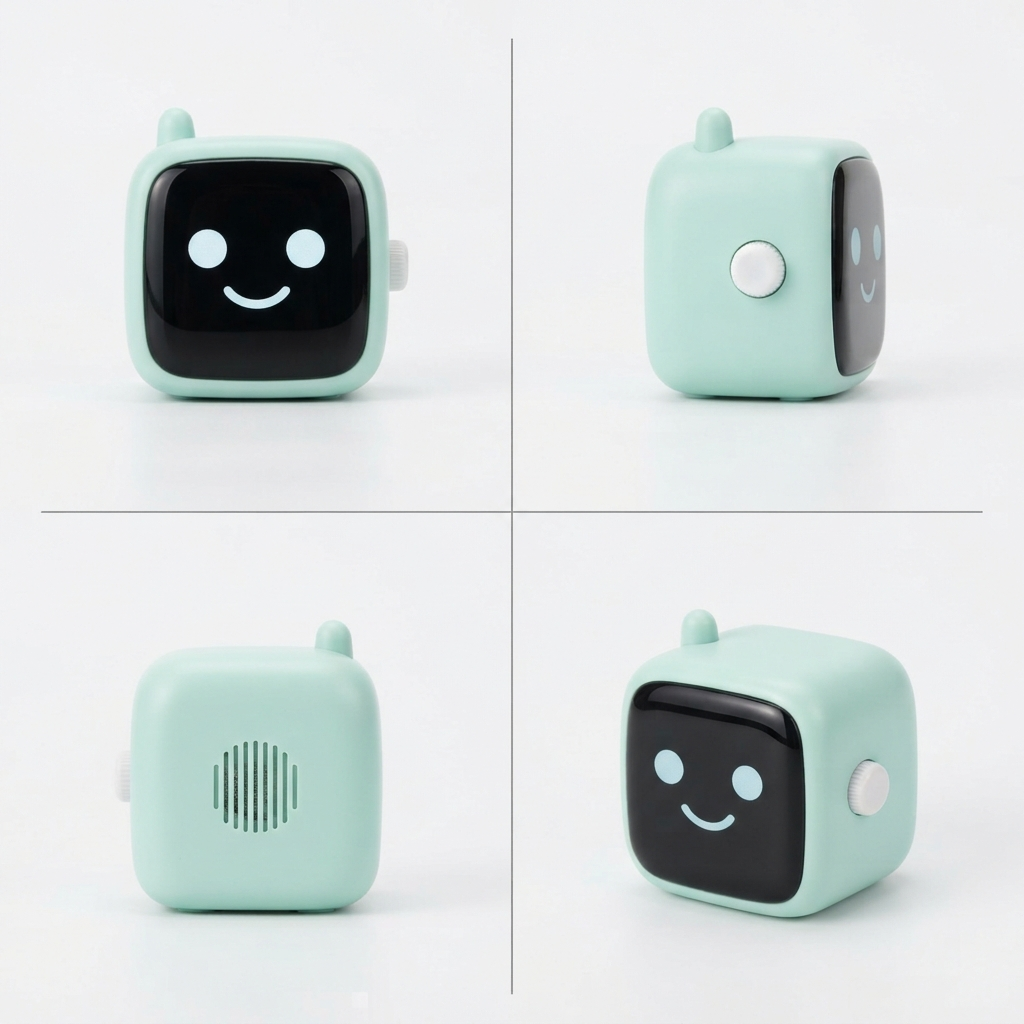
7aaed0560 เครดิต
curl — POST /images (คีย์บอร์ด)
curl --location 'https://api.useapi.net/v1/google-flow/images' \
--header 'Authorization: Bearer user:1234-…' \
--form 'email="[email protected]"' \
--form 'aspectRatio="1:1"' \
--form 'count="4"' \
--form 'prompt="Orthographic product-catalog sheet on a plain white background: a real mechanical three-key macro pad, the kind sold for shortcuts: a slim, low-profile white aluminum case, three mechanical key switches in one row with sculpted dished keycaps and a small gap between them, coral on the left, lemon yellow in the middle, sky blue on the right, a USB-C port on the back edge. Exactly three keys in one row, never more. The sheet is divided into four equal panels by thin grey lines in a 2 by 2 grid. Every panel shows the same single item at exactly the same size, position and lighting, camera at the item'\''s eye level unless stated: top-left: top-down view straight from above, the three keys in a row left to right; top-right: front view at eye level; bottom-left: left side view at eye level, the slim case and the keycap profile seen edge-on; bottom-right: three-quarter view from above. Soft even studio light, photoreal. Object only: no hands, no people, no props, no text anywhere, no captions, no labels, no logo, no packaging."'
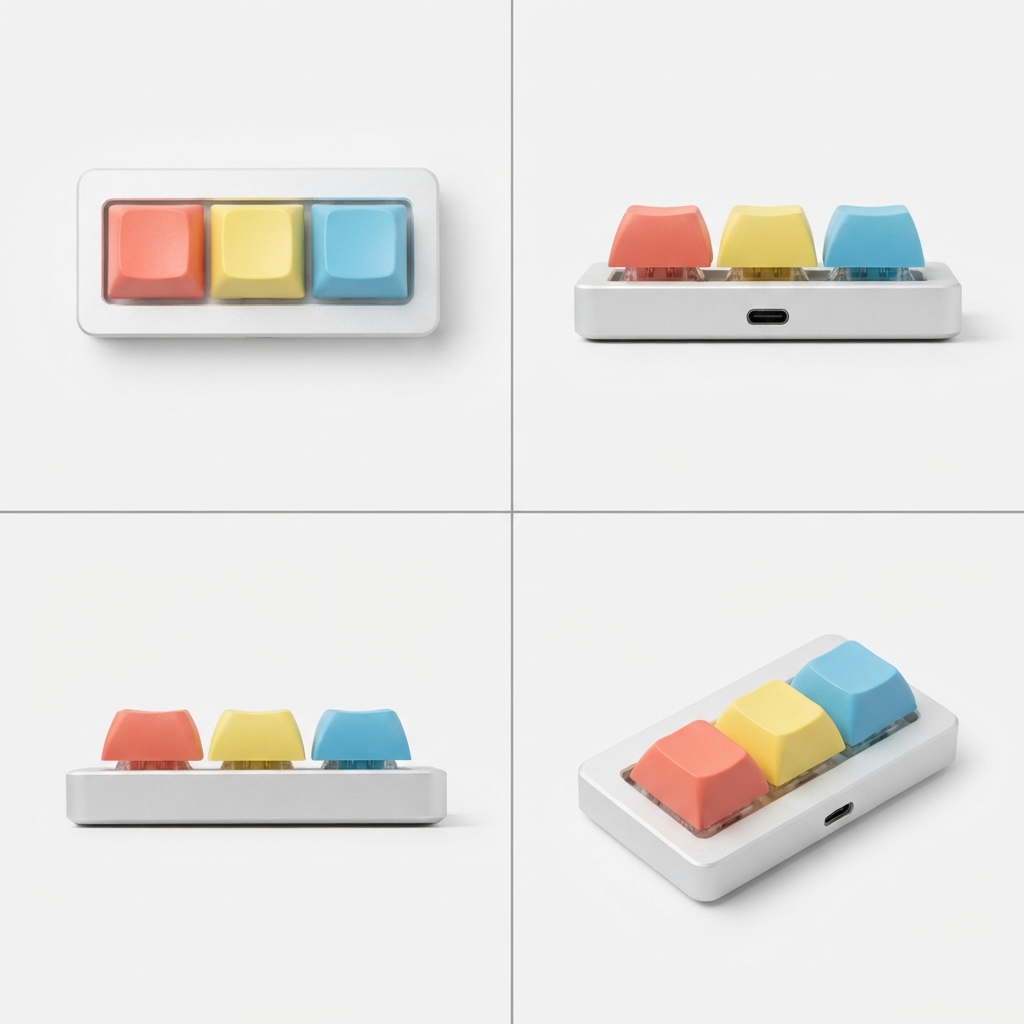
4f861c230 เครดิต
การสร้างภาพไม่เสียเครดิต จึงตั้ง count เป็น 2 ถึง 4 แล้วเก็บชีตที่ดีที่สุดไว้ คีย์บอร์ดต้องลองอยู่หลายรอบกว่าพรอมต์จะบรรยายมาโครแพดของจริงพร้อมช่องมุมมองจากด้านบนได้ ส่วนลูกบาศก์ได้ผลตั้งแต่ครั้งแรก
ขั้นตอนที่ 2: พรีเซนเตอร์
เรียกสามครั้ง ภาพพอร์ตเทรตหน้าตรงจากคำบรรยาย ภาพพอร์ตเทรตมุมสามในสี่ที่สร้างจากภาพแรกด้วย reference_1 เพื่อให้ใบหน้าในสองภาพตรงกัน จากนั้นเรียก POST /characters ด้วยภาพพอร์ตเทรตทั้งสอง ซึ่งจะคืนค่าตัวอ้างอิงตัวละคร นับจากนั้นเธอคือ @character_1 ในทุกพรอมต์ และ Google ตรึงหน้าตาเธอไว้ด้วยระบบเอนทิตีของตัวเอง แทนที่จะใช้คำบรรยาย
curl — POST /images (พอร์ตเทรตหน้าตรง)
curl --location 'https://api.useapi.net/v1/google-flow/images' \
--header 'Authorization: Bearer user:1234-…' \
--form 'email="[email protected]"' \
--form 'aspectRatio="3:4"' \
--form 'count="2"' \
--form 'prompt="Character reference portrait, photoreal, natural skin, no heavy retouching: a strikingly attractive young woman in her early twenties with a sleek platinum-blonde blunt bob and straight bangs, dark defined eyebrows, icy grey eyes, a tiny silver nose stud, a playful smirk with a hint of teeth, wearing a fitted black turtleneck and a thin gold chain necklace. Head and shoulders, facing the camera straight on, plain light-grey studio background, soft even light. No text, no logo, no captions."'
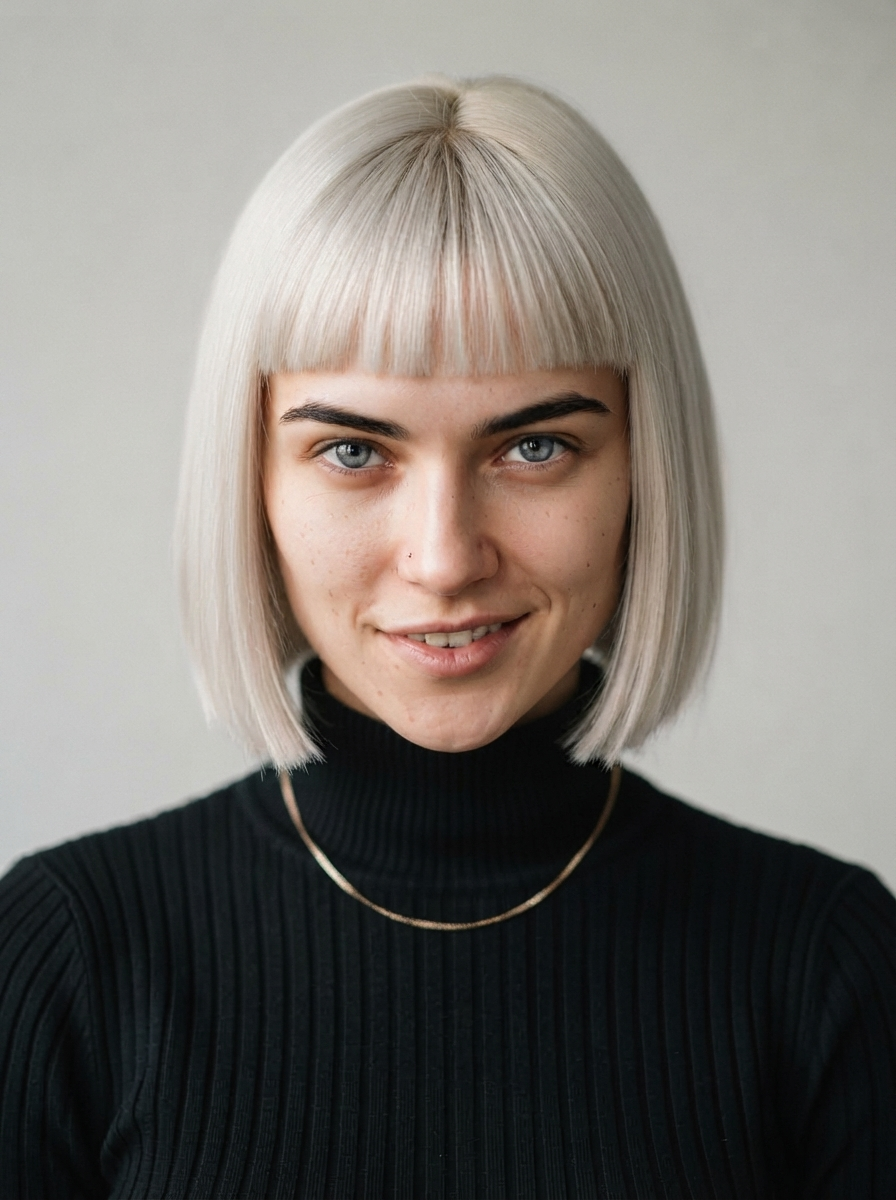
a236ef660 เครดิต
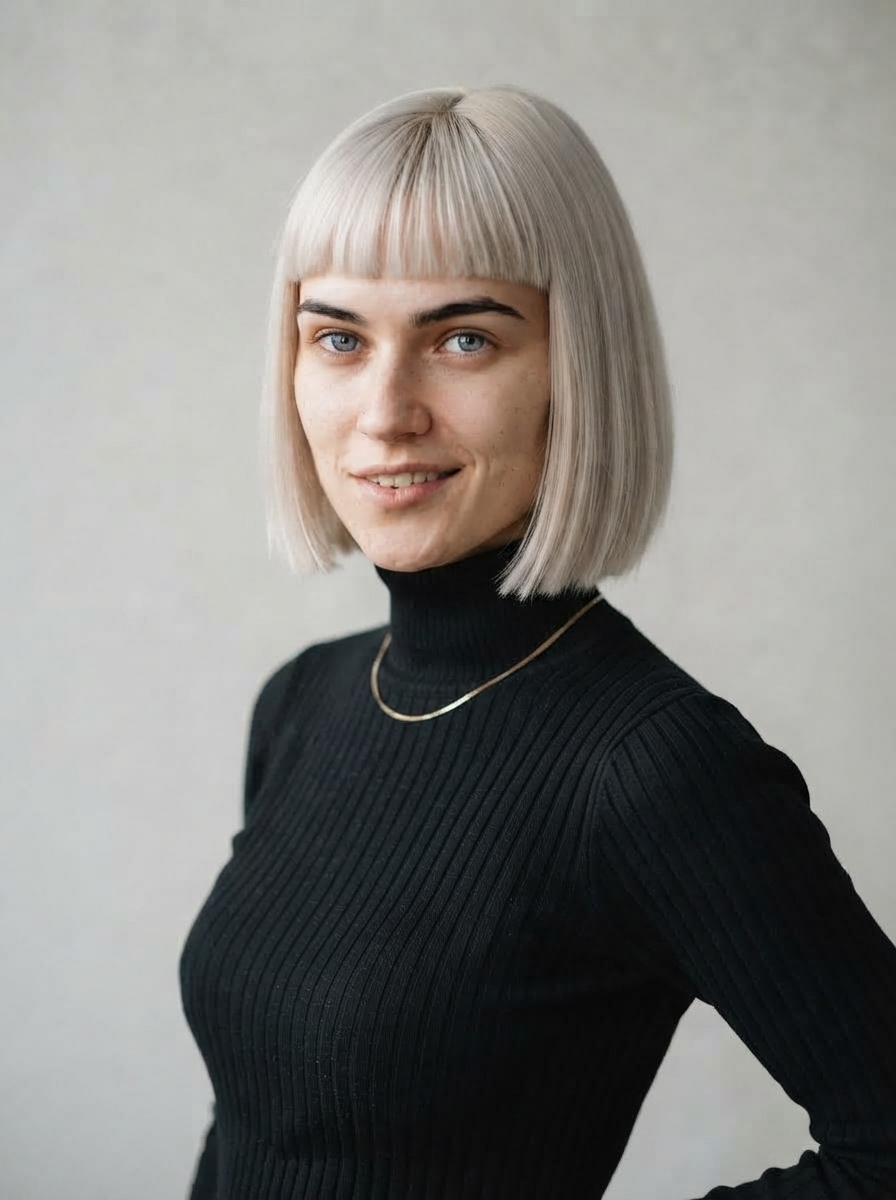
เราสร้างไว้หลายลุคแล้วเลือกลุคนี้ ถ้าภายหลังต้องเปลี่ยนรายละเอียดบางอย่าง เช่น สร้อยคอ ให้สร้างเธอใหม่โดยใช้ภาพพอร์ตเทรตของเธอเองเป็น reference_1 และเขียนพรอมต์ระบุเฉพาะสิ่งที่เปลี่ยน ใบหน้าจะยังคงเดิม
curl — POST /images (พอร์ตเทรตมุมสามในสี่)
curl --location 'https://api.useapi.net/v1/google-flow/images' \
--header 'Authorization: Bearer user:1234-…' \
--form 'email="[email protected]"' \
--form 'aspectRatio="3:4"' \
--form 'count="1"' \
--form 'reference_1="user:1234-email:…-image:a236ef66-…"' \
--form 'prompt="@reference_1 is the same woman: identical face, hair, freckles, sweater and earrings. Three-quarter view from the waist up, relaxed natural smile, plain light-grey studio background, soft even light. Photoreal, no text."'
reference_1 คือภาพพอร์ตเทรตหน้าตรง a236ef66 พรอมต์นี้ยังพูดถึงกระ เสื้อสเวตเตอร์ และต่างหูที่หลงเหลือมาจากพรีเซนเตอร์คนก่อน แต่ก็ไม่มีผลเสีย: เมื่อคำขอมีภาพอ้างอิง ภาพอ้างอิงจะชนะคำบรรยาย
d891301c0 เครดิต
curl — POST /characters
curl --location 'https://api.useapi.net/v1/google-flow/characters' \
--header 'Authorization: Bearer user:1234-…' \
--form 'displayName="Mia"' \
--form 'personalityNotes="Quick, bright, deadpan delivery with a smile in her voice. Talks to the camera like a friend showing off things she bought at 2am."' \
--form 'imageReference_1="user:1234-email:…-image:a236ef66-…"' \
--form 'imageReference_2="user:1234-email:…-image:d891301c-…"' \
--form 'voice="Leda"'
imageReference_1 คือภาพหน้าตรง a236ef66 และ imageReference_2 คือภาพมุมสามในสี่ d891301c ฟิลด์ character ในการตอบกลับคือ id ของเธอ ซึ่งด้านล่างคือ 53ca1036 ส่วน voice คือเสียงสำเร็จรูปของระบบ Google แบบหนึ่ง และติดไปกับตัวละคร แต่ไปไม่ถึงโหมดคลิปที่ใช้ในขั้นตอนที่ 4 ดูสิ่งที่ควรรู้
ขั้นตอนที่ 3: ภาพนิ่ง ทั้งฉากในเฟรมเดียว
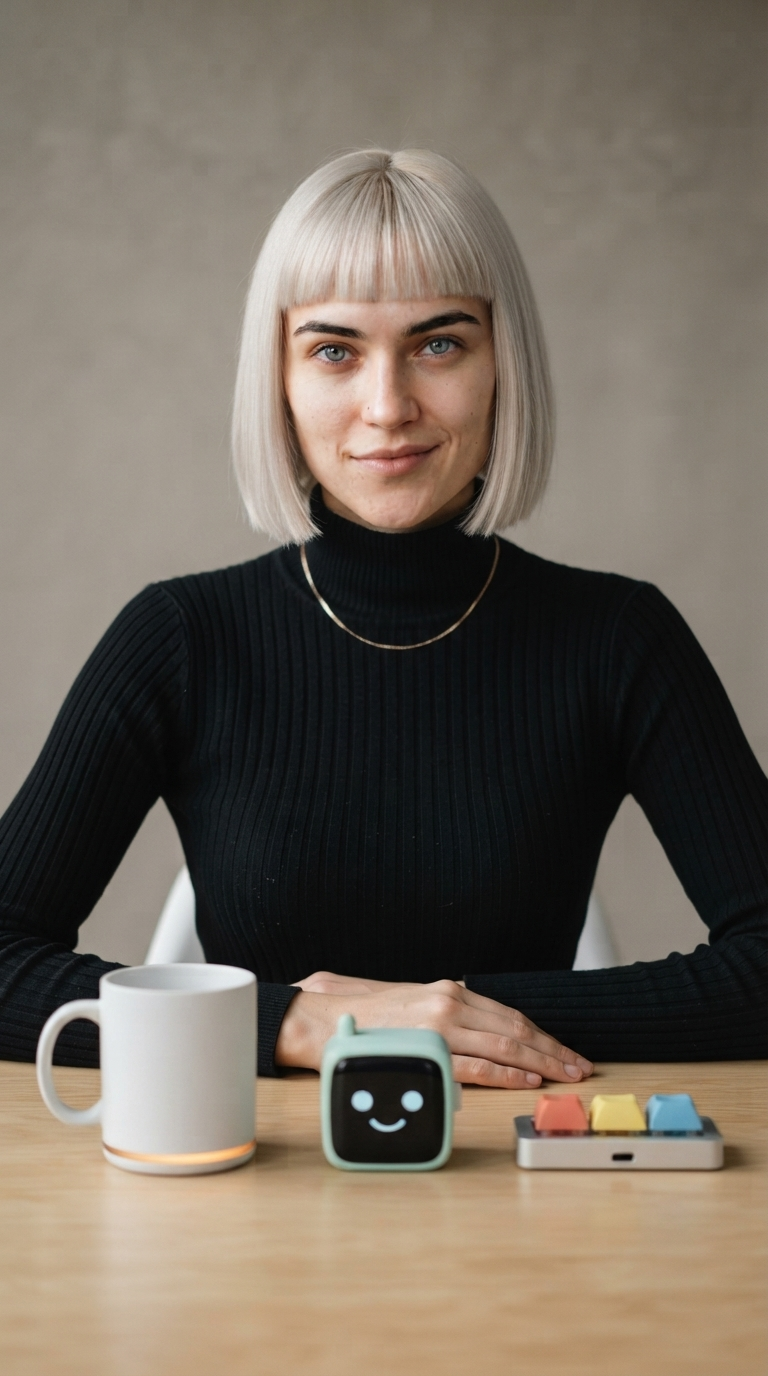
คำขอเดียวรวมทุกอย่างเข้าด้วยกัน ตัวละครเข้ามาเป็น character_1 ชีตทั้งสามเป็น reference_1 ถึง reference_3 และพรอมต์จัดวางแต่ละชิ้นตามแท็ก เรียงจากซ้ายไปขวาบนโต๊ะตรงหน้าเธอ เฟรมนี้จะเป็นทั้งต้นและท้ายของทุกคลิป จึงเป็นที่เดียวที่แท็กทำงาน
curl — POST /images
curl --location 'https://api.useapi.net/v1/google-flow/images' \
--header 'Authorization: Bearer user:1234-…' \
--form 'email="[email protected]"' \
--form 'aspectRatio="9:16"' \
--form 'count="2"' \
--form 'character_1="user:1234-email:…-character:53ca1036-…"' \
--form 'reference_1="user:1234-email:…-image:b0bdf3e8-…"' \
--form 'reference_2="user:1234-email:…-image:7aaed056-…"' \
--form 'reference_3="user:1234-email:…-image:4f861c23-…"' \
--form 'prompt="Full-frame vertical phone video look, no phone, no bezel. @character_1 sits at a light wooden table in a bright minimal creator studio, facing the camera, waist-up and centered, a plain warm-grey backdrop behind her, soft key light from the left with a gentle catchlight in her eyes. Laid out on the table in front of her, left to right, each fully visible and resting flat on the table: the mug from @reference_1, the desk robot from @reference_2, the keyboard from @reference_3. Her hands rest on the table, relaxed closed-mouth smile, eyes on the lens. Photoreal, no text, no captions."'
character_1 คือตัวละครจากขั้นตอนที่ 2 53ca1036 ส่วน reference_1 ถึง reference_3 คือชีตทั้งสามจากขั้นตอนที่ 1: แก้ว b0bdf3e8 หุ่นยนต์ตั้งโต๊ะ 7aaed056 และคีย์บอร์ด 4f861c23
034cddc80 เครดิต
แก้วมีแถบไฟเรืองแสง หุ่นยนต์มีหน้าและเสาอากาศ คีย์บอร์ดมีสามสีและพอร์ต และเธอคือผู้หญิงคนเดียวกับในภาพพอร์ตเทรต
ขั้นตอนที่ 4: หนึ่งคลิปต่อสินค้าหนึ่งชิ้น ทั้งหมดจากภาพนิ่ง
ใช้โหมดเฟรมแรก + เฟรมสุดท้ายของ Omni โดยใส่ภาพนิ่งทั้งสองช่อง หนึ่งคำขอต่อสินค้าหนึ่งชิ้น ใช้ POST /videos ตัวเดิมทุกครั้ง โหมดนี้รับแค่ภาพสองภาพนั้น ไม่รับชีต ไม่รับตัวละคร ไม่รับเสียงอ้างอิง ซึ่งไม่เป็นไร เพราะภาพนิ่งมีทุกอย่างอยู่แล้ว สินค้าทุกชิ้นที่เธอหยิบขึ้นมาออกมาตรงกับชีตของมันจากภาพนิ่งเพียงอย่างเดียว
พรอมต์ทำงานสามอย่าง ตรึงทั้งสองปลายไว้กับเฟรม โดยมีจังหวะนิ่งเงียบสั้น ๆ ทั้งสองด้าน ให้บทพูดและน้ำเสียงแก่เธอ และกำหนดจังหวะเวลาของท่าทาง: เธอเริ่มพูดขณะยกสินค้าขึ้น สินค้ากลับไปวางที่เดิมภายในวินาทีที่แปด และสองวินาทีสุดท้ายเป็นช่วงนิ่งและเงียบ ถ้าไม่มีส่วนสุดท้ายนี้ เธอจะช้ากว่ากำหนด และแขนจะกระตุกเข้าเฟรมสุดท้าย
curl — POST /videos (แก้ว)
curl --location 'https://api.useapi.net/v1/google-flow/videos' \
--header 'Authorization: Bearer user:1234-…' \
--form 'email="[email protected]"' \
--form 'model="omni-flash"' \
--form 'aspectRatio="portrait"' \
--form 'duration="10"' \
--form 'resolution="720p"' \
--form 'startImage="user:1234-email:…-image:034cddc8-…"' \
--form 'endImage="user:1234-email:…-image:034cddc8-…"' \
--form 'prompt="She begins and ends exactly on this frame: hands resting on the table, the three items laid out in front of her, a small closed-mouth smile, looking into the lens, with a short quiet beat before she moves and another after she settles back. Timing matters: after a short quiet beat she picks up the mug on the left with both hands and starts talking as she lifts it, holding it up to the camera and talking straight to the lens, quick and bright with a deadpan edge and a smile in her voice, keeping both hands on the mug while she speaks. She says: \"Three gadgets smarter than me. Low bar. One: this mug texts me when my coffee'\''s cold. Better follow-up than my ex.\" Right after the last word she gives one short laugh to herself, still holding the mug. By the eight-second mark the mug is back down gently in exactly the same spot and both hands are resting on the table again, brought back in one calm unhurried movement. For the final two seconds she holds completely still, hands resting on the table, looking into the lens with a small closed-mouth smile. Natural room tone, no music, no captions, no text on screen."'
startImage และ endImage คือภาพนิ่งจากขั้นตอนที่ 3 034cddc8 ทั้งคู่ ใช้ id สองตัวเดียวกันนี้ในทั้งสามคลิป
55808825, แสดงหลังอัปสเกลเป็น 1080p ในขั้นตอนที่ 515 เครดิต
curl — POST /videos (หุ่นยนต์ตั้งโต๊ะ)
curl --location 'https://api.useapi.net/v1/google-flow/videos' \
--header 'Authorization: Bearer user:1234-…' \
--form 'email="[email protected]"' \
--form 'model="omni-flash"' \
--form 'aspectRatio="portrait"' \
--form 'duration="10"' \
--form 'resolution="720p"' \
--form 'startImage="user:1234-email:…-image:034cddc8-…"' \
--form 'endImage="user:1234-email:…-image:034cddc8-…"' \
--form 'prompt="She begins and ends exactly on this frame: hands resting on the table, the three items laid out in front of her, a small closed-mouth smile, looking into the lens, with a short quiet beat before she moves and another after she settles back. Timing matters: after a short quiet beat she picks up the desk robot in the middle with both hands and starts talking as she lifts it, holding it up to the camera with its smiling face toward the lens and turning it once and talking straight to the lens, quick and bright with a deadpan edge and a smile in her voice, keeping both hands on it while she speaks. The other two items stay on the table exactly where they are. She says: \"Two: a desk robot that reacts to my day. It has a face. It has never once looked impressed.\" Right after the last word she raises one eyebrow at the camera, a quick expressive beat, still holding the desk robot. By the eight-second mark the desk robot is back down gently in exactly the same spot and both hands are resting on the table again, brought back in one calm unhurried movement. For the final two seconds she is silent and holds completely still, hands resting on the table, looking into the lens with a small closed-mouth smile. Natural room tone, no music, no captions, no text on screen."'
c4d0e6b1, แสดงหลังอัปสเกลเป็น 1080p ในขั้นตอนที่ 515 เครดิต
curl — POST /videos (คีย์บอร์ด)
curl --location 'https://api.useapi.net/v1/google-flow/videos' \
--header 'Authorization: Bearer user:1234-…' \
--form 'email="[email protected]"' \
--form 'model="omni-flash"' \
--form 'aspectRatio="portrait"' \
--form 'duration="10"' \
--form 'resolution="720p"' \
--form 'startImage="user:1234-email:…-image:034cddc8-…"' \
--form 'endImage="user:1234-email:…-image:034cddc8-…"' \
--form 'prompt="She begins and ends exactly on this frame: hands resting on the table, the three items laid out in front of her, a small closed-mouth smile, looking into the lens, with a short quiet beat before she moves and another after she settles back. Timing matters: after a short quiet beat she picks up the keyboard on the right with both hands and starts talking as she lifts it, holding it up to the camera with the three keys facing the lens and talking straight to the lens, quick and bright with a deadpan edge and a smile in her voice, keeping both hands on it while she speaks. The other two items stay on the table exactly where they are. She says: \"Three: a keyboard with three keys. Copy, paste, undo. That'\''s my whole career. Oh, the mug'\''s texting. Bye!\" Right after the last word she raises one eyebrow at the camera, a quick expressive beat, still holding the keyboard. By the eight-second mark the keyboard is back down gently in exactly the same spot and both hands are resting on the table again, brought back in one calm unhurried movement. For the final two seconds she is silent and holds completely still, hands resting on the table, looking into the lens with a small closed-mouth smile. Natural room tone, no music, no captions, no text on screen."'
3cc8ea2f, แสดงหลังอัปสเกลเป็น 1080p ในขั้นตอนที่ 515 เครดิต
ผู้หญิงคนเดิม โต๊ะตัวเดิม แสงแบบเดิม และทุกคลิปเปิดและปิดที่ภาพนิ่ง คลิปไหนจะต่อท้ายคลิปไหนก็ได้ บทพูดยาวประมาณ 20 คำภาษาอังกฤษ ซึ่งพอดีกับ 10 วินาทีที่จังหวะนี้ และยังเหลือที่สำหรับจังหวะนิ่งตอนท้าย
ขั้นตอนที่ 5: อัปสเกลเป็น 1080p
Omni 1.1 Flash เรนเดอร์ที่ 720p ส่วน POST /videos/upscale อัปสเกลคลิปเป็น 1080p ได้ฟรีในทุกแพ็กเกจแบบเสียเงิน ใช้เวลาประมาณ 40 วินาที และตอบกลับในการเรียกครั้งเดียวกันพร้อม id และ URL ของคลิปที่อัปสเกลแล้ว หนึ่งคำขอต่อหนึ่งคลิป ไม่ต้องใส่ email เพราะบัญชีระบุได้จาก id
curl — POST /videos/upscale (แก้ว แล้วทำแบบเดียวกันกับอีกสองคลิป)
curl --location 'https://api.useapi.net/v1/google-flow/videos/upscale' \
--header 'Authorization: Bearer user:1234-…' \
--form 'mediaGenerationId="user:1234-email:…-video:55808825-…"' \
--form 'resolution="1080p"'
mediaGenerationId คือคลิปแก้วจากขั้นตอนที่ 4 55808825 เรียกแบบเดียวกันด้วย c4d0e6b1 และ 3cc8ea2f เพื่ออัปสเกลหุ่นยนต์และคีย์บอร์ด การตอบกลับแต่ละครั้งมีคลิปใหม่อยู่ที่ media[0].mediaGenerationId ซึ่งคือ id ต้นทางที่ต่อท้ายด้วย _upsampled ดังนั้น id ที่อัปสเกลแล้วทั้งสามคือ 55808825-…_upsampled, c4d0e6b1-…_upsampled และ 3cc8ea2f-…_upsampled คลิปที่แสดงในขั้นตอนที่ 4 คือเวอร์ชันที่อัปสเกลแล้วเหล่านี้ อัปสเกลเป็น 4K ก็ได้ ราคา 50 เครดิต และใช้ได้เฉพาะแพ็กเกจ Google AI Ultra
ขั้นตอนที่ 6: ต่อคลิปเข้าด้วยกัน
POST /videos/concatenate รับ id ที่อัปสเกลแล้วทั้งสามตามลำดับ และคืนไฟล์ที่ต่อแล้วเป็น base64 ที่ความละเอียดเดียวกับคลิป การตัดหัวท้ายเป็นตัวตัดสินว่ารอยต่อจะดูเหมือนถ่ายเทคเดียวหรือไม่ แต่ละคลิปเปิดด้วยการค้างสั้น ๆ ที่ภาพนิ่ง และปิดด้วยการกลับไปที่ภาพนั้น ถ้าไม่ตัด ช่วงค้างเหล่านี้จะซ้อนกันกลายเป็นภาพค้างทุกรอยต่อ แต่เธอพูดจบแต่ละประโยคตอนที่มือวางอยู่บนโต๊ะแล้ว การตัดโดยดูแค่ภาพจึงกินคำสุดท้ายไป ให้ตัดหลังเสียงสุดท้ายบวกอีกหนึ่งจังหวะ ห้ามเร็วกว่านั้น สำหรับคลิปชุดนี้หมายถึงปล่อยคลิป 1 ไว้ทั้งหมด เพราะเสียงหัวเราะลากยาวถึงเฟรมสุดท้าย ตัดท้ายคลิป 2 ออกมากกว่าครึ่งวินาทีเล็กน้อย และตัดต้นคลิป 2 และ 3 ออกไม่กี่เฟรม
curl — POST /videos/concatenate
curl --location 'https://api.useapi.net/v1/google-flow/videos/concatenate' \
--header 'Authorization: Bearer user:1234-…' \
--header 'Content-Type: application/json' \
--data '{
  "media": [
    { "mediaGenerationId": "user:1234-email:…-video:55808825-…_upsampled" },
    { "mediaGenerationId": "user:1234-email:…-video:c4d0e6b1-…_upsampled", "trimStart": 0.458, "trimEnd": 0.6 },
    { "mediaGenerationId": "user:1234-email:…-video:3cc8ea2f-…_upsampled", "trimStart": 0.125 }
  ]
}'
id ทั้งสามคือคลิปที่อัปสเกลแล้วจากขั้นตอนที่ 5 ตามลำดับ: แก้ว หุ่นยนต์ตั้งโต๊ะ คีย์บอร์ด
0 เครดิต
เธอพูดจบประโยคพร้อมมือวางบนโต๊ะ ภาพตัด แล้วเธอก็เอื้อมไปหยิบสินค้าชิ้นต่อไป ไฟล์ที่ต่อแล้วถูกเข้ารหัสใหม่ให้มีขนาดเล็กลงเพื่อโฮสต์ ส่วนคลิปทั้งสามยังเป็นแบบที่ API ส่งกลับมา
สิ่งที่ควรรู้
- สร้างใหม่ อย่าแก้ไข โพสต์ UGC talking head (ภาษาอังกฤษ) ต่อความยาวคลิปด้วยการแก้ไขแบบวิดีโอเป็นวิดีโอ ซึ่งยังใช้ได้เมื่อบทพูดสั้น แต่ที่นี่ใช้ไม่ได้ การแก้ไขจะเก็บเสียงพูดของต้นฉบับไว้บนไทม์ไลน์ของต้นฉบับเอง เมื่อบทพูด 10 วินาทีเต็มคลิปต้นทาง บทใหม่จึงพันเข้ากับบทเก่าแทนที่จะแทนที่มัน และสินค้าที่วางอยู่บนโต๊ะก็ผิดเพี้ยนไปในแต่ละเทค การสร้างแต่ละคลิปจากภาพนิ่งให้บทพูดครบถ้วน สินค้าไม่เพี้ยน และรอยต่อสะอาดกว่า โดยใช้เครดิตน้อยกว่า
- ภาพนิ่งเป็นตัวถือแท็ก โหมดเฟรมแรก + เฟรมสุดท้ายรับได้แค่ภาพสองภาพ ให้ติดแท็กในภาพนิ่ง ด้วยตัวละครและชีต แล้วคลิปจะสืบทอดไปเอง
- กำหนดเวลาของท่าทาง คลิป 10 วินาทีที่มีบทพูดเต็มต้องระบุจังหวะวางสินค้าตามเวลา “by the eight-second mark” (ภายในวินาทีที่แปด) และมีช่วงนิ่งเงียบตอนท้าย ถ้าปล่อยให้โมเดลทำเอง มันจะลากบทพูดยาวแล้วกระโดดเข้าเฟรมสุดท้าย
- บรรยายเสียงแบบเดียวกันในทุกพรอมต์ ไม่มีอะไรส่งต่อเสียงระหว่างคลิปที่แยกกัน และตัวละครเก็บเสียงสำเร็จรูปได้ แต่ไปไม่ถึงโหมดนี้ เมื่อใช้คำบรรยายเหมือนกันทุกตัวอักษร เสียงของทั้งสามคลิปก็ใกล้กันพอจะดูเหมือนถ่ายเทคเดียว
- ชีตต้องระบุมุมกล้องของแต่ละช่อง บอกว่าแต่ละช่องในสี่ช่องแสดงอะไร ให้วัตถุแบนมีช่องมุมมองจากด้านบน อย่าใส่มือ ข้อความ และโลโก้ เพราะอะไรก็ตามที่อยู่บนชีตอาจไปโผล่ในคลิป
- ตัดตามเสียง ไม่ใช่ตามภาพ เธอหยุดนิ่งก่อนพูดจบ การตัดที่เฟรมนิ่งเฟรมแรกทำให้ท้ายประโยคหายไปด้วย
- พรีเซนเตอร์เป็นตัวละครที่สร้างขึ้น Google ตรวจสอบเนื้อหาเข้มงวดกว่ากับบุคคลจริงที่ระบุตัวตนได้ ให้เริ่มจากตัวละครที่สร้างขึ้น
ค่าใช้จ่ายจริง
| ขั้นตอน | โหมด | เครดิต |
|---|---|---|
| ชีตสินค้าสามชีต, 1:1 | Nano Banana 2 Lite | 0 |
| พอร์ตเทรตพรีเซนเตอร์สองภาพ, 3:4 | Nano Banana 2 Lite | 0 |
| ตัวละคร | — | 0 |
| ภาพนิ่ง, 9:16 | Nano Banana 2 Lite, ตัวละคร + ภาพอ้างอิง 3 ภาพ | 0 |
| คลิป 1 แก้ว, 10 วินาที | I2V, เฟรมแรก + เฟรมสุดท้าย | 15 |
| คลิป 2 หุ่นยนต์ตั้งโต๊ะ, 10 วินาที | I2V, เฟรมแรก + เฟรมสุดท้าย | 15 |
| คลิป 3 คีย์บอร์ด, 10 วินาที | I2V, เฟรมแรก + เฟรมสุดท้าย | 15 |
| อัปสเกลสามคลิปเป็น 1080p | — | 0 |
| ต่อคลิป | — | 0 |
| รวม | 45 |
ภาพ ตัวละคร การอัปสเกลเป็น 1080p และการต่อคลิปไม่มีค่าใช้จ่าย จึงลองปรับชีต พรีเซนเตอร์ และภาพนิ่งได้ตามใจก่อนจะใช้เครดิตแรกกับวิดีโอ 4K เป็นการอัปเกรดเดียวที่มีค่าใช้จ่าย คือ 50 เครดิตต่อคลิปบน Ultra
ลองรันเอง
แต่ละขั้นตอนด้านบนคือการเรียก API หนึ่งครั้ง และทั้งหกขั้นตอนต่อกันเป็นสคริปต์เดียวได้ ไปป์ไลน์ Node.js แบบสมบูรณ์ เวอร์ชัน Python และไฟล์ prompts.json ที่เก็บพรอมต์ทั้งหมดในหน้านี้อยู่ที่ useapi/google-flow-api/ugc-product-video โคลนไป ใส่สินค้าและบทพูดของคุณเองใน prompts.json แล้วคำสั่งเดียวก็สร้างวิดีโอได้ทั้งเรื่อง
สคริปต์บันทึกเช็กพอยต์หลังทุกขั้นตอน การรันที่ถูกขัดจังหวะจึงทำต่อได้โดยไม่ต้องจ่ายค่าคลิปซ้ำ และคุณทำใหม่เฉพาะขั้นตอนเดียวได้ เช่น ภาพนิ่งที่ดีขึ้นหรือพรีเซนเตอร์คนใหม่ โดยไม่ต้องสร้างสิ่งที่มาก่อนหน้าใหม่
คำถามที่พบบ่อย
- ใช้รูปสินค้าของฉันเองแทนชีตที่สร้างขึ้นได้ไหม? ผ่าน useapi.net ได้ อัปโหลดรูปด้วย POST /assets แล้วส่ง id ที่ได้เป็น
reference_1ถึงreference_3ในคำขอภาพนิ่ง เหมือนกับที่ส่งชีตที่สร้างขึ้นในหน้านี้ทุกประการ ชีตสี่ช่องเป็นวิธีให้โมเดลเห็นวัตถุครบทุกด้าน และสินค้าจริงก็ได้ประโยชน์จากวิธีเดียวกัน - ทำไมไม่แก้ไขคลิปหนึ่งให้เป็นคลิปถัดไป เหมือนในโพสต์ talking head (ภาษาอังกฤษ)? ผ่าน useapi.net ทำได้ แต่การแก้ไขแบบวิดีโอเป็นวิดีโอจะเก็บเสียงพูดของต้นฉบับไว้บนไทม์ไลน์ของต้นฉบับ ถ้าบทพูดสั้นก็ใช้ได้ แต่เมื่อบทพูด 10 วินาทีเต็มคลิป บทใหม่พันเข้ากับบทเก่า และสินค้าบนโต๊ะก็ผิดเพี้ยน การสร้างทุกคลิปจากภาพนิ่งเดียวกันหลีกเลี่ยงได้ทั้งสองปัญหา และใช้ 15 เครดิตแทน 20 ดูสิ่งที่ควรรู้
- ทำไมทั้งสามคลิปเริ่มและจบที่เฟรมเดียวกัน? ผ่าน useapi.net โหมดเฟรมแรก + เฟรมสุดท้ายตรึงทั้งสองปลายของแต่ละคลิปไว้กับภาพนิ่งภาพเดียวกัน คลิปจึงต่อกันได้ทุกลำดับโดยไม่เห็นรอยตัด และการเรียกต่อคลิปจะตัดช่วงค้างสั้น ๆ ที่แต่ละรอยต่อออก กลไกนี้อธิบายไว้ในโพสต์ UGC talking head (ภาษาอังกฤษ)
- เสียงยังเหมือนเดิมในทุกคลิปไหม? ผ่าน useapi.net ทั้งสามคลิปมีเสียงใกล้กันพอจะดูเหมือนถ่ายเทคเดียว เพราะบรรยายเสียงเหมือนกันทุกตัวอักษรในทุกพรอมต์ โหมดเฟรมแรก + เฟรมสุดท้ายไม่รับเสียงอ้างอิง และเสียงสำเร็จรูปของตัวละครก็ไปไม่ถึงโหมดนี้ ถ้าต้องการเสียงที่รับประกันได้ โหมดอ้างอิงเป็นวิดีโอรับ
referenceAudio_1โดยแลกกับการไม่ได้ตรึงเฟรม - ค่าใช้จ่ายเท่าไร? ผ่าน useapi.net วิดีโอ 29 วินาทีทั้งเรื่องนี้มีค่าใช้จ่าย $0.36 บน Google AI Ultra $199.99: 45 เครดิต Flow สำหรับคลิป Omni 1.1 Flash สามคลิป ส่วนภาพ พอร์ตเทรต ตัวละคร และการต่อคลิปฟรีทั้งหมด Omni 1.1 Flash ที่ 720p ความยาว 30 วินาทีเท่ากันมีค่าใช้จ่ายราว $3.04 บน Gemini API ทางการ (ข้อมูล ณ พฤศจิกายน 2026) ดูค่าใช้จ่ายจริง
สรุป
ติดต่อเราได้ที่  Discord Server หรือ
 Telegram Channel สำหรับทุกคำถามและข้อสงสัยด้านการใช้งาน
ดูตัวอย่างโค้ดได้ใน GitHub repo ของเรา
เผยแพร่ที่อื่นด้วย
เผยแพร่บน dev.to (ภาษาอังกฤษ)
เริ่มใช้งาน API
การสมัครสมาชิกเดือนละ $15 ใช้ได้กับทุก API บน useapi.net ใช้ Token เดียวกับทุกบริการ เชื่อมบัญชีของคุณเองได้สูงสุด 3 บัญชีต่อบริการ แต่ละบัญชีใช้แพ็กเกจของเว็บไซต์นั้นเอง ส่วน useapi.net ดูแล REST API การกระจายโหลด และการ polling ให้ ต้องการบัญชีมากกว่านี้? สมัครเพิ่มแต่ละครั้งเดือนละ $10 และได้เพิ่มอีก 3 บัญชีต่อบริการ
สมัครสมาชิก — $15/เดือน ชำระด้วยคริปโต
ไม่มีบัตรเครดิตที่ใช้จ่ายต่างประเทศได้? สมัครด้วยคริปโตก็ได้ (การชำระด้วยคริปโตขอคืนเงินไม่ได้) ดูราคาและแพ็กเกจสำหรับปริมาณมากได้ที่หน้าการสมัครสมาชิก ถ้าชำระผ่าน Stripe ขอคืนเงินเต็มจำนวนได้ภายใน 14 วันหลังซื้อครั้งแรก หากสร้างงานสำเร็จไม่ถึง 50 ครั้ง สมัครไว้แล้ว? เปลี่ยนจำนวนได้ที่ Stripe Customer Portal โดยไม่ต้องซื้อใหม่