如何用 Google Flow API 制作 UGC 产品视频
8 分钟阅读 • 2026 年 9 月 4 日(2026 年 11 月 6 日更新)
useapi.net 是第三方 API,与 Google 无关联,也未获得 Google 的认可。
目录
- 简介
- 价格
- 关于请求中的 id
- 第 1 步:为每件产品生成设定图
- 第 2 步:出镜人物
- 第 3 步:定帧图,一帧容纳整个场景
- 第 4 步:每件产品一段视频,全部从定帧图生成
- 第 5 步:放大到 1080p
- 第 6 步:拼接
- 注意事项
- 成本明细
- 自己动手运行
- 常见问题
- 结语
简介
通过 useapi.net 的 Google Flow API,可以从头到尾做出一条 UGC 产品视频,只花 45 个 Flow 积分,本地不做任何处理。视频里,一位虚构的出镜人物向镜头展示三件虚构的产品。
UGC(用户生成内容)风格的视频充斥着社交媒体信息流和广告库:一个人对着手机镜头说话,可能是在卖产品,可能是在搞笑,也可能只是好玩。
这是一份完整的从 A 到 Z 指南,教你以专业水准制作这类视频:产品、出镜人物、她的台词和最终剪辑全部由你掌控,共六步 API 调用,代码可直接复制使用。更喜欢无代码表单?n8n UGC 广告工作流(英文)可以生成这类广告,每一步都有选择或重新生成的页面。
下面是成品:三段 10 秒 Omni 1.1 Flash 视频,放大到 1080p,每一帧画面和每一个声音都由 Google Flow API 生成。同一个放大调用也能输出 4K,满足专业画质需求,见第 5 步:
共 45 积分
如果你更想看视频而不是读文字,下面是整篇指南的 75 秒版本(英文):
在 YouTube 上观看 · 旁白和音乐来自 MiniMax API
价格
Omni 1.1 Flash 视频需要付费的 Google AI 订阅(Plus、Pro 或 Ultra),useapi.net 不按视频收费。这条视频每一步花了多少,见成本明细;各套餐的每条视频价格以及与官方 API 的对比,见 Google Flow 价格表。
关于请求中的 id
下面每个请求都通过 mediaGenerationId 引用前面步骤的结果。这些 id 很长,所以这里缩写为 user:1234-email:…-image:b0bdf3e8-…,每个请求下方都有一行说明每个 id 对应前面的哪个结果。图片 id 来自 POST /images 返回的 media[0].image.generatedImage.mediaGenerationId,角色 id 来自 POST /characters 的 character 字段,视频 id 来自已完成 job 的 media[0].mediaGenerationId,放大后视频的 id 则是源视频 id 末尾加上 _upsampled。
第 1 步:为每件产品生成设定图
产品设定图是一张从四个角度展示物品的图片,让模型掌握整个物体,而不是某一个碰巧好看的角度。使用 POST /images,方形,每件产品一个请求。提示词为每个格子写明机位,因为只写“正面、侧面、背面”时,杯子出现了两个一模一样的格子,键盘也没有真正的侧面。像键盘这样的扁平物体需要一个俯视格,立方体形状的则不需要。不要手、不要文字说明、不要 logo,这样除了产品本身,没有任何东西会混进视频里。
真实产品也可以这样做。用 POST /assets 上传产品照片,把返回的 id 作为 reference_1 到 reference_4 传给这个请求,模型就会把它们整理成一张干净的四格设定图。包装、logo 或一整套产品也可以用同样的方法。
curl — POST /images(杯子)
curl --location 'https://api.useapi.net/v1/google-flow/images' \
--header 'Authorization: Bearer user:1234-…' \
--form 'email="[email protected]"' \
--form 'aspectRatio="1:1"' \
--form 'count="2"' \
--form 'prompt="Orthographic product-catalog sheet on a plain white background: a matte white ceramic mug with a straight cylindrical body and a clearly visible glowing amber light band around its base, about a finger wide, like a smart heated mug. The sheet is divided into four equal panels by thin grey lines in a 2 by 2 grid. Every panel shows the same single item at exactly the same size, position and lighting, camera at the item'\''s eye level unless stated: top-left: side profile, the handle pointing left and seen edge-on; top-right: view from the handle side, the handle pointing straight at the camera; bottom-left: view from the opposite side, the handle hidden behind the body; bottom-right: three-quarter view from slightly above, the handle to the right. Soft even studio light, photoreal. Object only: no hands, no people, no props, no text anywhere, no captions, no labels, no logo, no packaging."'
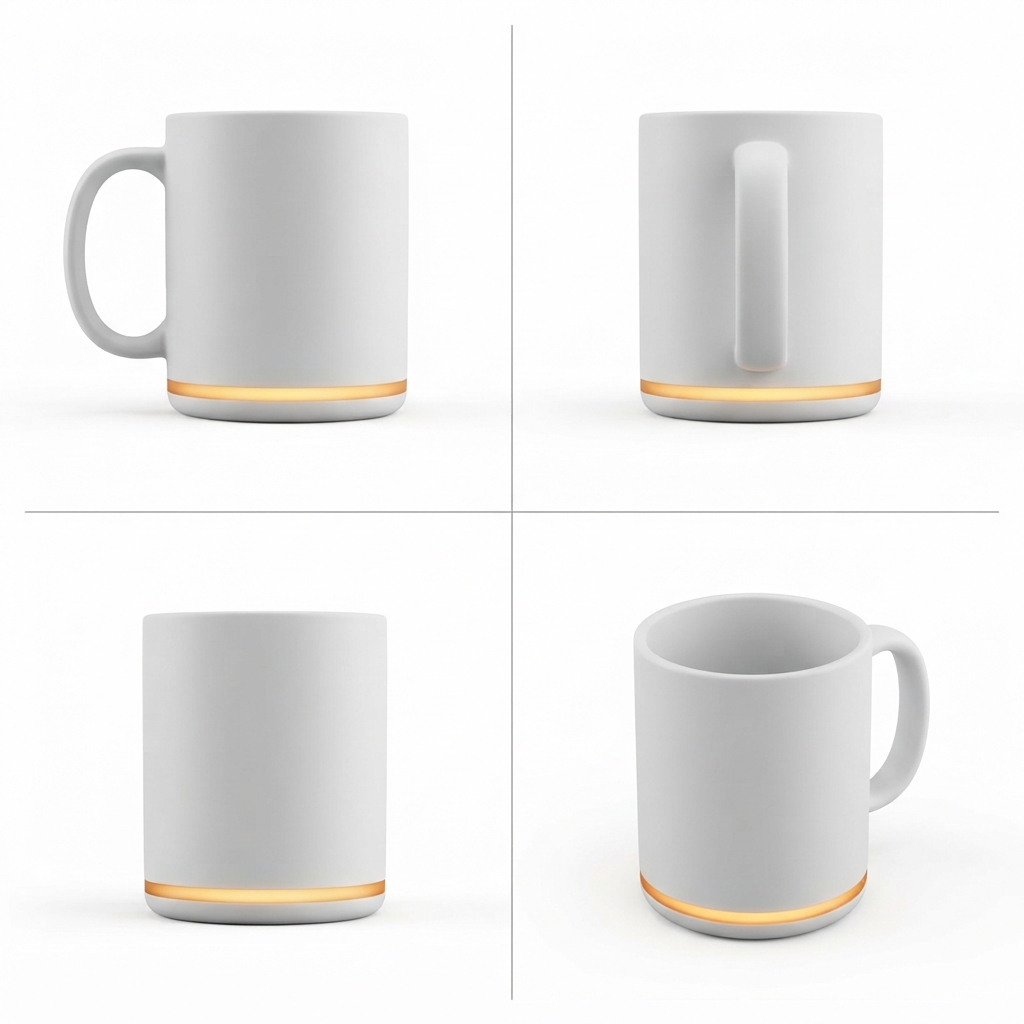
b0bdf3e80 积分
curl — POST /images(桌面机器人)
curl --location 'https://api.useapi.net/v1/google-flow/images' \
--header 'Authorization: Bearer user:1234-…' \
--form 'email="[email protected]"' \
--form 'aspectRatio="1:1"' \
--form 'count="2"' \
--form 'prompt="Orthographic product-catalog sheet on a plain white background: a small rounded pastel mint desk robot, a palm-sized cube with a glossy black screen face showing a happy smiling expression, two round white eyes and a curved white smile, a little rounded antenna nub on top, a small round white dial on its right side, and a speaker grille on its back. The sheet is divided into four equal panels by thin grey lines in a 2 by 2 grid. Every panel shows the same single item at exactly the same size, position and lighting, camera at the item'\''s eye level unless stated: top-left: front view showing the smiling face; top-right: right side view showing the round dial and the antenna nub; bottom-left: back view showing the speaker grille; bottom-right: three-quarter view showing the smiling face and the dial. Soft even studio light, photoreal. Object only: no hands, no people, no props, no text anywhere, no captions, no labels, no logo, no packaging."'
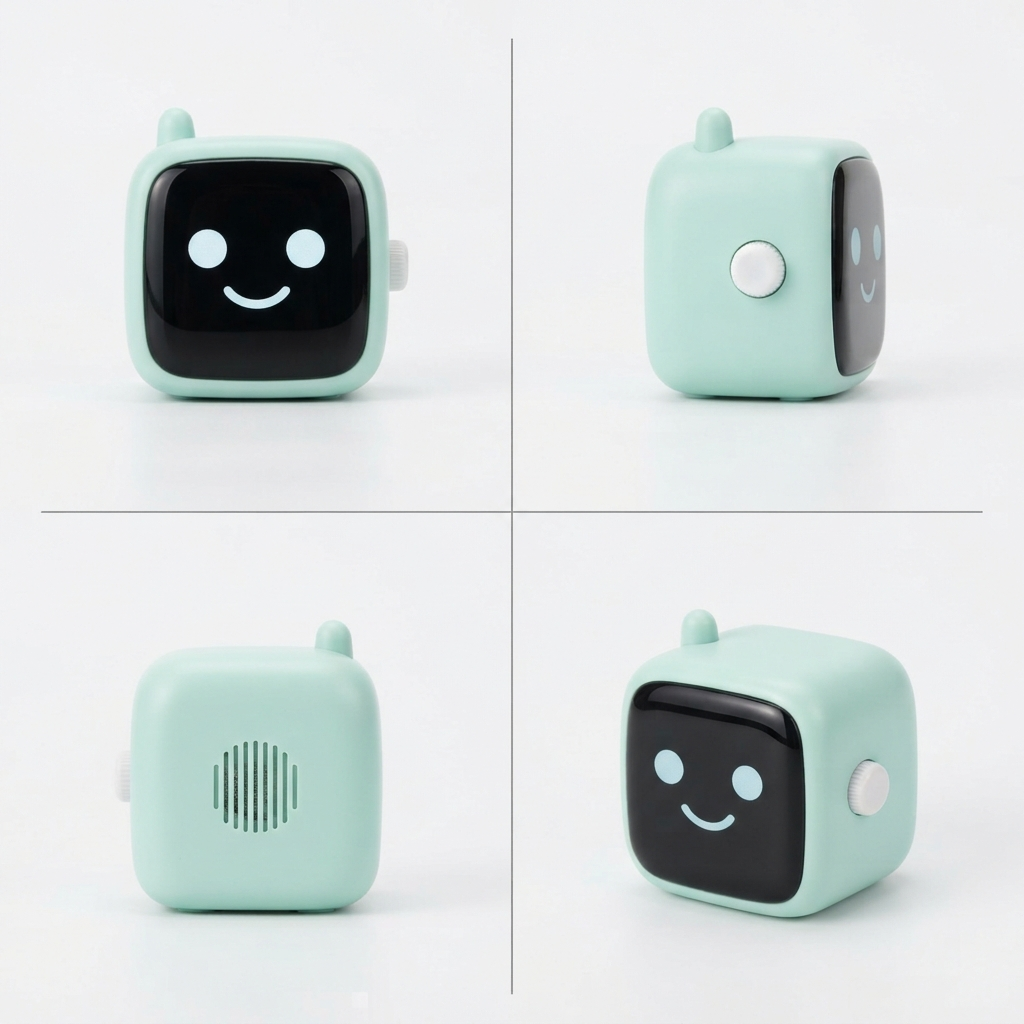
7aaed0560 积分
curl — POST /images(键盘)
curl --location 'https://api.useapi.net/v1/google-flow/images' \
--header 'Authorization: Bearer user:1234-…' \
--form 'email="[email protected]"' \
--form 'aspectRatio="1:1"' \
--form 'count="4"' \
--form 'prompt="Orthographic product-catalog sheet on a plain white background: a real mechanical three-key macro pad, the kind sold for shortcuts: a slim, low-profile white aluminum case, three mechanical key switches in one row with sculpted dished keycaps and a small gap between them, coral on the left, lemon yellow in the middle, sky blue on the right, a USB-C port on the back edge. Exactly three keys in one row, never more. The sheet is divided into four equal panels by thin grey lines in a 2 by 2 grid. Every panel shows the same single item at exactly the same size, position and lighting, camera at the item'\''s eye level unless stated: top-left: top-down view straight from above, the three keys in a row left to right; top-right: front view at eye level; bottom-left: left side view at eye level, the slim case and the keycap profile seen edge-on; bottom-right: three-quarter view from above. Soft even studio light, photoreal. Object only: no hands, no people, no props, no text anywhere, no captions, no labels, no logo, no packaging."'
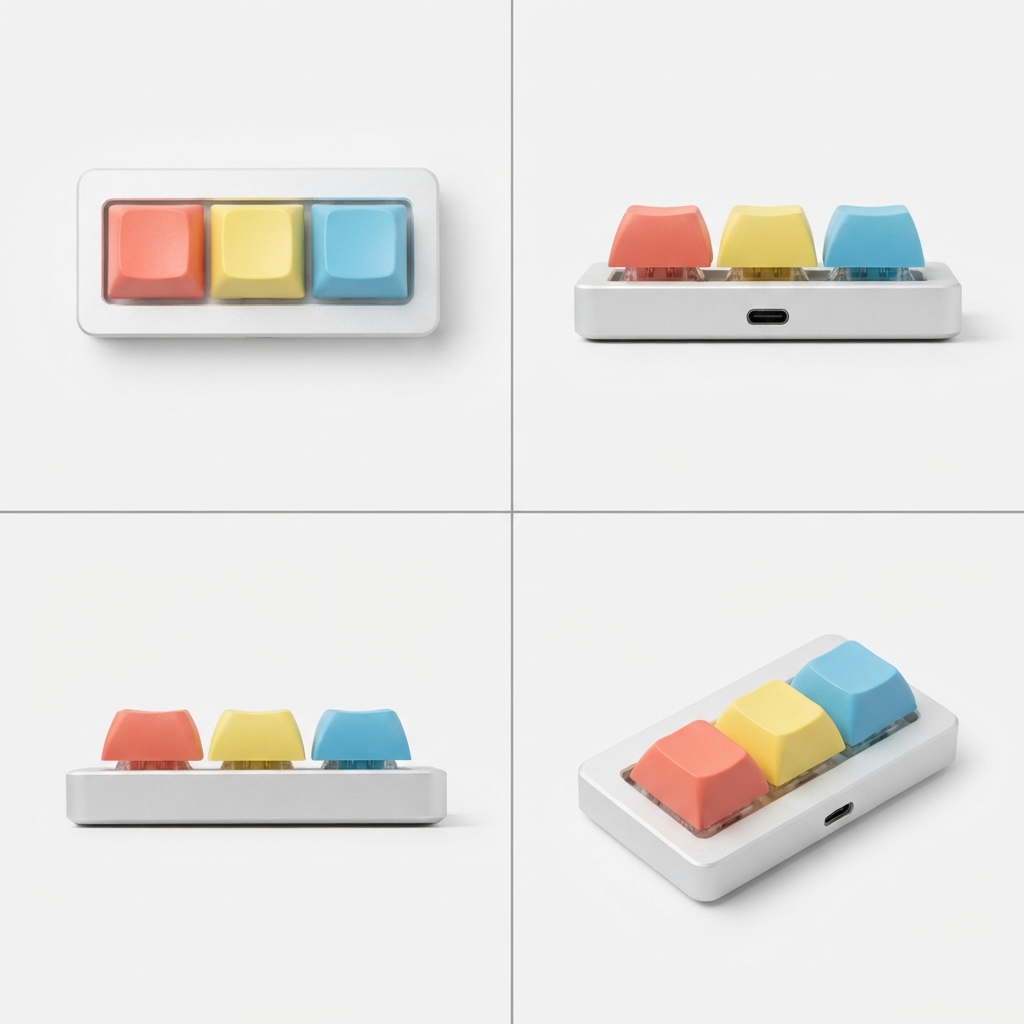
4f861c230 积分
图片不花钱,所以把 count 设为 2 到 4,挑最好的一张设定图。键盘试了好几轮,直到提示词描述出一个真实的宏键盘并带有俯视格;立方体的机器人一次就成功了。
第 2 步:出镜人物
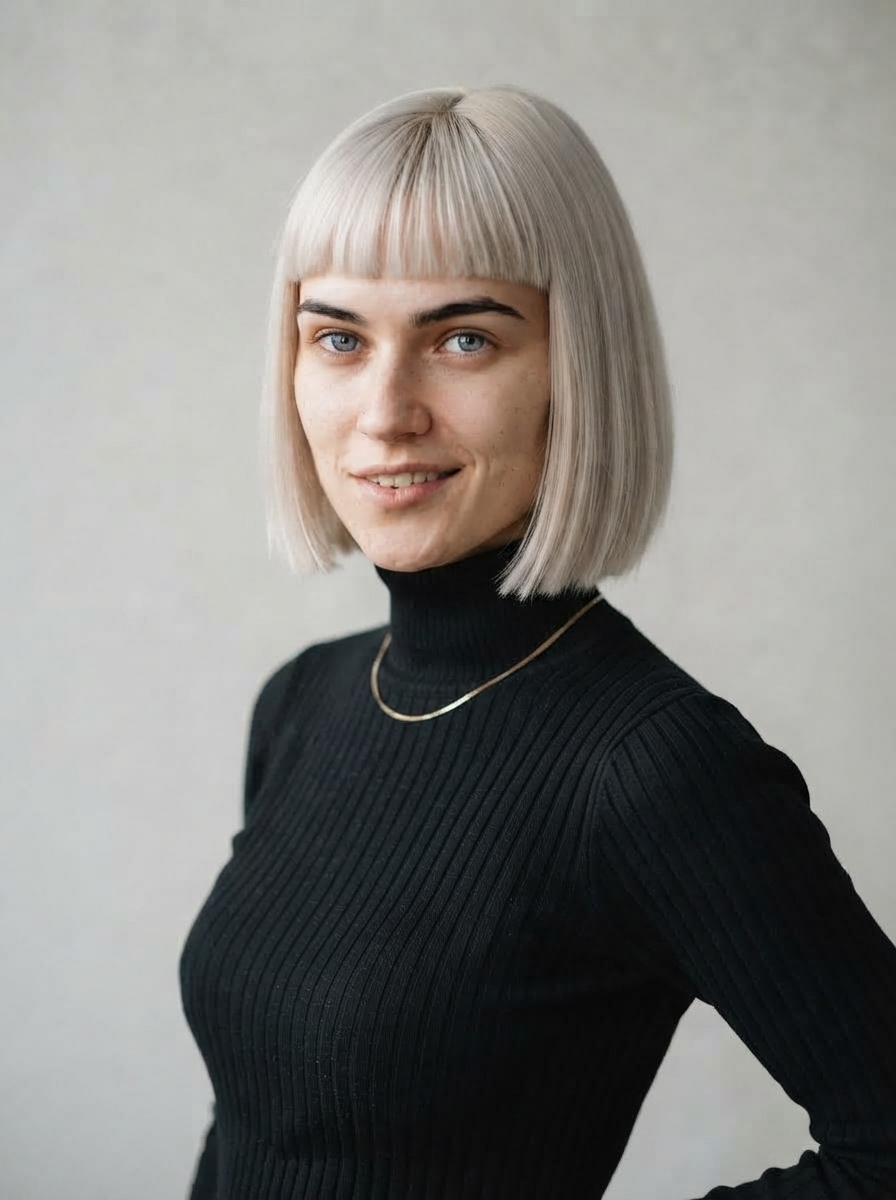
三次调用。先根据描述生成一张正面肖像。再用 reference_1 以第一张为参考生成一张四分之三侧面肖像,让两张图的脸保持一致。然后用这两张肖像调用 POST /characters,得到一个角色引用。从此在任何提示词里她都是 @character_1,Google 通过自己的实体系统而不是文字描述来锁定她的形象。
curl — POST /images(正面肖像)
curl --location 'https://api.useapi.net/v1/google-flow/images' \
--header 'Authorization: Bearer user:1234-…' \
--form 'email="[email protected]"' \
--form 'aspectRatio="3:4"' \
--form 'count="2"' \
--form 'prompt="Character reference portrait, photoreal, natural skin, no heavy retouching: a strikingly attractive young woman in her early twenties with a sleek platinum-blonde blunt bob and straight bangs, dark defined eyebrows, icy grey eyes, a tiny silver nose stud, a playful smirk with a hint of teeth, wearing a fitted black turtleneck and a thin gold chain necklace. Head and shoulders, facing the camera straight on, plain light-grey studio background, soft even light. No text, no logo, no captions."'
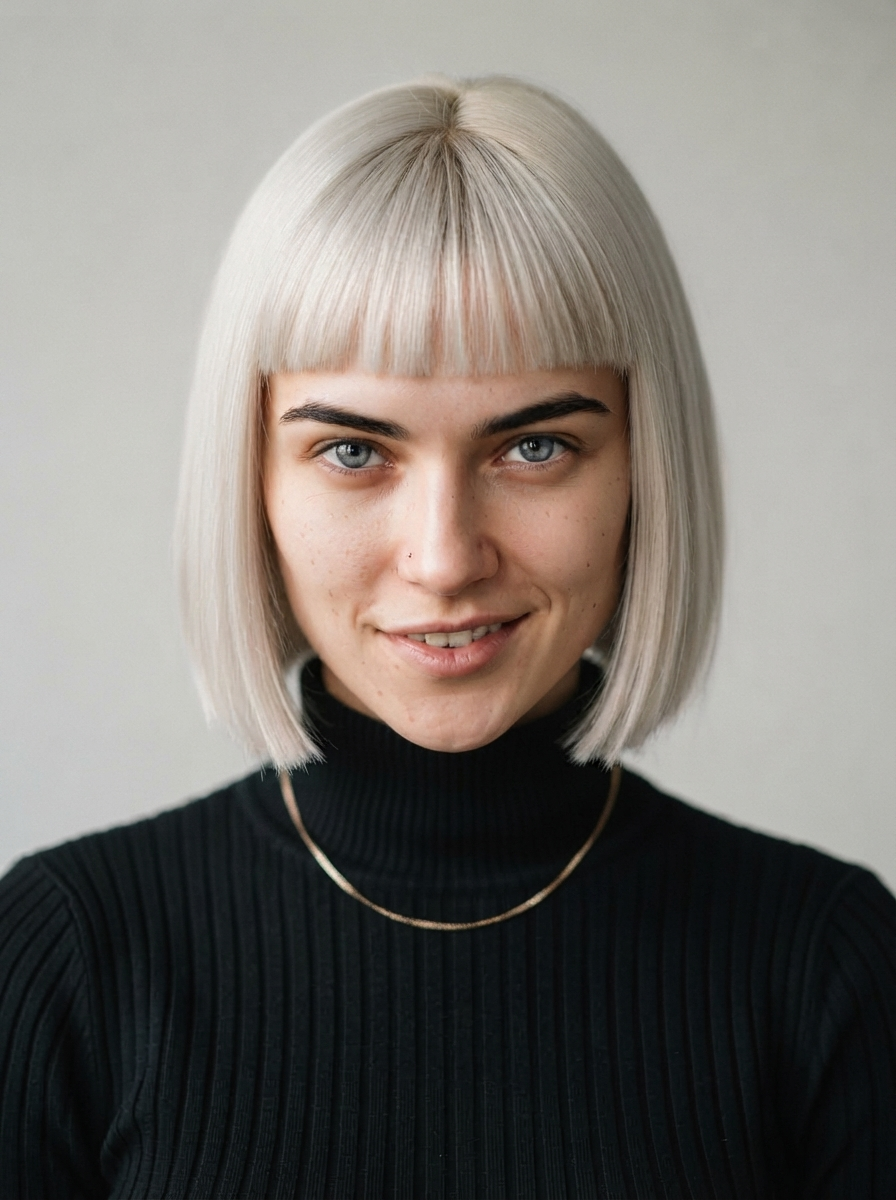
a236ef660 积分
生成了几种造型,选了这一个。如果之后某个细节需要修改,比如项链,就用她自己的肖像作为 reference_1 重新生成,提示词只写要改的地方,脸就不会变。
curl — POST /images(四分之三侧面肖像)
curl --location 'https://api.useapi.net/v1/google-flow/images' \
--header 'Authorization: Bearer user:1234-…' \
--form 'email="[email protected]"' \
--form 'aspectRatio="3:4"' \
--form 'count="1"' \
--form 'reference_1="user:1234-email:…-image:a236ef66-…"' \
--form 'prompt="@reference_1 is the same woman: identical face, hair, freckles, sweater and earrings. Three-quarter view from the waist up, relaxed natural smile, plain light-grey studio background, soft even light. Photoreal, no text."'
reference_1 是正面肖像 a236ef66。这条提示词里还残留着之前另一位出镜人物的雀斑、毛衣和耳环,但没有造成影响:请求里有参考图时,参考图优先于文字。
d891301c0 积分
curl — POST /characters
curl --location 'https://api.useapi.net/v1/google-flow/characters' \
--header 'Authorization: Bearer user:1234-…' \
--form 'displayName="Mia"' \
--form 'personalityNotes="Quick, bright, deadpan delivery with a smile in her voice. Talks to the camera like a friend showing off things she bought at 2am."' \
--form 'imageReference_1="user:1234-email:…-image:a236ef66-…"' \
--form 'imageReference_2="user:1234-email:…-image:d891301c-…"' \
--form 'voice="Leda"'
imageReference_1 是正面肖像 a236ef66,imageReference_2 是四分之三侧面 d891301c。响应的 character 字段就是她的 id,下文为 53ca1036。voice 是 Google 的系统预设音色之一,会跟随角色一起保存,但第 4 步使用的视频模式用不到它,见注意事项。
第 3 步:定帧图,一帧容纳整个场景
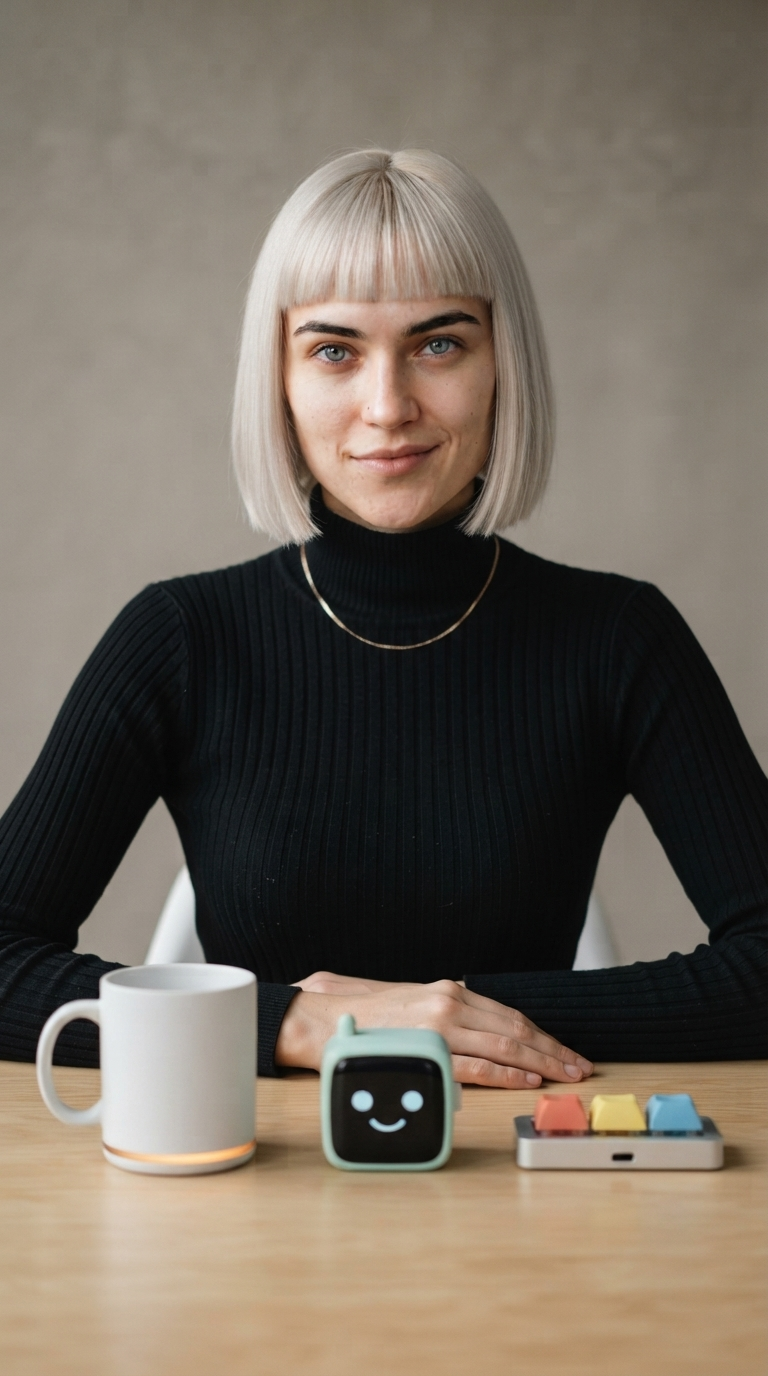
一个请求把所有元素放在一起。角色作为 character_1 传入,三张设定图作为 reference_1 到 reference_3,提示词按标签把它们从左到右摆在她面前的桌子上。这一帧会成为每段视频的首帧和尾帧,所以标签只需要在这里发挥作用。
curl — POST /images
curl --location 'https://api.useapi.net/v1/google-flow/images' \
--header 'Authorization: Bearer user:1234-…' \
--form 'email="[email protected]"' \
--form 'aspectRatio="9:16"' \
--form 'count="2"' \
--form 'character_1="user:1234-email:…-character:53ca1036-…"' \
--form 'reference_1="user:1234-email:…-image:b0bdf3e8-…"' \
--form 'reference_2="user:1234-email:…-image:7aaed056-…"' \
--form 'reference_3="user:1234-email:…-image:4f861c23-…"' \
--form 'prompt="Full-frame vertical phone video look, no phone, no bezel. @character_1 sits at a light wooden table in a bright minimal creator studio, facing the camera, waist-up and centered, a plain warm-grey backdrop behind her, soft key light from the left with a gentle catchlight in her eyes. Laid out on the table in front of her, left to right, each fully visible and resting flat on the table: the mug from @reference_1, the desk robot from @reference_2, the keyboard from @reference_3. Her hands rest on the table, relaxed closed-mouth smile, eyes on the lens. Photoreal, no text, no captions."'
character_1 是第 2 步的角色 53ca1036。reference_1 到 reference_3 是第 1 步的三张设定图:杯子 b0bdf3e8、桌面机器人 7aaed056、键盘 4f861c23。
034cddc80 积分
杯子有它的灯带,机器人有它的脸和天线,键盘有它的三种颜色和接口,她也正是肖像里的那个人。
第 4 步:每件产品一段视频,全部从定帧图生成
使用 Omni 的首尾帧模式,首帧和尾帧都放定帧图,每件产品一个请求,每次都是同一个 POST /videos。这个模式只接受这两张图片,不接受设定图、角色或音色参考。这没关系,因为定帧图里已经包含了这一切。她拿起的每件物品,仅凭定帧图就和设定图完全一致。
提示词承担三项任务。它把首尾两端都钉在这一帧上,两端各留一个安静的停顿。它给出她的台词和声音。它还为动作设定时间:她拿起物品时开始说话,到第八秒物品放回原位,最后两秒静止无声。少了最后这部分,她会拖时间,手臂会突然跳到尾帧的位置。
curl — POST /videos(杯子)
curl --location 'https://api.useapi.net/v1/google-flow/videos' \
--header 'Authorization: Bearer user:1234-…' \
--form 'email="[email protected]"' \
--form 'model="omni-flash"' \
--form 'aspectRatio="portrait"' \
--form 'duration="10"' \
--form 'resolution="720p"' \
--form 'startImage="user:1234-email:…-image:034cddc8-…"' \
--form 'endImage="user:1234-email:…-image:034cddc8-…"' \
--form 'prompt="She begins and ends exactly on this frame: hands resting on the table, the three items laid out in front of her, a small closed-mouth smile, looking into the lens, with a short quiet beat before she moves and another after she settles back. Timing matters: after a short quiet beat she picks up the mug on the left with both hands and starts talking as she lifts it, holding it up to the camera and talking straight to the lens, quick and bright with a deadpan edge and a smile in her voice, keeping both hands on the mug while she speaks. She says: \"Three gadgets smarter than me. Low bar. One: this mug texts me when my coffee'\''s cold. Better follow-up than my ex.\" Right after the last word she gives one short laugh to herself, still holding the mug. By the eight-second mark the mug is back down gently in exactly the same spot and both hands are resting on the table again, brought back in one calm unhurried movement. For the final two seconds she holds completely still, hands resting on the table, looking into the lens with a small closed-mouth smile. Natural room tone, no music, no captions, no text on screen."'
startImage 和 endImage 都是第 3 步的定帧图 034cddc8。三段视频用的都是这两个 id。
55808825,展示的是第 5 步放大到 1080p 后的版本15 积分
curl — POST /videos(桌面机器人)
curl --location 'https://api.useapi.net/v1/google-flow/videos' \
--header 'Authorization: Bearer user:1234-…' \
--form 'email="[email protected]"' \
--form 'model="omni-flash"' \
--form 'aspectRatio="portrait"' \
--form 'duration="10"' \
--form 'resolution="720p"' \
--form 'startImage="user:1234-email:…-image:034cddc8-…"' \
--form 'endImage="user:1234-email:…-image:034cddc8-…"' \
--form 'prompt="She begins and ends exactly on this frame: hands resting on the table, the three items laid out in front of her, a small closed-mouth smile, looking into the lens, with a short quiet beat before she moves and another after she settles back. Timing matters: after a short quiet beat she picks up the desk robot in the middle with both hands and starts talking as she lifts it, holding it up to the camera with its smiling face toward the lens and turning it once and talking straight to the lens, quick and bright with a deadpan edge and a smile in her voice, keeping both hands on it while she speaks. The other two items stay on the table exactly where they are. She says: \"Two: a desk robot that reacts to my day. It has a face. It has never once looked impressed.\" Right after the last word she raises one eyebrow at the camera, a quick expressive beat, still holding the desk robot. By the eight-second mark the desk robot is back down gently in exactly the same spot and both hands are resting on the table again, brought back in one calm unhurried movement. For the final two seconds she is silent and holds completely still, hands resting on the table, looking into the lens with a small closed-mouth smile. Natural room tone, no music, no captions, no text on screen."'
c4d0e6b1,展示的是第 5 步放大到 1080p 后的版本15 积分
curl — POST /videos(键盘)
curl --location 'https://api.useapi.net/v1/google-flow/videos' \
--header 'Authorization: Bearer user:1234-…' \
--form 'email="[email protected]"' \
--form 'model="omni-flash"' \
--form 'aspectRatio="portrait"' \
--form 'duration="10"' \
--form 'resolution="720p"' \
--form 'startImage="user:1234-email:…-image:034cddc8-…"' \
--form 'endImage="user:1234-email:…-image:034cddc8-…"' \
--form 'prompt="She begins and ends exactly on this frame: hands resting on the table, the three items laid out in front of her, a small closed-mouth smile, looking into the lens, with a short quiet beat before she moves and another after she settles back. Timing matters: after a short quiet beat she picks up the keyboard on the right with both hands and starts talking as she lifts it, holding it up to the camera with the three keys facing the lens and talking straight to the lens, quick and bright with a deadpan edge and a smile in her voice, keeping both hands on it while she speaks. The other two items stay on the table exactly where they are. She says: \"Three: a keyboard with three keys. Copy, paste, undo. That'\''s my whole career. Oh, the mug'\''s texting. Bye!\" Right after the last word she raises one eyebrow at the camera, a quick expressive beat, still holding the keyboard. By the eight-second mark the keyboard is back down gently in exactly the same spot and both hands are resting on the table again, brought back in one calm unhurried movement. For the final two seconds she is silent and holds completely still, hands resting on the table, looking into the lens with a small closed-mouth smile. Natural room tone, no music, no captions, no text on screen."'
3cc8ea2f,展示的是第 5 步放大到 1080p 后的版本15 积分
同一个人,同一张桌子,同样的光线,而且每段视频都以定帧图开始和结束,所以任意一段都可以接在另一段后面。每段台词大约 20 个英文单词,按这个语速正好装进 10 秒,结尾还留有停顿。
第 5 步:放大到 1080p
Omni 1.1 Flash 以 720p 渲染。POST /videos/upscale 在任何付费套餐上都能免费把视频放大到 1080p,大约 40 秒完成,并在同一次调用中返回放大后视频的 id 和 URL。每段视频一个请求,不需要 email,账号由 id 决定。
curl — POST /videos/upscale(杯子,另外两段同理)
curl --location 'https://api.useapi.net/v1/google-flow/videos/upscale' \
--header 'Authorization: Bearer user:1234-…' \
--form 'mediaGenerationId="user:1234-email:…-video:55808825-…"' \
--form 'resolution="1080p"'
mediaGenerationId 是第 4 步的杯子视频 55808825。用 c4d0e6b1 和 3cc8ea2f 做同样的调用,就能放大机器人和键盘的视频。每个响应都在 media[0].mediaGenerationId 下返回新视频,它就是源 id 末尾加上 _upsampled,所以三个放大后的 id 是 55808825-…_upsampled、c4d0e6b1-…_upsampled 和 3cc8ea2f-…_upsampled。第 4 步展示的视频就是这些放大后的版本。也可以放大到 4K,每段 50 积分,且仅限 Google AI Ultra 套餐。
第 6 步:拼接
POST /videos/concatenate 按顺序接收三个放大后的 id,以 base64 返回拼接好的文件,分辨率与原视频相同。裁剪决定了衔接处是否像一镜到底。每段视频开头在定帧图上有短暂停留,结尾回落到定帧图上,不裁剪的话,每个剪辑点都会叠成一次定格。但她每句台词说完时手已经放回桌上,所以只看画面来裁剪会切掉最后几个字。要在最后一个声音之后再留一拍才剪,不能更早。对这几段视频来说,这意味着片段 1 保持完整(她的笑声一直持续到最后一帧),片段 2 结尾裁掉略多于半秒,片段 2 和片段 3 的开头各裁掉几帧。
curl — POST /videos/concatenate
curl --location 'https://api.useapi.net/v1/google-flow/videos/concatenate' \
--header 'Authorization: Bearer user:1234-…' \
--header 'Content-Type: application/json' \
--data '{
  "media": [
    { "mediaGenerationId": "user:1234-email:…-video:55808825-…_upsampled" },
    { "mediaGenerationId": "user:1234-email:…-video:c4d0e6b1-…_upsampled", "trimStart": 0.458, "trimEnd": 0.6 },
    { "mediaGenerationId": "user:1234-email:…-video:3cc8ea2f-…_upsampled", "trimStart": 0.125 }
  ]
}'
这三个 id 依次是第 5 步放大后的视频:杯子、桌面机器人、键盘。
0 积分
她说完一句,手放在桌上,镜头切换,她伸手去拿下一件物品。拼接后的文件为了托管重新编码成了更小的体积,三段视频则保持 API 返回的原样。
注意事项
- 生成,而不是编辑。UGC 口播视频(英文)一文用视频到视频编辑来延长视频,台词短的时候这样仍然可行。但这里不行。编辑会把源视频的语音保留在源视频自己的时间线上,当 10 秒的台词填满源视频时,新台词会和旧台词交织在一起,而不是替换它,桌上的产品在不同镜头之间也会走样。从定帧图生成每段视频,台词完整,产品不变形,衔接更干净,花的积分也更少。
- 标签由定帧图承载。首尾帧模式只接受两张图片。在定帧图里用角色和设定图完成标签,视频就会继承它们。
- 给动作计时。一段装满台词的 10 秒视频,需要按时间点明放下物品的时刻,即“by the eight-second mark”(到第八秒),结尾再留一段静止无声的停留。放任不管的话,模型会把台词拖长,然后跳到尾帧。
- 每条提示词用同样的方式描述声音。不同的视频之间没有任何东西会传递声音,角色虽然可以保存音色预设,但用不到这个模式里。用完全相同的描述,三段视频的声音接近到可以当成一镜到底。
- 设定图需要为每格指定机位。写明四个格子分别展示什么。扁平物体要有俯视格。不要手、文字说明和 logo,因为设定图上的任何东西都可能出现在视频里。
- 按声音裁剪,而不是按画面。她在说完话之前就已经静止。在第一个静止帧处剪切,会把台词的结尾一起剪掉。
- 出镜人物是虚构的。Google 对真实、可识别人物的审核更严格。从生成的角色开始。
成本明细
| 步骤 | 模式 | 积分 |
|---|---|---|
| 三张产品设定图,1:1 | Nano Banana 2 Lite | 0 |
| 两张出镜人物肖像,3:4 | Nano Banana 2 Lite | 0 |
| 角色 | — | 0 |
| 定帧图,9:16 | Nano Banana 2 Lite,角色 + 3 张参考图 | 0 |
| 片段 1,杯子,10 秒 | 图生视频,首帧 + 尾帧 | 15 |
| 片段 2,桌面机器人,10 秒 | 图生视频,首帧 + 尾帧 | 15 |
| 片段 3,键盘,10 秒 | 图生视频,首帧 + 尾帧 | 15 |
| 放大,三段视频到 1080p | — | 0 |
| 拼接 | — | 0 |
| 合计 | 45 |
图片、角色、1080p 放大和拼接都不花钱,所以在花第一个积分生成视频之前,可以尽情反复调整设定图、出镜人物和定帧图。唯一要花钱的升级是 4K,在 Ultra 上每段 50 积分。
自己动手运行
上面的每一步都是一次 API 调用,六步可以串成一个脚本。完整的 Node.js 流水线、Python 版本,以及包含本页所有提示词的 prompts.json 都在 useapi/google-flow-api/ugc-product-video。克隆仓库,在 prompts.json 里换上你自己的产品和台词,一条命令就能生成整条视频。
脚本在每一步之后都会保存检查点,中断的运行可以继续,而不必重新为视频付费;你也可以只重做某一步,比如换一张更好的定帧图或换一位出镜人物,而不必重新生成之前的内容。
常见问题
- 可以用我自己的产品照片代替生成的设定图吗? 通过 useapi.net 可以。用 POST /assets 上传照片,把返回的 id 作为
reference_1到reference_3传给定帧图请求,和这里传入生成的设定图完全一样。四格设定图是让模型看到物体每一面的方法,真实产品同样受益。 - 为什么不像口播视频那篇文章(英文)那样,把一段视频编辑成下一段? 通过 useapi.net 可以这样做,但视频到视频编辑会把源视频的语音保留在源视频的时间线上。台词短时没问题。当 10 秒的台词填满整段视频时,新台词会和旧台词交织在一起,桌上的产品也会走样。从同一张定帧图生成每段视频可以避免这两个问题,而且每段只要 15 积分而不是 20。见注意事项。
- 为什么三段视频都以同一帧开始和结束? 通过 useapi.net,首尾帧模式把每段视频的两端都钉在同一张定帧图上,所以视频可以按任意顺序衔接,看不出剪辑痕迹,拼接调用再把每个衔接处的短暂停留裁掉。原理见 UGC 口播视频(英文)一文。
- 三段视频的声音能保持一致吗? 通过 useapi.net,三段视频的声音接近到可以当成一镜到底,因为每条提示词对声音的描述完全相同。首尾帧模式不接受音频参考,角色的音色预设也用不到它。如果需要保证声音一致,参考生视频模式接受
referenceAudio_1,代价是失去固定的首尾帧。 - 要花多少钱? 通过 useapi.net,这整条 29 秒的视频在 Google AI Ultra($199.99)上只花 $0.36:三段 Omni 1.1 Flash 视频共 45 个 Flow 积分,所有图片、肖像、角色和拼接都免费。同样 30 秒的 720p Omni 1.1 Flash 视频,在官方 Gemini API 上约 $3.04(截至 2026 年 11 月)。见成本明细。
结语
有问题欢迎加入我们的  Discord 服务器 或
 Telegram 频道。
示例代码见 GitHub 仓库。
其他发布平台
本文英文版也发布在 dev.to。
开始使用
每月 15 美元的订阅即可使用 useapi.net 上的所有 API:一个 Token,所有服务。每个服务最多绑定 3 个你自己的账号,useapi.net 负责 REST 接口、负载均衡和轮询。需要更多账号?每增加一个订阅每月 10 美元,每个服务再多 3 个账号。
没有国际信用卡?可以用加密货币订阅(加密货币付款不退款)。价格与批量方案见订阅页面。用 Stripe 付款,首次购买 14 天内、且成功生成少于 50 次可全额退款。已经订阅?请在 Stripe 客户门户 修改数量,无需重新购买。